
Trump says pilots are fine after U.S. helicopter crashes near Strait of Hormuz


Donald Trump

A U.S. Army helicopter crashed near the Strait of Hormuz, but President Donald Trump said the two crew members aboard were not injured in the incident near the strategic waterway that Iran has effectively closed during the war.

What caused the crash remained unclear Tuesday morning in the Middle East, which was still reeling after Iran and Israel exchanged fire the previous day in the biggest blow yet to the straining ceasefire in the Iran war. Iranian state television reported Tuesday the Israeli attacks killed at least two members of the country's air defense units.

Since the U.S. and Israel began striking Iran on Feb. 28, the war has shaken the global economy, driven up energy prices around the world and made many basics, including food, more expensive. Officials have been unable to turn the April ceasefire into a deal to permanently end the conflict, particularly as Israel intensifies and expands its military campaign in Lebanon against the Iranian-backed militia Hezbollah.

Trump, speaking to journalists at John F. Kennedy International Airport in New York after watching the NBA Finals on Monday night, acknowledged the crash.

“The pilots are fine. Yeah,” Trump said. “Nobody injured. We are going to issue a report tomorrow. But the pilots are fine.”

The New York Times first reported that a U.S. Army Apache attack helicopter went down near the strait in unclear circumstances. The U.S. military's Central Command and the Defense Department did not immediately respond to requests for comment from The Associated Press.

Apache helicopters have been a key asset for the American military as it enforces a blockade on Iranian crude oil shipments and tankers, seeking to pressure Tehran into reaching a deal. The helicopters also have been used by the United Arab Emirates to shoot down Iranian drones during the Iran war.

Trump insists an Iran deal is coming

Trump also expressed renewed optimism over negotiations with Iran.

“We have a good chance” of signing a deal in “two or three days," Trump said. But he didn’t provide any details on why there was reason for new optimism. Trump has repeatedly predicted that a deal is near over the two months since the U.S. and Iran agreed to an initial ceasefire.

“We’re very close to having a very, very good, strong, powerful deal,” the president said. “If we go and bomb — which we could do very easily if we want, and we spend another two or three weeks bombing — they’ll have nothing left whatsoever. But you won’t have the strait open for months.”

He added: “If we do the bombing, you know, a lot of people are going to be killed. Who wants to do that? I don’t.”

Mediators, led predominantly by Pakistan, have been trying for weeks to get a deal across the line. However, both Iran and the U.S. have taken hard-line positions.

The U.S. wants to see Iran give up its stockpile of highly enriched uranium, which is believed still to be entombed in the country after American airstrikes in the 12-day war in 2025. But Iran is refusing that and demanding relief from sanctions. It also wants the release of frozen assets even before a final agreement is in place, something rejected by Trump.

Before Trump’s comments on negotiations, Iranian parliament speaker Mohammad Bagher Qalibaf said Monday that Trump’s remarks so far on a possible deal “contradicted the agreed-upon sections, showing that (the U.S. is) neither seeking a ceasefire nor dialogue.”

The continued fighting between Israel and Hezbollah remains a major Iranian priority as well. Lebanon’s army chief, Gen. Rodolphe Haykal, traveled to Pakistan on Tuesday. There, he met Pakistan’s army chief, Field Marshal Asim Munir, who has been a key figure in the Iran-U.S. talks.

Haykal's visit comes as Lebanon's government takes an increasingly hard line on Hezbollah, but remains unable to disarm the powerful militia. Hezbollah thanked Iran on Tuesday for attacking Israel “in defense of our Lebanese people,” suggesting that the Lebanese government should take this opportunity to improve relations with Tehran.

Israel issues warning for Tyre, Lebanon

Meanwhile Tuesday, the Israeli military issued an evacuation warning for Lebanon’s southern port city of Tyre, including the Christian quarter, which has so far been spared in the destructive airstrikes on the port city.

Last week, Israel warned the Christian neighborhoods in Tyre that it believed Hezbollah members were among them. Many Lebanese Shiite Muslims fled to those areas as Israeli strikes hammered the Mediterranean coastal area over the past two weeks.

After last week’s warning, the Lebanese army deployed to the Christian district of Tyre in an effort to prevent Israeli attacks there and to show that Hezbollah has no armed presence in the area. But Avichay Adraee, the Israeli military’s Arabic-language spokesperson, posted on X on Monday that the Israeli military “will have to act against their terrorist activities in the neighborhood soon.”




Source link

Leave a Reply

Subscribe to Our Newsletter

Get our latest articles delivered straight to your inbox. No spam, we promise.

Recent Reviews


What are Data Catalogs?

A Data Catalog seems to be an accumulation of metadata especially in data planning and search tools that assists experts as well as other data consumers in locating the data they require, acts as a current asset of data available, and offers criteria to assess strength and conditioning data for potential purposes.

This succinct process made several locations regarding data catalogs—data management, looking, data inventory, and interpretation of data; they all rely on the central capacity to deliver a catalogue of metadata.

    Start learning Denodo Online Course from hkrtrainings to make a bright career in the world of Denodo!

What is the Denodo Data Catalog?

The Data Catalog seems to be a web-based self-service device that is included in the Denodo System that would allow technology and commercial consumers to query, lookup, and explore details and metadata saved in a Virtual DataPort server. Consumers could use this device to create knowledge and open the way for best choices.

If you want to explore the denodo server metadata, then use the dendo data catalog. Here I am going to explain how all these things happen.

Launching the data catalog:

The Data Catalog seems to be a web based application distributed as part of Denodo 8.0 that allows data analysts, enterprise customers, and app developers to search and browse data and metadata in a business-friendly way for personal exploration and predictive analysis.

To use this web tool, open the Denodo Platform Control Center and launch the Data Catalog. When the status changes to “Running,” click the Data Catalog link to launch the Web tool (by default, https://127.0.0.1:9090/denodo-data-catalog).

Login into the denodo platform with your login details.If you are logging for the first time, you will see a pop up window showing the synchronize metadata option.This must be run the first time you start the Data Catalog to make sure that it reflects the most recent state of the Denodo 8.0 server to which you are connected.

The VDP Synchronization should be performed as follows:

  • Click the Synchronize metadata now button.
  • On each Synchronization step, click Continue.
  • The views have now been synchronized, and you can begin exploring!

Using the metadata search:

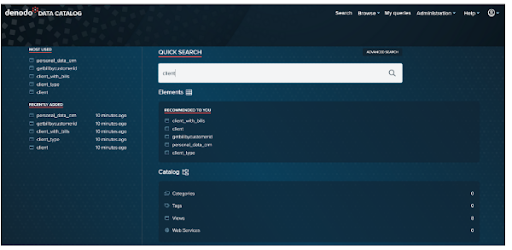
The first example comes from the Data Catalog’s home page.

Let’s use the Business Analyst’s scenario to look at a simple use case: searching for clients by typing in client and pressing enter.

denodo data catalog

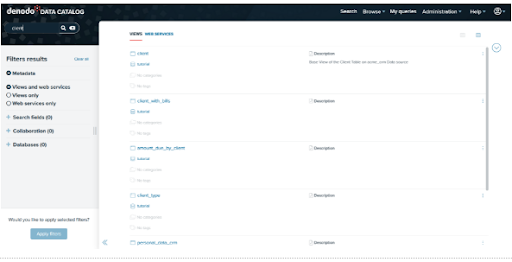
Here are the outcomes of our search. Starting with Data Catalog 8.0, this search will look for views or web services that include the query terms in the element’s metadata, such as:

  • It has a name.
  • It is described.
  • The names of the fields in which it operates.
  • The descriptions of its various fields.
  • The values of any custom properties that have been assigned to it.

denodo data catalog 1

For instance, let’s click on the view client to go to the summary of the selected view:

denodo data catalog 2

For the time being, we have conducted a search in the Virtual DataPort metadata. In the following section, we’ll look into the Data Catalog’s more advanced features!

Denodo Training

  • Master Your Craft
  • Lifetime LMS & Faculty Access
  • 24/7 online expert support
  • Real-world & Project Based Learning

Exploring the features of Data Catalog:

We’ll now look at the features in the Data Catalog that allow for more in-depth interrogation of a view. This includes the following:

  • Filtering and querying results from a view
  • Results are being saved to a file.
  • Developing new fields
  • Queries saved
  • Investigating viewpoint relationships
  • Investigating data ancestry
  • Views with related fields can be queried

Exploration of Data Catalog Views:

We chose our client view from the previous section. We can now look through the contents of this view.

Summary Tab:

We could see a summary of the selected view under the Summary Tab. It will display the metadata of the selected view, such as the database name, the list of categories, the list of tags, and collaboration information provided by the user, such as Endorsement and Warnings. You can edit the view’s description by clicking the Edit button next to the Description option. If the view is deprecated, an indication will appear at the top of the summary tab.

Furthermore, the Summary tab includes buttons such as Add Tags/Categories , Collaborative effort possibilities further to create custom the view, and Connection URLs, Tableau to display different opportunities to link to the view/datasource.

denodo data catalog 3

Schema tab:

Under the Schema Tab, we can see the view’s schema, which includes the view description as well as all of the fields and types. We can add a field description by clicking the Edit button next to the column. We can also use the search option at the top of each section to look for fields, data types, and descriptions.

denodo data catalog 4

Query Tab:

The Query Tab is the following tab. Ad-hoc queries can be run against the view here (the query is created graphically).

Business Intelligence & Analytics, denodo-data-catalog-description-3, Business Intelligence & Analytics, denodo-data-catalog-description-6

Subscribe to our YouTube channel to get new updates..!

Select all of the following fields for our view and drag them into the Output columns area.

client_id

name

surname

Client_type

denodo data catalog 5

Click on the execute to get the results.

denodo data catalog 6

Editing of data catalog metadata:

In this segment, we would then look at the metadata characteristics of the Data Catalog. Users could use Denodo Data Catalog to append tags and categories to views, and also keep updating the view as well as field descriptions, with such a function.

In our instance, we will: (1) add explanations to the customer fields in addition to allowing for more particular discovery of such a view, (2) add tags and categories, and (3) implement those to our client view.

Data catalog Metadata:

The capacity to exhibit view metadata, such as the View Description and Field Descriptions, is a good feature of the Data Catalog. Then see how we can make that data more modifiable.

Editing view and field descriptions:

  • Browse to the Client View’s Summary page and click the Edit option beside Description.
  • Add the necessary descriptions to the View and then click Ok.
  • Similarly, you can add a description to fields by going to the Schema tab and clicking on the Edit button next to each one.
  • The new descriptions are now visible in the view. These descriptions are saved as metadata in the Data Catalog.

Adding of tags and categories in data catalog metadata:

Tags and Categories are useful for allowing users to search the Data Catalog more precisely. While the number of Data Sources and Views in our tutorial is small, maintaining good Categorization and Tagging habits will pay off in the long run by allowing users to navigate the Data Catalog more easily.

In order to add categories follow the below mentioned points.

  • Navigate to Administration > Configuration and Management.
  • Click the Categories option in the Administration window’s Catalog Management section.
  • Select the + Add Category option.
  • Make a category with the following information:
    • Customer’s name
    • Customer data sources
  • Make a new category with the following information:
    • CRM (Customer Relationship Management)
    • Customer is the parent of the Acme crm System.
  • Make a final category with the following information:
    • Name: Billing 
    • Description: Billing
    • Parent:customer

Denodo Training

Weekday / Weekend Batches

Adding tags:

  • Navigate to Administration > Configuration and Management.
  • Click the Tags option in the Administration window’s Catalog Management section.
  • Click the + Add Tag icon to add a new Tag with the following information:
    • Name:JDBC 
    • Description: JDBC data sources
  • Creating another tag with the following data.
    • Name:SOAP
    • Description:SOAP data sources

We can easily modify the views for adding tags and categories as well.

                            Get ahead in your career with our Denodo Tutorial!

Recommendation and collaboration in data catalog:

Recommendations in data catalog:

The AI Feature Package includes Automatic recommendation of datasets in the Data Catalog to assist you in discovering new elements among your company’s data resources.

This feature displays individualized recommendations based on earlier activity in the Data Catalog, like datasets which are most utilised, lately used, suggested, and so on.

Go to the Data Catalog’s homepage to see the recommendations.

The homepage displays a collection of products provided by various topics, such as one titled Recommended to you. This dataset recommendation is really only accessible only with the AI Feature Pack.

Collaboration in data catalog:

In the collaboration there are 3 options such as endorsements, warnings and decrepation notes.

Endorsements seem to be comments made by users on a view or a webservice to express their support. A user can only endorse a perspective or web service once, which means whenever a new comment is added, the prior endorsement is removed.

Warnings have been used by customers to write and exhibit “advise against” texts on opinions and web services. A consumer could only add one warning to a view as well as web service.

Deprecations have been used to notify people that a feature has become outdated and should no longer be used. A consumer could only write one deprecation for a perspective as well as web application.

Conclusion:

In the above blog post we had clearly discussed the dendo data catalog, data catalog metadata, adding of tags and categories, recommendations, collaboration etc in a more detailed way. If you have any doubts please drop your query in the comments section to get them clarified.

Other Related Articles:


Source link