
Chase Sapphire Preferred cuts Hyatt transfer value, adds new perks


After weeks of rumors, it’s official. Changes are coming to the Chase Sapphire Preferred® Card (see rates and fees) — including a negative one pertaining to Hyatt point transfers.

And while the Hyatt news is undeniably bad for some travelers, most of the update is refreshingly positive. Plus, existing cardholders have some time before the changes kick in.

There’s a lot to unpack, so here’s what’s happening with the Chase Sapphire Preferred.

Chase is changing Sapphire Preferred point transfer ratios to Hyatt

One of the biggest strengths of Chase Ultimate Rewards points has long been the program’s simple 1:1 transfer ratios to its 14 hotel and airline partners.

But now, Chase is changing the transfer ratio to the World of Hyatt program from 1:1 to 4:3 for Sapphire Preferred cardmembers.

Park Hyatt Kuala Lumpur
Park Hyatt Kuala Lumpur. ERIC ROSEN/THE POINTS GUY

In practical terms, this means transferring 40,000 Chase points to Hyatt will yield just 30,000 Hyatt points instead of 40,000. That’s a significant devaluation for travelers who regularly transfer the points from their Sapphire Preferred to Hyatt.

The good news? Current Chase Sapphire Preferred cardholders won’t experience this change until Oct. 1, 2026. New cardholders who apply on or after June 15, 2026 will see the new ratio effective immediately.

This change also applies to the Ink Business Preferred® Credit Card (see rates and fees), the legacy Chase Ink Plus and the legacy Corporate Flex card.

No planned transfer ratio changes for Sapphire Reserve cardholders

For those who frequently transfer their Chase points to World of Hyatt, a silver lining from today’s announcements is that the 1:1 ratio remains intact for Chase Sapphire Reserve® (see rates and fees) and Chase Sapphire Reserve for Business℠ (see rates and fees) cardholders.

Reward your inbox with the TPG Daily newsletter

Join over 700,000 readers for breaking news, in-depth guides and exclusive deals from TPG’s experts

Chase shared with TPG that “there are no planned changes to transfers from the Sapphire Reserve at this time.”

TANNER SAUNDERS/THE POINTS GUY

If this transfer change is particularly painful for your travel style, you may want to consider the Sapphire Reserve now.

In fact, due to a relatively recent change in card eligibility rules, having the Sapphire Preferred does not automatically disqualify you from getting the Sapphire Reserve and its bonus.

And travelers considering the jump should note that the Sapphire Reserve is currently offering its highest-ever public welcome bonus of 150,000 points after spending $6,000 on purchases in the first three months from account opening.

Related: Am I eligible for the Chase Sapphire Reserve’s 150,000-point bonus?

10% points anniversary bonus is ending

The Sapphire Preferred’s 10% anniversary points bonus, which awarded cardholders a 10% points bonus on their spending each year, will be sunsetted. This essentially added 0.1 points per dollar spent on the card.

For many cardholders, this perk likely sounded more valuable than it actually was. Even if you put $50,000 per year on the card, that would only amount to 5,000 bonus points.

This will be effective immediately for those who apply on or after June 15, 2026. If you applied before that date, purchases through Oct. 1, 2026 will continue to count toward your final 10% anniversary bonus — which will be deposited by Jan. 2027.

Chase Sapphire Preferred card adds new bonus categories

The Sapphire Preferred is getting some new bonus categories.

Starting June 15, 2026, new and existing cardholders will earn 3 points per dollar on purchases at:

  • Gas stations
  • EV charging
  • Vacation home rentals booked at Airbnb, Vrbo, Plum Guide, HomeAway, Homestay.com and Vacasa

These are practical everyday spending categories that will likely matter to many cardholders and they’re joining the already impressive lineup of Sapphire Preferred bonus categories, all of which remain intact.

person in airbnb
AIRBNB

That includes 5 points per dollar for Chase Travel℠ purchases, 3 points per dollar on dining, select streaming services and online grocery store purchases (excludes Target, Walmart and wholesale clubs), and 2 points per dollar on all other travel not booked through the Chase Travel portal (travel is broadly defined by Chase and includes things such as parking, tolls, ferries and campgrounds).

In some cases, those earning rates even outpace the pricier Sapphire Reserve.

Sapphire Preferred card increases hotel statement credit to $100

In a really cardholder-friendly move, Chase is increasing the annual Chase Travel hotel statement credit from $50 to $100 (effective June 15, 2026), making this benefit much more meaningful. In fact, this change means the credit will soon exceed the annual fee.

Unlike many other cards, there’s no minimum stay requirement or spending threshold to use this credit. You simply need to book and prepay for a hotel stay through Chase Travel with the Sapphire Preferred.

Hyatt Regency Cleveland at the Arcade
GISELLE GOMEZ/THE POINTS GUY

For example, you could book a one-night stay at a budget-friendly hotel for $125, and once the credit is applied, you’d effectively spend just $25 out of pocket.

If you’re an existing cardholder and have already used your $50 credit, you’ll get another $50 credit as of June 15. If you haven’t used it, you’ll be eligible for the full $100 credit as of June 15.

$120 statement credit for TSA PreCheck, Global Entry or Nexus added

Also effective June 15, the Sapphire Preferred is adding a new statement credit of up to $120 every four years to cover the application fee for TSA PreCheck, Global Entry or Nexus. The card will now be one of the lowest-annual-fee cards to provide this benefit, which is more commonly found on premium cards.
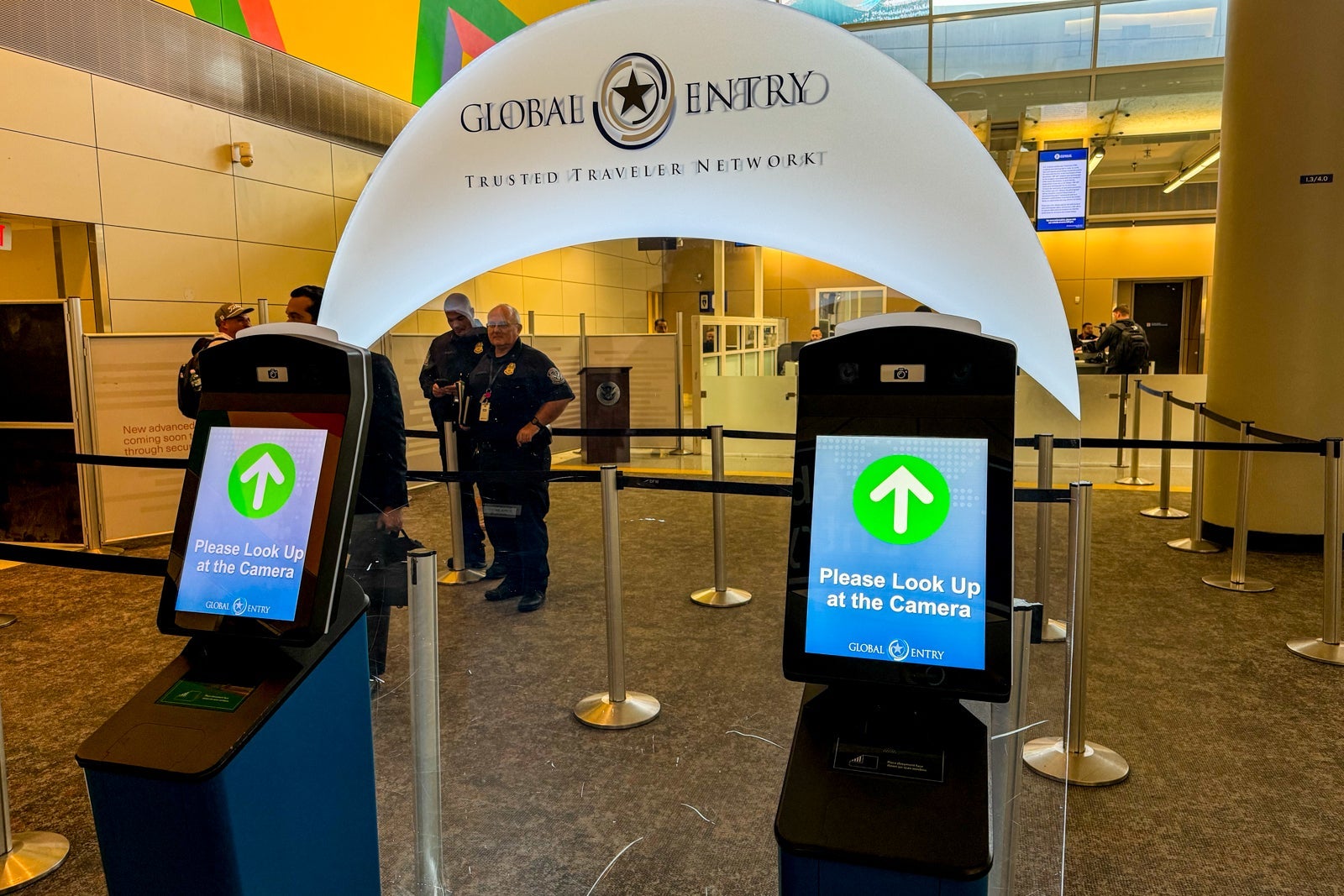
CBP Global Entry
SEAN CUDAHY/THE POINTS GUY

(Pro tip: Go for Global Entry, since it includes TSA PreCheck as well as priority customs screening arriving back in the U.S.)

Travelers who already have one of those memberships can still use the credit for a friend or family member’s application.

Chase adds new one-year Apple TV subscription

Starting June 15, 2026, Sapphire Preferred cardholders will be eligible to activate a complimentary one-year Apple TV subscription.

To do so, you must link your Apple ID to your card through the Benefits & Rewards section of your account and activate it by Dec. 31, 2026.

Sapphire Preferred now comes with enhanced travel protections

The Chase Sapphire Preferred already has very strong built-in travel protections, such as trip cancellation coverage and trip delay reimbursement, but it is now adding emergency evacuation and transportation protections.

This likely cements the Sapphire Preferred as one of the strongest travel-protection cards in its annual fee range.

Related reading: How my Chase Sapphire Preferred saved me nearly $250 on a canceled trip

No change to the $95 Sapphire Preferred annual fee

Perhaps the most surprising part of today’s announcement is what didn’t change.

With the addition of new and expanded credits, along with more travel protections, you may assume that an annual fee increase is all but inevitable.

Chase Sapphire Preferred card image
THE POINTS GUY

I’m very happy to share the Chase Sapphire Preferred is keeping its annual fee at $95 — the same price it has had since launching in 2009.

And with that increased $100 hotel credit to use via Chase Travel, it’s not unreasonable to say that the card can easily pay for itself with very little effort year after year.

Is the Chase Sapphire Preferred better or worse than before?

The million-dollar (or $95?) question is whether the Chase Sapphire Preferred is now a stronger or weaker card than before today’s announcements.

For travelers who rely heavily on Hyatt transfers, these changes are clearly negative. This may even push some people toward the Sapphire Reserve to retain the 1:1 transfer ratio — though it’s worth noting that these redemptions may not be the slam dunk they once were with recent changes to the World of Hyatt’s award chart.

And while points maximizers may feel this change most strongly, the reality is that many Sapphire Preferred cardholders rarely or never transfer their points at all.

Casual or semifrequent travelers primarily want strong bonus categories, useful benefits, straightforward redemptions and a manageable annual fee. Through this lens, the Sapphire Preferred is now even more compelling overall, despite the change in transfer ratio.

And at a time when many travel cards are becoming increasingly expensive and complicated, there’s a strong argument that the Sapphire Preferred just became an even better fit for casual travelers.

To learn more, check out our full review of the Sapphire Preferred.


Source link

Leave a Reply

Subscribe to Our Newsletter

Get our latest articles delivered straight to your inbox. No spam, we promise.

Recent Reviews


What is SAP EWM (Extended Warehouse Management) 

It is one of the functional modules which is used to manage warehouse inventory and supports the processing of goods movements. The SAP EWM also allows organizations to control both inbound and outbound delivery process delivery. and movements in the warehouse. The main purpose to use EWM is to manage the outbound and inbound delivery process, maintain goods receipts, solve goods issues, fulfill customer orders, and goods distributions.

*Note: the SAP EWM is quite different from warehouse management (mostly used in supply chain management) as it offers many advanced features like picking up of goods, RF frameworks, warehouse structure, and flexible enough to manage the warehouse management functions.

Become a master of SAP EWM by going through this HKR SAP EWM Online Training!

Image

Salient features of SAP EWM :

SAP EWM signifies the major key features which are considered so important in any organization; Let us explain one by one;

  • With the help of SAP EWM, users can control the various warehouse activities such as picking, posting, managing storage, and good sales document types.
  • The SAP EWM helps you to set the alert before the goods receipt transfer from EWM to the SAP ERP system along with this feature, users are also able to perform corrections, reversal, and inbound delivery split from the SAP EWM to the SAP ERP system.
  • Users can also perform deconsolidation of the handling of various units that contain product details and their storage locations.
  • Users can also determine the storage concepts like product slotting, and optimize the goods arrangements for the warehouse automatically.
  • The SAP EWM functional module allows users to perform various tasks like work packaging, and also monitor the warehouse activities which are performed by the warehouse employees.
  • The SAP EWM also helps organizations to keep track of the vehicles, and other transportation units (it consists of a yard-in check-in and yard-out checkout) activities.
  • SAP EWM also comprises storage and handling of various hazardous substances (such as SAP environmental health, and safety EHS).
  • SAP EWM allows organizations to store the labor time, and resource usage effectively( managing the resources effectively).
  • The SAP EWM cockpit allows users to perform the transportation of products to various warehouse centers.

SAP EWM modules :

Here we come to the actual topic of the post, the SAP EWM supports a lot of different functional modules. Let’s start learning them one by one;

In this blog, we are going to concentrate only on the functional modules and customer existing transactions. Each functional module is combined with the transactions to create a simple screen or to enhance the current available functional module to meet the specific customer’s requirements.

Processing TRs(transfer requirements) using the functional module :

This type of functional module allows users to create or change the transfer requirements in the warehouse management. You can make use of these types of functional modules instead of using batch input processes this improves the performance of batch input processing.

To perform this action, the following are the important functional modules available:

  • L _TR_CREATE_CHECK ->this functional module helps to perform plausibility checks.
  • L_TR_CREATE_UPDATE -> this functional module helps to database updated according to plausibility checks.
  • L_TR_CREATE -> perform plausibility checks and database updates.
  • L_TR_CANCEL -> cancel plausibility checks and database updates.

Processing TOs using the functional module :

In warehouse management, users can create, confirm, and change the transfer order using the various functional modules. Let us make a list of them;

  • Report SAPML03T -> this Report SAPML03T consists of the screens and tasks necessary to process external documents.
  • Function group LO34 -> this function group contains the essential internal data for creating and confirming the transfer orders and calls up the update program. The function modules from group L034 are for internal use and are therefore not released to customers.
  • Function group L03B -> this function group L03B contains the functional modules that you should use instead of batch input or CALL transaction using since they are considerably easier to manage.
  • L_TO_CREATE_SINGLE -> create a transfer order (TO) within a single item.
  • L_TO_CREATE_MULTIPLE -> create a transfer order with two or more items.
  • L_TO_CREATE_MOVE_SU -> create a transfer order to move a storage unit.
  • L_TO_CREATE_MOVE_LSR -> initiate a stock transfer of storage units from an external system.
  • L_TO_CREATE_TR -> create a transfer order for transfer requirements.
  • L_TO_CREATE_DN -> create a transfer order for delivery.
    L_TO_CONFIRM -> confirm a transfer order.
  • L_TO_CONFIRM_SU -> confirm a transfer order for a storage unit.
  • L_TO_CANCEL -> cancel a transfer order.
  • L_REF_CREATE -> create a transfer order using multiple processing.
  • L_TO_CREATE_2_STEP_PICKING -> create a transfer order for 2 step picking.
  • L_TO_CREATE_POSTING_CHANGE -> create transfer order for posting changes.

SAP EWM Training

  • Master Your Craft
  • Lifetime LMS & Faculty Access
  • 24/7 online expert support
  • Real-world & Project Based Learning

Delivery functional modules:

These delivery functional modules enable users to deliver the output or sales-related documentation. Let us know them one by one;

  • BAPI_OUTB_DELIVERY_CHANGE ->Logistics execution of BAPI functions.
  • BAPI_PO_CHANGE -> change purchase order.
  • BAPI_TRANSACTION_COMMIT ->execute external commit when using BA PIs.
  • BAPI_PO_CREATE1 -> Create a purchase order.
  • BAPI_GOODSMVT_CREATE ->  post goods movements with MB_CREATE_GOODS_MOVEMENT.
  • WS_DELIVERY_UPDATE -> update about the warehouse goods delivery.
  • GN_DELIVERY_CREATE -> defines the sales document basic functions.
  • L_TO_CONFIRM -> confirm transfer order.
  • BAPI_SAG_CHANGE -> change scheduling agreements.
  • BAPI_SCHEDULE_MAINTAIN -> maintenance of scheduling agreement and delivery schedule lines.
  • BAPI_SAG_GETDETAIL -> read out details from the scheduling agreement.
  • BAPI_OUTB_DELIVERY_REJECT -> rejection of delivery changes from WME.
  • GUI_UPLOAD -> Upload for the data provider.
  • BAPI _DELIVERYPROCESSING_EXEC -> Logistic delivery processing execution.
  • WS_DELIVERY_UPDATE2 ->sales documents functionalities.
  • CHANGE_DOCUMENT_READ_POSITIONS ->change document read change documents item. 
  • BAPI_CONTRACT_CREATE ->BAPI to create a purchase contract.
  • RV_DELIVERY_CREATE -> create the delivery documents.
  • L_TO_CREATE_DN -> create a transfer order for a delivery note.
  • BAPI_INB_DELIVERY_CHANGE -> inbound processing delivery change.
  • BBP_OUTB_DELIVERY_SPLIT_DEC -> BAPI for subsequent outbound-delivery split from a decentralized system.
  • BAPI_HU_PACK -> BAPI for packing an item into an HU.
  • BAPI_INCOMINGINVOICE_CHANGE -> invoice verification: change provisional invoice.
  • BAPI_OUTB_DFELIVERY _SAVEREPLICA -> BAPI function module for replication of outbound deliveries.
  • WS_REVERSE_GOODS_ISSUE -> this functional module will help you to resolve the issues related to the warehouse goods.
  • BAPI_INB_DELIVERY_SAVEREPLICA ->BAPI function module for replication of inbound deliveries.
  • IDOC_INPUT_INVOICE_FI -> EDI: Invoice receipt (Invoice).

frequently asked SAP EWM Interview Questions and Answers

HKR Trainings Logo

Subscribe to our YouTube channel to get new updates..!

A customer exits functional module for TR selection:

Below are a few major customers exits functional module that permits you to create customer-specific projects used to select the transfer requirements for the automatic creation of transfer orders.

  • MWMTOAU1 -> this task allows you to influence the section of transfer requirements for the automatic creation of the transfer orders.
  • MWMTOAU2 ->this task allows you to influence the selection of transfer requirements for the automatic creation of the multiple transfer orders using groups.

Customer exits for creating and confirming TOs:

The following functional modules define the customer-specified logics that permit you to involve in the storage bin search process, and afterward to update the customer data using creating and confirming the transfer orders.

  • MWMTO001 -> this module update the own data after creating transfer orders.
  • MWMTO002 -> this module updates its own data after confirming transfer orders.
  • MWMTO003-> customer-defined putaway strategy, this task allows you to create and implement your own putaway strategies.
  • MWMTO004 -> customer-defined picking strategy, and also allows you to create and implement your own picking strategy.
  • MWMTO005 -> TO-related underdelivery.
  • MWMTO006 -> storage bin related over delivery.
  • MWMTO007 -> palletization and storage type search for putaway.
  • MWMTO008 -> storage type search for picking. This task also allows you to create your own storage type search strategy for stock picking.
  • MWMTO009 -> prevents deletion of TO items, this task makes it possible to prevent the deletion of the transfer order items.

Creating/confirming TOs online or through update programs:

For warehouse management, the update programs for creating or confirming transfer orders can be controlled through a separate parameter. Updates for the normal transactions are carried out through the update programs. To perform this task, change the program ML03TPAR.

  • DEF_VERBU_CREATE -> this functional module helps you to create default transfer orders with the values “x” for update via the update program and “ “ for update without changing the online process.
  • DEF_VERBU_CONFIRM -> default value for the confirming transfer orders with the value “X” for update without changing the online processes.
  • COMMIT_WORK -> this functional module allows you to post data in the system without running.
  • SET UPDATE TASK LOCAL -> the system posts the data synchronization data updates with the help of this functional module.

Want to know more about Sap EWM Tutorial, visit here SAP EWM Tutorial !

SAP EWM Training

Weekday / Weekend Batches

Final words:
In this SAP EWM module blog, we have listed out major functional modules and tried to provide a description of each module. Our main aim to develop these core topics is to adhere or guide many SAP communities around the globe to enhance the skills with respect to the modules. Keep on updating yourself to recent trends or technologies to accelerate your SAP career.

Related Articles:


Source link