Visa Wants to Let You Give ChatGPT Your Credit Card. What Could Go Wrong?


gettyimages-2155812090

Only 24% of US adults would feel comfortable letting AI make a purchase for them, a study shows. 

the_burtons/Moment/Getty Images

Imagine a world where AI can book a flight and order new luggage on your credit card. Don’t spend too long imagining; we’re already living in it. 

Visa said this week that it’s partnering with OpenAI to allow you to make Visa payments on its ChatGPT AI chatbot. Visa announced the news at Visa Payments Forum 2026 on Wednesday in San Francisco. Visa plans to use tokenization, which replaces your 16-digit card number with a random string of numbers to safeguard your information when you pay online. 

The partnership is a part of Visa Intelligent Commerce, the payment processor’s platform for agentic commerce. The goal is for OpenAI and Visa to join forces to let ChatGPT initiate and complete transactions — without your help. How safe is that? 

Creating an entirely new layer to the digital payment landscape can create many problems, says Daniella Flores, an AI and machine learning technical writer, financial and career writer, and former CNET Money Expert Review Board member. “In any situation, not just this one, the more parties that have your payment credentials, the more opportunity there is for data breaches and theft,” Flores said in an email to CNET. 

How will ChatGPT work with Visa?

A Visa spokesperson said in an email to CNET that the goal for Visa’s OpenAI partnership with Visa is to make shopping easier and more efficient while making sure consumers still decide when, where and how their money is spent.

“Consumers remain fully in control,” the spokesperson said. “AI agents can only initiate purchases within clearly defined, user-set parameters, such as spending limits, approved merchants, or required approvals.” 

Visa said in a press release that it’s planning for other AI-driven tools and features, like an Agent Score rating system for merchants to evaluate whether or not their website is ready for AI commerce. There’s also an Agentic Directory coming for merchants to know which AI agents to trust for transactions, including Visa-verified agents and merchants. The company also plans to use an AI model to improve fraud detection. 

We’ll have to wait and see when this feature rolls out, where it’s available first and what its limitations are. 

Watch this: AI Data Center Infrastructure Plans Continue to Draw Controversy

The problem with giving AI your payment information

AI Atlas

These security measures don’t necessarily guarantee you won’t fall victim to fraud or theft. And Visa and OpenAI haven’t shared who would be responsible if the AI agent makes a costly mistake. Imagine trusting AI to buy your luggage, but choosing the wrong one or shipping it to the wrong address. The companies have not responded to a request for comment.

Do people even want this? A Bain & Company 2025 survey found that about a quarter (24%) of US consumers surveyed would feel comfortable letting AI make a purchase for them. If most US adults aren’t fans of bots shopping and buying for them, why enable it? 

AI is being positioned as a helpful tool to save us time, but that convenience comes at a cost when our personal information is at risk. And shopping is personal. While AI may be used to research, compare and recommend, many Americans don’t want a bot acting autonomously on some of their most personal decisions using their hard-earned money. 

It’s not OpenAI’s first foray into shopping — and OpenAI isn’t unique among AI companies.

ChatGPT already has ChatGPT Search, so you can shop, compare and buy items directly in the chat without going to an external website. The retired Visa Instant Checkout allowed the AI agent to be your personal shopper for an item. But the big difference for both is that you would complete the purchase yourself. AI-enabled shopping has been highlighted by other companies, like Google, Apple and Samsung, in their pitches about agentic AI

In the meantime, use AI in a way that you feel most comfortable — even if that means not using it at all. 

“There is no pressure to use these AI tools. If you’re not comfortable doing so, don’t, especially if you don’t understand how your data is being secured and what the AI agents can and can’t do with that data,” Flores said.


Source link

Leave a Reply

Subscribe to Our Newsletter

Get our latest articles delivered straight to your inbox. No spam, we promise.

Recent Reviews


PeopleSoft Architecture – Table of Content

In this blog, We are going to learn about the architecture of Peoplesoft in detail. So without wasting our time, let’s get on with it.

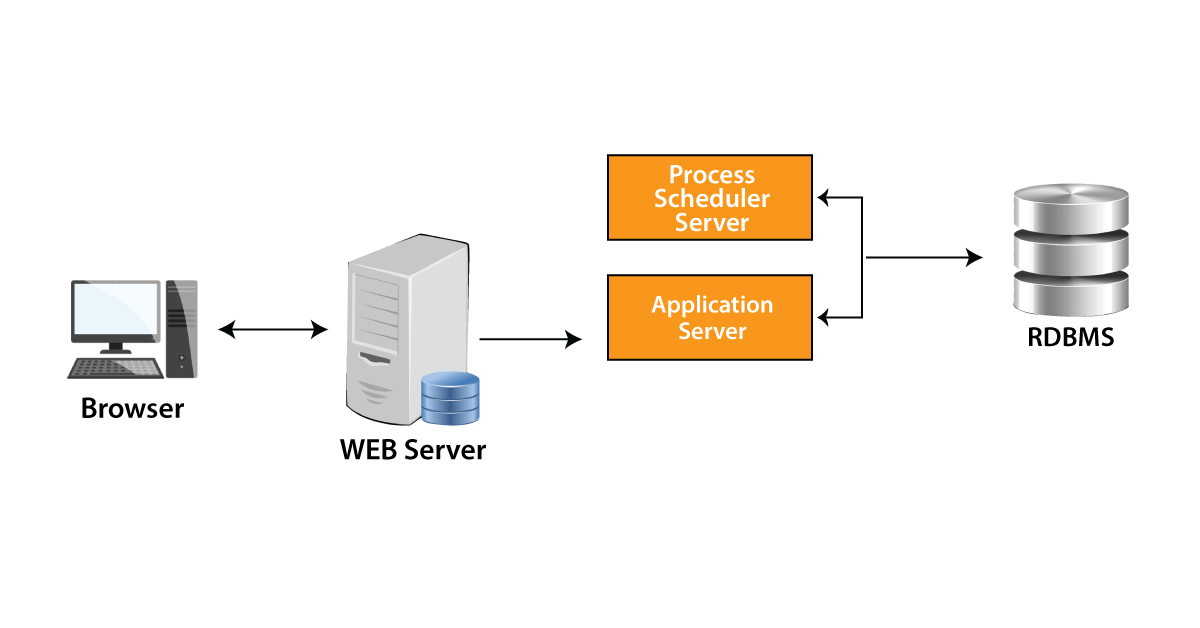
PeopleSoft application operates under PeopleSoft Internet Architecture that needs various Hardware and Software components such as 

  • Database server
  • Process Scheduler server
  • Application server
  • Web browsers
  • Web Servers

We need to understand the role of every component before deciding the configuration options that are most appropriate for the implementation.

implementationThe requests are sent by the web browser to the web server. The web server will pass the request to the application server, which will generate the SQL to be executed in the database.



The configuration of the PeopleSoft infrastructure is not only about enabling the deployment of Internet applications via a browser. PeopleSoft allows us to benefit from many of PeopleSoft’s Internet, intranet, and back-end solutions, that includes service-orientated architecture, Performance Monitor, Feeds Framework, PeopleSoft Interaction Hub, and Search Framework.

           We have the perfect professional PeopleSoft Admin Training course for you. Enroll now!

PeopleSoft Admin Training

  • Master Your Craft
  • Lifetime LMS & Faculty Access
  • 24/7 online expert support
  • Real-world & Project Based Learning

Database Server: 

The database server hosts a database engine and PeopleSoft application database consisting of all PeopleTools application definitions, metadata, system tables, application data, and application tables. The database server manages the connections of the application server, the connections of the development environment, and the batch programs executing against it at the same time. The PeopleSoft database is the repository of all the information that the PeopleSoft application manages. PeopleSoft application data and metadata are stored and kept up to date within the database. Application Designer is the primary tool in the development environment, allowing us to define, edit and manage this metadata that the system uses to control the execution architecture. This metadata collection specifies a PeopleSoft application.

Process Scheduler server: 

PeopleSoft Process Scheduler environment is also called the “batch” environment. This is where most of the batch programs like Application Engine programs run, and that’s where you installed the COBOL and SQR executables. In a multi-server environment, we can choose where to find your Process Scheduler environment depending on server availability and performance requirements. Within the topology of PeopleSoft, Process Scheduler can be installed on a separate server, or it may be executed on the database server or application server.

                                 We have the perfect professional PeopleSoft HRMS Tutorial for you. Enroll now!

Application servers and associated components:

Application server: It is the heart of PeopleSoft’s Internet architecture. The business logic is executed by the application server and SQL is submitted to the database server. The application server is made up of many PeopleSoft server processes that are grouped into domains. Every server process in a domain offers unique processing capabilities, allowing the application server to effectively respond to multiple transactional requests produced in the PeopleSoft architecture. Application servers need locally installed database connectivity software to keep SQL connected to RDBMS. You need to install the necessary connectivity software and related utilities for your RDBMS on any server where you plan to run the PeopleSoft application server.

Once an application server has established a database connection, any device which issues a transaction request across the application server benefits from the direct connection of the application server to the database.

  • Oracle Jolt and Tuxedo: PeopleSoft utilizes Oracle Tuxedo for managing transactions between the application server and the database. PeopleSoft uses Oracle Jolt to make it easier to communicate between PeopleSoft running on the webserver and Tuxedo running on the application server. Oracle Tuxedo and Jolt are mandatory components of PeopleSoft’s application server.
  • Domains: A domain is a set of supporting processes, server processes, and resource managers which allows the database connections necessary to meet application requests. Every domain is managed with a separate configuration file, and every application server domain is configured for connecting to a single database. One application server machine may support more than one application server domain executing on it. Using the psadmin utility, we can configure the application server domain.
HKR Trainings Logo

Subscribe to our YouTube channel to get new updates..!

  • Peoplesoft server Processes: When we start an application server domain, it will start all the server processes related to this domain. Many server processes are executed in a domain. Every server process creates a permanent connection to a PeopleSoft database, which acts like a generic SQL pipeline which is used by server processes for sending and receiving SQL. Every server process utilizes its own unique SQL connection to make requests from several sources easier. From an RDBMS point of view, every server process in a domain represents a logged-on user.
  • Services: When a request is submitted to the application server by a PeopleSoft application, service name and a set of parameters are also submitted like MgrGetObject and also its parameters. The transaction request is queued by the Tuxedo to a particular server process which is designed to manage certain services. When the server process starts, it informs the system about the predefined services it manages.
  • Listeners, Handlers, and Queues: All these Listeners, Handlers, and Queues form the basis for the functionality of a domain. They receive requests, direct the requests, store the requests, follow-up requests, and respond to return requests.

Web Servers:

A Java-compatible web server is needed for extending the architecture of PeopleSoft to the Internet and intranet. When Peoplesoft Internet Architecture is installed on the webserver, a collection of Java servlets was designed to handle a wide variety of PeopleSoft transactions from the Internet or Intranet.

PeopleTools supports and offers the following standard web servers to be used in the PeopleSoft implementation:

  • IBM WebSphere
  • Oracle WebLogic
  • PeopleSoft Servlets

The following are the PeopleSoft servlets available on the webserver:

  • PSIGW:
  • Portal
  • PSEMHUB
  • PSINTERLINKS
  • Report Repository

Web browsers:

Peoplesoft Applications and administrative tools can be accessed by the supported Web browser. It is unnecessary to install any other software on the workstation that runs the browser, like the connectivity software or the downloaded applets.

PeopleSoft only sends the following elements to the browser:

As the browser only handles this core Internet content, the client workstation is not overloaded by an unnecessary processing responsibility. The entire process is performed at the server level.

    Click here to get frequently asked PeopleSoft Admin interview questions for freshers & experienced professionals

PeopleSoft Admin Training

Weekday / Weekend Batches

Conclusion: 

In this blog, we have gone through the architecture of Peoplesoft and the components of Peoplesoft architecture. I hope you found this information useful.

Related Article:

Peoplesoft Data Management Training


Source link