How I used the Chase Sapphire Preferred $100 hotel credit


I’m always looking for ways to squeeze more value out of my travel credit cards while I’m on the go. Last weekend, the Chase Sapphire Preferred® Card (see rates and fees) came in clutch.

After attending an Atlanta Braves baseball game with my family on Friday, I wanted to extend my stay in the area through Sunday. Thankfully, the Sapphire Preferred’s $100 hotel credit (received each account anniversary year) made that easy.

The Sapphire Preferred’s newly-doubled hotel credit now more than offsets the card’s $95 annual fee on its own. And, it helped me pay just $35 for a night at the Atlanta Marriott Alpharetta. Here’s how I did it — and how you can, too.

How the Sapphire Preferred’s $100 hotel credit works

If you were familiar with the old $50 hotel credit on the Sapphire Preferred, the revamped $100 credit works similarly.

You can use the credit on hotel bookings made through Chase Travel℠. The credit can be used for one or more stays (there are no monthly or biannual restrictions) and it renews every account anniversary. And you don’t have to activate the credit before you use it.

Cardholders can check their progress by logging into their online account, selecting the “Benefits & travel” menu and clicking “Benefits.” The website has a benefits tracker that helps you manage your progress. You can even see your unique renewal date.
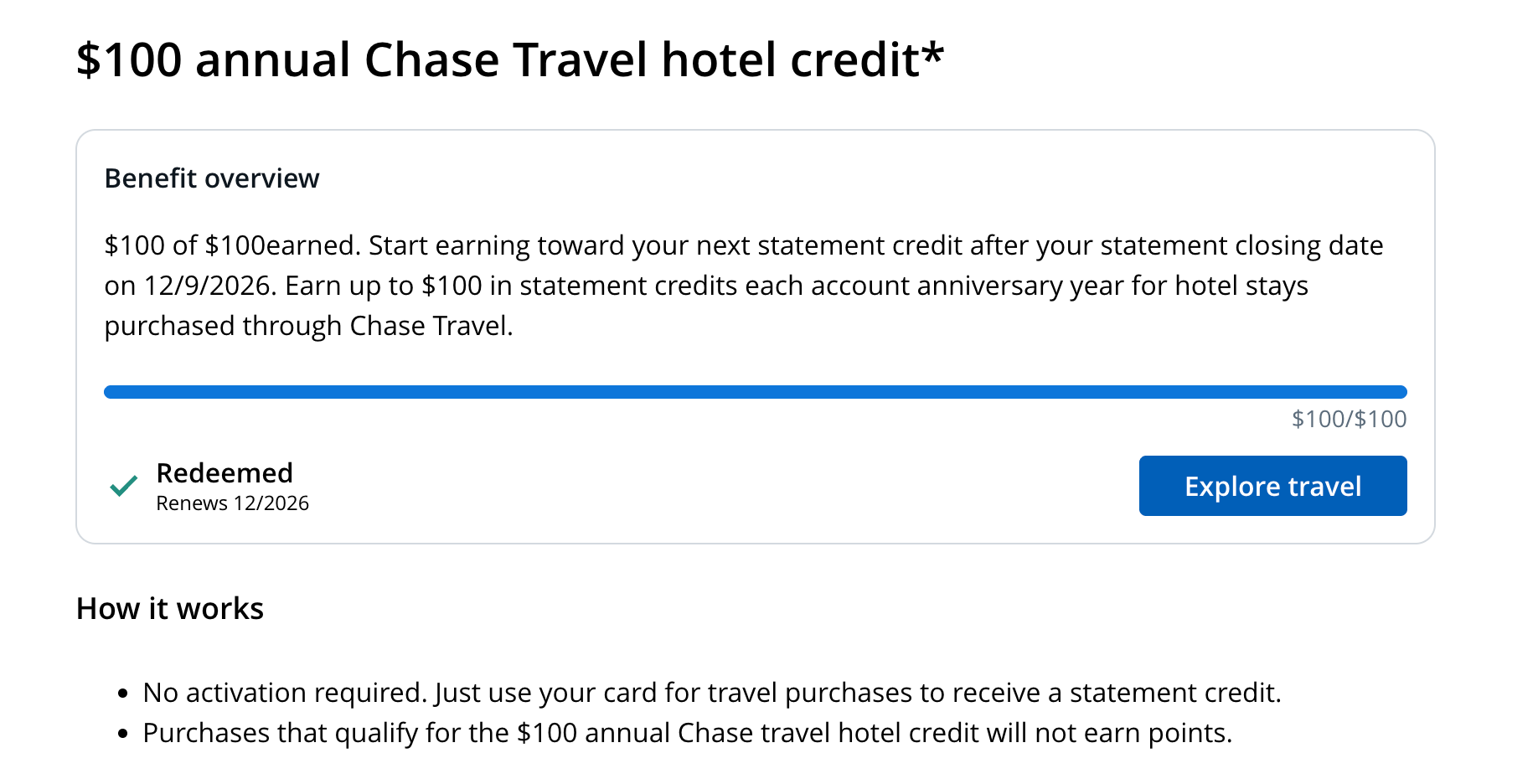
Hotel credit tracker
CHASE

Be sure you pay with your eligible Sapphire Preferred if you want to redeem this credit. Statement credits usually post within three business days, but Chase notes it can sometimes take up to four weeks.

It’s important to note that you won’t earn Chase Ultimate Rewards points on the portion of your booking covered by the statement credit, but you will earn points on any remaining cost after the statement credit is applied. Since my booking was $135 total, I earned points on the remaining $35.

Related: Why the Chase Sapphire Preferred is one of the best cards for everyday spending

Reward your inbox with the TPG Daily newsletter

Join over 700,000 readers for breaking news, in-depth guides and exclusive deals from TPG’s experts

How I booked my $35 stay

When I started planning to extend my weekend in Atlanta, I logged into Chase Travel and started some searches. Since I’d be spending most of my time with my family anyway, I wanted to find a hotel that was functional and affordable so I could get the most mileage out of my $100 credit.
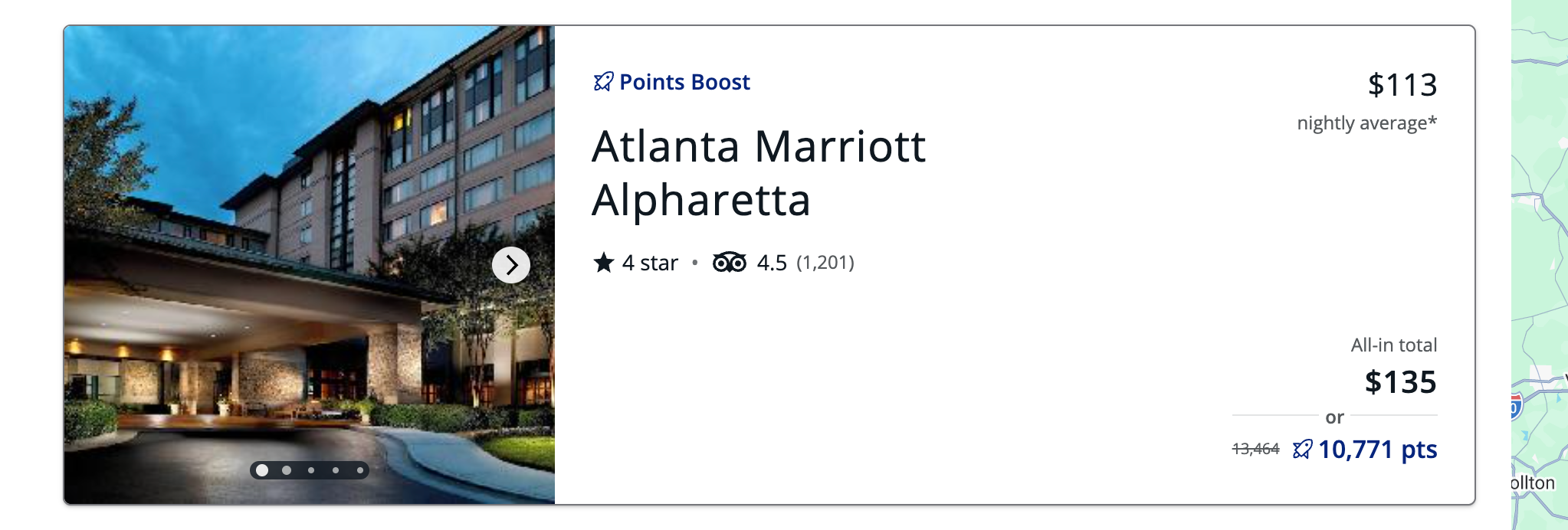
Atlanta Marriott Alpharetta Chase Travel listing
CHASE

I decided on the Atlanta Marriott Alpharetta, in a suburb to the north of the city. For $135 it was perfect for a Saturday night stay. I’d get $100 off (more than offsetting my $95 annual fee on the Sapphire Preferred) and pay $35 out of pocket.

I also have the Chase Sapphire Reserve® (see rates and fees), so I had to double-check that I was paying with my Sapphire Preferred.
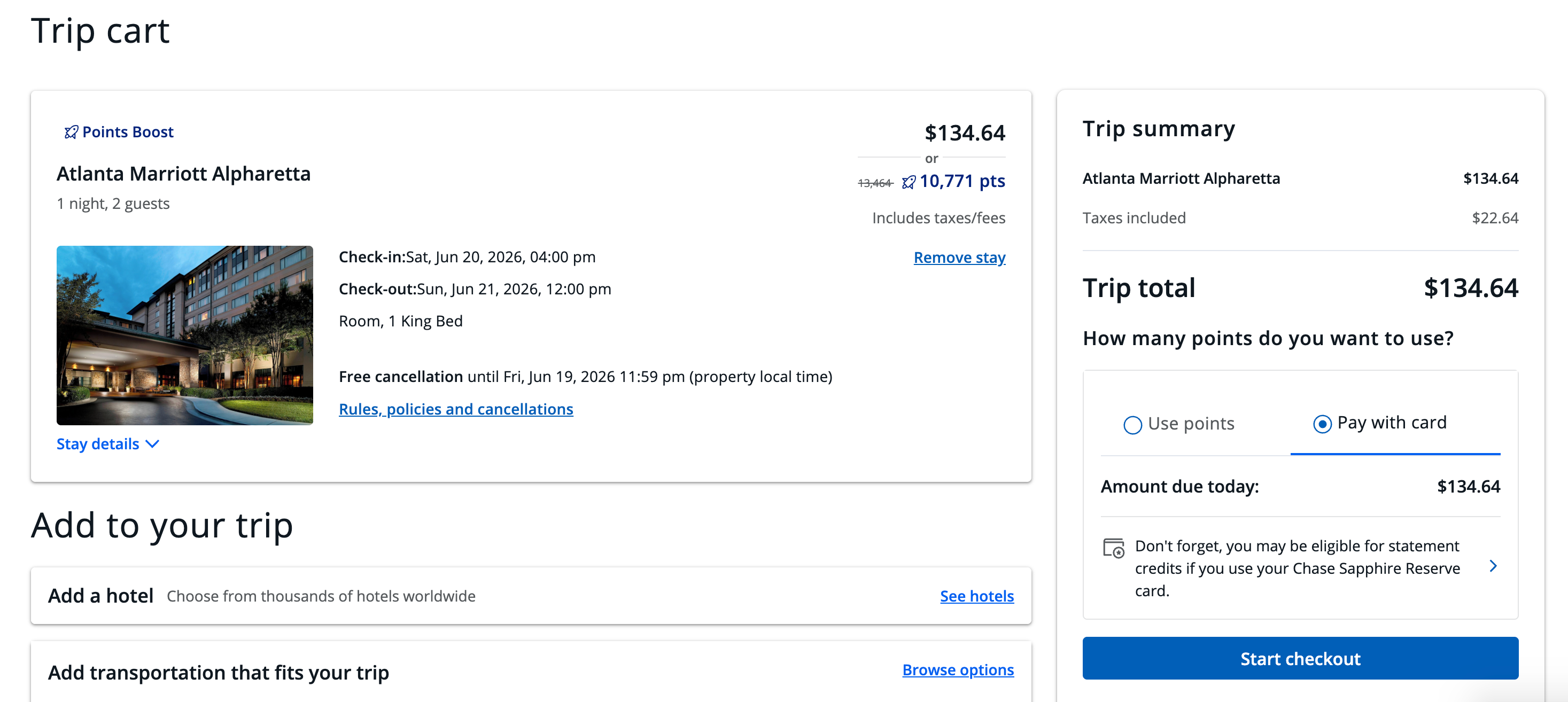
Paying for Atlanta Marriott Alpharetta in Chase Travel
CHASE

After my stay on Saturday, I logged back into my Chase account to check if the statement credit had been posted. I found it in the “Rewards” section of the website.
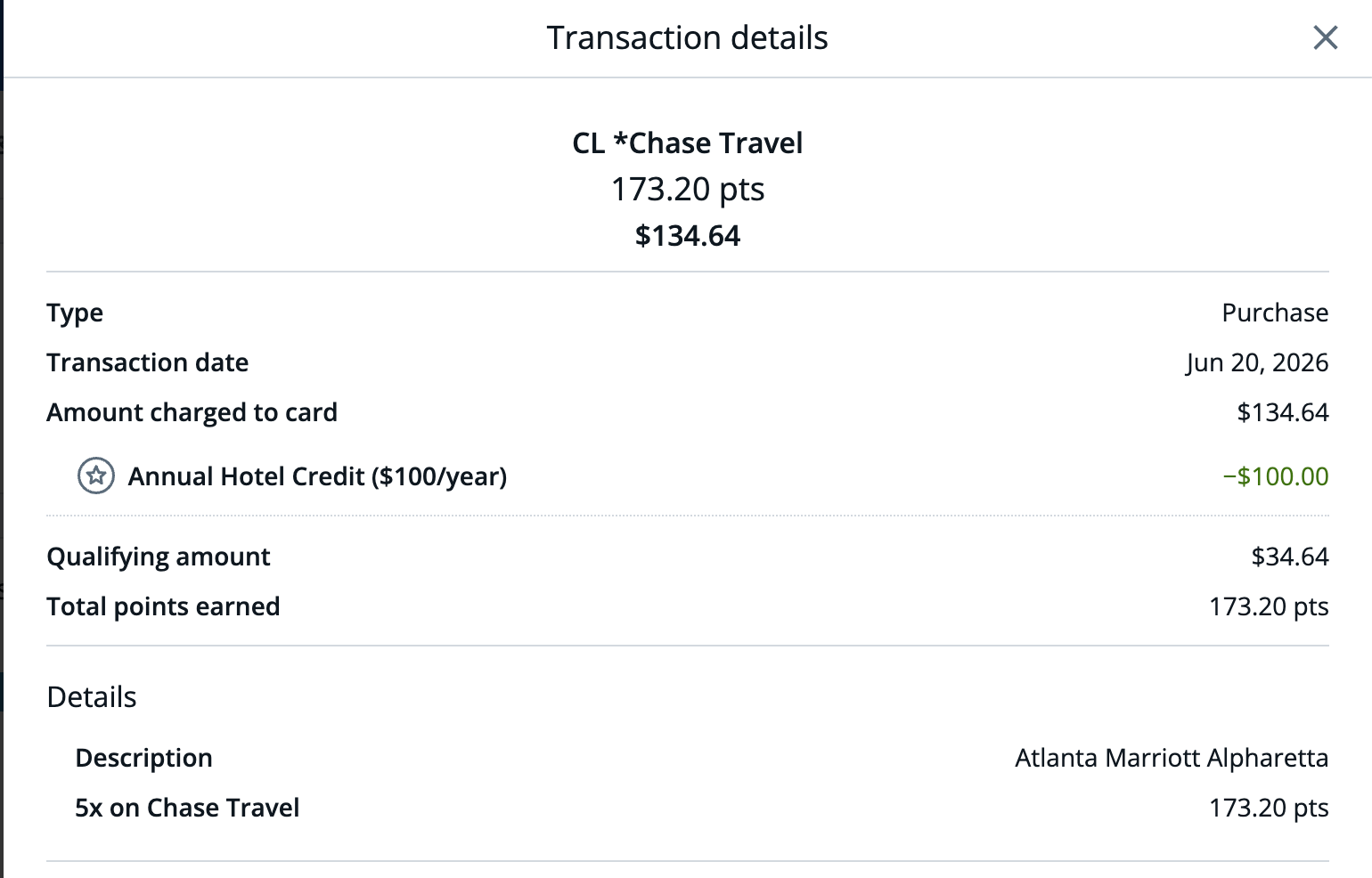
Chase Travel statement
CHASE

I knew I wouldn’t earn points on the $100 statement credit, but I did earn 173 points on the remainder of the booking. This is thanks to the Sapphire Preferred earning 5 points per dollar on Chase Travel purchases.

Related: Value simplicity? Why the Chase Sapphire Preferred is now the only card you need

How to maximize the Sapphire Preferred’s hotel credit

If you find a hotel within the $100 to $150 range, you can maximize the credit just like I did and pay very little out of pocket with the Sapphire Preferred.

As you navigate Chase Travel, keep an eye on the total costs. Don’t limit yourself to city-center properties; there are suburbs with nice properties at lower rates.

This Marriott in Alpharetta was 25 minutes from where the Braves play, but the $35 price tag made it well worth it.

Atlanta Marriott Alpharetta guest room
AUGUSTA STONE/THE POINTS GUY

From luxurious villas to city-center hotels and suburban spots like my Alpharetta Marriott, I think Chase Travel has enough options to make this credit work in most markets.

And for a $95 annual fee, the Sapphire Preferred can pay for itself in just one night at certain properties.

Related: After more than 16 years, why the Chase Sapphire Preferred should still be your first rewards card

Bottom line

The Sapphire Preferred’s $100 hotel credit is one of the simplest credit card perks to use.

There’s no need for activation and no restrictions on timing; all you have to do is book through Chase Travel and let the statement credit do the work. For a card with a $95 annual fee, one night away can put you ahead before you’ve used any other benefit.

Plus, the Sapphire Preferred is offering an outstanding welcome bonus right now: Earn 100,000 bonus points after spending $5,000 on purchases in the first three months from account opening. If you’ve been considering it, now is a great time to apply.

To learn more, read our full review of the Sapphire Preferred.


Apply here: Chase Sapphire Preferred Card


Source link

Leave a Reply

Subscribe to Our Newsletter

Get our latest articles delivered straight to your inbox. No spam, we promise.

Recent Reviews


What is Robot Process Automation?

Robotic Process Automation (RPA) is the technique that presently enables everyone to customise computer software, or a “robot,” to mimic and incorporate the activities of participants to discuss within communication devices to implement work processes. RPA robots, like humans, use the operating system to capture data and exploit applications.In order to perform a wide range of repetitive tasks, they interpret, trigger responses, and communicate with other systems. Only far superior: an RPA software robot never sleeps and makes no mistakes.

Become a RPA Certified professional by learning this HKR RPA Online Training !

What are Robot Process Automation(RPA) tools?

Robotic Process Automation (RPA) techniques are commonly used for task automation configuration. These tools are critical for performing routine back-office processes. There are multiple RPA tools on the market, and selecting one can be difficult.

Why are RPA tools required?

The business environment is constantly changing. To grow and remain relevant, a company’s product, sales, and marketing processes must be constantly improved.

To run its operations, a typical enterprise employs multiple and disparate IT systems. Due to budget, timing, and implementation complexity issues, these IT systems are not changed frequently as business processes change.To bridge the gap between systems and processes, a human workforce is hired to bridge the technical and organizational debt.

The company can use robotic automation to implement virtual workers who look and act like human workers. In the event of a process change, changing a few lines of software code is always faster and less expensive than retraining hundreds of employees.

Before selecting the right RPA tools for your organization you need to cross check with these 4 parameters first. They are:interoperability i.e how it can be integrated or work with other applications, , types of tasks performed, AI support to mimic user actions and how data can be read.

Take your career to next level in RPA Developer Advanced with HKR. Enroll now to get RPA Developer Advanced Training!

Robotic Process Automation Training

  • Master Your Craft
  • Lifetime LMS & Faculty Access
  • 24/7 online expert support
  • Real-world & Project Based Learning

Robotic Process Automation(RPA) Tools:

In the market there are different RPA tools. Now let’s go through the tools one after the other in detail.

  • Blueprism
  • Uipath
  • Automation Anywhere
  • Pega
  • Kofax
  • Krayan
  • Softomotive
  • Inflectra Rapise
  • Contexor
  • Viusal Cron
1. Blue Prism:

All core capabilities are provided by Blue Prism RPA. It is compatible with any platform and any application. This tool requires programming skills to use, but it is user-friendly for developers. This tool is ideal for medium and large businesses.

The key features supported by this Blue prism RPA tool are:

  • It is compatible with the multi-environment deployment model.
  • Security for network and software credentials is provided.
  • It is suitable for use on any platform.
  • It can be used for any application.

Become a Blue Prism Certified professional by learning this HKR Blue Prism Training !

2. Uipath:

UiPath includes all of the essential features. It includes Citrix support. It is also user-friendly for non-developers. It is capable of handling complex processes. And this tool is appropriate for any size business.

The key features of the Uipath RPA tool are:

  • It ensures security by managing credentials, encrypting data, and imposing access controls based on the role.
  • It can automate more quickly. Citrix also provides eight to ten times faster automation.
  • It serves as an open platform.
  • It can manage any procedure, in any number, regardless of how complex it is.

Become a UiPath Certified professional by learning this HKR UiPath Training !

3. Automation Anywhere:

Automation Anywhere includes all of the essential features. It offers both on-premise and cloud-based services. This user-friendly tool is ideal for medium and large businesses.

The key features of the automation anywhere RPA tool are:

  • Automation anywhere tool promises bank-grade security.
  • It helps in authentication, encryption, and credentials are used to provide security.
  • It generates reports and analytics in real time.
  • It allows for platform independence.

Become a Automation Anywhere Certified professional by learning this HKR Automation Anywhere Training !

4. Pega:

Pega is a Business Process Management (BPM) application. It is suitable for use on desktop servers. It only offers cloud-based solutions or services. It is compatible with Windows, Linux, and Mac. This tool is ideal for medium and large-sized businesses.

The key features of the pega RPA tool are:

  • It will assist you in deploying your solutions to customers.
  • It offers a solution that is cloud-based.
  • It does not store any implementation data in a database; instead, it stores everything in memory.
  • You can use this tool to distribute work to desktops, servers, and employees.
5. Kofax:

Kofax can virtually work with any application. This tool does not require any coding skills. It is capable of processing data from any website, desktop application, or portal.

It is good at repetitive tasks.

The key features of the kofax RPA tool are:

  • It is an Intelligent process monitoring and optimization tool.
  • A server can be used to manage it centrally.
  • It is simple to integrate with the Kapow Katalyst Platform.
6. Krayan:

Automate is the name given to Kryon RPA.It has three automation solutions. There are three types of systems: unattended, attended, and hybrid. An unattended solution is a smart tool that can make decisions. Attended tool will increase your productivity, accuracy, and efficiency at work.The combination of both attended and unattended automation is known as hybrid automation.

The key features of the krayan RPA tool are:

  • Kryon offers both attended and unattended automation, as well as hybrid automation.
  • It is a system that can be scaled.
  • It aids in increasing productivity.
  • It has a recording function.
Robotic Process Automation (RPA), rpa-tools-description-0, Robotic Process Automation (RPA), rpa-tools-description-1

Subscribe to our YouTube channel to get new updates..!

7. Softomotive:

Softomotive offers two robotic process automation solutions.It consists of Enterprise Automation as well as Desktop Automation. Enterprise automation will aid in improving sustainable productivity, efficiency, and productivity. Desktop automation is designed for individuals and small teams.It is capable of automating both desktop and web-based tasks.

The key features of this RPA tool are:

  • This tool will assist you from the design to the manufacturing processes.
  • It offers precision, security, and error handling.
  • It is simple to integrate with SAP, Salesforce, Oracle Financials, and PeopleSoft Automation, among other systems.
  • It is compatible with.NET and SQL server.
8. Inflectra Rapise:

Rapise can handle hybrid business scenarios. It is capable of automating Web, Desktop, and Mobile applications. It is user-friendly for both programmers and non-programmers. Rapise is a hosted solution.This tool is ideal for small and medium-sized businesses.

The key features of this RPA tool are:

  • Endorses any size automation project Record and play functionality
  • Automation of the web and desktop; web and screen scraping; REST and SOAP calls; and email processing (gmail, Office 365, private mail servers)
  • It comes with open platform for enhancements and integration
  • It provides specialized support for Microsoft Dynamics applications.
9. Inflectra Rapise:

Rapise can handle hybrid business scenarios. It is capable of automating Web, Desktop, and Mobile applications. It is user-friendly for both programmers and non-programmers. Rapise is a hosted solution.This tool is ideal for small and medium-sized businesses.

The key features of this RPA tool are:

  • Endorses any size automation project Record and play functionality
  • Automation of the web and desktop; web and screen scraping; REST and SOAP calls; and email processing (gmail, Office 365, private mail servers)
  • It comes with open platform for enhancements and integration
  • It provides specialized support for Microsoft Dynamics applications.
10. Viusal Cron

Visual Cron is a task scheduling and integration automation tool. It is only available for Windows. This tool does not require any programming skills.Tasks can be customized based on technology.

The key features of this RPA tool are:

  • The API allows you to program.
  • Visual Cron can create features based on your specifications.
  • The interface is simple to use.
  • You can use the tool even if you don’t know how to code.

If you have any doubts on RPA, then get them clarified from RPA Industry experts on our RPA Community!

Robotic Process Automation Training

Weekday / Weekend Batches

Conclusion:

In this blog post we had covered all the important RPA tools that help in improving and enhancing the organization performance. By going through the tools you can get to know the functionalities and capabilities of the various tools. If you have queries please do comments below, we will resolve your queries very soon.

Related Articles:


Source link