Information & Cyber Risk — Another AI Upload Alters Attorney-Client Privilege Protection, AI Provisions in Protective Orders, Legal Assistant’s Confidentiality Clash, Law Firm Hacking and Data Breach News
“To my knowledge this is the fifth decision in the US to address issues regarding attorney-client privilege and work product in relation to a parties ‘conversations’ with generative AI programs. This one comes to us from Texas state court. “
“In Tate Group Automotive v. Legacy Automotive Capital, the plaintiff’s principal uploaded a zip file of confidential discovery materials to ChatGPT and used it to analyze litigation strategy, including prompting the AI to roleplay as defense counsel and predict how they’d think about the case. Defendants discovered this through a privilege log entry, and the dispute landed before Judge Grant Dorfman in the Texas Business Court.”
“Judge Dorfman ruled in plaintiff’s favor, citing Warner v. Gilbarco (E.D. Mich. 2026) and Morgan v. V2X (D. Colo. 2026). The Judge found that work product waiver requires disclosure to an adversary, or in circumstances that substantially increase the likelihood of adversary access. Uploading to ChatGPT didn’t clear that bar, at least under Texas Rule 192.5(a)(1), which extends work product protection to materials prepared ‘by or for a party.’”
“But the court still ordered the plaintiff to disclose by Bates number every discovery document that was shared with ChatGPT in relation to the question of whether uploading confidential materials to ChatGPT violates a standard protective order. Most protective orders say nothing about AI at all – something to think about when negotiating a protective order at the outset of a case. “
“From an SDNY case yesterday. I think this is the shortest and simplest AI provision in a protective order that I have seen. Basically, it just says that confidential information must stay confidential when put into AI, so don’t use an AI platform that can’t do that. Simpler and shorter is probably a good idea in most cases:”
“’10. Absent the prior written consent of the producing Party or an order of the Court, no receiving Party shall upload, submit, disclose, quote, feed, or otherwise provide any Confidential Material to any artificial intelligence, machine learning, language model, generative text, or similar technology or service (collectively, ‘AI Tool’) unless that AI Tool:”
“(a) is an enterprise-grade platform that the receiving Party (or its counsel) has licensed;”
“(b) is subject to a binding written agreement that (1) requires the provider to keep all user-supplied data strictly confidential, and (2) expressly prohibits the provider from using such data for training, fine-tuning, product improvement, or any purpose other than providing the contracted-for services; and”
“(c) employs technical and organizational security measures reasonably designed to prevent any unauthorized access, disclosure, or use of Confidential Material. The obligations and restrictions of this paragraph apply even where the data or the Confidential Material has been anonymized.’”
“A Houston law firm on Thursday told a Texas state court that an erstwhile legal assistant stole heaps of attorney-client communications that she subsequently misused, including by relaying sensitive emails to a lawyer representing the wife of a firm attorney in the middle of a divorce.”
“The Watts Law Firm PC claimed that former legal assistant Kisanet Mogos had access to firm documents, communications, emails and calendar information, and while working at the firm, she surreptitiously downloaded the documents onto her personal iCloud. Those documents ended up in the hands of parties who should not have been able to access them, the firm said.”
“‘The only means to have possession of these emails was either Mogos forwarded the emails to herself from [Joseph Watts]’ firm email or she printed out copies without authorization from [the firm or Watts],’ Watts Law told the court in its complaint.”
“In April, she filed a bar grievance against Watts that contained communications between him and a client. That same month, an attorney representing Watts’ wife in a divorce produced a printed copy of an internal firm email that confirmed a financial transaction during a deposition.”
“‘The only possible source of the documents was Mogos,’ Watts said, adding that she seemingly worked in concert with his wife and her attorney.”
“Watts Law asked the court to find that Mogos stole the documents, breached her fiduciary duty, and engaged in a conspiracy. It also asked the court to award exemplary damages for fraud and attorney fees.”
“U.S. law firm Fox Rothschild was sued on Tuesday in a proposed class action lawsuit for allegedly failing to safeguard sensitive personal data and allowing hackers to access people’s names and Social Security numbers in a data breach in May.”
“The lawsuit alleges that the data breach was carried out by Silent Ransom Group. The group has been targeting law firms since 2023, according to the FBI.”
“The lawsuit was brought by Jasmine Trotter, a Georgia resident who said Fox Rothschild possessed her personal information in connection with an unspecified legal case. Trotter estimated there are thousands of potential class members.”
“Trotter alleged that Fox Rothschild did not issue a notice about the data breach and failed to use reasonable procedures to keep her data secure.”
“Mark McCreary, Fox Rothschild’s chief AI & information security officer, in a statement said they’re continuing to investigate the breach ‘and will provide notice as required by applicable law.’”
“McCreary said one attorney at the firm was ‘the victim of a sophisticated social engineering event’ and that the breach was limited to a single device.”
“The firm’s data security practices ‘limited the potential scope of this event,’ McCreary said.”
“Law firms have faced mounting lawsuits stemming from hacking incidents. Some, including Gunster Yoakley & Stewart, Orrick Herrington & Sutcliffe, and Bryan Cave Leighton Paisner, have reached settlements in recent years.”
“A cyberattack on Lewis Brisbois illustrates how hackers target large law firms by cold-calling remote employees. Hackers earlier this month tried to gain access to Lewis Brisbois employees’ accounts by posing as firm IT workers in phone calls. The attack showed some of the hallmarks of recent attacks on other large firms, in which cybercriminals pivoted away from phishing emails in favor of pressuring employees to act over the phone.”
“Several Lewis Brisbois support staff members work remotely or on hybrid schedules, signing into the Lewis Brisbois computer network from their personal devices. That set up, while not uncommon for firms post-COVID, made the firm vulnerable to threat actors posing as tech experts seeking remote control of a device already accessing the firm’s virtual network, cybersecurity professionals say.”
“‘Large law firms remain attractive targets because they maintain large swaths of juicy information,’ said Jesse Lemon, a cybersecurity lawyer with The Beckage Firm. ‘It makes them a one-stop shop for threat actors.’”
“It’s not clear who was behind the Lewis Brisbois attack and whether they were able to infiltrate the firm’s network. Representatives for the firm, which has some 1,600 lawyers nationwide, did not respond to comment requests.”
“Some hacker groups look for the law firms’ cyber insurance policies and request policy limits as ransom, said Melissa Ventrone, a Clark Hill partner who advises clients on data security and privacy. Ventrone said she has heard of one law firm, which she declined to name, paying $10 million to avoid the release of hacked data.”
“‘This threat group understands the value of the data to the law firm,’ she said.”
This tutorial covers a wide range of Denodo Platform features. We’ll start with an overview of fundamental definitions like what is Denodo and why the Denodo platform is used and then will explore the topics of Data Virtualization, Data Services, integrating big data system to Denodo platform, implementing agile BI for Data Virtualization, what are 3C principles of Denodo, and how to create and deploy the web services.
Denodo Express is Denodo Technologies, Inc.’s newest product, a free data virtualization utility with a graphical user interface-based studio. Denodo Express connects to and integrates structured, unstructured, and big data sources on-premises and in the cloud. End-users have access to these sources, as well as enterprise apps, dashboards, portals, Intranet, search, and other tools.
Take your career to next level in Denodo with HKR. Enroll now to get Denodo Training!
2. Why the Denodo Platform?
The Denodo Platform offers breakthrough performance in big data, logical data warehouses, and operational scenarios; it accelerates adoption via cloud data virtualization. It streamlines business users’ data through self-service data discovery and searches.
3. Basics of Data Virtualization
3.1 Why data virtualization? Data virtualization produces a single virtual layer that connects different data and allows consuming apps to have uniform access to it. These apps will take advantage of the virtual layer’s semantic components and reuse them as necessary. Your applications would be independent of the physical sources where the data is kept in this manner.
The Denodo Platform offers the following features:
Data services are simple to create.
Data Services that are not dependent on a physical source (s).
Control your data sources from a single point.
Development cycles are short and agile.
Little to no coding!
Simple needs require intuitive solutions.
All clients will be able to reuse your models.
3.2 Installation & Bootstrapping This section explains the prerequisites for utilizing Denodo, and also how to configure your Denodo setup and get started with Denodo Data Virtualization.
Denodo Platform 8.0 – Download the installer and license from https://community.denodo.com/ express.
MySQL 5.0 or higher – Some of the data sources used in the lesson will require MySQL (or another relational database). It’s available for download here: http://dev.mysql.com/downloads/mysql/
MySQL Connector/J 5.0 or higher – Denodo will be able to connect to MySQL using this JDBC driver: http://dev.mysql.com/downloads/connector/j/
MySQL Workbench 5.0 or higher – These are some handy MySQL tools that you might want to use, although they aren’t necessarily required for the tutorial: http://dev.mysql.com/downloads/tools/workbench/
Denodo Tutorial Files – Download and extract the contents of the zipped Tutorial files to a handy local directory, which will be referred to as in this guide.
3.3 Initial Steps The following are the first steps in using the Denodo Platform, which cover the most fundamental functionality:
Starting the Denodo server and applications.
Find out how to use the Denodo Administration tool.
Make a database for development.
Make folders to help you organize your database.
Relational databases should be imported.
Run the queries.
Make an easy combination view.
3.4 Advanced Operations You’ll combine the unified customer view you’ve created with this billing information in this section to create a report that shows the total amount due for each of your clients.
Create a data source for a Web Service.
A hierarchical system that has been flattened.
See how Tree View is used to create derived views.
Make a view that brings together data from various sources.
Create a view for aggregation.
3.5 Using your application to connect The Denodo Platform is built on a client-server model, in which clients send requests to the server. One of the following interfaces could be used to send these requests:
JDBC: Denodo’s proprietary JDBC driver is provided.
ODBC: An ODBC interface is provided by Denodo (additional components must be installed).
ADO .Net: The Npgsql ADO.Net provider for PostgreSQL is compatible with Denodo.
RESTful web service (XML, JSON, HTML outputs): For apps that can’t connect to Denodo through JDBC or ODBC.
Several methods for accessing Denodo from outside apps are discussed in this section:Using a JDBC Client via a Third Party.
Using ODBC.
Use a Denodo RESTful Web service to consume it.
Browse through Linked Data.
3.6 Performance of an Agile Data through users. ItAfterata Virtualization software accesses and pulls data from target sources at runtime, then blends it in real-time to provide the desired outcome. Denodo is too vital, although not exclusive, part of any data management architecture. When assessing performance, it’s critical to determine which elements constitute bottlenecks.
4. Data Services
The Data Services layer is an abstraction layer that can supply data to various users on an enterprise-wide scale. Using the views in the virtual layer, Data Virtualization software can quickly develop new Data Services. A uniform, consistent, and scalable data services infrastructure is required in many projects.
What are the most prevalent problems that these services encounter?
Complex architectures make it difficult and time-consuming to integrate different systems.
Rigid infrastructure that makes it difficult to respond swiftly to customer requests with new services.
Excessive reliance on the IT department.
Advantages of a Data Services layer
Every business application can access all information through a single data layer.
Many issues can be solved by relying solely on the Data Services layer.
As though all sources were homogeneous, you can access them all.
Simple ESB software plugins
Defining contracts/interfaces
An interface is a form of view in Denodo that consists solely of the description of fields and their data types. The most typical application is in a top-down design, where you create the fields first and then associate the interface implementation(data).
SOAP Web services
Web services are software solutions that enable interoperable machine-to-machine communication via the internet. SOAP Web services would be covered in this section. To exchange messages, these Web services employ the SOAP (Simple Object Access Protocol) protocol. The messages are as follows, according to the specifications:
REST Web services
As you may know, Web services are software solutions that enable interoperable machine-to-machine communication over a network. In this section, we’ll discuss REST Web services, which are different kinds of Web services. This type of service communicates through HTTP and uses the REST (REpresentational State Transfer) architectural style as the messaging protocol.
Publish Web services
The Web Container Status Window in the Denodo Administration Tool is used to manage REST and SOAP services. To bring up this window in the workspace, go to Tools > Web services container in the menu bar. A table will appear in the Administration Tool, listing the Web services generated in a certain Denodo Database.
Invocation of services
REST services work in the same way as RESTful services, however, you only have access to the views built with this REST service in this case. A SOAP client is used to call SOAP Web services.
Change Web service Implementation
It’s to make a derived view and use it to implement the i_client_info interface. You’ll set up the i_client_info interface to utilize client_info_impl as its implementation view in this section.
Denodo Training
Master Your Craft
Lifetime LMS & Faculty Access
24/7 online expert support
Real-world & Project Based Learning
5. Big Data
The marketing department compiles a list of possible new clients on a regular basis. An Apache Hadoop distribution is in place to process the input data and produce the needed outputs in order to construct this list of prospects. You’ll learn how to integrate a Big Data system into the Denodo Platform in this section.
Using Hive for creating JDBC Data Source
Apache Hive is a piece of software that makes querying and handling massive datasets in distributed storage easier. HiveQL is a SQL-like language that allows you to project structure onto this data and query it.
Connecting to Other Big Data systems
This explains using Denodo Platform 8.0 to access various Big Data platforms. Because Denodo Platform connects to so many different data sources, the following list is the best options that are used for connecting to these systems from Denodo Platform:
Apache Impala
HBase
Presto
SparkSQL
HDFS
Splunk
MapReduce
Using the REST API for Accessing HCatalog
HCatalog is a Hadoop table and storage management layer that makes reading and writing data easier. Users can get a relational view of their data on HDFS with HCatalog, and they don’t have to worry about where or how their data is stored.
6. Agile BI
Denodo Agile BI will go through the basics of leveraging Data Virtualization tools, as well as how the Denodo Platform analyzes enterprise data for operational insight. This article will demonstrate the key advantages of adopting Data Virtualization rather than connecting BI tools directly to data sources.
Agile BI we’ll go through the following stages:
Presenting the use case.
Implementing Solutions with Denodo. 1) Connecting Data Sources. 2) Blending the Data. 3) Generating Final Reports for Publishing Data for Clients
Using a BI tool for consuming data.
Business problem
Traditional methods to business intelligence sometimes result in the same logic being built over and over again across many BI and Reporting systems in order to generate similar results. The business logic required to build all of the reports will be centralized by the Data Virtualization layer, allowing it to be simply maintained and modified, as well as easily shared with a range of external BI tools without having to duplicate code across them.
Connecting to Data Sources
All data is organized into a unified perspective of marketing promotion performance. This is how the procedure will go:
Connect Denodo to your data sources for real-time data retrieval.
Combine the information after applying the necessary transformations and normalizations.
Prepare final reports for consumption.
Publish the client application’s data.
Combining the data
We can begin combining all of the data now that we have the data sources and base views in place. The first step is to create a denormalized, standardized view of each data source so that we can create a set of foundation business entities from which we may build more complex reports later.
Publishing the data for clients
This BI tool connects to Denodo through ODBC and sends regular SQL queries. Denodo automatically delivers all views (base and derived) over JDBC and ODBC by default; we just need to perform manual publishing procedures when establishing web services.
Using a BI tool
A client tool is used to access the views we developed in the Denodo Platform. We’ll use Tableau, however, Denodo may be accessed using the JDBC, ODBC, or Web Services interfaces by any standard tool.
7. The 3 Cs Principles of Denodo
Data virtualization is a layer that allows organizations to integrate real-time data from multiple sources and make it available to them without exposing any technical details (e.g., data center, database, data source, data structure, etc.). Denodo’s approach is based on the “Three Cs principle.”
Connect — Connecting any data source (e.g. APIs, files, databse, etc.).
Combine — Since the goal of data virtualization is to collect data from different sources and blend it to meet a business need, this layer is designed to do just that. A developer is expected to define the data transformation and combination to suit business requirements in this layer.
Consume — Finally, a method/medium for making real-time data available to data consumers. Denodo offers a number of options for users to access data, including an ODBC interface, JDBC drivers, and web services (SOAP/REST).
7.1 Steps to Get Started with the Denodo Admin Tool
Let’s have a look at Denodo’s 3 Cs implementation in practice after finishing the installation of Denodo installation.
1) After installation, open the Denodo Admin Tool.
Subscribe to our YouTube channel to get new updates..!
2) Connect to the Denodo Admin Tool by logging in, providing login credentials, and clicking “connect.” On the admin tool, you should be able to see the landing view (as shown below).
Note: Denodo’s default databases are Admin and itpilot. You should keep them instead of deleting them.
3) The best method to get started on a new project is to build a new database. Go to Menu -> Administration -> Database management -> New to create a new database.
4) Denodo’s nomenclature is split into layers — Derived View, Web Service, Data Source, Base View. Create these folders with the specified nomenclature in the new database (Right-click on database name-> New-> Folder). This will make it easier to maintain the various elements based on their functions.
7.2 Connect Let’s take a look at Denodo’s first C Principle, which is “Connect.” To connect to the desired data source, we’ll construct a data source here.
Steps for Creating a Data Source
Right-click on the Data Source folder -> New -> Data source -> JDBC.
Give the data source a name.
As the database adaptor, select “MySQL 5.”
To match the local MySQL installation, change the Database URI.
Enter in the login and password for the database.
Select “Connection Pool configuration” and make a connection test with “Test connection.”
Note: We’ve only dealt with relational data sources so far, but Denodo also supports files, NoSQL databases, APIs, and other data sources.
7.3 Combine The second key C premise is this. In this section, we’ll learn how to make a base view. The base view would connect to the data source created in “Connect” and give a variety of operations on Base Views that can be used to generate Derived Views.
Steps for Creating a Base View
Double click on the Data Source -> Create Base View.
Choose the table/view from which to build the base view.
Choose which columns should be included in the base view. The developer can choose which data to display on the Base View.
Steps for Testing the Base View
Right-click on Base View -> VQL Shell -> Select -> Execute.
On the right side of the element tree, you must see a select query that returns real-time results.
Note: Derived Views could be built by querying one or multiple Base Views after the Base View has been created.
Derived Views
Derived Views are simple views produced by combining single/multiple Base Views with various operations like JOIN/UNION/MINUS, and so on.
Steps for Join Operation
Right-click on Base View -> New -> Join. A new view window will open.
The views can be dragged and dropped from the element tree.
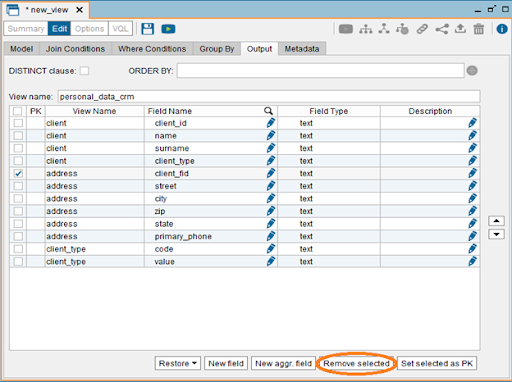
Connect the join column of one view to the join column of other views by dragging it from one view to the other’s join column. Denodo supports multiple join procedures, so you can join various views to reach the desired result. On Client_id, the client and address are joined, as shown in the screenshot below. On client_type and code, Client and client_type are joined.
To choose only the required columns from these three views, go to the Output tab and use the checkbox to delete the non-required columns.
Click the save button or press ctrl + s to rename the view to a logical name.
Aside from the JOIN operation, Denodo offers a variety of other relational operations: SELECTION, AGGREGATION, UNION, PROJECTION, FLATTEN, MINUS/INTERSECTION
Using the same steps as before, new views can be generated by Right-click-New Operation.
7.4 Consume This is Denordo’s third important C principle. The adoption of this idea would provide real-time data to business users/enterprise applications.
Let’s examine how Denodo plans to make the data available to users. Denodo is a company that focuses on client-server architecture. It offers an ODBC interface, JDBC drivers, RESTful Web Services (with HTML, XML, JSON outputs).
Now you will see how to use Denodo’s RESTful Web services. Denodo’s web services are built on REST (Representational State Transfer) architecture principles and use HTTP.
Using HTTP verbs (GET, POST, PUT, or DELETE), define a set of operations.
The data is usually returned in HTML, XML, or JSON format.
Every view in Denodo can be published as a REST web service, allowing external applications to access the data.
ODATA 4.0 web services are also supported by Denodo.
8. Creating a Web Service
Right Click on the Derived View/BaseView -> New -> Data services -> REST Web Service.
This will display the view from which the web service was built. On use case Demand, several views can be introduced as part of a single web service.
Give your web service a logical name and choose from JSON, XML, or HTML to represent the data.
9. Deploying Web Service
Deploy the web service by right-clicking it.
This step will deploy the web service and provide you with the URL where you can access it.
Denodo Training
Weekday / Weekend Batches
Conclusion
We hope this tutorial is very useful to you and with this, you have mastered the concepts of implementing the 3 C’s principles of Denodo to connect, combine and consume. Initially, we have covered the concepts like basics of Data Virtualization and its operations, the data services like REST and SOAP, and other Big data and Agile BI so as to make you understand it from scratch.
To provide the best experiences, we use technologies like cookies to store and/or access device information. Consenting to these technologies will allow us to process data such as browsing behavior or unique IDs on this site. Not consenting or withdrawing consent, may adversely affect certain features and functions.
Functional
Always active
The technical storage or access is strictly necessary for the legitimate purpose of enabling the use of a specific service explicitly requested by the subscriber or user, or for the sole purpose of carrying out the transmission of a communication over an electronic communications network.
Preferences
The technical storage or access is necessary for the legitimate purpose of storing preferences that are not requested by the subscriber or user.
Statistics
The technical storage or access that is used exclusively for statistical purposes.The technical storage or access that is used exclusively for anonymous statistical purposes. Without a subpoena, voluntary compliance on the part of your Internet Service Provider, or additional records from a third party, information stored or retrieved for this purpose alone cannot usually be used to identify you.
Marketing
The technical storage or access is required to create user profiles to send advertising, or to track the user on a website or across several websites for similar marketing purposes.