This Lab Winner Window AC Cools My Old Home in the Summer, and It’s $60 Off During Prime Day


CNET’s key takeaways

  • The Windmill AC normally starts at $339 for 6,000 BTUs, but you can find it on sale right now at Windmill’s website or Amazon for $279, ($60 off). 
  • Not only is the Windmill AC the easiest unit I’ve ever installed, it’s the only AC unit I’ve tried that effectively kept my older and not well-insulated home cool during heat waves. 
  • Bonus: It’s actually stylish. (I still would have paid for an ugly one that works.) 

There are a lot of things I love about living in an older home — my 100-year-old rental has original 1920s art deco tile, tall ceilings, and a lot more character than you might find in a newly constructed house. One thing it doesn’t have? Central air conditioning.

With record-breaking heat waves regularly hitting in my area, I needed to find window ACs that could cool my poorly insulated 2,500 square foot home.

I hunted for the right one for years. Every summer I’d buy and test out new window air conditioners, only to feel frustrated by how poorly they worked. I’d sell them at the end of the season, and restart the cycle again the following year.

Finally, after years of sweating through sweltering three-digit temperatures and overbearing humidity, I found it: the Windmill WhisperTech window air conditioner. This innovative powerhouse was so effective at cooling my oversized master bedroom, that I eventually bought two more. These three AC units effectively cool my 2,500-square-foot Philadelphia row home even during intense heat waves. And they look great while they do it.

The Windmill AC isn’t the cheapest option on the market, but for me, it was well worth every cent. If you’re also fed up with sweating indoors, here’s why you need to try this game-changing AC.

windmill window air conditioner

I’ve had the 12,000 BTU Windmill WhisperTech air conditioner for three years, and it keeps our master bedroom comfortable during intense temperatures. (It’s stylish, too!)

Courtney Johnston/CNET

My experience with the Windmill air conditioner

I was skeptical about the Windmill window air conditioner when it first arrived. It was lighter than other units I’d tried out (I could pick it up myself), so I panicked, thinking there was no way this one could cool our south-facing 350 plus square foot bedroom.

But within minutes, my partner and I had the unit installed and running. Only a few hours later, our bedroom felt less like a sauna and dropped to 68 degrees Fahrenheit — a feat that hadn’t happened with prior ACs. The humidity, which often jumped up to 65% or higher on humid days also dropped to below 50%. I was equally impressed by how well it maintained its set temperature, too. Especially during intense heat waves. 

The very next day, I ordered a second unit for the other end of our house.

Note: CNET does scientific testing on window ACs at our Louisville testing labs. In our recent comparison of window and portable AC units, the Windmill 8k was found to be the top-performing window AC unit.

What makes the Windmill AC different?

Windmill air conditioners have a few unique features, but what prompted me to add one to my cart was the unit’s cooling design. Windmill ACs push cool air out of the top of the unit at a 45 degree angle for better cooling. After trying several big name window ACs that pushed air out horizontally, I was excited to find that this feature actually cooled a second-story room with a tall ceiling; the air seemed to circulate better since the unit pushes the cold air up, rather than out and down.

No need to hide the ugly Window AC

I’d deal with an ugly air conditioner as long as it cooled my home. But I’m glad I don’t have to. The Windmill air conditioner has a sleek, minimal design that many of my friends and family have commented on. The unit has an attractive front panel design that hides its air filter and houses tiny buttons that are nearly hidden at the top of the panel. 

The LED display lights automatically dim, so you don’t have to worry about any visual disruptions at night. It also comes with side panel covers that offer extra insulation and a seamless look.

Windmill also offers colorful magnetic panel fronts to add some whimsy to your window, if you’re into that kind of thing. 

It’s the quietest AC I’ve ever owned

Although it wasn’t a main selling point for me, I’m now a huge fan of Windmill’s Whispertech quiet cooling technology. My first priority was an air conditioner that made my house feel comfortable; I just assumed that would come with some noise. The specs list it as 42 decibels — softer than the average household refrigerator. I found my Windmill units comfortably quiet, even after regularly using two for almost three years.

My partner and I are able to watch TV at a normal volume, talk to each other from other ends of the house and jump on work calls without the noise bothering us. I actually enjoy the white noise effect it offers in our bedroom at night.

I do sometimes find the running noise distracting when I’m on work calls, but that would happen with any AC since my window is right next to my desk. This typically only happens if it’s on high or medium, so I just switch it to low or eco-mode to solve this problem.

You can install it in minutes (really)

I’ve installed three of these units in multiple homes and windows, and it only takes me five to ten minutes to set up. That’s because this unit comes pre-assembled. There’s no attaching panels or screwing brackets onto the base before installing it.

All you have to do is add the window foam to the sides of your windows, set the unit onto your window pane, expand the side panels, shut your window, then secure it with screws. If you can’t drill into your window panes or if you rent (like me) and don’t want to, you can secure it to a block of wood. 

I usually have my partner help me install this (one of us lifts while the other opens and lowers the window), but I’ve successfully installed it on my own in the past. 

It comes with a smart app and voice control

Windmill will send a remote with your window AC, but if you have multiple units to control, I highly recommend using Windmill’s smart app. It takes just a few minutes to install and register your device (they send a QR code you can use to make set up even easier). 

Windmill app

The Windmill app makes it easy to control settings for multiple window air conditioners in one spot.

Screenshot by Courtney Johnston

The app’s easy to use and helpful if you leave the house and forget to adjust the temperature before you go. It does occasionally show the wrong temperatures, though. I had an issue with my office AC’s temperature on the app showing as 61 degrees when it clearly wasn’t, but a quick reset of the AC solved that.

Similar to a smart thermostat, you can create automations to lower or raise the temperature, speed or even shut the unit off at certain times of day. It’s a great tool if you want to raise the temperature while you’re at work or away for a weekend.

I don’t use the voice control with Alexa feature, but if you’re into that, it seems easy to set up.

Eco mode keeps my energy bill low

Since I have gas heat, my electric bill tends to go up in the summer when I’m running the AC. While that’s still the case, I don’t worry about large energy bill surges anymore. Windmill’s eco-mode helps my rooms stay cool without causing a surprise electric bill. 

Windmill air conditioners are Energy Star rated, with up to a 15 Combined Energy Efficiency Ratio rating. To earn an Energy Star rating, air conditioners need a CEER rating of 12 or higher. 

Solves the storage dilemma

I’m lucky to have a basement where I can store my air conditioners when I’m not using them. But if you don’t have an extra closet or garage to house these units during the winter, Windmill sells winter covers that will protect your unit, keep your house insulated, and add a pop of color (if you choose) to your window.

I like this idea, although the current options are fairly limited and I don’t personally love any of the color schemes they offer.

The specs

  • 6,000, 8,000, 10,000 and 12,000 BTU units available. 
  • Pre-assembled for easy installation
  • WhisperTech quiet technology
  • The 6,000 BTU unit is 42 decibels
  • Comes with side panel covers for extra insulation and a seamless finish
  • Airflow at a 45 degree angle
  • Auto-dimming LED lights
  • Three cooling options
  • Three fan speeds
  • Eco-mode
  • Remote control
  • Smart app and voice control
  • One-year limited warranty
  • The 6,000 BTU unit retails for $350, but we usually see it on sale for  $340. The 12,000 BTU retails for $629 and often on sale for $589. 

CNET’s buying advice

I recommend Windmill window air conditioners to everyone I know who’s looking for one. My experience with the three units I own has been nothing but positive. They’ve outperformed GE and Midea air conditioners I’ve tried in the past and work well to keep my humid row house cool and comfortable.

The biggest drawback of the Windmill air conditioner is its price. While the cost is on par with competitors like July (yes, they’re an AC company named after one of the hottest months of the year) and Midea, you can find more affordable options. Paying $630 for a 12,000 BTU window air conditioner is a steep price, but you can frequently find them on sale at Windmill’s website or at Amazon, Home Depot, Lowes, P.C. Richards and Costco.

If a Windmill AC isn’t in your budget, don’t go into debt to buy one. Instead consider the GE 5,000 BTU mechanical window air conditioner, CNET’s best budget pick, the GE AHEC05AC window AC for around $160-170. 


Source link

Leave a Reply

Subscribe to Our Newsletter

Get our latest articles delivered straight to your inbox. No spam, we promise.

Recent Reviews


SAP EWM Process Flow – Table of Content

Introduction to the SAP EWM:

The  SAP EWM (extended warehouse management) is one of the functional modules which is used to manage warehouse inventory and supports the processing of goods movements. The SAP EWM also allows organizations to control both inbound and outbound delivery process delivery. and movements in the warehouse. The main purpose to use EWM is to manage the outbound and inbound delivery process, maintain goods receipts, solve goods issues, fulfill customer orders, and goods distributions. 

               We have the perfect professional SAP EWM Training for you. Enroll now!

SAP EWM key features:

SAP EWM signifies the major key features which are considered so important in any organization; Let us explain one by one;

  • With the help of SAP EWM, users can control the various warehouse activities such as picking, posting, managing storage, and good sales document types.
  • The SAP EWM helps you to set the alert before the goods receipt transfer from EWM to the SAP ERP system along with this feature, users are also able to perform corrections, reversal, and inbound delivery split from the SAP EWM to the SAP ERP system.
  • Users can also perform deconsolidation of the handling of various units that contain product details and their storage locations.
  • Users can also determine the storage concepts like product slotting, and optimize the goods arrangements for the warehouse automatically.
  • The SAP EWM functional module allows users to perform various tasks like work packaging, and also monitor the warehouse activities which are performed by the warehouse employees.
  • The SAP EWM also helps organizations to keep track of the vehicles, and other transportation units (it consists of a yard-in check in and yard-out checkout) activities.
  • SAP EWM also comprises storage and handling of various hazardous substances (such as SAP environmental health, and safety EHS).
  • SAP EWM allows organizations to store the labor time, and resource usage effectively( managing the resources effectively).
  • The SAP EWM cockpit allows users to perform the transportation of products to various warehouse centers.

Overview of SAP EWM Process Flow:

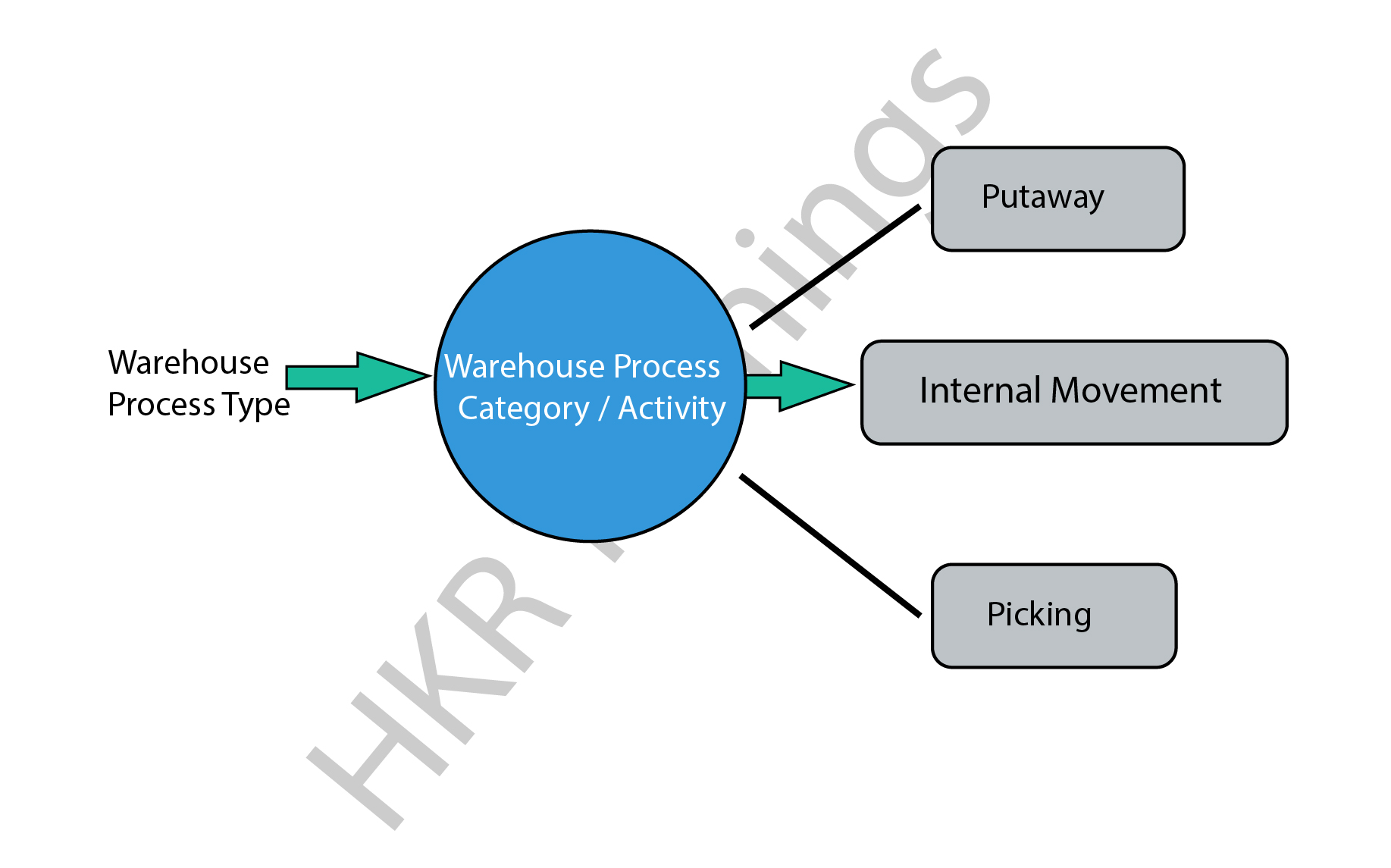
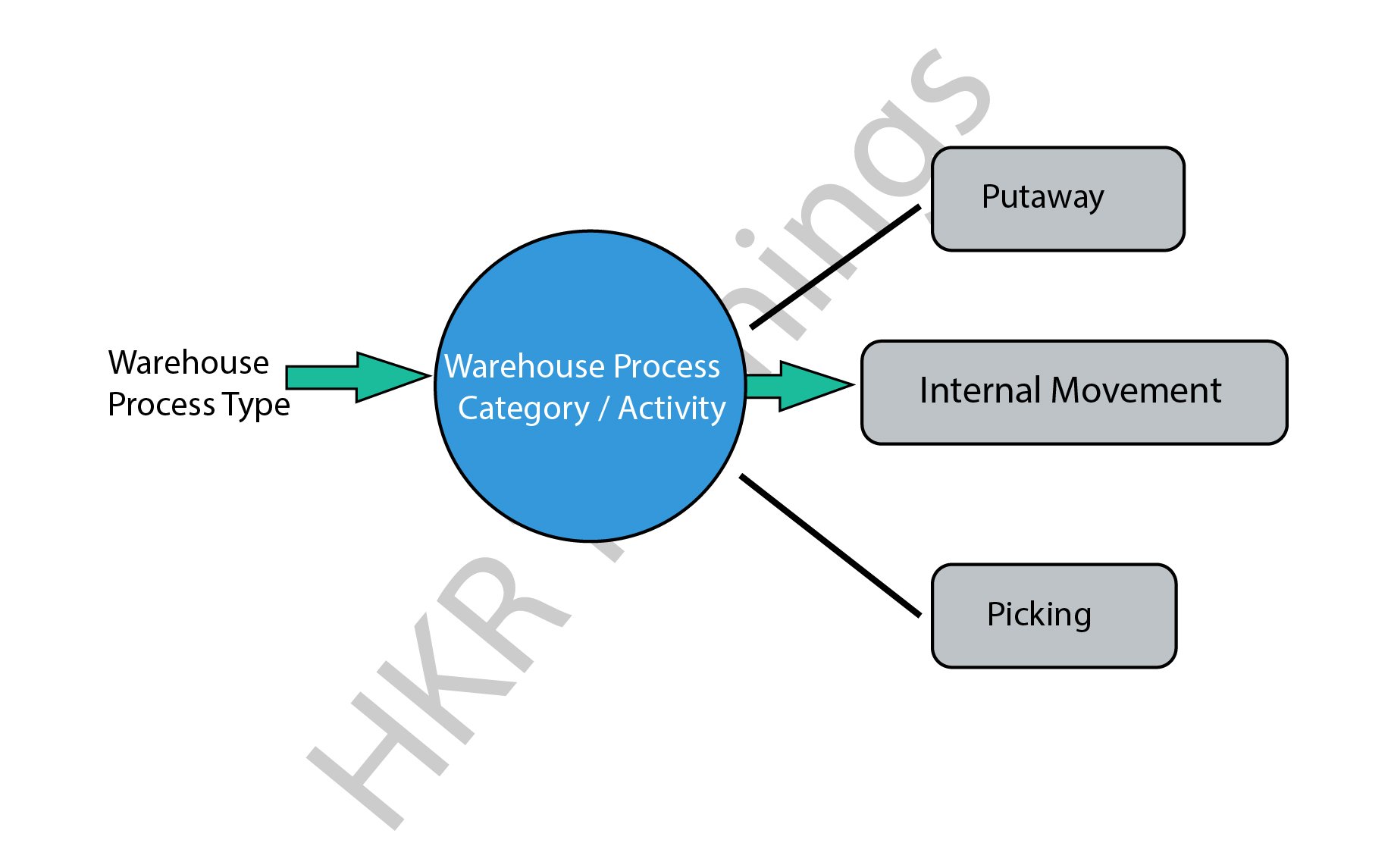
In general, SAP EWM process flow defines the type of activities that have been performed in a warehouse. We can consider the type of activities such as packing, goods receipt, goods issues, and they are assigned to each warehouse document. 

All warehouse process flow is further divided into warehouse categories. The warehouse categories also define the goods movement in the organization’s warehouses.

The following diagram explains the process flow of the SAP EWM;

SAP EWM

There are various process types also categorized in the SAP EWM system, we would like to mention them as well ;

  • Stock removal 
  • Putaway
  • Internal movement 
  • Goods receipt posting 
  • Goods issue posting 
  • Physical inventory 
  • Crossline putaway

               We have the perfect professional SAP Training in chennai for you. Enroll now!

SAP EWM Training

  • Master Your Craft
  • Lifetime LMS & Faculty Access
  • 24/7 online expert support
  • Real-world & Project Based Learning

Example 1: Here we are going to explain the internal process type for the picking type as follows;

The steps include are;

  • To create a picking type process type, go to the navigation EWM ->click on “cross-process setting” -> select warehouse tasks -> now choose to define warehouse process types.
  • You can also select the process type to copy -> then click on the copy at the top.
  • To save all the process type details -> then click on the Save button.

Example 2: internal process type for selling and receiving goods:

This process involves internal process types for selling and receiving goods/products in the warehouse. In general, the receiving goods process begins in the SAP ERP system once you have detected the purchase requisition and purchase order created. The purchase order composes the quantity of the material stored and plants in the storage location. 

There are two ways available to handle the purchase order requests;

  • Firstly you need to send the purchase order to the supplier for the goods deliveries, once you receive the goods, the receipt of the goods will keep posted.
  • Receive the order announcement from the supplier that is all about the goods arrival and purchase order request.

SAP EWM

Note: when you create the purchase order -> you can set the CTRL key to enabling the notification from the supplier. An inbound delivery will be created once you set the control. In a few cases, inbound delivery cannot be created even though you have set the control key. 

All the inbound delivery process consists of the following information;

  • Goods arrival
  • Quantity of goods
  • Store details
  • Plant location

An inbound process includes;

  • Goods receipt and optimization 
  • Transportation unit inspections
  • Quality inspection 
  • Routing of goods in warehouse 

The following image illustrates the inbound delivery process flow,

 inbound delivery process flow

Points to remember:

  • Whenever you make any changes to the inbound delivery, it will affect the SAP system.
  • The status of the inbound delivery report can be updated as per goods delivery.
  • Successful completion of the goods delivery report will also be updated on the SAP system.

          If you want to Explore more about SAP EWM? then read our article – SAP EWM Tutorial

HKR Trainings Logo
Subscribe to our YouTube channel to get new updates..!

SAP EWM outbound delivery process flow:

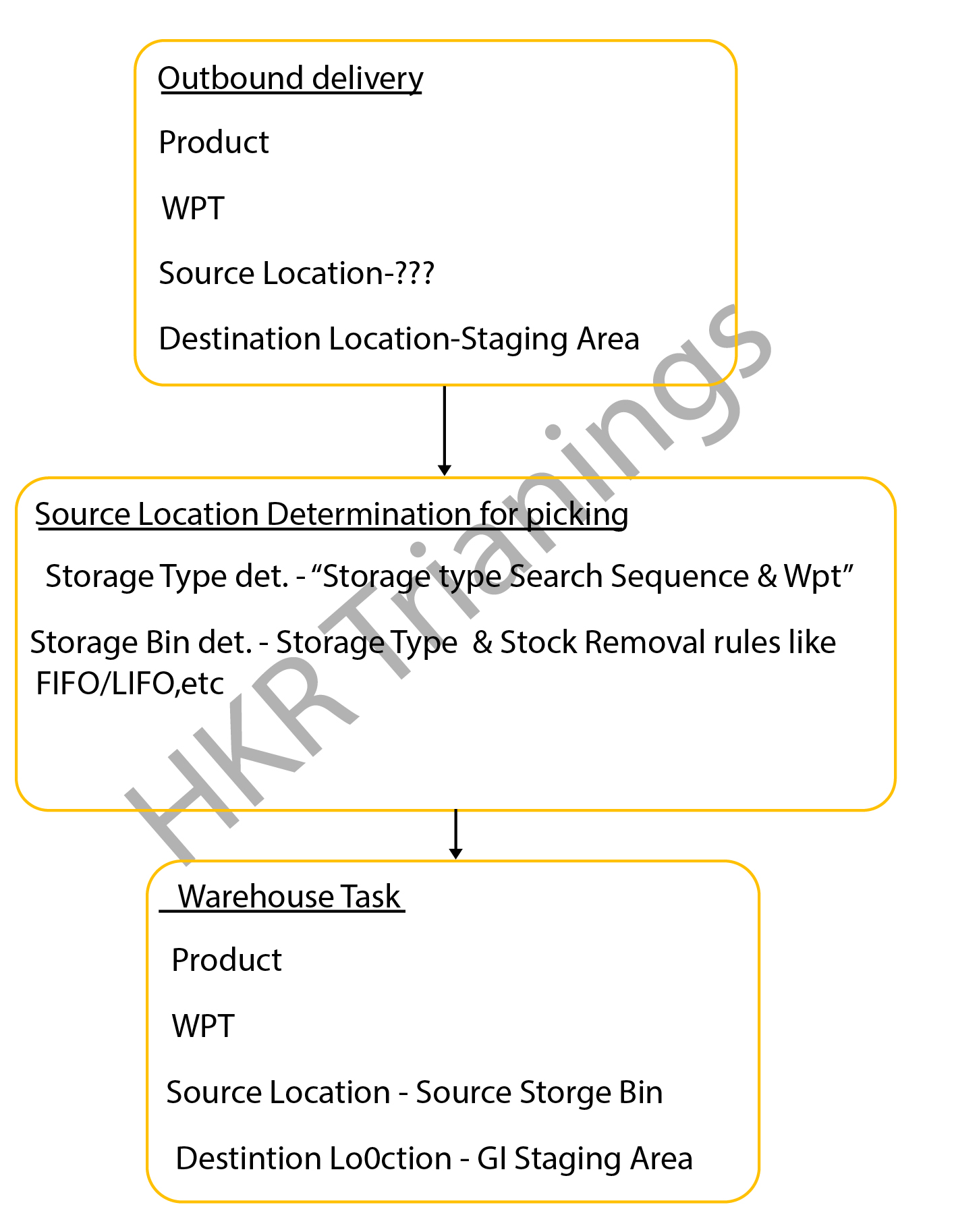
The SAP EWM outbound delivery process flow can also be known as the “Picking process”. This process type in the SAP system defines the store bin types in the warehouse. The outbound delivery process also helps to remove the stocks in the outbound goods issue process, this process is often known as the “picking process” in the SAP system.

The below diagrams explain the outbound delivery process in detail;

outbound delivery process

The types of the outbound delivery process;

  • Customer sales order: An outbound delivery process can be created with reference to the sales order to perform various tasks like picking products from a warehouse bin, packing the picked products, and resolving the goods issues which are related to the shipment.
  •  Stock transport order: this step involves moving the goods within the organization once the supply management issues it and receiving the receipt. The outbound delivery process can be created at the supplying plant, goods packed, shipment, and delivery of the products.
  • Vendor returns order: The return order is created within the ERP system if the product delivered failed to meet the customer’s expectations. 
    Production staging process: in this stage, the appropriate raw materials will be picked from the warehouse bin that is completely based on the order picking strategies and then moved to the production supply area. 

The following image explains the types of the outbound delivery processes and overall functionalities;

overall functionalities

The important documents created during the outbound delivery process;

  • Outbound delivery order: this document popularly known as the warehouse request is the source document that usually initiates the picking activity while creating a specific task.
    Warehouse task: The warehouse task consists of information like source bin, quality, search, batch, and destination bin. 
  • Warehouse orders: The warehouse orders are also the documents that are assigned to a warehouse employee to execute the product picking tasks at a specific time. The steps included in the storage bin determination in the SAP picking process:The storage bin ty             

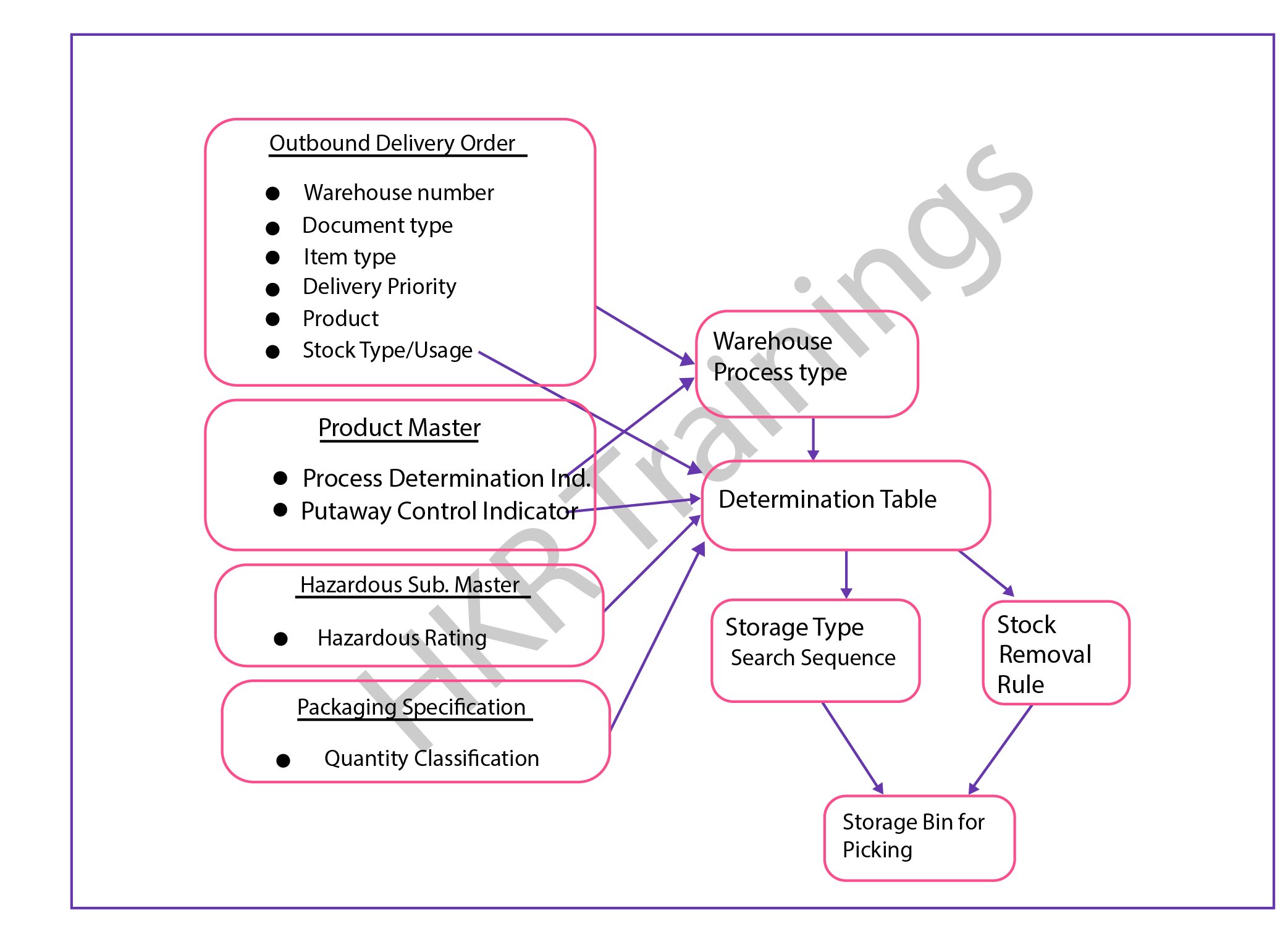
The steps included in the storage bin determination in the SAP picking process:

  • The storage bin type determination in the SAP picking process:The configuration process consists of the following parameters;Warehouse process types, stock removal control indicator (this will be maintained in the master data process), and packing specifications.
  • Stock removal determination type in the SAP picking process;This process can be performed based on the system looks available for the storage type or group of the storage types and the storage area where the stocks can be picked. 

The overall outbound determination process is shown below,

outbound determination process

                              frequently asked SAP EWM Interview Questions and Answers

SAP EWM Training

Weekday / Weekend Batches

Final note:

The latest survey report suggests that the SAP EWM is emerging as a powerful warehouse inventory management tool. The SAP EWM process flow plays a vital role in delivering efficient outcomes and also managing the storage bin. Our main aim to design this SAP EWM process flow article is to reach a global audience and shape their professional careers. This SAP EWM process flow article helps you to know both the inbound as well as process flow activities and how to perform them in the organizations to maintain the proper inventories.

Related Article:

  1. What is SAP EWM?
  2. SAP EWM Certifications


Source link