Shark Week 2026 Schedule: Full Lineup, Dates, Times & Specials


Great White SHark in water
Discovery Channel

Shark Week is back for a 38th year!

The annual celebration of all things shark kicks off on Sunday, July 26 at 8 p.m. ET on Discovery Channel.

This year’s slate includes K-Pop Shark Heroes, featuring REI AMI and Ken Jeong “on a mission to reshape the perception of sharks across East Asia and around the globe, fueled by the power of K-POP,” as well as Jurassic Sharks, which uses revolutionary CGI to resurrect the ocean’s most bizarre Jurassic sharks. Plus, there’s Alien Sharks: Untamed America, a celebration of America’s 250th birthday that explores the nation’s “most bizarre and dangerous alien sharks.”

There’s also My Strange Shark Addiction, Sharkzilla Takes New York, and Secrets of the Great White Kill, among many other specials set to air throughout the week.

Check out the full Shark Week 2026 slate inside…

SUNDAY, JULY 26

“K-Pop Shark Heroes” premieres at 8PM ET/PT on Discovery

After a recent series of shark encounters off the Korean Peninsula, actor and comedian Ken Jeong joins forces with GRAMMY®-nominated singer and lifetime shark lover REI AMI on a mission to reshape the perception of sharks across East Asia and around the globe, fueled by the power of K-POP.

“Air Jaws: Red, White and Breach” premieres at 9PM ET/PT on Discovery

Across the U.S. coastline, a new phenomenon is emerging as great white sharks are captured on film breaching in California like never before. Filmmaker Jeff Kurr, marine biologist Alison Towner, and cinematographer Andy Casagrande set out to capture this unprecedented behavior and uncover the secrets behind the Great American Breach.

“Invasion of the Mega Sharks” premieres at 10PM ET/PT on Discovery

Shark researcher Dr. Neil Hammerschlag, joined by Shark Week expert Paul de Gelder, leads a team on a high-risk mission to track down “Big Rose,” a record-breaking great white believed to be one of largest predators in the North Atlantic. Using innovative tagging technology and daring field operations, they venture to a newly discovered shark hotspot off Nova Scotia aiming to transform our understanding of these ocean giants.

Encores run at 11PM ET/PT on Discovery.

MONDAY, JULY 27

“Bull Shark Dinner Bell” premieres at 8PM ET/PT on Discovery

Shark attack survivor and advocate Paul De Gelder teams up with apex predator specialist Rosie Moore in Jupiter, Florida to investigate what triggers giant bull sharks to confront humans, testing human behavior in the ocean, extreme weather events and prey preferences to determine what factors ring the loudest dinner bell.

“House of Sharks” premieres at 9PM ET/PT on Discovery

Off the coast of New Zealand lies a hidden shark battleground, where three distinct groups of great whites organize into competing “houses” and may be competing with one another to gain control of a major seal feeding ground. Marine biologist Dr. Tristan Guttridge and underwater cinematographer Kina Scollay venture into the middle of the action on an epic expedition, using brand new builds and massive blood bombs to document this new competitive behavior. As they investigate, they uncover the possibility that these clans of great whites recognize kin and return season after season to their ancestral territories, raising the theory that these predators aren’t solitary hunters, but rival dynasties at war.

“Biggest Mako on Earth” premieres at 10PM ET/PT on Discovery

For decades, rumors have swirled about massive,15 to 20-foot mako sharks patrolling the deep waters off Southern California. Long dismissed as fishermen’s tales, new footage, along with a recently published photo capturing a mako that appears to push 15 feet, is now forcing scientists to rethink everything they know about these oceanic apex predators. Marine biologist Tristan Guttridge, alongside conservationist Kendyl Berna and shark tagger Keith Poe, leads an investigation to determine whether the world’s biggest mako is real – and hunting in the coastal waters of Santa Catalina.

Encores run at 11PM ET/PT on Discovery.

TUESDAY, JULY 28

“Jurassic Sharks” premieres at 8PM ET/PT on Discovery

In a Shark Week first, revolutionary CGI resurrects the ocean’s most bizarre Jurassic sharks, bringing them to life like never before. Guided by the rare living sharks that once shared their seas, real-world expeditions seamlessly merge with cutting-edge visual effects to uncover stories from the deep and prehistoric seas in ways never before possible.

“Jaws vs Orca” premieres at 9PM ET/PT on Discovery

For millennia, the great white shark has reigned as the ocean’s ultimate apex predator. But now, a new challenger is emerging: the killer whale. Around the world, sharks are washing ashore with their livers removed with chilling precision while in the Strait of Gibraltar, orcas are targeting sailboats – ramming hulls, crippling rudders, and sinking vessels. To investigate this alarming shift in behavior, Dr. Tristan Guttridge places himself directly in the path of an orca encounter, using their attacks on boats to reveal how these predators hunt and ultimately, how they may be taking down great white sharks.

“Chum Island: Catching a Killer” premieres at 10PM ET/PT on Discovery

In this Shark Week whodunnit, a rare surge of highly aggressive shark attacks hit a tight-knit community off Australia’s southern coast, prompting marine biologist Dr. Riley Elliott to find and tag the oceanic suspects. But when he discovers this could be a new, elusive population of sharks, he builds the world’s first “chum island” to lure them in and uncover if they are the ones responsible for the attacks.

Encores run at 11PM ET/PT on Discovery.

WEDNESDAY, JULY 29

“Expedition X: Atomic Sharks” premieres at 8PM ET/PT on Discovery

Phil Torres and Heather Amaro travel 5,000 miles west of the U.S. to the remote Marshall Islands, home to the world’s largest shark sanctuary, where apex predators are exhibiting highly aggressive behaviors and erratic swimming patterns. Between 1946 and 1958, the United States military detonated 67 nuclear bombs around the island, raising questions about their lasting impact on marine life. Now, the team dives into these dangerous waters to investigate reports of “mutant” sharks and uncover whether atomic blasts could be to blame.

“Expedition Unknown: Shark Secrets” premieres at 9PM ET/PT on Discovery

Global explorer Josh Gates travels back in time and dives into the history behind some of the world’s most infamous shark encounters, from the earliest known shark attack to the mystery surrounding the shark feeding frenzy faced by sailors following the sinking of the USS Indianapolis in remote waters. He also investigates the legendary “Stronsay Beast,” a mysterious creature that washed ashore in Scotland in 1808, long thought to be a sea monster. But could it in fact be the remains of a massive shark?

“Alien Sharks: Untamed America” premieres at 10PM ET/PT on Discovery

In celebration of America’s 250th anniversary, wildlife biologist Forrest Galante embarks on a nationwide quest to find the nation’s most bizarre and dangerous alien sharks – from glowing swell sharks to elusive sawfish – proving the ultimate shark adventure is right here at home.

Encores run at 11PM ET/PT on Discovery.

THURSDAY, JULY 30

“What Shark Attacked?” premieres at 8PM ET/PT on Discovery 

Shark attacks are extremely rare, but when they happen, the first question is always the same: what kind of shark was it? Leading shark scientists Tom “Blowfish” Hird and Rosie Moore, alongside conservationist Kinga Phillips, investigate mysterious attacks from around the world using cutting-edge forensic analysis – including bite pattern comparison, geographic profiling, video evidence, and eyewitness testimony – to identify the species responsible and uncover why these life-threatening encounters occur.

“How to Train a Great White” premieres at 9PM ET/PT on Discovery

Marine biologist Dr. Tristan Guttridge ventures into the shark-infested waters of New Zealand to answer a provocative question: can sharks be trained? Using techniques pioneered by the U.S. Navy to train dolphins in complex cognitive tasks, the team applies similar methods to great white sharks, testing whether these apex predators can learn, solve problems, and respond to cues. If successful, the experiment can potentially redefine shark intelligence and transform our understanding of one of the ocean’s most misunderstood predators.

“Ultimate Shark Dive” premieres at 10PM ET/PT on Discovery

World-class Red Bull high diver Molly Carlson leaps from a helicopter hovering above the open ocean in a bid to complete the highest freefall dive in Shark Week history, targeting a narrow plexiglass cage surrounded by circling reef sharks, or risking a direct plunge into a chum-filled feeding frenzy where seconds mean survival. From concept to execution, this fearless athlete will push herself to the limit with a record-setting stunt that no high diver has ever attempted.

Encores run at 11PM ET/PT on Discovery.

FRIDAY, JULY 31

“Secrets of the Great White Kill” premieres at 8PM ET/PT on Discovery

For centuries, great whites were believed to simply stalk their prey. Now, groundbreaking science believes that these alpha sharks are highly intelligent predators that adapt their hunting techniques in real time. For the first time on Shark Week, the full range of great white hunting tactics will be revealed, reinforcing their status as one of the ocean’s top predator.

“Sharkzilla Takes New York” premieres at 9PM ET/PT on Discovery

After a wave of mauled marine life washes ashore in New York, conservation biologist Dr. Craig O’Connell launches an investigation to find the culprit. When it leads to an old nuclear dumping ground teaming with great whites and makos, he is left with the chilling theory that the predator may be radioactive. A deeper dive reveals an unexpected hotspot for massive makos off the coast of the Hamptons, suggesting that these waters may be hiding something even bigger beneath the surface.

“My Strange Shark Addiction” premieres at 10PM ET/PT on Discovery

How far will people go to fuel their fascination with sharks? For four devoted shark “fin-atics,” their obsession shapes every aspect of their lives. From a dentist who spends every spare moment searching for life-size shark replicas that overwhelm his home to a woman who insists she has a special connection with her shark “boyfriend,” and a world-record holder covered in shark tattoos, this special explores how their daily routines, relationships, and finances revolve entirely around the apex predators they can’t live without.

Encores run at 11PM ET/PT on Discovery.

SATURDAY, AUGUST 1

“Great White Highway” premieres at 8PM ET/PT on Discovery

Great white sharks are pushing farther up the East coast than ever before and in far greater numbers leading to close encounters, forcing beach closures, and leaving locals wondering where the next attack could happen. Now, a daring team of shark scientists race to install high-tech receivers and tag as many great whites as possible before another harrowing incident rocks the country.

“Thresher Shark: Stun to Kill” premieres at 9PM ET/PT on Discovery

The physics behind the thresher shark’s devastating tail strike has long remained a mystery…until now. For the first time ever, the discovery of a shallow-water feeding ground has made observing this behavior possible. Now, shark scientist Dr. Craig O’Connell and marine biologist Aliah Banchik dive into the direct line of fire as they attempt to reveal exactly how these predators use their tails to stun and kill.

Encores run at 10PM and 11PM ET/PT on Discovery.

The post Shark Week 2026 Schedule: Full Lineup, Dates, Times & Specials appeared first on Just Jared – Celebrity News and Gossip | Entertainment.




Source link

Leave a Reply

Subscribe to Our Newsletter

Get our latest articles delivered straight to your inbox. No spam, we promise.

Recent Reviews


What is Power BI?

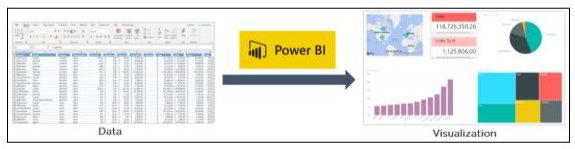
Power BI is a tool offered by Microsoft for business analytics that allows you to visualize your data and share insights. To build interactive dashboards and Business Intelligence reports, it converts data from various sources.

What is Power BI

In the above illustration, you can see there is an excel document and we have some sales info. Power BI lets you create numerous charts and graphs to visualize the data using this information. Now that you’ve learned what Power BI is, let’s comprehend why you need Power BI.

Become a Power BI Certified professional by learning this HKR Power BI Training !

Why Power BI?

The contributing factors why Power BI is so common and essential in the BI domain are as follows:

1. Access to Data Volumes from Multiple Sources

Power BI can access large volumes of multi-source data. This helps you to view, evaluate, and display massive volumes of data that cannot be accessed in Excel. Excel, CSV, XML, JSON, pdf, etc. are some of the essential data sources available for Power BI. To import and store the data inside the “.PBIX” format, Power BI uses strong compression algorithms.

2. Features of an Interactive UI/UX

Power BI renders items visually attractive. With features that allow you to copy all formatting across similar visualizations, it has a simple drag and drop feature.

3. Exceptional Integration of Excel

Power BI assists to collect, analyze, distribute, and exchange business data from Excel. Anyone acquainted with Office 365 can easily connect to Power BI Dashboards with Excel queries, data models, and reports.

4. Boost preparation for big data with Azure

The use of Power BI with Azure enables you to analyze and exchange large data volumes. An azure data lake will minimize the time it consumes for business analysts, data engineers, and data scientists to get insights and increase collaboration.

5. Transform Insights to Action 

To make data-driven business decisions, Power BI enables you to obtain insights from data and transform those insights into actions.

6. Stream Analytics in Real-Time

You will be able to perform real-time stream analytics with Power BI. For gaining access to real-time analytics, it allows you to gather data from various sensors and social media sources, so you are still able to make business decisions.

Power BI Training

  • Master Your Craft
  • Lifetime LMS & Faculty Access
  • 24/7 online expert support
  • Real-world & Project Based Learning

The Architecture of Microsoft Power BI 

To work together, Power BI is a business network that includes many technologies. It offers excellent solutions for business intelligence. There are four phases in Power BI Architecture. Let’s talk about these four measures that provide detailed information about each of them.

  • Sourcing Data
  • Transforming Information
  • Report & Publish
  • Creating a Dashboard

The Architecture of Microsoft Power BI

1. Data Sourcing

Power BI can deliver data from a wide variety of internet resources and types of files. To receive the information, the information can be imported into Power BI or a live service connection can be installed. If you import a Power BI file, the data sets that are compressed are limited to 1 GB. If the information collection reaches 1 GB, it is possible to use a direct query. There are two other options for huge data sets.

  • Power BI premium.
  • Azure analytics services.

List of Supported Power BI Data Sources

Files:

Excel, XML, JSON, Text/CSV,Folder and SharePoint Folder.

Database:

SQL Server Database, Access Database, SQL Server Analysis Services Database, SAP HANA Database, SAP Business Warehouse server, Amazon Redshift, Impala, Google BigQuery (Beta), Snowflake, Oracle Database, IBM DB2 Database, IBM Informix database (Beta), IBM Netezza (Beta), MySQL Database, PostgreSQL Database, Sybase Database, Teradata Database.

Azure:

Azure SQL Database,  Azure SQL Data Warehouse, Azure Analysis Services database (Beta), Azure Blob Storage, Azure Table Storage, Azure Cosmos DB (Beta), Azure Data Lake Store, Azure HDInsight (HDFS), Azure HDInsight Spark (Beta).

Online Services:

Power BI service, SharePoint Online List, Microsoft Exchange Online, Dynamics 365 (online), Dynamics 365 for Financials (Beta), Common Data Service (Beta), Microsoft Azure Consumption Insights (Beta), Visual Studio Team Services (Beta), Salesforce Objects, Salesforce Reports, Google Analytics, appFigures (Beta), comScore Digital Analytix (Beta), Dynamics 365 for Customer Insights (Beta), Facebook, GitHub (Beta), Kusto (Beta), MailChimp (Beta), Mixpanel (Beta), Planview Enterprise (Beta), Projectplace (Beta), QuickBooks Online. 

Other:

Vertica (Beta), Web, SharePoint List, OData Feed, Active Directory, Microsoft Exchange, Hadoop File (HDFS), Spark (Beta), R Script, ODBC, OLE DB, Blank Query.

Top 50 frequently asked Power BI Interview Questions !

2. Transforming information:

Power BI provides a preview window for selecting columns or entities after the information is imported into the Powerbi system. If you need to edit the query, there are many transformation choices available to perform the work.

3. Report and Publish:

After sourcing and editing the data, we are ready to produce reports. Reports are the data visualizations in the form of graphs, charts, and pie charts with filters and slicers. There is also a great deal of custom visualization accessible. After generating reports, we will publish them to power bi facilities. You may also publish them on the energy bi-server assumption.

4. Dashboard Creation:

After publishing reports for Power BI services, we can build dashboards by pinning the individual elements or by pinning the page of the live report. When the report is saved when pinning the individual components, the visual retains the filter setting chosen. Pinning the Live Report page helps the dashboard user to interact with the visual by selecting slicers and filters.

Power BI Components

Power BI Components

In Power BI, three main components play a significant role in providing Power BI capabilities.

1. Power BI Desktop:

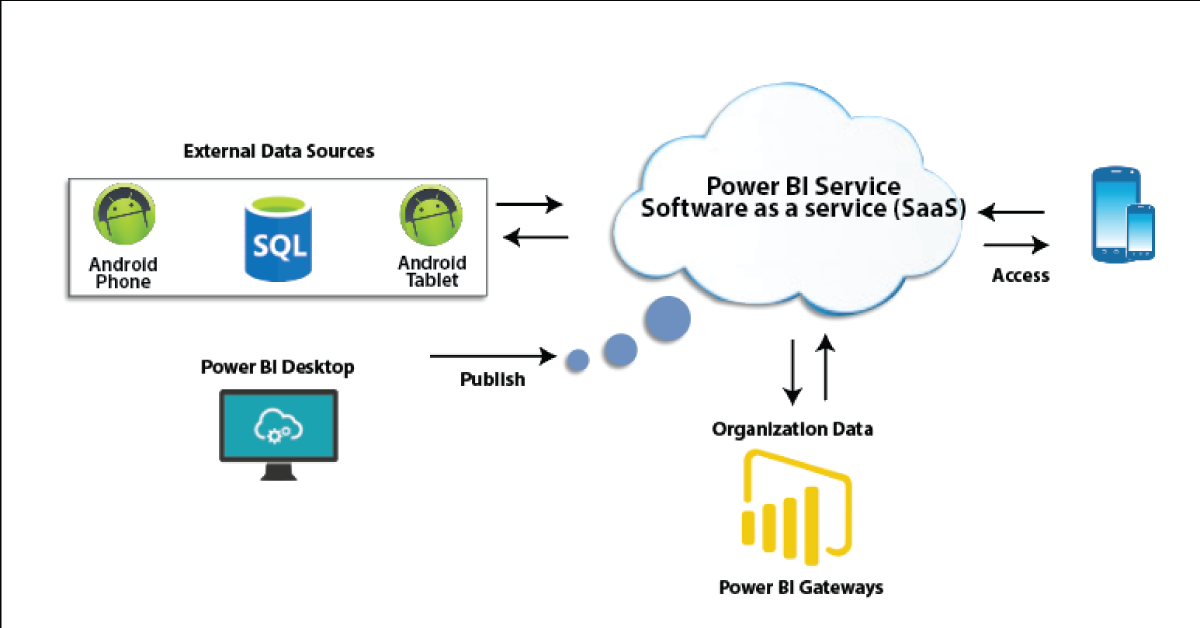
Power BI Desktop is a free application that provides your local desktop to connect, convert and visualize your data. With Power BI Desktop, you can connect to numerous different information sources and merge them (often called modeling) into a data model that allows you to build graphics and image collections that you can share as records with other people within your enterprise. Power BI Desktop is used for most users working on Business Intelligence projects to produce reports and then to exchange their reports with others using Power BI.

2. Power BI Gateway:

By connecting to your on-site data sources without moving the info, the on-site Power BI gateway can be used to keep your data fresh. It helps you to query and take benefit of current investments from large datasets. With on-site gateways, you can keep your data fresh by connecting to your on-site data sources without the need to move the data. Request huge datasets and benefit from existing investments. The gateways provide the versatility you need to meet the individual requirements and needs of your organization.

3. Power BI Mobile Apps:

You can use Power BI mobile apps to stay connected to your details from anywhere. Power BI apps are available for the Windows, iOS, and Android platforms.

4. Power BI Service:

This is a cloud service for producing accounts of Power BI and data visualization. It enables designers and BI experts to produce and distribute highly formatted, pixel-perfect reports alongside their interactive Power BI content, becoming the first cloud BI solution that blends self-service BI energy with the specifications and capabilities of conventional Enterprise BI scenarios.

Power BI Service

There are also other modules that we should comprehend in order to benefit from Power BI’s advanced capabilities.

Power BI's advanced capabilities

5. Power Query:

Data mashup and conversion instrument. With Power Query in Power BI, you can connect to several different information sources, transform the data into a format you want, and be able to quickly generate reports and ideas. When using Power BI Desktop, Power Query functionality is provided in the Power Query Editor. Power Query is made accessible through the Power Query Editor on the Power BI Desktop. To open the Power Query Editor, from the Power BI Desktop Home tab, choose Edit Queries.

Power Query

6. Power Q & A:

Question and Reply Engine for Natural Language. The easiest way to get an answer from your data is often to ask a question using natural language. To explore your results, the Power BI Q & A feature allows you to use your phrases. In various papers on Power BI mobile applications and Q & A with Power BI Embedded, Q & A is discussed.

Power Q & A

7. Power Map: 

To demonstrate how the values differ in proportion across the region, the Power BI Query is used. It also displays variations in shading from dark to light. It provides a geospatial 3D tool for the visualization of data.

Power Map

8. Power Pivot:

Power Pivot is a memory modeling component that allows highly compressed data storage and extremely fast aggregation and calculation of information. As part of Excel, it is also available and can be used for creating a data model inside an Excel workbook. Power Pivot can load data on its own, or data can be loaded into it by Power Query. It is extremely similar to the SSAS (SQL Server Analysis Services) tabular model, which is like a server-based Power Pivot version. 

To gain in-depth knowledge with practical experience in Power BI, Then explore hkr’s Power BI Training In Hyderabad !

9. Power View:

Power View is an interactive visualization platform that provides users with a drag-and-drop interface to rapidly and effortlessly construct visualizations of data in their Excel workbooks (using the Power Pivot data model).

Power View

10. SSRS Reporting services 2016:

SSRS tiles are taken to a Power BI dashboard with expected SQL Server Agent updates through the integration of SQL Serb Reporting and the Power BI Services. The tile from SSRS reports gives you this integration. Integrating SSRS reports into the Power BI service will build a connection from the Power BI dashboard to detailed SSRS reports.

SSRS Reporting services 2016

HKR Trainings Logo

Subscribe to our YouTube channel to get new updates..!

The Architecture of Power BI Clusters 

Azure, Microsoft’s cloud computing platform, is the basis of the Power BI service. Power BI is currently installed in several data centers around the world, with many active deployments made available to clients in the regions served by these data centers, with an equivalent number of passive deployments serving as backups for each active deployment.

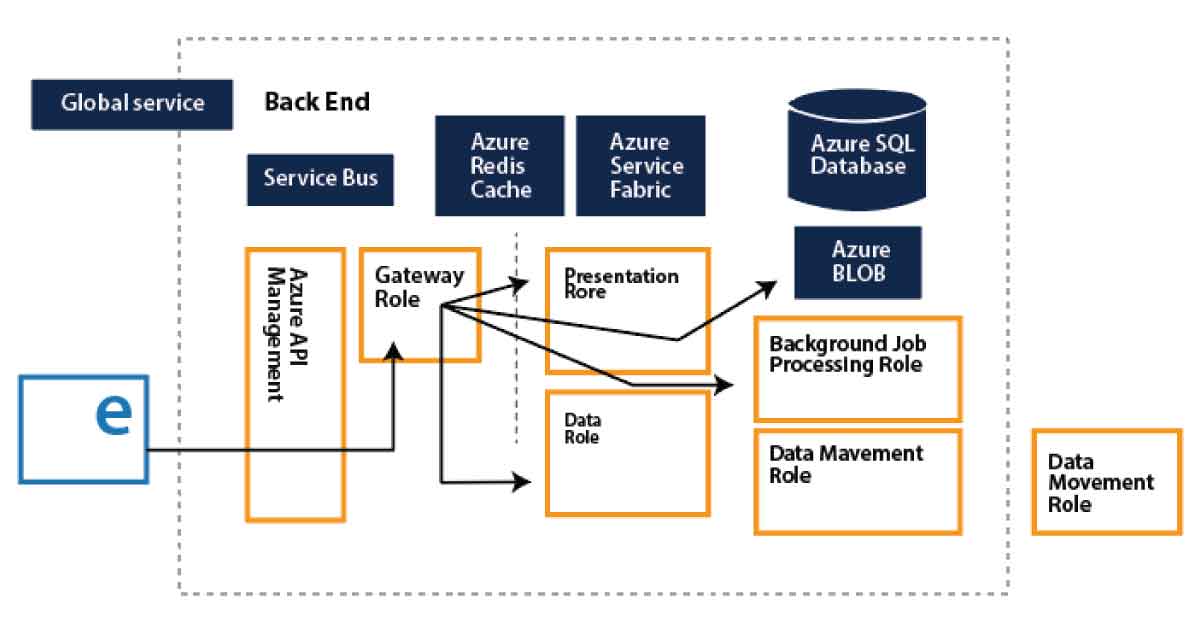
Every Power BI deployment consists of two clusters, the Web Front End (WFE) cluster, and the Back End cluster. These two clusters are seen in the following picture:

1. WFE Cluster:

To authenticate customers and provide tokens for subsequent Power BI customer connections, the WFE cluster manages the original Power BI link and authentication mechanism using AAD. The Azure Traffic Manager (ATM) is also used by Power BI to direct customer traffic to the nearest datacenter, which is determined by the DNS record of the client attempting to connect, authenticate and download static content and files. Power BI effectively distributes the appropriate static content and files to customers based on geographical location, using the Azure Content Delivery Network (CDN).

WFE Cluster

2. Backend Cluster:

The Back-End cluster is how authenticated clients interact with the Power BI service. Visualization, user dashboards, datasets, reports, data storage, information links, information refresh, and other Power BI service interaction elements are managed by the Back-End cluster. The Role Gateway works as a gateway between the demands of clients and the Power BI service. Users do not directly communicate with positions other than the gateway’s role. Azure API Management will eventually manage the gateway role.

Backend Cluster

Want to know more about Power BI,visit here Power BI Tutorial !

How would Power BI be an industry game-changer?

Through its data catalog and data management gateway, Power BI integrates centralized DW / BI techniques with cloud data sources and self-service tools, as no other application has yet been able to do. And all of its functionality is bundled as a SaaS solution so that any firm can successfully incorporate and use it. In short, the adoption curve can be accelerated by Power BI and making sophisticated BI Analytics as popular as Excel itself.

Power BI offers game-changing capabilities for all BI platform stakeholders:

1. End-users:

For a long time, end users expected the ability to readily access and analyze information. To allow each worker to use data as a basis for decision making, the natural language query of Q&A and the smart visualization engine can do more.

2. BI Analysts:

Over vast volumes of data, Power Pivot gave power users the opportunity to construct successful data models, but the information required to “fit” into clean data models.  Power Query’s data transformation and versatility further empower analysts to build their own end-to-end alternatives quickly.

3. IT & Data Managers:

The topic of push-pull has always been BI self-service. Everyone needs the tools and knowledge that customers need to make great choices. However, Good governance, protection, and auditing are also seen as an obstacle to change for power users. The catalog of Power BI data is interesting because it promotes self-service and governance simultaneously.

Not every business will move quickly to implement Power BI. Too much strategic change would be expressed too quickly for others. For some, there might be genuine regulatory or other factors that preclude consideration of cloud-based systems.

But it has been difficult and cost-prohibitive for many organizations to set up an open and comprehensive BI network. Power BI is really the solution that eventually renders sophisticated BI as easy to use as a search engine and generally accepted.

Power BI Training

Weekday / Weekend Batches

Conclusion

We had provided detailed information about the Power BI Architecture, its operations, and components in this blog. And we’ve also explained the Power BI service and its operation. After exploring this blog, you might have comprehended the need for Power BI in Business Intelligence, what Power BI is, and the various Power BI features. You’ve also learned about the Power BI service, the Power BI dashboard, and how the architecture looks.

Related Article:


Source link