Shark Week 2026 Schedule: Full Lineup, Dates, Times & Specials


Great White SHark in water
Discovery Channel

Shark Week is back for a 38th year!

The annual celebration of all things shark kicks off on Sunday, July 26 at 8 p.m. ET on Discovery Channel.

This year’s slate includes K-Pop Shark Heroes, featuring REI AMI and Ken Jeong “on a mission to reshape the perception of sharks across East Asia and around the globe, fueled by the power of K-POP,” as well as Jurassic Sharks, which uses revolutionary CGI to resurrect the ocean’s most bizarre Jurassic sharks. Plus, there’s Alien Sharks: Untamed America, a celebration of America’s 250th birthday that explores the nation’s “most bizarre and dangerous alien sharks.”

There’s also My Strange Shark Addiction, Sharkzilla Takes New York, and Secrets of the Great White Kill, among many other specials set to air throughout the week.

Check out the full Shark Week 2026 slate inside…

SUNDAY, JULY 26

“K-Pop Shark Heroes” premieres at 8PM ET/PT on Discovery

After a recent series of shark encounters off the Korean Peninsula, actor and comedian Ken Jeong joins forces with GRAMMY®-nominated singer and lifetime shark lover REI AMI on a mission to reshape the perception of sharks across East Asia and around the globe, fueled by the power of K-POP.

“Air Jaws: Red, White and Breach” premieres at 9PM ET/PT on Discovery

Across the U.S. coastline, a new phenomenon is emerging as great white sharks are captured on film breaching in California like never before. Filmmaker Jeff Kurr, marine biologist Alison Towner, and cinematographer Andy Casagrande set out to capture this unprecedented behavior and uncover the secrets behind the Great American Breach.

“Invasion of the Mega Sharks” premieres at 10PM ET/PT on Discovery

Shark researcher Dr. Neil Hammerschlag, joined by Shark Week expert Paul de Gelder, leads a team on a high-risk mission to track down “Big Rose,” a record-breaking great white believed to be one of largest predators in the North Atlantic. Using innovative tagging technology and daring field operations, they venture to a newly discovered shark hotspot off Nova Scotia aiming to transform our understanding of these ocean giants.

Encores run at 11PM ET/PT on Discovery.

MONDAY, JULY 27

“Bull Shark Dinner Bell” premieres at 8PM ET/PT on Discovery

Shark attack survivor and advocate Paul De Gelder teams up with apex predator specialist Rosie Moore in Jupiter, Florida to investigate what triggers giant bull sharks to confront humans, testing human behavior in the ocean, extreme weather events and prey preferences to determine what factors ring the loudest dinner bell.

“House of Sharks” premieres at 9PM ET/PT on Discovery

Off the coast of New Zealand lies a hidden shark battleground, where three distinct groups of great whites organize into competing “houses” and may be competing with one another to gain control of a major seal feeding ground. Marine biologist Dr. Tristan Guttridge and underwater cinematographer Kina Scollay venture into the middle of the action on an epic expedition, using brand new builds and massive blood bombs to document this new competitive behavior. As they investigate, they uncover the possibility that these clans of great whites recognize kin and return season after season to their ancestral territories, raising the theory that these predators aren’t solitary hunters, but rival dynasties at war.

“Biggest Mako on Earth” premieres at 10PM ET/PT on Discovery

For decades, rumors have swirled about massive,15 to 20-foot mako sharks patrolling the deep waters off Southern California. Long dismissed as fishermen’s tales, new footage, along with a recently published photo capturing a mako that appears to push 15 feet, is now forcing scientists to rethink everything they know about these oceanic apex predators. Marine biologist Tristan Guttridge, alongside conservationist Kendyl Berna and shark tagger Keith Poe, leads an investigation to determine whether the world’s biggest mako is real – and hunting in the coastal waters of Santa Catalina.

Encores run at 11PM ET/PT on Discovery.

TUESDAY, JULY 28

“Jurassic Sharks” premieres at 8PM ET/PT on Discovery

In a Shark Week first, revolutionary CGI resurrects the ocean’s most bizarre Jurassic sharks, bringing them to life like never before. Guided by the rare living sharks that once shared their seas, real-world expeditions seamlessly merge with cutting-edge visual effects to uncover stories from the deep and prehistoric seas in ways never before possible.

“Jaws vs Orca” premieres at 9PM ET/PT on Discovery

For millennia, the great white shark has reigned as the ocean’s ultimate apex predator. But now, a new challenger is emerging: the killer whale. Around the world, sharks are washing ashore with their livers removed with chilling precision while in the Strait of Gibraltar, orcas are targeting sailboats – ramming hulls, crippling rudders, and sinking vessels. To investigate this alarming shift in behavior, Dr. Tristan Guttridge places himself directly in the path of an orca encounter, using their attacks on boats to reveal how these predators hunt and ultimately, how they may be taking down great white sharks.

“Chum Island: Catching a Killer” premieres at 10PM ET/PT on Discovery

In this Shark Week whodunnit, a rare surge of highly aggressive shark attacks hit a tight-knit community off Australia’s southern coast, prompting marine biologist Dr. Riley Elliott to find and tag the oceanic suspects. But when he discovers this could be a new, elusive population of sharks, he builds the world’s first “chum island” to lure them in and uncover if they are the ones responsible for the attacks.

Encores run at 11PM ET/PT on Discovery.

WEDNESDAY, JULY 29

“Expedition X: Atomic Sharks” premieres at 8PM ET/PT on Discovery

Phil Torres and Heather Amaro travel 5,000 miles west of the U.S. to the remote Marshall Islands, home to the world’s largest shark sanctuary, where apex predators are exhibiting highly aggressive behaviors and erratic swimming patterns. Between 1946 and 1958, the United States military detonated 67 nuclear bombs around the island, raising questions about their lasting impact on marine life. Now, the team dives into these dangerous waters to investigate reports of “mutant” sharks and uncover whether atomic blasts could be to blame.

“Expedition Unknown: Shark Secrets” premieres at 9PM ET/PT on Discovery

Global explorer Josh Gates travels back in time and dives into the history behind some of the world’s most infamous shark encounters, from the earliest known shark attack to the mystery surrounding the shark feeding frenzy faced by sailors following the sinking of the USS Indianapolis in remote waters. He also investigates the legendary “Stronsay Beast,” a mysterious creature that washed ashore in Scotland in 1808, long thought to be a sea monster. But could it in fact be the remains of a massive shark?

“Alien Sharks: Untamed America” premieres at 10PM ET/PT on Discovery

In celebration of America’s 250th anniversary, wildlife biologist Forrest Galante embarks on a nationwide quest to find the nation’s most bizarre and dangerous alien sharks – from glowing swell sharks to elusive sawfish – proving the ultimate shark adventure is right here at home.

Encores run at 11PM ET/PT on Discovery.

THURSDAY, JULY 30

“What Shark Attacked?” premieres at 8PM ET/PT on Discovery 

Shark attacks are extremely rare, but when they happen, the first question is always the same: what kind of shark was it? Leading shark scientists Tom “Blowfish” Hird and Rosie Moore, alongside conservationist Kinga Phillips, investigate mysterious attacks from around the world using cutting-edge forensic analysis – including bite pattern comparison, geographic profiling, video evidence, and eyewitness testimony – to identify the species responsible and uncover why these life-threatening encounters occur.

“How to Train a Great White” premieres at 9PM ET/PT on Discovery

Marine biologist Dr. Tristan Guttridge ventures into the shark-infested waters of New Zealand to answer a provocative question: can sharks be trained? Using techniques pioneered by the U.S. Navy to train dolphins in complex cognitive tasks, the team applies similar methods to great white sharks, testing whether these apex predators can learn, solve problems, and respond to cues. If successful, the experiment can potentially redefine shark intelligence and transform our understanding of one of the ocean’s most misunderstood predators.

“Ultimate Shark Dive” premieres at 10PM ET/PT on Discovery

World-class Red Bull high diver Molly Carlson leaps from a helicopter hovering above the open ocean in a bid to complete the highest freefall dive in Shark Week history, targeting a narrow plexiglass cage surrounded by circling reef sharks, or risking a direct plunge into a chum-filled feeding frenzy where seconds mean survival. From concept to execution, this fearless athlete will push herself to the limit with a record-setting stunt that no high diver has ever attempted.

Encores run at 11PM ET/PT on Discovery.

FRIDAY, JULY 31

“Secrets of the Great White Kill” premieres at 8PM ET/PT on Discovery

For centuries, great whites were believed to simply stalk their prey. Now, groundbreaking science believes that these alpha sharks are highly intelligent predators that adapt their hunting techniques in real time. For the first time on Shark Week, the full range of great white hunting tactics will be revealed, reinforcing their status as one of the ocean’s top predator.

“Sharkzilla Takes New York” premieres at 9PM ET/PT on Discovery

After a wave of mauled marine life washes ashore in New York, conservation biologist Dr. Craig O’Connell launches an investigation to find the culprit. When it leads to an old nuclear dumping ground teaming with great whites and makos, he is left with the chilling theory that the predator may be radioactive. A deeper dive reveals an unexpected hotspot for massive makos off the coast of the Hamptons, suggesting that these waters may be hiding something even bigger beneath the surface.

“My Strange Shark Addiction” premieres at 10PM ET/PT on Discovery

How far will people go to fuel their fascination with sharks? For four devoted shark “fin-atics,” their obsession shapes every aspect of their lives. From a dentist who spends every spare moment searching for life-size shark replicas that overwhelm his home to a woman who insists she has a special connection with her shark “boyfriend,” and a world-record holder covered in shark tattoos, this special explores how their daily routines, relationships, and finances revolve entirely around the apex predators they can’t live without.

Encores run at 11PM ET/PT on Discovery.

SATURDAY, AUGUST 1

“Great White Highway” premieres at 8PM ET/PT on Discovery

Great white sharks are pushing farther up the East coast than ever before and in far greater numbers leading to close encounters, forcing beach closures, and leaving locals wondering where the next attack could happen. Now, a daring team of shark scientists race to install high-tech receivers and tag as many great whites as possible before another harrowing incident rocks the country.

“Thresher Shark: Stun to Kill” premieres at 9PM ET/PT on Discovery

The physics behind the thresher shark’s devastating tail strike has long remained a mystery…until now. For the first time ever, the discovery of a shallow-water feeding ground has made observing this behavior possible. Now, shark scientist Dr. Craig O’Connell and marine biologist Aliah Banchik dive into the direct line of fire as they attempt to reveal exactly how these predators use their tails to stun and kill.

Encores run at 10PM and 11PM ET/PT on Discovery.

The post Shark Week 2026 Schedule: Full Lineup, Dates, Times & Specials appeared first on Just Jared – Celebrity News and Gossip | Entertainment.




Source link

Leave a Reply

Subscribe to Our Newsletter

Get our latest articles delivered straight to your inbox. No spam, we promise.

Recent Reviews


PowerBI with SQL Server- Table of Content

What is Power BI?

Power BI is indeed a set of software tools, applications, and interfaces which works together to transform disparate data sources into logical, visualizations, and engaging information. The information could be in the form of an Excel spreadsheet or even a set of blended data warehouses which are both cloud-based and on-premises. Power BI makes it simple to link to various data sources, display and uncover what matters, and share your findings with whomever you choose.

  Become a Power BI Certified professional by learning this HKR Power BI Training !

Power BI’s elements:

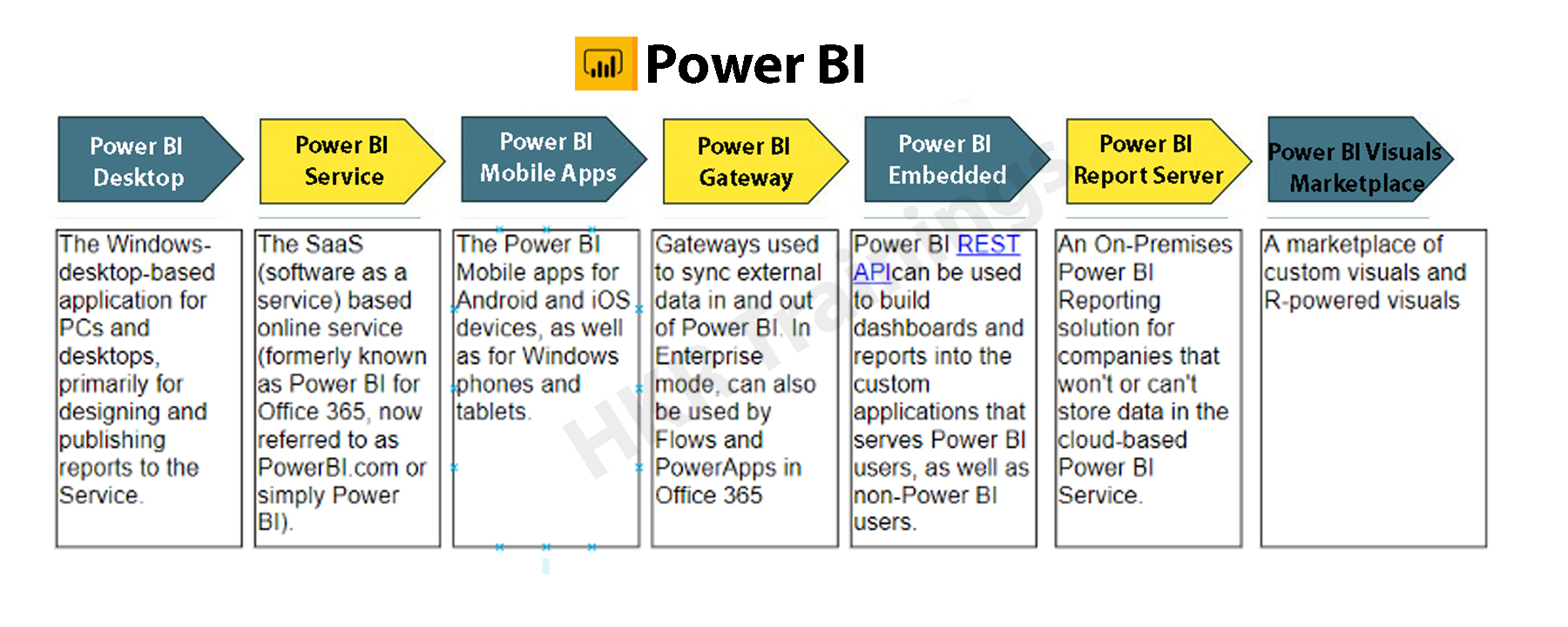
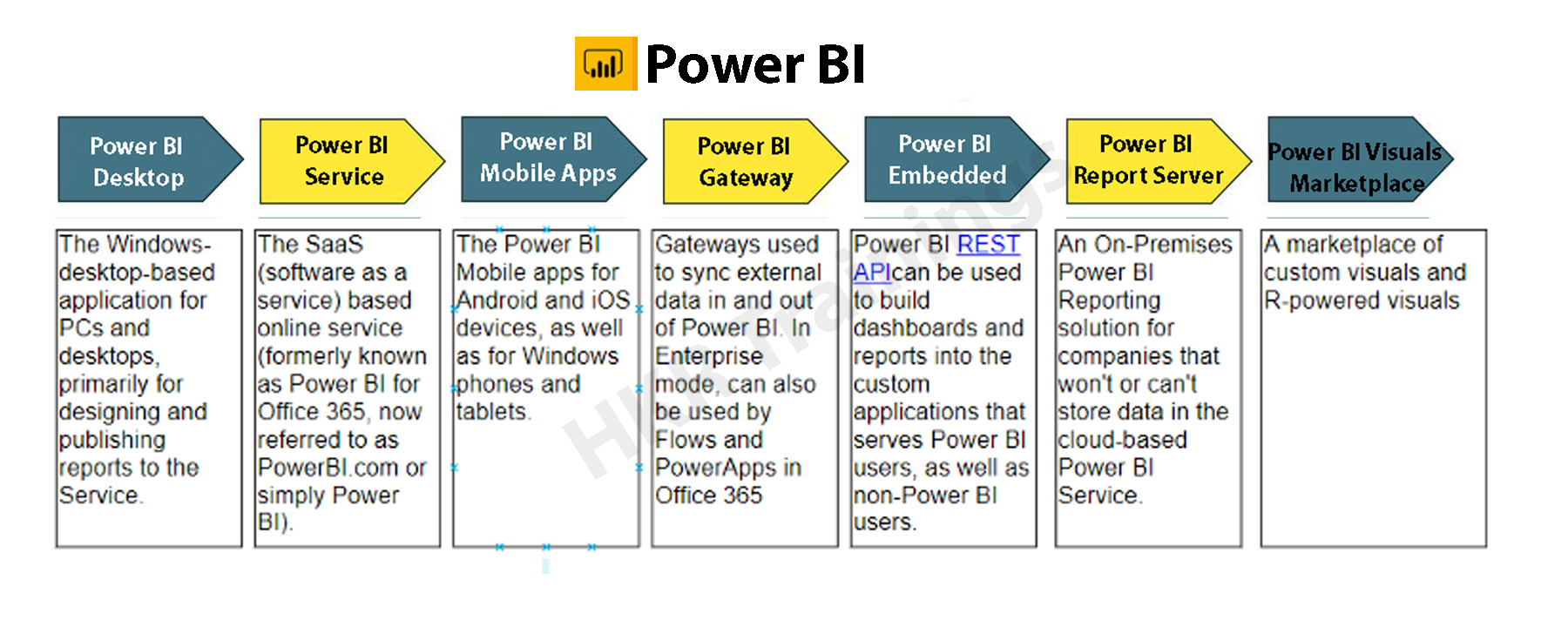
Beginning with the three fundamentals, Power BI is made up of various components working together:

  • Power BI Desktop for Windows is a desktop app.
  • The Power BI service is a cloud-based SaaS (Software as a Service) application.
  • In iOS, Windows, & Android smartphones, there are Power BI mobile apps.

Power BI Desktop, the platform, as well as the mobile applications, are all intended to help you generate, distribute, and utilize market intelligence in the most efficient way possible.Apart from them, Power BI has two more characteristics: the Power BI Report Builder, which allows you to create paginated reports that you can distribute through the Power BI service, and the Power BI Data Warehouse. On-premises data server powered by Power BI. After developing your Power BI reports in Power BI Desktop, you may upload them to Power BI Report Server, a report server.Power BI's elements

The Benefits of Power BI

Power BI has a number of features that set it apart from other analytical tools:

  • It has both a cloud-based and a desktop interface.
  • Data warehousing, analytic tools, and interactive dashboards are some of the features available.
  • Customized visualizations can be loaded.
  • It’s simple to scale throughout the entire company.

Become a Sisense Certified professional by learning this HKR Sisense Training

What is SQL Server?

SQL (Structured Query Language) is a crucial skill in the field of data science, and it’s quite simple to master. Most people, however, overlook the fact that SQL is more than just generating queries, but that’s only the first step. It’s a different matter to ensure that inquiries are efficient or even that they match the environment in which you’re working.

Microsoft’s SQL Server is a relational database management system (RDBMS). It was created largely to compete with the MySQL and Oracle databases. The standard SQL language is supported by SQL Server. T-SQL, SQL Server’s own version of a SQL language, is included (Transact-SQL).  T-SQL stands for Transact-SQL, a Microsoft proprietary language. It also has the ability to declare variables, handle exceptions, and run stored procedures, among other things. Another important interface tool for SQL Server is SQL Server Management Studio (SSMS), which works in both 32-bit and 64-bit settings.

SQL Server helps to run several services at the same time, each with its own ports, logins, databases, and so on. These are separated into two categories:

  • Primary Instance.
  • Instances with a Name

There are two methods for gaining access to the primary instance. We can start with the server name. We can also utilize its IP address. By attaching a backslash and the instance name, you can access named instances.

Is SQL important for Power BI?

Power BI Desktop’s ability to conduct T-SQL queries gives you useful resources for retrieving SQL Server data. Perhaps you’ll be able to get the most out of the SQL Server query engine, and you’ll also be able to reduce the amount of the datasets are imported into Power BI Desktop and the number of modifications you have to do.

To take this technique, you’ll need to know how to utilize T-SQL, and if you do or can find someone who does, you’ll have a lot of flexibility when dealing with SQL Server data. Even if you extract data table by table, you still have a variety of powerful tools for interacting with SQL Server data & organizing it for use in Power BI visualizations. Whereas the Power BI service allows you to retrieve data from a variety of sources, it will not have a SQL Server data connector. One could export SQL Server files and then import them into the service, but you can’t connect immediately from service to SQL Server, regardless of the fact that SQL Server seems to play a crucial role in many organizations today. The more you know about importing and transforming SQL Server data in Power BI Desktop, the better.

Prerequisites to connect Power BI To SQL Server

  • Before you begin, join up for the free trial of Power BI, in case you do not even already have one.
  • On the local computer, install the Power BI Desktop.
  • Download SQL Server within a local computer and recover a backup of the demo database.
  • In the local computer as SQL Server, install the data gateway.
  • Consult a network administrator in the organization if you aren’t a network administrator and wouldn’t want to set up a gateway yourself. They’ll be capable of creating the data source configuration needed to link your dataset to the SQL Server database. Import Data connectivity mode must be used if you’re going to employ a saved procedure.

Step by Step approach to Connect Power BI to SQL Server

1. Power BI Desktop and installation

Power BI Desktop seems to be a free tool that you can download and install on your computer. It may link to a variety of data sources. Normally, an analytical project starts with report development in Power BI Desktop. The data is subsequently uploaded to the Power BI service, where it may be associated with the Power BI Mobile applications, allowing users to access the reports on their mobile devices.

Power BI Desktop and installation

Installation

Power BI is only available on Windows computers. Users on Macs may either create a Windows VM on Azure and install Power BI there, including using Turbo.net, that could broadcast Power BI instantly towards the Mac from either the cloud.

There are two ways to use Power BI:

  • We can download this from the Microsoft Store as an application and simply login in and get going. This would be the device’s digital equivalent.
  • We often have to operate with the information in offline mode. In these kinds of cases, download the software first rather than install it locally. Take the time to read through the entire installation guide.

Download the application to the system, based on the products you’ve chosen. Check the installation via selecting the Power BI Symbol after approving the license agreement. If the screen below shows, you’re ready to begin.

Power BI Symbol

2. Workspace

Let’s have a look at how Power BI Desktop works now. We’ll have a look at it in another part to get an idea of how it works.

The graphic below depicts the key characteristics of Power BI’s workspace..

Workspace

Click here to learn Power BI Tutorial

Power BI Training

  • Master Your Craft
  • Lifetime LMS & Faculty Access
  • 24/7 online expert support
  • Real-world & Project Based Learning

3. Data Source

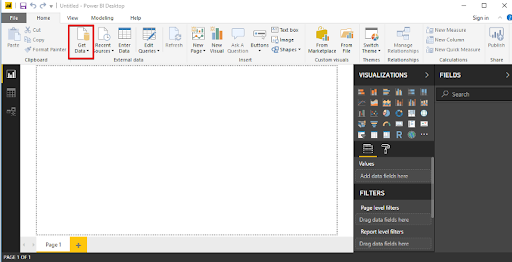
A variety of data sources could be connected to Power BI. The Get Data button toggles all of the data sources that may be used to import data into Power BI.

Data Source

4. Connecting to SQL Server

Let’s look at an example of connecting a SQL server dataset to Power BI Desktop and using that to examine the data.

Database Example

We’ll have to use a publically available SQL Server installation on AWS for the demonstration, as well as a database built from the Superstore dataset.

Our goal as Data Analysts would be to assess the data and identify significant areas of concern inside this hypothetical firm. 

Getting into the sample database

SQL Server Management Studio should be installed (SSMS). SSMS seems to be a free and fully integrated management environment for every SQL system. SSMS allows you to install, manage, and modify the data-tier components that your applications rely on, and also create inquiries and workflows.

After you’ve downloaded and installed the software, you’ll see the page below, which will prompt you for particular credentials.

Connecting to SQL Server

1. Insert the given information:

Server Name: ec2-52-14-205-70.us-east-2.compute.amazonaws.com

Authentication: SQL Server Authentication

Login: SQL

Password: SQL

The ‘SuperStoreUS’ database will indeed be accessible as a ‘Read Only’ user. As our sample, the instance is ec2–52–14–205–70.us-east

2. compute.amazonaws.com, the databases are SuperstoreUS and Test, and the tables inside the SuperstoreUS database are Customers, Orders, and so on. As a result, there could be lots of instances, each of which can have multiple databases, each of which would contain various tables.

SQL Server Authentication

5. Importing SQL data into Power BI

The data is organized into searches by Power BI Desktop. It implies that all of the information is organized in a table-like format.

Making the connection

Proceed to the start button by opening Power BI Desktop. The Get Data tab pane gives you a number of options when it comes to sources of data that could be linked to the Power BI Desktop. We’ll establish a connection to the SQL Server.

connection to the SQL Server

When you select SQL Server, a fresh screen will appear, asking again for the server with which we wish to connect our Power BI Desktop. Fill in the blanks, and you’re finished. We could now inspect the details of the selected table by clicking on it. For uploading a certain table, merely check the box beside it click the load button.

SQL Server

Modes of Data Connectivity

Power BI Desktop may link to a SQL database in two distinct ways, both of which display on the homepage.

Import

The import technique, as the title suggests, ‘imports’ the chosen tables onto Power BI Desktop. The imported data is therefore used by Power BI to create a visualisation or perform any adjustments. We must reload the data to view any modifications in the data, which re-imports the full data set.

DirectQuery

No information is incorporated or transferred to Power BI Desktop if DirectQuery is selected as an option. Power BI Desktop searches the fundamental data source while we generate or process the information through visualisations, ensuring that we’re still dealing with the most recent data. Nevertheless, unlike the importing method, this approach has restricted data processing capabilities.

Power BI Desktop

6. Query Editor

All of the chosen tables would be imported into Power BI Desktop & displayed in the Data view as distinct datasets. .

Query Editor

We can make changes to our datasets from here. We’ll use the Query Editor to accomplish this. The query generator could be used to edit datasets regardless of the data source. The query editor allows us to perform operations such as rebranding a dataset, eliminating a single or several columns, and so on.

 rebranding a dataset

The number of functional inquiries is displayed on the left pane, while the Query Settings pane on the right provides all of the stages related with a query.

Advanced  Editor

The script for the inquiry that has been run against the source of data is displayed in the Advanced Editor. The syntax is M, which stands for Power Query Formula Language. It is also possible to write your own code.

Make a backup of your work

Choose Close & Apply from the Query Editor’s File menu once you’ve made the appropriate data changes in the query editor. The adjustments will be applied to the data in Power BI Desktop.

data in Power BI Desktop

 Top 50 frequently asked Power BI Interview Questions !

Business Intelligence & Analytics, powerbi-with-sql-server-description-4, Business Intelligence & Analytics, powerbi-with-sql-server-description-14

Subscribe to our YouTube channel to get new updates..!

7. Merging Datasets

When we wish to integrate one or maybe more datasets into one, merging datasets proves useful. The Query Editor can also assist with this merger. We’ll pull multiple tables(3) from the SuperstoreUS database this time.  Customers, Orders, and Returns are the three tables.

Merging Datasets

The three specified tables are listed in the Fields column. Now, go to the Edit Queries option and click the Combine option from the dropdown menu, which will reveal the Merge option. We’ll use the merged existing queries to construct a new query.

Merge option

We pick the tables to be combined as well as the kind of join we need in the Merge dialogue box. Columns that are similar to both tables must be chosen.

Let’s start by creating a new query called Orders and Customers. Through this query, we’ll join the Orders and Customers tables. All of the key columns from the orders table, as well as correlation columns from either the customer’s table, were included in the new query. Except for the last one, which reflects the Customers query, eliminate all the correlation columns. Next, from the Customers query, choose columns to merge into the newly merged query.

Customers query

The merged query is composed of a single database that has all of the required columns. Rather than operating with several data sources, which might cause confusion, you could now easily interact with one single database.

8. Building & Publishing a Dashboard

We may begin the Dashboard construction process since we had the dataset prepared along with all the alterations completed. The Power BI dashboard often referred to as a canvas, is a single sheet that contains multiple visualizations that serve to convey a narrative. The reports’ visuals, known as tiles, are attached to the dashboard.

Now just to see what recommendations we can glean from the superstore data set.

  • States seeking profit
  • Profit & Sales by Segment

Building & Publishing a Dashboard

Region-by-Region Sales and Profit

Sub-Category Sales

Profits by location

Quantity

We’ll obtain a dashboard that looks like the one below after we’ve formatted the size, look, and colour.

dashboard

Publishing
Data would be only valuable if it can be transferred across individuals or groups. By publishing the Dashboard or reports to the Power BI Service, they can be shared with others. The Dashboards/Reports can then be seen or interacted with using the Power BI Apps.

Publishing

Power BI Training

Weekday / Weekend Batches

Conclusion:

When SQL and Power BI are combined, data analysis is carried out properly. We can integrate SQL Server to Power BI with ease and retrieve information right into it. Customers can switch connections with a single click in Power BI to execute in-memory searches to a bigger dataset. SQL is a handy tool that, when combined with Power BI’s expertise, may assist in monitoring and reporting more effectively and informative.

Related Articles:

  1. KPI in Power BI
  2. Looker vs Power BI
  3. MSBI vs Power BI


Source link