Major Bummer for Students: Apple Hikes Price of MacBook Neo


Apple raised prices across the board on Thursday, pointing the finger at RAMageddon for what Apple CEO Tim Cook called an “unavoidable” response to rising memory and storage prices as demand for these components surged with the spread of AI data centers. The price hikes hit many Apple product lines, including the iPad, Mac, Apple TV, HomePod and VisionPro. Seemingly, only the iPhone and Apple Watch were spared.

What I’m most upset about is that Apple raised the price of its budget MacBook Neo. We finally got a MacBook built for student budgets, and in the blink of an eye, it’s gone. The $499 Neo student pricing lasted about as long as a semester. 

Only three-and-a-half months after Apple drastically reduced the entry point for the MacBook, it’s turned around and raised the price by $100. Now, the MacBook Neo starts at $699 at Apple, and students can get it for $599. (At the time of this writing, it’s still available for $590 at Amazon.)

The cost of the step-up model with Touch ID and double the storage also went up by $100. It now costs $799, or $699 with Apple’s education discount. (It’s still $690 at Amazon.)

Is it really the RAM?

Apple and other computer-makers point to the surge in demand for memory and storage from AI data centers, called RAMageddon, as the reason for rising component prices, which have forced them to hike the price of the computers they sell. But with only 8GB of RAM and a modest 256GB SSD, the baseline MacBook Neo doesn’t seem to merit a $100 increase. And given that the step-up model gets you only a 512GB SSD with no accompanying increase in memory, its $100 price hike feels steep, too.

I think Apple is hiding the real reason behind the Neo’s price hike: It sold through its initial supply of Neos that used leftover iPhone processors and now must incur the added cost of manufacturing new A18 Pro chips to meet Neo demand. 

As previously reported, Apple was preparing a new production run of the MacBook Neo, increasing the number of units to 10 million from its initial run, estimated at 5 to 6 million. And the math changes for Apple if it no longer has a stash of A18 Pro chips it can borrow for this new Neo run.

I suspect RAMageddon is a convenient excuse for Apple to cover the added costs to make new Neos. Or at least, it’s not the only reason for Apple raising the price of the Neo just a few months after its debut.

Apple did not immediately respond to a request for comment on this theory.

MacBook Neo lock button

It’ll now cost you $799 to turn that lock button into a Touch ID sensor.

Matt Elliott/CNET

Bigger increases for MacBook Air and Pro

What throws cold water on my Neo theory is that Apple slapped even larger price increases on the MacBook Air and Pro lines. The price of the MacBook Air went up by $200, and the MacBook Pro increased by $300. 

The 13-inch MacBook Air now starts at $1,299, and the 15-inch Air now starts at $1,499.

The 14-inch MacBook Pro now starts at $1,999, and the 16-inch Pro now starts at $2,999. 

The MacBook Air comes with a minimum of 16GB of RAM and 512GB SSD, and the MacBook Pro comes with a minimum of 16GB of RAM and a 1TB SSD. 

“We have never seen a component price increase this much, this quickly,” Apple said in the statement. “We have now reached a point where we need to begin raising prices on a number of products, including today’s increases for iPad and Mac.”

MacBook price increases

Model Old price New price
MacBook Neo $599 $699
13-inch MacBook Air $1,099 $1,299
15-inch MacBook Air $1,299 $1,499
14-inch MacBook Pro $1,699 $1,999
16-inch MacBook Pro $2,699 $2,999

Neo vs. Air

As much as it hurts for students and their parents to pay $100 more for a MacBook Neo for school, you could try to console yourself by comparing that increase to the new pricing for the MacBook Air. With the Neo jumping from $599 to $699, and the Air jumping from $1,099 to $1,299, the gap between the two has widened. The Neo now costs $600 less than the cheapest Air.

While that reasoning might help justify being forced to pay more for a MacBook Neo, the $100 price increase still hurts anyone who’s already facing the higher costs of higher education.

Apple M5 MacBook Air laptop in front of a house plant

The MacBook Air now starts at $1,299, a $200 increase from its previous price.

Matt Elliott/CNET

Other Macs are more expensive now, too

Apple’s Mac desktops weren’t spared. Pricing increased for the iMac, Mac Mini and Mac Studio.

Apple raised the price of the iMac by $200 to $1,499. It brought back the baseline M4 Mac Mini with 16GB of RAM and 256GB of storage that it discontinued in May, but it returned with a $200 increase. The M4 Pro model also got hit with a $200 price hike. 

Those increases pale in comparison to what the Mac Studio received. The M4 Max model now starts at $2,499, up $500. And if you’re sitting down, I’ll tell you what the Mac Studio with the M3 Ultra chip now costs. It starts at $5,299, a staggering rise in price of $1,300.

Mac desktop price increases

Model Old price New price
iMac $1,299 $1,499
Mac Mini (M4) $599 $799
Mac Mini (M4 Pro) $1,399 $1,599
Mac Studio (M4 Max): $2,499, up from $1,999 (+$500) $1,999 $2,499
Mac Studio (M3 Ultra): $5,299, up from $3,999 (+$1,300) $3,999 $5,299


Source link

Leave a Reply

Subscribe to Our Newsletter

Get our latest articles delivered straight to your inbox. No spam, we promise.

Recent Reviews


Informatica Architecture:

The architecture of Informatica is service-oriented (SOA). A service-oriented architecture is a collection of services which interact with one another. It could be a basic data transfer or two or even more services coordinating the same action throughout this interaction.

Informatica growth is dependent on component-based development techniques. To achieve the desired result, this technique employs predefined components and functional departments with their associated functionalities.

Become a Informatica Certified professional by learning this HKR Informatica Online Training !

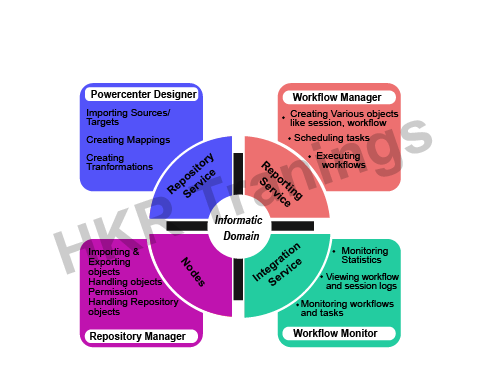
PowerCenter is built using element methodology. The process of constructing a dataflow from source to target involves the use of various components, which is known as transformation.The Informatica ETL tool includes the following services and components:

Informatica Architecture

  • Repository Service: This service is in charge of keeping Informatica metadata and providing access to that to other services.
  • Integration Service: This service facilitates the transfer of data from sources to targets.
  • Reporting Service: This service is in charge of producing reports.
  • Nodes: This is really a software device used to carry out the aforementioned services.
  • Informatica Designer: It is responsible for creating mappings between source and target.
  • Workflow Manager: It’s being used to generate workflows as well as other tasks, as well as to execute them.
  • Workflow Monitor: It’s being used to keep track of how workflows are being executed.
  • Repository Manager: This application is used to handle the objects inside the repository.

Informatica ODBC

Informatica Certification Training

  • Master Your Craft
  • Lifetime LMS & Faculty Access
  • 24/7 online expert support
  • Real-world & Project Based Learning

Informatica Domain:

Informatica Domain

  • The Informatica domain serves as the primary administrative division.
  • Informatica is made up of nodes and services. Premised on administration requirements and design architecture, these nodes and services are organised into folders or subfolders.
  • The Informatica administrator’s Console web page creates a domain that resembles a folder. We could indeed generate a node with the services inside this folder.
  • A node is a logical depiction of a machine in the Informatica domain. In Informatica, all services and processes run within the domain. A single domain can contain multiple nodes. A gateway node receives client requests and routes them to the appropriate service.
  • The domain offers two types of services, including:
  • It handles domain operations including such logging, authentication, and authorization. It manages users and groups and runs the application services on the nodes.
  • Application Services: These are server-specific services like repository services, reporting services, as well as integration services. Depending on the configuration, the application service can run on multiple nodes.

Node:A node seems to be a reasonable analysis of a machine in a domain, and a domain has various hubs. We could indeed create hubs, such as mix administration, to run application administrations.

PowerCenter Repository:A relational database, such as SQL Server, Oracle, or Sybase, serves as the PowerCenter repository. And the repository services are in charge of maintaining these databases. The metadata is stored in the database tables.


Informatica client tools are classified into three types:

  • Informatica designer
  • Workflow manager for Informatica
  • Informatica workflow supervisor

Informatica is often used to handle the repository and provides repository services. The repository services only handle one request per repository. However, we can run it on multiple nodes to improve performance.

Because of its version control mechanism, we can keep different versions of the same objects. Also, disregard multiple users who are modifying the same object at the same time.This three-state is present in the objects created in the repository, such as:

  • As per Informatica, valid objects have the correct syntax. And it is used to carry out the workflow.
  • Invalid objects do not adhere to the standard or rules. During the object’s save in Informatica, these objects checked whether the syntax and properties were valid or not.
  • Affected: The affected object’s child objects are invalid.
HKR Trainings Logo

Subscribe to our YouTube channel to get new updates..!

PowerCenter Repository Service:

The PowerCenter repository service is a separate multi-step process. It enables customers to modify the metadata in the store. It accepts metadata requests from the respectful benefit in order to run work processes.

And the repository service keeps PowerCenter customers’ connections to the PowerCenter vault up to date. It inserts the metadata into the archive and keeps it up to date. It can maintain consistency within the archive metadata.

Domain Configuration:

The domain is a necessary fundamental administrative control in the Informatica ETL tool. It is a visible entity that offers a variety of services such as repository service, integration service, and various nodes. The Informatica admin console is used to configure the domain. In addition, web browsers are used to launch the console.

Connectivity of the PowerCenter Client and Server:

Client-side machines have PowerCenter client tools installed. Workflow manager, PowerCenter designer, repository manager, and workflow monitor are examples of development tools.

All mapping as well as objects created in these client tools are stored in the Informatica repository, which is located on the Informatica server. As a result, client tools must be network-connected to the server.

In addition, the PowerCenter client connects to the sources and targets in order to import metadata and structure definitions. As a result, it maintains connectivity to the source or target systems.

  • TCP/IP protocols are used by the PowerCenter client to connect to the integration and repository services.
  • And the PowerCenter client connects to the source or target using ODBC drivers.

Top 30 frequently asked Informatica Interview Questions !

Repository Service:

The repository service runs in multiple threads. It keeps the PowerCenter clients and the PowerCenter repository connected.The repository service has access to the repository’s metadata and can retrieve, insert, and update it. It also ensures consistency within the repository metadata.

Integration Service:

In Informatica, the integration service serves as an execution engine. It aids in the execution of tasks created in Informatica. The integration service operates in the following ways:

  • A workflow is carried out by a user.
  • Informatica directs the integration service to carry out the workflow.
  • The integration service then retrieves workflow details from the repository.
  • The integration service initiates the execution of the tasks contained within the workflow.
  • Following implementation, the task condition is modified, such as Succeeded, Failed, or Aborted.
  • The session log as well as workflow log are then granted.
  • This service transfers data from the source systems to the target systems.
  • The integration service combines information from diverse sources.

Informatica Certification Training

Weekday / Weekend Batches

Conclusion:

In the above blog post we had discussed informatica, informatica architecture in depth. Had any doubts stop your queries in the comments section to get them resolved. Happy learning!

Related Articles:


Source link