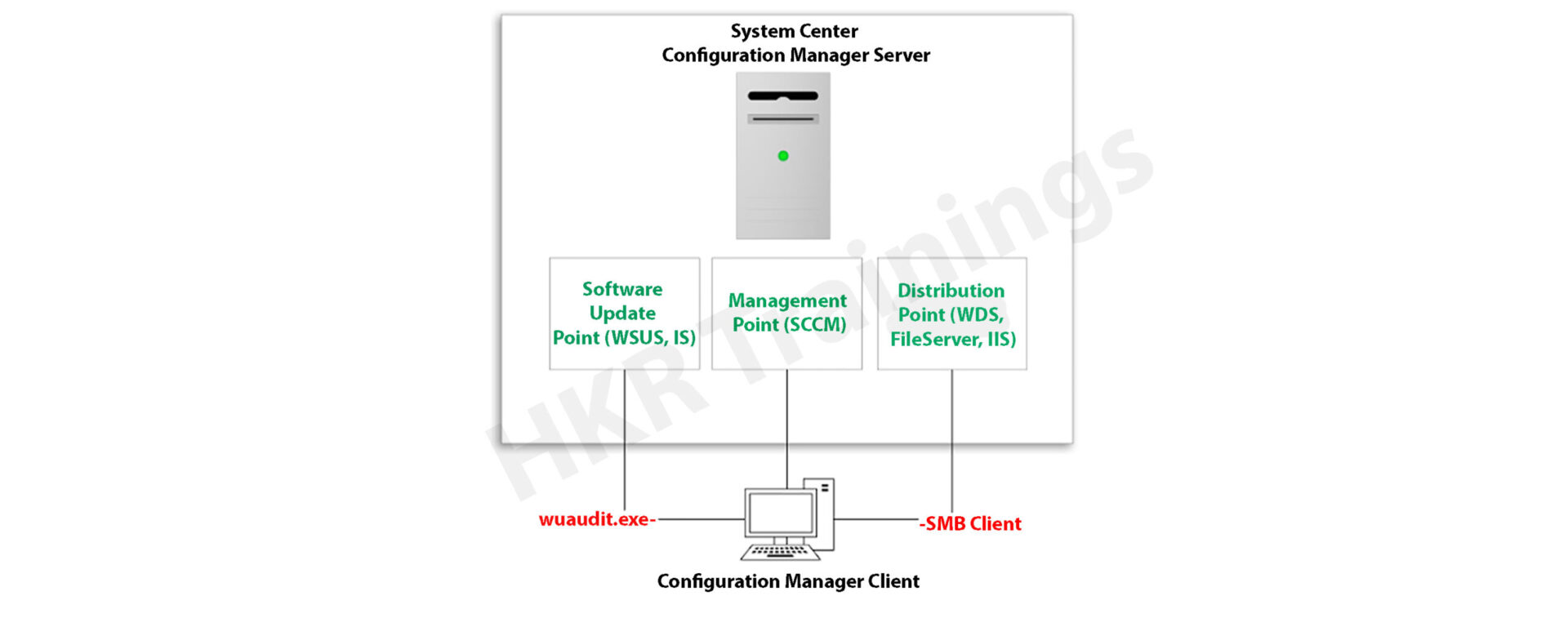
A special tool designed for the development of organizations, which helps to track the assets through a single product and a separate one to put images onto the system. It maintains a product to update and patch the system when required and another one to observe the system and inform administrators in unforeseen situations. A different product used for data backup and to provide a security management system also exists. When all of these operate by different products, Microsoft faces situations like this almost from 5 to 8 years. After all these Microsoft put all products into the single suit of products called the system centered and spent time to get all products together to work. Companies which want to purchase a new licence can actually purchase a suit licence to work with all these products under leverage benefits for their enterprises. This focuses on bringing a product as a system center which handles the system from deployment, patching, updating, support, maintenance and retirement with a single management tool.
Get ahead in your career by learning SCCM through hkrtrainings SCCM Training
SCCM Training
Master Your Craft
Lifetime LMS & Faculty Access
24/7 online expert support
Real-world & Project Based Learning
Latest version of SCCM
As users grow their deployments in public cloud, managing tools are updating to meet customer needs. System center suits continue to play an important role in managing the premises of data centers, and developing IT needs. Recently SCCM released its latest version SCCM 2019, which is available from march 2019 which enables deployment and management of windows server 2019 at large scale to meet your data center needs. It is a first class tool to monitor and manage data, support and manage capabilities in the latest version, update hybrid management and monitor the capabilities.
What new in SCCM latest version
SCCM 2019, created to deliver the value for the following areas.
Hybrid: An environment of enterprise span on premises, customers look to leverage the innovation in services of azure. By using their premises tools, to enable that we have integrated system center with management services of azure to argument on premise tools
Security: With the growing security threats in sophistication and number, security becomes top priority for customers.
Software defined data center: HCL is a significant trend in premises data centers today. Customers looking for lower cost by using their servers with the local disk to run compute and storage also needed at the same time.
Monitoring and Modernizing operations: Users have come to rely on SCOM for its management packs to monitor and third-party workloads.
Faster backups with data protection Manager 2019: BPM 2019 will provide backup optimized in time.
Orchestrator 2019 and service manager 2019.
Changes to release cadence.
Call to action.
If you want to Explore more about sccm? then read our article SCCM Tutorial!
Subscribe to our YouTube channel to get new updates..!
Working of SCCM
We will explain every point with step by step explanation on how the procedure of System center configuration manager works. First we need to download the application to create packages in System Center Configuration
Manager, along with the command line and executed files.
Admin of the configured manager creates the physical applications package to select the distribution point.
When the user needs to download any application, they can directly download the application from distribution points, instead of connecting the primary survey of SCCM.
For machines for communicating with SCCM servers, users may download the app SCCM agent.
This step includes an SCCM agent which keeps checking new policies and deployments. By using the updated SCCM admin, we may create deployment where the application targeted on a number of m.
When the policy reaches the end machine, the agent provides the policy and reaches out to particular regional points.
After the executed files are downloaded in the folder, we can install packages in the system. Then the status of the file is sent back to the SCCM server in the database.
Pros
It updates the latest updates and patches from windows, which is the valuable feature we may really utilize. Its solutions capture all devices of our infrastructure.
We can save a lot of money by installing things automatically. They install in the same exact way on every computer. Provide integration between products.
It is very competitive nowadays and they really invest a lot of money for updating new features, to stand in the competition in the market. The setup is straightforward and not complicated.
Patching is one of the important features. SCCM controls the total environment instead ofmanual interpretation, which makes us feel like it is good to use patching.
Scalability is the most valuable feature, it is the best decision for deployment that performs well.
Cons
It is a very complex application. Installation process is time consuming and critical so that we know what we are doing in order to set it correctly for the first time.
When we want to troubleshoot logs, then we have plenty to choose from. The trick is knowing which file to look at, where there is a problem and which problem would be logged in the file.
It is very scalable and may be used with hundreds of thousands of workstations, the price we pay for scalability is the fact that rolling out changes to computers are very slow.
When we have issues, we have to know what we are doing, because it is one of the applications which with its sheer size and complexity makes troubleshooting very difficult.
Software center configuration management helps to solve the business problems, we come to know the system management in an enterprise, and how to solve the problems with special features that it has. Itsuits its products and features provided by it, it includes some major features even updating with new features as latest versions releasing. SCCM 2016 used for system administrators which helps to handle client operating systems on a large scale with ease. It provides the complete process into more convenient ways of managing things. It enables features like operating system deployment, remote control, patch management, inventory management.
Microsoft System Center Configuration Manager (SCCM), a modern product from Microsoft, is designed to streamline the management and updating of software products. SCCM stands out for its highly adaptable, automated approach to deploying and configuring various devices, including desktops and laptops, starting from any initial state, such as bare-metal deployments. This tool empowers IT admins by offering an end-to-end solution for Windows installation and configuration. It simplifies the delivery of apps, patches, and security updates through a unified distribution system.
A standout feature of SCCM is its capacity to manage many computers running various OS like Windows, Linux, UNIX, and iOS, demonstrating its versatility in diverse IT environments.
The installation process for SCCM 2012 R2 is outlined in a series of steps crafted to simplify the user experience. The process begins with setting up the primary server and accompanying SQL server, typically housed on the same device.
Step1: Prepare active directory for configuration manager
a) Create the system management container:
Please navigate to the domain controller, load the ADSI file, and edit it. In the system OU, create a new object named ‘System Management.’
Complete the wizard, closing the ADSI editor. Grant control of the system to the configuration system server for the new system configurator object.
Choose the container and click next.
Enter the name of system management and click next
b)Complete the wizard browser and close the ADSI editor.
Now pass the system control to the configuration system server to the newly created system configurator object, this can be done by using the navigation, choose the folder -> existing object -> create the new objects.
Check all the boxes (use the right tick) and complete the browser wizard.
Step2: Extend the system configuration Schema:
Navigate to \SMSSetup\bin\x64, accessing the folder controlling the system schema rules. Ensure the account used is a member of the AD admins’ group. Run Extadsch.exe as an admin and verify the successful extension in the Extadsch.log file.
Log into Extadsch.log file-> it will take you to the root, C: Drive. Check for the entry then you will notify with a message as “successfully extended to the active schema director”.
<02-02-2013 23:21:22=””> successfully extended the schema directory.
To check the activity of extadsch.exe -> go to the directory file “ConfigMgr_ad_schema.idf” that is located in the same folder in the system.
Step 3: Install the Site server prerequisites:
Essential SCCM site server management components include BITS, Remote Differential Compression, .NET Framework 3.5, and IIS components.
a. BITS
b. Access the remote differential compression
c. .NET framework 3.5
d. IIS components.
Step 4: Install the window assessments and Deploy kits (Windows ADK):
Download ADK 8.1 and follow the installation steps, including running the adksetup.exe file, accepting licenses, and choosing components like User State Migration Tools and Windows Deployment Tools.
a. Run the executable file adksetup.exe file -> accept the license agreements -> it will download and install the.Net framework 4.5.
Now restart the system when you accessed,
If you have any doubts on SCCM, then get them clarified from SCCM Industry experts on our SCCM Tutorial !
SCCM Training
Master Your Craft
Lifetime LMS & Faculty Access
24/7 online expert support
Real-world & Project Based Learning
After that system setup will resume-> accept the default location-> click next.
Select to join the CEIP -> click next
Now accept the license agreements
Install the component and click the “install” button
User state migration tools
Windows deployment tools
Windows pre installment environment (windows PE).
Once they complete the installation and click close.
Subscribe to our YouTube channel to get new updates..!
Step 5: Install the SQL server:
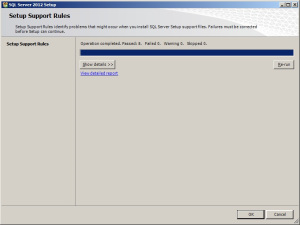
For the SCCM database, install SQL Server 2012 by running the setup.exe file and following the installation wizard.
Run the executable file -> setup.exe
Install stand-alone SQL database server
Click OK-> it will open the new browser;
Install the product key -> run in evaluation mode -> click next
Accept the SQL license agreement -> click next -> add any product updates-> click next -> now it’s time to choose the installation features -> click next
Set SQL to run with adding an appropriate domain name, network service, and local system account.
Step6: Install the SCCM R12:
Execute the splash.hta file and follow the guided installation process. It includes selecting the primary site installation, entering the license key, and configuring SQL database server settings.
1. Run the splash.hta -> click install
Now click next
Choose to install the primary site-> click next
Enter the license key->click next
Now accept the license key -> click next
SCCM Training
Weekday / Weekend Batches
Accept the pre-required license agreement->click next
Create any file solder to store the installation updates and Store the SCCM executable file in any folder-> click next
Updates will download -> installation begins-> select any language for the SCCM server-> click next.
Choose any client language-> click next-> enter the 3 digit site code and add the description.
Choose to run SCCM installation as a stand-alone -> click next
Click yes to accept -> select the default database server configuration-> click next.
Now specify the path to store the SQL database server and log files-> click next to set the current server -> set the configure the communication on each site system role”-> next install both MP and DP -> site server -> SCCM will begin the installation-> close the browser when it completes.
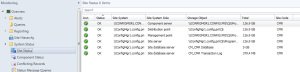
Launch the SCCM console -> make sure that all the database entries you have done are right -> start monitoring the workspace -> site status.
This finishes the installation process of SCCM.
Functionalities of SCCM:
The updated version of SCCM software adds much functionality to the applications. Let me explain them one by one;
Site infrastructure:
Supports Microsoft Office 365 file updates and features keyboard shortcuts for easy navigation within the configuration manager.Under the site infrastructure we can see the following features;
Site infrastructure’s client peer cache will support the updating of files for Microsoft office 365 and distributed express installed files for configuration of Microsoft Windows 10.
With the addition to this, there are few functionalities available such as,
Ctrl + D -> this keyword indicates the detailed panel
Ctrl +I -> this keyword indicates the breadcrumb bar
Ctrl + L -> this keyword indicates the search field
Ctrl + M -> this keyword indicates the main central panel
Ctrl + T -> this indicates the top node in the navigation panel.
This central administration site and primary configuration sites both include the configuration manager updates. Rest tolls will be used for downloading or replicating problems.
With the help of this update, the configuration console manager can be measured and display them on the user interface applications.
Include various device settings adjustments, such as password encryption, name modification, and storage settings.
The settings are as follows;
Password -> device encryption
Device ->
Modification of device name
Modification of region settings (only desktops)
Language setting modifications
Modification of power and sleep settings
Modification of system time and language settings
Storage -> it uses only the private storage
Auto-update available for the apps
Available store-oriented app launch
Application management:
It facilitates script deployment for client device management, including PowerShell script integration and result analysis.In this application management configuration setting, users can deploy the scripts to manage the client devices in the form of packages and programming codes. The following actions included are,
Users can run the script on-premises managed windows and windows client PCs.Here no need to deploy the scripts, they only run in real-time client devices.
Importing of PowerShell scripts to the system configuration manager
Edit the whole script from the system configuration console.
Need to mark the scripts whether it is approved or denied
Finally, examine the results which will return the script in the configuration manager console.
Operating system deployment:
Collapsible task sequence groups: this deployment version will expand and collapse the task management, sequence groups. Here user can expand or collapse all the groups or individual groups at once.
Hardware inventory collects the secured boot information: this hardware inventory collects information such as client enabled boot data. This information will be stored in the SMS_firmware class and enabled in the hardware inventory by default.
Software updates
Improvements to express the update download time:
Features improvements in express update download times, Microsoft Surface driver updates management and configurations for Windows Update for Business deferral policies.
Manage Microsoft Surface driver updates:
Here user can use the configuration manager to manage any Microsoft software driver updates.
Configure Windows Update for Business deferral policies:
Now you can configure the whole deferral policies for windows 10 quality features and also quality updates for the windows 10 software devices. This will manages the windows updates directly which will be used for the business later. You can manage the business referral policies in any newly updated system as follows; Software library -> Windows 10 servicing.
Improved user notifications for Microsoft office 365 Updates:
Improvements will be made to leverage the Microsoft office click-to-run user experience when a client installs new office 365b software updates. This update should consist of pop-up and in-app notifications.
Reporting:
Integrates with Windows Analytics for insights into the software environment.
Using windows Analytics with configuration manager:
Windows analytics is nothing but a collection of solutions that run on the Microsoft operational management suite. This solution allows users to form any kind of insight into the current state of the software environment. Devices in the software environment also report the telemetry data. The data can be accessed through the operations management suite web portals.
Mobile device management:
Updates to Android devices for work-sharing configuration management:
Includes updates for Android work profile settings and enrollment restrictions for Android and iOS devices.
Android and IOS enrollment restrictions:
Here users can be allowed to specify the enrollment in any personal Android or IOS devices. With the Android devices, there is a limit restriction on enrollment but with the IOS devices, users can easily block the enrollment with the help of Apple device enrollment settings.
Protect devices:
Newly software update includes the specific trust files and data folders options in Device Guard policy settings. And also advanced capabilities are added to this device guard policy management.
Advantages of SCCM:
There are a lot of advantages of using SCCM, let me explain them one by one,
Empowers User Productivity: It allows users to access necessary devices and applications while ensuring corporate compliance and control.
Unified Infrastructure: It offers a single platform for managing physical, virtual, and mobile devices.
Efficient Change and Configuration Management: It provides tools for seamlessly managing software changes and configurations on the Microsoft platform.
Rapid Software and Update Deployment: It facilitates quick and cost-effective distribution of software apps and updates, including security patches.
Comprehensive Hardware and Software Inventory Management: It streamlines hardware and software inventory collection and management.
Operating System Deployment: It supports efficient deployment of operating systems across various devices.
Software Usage Metering: It monitors and reports software usage, aiding and resource management.
Affordable IT Management Solution: It offers a cost-effective solution for comprehensive IT management.
Database Growth Tracking: Enables monitoring of SQL Server database growth for optimized database management.
Remote Computer Control: It allows remote control of computers for troubleshooting and support.
Enhanced IT Environment Visibility: It provides greater insight into the IT infrastructure, improving decision-making and management.
Conclusion
In this blog, I have tried my best to explain the key factors involved in installing SCCM software and its advantage. SCCM is a popular Microsoft product; SCCM is used to update system management. The complete SCCM installation guide enables you to become a master in this. This blog may help a few of those who are Windows server professionals, and also for Microsoft social community forums.
To provide the best experiences, we use technologies like cookies to store and/or access device information. Consenting to these technologies will allow us to process data such as browsing behavior or unique IDs on this site. Not consenting or withdrawing consent, may adversely affect certain features and functions.
Functional
Always active
The technical storage or access is strictly necessary for the legitimate purpose of enabling the use of a specific service explicitly requested by the subscriber or user, or for the sole purpose of carrying out the transmission of a communication over an electronic communications network.
Preferences
The technical storage or access is necessary for the legitimate purpose of storing preferences that are not requested by the subscriber or user.
Statistics
The technical storage or access that is used exclusively for statistical purposes.The technical storage or access that is used exclusively for anonymous statistical purposes. Without a subpoena, voluntary compliance on the part of your Internet Service Provider, or additional records from a third party, information stored or retrieved for this purpose alone cannot usually be used to identify you.
Marketing
The technical storage or access is required to create user profiles to send advertising, or to track the user on a website or across several websites for similar marketing purposes.