
BMW’s X5 Finally Goes Electric With An Impressive 435 Miles Of Range


BMW has unveiled its new X5 lineup, and for the first time, there’s a fully electric version among the many powertrain options. The iX5 60 xDrive EV offers impressive range and power, along with an all-new design that features wild new “X” shaped headlights. 

In the past, BMW has used separate platforms for its EV and ICE vehicles, with X3 and iX3 series being a good example of that. However, the X5 will offer a common platform and BMW’s “Neue Klasse” styling for its numerous power options. Along with the EV, those include gasoline, diesel, plug-in hybrid and even hydrogen. BMW says that the larger X5 platform will work with all of those powertrains without compromises. 

The iX5 60 xDrive comes with BMW’s sixth-generation eDrive technology. With a massive 140kWh battery (smaller options will be available later) and 800 volt architecture, it offers up to 435 miles of EPA range. That would make it one of the longest-range vehicles available for sale in North America, with only pickups like the Chevrolet Silverado EV 8WT offering larger batteries. It will charge quickly, as well, thanks to the 450kW bi-directional charging capability. BMW has yet to provide exact charging times, but some napkin math suggests it could charge to 80 percent in about 20 minutes at the maximum 450kW.

With dual 325 horsepower and 245 horsepower rear and front motors, the iX5 60 xDrive puts 570 total horsepower to the ground. That will allow it to accelerate from 0 to 62 MPH in just 4.7 seconds, not bad for a 6,371 pound vehicle. By the way, that 3.18 ton weight makes it BMW’s heaviest regular production vehicle and a true pedestrian hazard. To make such a big vehicle drive decently, BMW equipped the iX5 with a full air suspension, and you can get it with optional active anti-roll bars and four-wheel steering. 

The new X headlights are a fun way to complement the X5 branding, despite the resemblance to Elon Musk’s X logo (and a slightly morbid connotation). You’ll also notice a lack of door handles, with those having been replaced by button-operated “winglet” handles to make the iX5 more streamlined. Doors can be opened and closed using either the key fob or BMW’s app. Two other BMW signature X5 and electric design features have also been banished: the split folding tailgate and and iDrive knob. 

Styling otherwise isn’t too controversial, with a more squarish body, several new creases and fenders that flare a bit more than before. You also see the vertically aligned kidney “Iconic Glow” front-end found on other Neue Klasse vehicles. Inside, much has changed as well. The iX5 has a massive new 17.9-inch center touchscreen, along with an optional 14.6-inch passenger display. It’s also equipped with BMW’s new vertical spoke steering wheel. 
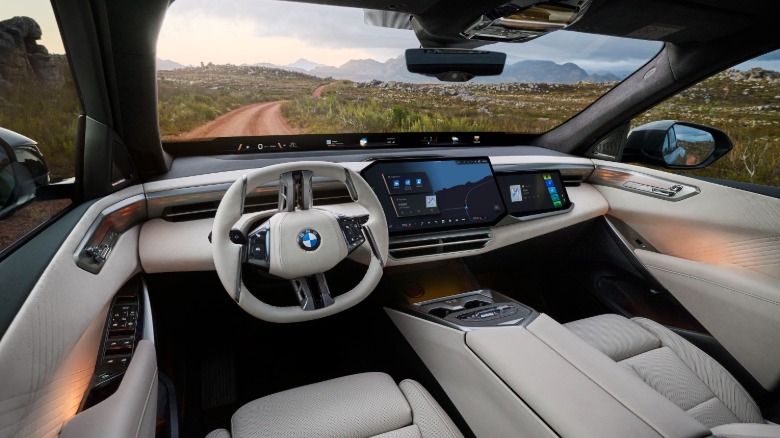
The sound system is impressive, with a standard 280-watt 12-speaker system or optional Bowers & Wilkins Dolby Atmos system pumping out up to 775 watts. The Panoramic iDrive assisted driving and infotainment systems are powered by BMW’s Operating System X software (based on Android Open-Source Project). It offers an “extensive app, video and gaming portfolio,” BMW explains, or you can use your smartphone as a mobile hotspot. Drivers will also have the option of using Apple CarPlay and Android Auto as standard, fortunately

The fully-electric iX5 60 eDrive will start at $79,800 (destination charges excluded) and should be on dealer lots by the end of 2026. BMW is also offering the X5 50e plug-in hybrid at $77,500, and the standard ICE X5 40 will start at $69,800. Those prices seem… reasonable? considering BMW’s luxury branding and an average US car price around $50,000.  


Source link

Leave a Reply

Subscribe to Our Newsletter

Get our latest articles delivered straight to your inbox. No spam, we promise.

Recent Reviews


SAP EWM Tables – Table of Content

Introduction to SAP EWM :

SAP EWM is a crucial functional module that is pivotal in helping organizations manage their inventories and streamline the movement of goods within their warehouse operations. This advanced software solution offers a complete suite of functions. It includes handling inbound and outbound delivery processes, (GR) receipt of goods, order success, and efficient goods distribution.

SAP EWM Tables:

SAP EWM tables deal with the storage for key warehouse management and stock control data. The EWM tables play a vital role in ensuring the smooth functioning of warehouse activities. Here, we will delve into the various categories of SAP EWM tables and provide brief descriptions for each:

1) Stock

  • /SCWM/AQUA: Describes available quantity.
  • /SCWM/QUAN: Defines quant attributes.
  • /LIME/NQUAN: Details LIME quantity attributes.
  • /SCWM/STOCK_IW01: Manages stock key material (WME).
  • /SCWM/STOCK_IW02: Manages stock key material with batch (WME).
  • /SCWM/STOCK_IW03: Manages stock key material with batch and reference documents (WME).
  • /SCWM/STOCK_IW04: Manages stock key material with sales order and project (WME).

Become a master of SAP EWM by going through this HKR SAP EWM Online Training! 

SAP EWM Training

  • Master Your Craft
  • Lifetime LMS & Faculty Access
  • 24/7 online expert support
  • Real-world & Project Based Learning

2) Warehouse Task

  • /SCWM/ORDIM_C: Defines confirmed warehouse tasks.
  • /SCWM/ORDIM_CS: Specifies serial numbers for confirmed warehouse task items.
  • /SCWM/ORDIM_E: Specifies exception codes for warehouse tasks.
  • /SCWM/ORDIM_H: Manages warehouse task movements for handling unit (HU) items.
  • /SCWM/ORDIM_HS: Handles serial numbers for HU item movements.
  • /SCWM/ORDIM_L: Logs warehouse task information.
  • /SCWM/ORDIM_LS: Logs serial numbers for warehouse task entries.
  • /SCWM/ORDIM_O: Open warehouse tasks.
  • SCWM/ORDIM_OS: It handles serial number items for available warehouse tasks.
  •  

3) Transportation Unit

  • /SCWM/TU_DLV: Describes the assignment of deliveries and HUs to transportation units.
  • /SCWM/TU_DOOR: Assigns transport units to doors.
  • /SCWM/TUNIT: Defines transportation units.
  • /SCWM/TU_SR_ACT: Specifies S and R activities of transportation units.
  • /SCWM/TU_STATUS: Manages the status of transportation unit activities.
  • /SCWM/TU_VEH: Assigns transport units to vehicles.
  • /SCWM/DOOR_SRACT: Defines S & R activities of doors.
  •  

4) Wave

  • /SCWM/WAVEHDR: Manages wave header data.
  • /SCWM/WAVEITM: Contains wave item data.
  •  

5) Outbound Delivery

  • /SCDL/DB_DLVH_O: Handles outbound delivery header data.
  • /SCDL/DB_DLVI_O: Manages outbound delivery item details.
  • /SCDL/DB_PROCH_O: Oversees outbound delivery order header.
  • /SCDL/DB_PROCI_O: Manages outbound delivery order items.
  •  

6) Inbound Delivery

  • /SCDL/DB_PROCH_I: Manages inbound delivery header information.
  • /SCDL/DB_PROCI_I: Details inbound delivery item information.

Interested in learning python Join HKR Python certification training! 


7) References

  • /SCDL/DB_REFDOC: Determines reference information.
  • /SCDL/DB_REQH: Defines header information for inbound delivery notifications or outbound delivery requests.
  • /SCDL/DB_REQI: Manages item information for inbound delivery notifications or outbound delivery requests.
  •  

8) Handling Units (HUs)

  • /SCWM/HUHDR: Oversees handling unit header information.
  • /SCWM/GMHUIDENT: Manages additional handling units for goods movement logs.
  • /SCWM/HUSSTAT: Specifies individual status for each handling unit.
  • /SCWM/HUREF: Manages handling unit references.
  • /SCWM/HUSTOBJ: Details information about handling unit status objects.
  • /SCWM/GMHUSTAT: Tracks HU status from goods movement logs.
  • /SCWM/GMHUITM: Manages handling unit items.
  • /SCWM/GMHUHDR: Maintains handling unit header data in goods movement logs.
  •  

9) Storage Bins

  • /SCWM/LAGP: Provides storage bin details.
  • /SCWM/LAGPS: Offers comprehensive information on available storage bins for various execution areas and activities.
  •  

10) Master Data

  • /SAPAPO/MATKEY: Defines product details.
  • /SAPAPO/MATMAP: Manages mapping table details for products.
  • /SAPAPO/MATEXEC: This table contains product execution data.
  • /SAPAPO/MATTXT: It provides material descriptions.
  • /SAPAPO/MATLWHST: This table states the location-specific product information by storage types.
  • /SAPAPO/MATLWH: It specifies location product information for warehouse locations.
  •  

11) Physical Inventory Documents

  • /LIME/PI_DCTYTXT: It describes physical inventory procedure details.
  • /LIME/PI_DOCTYPE: It defines document types for physical inventory and internal settings.
  • /LIME/PI_DOC_IT: It manages physical inventory document items.
  • /LIME/PI_DOC_SER: This table tracks serial numbers for physical inventory document items.
  • /LIME/PI_DOC_TB: This table contains quantities for physical inventory document items.
  • /LIME/PI_IT_BIZ: Specifies business key objects for physical inventory documents.
  • /LIME/PI_LOGHEAD: It logs header data of physical inventory log entries.
  • /LIME/PI_LOGHIST: Maintains a history table for physical inventory log entries.
  • /LIME/PI_LOGITEM: This table logs item data of a physical inventory document.
  • /LIME/PI_PAR_BIZ: It manages parent objects for physical inventory document business keys.
  •  

12) Route

  • /SCMB/ROUTE: Provides route information.
  • /SCMB/ROUTET: Contains route table information.
  • /SCMB/TOENTITYT: Specifies text information about supply chain units.
  • /SCDL/TSRVLVLT: It specifies the details of shipping condition text information.
  • /SCMB/ROUTE_SC: Manages shipping conditions for routes.
  • /SCMB/ROUTE_RT: Defines request types for routes.
  • /SCMB/STOP: Offers information about route stop logs.
  • /SCMB/ZONE: Contains transportation zone details.
  • /SCMB/ZONE_D: Provides details on transportation unavailability zones.
  • /SCMB/TOENTITY: Manages the details of the supply chain unit header.
  •  

13) Location

  • /SCWM/LOC_IW01: this table specifies location table numbers and storage bin details.
  • /SCWM/LOC_IW02: This table offers details on warehouse resources.
  • /SCWM/LOC_IW03:- Provides location table warehouse views.
  • /SCWM/LOC_IW04:- Contains location table transport details.

frequently asked SAP EWM Interview Questions and Answers

HKR Trainings Logo

Subscribe to our YouTube channel to get new updates..!

14) APO Location

  • /SAPAPO/LOC:- Describes location details.
  • /SAPAPO/LOCMAP:- Manages mapping tables for locations.
  • /SAPAPO/LOCT: Offers short text descriptions for sites/locations.
  • /SAPAPO/LOCVER:- Maintains version-dependent location data.
  •  

15) RF (Radio Frequency)

  • /SCWM/TTRNS_CAT:- It specifies logical transactions.
  • /SCWM/TSTEP_CAT:- It manages steps of logical transactions.
  • /SCWM/TPRDV_CAT:- This table specifies presentation devices.
  • /SCWM/TPRES_CAT:- This table defines presentation profiles.
  •  

16) Communications 

  • TRFCQIN:- Describes TRFC queue details for inbound delivery processes.
  • EDIDC:- Contains control record details.
  •  

17) Business Partner (BP)

  • ADRC:- Provides business address server details.
  • SCDL/DB_BPLOC:- Manages partner location searches for delivery information.
  • BUT000:- Contains general data for BP.
  • BUT020:- Specifies BP address details.

[Related Article : Dell Boomi Tutorial]

SAP EWM Training

Weekday / Weekend Batches

Final Thoughts:

This detailed overview of SAP EWM tables offers valuable insights into the critical components of warehouse management and inventory control. By exploring these tables, readers can gain a more profound knowledge of the functional modules and capabilities of SAP EWM. It also equips them to excel in real-time projects with expert guidance.


Other Related articles: 


Source link