

Introduction to the Ariba Network:
Ariba is a hosted service that helps suppliers and buyers to establish a relationship and conduct transactions online. As a supplier, you might already have an existing relationship with customers who invite you to collaborate and form a relationship on the Ariba network. Most of the buying organizations (buyers), make use of the Ariba network to enable electronic processing of orders and invoices with existing suppliers. Once a supplier accepts an invitation, the buyers can able to view the supplier’s catalogs and place the orders. Now suppliers can receive your orders, create, and send order confirmations, advanced shipment notices, and invoices if the buyers accept these documents. Then buyers finally will send the payment documents to the supplier to document about invoices. Both the buyers and sellers use the Ariba network as a chain to establish their business network.
Become a SAP Arbic Certified professional by learning this HKR SAP AribaTraining !
Benefits of using the Ariba Network:
The following are the primary benefits of using the Ariba network;
Respond to the business opportunities
Ariba network enables suppliers to search for and attend to online sourcing opportunities created by buying organization views. A business opportunity might request various information such as RFI (remote function call), a request for quote (RFQ), and a request for proposal (RFP) or a negotiation.
Automate the business processes
Ariba network enables buyers and suppliers to automate their certain tasks such as creating business aspects, offering improved business practices, and also reduces the costs.
Publish and control access to electronic catalogs
with the help of the Ariba network, suppliers have full control over which customers hold access to their catalogs. This approach enables suppliers to generate catalogs that consist of the special items or any contract prices for specific customers.
Conduct business in a secure and reliable environment
Ariba network is one of the most secured e-commerce service providers and provides different reliability features. The reliability features include catalog security, transaction security, and transaction reliability.

SAP Ariba Training
- Master Your Craft
- Lifetime LMS & Faculty Access
- 24/7 online expert support
- Real-world & Project Based Learning
Types of Ariba business network:
Below are the types of Ariba business networks such as;
- Buying organization view.
- Suppliers view
- Purchase order life cycle
Let us know them one by one;
Buying organization view
Buying organization view can make use of the SAP procurement solutions such as SAP Ariba buying and invoicing to create purchase orders and enable to send them through the Ariba network to the respective customers.
Buying an organization view can also able to use SAP Ariba commerce Automation to transmit cXML documents between the external ERP system and Ariba network applications. In the SAP Ariba network, each buying organizations have access to buying accounts on buyers.ariba.com.
Buying organization uses the SAP Ariba network for the following purposes:
- To search for suppliers with products and services they need
- To Invite suppliers to form a trading partnership
- To send purchase orders and receive invoices
- To Receive order confirmatIons and ship notices
- To Send payment documents
- Run reports on their suppliers
With the help of SAP Ariba discovery, the buying organizations can search for suppliers, publish postings for the goods and services, receive bids, and reward supplier products.
Suppliers view
A supplier in an Ariba network that sells any type of products or services. One more benefit of using the SAP Ariba network for the suppliers’ view is that suppliers can hold more than one account on supplier.ariba.com.
Below are the possibilities that Suppliers view the offer, they are;
- Access a network of high-volume buying organizations.
- Connect with specific buying organizations that are interested in the supplier’s products or services.
- Publish catalogs containing information and pricing that are customized for specific customers.
- Categorize products and services so that customers can find them when searching by category.
- Select a routing method for the documents that best fit the supplier’s business needs—suppliers can receive documents through email, fax, online (using your Ariba Network inbox and outbox), cXML, or EDI, and send documents online.
- Conduct transactions electronically by sending purchase order confirmations, invoices, and other documents. Ariba Network provides fast transmission, tracking, and processing of transactions.
Become a SAP Certified professional by learning this HKR SAP Training in Bangalore !
The purchase order life cycle
Once suppliers successfully create their catalog files that define the products and services, they upload each detail on the Ariba network portal for validations and publish catalogs to the specific customers.
Below are the possibilities that the purchase order life cycle offer;
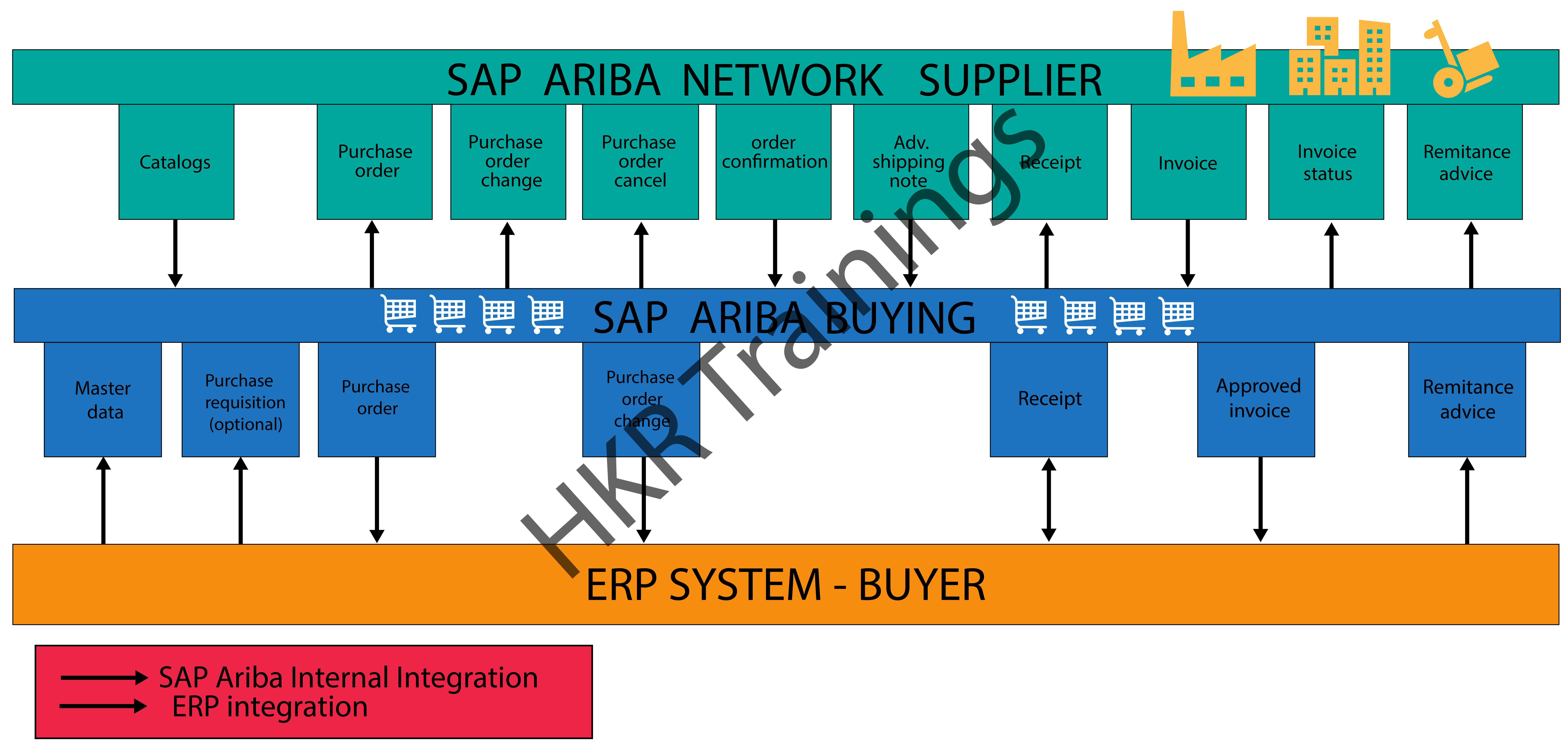
- Their customer uses their procurement application to browse catalogs for products and services and initiate purchase requisitions, which are routed through their organizations for approval.
- Upon approval, the customer’s procurement application automatically converts the requisitions to purchase orders and sends them in cXML format to Ariba Network.
- Ariba Network sends the purchase orders to the supplier’s account where they can view them in their online inbox and receive them according to the selected routing method.
- If the customer’s business rules allow suppliers to send order confirmatIons, ship notices, and invoices through Ariba Network, suppliers can then send order fulfillment information and invoices electronically to their customers.
The below diagram illustrates the overall Ariba network type cycle:

Subscribe to our YouTube channel to get new updates..!
Ariba network sign-in configuration set up( with the help of SAP Cloud platform identity Authentication services):
Buyers users can login into the Ariba network’s buyers account with the help of SSO (single sign-on) authentication with SAML 2.0 through the SAP cloud identity authentication services. The main purpose is to configure the SAP Ariba network with a cloud platform is to provide secured authentications. These buyers support only new users onboarded using SAP identity access management. The Ariba network validates the username and distinguishes between native Ariba network users and users from the SAP cloud platform identity authentication service, whereas non-native users are redirected to the SAP cloud platform identity authentication service for authentication. So the native Ariba network users need to enter their password and sign in as usual.
Here we are going to explain how the high-level workflow of users signing into the Ariba network is as follows:
1.A user enters the username in the Ariba Network sign-in page and clicks Next.
2. Ariba Network distinguishes between native and non-native Ariba Network users and redirects them to the relevant sign-in page.
Non-native users
1.Users are redirected to the SAP Cloud Platform Identity Authentication Service for authentication.
2. SAP Cloud Platform Identity Authentication Service validates the user-entered credentials and redirects the user to Ariba Network.
Native Ariba network users
1.Users are redirected to an Ariba Network sign-in page.
2. Ariba Network validates the user-entered credentials and displays the home page.
Connecting to Ariba Network using SAP Ariba cloud integration gateway:
The SAP Ariba cloud integration gateway is a fully self-service gateway that allows suppliers to integrate and configure to Ariba Network and perform online transactions seamlessly.
With the help of the SAP Ariba cloud integration you can perform the below things:
- Configure your integration between Ariba Network and your ERP application to manage one or more buyer-supplier trading relationships.
- Specify the mapping configuratIon.
- Validate and self-test transaction documents.
- Monitor and track the integration lifecycle overall.
Become a SAP Arbic Certified professional by learning this HKR SAP AribaTraining in Mumbai !
SAP Ariba Training
Weekday / Weekend Batches
Conclusion
The main aim of using the Ariba network is to have a good relationship between buyers and suppliers to sell or purchase their products and also enable them to do transactions over the internet. We hope that through this post you might have learned fundamental concepts such as introduction to the Ariba network, the purpose of using the Ariba network, Types, and the configuration setups.
Related Articles:

Stephan is the sports journalist for the Maple Grove Report.