‘Fast, free Wi-Fi’ hiccup: Slow service, outages plague some airlines


You know that fast, free inflight Wi-Fi your airline promised? If you’ve been on a flight lately and found it to be … well, kind of slow … you’re not alone.

The Wi-Fi provider that supplies on-board internet to several of the nation’s biggest airlines admits its service has been a bit sluggish recently as more customers than ever log on, stream videos and eat up precious bandwidth.

Elsewhere, passengers taking long flights to Europe and Asia have reported prolonged internet outages, lately, even when paying for the service.

And even more flyers have run into a frustrating reality: Some planes now have faster Wi-Fi than they enjoy at home — but on others, the service barely works at all.

American Airlines Airbus A321 takes off. SEAN CUDAHY/THE POINTS GUY

These are the predictable growing pains as airlines race to make logging on at 30,000 feet the norm on every flight.

And it’s something to keep in mind before your next trip.

A speedbump in the ‘fast, free’ rollout

Trying to use internet while on a flight used to be a frustrating and expensive experience for passengers.

But over the last few years, the technology has improved rapidly. Along the way, U.S. carriers have moved to ditch Wi-Fi fees, opting instead to dangle complimentary access as a prime new perk for any passenger with a loyalty program membership.

ZACH GRIFF/THE POINTS GUY

Not surprisingly, though, bandwidth hiccups have popped up as a deluge of flyers unburdened by $10 or $20 fees have connected multiple devices, streamed YouTube and scrolled TikTok while in the air.

Reward your inbox with the TPG Daily newsletter

Join over 700,000 readers for breaking news, in-depth guides and exclusive deals from TPG’s experts

Viasat satellite issue snarls web surfing

In recent months, data “supply and demand” constraints have plagued Viasat, a key Wi-Fi provider for American, Delta, Southwest Airlines, JetBlue and others.

A big reason: the company ran into problems with a satellite it launched into orbit in 2023, which was supposed to help shoulder the data load of multiple large airlines opening up their Wi-Fi to virtually all passengers.

“Unfortunately, we got caught in a little bit of a spot where there wasn’t as much capacity as we had planned to be on orbit,” Don Buchman, president of aviation at Viasat, told TPG. “It created a short-term problem.”

Frustration for flyers

Customers have noticed the recent slowdown. One loyal American flyer commenting on a recent TPG story said he wished the airline’s internet paywall was still in place.

“They opened it up to anyone,” he said, “and on my last seven or eight flights, the service has been absolute garbage.”

An American Airlines plane at New York’s LaGuardia Airport (LGA). SEAN CUDAHY/THE POINTS GUY

I’ve experienced the spottiness firsthand on some recent American and Delta flights — a shift from what was previously pretty reliable service that allowed me to easily work from the sky.

‘Light at the end of the tunnel’

Viasat says it’s confident things are about to get a lot better.

In April, the company launched a new satellite that will come online and double its data capacity — meaning way more bandwidth for passengers — by the end of the summer.

“It’ll be back to where it was and better,” Buchman said. “There’s definitely a light at the end of the tunnel.”

Viasat’s new satellite launching in April. MANUEL MAZZANTI/NURPHOTO VIA GETTY IMAGES

In a statement to TPG, Delta said it was “excited for soon-to-come upgrades” that will “unlock expanded service across the Americas” beginning in August.

Long-haul Wi-Fi woes

But the Wi-Fi hang-ups go well beyond the Americas.

Passengers on long-haul flights have run into significant internet outages in recent months.

In particular, some American and United passengers have reported virtually nonfunctional service on some transoceanic flights, especially on planes with older Wi-Fi tech from Panasonic — which supplies connectivity to many of the two airlines’ big twin-aisle jets.

The complaints have surfaced across Reddit and other online forums — and hit TPG staffers, too.

Last week, TPG founder Brian Kelly reported he had “horribly slow and unreliable internet” on a United flight to Rome.

That mirrors my own experience: On a 17-hour United flight from San Francisco to Singapore in April, the Wi-Fi was effectively unusable. It wasn’t much better on an American flight from Europe the following month, where internet access cost $35.

SEAN CUDAHY/THE POINTS GUY

Those are long stretches in the air with little to no connectivity, especially at a time when passengers increasingly expect they’ll be connected while in the air.

Asked about the recent issues, Panasonic did not address the recent outages. Instead, the company simply said it was developing next-generation satellite service that would help it meet “the passenger expectations of tomorrow.”

“This is our principal area of focus,” a spokesperson told TPG.

United, meanwhile, said it was “actively engaged in conversations with Panasonic to address these issues.”

All-in on Starlink

Airlines are making moves, in the meantime.

United, Alaska Airlines and Southwest are each in the process of upgrading their Wi-Fi tech with Starlink, which at the moment is clearly (and reliably) the fastest internet in the sky.

ZACH GRIFF/THE POINTS GUY

Notably, United last week said it was accelerating plans to bring those Starlink satellites to its widebody airplanes, which should offer a major connectivity boost on long-haul flights.

American recently announced its own Starlink plans, while Delta and JetBlue have said they’ll upgrade many of their jets in the coming years with future Starlink-like service from Amazon.

Viasat, for its part, has longer-term upgrades in the works that the company says will significantly improve its Wi-Fi service on carriers in the coming years — beyond the boost that’s already expected to come next month.

Will the Wi-Fi work on your flight, or not?

Still, all of those innovations take time — not to mention countless hours of work from airlines’ maintenance teams.

Best bet in the meantime?

Dial it back to 2019: download that podcast before your flight, just in case. Load up the tablet with a movie. And let the boss know you could be out of pocket when the plane pushes back.

Sure, it’s possible your Wi-Fi might be better than what you have at home. It’s also possible it’ll be really spotty.

Because while the inflight internet renaissance is here, it’s also still very much a work in progress.

Related reading:


Source link

Leave a Reply

Subscribe to Our Newsletter

Get our latest articles delivered straight to your inbox. No spam, we promise.

Recent Reviews


Incremental Load in QlikView – Table of content

What is Incremental load?

The practice of loading only new or modified records from a database into an existing QVD is known as an incremental load. As compared to complete loads, incremental loads are more effective, which is especially useful for large data sets. In QlikView, an incremental load occurs when new data from a source database is loaded while previously retrieved data is loaded from a local store. QVD files or the QVW format used with a binary load are commonly used to save data. 

Why incremental load?

Is your BI application storing large amounts of data in a  atabase? Is it happening regularly, if so? Because BI applications are expected to handle larger data sets, frequent refreshes must obtain the most up-to-date information. In both cases, loading all of the data historically every time to get the most recent updated records on a timely basis is inefficient. This is where the concept of “Increment Load” comes in handy for making BI applications more efficient.

To gain in-depth knowledge with practical experience in QlikView, Then explore HKR’S QlikView Online Course!

What is the intention of the incremental load?

The “Incremental Load” is the answer to all of the previous questions. The loading process’s performance is improved by pulling only new and updated records rather than the entire data set and appending them to the existing data set (QVD). To keep it simple, incremental load updates old table/QVD data with newly modified records at each refresh. It increases the loading process 100 times over conventional loads in this manner.

How exactly incremental load works?

Let’s take a closer look at it by putting it to use. The workflow steps for implementing the same are described below.

1. You must load the whole data without the incremental Load. Either time you need to update new records, you must reload the whole data, which takes a long time to load and save on the local drive (QVD). You can only load new/updated records with incremental loading.

2. In a table, find the last revised record date from the QVW.

3. Connect to the data repository based on the last updated date and pull the recently inserted records that are older than the last modified date. The “where” clause of the load script can be used to do this.

4. To get live data, attach the recently modified records to the current table locally.

5. The incremented table should be added to the BI application.

Qlikview Training Certification

  • Master Your Craft
  • Lifetime LMS & Faculty Access
  • 24/7 online expert support
  • Real-world & Project Based Learning

Illustration of Incremental Load in Real Time

The practice of loading only new or modified records from a database into an existing QVD is known as an incremental load. As compared to complete loads, incremental loads are more effective, which is especially useful for large data sets. The incremental load can be applied in various ways, with the following being the most common:

  • Insert only (Do not validate for duplicate records).
  • Insert and update.
  • Insert, update and delete.

Illustration of Incremental Load in Real Time

1. Insert Only: 

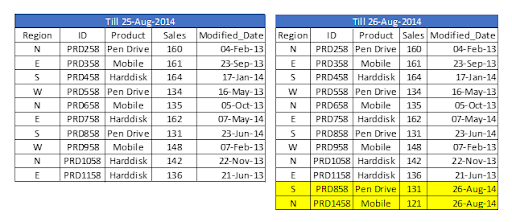
Let’s assume we have sales raw data (in Excel) updated with necessary details about the transaction by modified date if a new sale is registered. We already had a QVD produced before yesterday because we are working on QVDs (25-Aug-14 in this case). Now you can load incremental data (Highlighted in yellow below).

Insert Only

To begin, build a QVD for data up until August 25, 2014. We need to know the date on which QVD was last changed to find new incremental data. The maximum Modified_date in the available QVD file will be used to determine this. As previously stated, It is concluded that “Sales. qvd” is up to date with data until August 25, 2014. The following code will be used to determine the last updated date of “Sales. qvd”:

QVD file

We have loaded the most recent QVD into memory and then identified the most recent modified date by storing the maximum number of “Modified_Date” values. We then save this date in a variable called “Last_Updated_Date” and delete the “Sales” table. I used the Peek() function to store the maximum number of changed dates in the above code. The syntax is as follows:

Peek( FieldName, Row Number, TableName)

lets’s get started with QlikView Tutorial

This function retrieves the contents of a given field from an internal table row. FieldName and TableName must be string values, while Row must be an integer value. The first record is indicated by a 0, the second by a 1, and so on. Negative numbers indicate the order of the table from the top. The last record is indicated by a -1.

We can load incremental records of the data set (Where clause in Load statement) and merge them with available QVD because we know when the records will be considered new records after that date (Look at the snapshot below).

incremental records of the data set

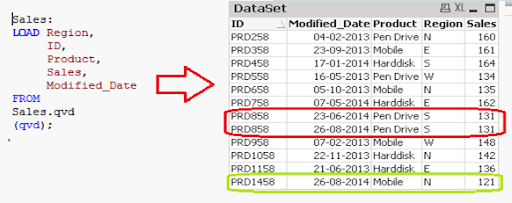
Now, load the most recent QVD (Sales), which will have incremental records.

incremental records

As you can see, two records from August 26, 2014, have been added. However, we’ve also added a duplicate record. Since we haven’t accessed the available records, we may tell that an INSERT is the only approach that will not validate duplicate records.

Furthermore, we are unable to update the value of existing records using this method.

To recap, the steps to load only incremental records to QVD using the INSERT only method are as follows:

1. Recognize and load new records.
2. Combine this data with the QVD file.
3. Replace the old concatenated table with the new QVD file.

2. Insert and Update method:

We can’t search for duplicate records or update existing records, as seen in the previous case. The Insert and Update approach comes in handy here:

Insert and Update method

Assume ID is the primary key, and we should be able to define and distinguish new or updated records based on change date and ID.

To use this process, repeat the steps for identifying new records as in the INSERT the only method. Then, apply the search for duplicated records or change old records’ value when concatenating incremental data with existing records.

incremental data with existing records

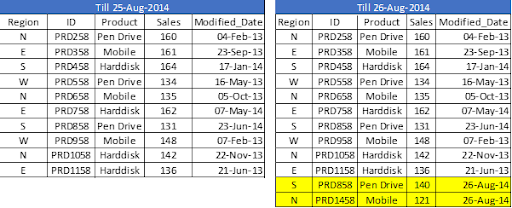
We’ve only loaded records where the Primary Key(ID) is new. The Exists() feature prevents the QVD from loading old records because the Latest version is already in memory, so expired record values are immediately updated.

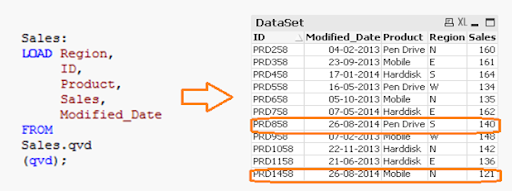
Both specific records are now available in QVD, along with an updated sales value for ID (PRD858).

feature prevents the QVD

Business Intelligence & Analytics, incremental-load-in-qlikview-description-0, Business Intelligence & Analytics, incremental-load-in-qlikview-description-9

Subscribe to our YouTube channel to get new updates..!

3. INSERT, UPDATE, and DELETE method:

This method’s script is somewhat similar to the INSERT & UPDATE method, except there is an additional step to remove deleted records.

We’ll use an inner join with a concatenated data set (Old+Incremental) to load primary keys for all records in the new data set. Only common records shall be maintained, and unnecessary records will be deleted due to the inner join. Assume that in the previous case, we want to remove a record with the ID PRD1058.

INSERT, UPDATE, and DELETE method

We have a data set of one record added (ID PRD1458), one record modified (ID PRD158), and one record deleted (ID PRD1058).

Qlikview Training Certification

Weekday / Weekend Batches

Advantages of Incremental Load

The following are the benefits of the incremental load.

  • By removing the maximum load of data, it provides a productive load at any time.
  • As opposed to the standard model, it lowers the time it takes to get complete data by 100 times.
  • Incremental load reduces the database’s traffic load.
  • It reduces the workload for data source drivers.
  • The Incremental load minimizes the load on RAM.
  • It functions as a JIT (Just-In-Time) engine in the Data Extraction layer, fetching data in real-time.
  • It makes use of QVD file formatted tables, which significantly compresses the results.

Data Localization

The incremental load uses newly added data and attaches it to the recently incremented table, resulting in data access that is still local to the BI application.

Conclusion

This blog has addressed how incremental loads are faster and more effective than FULL loads for loading data. You should make regular backups of your data as the best idea, and if there are problems with your database server or network, your data can be affected or lost. It would be best to choose which approach is best for you based on your business and application needs. Insert and Update is used in the majority of BFSI applications. In most cases, records are not deleted.

Other Related Articles:


Source link