
How to use 100,000 Chase points to fly lie-flat to Europe


The Chase Sapphire Preferred® Card (see rates and fees) is now even more valuable after its recent refresh added new benefits, like a $100 annual Chase Travel℠ hotel credit each anniversary year and a $120 application fee credit for Global Entry, TSA PreCheck or Nexus.

But that’s not all: For a limited time, you can also earn 100,000 bonus points after spending $5,000 on purchases in the first three months from account opening.

To celebrate, we are sharing some of the best and easiest ways to maximize this limited-time offer. So far, we’ve shown you how to book round-trip flights for the whole family to Hawaii and how to fly business class to Japan with 100,000 Chase Ultimate Rewards points.

Next up: How to fly business class to Europe using the points from this welcome bonus.

Chase Ultimate Rewards can be transferred to several airline partner programs to book these flights. For example, you can book business-class flights to Spain on Iberia from as few as 40,500 Chase points transferred to British Airways Club (or Iberia Club) at a 1:1 rate; however, this exceptional price is available on only a handful of nonstop routes from the Northeast to Adolfo Suárez Madrid-Barajas Airport (MAD).

Another option is to transfer your Chase points to Air France-KLM’s Flying Blue program, where business-class flights on a wider network start from 60,000 miles per person. However, as these are priced dynamically, on popular dates the redemption rates can be much higher than this and carrier-imposed surcharges are also payable.

A better option for most travelers is Air Canada Aeroplan, which offers a fixed business-class rate to Europe and good availability across a wide range of Star Alliance airlines and transatlantic routes.

I’ve transferred Chase Ultimate Rewards points to Aeroplan myself to book business-class flights to Europe many times, and it’s a terrific way to travel lie-flat on overnight flights and arrive rested and refreshed.

Business class to Europe from 60,000 points

Air Canada Aeroplan (1:1 transfer from Chase Ultimate Rewards, transfers should be instant)

From 60,000 points one-way, plus a 39 Canadian dollar (about $27) partner booking fee and minimal taxes

At least 2 cents per point

Lufthansa, Swiss, Austrian, TAP Air Portugal, Brussels Airlines and LOT Polish. United Airlines is also available at higher rates.

Anyone who wants a comfortable lie-flat journey to Europe

Related: How to transfer Chase Ultimate Rewards points to Air Canada Aeroplan

Reward your inbox with the TPG Daily newsletter

Join over 700,000 readers for breaking news, in-depth guides and exclusive deals from TPG’s experts

Aeroplan prices partner-operated business-class awards to Europe by distance as follows (one-way, per person):

  • Itineraries up to 4,000 miles: 60,000 points. This includes New York’s John F. Kennedy International Airport (JFK), Newark Liberty International Airport (EWR), Boston Logan International Airport (BOS) and Dulles International Airport (IAD) to most of Western Europe.
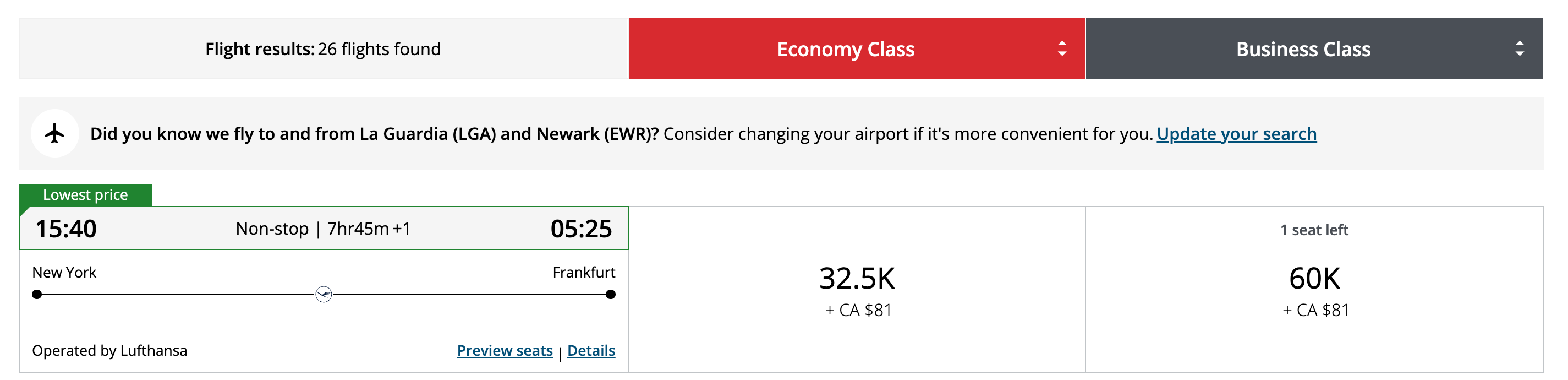
Aeroplan screenshot
AEROPLAN
  • Itineraries 4,001 to 6,000 miles: 75,000 points. This includes Chicago’s O’Hare International Airport (ORD), Miami International Airport (MIA), Seattle-Tacoma International Airport (SEA), Houston’s George Bush Intercontinental Airport (IAH), Denver International Airport (DEN), Los Angeles International Airport (LAX), and San Francisco International Airport (SFO) to most of Western Europe as well as the Northeast to most of Central and Eastern Europe.
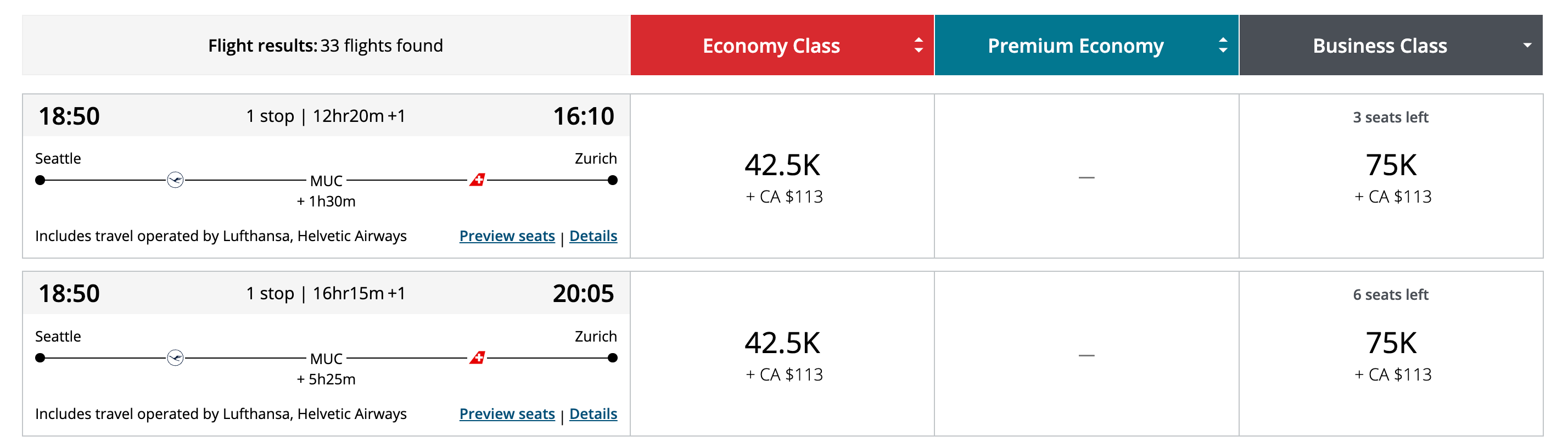
Aeroplan screenshot
AEROPLAN
  • Itineraries 6,001 to 8,000 miles: 90,000 points. This includes the West Coast to Central and Eastern Europe.
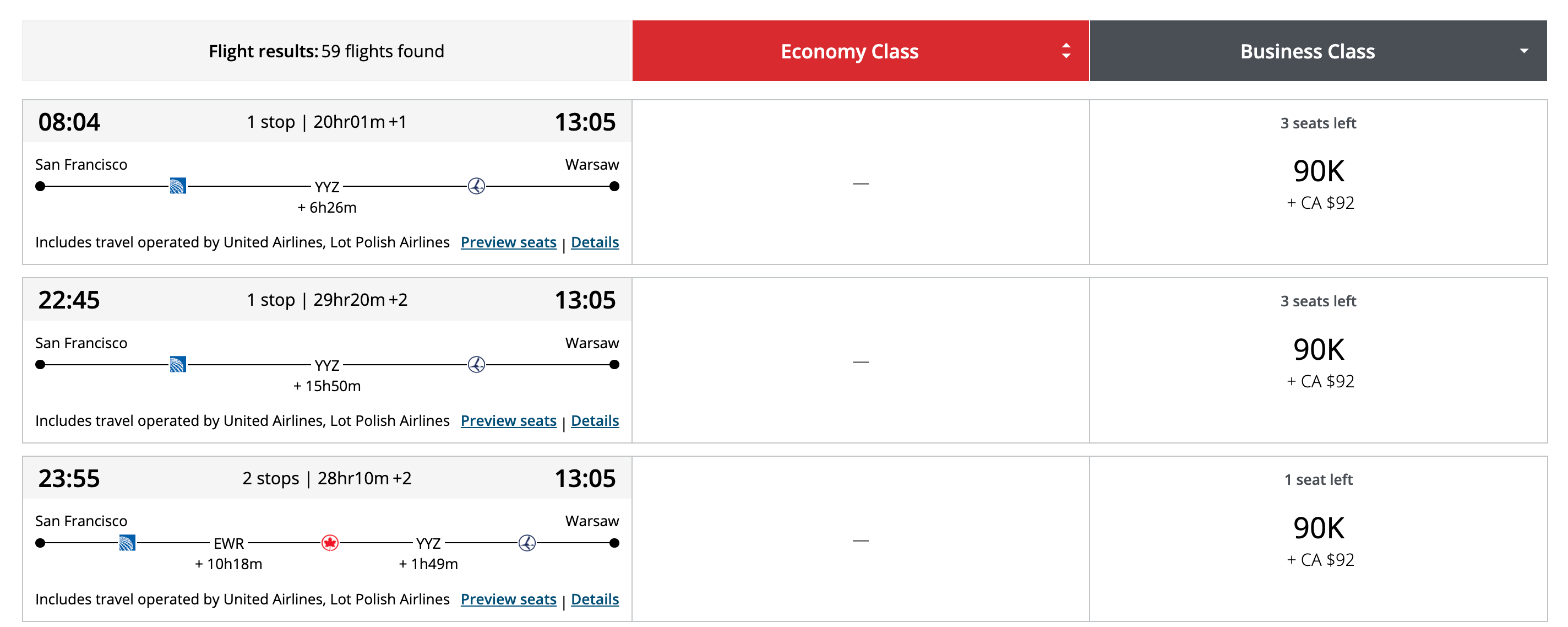
Aeroplan screenshot
AEROPLAN

Bottom line

Booking business-class seats to Europe via Aeroplan is one of the most luxurious and best-value ways to redeem Chase Ultimate Rewards points.

We’ll keep bringing you our favorite redemption options and showing you just how easy it is to book.

This 100,000-point welcome offer on the Chase Sapphire Preferred Card is a strictly limited-time offer, so don’t miss out.

Related reading:


Source link

Leave a Reply

Subscribe to Our Newsletter

Get our latest articles delivered straight to your inbox. No spam, we promise.

Recent Reviews


Looker Analytics – Table of Content

What is Looker?

Looker is a robust business intelligence (BI) application that may assist a company in creating insightful visuals. It features a simple user interface, is browser-based (so no desktop software is required), and enables dashboard collaboration. Users may construct interactive and dynamic dashboards, schedule and automate report distribution, establish custom alert criteria, and employ integrated analytics, among other features.

We have the perfect professional Looker Training for you. Enroll now!

What makes Looker unique?

Platform Experience

  • Looker may be installed on public cloud services or on-premises, and migration between cloud databases is easy. Looker is a completely browser-based application.
  • Microsoft’s Azure public cloud environment is the only place where Power BI may be used. The cloud-based Azure service is at the heart of the Power BI product.
  • However, in other cases, a desktop component is necessary. Power BI Report Server, an on-premises version, is available. However, the functionalities are different from those of the Azure service. Users may become perplexed as a result of this.
  • Tableau provides both cloud and on-premises solutions, Power BI is comparable. To perform certain activities, users must go from one desktop application (such as
  • Tableau Desktop) to another (such as Tableau Prep Builder), and finally to the web.

Related Article: Looker Features

Looker Training

  • Master Your Craft
  • Lifetime LMS & Faculty Access
  • 24/7 online expert support
  • Real-world & Project Based Learning

Ease of Use

  • Looker needs some upfront effort, such as creating a comprehensive semantic model for storing all of your business logic and analytics, but once that’s done, you’ll have a single source of truth. Looker is extremely collaborative once it’s set up, especially with the simultaneous publishing feature, which allows several people to operate in the same dashboard function at the same time.
  • Power BI requires initial technical support, but after that, business users may self-serve within the parameters specified by the tech team. Users may quickly create visualizations and get insights by dragging and dropping data. However, dashboard collaboration is hampered by the lack of parallel publishing functionality.
  • Tableau creates very complex, well-designed visuals and offers a user-friendly interface with a large number of capabilities. There is no parallel publishing functionality, much like in Power BI.

Cost

  • Looker price is tailored to the specific needs and preferences of each organization. However, for maximum performance, Looker needs an MPP database that should be included in your budget.
  • Power BI is initially inexpensive, particularly if you’re already a Microsoft ecosystem. Different add-on features, on the other hand, might raise the price. The inability to choose a different public cloud provider might also have a financial impact.
  • Tableau employs role-based licensing, which raises the price dependent on the number of users, especially those with a large range of technological users.

If you want to Explore more about Looker? then read our updated article – Looker Tutorial

Business Intelligence & Analytics, looker-analytics-description-0, Business Intelligence & Analytics, looker-analytics-description-1

Subscribe to our YouTube channel to get new updates..!

Is Looker a good fit for my analytics system?

When Should You Use Looker?

Looker could be the ideal BI platform for you if you want customizable visualizations, collaborative dashboards, and a single source of truth, as well as top-notch customer service. Because it’s entirely browser-based, there’ll be less confusion when your team gets up and running, and pricing tailored to your business means you’ll receive just what you need to accomplish your analytics goals.

When You Shouldn’t Use Looker

Power BI is your best option if you’ve already invested in the Microsoft environment. Adding another tool will almost certainly lead to more confusion and more expenses. The first thought that comes to mind when someone speaks “Tableau” is how spectacular the visuals are. Tableau may be the best option if you would like the most attractive graphics and a platform that is easy to use for both analysts and business customers.

If none of these tools appear to be a good fit for your company, we’d be happy to speak about additional data visualization options.

Related Article: Looker Data Actions

How can I begin using Looker?

Looker is easy to use and can be learned in four simple steps:

1. Analyze your data to see if it’s analytics-ready.

Examine where your data is kept, what formats are utilized, and so on. You should consider a data strategy project before moving forward with a BI platform implementation.

2. Recognize your company’s BI requirements and use cases.

Work with key stakeholders across the company to learn how they are currently using analytics and how they plan to use more sophisticated analytics in the future. What features do they or their workers require from a BI tool?

3. Reviewing the concerns of compliance and data governance.

When speaking with those important stakeholders, be sure you bring up their compliance and data governance issues. Invite your technology executives to participate in the discussion to gain their important insights. Any additions to your IT stack should be informed by an enterprise-wide stance on these issues.

4. To ensure a seamless implementation, partner with a reliable resource.

Our advisors’ hands-on Looker knowledge can help you make a smoother transition. Furthermore, Aptitive can provide the required training to ensure that your staff is prepared to make the most of your new BI tool. We can even assist with the first three stages, taking you through the procedure from beginning to end.

If you have any further questions about whether Looker is right for your company, or if you’re ready to get started with Looker, please contact us.

Click here to get latest Looker interview questions and answers for 2022

Looker Training

Weekday / Weekend Batches

Conclusion

In this session, you have learned the looker analytics in detail covering the topics of basic definition, unique capabilities, when looker to be used and not to be used, what are the steps to start with Looker Analytics, etc.

Related Articles:


Source link