

Pros
- Bladeless fan has 10 speeds
- Comes with cooling plate and water mister attachments
- Can be used three ways
- Lightweight at 0.77 pounds
- Comes in 8 colors
- Battery runs up to 11 hours
Cons
- Pricey at full price of $150
- Accessories sold separately, from $10 to $40
- Loud at higher speeds, up to 74.6 dBA
CNET’s key takeaways
- At a full price of $150, the Shark ChillPill is pricey, but it could be worth it for those who want a device that functions as more than a handheld fan.
- I’m especially impressed with the ChillPill’s dry-touch mister and cooling plate, which can reduce skin temperature by up to 16 degrees Fahrenheit.
- I did occasionally experience issues pressing the display to activate the device. I also don’t love that all its accessories are sold separately, from $10 to $40.
On elementary school field days, when classes would gather for outdoor events on what felt like the hottest day of the year, I used to get jealous of the kids who had those handheld fans that doubled as water misters. Shark’s new ChillPill personal fan reminds me of them, but in a more modern, high-tech form.
The ChillPill is three-in-one, in both what it does and how it can be used.
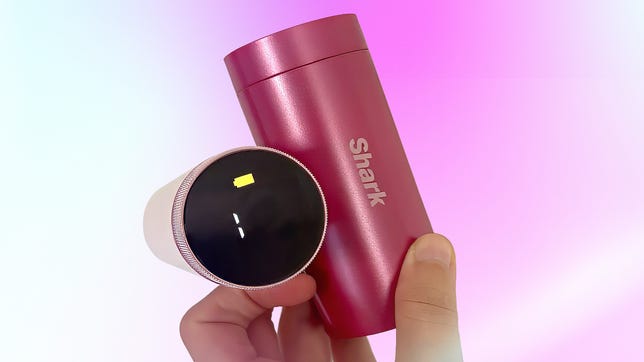
Along with being a portable, handheld fan, the ChillPill is also a cooling plate and water mister.
As a wellness editor who tests the latest health tech for CNET, and as someone who runs hot, I was excited to try the ChillPill as summer approaches, and during heat waves. Especially since I also have Dyson’s new HushJet Mini Cool, its first portable fan, and two popular JisuLife fans, the Ultra2 and Pro1 Mini, to compare it to.
The ChillPill combines a bladeless 10-speed fan with airflow up to 17 mph, a dry-touch evaporative mister that won’t leave you soaked and a cryotherapy-inspired cooling plate that drops skin temperature up to 16 degrees Fahrenheit. The latter measurement was calculated from controlled testing at 77 degrees F, with the plate applied to the neck at its highest setting.
Lightweight at 12.3 ounces, the ChillPill can be worn on your person as a wristlet or crossbody, clipped to a jacket or purse strap, twisted to rest on a tabletop or clamped onto a stroller or workout machine.
Turn the ChillPill into a mister or cooling plate by swapping out the 10-speed fan attachment.
My time with the Shark ChillPill
I started using the ChillPill when temperatures climbed over 90 degrees Fahrenheit here in Los Angeles, and I can confirm that it made a difference. Unlike traditional portable fans, having the mister and cooling plate is particularly helpful.
The cooling plate is simple, but mighty cool
The cooling plate is my favorite ChillPill attachment, and it has two modes: level 1 (best for indoor use) and level 2 (for both indoor and outdoor use). I could actually feel a difference between the two.
I love placing it on the back of my neck for instant cooling. While this isn’t its intended use, I also enjoy putting it on level 1 under my eyes to reduce puffiness.
The cooling plate was easy to clean with an alcohol wipe, keeping things hygienic. To clean the device’s exterior, wipe it down with a soft, damp cloth, avoiding moisture in the fan inlet, outlet and charging port.
Between level 1 and 2, the ChillPill’s cooling plate will help you chill out (literally).
The mister won’t leave you soaking wet
As for the mist pod, it uses dry-touch evaporative misting, leaving you feeling refreshed, not wet. Definitely an upgrade from those field day fans that are also water spray bottles. It has two modes, constant or interval.
I appreciate that the mister comes with three replacement moisture wicks (normally $5 for three), which act like straws to bring water to the misting outlet, regardless of the device’s angle. Depending on how often you use it, the wicks should be replaced monthly.
The white wick inside the misting pod.
You’ll want to empty the water reservoir and allow it to air dry after each use. A weekly clean soak with undiluted distilled white vinegar is recommended, and instructions are available here.
The misting attachment’s reservoir holds about 14 milliliters of water, which can be sprayed continuously or in an interval mode to extend the water’s duration. (Just make sure you rotate the attachment’s cap to open its protective cover.)
You can also use the 10 speeds with this feature. In constant mode, water lasts up to 5 minutes; in interval mode, up to 10 minutes. So make sure you have a water bottle on hand if you plan to refill away from a sink.
In constant or internal mode, the mist pod’s dry-touch evaporative misting won’t leave you dripping.
The fan could better balance speed and quiet
At up to 17 mph, I found the ChillPill’s fan sufficient, but it’s about a third of the speed of Dyson’s HushJet Mini Cool, which goes up to 55 mph in boost mode. It’s also less than half the speed of the 38-mph JisuLife Ultra2.
When I used the Decibel X app to measure loudness in the quietest area of my apartment, the ChillPill’s speed 10 reached a maximum of 74.6 dBA (A-weighted decibels). As for the HushJet Mini Cool, its boost mode reached 77.5 dBA.
As a reference point, the American Speech-Language-Hearing Association reports that a group conversation, a vacuum cleaner and an alarm clock are around 70 dBA. Noise at 85dBA can lead to hearing loss if you listen to it for more than 8 hours.
While its lower speeds aren’t as noticeable, I would say that the ChillPill’s speed 10 is a bit too loud for quiet, shared indoor spaces, but could easily be used outdoors.
The ChillPill’s rainbow of colors
The ChillPill is available in eight colors: heat (red), rose gold, haze (purple), carbon (black), dragon fruit (pink), matcha (green), iced latte (brown) and glacier (teal). One barrel has a lighter version of the color, while the other is darker.
The HushJet Mini Cool, by comparison, only comes in three colors: stone/blush (blush pink), ink/cobalt (blue) and carnelian/sky (red and light blue).
The ChillPill’s dragon fruit (pink) is my favorite out of the array of colors, but I also love the matcha (green) variant.
Battery life and charging time compared
On low speed, the ChillPill’s battery runs up to 11 hours on fan mode; at max power, up to 1.5 hours. Using the included USB-C charging cable, it charges in 3.5 hours.
For comparison’s sake, the 40-watt Dyson HushJet Mini Cool runs for up to 6 hours (5 hours less than the ChillPill) on speed 1. It’s fully charged in 3 hours, which is 30 minutes less than the 15-watt ChillPill.
The 4.25-watt JisuLife Pro1 Mini, on the other hand, can be fully charged in at least 2 hours and lasts up to 30 hours on speed 1, while the 18-watt Ultra2 charges in 2.5 hours and runs up to 25 hours on speed 1.
If battery life is what you’re after, then the 30-hour JisuLife Pro1 Mini would be your best option. Between the ChillPill and the HushJet Mini cool, go for the ChillPill.
Battery life is displayed on the LED screen that doubles as an on/off button.
The display button was my only setback
The ChillPill’s circular LED display shows the speed, misting settings, cooling plate levels and battery life. After you unlock the travel lock (which I kept forgetting to do), you press the display to turn the device on and off and change the attachment settings. Turn the dial to increase or decrease the fan speed.
Occasionally, I’d have to press the display several times to get it to work, which was the only issue I encountered while using the device.
Attachments are easy to use, but not travel-friendly
The attachments are also easy to swap on and off by aligning each one with the circle icon on the ChillPill’s barrel, then rotating until it clicks into place.
Two attachments will fit in the included travel pouch, but the entire device will not. Carrying both the device and attachments can be a lot, and I find that the HushJet Mini Cool’s slim profile makes it easier to throw in a bag when on the go.
The three ChillPill attachments: fan, cooling plate and mister.
ChillPill accessories are pricey and sold separately
I wish the ChillPill came with at least one of its accessories, like the crossbody strap or clip attachment. Instead, all are sold separately for these prices:
- Wristlet: $10
- Crossbody strap: $25
- Clamp: $40
- Clip: $30
On top of ChillPill’s $150 full price, those accessory prices seem high. Yet, I do understand that they were created especially for the ChillPill, and being proprietary is likely what makes them more expensive.
Though also not cheap, Dyson’s HushJet Mini Cool is $100 and comes with a lanyard, a travel pouch that fits the entire device and a charging stand. Other accessories will be available soon and sold separately.
Yes, the ChillPill has the two misting and cooling plate attachments, but I’m not sure that makes it worth the extra $50, plus the cost of the other accessories.
I received the clamp attachment to test out, and although I don’t have a stroller or workout machine, I was able to clamp it onto my balcony railing. Sitting on the balcony, enjoying the sun, was especially nice while having the ChillPill fan cool me down.
The ChillPill clamped onto my balcony railing.
Shark ChillPill vs Dyson HushJet Mini Cool
|
Specs |
Shark ChillPill |
Dyson HushJet Mini Cool |
|---|---|---|
|
Full price |
$150 |
$100 |
|
Core functions |
Fan, misting, cooling plate |
Fan |
|
Max airflow |
Up to 17 mph |
Up to 55 mph (boost mode) |
|
Max sound level (dBA) |
74.6 |
77.5 |
|
Wattage |
15 |
40 |
|
Battery life (low speed) |
Up to 11 hours |
Up to 6 hours |
|
Charge time (hours) |
3.5 |
3 |
|
Weight (pounds) |
0.77 |
0.46 |
|
Colors available |
8 |
3 |
The specs
- Full price: $150
- Speeds: 10, up to 17 mph
- Sound level (speed 10): 74.6 dBA
- Attachments: Three (fan, misting and cooling plate)
- Warranty: Two-year limited
- Weight: 0.77 pounds
- Dimensions: 1.77×3.31×4.41 inches
- Wattage: 15 watts
- Battery life: 11 hours
- Battery charge time: 3.5 hours
- Included in box: device, fan cap, misting pod, cooling plate, USB-C charging cable, three replacement misting wicks
CNET’s buying advice
- If you’re looking for a personal fan with extra functionality (such as a misting pod and cooling plate), the Shark ChillPill is the perfect choice.
- While it’s expensive at a full price of $150, the ChillPill is the only personal fan on the market (that I’m aware of) that also triples as a cooling plate and mister. However, I’m not sure it’s worth it when you include the price of accessories that range from $10 to $40.
- If you’re simply looking for a personal fan, I’d consider the $100 Dyson HushJet Mini Cool, the even more affordable JisuLife Ultra2 ($79, which also doubles as a flashlight and power bank) or the Pro1 Mini ($56, which comes with a magnetic aroma pod).

Stephan is the sports journalist for the Maple Grove Report.