Claude’s New Reflect Dashboard Wants To Help You Log Off Of Claude


The internet loves a good usage dashboard, and today Anthropic is releasing one for Claude designed to help you “reflect” on the time you’ve spent with its chatbot. Think of the new feature as something of a cross between Spotify Wrapped and Apple’s Screen Time tool. You can generate your first report by opening Claude’s settings menu and navigating to the new “Reflect” tab. For now, the dashboard is only available through the Claude web client and desktop app.

At the top, you’ll see a paragraph-long summary of your recent conversations with the chatbot. By default, Claude will collate your last month of interactions, but you can also see your last three, six or 12 months of usage. Under that, the interface lists your most active day, peak hour and total chats over your selected time period, with a visual representation just below. In the future, you’ll also be able to see how much time you’ve spent chatting with Claude, but for now that metric isn’t available. If you continue scrolling, there’s a toggle to configure break reminders and time limits. You can independently set these of the Reflect interface by navigating to the “Time and focus” tab, and dismiss the nudges if you’re in the middle of something.
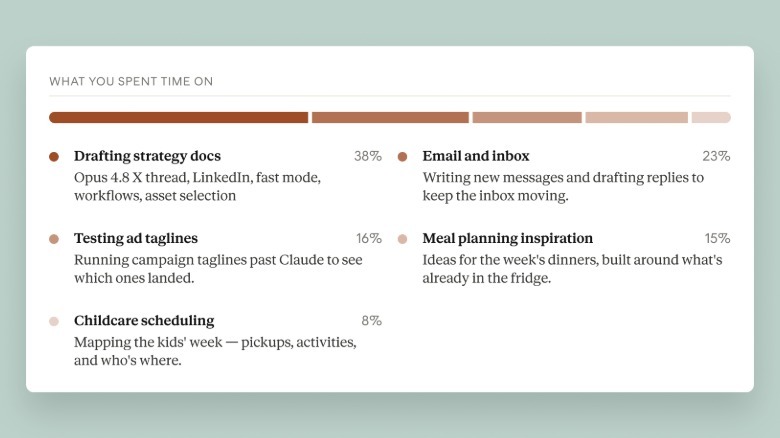
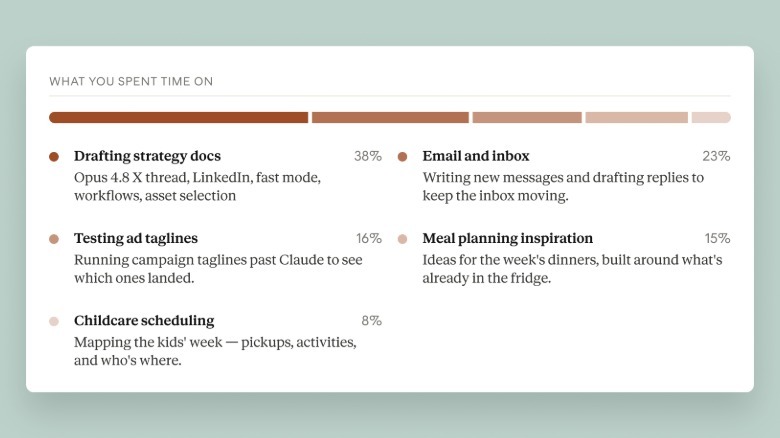
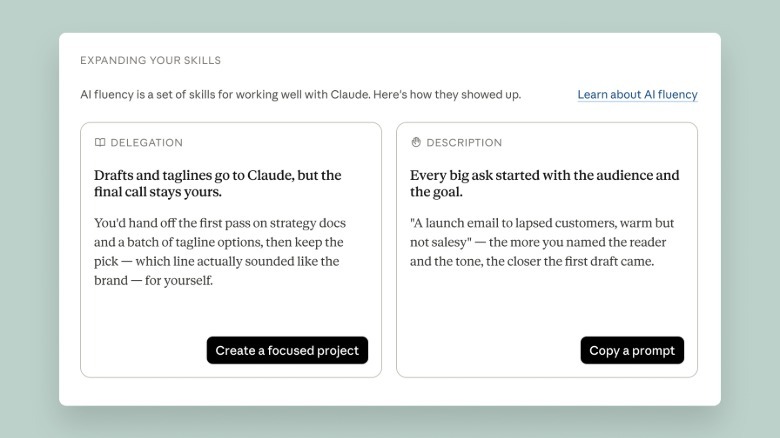
Further down, there’s a breakdown of topics you’ve discussed with Claude, with a percentage assigned to the ones you bring up most often. If you’ve been following along with the screenshots, all of this should feel broadly familiar. The penultimate section does things a bit differently, offering a set of AI “fluency” recommendations designed to streamline your usage of Claude, which are grouped around guidelines Anthropic co-created with a group of academics. For example, if Claude finds you frequently re-establish the same or similar context when you go to write a question or request, it will recommend you use its Projects feature to group your prompts together, so that you don’t need to repeat yourself so often.  

For a more specific example, I’ve been working on a story about inference costs — the amount of AI labs like Anthropic pay for their trained models to process data — and I’ve turned to Claude a few times to track down statements from executives like Dario Amodei and Sam Altman. Based on that usage, the Reflect dashboard recommended creating a custom fact-checking skill for Claude. When I went ahead with that suggestion, the chatbot devised a text template to ensure it would always list its source for a claim, as well as its confidence in the information it had found alongside any caveats. I’ll admit I found the template helpful, and it wasn’t something I would have thought to ask Claude to do on its own.
According to Ryn Linthicum, Anthropic’s head of wellbeing policy, Reflect came out of a study the company’s Societal Impacts team recently completed where participants expressed a mixture of optimism and anxiety around Claude and other AI products. “We were really intentional about building [the dashboard] with an eye toward how we can upskill people’s usage of Claude, not in a way that encourages them to spend more time with it, but instead enables them to get more efficient at meeting their goals, and hopefully get off of Claude or preserve the things that they want to think about,” Linthicum told Engadget.

Linthicum says part of the reason the dashboard doesn’t currently display the exact amount of time you’ve used Claude is because it wasn’t a metric Anthropic had been tracking internally, due to it being something the product team “didn’t want to maximize.” Looking forward, they note Anthropic plans to surface that information for users so they can use it alongside the usage management settings. In the future, the dashboard will also be available mobile, and reflect your usage there.

Anthropic is releasing Reflect in beta today. Notably, the company is making the feature available to Free accounts, in addition to Pro and Max subscribers.


Source link

Leave a Reply

Subscribe to Our Newsletter

Get our latest articles delivered straight to your inbox. No spam, we promise.

Recent Reviews


After 10 years of homeownership, I’ve had my fair share of pricey expenses.

Washing machine won’t complete a wash cycle? That’ll be $330 for the labor and part swap. Fireplace won’t stay lit? Goodbye $460 for the cleaning and inspection — plus another $900 for a new pilot light.

Then there are the never-ending water heater issues that seem to cost me $1,000-plus every other year.

Unexpected financial hits are par for the course when it comes to owning a home. But with the right strategy, they can also create opportunities.

In fact, a major home renovation is the exact reason I recently added both the Chase Sapphire Reserve® (see rates and fees) and the United Club℠ Card (see rates and fees) to my wallet.

With thousands of dollars in spending on the horizon, I realized I could use those unavoidable expenses to earn enough points and miles for a bucket-list business-class trip.

Here’s how I’ve handled home expenses so far — and why I’ve changed my strategy now.

My original card strategy for home expenses

Because I prefer travel rewards cards that earn points and miles over cash-back, I added the Capital One Venture X Rewards Credit Card to my wallet shortly after becoming a homeowner.

The card offered perks I knew I’d use — including a $300 annual Capital One travel credit applied to bookings made through the Capital One Travel portal and lounge access at my two home airports — plus a simple earning structure that works well for everyday spending.

Reward your inbox with the TPG Daily newsletter

Join over 700,000 readers for breaking news, in-depth guides and exclusive deals from TPG’s experts

GABRIELLE BERNARDINI/THE POINTS GUY

You’ll earn:

  • 10 miles per dollar spent on hotels and rental cars booked through Capital One Travel
  • 5 miles per dollar spent on flights and vacation rentals booked through Capital One Travel
  • 2 miles per dollar spent on all other purchases

The last earning rate for all other purchases is what particularly caught my eye, as this catch-all category for everyday expenses offers more miles per dollar than what you’ll get with many other general travel cards.

While I knew I’d take advantage of it for pet-related purchases and other items rarely included as an elevated earning rate category, I also liked having a reliable card for large home-related expenses, from annual maintenance to unexpected repairs.

Related: 9 things you didn’t know you could pay for with a credit card

Why I’ve recently reevaluated my approach

Relying on my Venture X for home-related purchases for the past few years has served me well so far.

In fact, I’ve racked up enough miles to cover several nights of a weeklong stay at the Fairmont Royal Pavilion in Barbados and partially cover an upcoming five-night stay at Amansara in Cambodia, both through Capital One’s “cover travel purchases” fixed-value redemption option.

ALL ACCOR

Knowing I was about to begin a major home renovation project in the form of a top-to-bottom, start-from-scratch refresh of my kitchen alongside significant updates to my living room, it seemed like the perfect time to add another card to my wallet.

I knew a few appliance purchases would easily satisfy a welcome-bonus spending requirement, so it felt like the perfect time to open a new premium credit card.

Naturally, the Chase Sapphire Reserve® became a front-runner, thanks to its current best-ever welcome offer of 150,000 bonus points after spending $6,000 on purchases in the first three months from account opening.

Young Asian woman shopping for home decor and household necessities in a homeware store, looking at bedding sets on a shelf
D3SIGN/GETTY IMAGES

While I already have the Chase Sapphire Preferred® Card (see rates and fees) — and the Sapphire Reserve’s high $795 annual fee requires careful planning with spending to justify — thanks to Chase’s updated Sapphire bonus rules, I was eligible for the Reserve’s welcome offer, making the decision much easier.

Two bonuses are better than one

Since I’d owned most of my furniture for a decade, replacing it alongside the renovation suddenly made sense. I wanted my home decor to match the new cabinetry, stone, paint and appliances I’ve selected.

That’s when I realized I could potentially earn a second limited-time welcome bonus, too.

Ultimately, I stumbled upon the United Club℠ Card.

At the time I applied, the card was offering the opportunity to earn 100,000 bonus miles and 3,000 Premier qualifying points after spending $5,000 on purchases in the first three months from account opening (no longer available).

A United Airlines plane on final descent into Washington Dulles International Airport (IAD). SEAN CUDAHY/THE POINTS GUY

Since United has a major presence at Dulles International Airport (IAD), a hub I use frequently, the card caught my attention quickly despite the United Club Card’s high $695 annual fee.

Then, things really clicked.

If I successfully earn both bonuses, I’d earn at least 100,000 miles with the United Club Card and 150,000 points with the Sapphire Reserve, the latter of which I could transfer to United MileagePlus, a Chase transfer partner, for a whopping total of 250,000 miles.

Say no more. Within days of coming to that realization, I applied for both cards.

Related: Can you pay your rent or mortgage with a credit card? Everything you need to know

How I plan on spending the bulk of points

It didn’t take long to meet the spending requirement for my United Club Card‘s welcome offer. Just 24 hours after receiving the card in the mail, I purchased five new appliances. Within days, the offer’s 3,000 PQPs appeared in my MileagePlus account, and after my first billing cycle, the 100,000 miles were deposited.

BOB KRIST/GETTY IMAGES

Once I earn the 150,000 points with my Chase Sapphire Reserve and transfer them to my MileagePlus account, I have big plans for how I’ll use the bulk of the miles.

After visiting Asia for the first time this year, I already have my sights set on another new continent for 2027: South America.

As an architecture buff and lover of far-flung destinations that haven’t been spoiled by overtourism, I’ve long wanted to visit Easter Island.

Rapa Nui, as it’s known locally, is one of the world’s most remote inhabited islands and can only be reached by air from Santiago, Chile, or via select world cruise itineraries.

A world cruise is out of reach for me, so instead, I’ll fly from D.C. to Easter Island, with connections in Houston and Santiago, to finally see the island’s iconic moai in person.

United miles won’t cover the Santiago-to-Easter Island segment on LATAM, but they can cover the rest of the itinerary, including a nine-plus-hour business-class flight from Houston to Santiago. With the trip priced at nearly $11,500 in cash, it’s exactly the kind of redemption that makes my home renovation spending feel worthwhile.

Related: Turn miles into adventure: How to travel to South America with Alaska Airlines miles

Bottom line

Homeownership comes with plenty to celebrate — and plenty of expenses.

While there’s no way around the cost of maintaining and upgrading a home, there are ways to get more value from that spending.

In my case, a major renovation project is helping turn thousands of dollars in home expenses into a dream trip to Easter Island that would have otherwise been out of reach.

Related: How my travel credit cards keep me on the go within a modest budget


Source link