There’s just something magical about a robot that can convert into a car, tank or plane. It seems that Hollywood agrees as there are several major franchises based around that concept. As someone who grew up in the 80s and 90s, Transformers hold a special place in my heart, despite Michael Bay’s best efforts at tarnishing its legacy. I spent countless hours as a kid playing with Hasbro and Takara’s plastic figures, but there was one type of toy I always wanted but never got: a robot that could transform on its own just like the ones I watched on TV. That changed a few years ago when Robosen launched its line of officially licensed auto-converting models, and from what I’ve seen, its latest release featuring Soundwave might be its best yet.

Image for the large product module

Robosen / Engadget

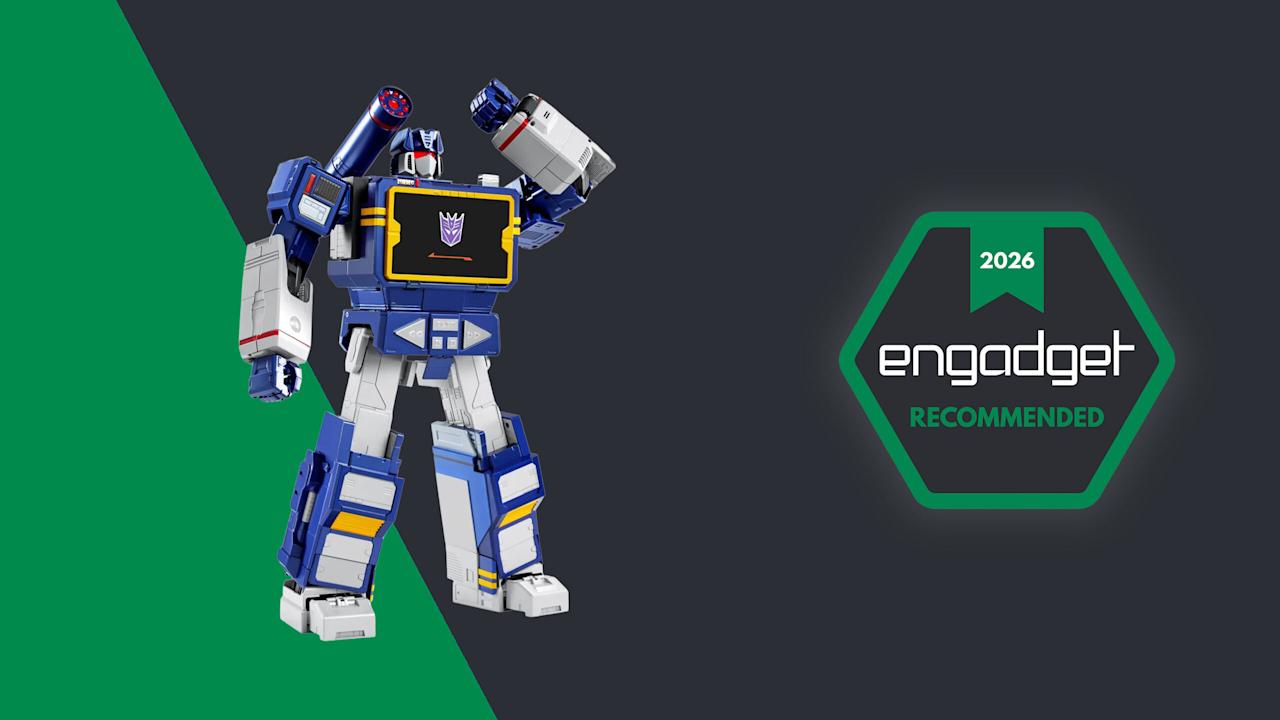
For anyone fond of old-school Transformers, Robosen’s auto-converting Soundwave is like a child’s dream come true. The only real downside is that it’s too expensive for any kid to afford.

Pros

  • It actually transforms and walks on its own!!!
  • High quality G1-inspired design
  • Voice lines by Frank Welker
  • Functions as a Bluetooth speaker and recorder
  • Mobile app is well designed and easy to use
Cons

  • It’s REALLY expensive
  • Did I mention it costs $1,400?
  • Voice recognition can be hit or miss
  • Mediocre audio quality

Design: More than meets the eye

As a follow-up to previous bots featuring Optimus Prime, Megatron, Bumblebee, Grimlock and others, Soundwave was a superior choice, and Robosen has done a more than respectable job of bringing him to life. Not only can he spit out classic lines performed by original voice actor Frank Welker, both his robot and alt modes are a vision straight out of the first-generation (G1) cartoon. Everywhere you look, there are a ton of lovingly crafted details like the working eject button for the cassette slot and all sorts of lights. Robosen’s head sculpt is spot on, and it even includes additional LEDs for his eyes and shoulder cannon. Granted, there is a bit of kibble (aka what fans call out of place parts leftover from transformation), like hands that don’t properly fold away when Soundwave turns into a boombox, but that’s really nitpicking. Between his incredibly accurate design, vocoder-powered vocals and an imposing stature that stands at around 14 inches tall, there’s no way you can call this rendition of Soundwave uncharismatic.

A simply superior head sculpt.

A simply superior head sculpt. (Sam Rutherford for Engadget)

However, the real magic happens when you turn him on (there’s a little button on his back) and say “Hey, Soundwave.” From here, you can use more than 50 different voice commands to boss him around like you’re the leader of the Decepticons. This includes asking him to say iconic lines, respond to an Autobot attack or just wishing someone a happy birthday. Naturally, the most impressive request is asking him to transform, at which point 28 high-precision servo motors and multiple motion sensors coordinate. This allows Soundwave to convert from boombox mode to robot and back again, complete with the required sound effects. Even as a jaded adult, there’s still something incredibly enchanting about watching a Transformer actually transform on its own. But that pales in comparison to the one-of-a-kind reaction my four-year-old son gave me when I repeated the process for him. There was a joy in his face I’m not sure a grown-up can truly express, as he gets to experience this without knowing this bot costs a cool $1,400.

Robosen's free mobile app features a D-pad so you can easily tell the robot where to walk.

Robosen’s free mobile app features a D-pad so you can easily tell the robot where to walk. (Sam Rutherford for Engadget)

While testing Soundwave’s various commands, I did notice that his voice recognition can be somewhat hit or miss. I found that even a little background noise can cause issues. To be consistently heard, you have to speak louder than you think you should. The real key is being very deliberate with a sharp “Hi” or “Hey” to activate Soundwave’s wake phrase properly. Alternatively, if you prefer not to yell at your robots, there’s also a free companion app that allows you to send commands by simply pressing a button, which was super easy to set up and quickly became my preferred control scheme.

Here is Robosen's version of Soundwave (right) compared to the Studio Series 86 figure (left).

Here is Robosen’s version of Soundwave (right) compared to the Studio Series 86 figure (left). (Sam Rutherford for Engadget)

In addition to making it easier to get Soundwave to walk around (it’s much more fun to use a virtual D-pad than yell “Walk forward” all the time), the app also provides a more straightforward way of discovering what he can do while reducing the ambiguity of voice commands. There are handy buttons for all his voice lines and poses, plus there’s a toolkit for creating some of your own. You can also download more from the app, though there weren’t any for me to test out because Soundwave wasn’t officially out yet at the time of writing. There’s even a Mini Theatre mode that allows the bot to perform short skits, and if you’re lucky enough to own some of Robosen’s other Transformers toys, like Megatron, some of these scenes can even be performed in tandem.

I don't think any Autobots have a chance against a Soundwave this big.

I don’t think any Autobots have a chance against a Soundwave this big. (Sam Rutherford for Engadget)

One awkward thing about Roboen’s more sophisticated approach to toy robots is that Soundwave loses some of his structural integrity when his motors are off. For example, when you power him down in robot mode, he bends over backwards and gets stuck halfway between his humanoid and boombox forms. I assume this is to prevent him from falling over, which is a good thing; it just looks kind of weird. On the flip side, if you pick him up while in stereo mode, his limbs tend to droop. However, perhaps the biggest downside to Soundwave is one inherent to his design. Because his alt mode is a boombox instead of a vehicle like Optimus, Bumblebee and others, he can’t pull double duty as a remote control car. But what Soundwave lacks in mobility, he makes up for with his signature acoustic skills.

Audio: Not just a bot, he’s a real boombox too

From the front, Soundwave's boombox alt mode looks damn near perfect.

From the front, Soundwave’s boombox alt mode looks damn near perfect. (Sam Rutherford for Engadget)

Soundwave turning into a boombox that can’t play music just wouldn’t make sense. Thankfully, that’s not an issue as this bot’s buttons aren’t just for show. Hitting Play lets you listen to original tracks from the G1 cartoon, complete with the ability to pause or skip to the next track. You can also hold the record button to save a personal message for later, though I found this feature has a bit of a learning curve as Soundwave tends to cut out one or two seconds from the beginning and end of a clip.

Inside the app, there's also a big list for all of Soundwave's voice lines and poses.

Inside the app, there’s also a big list for all of Soundwave’s voice lines and poses. (Sam Rutherford for Engadget)

Most importantly, if you want Soundwave to play other tunes, you can pair it with your phone or pretty much any other mobile device and use him just like a typical Bluetooth speaker. Now it probably won’t be a surprise when I say that Soundwave’s audio quality is mediocre at best. With all the various sensors, motors and moving parts, there probably isn’t a ton of room for fancy drivers, so things sound tinny and flat. But in a way, that’s kind of endearing because the vast majority of portable speakers back in the 80s didn’t sound great either. The one thing I wish Robosen had included was a proper cassette player to really capitalize on Soundwave’s classic audio capabilities. That said, even though I still have stacks of CDs and DVDs in my house, I don’t have any tapes (despite their resurgence), so I get why that feature didn’t make it.

Battery life

It may not be period accurate, but the addition of a USB-C port around back for power is a really nice touch.

It may not be period accurate, but the addition of a USB-C port around back for power is a really nice touch. (Sam Rutherford for Engadget)

Soundwave comes with a built-in 1,650mAh battery which takes about 120 minutes to charge from dead to full while offering a standby time of around 60 minutes. During my testing, I found you can get a solid 20 to 30 minutes of playtime out of him, which felt like plenty. Of course,that depends a ton on how much moving around you tell him to do. And while it certainly isn’t period authentic, I really appreciate the inclusion of a USB-C port for charging.

Wrap-up

The funny thing about Robosen’s Soundwave is that a toy like this would have been priceless to me as a child. But now that I’m older and I have to attach a value that goes beyond its basic price, things are a lot trickier.

I love Robosen’s attention to detail. The figure looks incredible and getting voice lines from the original actor shows there’s more than meets the eye to the robot’s design. But most importantly, seeing Soundwave transform on his own and stomp around like he does in the show will never get old.

As you'd expect from a toy this expensive, Robosen's packaging is excellent.

As you’d expect from a toy this expensive, Robosen’s packaging is excellent. (Sam Rutherford for Engadget)

On the other hand, $1,400 can buy the whole family a nice three-day vacation or more than two dozen regular Transformers toys. That kind of math makes it difficult to add this Cybertronian to the household register. But for anyone who has a budget similar to a Michael Bay movie, this take on Soundwave really does feel like a dream come true. Aside from some of Robosen’s other products, this robot is certainly made of sterner stuff.


Source link

Leave a Reply

Subscribe to Our Newsletter

Get our latest articles delivered straight to your inbox. No spam, we promise.

Recent Reviews


What is Power BI?

Power BI is a tool offered by Microsoft for business analytics that allows you to visualize your data and share insights. To build interactive dashboards and Business Intelligence reports, it converts data from various sources.

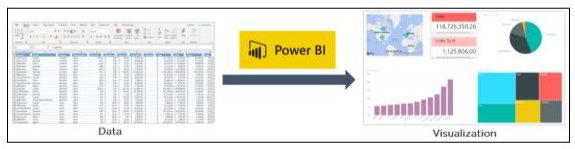
What is Power BI

In the above illustration, you can see there is an excel document and we have some sales info. Power BI lets you create numerous charts and graphs to visualize the data using this information. Now that you’ve learned what Power BI is, let’s comprehend why you need Power BI.

Become a Power BI Certified professional by learning this HKR Power BI Training !

Why Power BI?

The contributing factors why Power BI is so common and essential in the BI domain are as follows:

1. Access to Data Volumes from Multiple Sources

Power BI can access large volumes of multi-source data. This helps you to view, evaluate, and display massive volumes of data that cannot be accessed in Excel. Excel, CSV, XML, JSON, pdf, etc. are some of the essential data sources available for Power BI. To import and store the data inside the “.PBIX” format, Power BI uses strong compression algorithms.

2. Features of an Interactive UI/UX

Power BI renders items visually attractive. With features that allow you to copy all formatting across similar visualizations, it has a simple drag and drop feature.

3. Exceptional Integration of Excel

Power BI assists to collect, analyze, distribute, and exchange business data from Excel. Anyone acquainted with Office 365 can easily connect to Power BI Dashboards with Excel queries, data models, and reports.

4. Boost preparation for big data with Azure

The use of Power BI with Azure enables you to analyze and exchange large data volumes. An azure data lake will minimize the time it consumes for business analysts, data engineers, and data scientists to get insights and increase collaboration.

5. Transform Insights to Action 

To make data-driven business decisions, Power BI enables you to obtain insights from data and transform those insights into actions.

6. Stream Analytics in Real-Time

You will be able to perform real-time stream analytics with Power BI. For gaining access to real-time analytics, it allows you to gather data from various sensors and social media sources, so you are still able to make business decisions.

Power BI Training

  • Master Your Craft
  • Lifetime LMS & Faculty Access
  • 24/7 online expert support
  • Real-world & Project Based Learning

The Architecture of Microsoft Power BI 

To work together, Power BI is a business network that includes many technologies. It offers excellent solutions for business intelligence. There are four phases in Power BI Architecture. Let’s talk about these four measures that provide detailed information about each of them.

  • Sourcing Data
  • Transforming Information
  • Report & Publish
  • Creating a Dashboard

The Architecture of Microsoft Power BI

1. Data Sourcing

Power BI can deliver data from a wide variety of internet resources and types of files. To receive the information, the information can be imported into Power BI or a live service connection can be installed. If you import a Power BI file, the data sets that are compressed are limited to 1 GB. If the information collection reaches 1 GB, it is possible to use a direct query. There are two other options for huge data sets.

  • Power BI premium.
  • Azure analytics services.

List of Supported Power BI Data Sources

Files:

Excel, XML, JSON, Text/CSV,Folder and SharePoint Folder.

Database:

SQL Server Database, Access Database, SQL Server Analysis Services Database, SAP HANA Database, SAP Business Warehouse server, Amazon Redshift, Impala, Google BigQuery (Beta), Snowflake, Oracle Database, IBM DB2 Database, IBM Informix database (Beta), IBM Netezza (Beta), MySQL Database, PostgreSQL Database, Sybase Database, Teradata Database.

Azure:

Azure SQL Database,  Azure SQL Data Warehouse, Azure Analysis Services database (Beta), Azure Blob Storage, Azure Table Storage, Azure Cosmos DB (Beta), Azure Data Lake Store, Azure HDInsight (HDFS), Azure HDInsight Spark (Beta).

Online Services:

Power BI service, SharePoint Online List, Microsoft Exchange Online, Dynamics 365 (online), Dynamics 365 for Financials (Beta), Common Data Service (Beta), Microsoft Azure Consumption Insights (Beta), Visual Studio Team Services (Beta), Salesforce Objects, Salesforce Reports, Google Analytics, appFigures (Beta), comScore Digital Analytix (Beta), Dynamics 365 for Customer Insights (Beta), Facebook, GitHub (Beta), Kusto (Beta), MailChimp (Beta), Mixpanel (Beta), Planview Enterprise (Beta), Projectplace (Beta), QuickBooks Online. 

Other:

Vertica (Beta), Web, SharePoint List, OData Feed, Active Directory, Microsoft Exchange, Hadoop File (HDFS), Spark (Beta), R Script, ODBC, OLE DB, Blank Query.

Top 50 frequently asked Power BI Interview Questions !

2. Transforming information:

Power BI provides a preview window for selecting columns or entities after the information is imported into the Powerbi system. If you need to edit the query, there are many transformation choices available to perform the work.

3. Report and Publish:

After sourcing and editing the data, we are ready to produce reports. Reports are the data visualizations in the form of graphs, charts, and pie charts with filters and slicers. There is also a great deal of custom visualization accessible. After generating reports, we will publish them to power bi facilities. You may also publish them on the energy bi-server assumption.

4. Dashboard Creation:

After publishing reports for Power BI services, we can build dashboards by pinning the individual elements or by pinning the page of the live report. When the report is saved when pinning the individual components, the visual retains the filter setting chosen. Pinning the Live Report page helps the dashboard user to interact with the visual by selecting slicers and filters.

Power BI Components

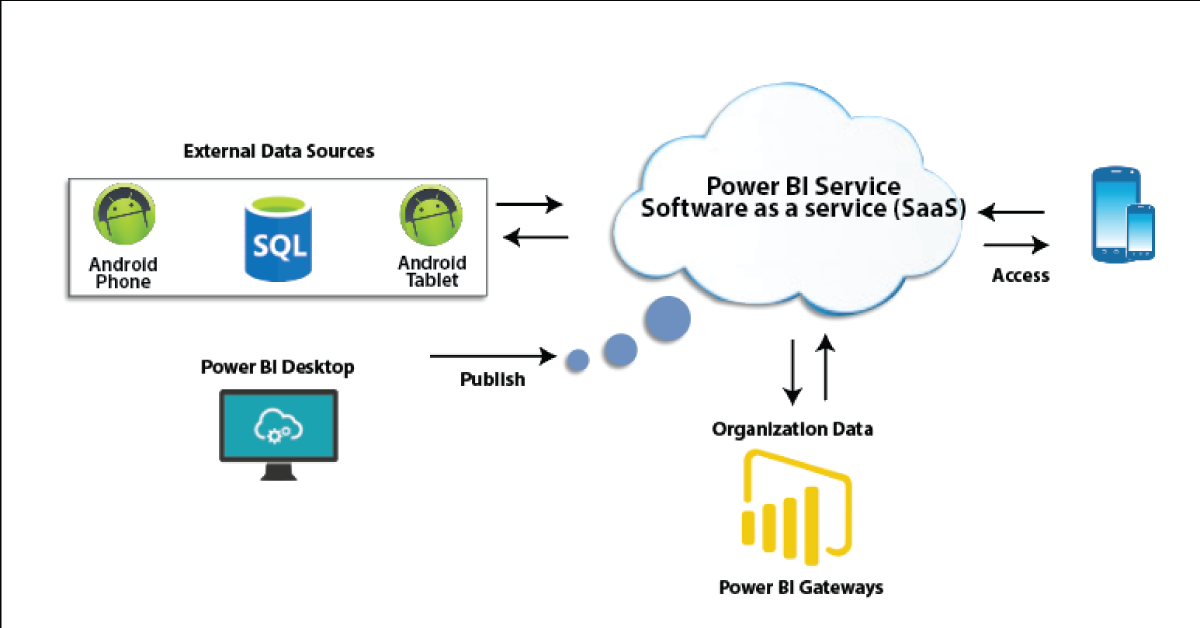
Power BI Components

In Power BI, three main components play a significant role in providing Power BI capabilities.

1. Power BI Desktop:

Power BI Desktop is a free application that provides your local desktop to connect, convert and visualize your data. With Power BI Desktop, you can connect to numerous different information sources and merge them (often called modeling) into a data model that allows you to build graphics and image collections that you can share as records with other people within your enterprise. Power BI Desktop is used for most users working on Business Intelligence projects to produce reports and then to exchange their reports with others using Power BI.

2. Power BI Gateway:

By connecting to your on-site data sources without moving the info, the on-site Power BI gateway can be used to keep your data fresh. It helps you to query and take benefit of current investments from large datasets. With on-site gateways, you can keep your data fresh by connecting to your on-site data sources without the need to move the data. Request huge datasets and benefit from existing investments. The gateways provide the versatility you need to meet the individual requirements and needs of your organization.

3. Power BI Mobile Apps:

You can use Power BI mobile apps to stay connected to your details from anywhere. Power BI apps are available for the Windows, iOS, and Android platforms.

4. Power BI Service:

This is a cloud service for producing accounts of Power BI and data visualization. It enables designers and BI experts to produce and distribute highly formatted, pixel-perfect reports alongside their interactive Power BI content, becoming the first cloud BI solution that blends self-service BI energy with the specifications and capabilities of conventional Enterprise BI scenarios.

Power BI Service

There are also other modules that we should comprehend in order to benefit from Power BI’s advanced capabilities.

Power BI's advanced capabilities

5. Power Query:

Data mashup and conversion instrument. With Power Query in Power BI, you can connect to several different information sources, transform the data into a format you want, and be able to quickly generate reports and ideas. When using Power BI Desktop, Power Query functionality is provided in the Power Query Editor. Power Query is made accessible through the Power Query Editor on the Power BI Desktop. To open the Power Query Editor, from the Power BI Desktop Home tab, choose Edit Queries.

Power Query

6. Power Q & A:

Question and Reply Engine for Natural Language. The easiest way to get an answer from your data is often to ask a question using natural language. To explore your results, the Power BI Q & A feature allows you to use your phrases. In various papers on Power BI mobile applications and Q & A with Power BI Embedded, Q & A is discussed.

Power Q & A

7. Power Map: 

To demonstrate how the values differ in proportion across the region, the Power BI Query is used. It also displays variations in shading from dark to light. It provides a geospatial 3D tool for the visualization of data.

Power Map

8. Power Pivot:

Power Pivot is a memory modeling component that allows highly compressed data storage and extremely fast aggregation and calculation of information. As part of Excel, it is also available and can be used for creating a data model inside an Excel workbook. Power Pivot can load data on its own, or data can be loaded into it by Power Query. It is extremely similar to the SSAS (SQL Server Analysis Services) tabular model, which is like a server-based Power Pivot version. 

To gain in-depth knowledge with practical experience in Power BI, Then explore hkr’s Power BI Training In Hyderabad !

9. Power View:

Power View is an interactive visualization platform that provides users with a drag-and-drop interface to rapidly and effortlessly construct visualizations of data in their Excel workbooks (using the Power Pivot data model).

Power View

10. SSRS Reporting services 2016:

SSRS tiles are taken to a Power BI dashboard with expected SQL Server Agent updates through the integration of SQL Serb Reporting and the Power BI Services. The tile from SSRS reports gives you this integration. Integrating SSRS reports into the Power BI service will build a connection from the Power BI dashboard to detailed SSRS reports.

SSRS Reporting services 2016

HKR Trainings Logo

Subscribe to our YouTube channel to get new updates..!

The Architecture of Power BI Clusters 

Azure, Microsoft’s cloud computing platform, is the basis of the Power BI service. Power BI is currently installed in several data centers around the world, with many active deployments made available to clients in the regions served by these data centers, with an equivalent number of passive deployments serving as backups for each active deployment.

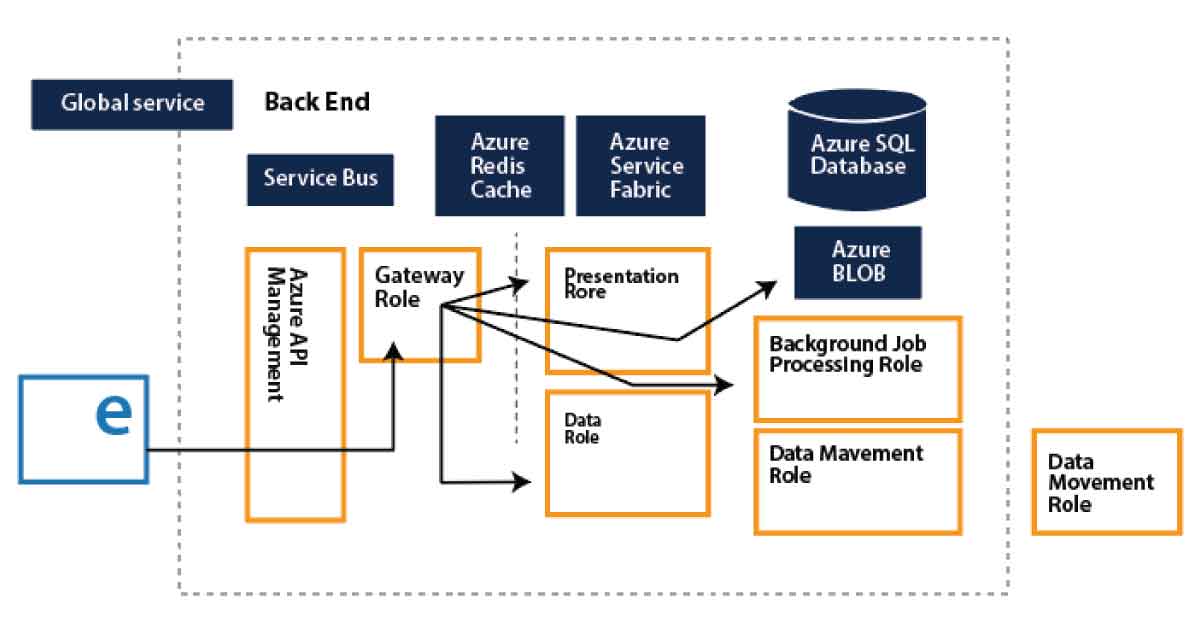
Every Power BI deployment consists of two clusters, the Web Front End (WFE) cluster, and the Back End cluster. These two clusters are seen in the following picture:

1. WFE Cluster:

To authenticate customers and provide tokens for subsequent Power BI customer connections, the WFE cluster manages the original Power BI link and authentication mechanism using AAD. The Azure Traffic Manager (ATM) is also used by Power BI to direct customer traffic to the nearest datacenter, which is determined by the DNS record of the client attempting to connect, authenticate and download static content and files. Power BI effectively distributes the appropriate static content and files to customers based on geographical location, using the Azure Content Delivery Network (CDN).

WFE Cluster

2. Backend Cluster:

The Back-End cluster is how authenticated clients interact with the Power BI service. Visualization, user dashboards, datasets, reports, data storage, information links, information refresh, and other Power BI service interaction elements are managed by the Back-End cluster. The Role Gateway works as a gateway between the demands of clients and the Power BI service. Users do not directly communicate with positions other than the gateway’s role. Azure API Management will eventually manage the gateway role.

Backend Cluster

Want to know more about Power BI,visit here Power BI Tutorial !

How would Power BI be an industry game-changer?

Through its data catalog and data management gateway, Power BI integrates centralized DW / BI techniques with cloud data sources and self-service tools, as no other application has yet been able to do. And all of its functionality is bundled as a SaaS solution so that any firm can successfully incorporate and use it. In short, the adoption curve can be accelerated by Power BI and making sophisticated BI Analytics as popular as Excel itself.

Power BI offers game-changing capabilities for all BI platform stakeholders:

1. End-users:

For a long time, end users expected the ability to readily access and analyze information. To allow each worker to use data as a basis for decision making, the natural language query of Q&A and the smart visualization engine can do more.

2. BI Analysts:

Over vast volumes of data, Power Pivot gave power users the opportunity to construct successful data models, but the information required to “fit” into clean data models.  Power Query’s data transformation and versatility further empower analysts to build their own end-to-end alternatives quickly.

3. IT & Data Managers:

The topic of push-pull has always been BI self-service. Everyone needs the tools and knowledge that customers need to make great choices. However, Good governance, protection, and auditing are also seen as an obstacle to change for power users. The catalog of Power BI data is interesting because it promotes self-service and governance simultaneously.

Not every business will move quickly to implement Power BI. Too much strategic change would be expressed too quickly for others. For some, there might be genuine regulatory or other factors that preclude consideration of cloud-based systems.

But it has been difficult and cost-prohibitive for many organizations to set up an open and comprehensive BI network. Power BI is really the solution that eventually renders sophisticated BI as easy to use as a search engine and generally accepted.

Power BI Training

Weekday / Weekend Batches

Conclusion

We had provided detailed information about the Power BI Architecture, its operations, and components in this blog. And we’ve also explained the Power BI service and its operation. After exploring this blog, you might have comprehended the need for Power BI in Business Intelligence, what Power BI is, and the various Power BI features. You’ve also learned about the Power BI service, the Power BI dashboard, and how the architecture looks.

Related Article:


Source link