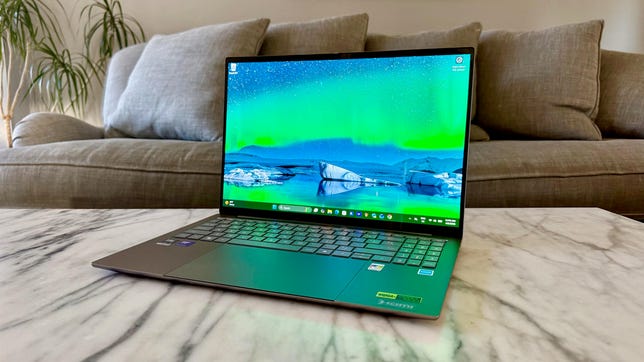


Pros
- Giant, gorgeous 16-inch OLED display
- Incredibly thin and light for its size
- Strong overall performance from Intel Panther Lake CPU
- Quiet and cool operator
Cons
- Poor audio output from underpowered speakers
- Huge haptic touchpad is so big that it gets in the way
- Some flex to the thin aluminum top and bottom panels
- Cannot expand memory or storage
The Acer Swift 16 AI gets a bump from Intel Lunar Lake on last year’s model to Panther Lake this year. While application and especially graphics performance have improved, pricing has also gone up, which is not unique to Acer’s laptops, thanks to the global RAM shortage. Pricing for this year’s models is near the point where the benefit of the integrated Intel B390 GPU with its 12 Xe cores starts to lose its shine because laptops with dedicated Nvidia RTX graphics cost roughly the same or not much more.
The other change Acer made to the Swift 16 AI is adding a gigantic haptic touchpad that comes with pen support and an included pen. I’m generally a huge fan of huge haptic touchpads, but the Swift 16 AI’s is a case of too much of a good thing. And my biggest criticism of last year’s model still applies to this year’s version: the speakers stink. And that’s a shame given the entertainment prospects of the roomy 16-inch OLED display.
The Swift 16 AI remains a great work laptop. The huge, 16-inch display provides plenty of space for multitasking productivity, and its strong color performance, combined with the very capable integrated Panther Lake GPU, also lends the system some appeal for creators looking for a big-screen laptop with a thin design and easy carrying weight. At or near the price of my test system, however, you can find a 16-inch OLED laptop backed by RTX graphics. For creators, I recommend the Lenovo Yoga Pro 9i 16 Aura Edition, which offers a 16-inch OLED display with RTX 5050 graphics for $1,950 at Best Buy.
Acer Swift 16 AI (SF16-71T-73P1)
| Price as reviewed | $1,800 |
|---|---|
| Display size/resolution | 16-inch 2880×1800 120Hz touch OLED |
| CPU | Intel Core Ultra X7 358H |
| Memory | 32GB LPDDR5-9600 |
| Graphics | Intel Arc B390 (12 Xe3 cores) |
| Storage | 1TB SSD |
| Ports | USB-C Thunderbolt 4 (x2), USB-A 3.2 (x2), HDMI 2.1, microSD card slot, combo audio |
| Networking | Wi-Fi 7 and Bluetooth 6.0 |
| Operating system | Windows 11 Home |
| Weight | 3.3 pounds (1.5 kg) |
Acer sells three models of the Swift 16 AI, and my test model sits in the middle of the series. It costs $1,800 at Acer and features an Intel Core Ultra X7 358H CPU, 32GB of RAM, Intel Arc B390 graphics and a 1TB SSD. It’s based on a 16-inch OLED display with a 2,880×1,800-pixel resolution, smooth 120Hz refresh rate and touch support.
The entry-level model costs $1,600 at Acer and is currently discounted to $1,550 at Best Buy. It’s the same as my test model, except it has half the memory at 16GB. It’s the only one of the three currently available at Best Buy.
The top-end model costs $1,199 at Acer, which is the same as my test model, but bumps you up to a Core Ultra X9 388H processor.
The Acer Swift 16 AI starts at £1,599 in the UK. I found a product page for the Swift 16 AI on Acer’s Australia site, but no pricing was available.
Acer made a late change to the Swift 16 AI, swapping the dull gray chassis with silver accents that I tested for a darker charcoal gray color and gold accents.
Color change for the better
Acer sent me a Swift 16 AI in a rather drab gray color with silver accents, but has since made a change in the design — and it looks to my eye that it’s a change for the better. Instead of safe corporate gray, the 2026 models of the Swift 16 AI will come outfitted in a darker gray, almost charcoal chassis with gold accents and an Acer logo on the top cover. From photos, the updated color scheme adds a little more personality to the system — less corporate and more consumer.
The Acer Swift 16 AI shown in its updated charcoal and gold color scheme.
Like last year’s model, this year’s edition boasts a thin, all-aluminum chassis that’s exceptionally light for its size. It weighs just 3.3 pounds, which is slightly lighter than last year’s Swift 16 AI, which weighed 3.4 pounds. This year’s version weighs the same as the 15-inch MacBook Air and has a larger screen.
As much as I like being able to slip the Swift 16 AI in my laptop bag — and it comes with a protective sleeve — the laptop feels almost too thin. Or at least the aluminum material used for the laptop feels too thin. There’s some flex in the top and bottom panels that I’d be more willing to accept in, say, Acer’s budget Aspire series, but I’m looking for a finer fit and finish when the price approaches $2,000. However, without the uninterrupted aluminum expenses of the top and bottom panels, the keyboard deck feels more rigid.
The Acer Swift 16 AI’s design will feature much darker gray than the dull gray color that I received.
I also like getting a haptic touchpad at this price, so I was excited to see that Acer added a large touchpad with haptic feedback for this update. Acer calls it “the world’s largest haptic touchpad,” and I’m not here to argue with that claim. It’s absolutely massive, measuring 6.9 inches wide by 4.3 inches tall. The problem I found with it is that it runs right to the front edge of the laptop, leaving no border for helping with palm rejection. The borderless front edge, combined with its gigantic size, had me accidentally bumping against or resting on its surface, resulting in unintended cursor jumps and interrupted scrolling.
In any color, the Acer Swift 16 AI’s haptic touchpad is huge.
Acer includes an MPP2.5 active stylus with the laptop for use with the touchpad, but not the screen. The display has touch support for tapping and swiping with your fingertip, but doesn’t have pen support. No, the pen is for sketching and drawing or scribbling notes and e-signatures on the surface of the giant touchpad. If that type of pen support matches your workflow, then you’re likely to enjoy the enormous touchpad. For the rest of us, a more sensibly proportioned touchpad is probably preferred.
Likewise, Excel jockeys will enjoy the inclusion of a number pad, but I’d rather sacrifice its narrow keys for the ability to have the rest of the keyboard centered below the display rather than positioned to the left. The keys themselves have a predictably shallow travel due to the thinness of the laptop, but I liked typing on the Swift 16 AI. The keys offer firm, springy feedback.
Acer includes an active pen with the Swift 16 AI to write on the touchpad but not the touch display.
Display and speakers stay the same, webcam gets worse
Acer runs back the same display from last year and for good reason: it’s a fantastic 16-inch OLED panel. It offers a crisp, 2,880×1,800-pixel resolution with vivid color and deep blacks. On my display tests with a Spyder X Elite colorimeter, the Swift 16 AI showed excellent color accuracy, covering 100% of the sRGB and P3 gamuts and 94% of AdobeRGB. It also hit a peak brightness of 403 nits, providing bright whites to go with the effective zero-nit black levels for superb contrast. The one drawback to the display is its glossy finish; you’ll find yourself bobbing and weaving to get around glare and reflections at times.
The 16-inch OLED display is big and bright but glossy.
Acer also runs back the same setup underpowered, downward-firing stereo speakers that sound tinny and flat. It’s disappointing to have such a big display that’s great for watching shows and movies paired with such underwhelming speakers. It’s too bad that Acer couldn’t find room on this large laptop for a quad-speaker array with fuller sound.
The webcam takes a step back with this year’s model, moving down from a 1440p camera to 1080p. Images and videos are grainier than what I experienced with last year’s model, especially in low-light environments. The camera does have an IR sensor for facial recognition logins via Windows Hello, which is the only biometric option because the laptop lacks a fingerprint reader.
New to this year’s version of the Acer Swift 16 AI: a microSD card slot.
The port selection offers two USB-C Thunderbolt 4 and two USB-A ports along with an HDMI port and headphone jack and adds a microSD card slot in a nod to creators eyeing the Swift 16 AI.
Inside, there’s no room for expansion. The RAM is soldered to the motherboard and therefore not user-replaceable. And there’s only a single M.2 slot, which is occupied by a 1TB SSD.
The Acer Swift 16 AI has no room inside for expansion.
Acer Swift 16 AI performance and battery life
Based on the 16-core (four performance cores, eight efficient cores and four low-power efficient cores) Intel Core Ultra X7 358H processor, 32GB of fast 9,600MHz RAM and Intel’s integrated Arc B390 graphics that has 12 Xe3 GPU cores, the Swift 16 AI proved itself to be a very capable performer in lab testing. It showed big leaps in multi-core performance from last year’s model on our Geekbench 6 and Cinebench 2024 tests, and even bigger gains in 3D graphics performance.
It provided playable framerates on our Shadow of the Tomb Raider and Guardians of the Galaxy benchmarks at 1080p. On more demanding titles like Assassin’s Creed Shadows and F1 24, however, you’ll need to employ Intel’s XeSS Frame Generation to get to 60 frames per second or lower the resolution or quality settings. Still, for a thin-and-light laptop with an iGPU, getting this level of 3D performance is a boon. Also a boon: the Swift 16 AI stays remarkably cool and quiet, even under heavy load.
The Swift 16 AI’s result on our YouTube streaming battery drain test was good, but I was expecting more. It ran for 13.5 hours, which is fantastic for a big-screen, high-res OLED laptop, but it was only about an hour longer than last year’s model.
Should I buy the Acer Swift 16 AI?
You should get it if you’re looking for a thin-and-light, big-screen OLED laptop. You won’t find many 16-inch models that are lighter than the 3.3-pound Swift 16 AI. And with its modern Panther Lake CPU and ample RAM, it delivers strong performance and lengthy battery life. For only $150 more, though, I still like the Lenovo Yoga Pro 9i 16 Aura Edition for its better build quality and added RTX graphics muscle, even if it is more than a pound heavier.
The review process for laptops, desktops, tablets and other computerlike devices consists of two parts: performance testing under controlled conditions in the CNET Labs and extensive hands-on use by our expert reviewers. This includes evaluating a device’s aesthetics, ergonomics and features. A final review verdict is a combination of both objective and subjective judgments.
The list of benchmarking software we use changes over time as the devices we test evolve. The most important core tests we’re currently running on every compatible computer include Primate Labs Geekbench 6, Cinebench R23, PCMark 10 and 3DMark Fire Strike Ultra.
A more detailed description of each benchmark and how we use it can be found on our How We Test Computers page.
Geekbench 6 CPU (multi-core)
Apple MacBook Pro 14 (M5, late 2025) 17946Lenovo Yoga Pro 9i 16 Aura Edition 17748MSI Prestige 14 Flip AI Plus 16607Dell XPS 14 16197Acer Swift 16 AI (2026) 16187MSI Katana 15 HX B14W 14587Asus Vivobook S 15 14058HP OmniBook X Flip 14 12747Acer Swift 16 AI (2025) 10993
Geekbench 6 CPU (single-core)
Apple MacBook Pro 14 (M5, late 2025) 4263Lenovo Yoga Pro 9i 16 Aura Edition 2980MSI Prestige 14 Flip AI Plus 2896Acer Swift 16 AI (2026) 2850HP OmniBook X Flip 14 2823Dell XPS 14 2813MSI Katana 15 HX B14W 2738Acer Swift 16 AI (2025) 2716Asus Vivobook S 15 2446
Cinebench 2024 CPU (multi-core)
MSI Katana 15 HX B14W 1220Lenovo Yoga Pro 9i 16 Aura Edition 1218Apple MacBook Pro 14 (M5, late 2025) 1118Asus Vivobook S 15 963Acer Swift 16 AI (2026) 915Dell XPS 14 700MSI Prestige 14 Flip AI Plus 692HP OmniBook X Flip 14 636Acer Swift 16 AI (2025) 533
Cinebench 2024 CPU (single-core)
Apple MacBook Pro 14 (M5, late 2025) 199Lenovo Yoga Pro 9i 16 Aura Edition 130Dell XPS 14 124Acer Swift 16 AI (2026) 121Acer Swift 16 AI (2025) 121MSI Katana 15 HX B14W 117MSI Prestige 14 Flip AI Plus 115HP OmniBook X Flip 14 114Asus Vivobook S 15 107
3DMark Steel Nomad
Lenovo Yoga Pro 9i 16 Aura Edition 2278MSI Katana 15 HX B14W 2207MSI Prestige 14 Flip AI Plus 1527Acer Swift 16 AI (2026) 1440Dell XPS 14 1286Apple MacBook Pro 14 (M5, late 2025) 1129Acer Swift 16 AI (2025) 679Asus Vivobook S 15 496HP OmniBook X Flip 14 456
3DMark Fire Strike Ultra
MSI Katana 15 HX B14W 6285Lenovo Yoga Pro 9i 16 Aura Edition 6247MSI Prestige 14 Flip AI Plus 3491Acer Swift 16 AI (2026) 3205Dell XPS 14 3019Acer Swift 16 AI (2025) 2185HP OmniBook X Flip 14 1916
PCMark 10 Pro Edition
Lenovo Yoga Pro 9i 16 Aura Edition 9754Acer Swift 16 AI (2026) 9219Dell XPS 14 8981MSI Prestige 14 Flip AI Plus 8761HP OmniBook X Flip 14 7199MSI Katana 15 HX B14W 7024Acer Swift 16 AI (2025) 6855
Shadow of the Tomb Raider (Highest @ 1920 x 1080)
Lenovo Yoga Pro 9i 16 Aura Edition 159MSI Katana 15 HX B14W 155Acer Predator Helios Neo 16 PHN16-71 136Acer Nitro 16 AN16-41-R3ZV 126Dell XPS 14 9440 84MSI Prestige 14 Flip AI Plus 64Acer Swift 16 AI (2026) 58M5 Apple MacBook Pro 14 56Dell XPS 14 50
Guardians of the Galaxy (High @1920 x 1080)
Acer Predator Helios Neo 16 PHN16-71 165MSI Katana 15 HX B14W 159Lenovo Yoga Pro 9i 16 Aura Edition 155Acer Nitro 16 AN16-41-R3ZV 128Dell XPS 14 9440 108Acer Swift 16 AI (2026) 67Dell XPS 14 64MSI Prestige 14 Flip AI Plus 44
The Riftbreaker GPU (1920 x 1080)
MSI Katana 15 HX B14W 231.99Lenovo Yoga Pro 9i 16 Aura Edition 222.47Acer Nitro V 16S AI 217.77Acer Nitro 16 AN16-41-R3ZV 193.65Dell XPS 14 9440 118.43Dell XPS 14 113.13Acer Swift 16 AI (2026) 100.44MSI Prestige 14 Flip AI Plus 80.74
Assasin’s Creed Shadows (1920×1080 @ High)
MSI Katana 15 HX B14W 53Lenovo Yoga Pro 9i 16 Aura Edition 48MSI Prestige 14 Flip AI Plus 27Acer Swift 16 AI (2026) 25Dell XPS 14 24
F1 24 (1920×1080 @ Ultra High)
MSI Katana 15 HX B14W 104Lenovo Yoga Pro 9i 16 Aura Edition 76Acer Swift 16 AI (2026) 34Dell XPS 14 33MSI Prestige 14 Flip AI Plus 25
Online streaming battery drain test (in minutes)
MSI Prestige 14 Flip AI Plus 25 hr, 18 minM5 Apple MacBook Pro 14 22 hr, 59 minAsus Vivobook S 15 15 hr, 26 minDell XPS 14 14 hr, 42 minAcer Swift 16 AI (2026) 13 hr, 34 minAcer Swift 16 AI (2025) 12 h 20 minLenovo Yoga Pro 9i 16 Aura Edition 11 hr, 33 minHP OmniBook X Flip 14 9 hr, 1 minMSI Katana 15 HX B14W 6 hr, 14 min
System configurations
| Acer Swift 16 AI (2026) | Windows 11 Home; Intel Core Ultra X7 358H; 32GB DDR5 RAM; Intel Arc B390 Graphics; 1TB SSD |
|---|---|
| Dell XPS 14 | Windows 11 Home; Intel Core Ultra X7 358H; 32GB DDR5 RAM; Intel Arc B390 Graphics; 1TB SSD |
| MSI Prestige 14 Flip AI Plus | Windows 11 Home; Intel Core Ultra X7 358H; 32GB DDR5 RAM; Intel Arc B390 Graphics; 1TB SSD |
| Acer Swift 16 AI (2025) | Windows 11 Home; Intel Core Ultra 7 256V; 16GB DDR5 RAM; Intel Arc 140V Graphics; 1TB SSD |
| Asus Vivobook S 15 | Windows 11 Home; Qualcomm Snapdragon X Elite X1E-78-100; 16GB DDR5 RAM; Qualcomm Adreno Graphics; 1TB SSD |
| HP OmniBook X Flip 14 | Windows 11 Home; AMD Ryzen AI 7 350; 32GB DDR5 RAM; AMD Radeon 860M Graphics; 1TB SSD |
| Lenovo Yoga Pro 9i 16 Aura Edition | Windows 11 Home; Intel Core Ultra 9 285H; 32GB DDR5 RAM; Nvidia GeForce RTX 5050; 1TB SSD |
| MSI Katana 15 HX B14W | Windows 11 Home; Intel Core i7-14650HX; 16GB DDR5 RAM; Nvidia GeForce RTX 5050; 512GB SSD |
| Acer Predator Helios Neo 16 PHN16-71 | Windows 11 Home; Intel Core i5-13500HX; 16GB DDR5 RAM; Nvidia GeForce RTX 4050; 512GB SSD |
| Acer Nitro 16 AN16-41-R3ZV | Windows 11 Home; AMD Ryzen 5 7640HS; 16GB DDR5 RAM; Nvidia GeForce RTX 4050; 512GB SSD |
| M5 Apple MacBook Pro 14 | Apple MacOS Tahoe 26.0.1; Apple M5 (10-core CPU, 10-core GPU); 16GB LPDDR5; 1TB SSD |

Stephan is the sports journalist for the Maple Grove Report.