AI Researchers, Ask Yourself These 6 Questions to Strengthen Your Moral Muscles


Welcome to CNET’s new series of guest columns called Alt View, a forum for a diverse array of experts and luminaries to share their insights into the rapidly evolving field of artificial intelligence. For more AI coverage, check out CNET’s AI Atlas.


Of course you have moral principles – but how often do you use them? 

I, Meia, am a professor doing psychology research, and I can tell you that most bad outcomes are caused not by a lack of moral principles, but by them not being activated. I, Max, am a professor doing AI research, and I can tell you that your choices as an AI researcher truly matter, because you’re helping build what will become the most powerful technology ever: AI will gain the potential to bring either unprecedented health, prosperity, liberty, dignity and empowerment, or a race to replace our jobs, our relationships, our decision-making, our power and even our species. 

Hardly a day goes by without the AI community facing moral decisions, on topics ranging from AI companions to surveillance, hacking and military use. Many top AI companies are fighting lawsuits about everything from data centers to AI safety, most prominently in the courtroom drama featuring OpenAI’s Sam Altman and xAI’s Elon Musk. Meanwhile, Anthropic is in a prolonged showdown with the Pentagon. 

So for all you AI researchers out there, here’s a handy checklist to tone up your moral strength.

1. Do you have red lines? 

Is there any action that you find so morally unacceptable that, if the organization you work for takes it, you’ll quit? Or take some other predetermined costly action, say, whistleblowing? Such actions are your moral red lines. 

CNET Alt View badge

For example, Rosa Parks got fined and fired for her civil disobedience against segregation; Vasily Arkhipov was criticized after vetoing a Soviet nuclear strike against the US; and Edward Snowden ended up in exile for whistleblowing on mass surveillance. Many AI researchers have left top AI companies that crossed their red lines, including Daniel Kokotajlo, who risked almost $2 million in equity by quitting OpenAI without signing a nondisparagement agreement. What are your red lines?

2. Have you written them down and shared them? 

Both George Washington and Benjamin Franklin wrote down moral guidelines for themselves, with Franklin grading his own performance weekly. This is a powerful tool for avoiding the boiling frog effect, protecting your red lines against gradual erosion as in the examples at the end of the next section. Sharing them with loved ones or online adds social pressure to stick to them. For each red line, make sure to write down what action you commit to taking if it is crossed. You can click here to list your red lines (we will only share them with your permission).

3. Have you resisted moral disengagement? 

To further strengthen your moral muscles and ensure that your red lines don’t move, it’s helpful to know what failure mechanisms to watch out for. Disengaging your muscles makes you weak – and this applies to your moral muscles as well. So let’s look at moral disengagement mechanisms identified by Albert Bandura, one of the most impactful psychologists of all time. This will help you spot them and fight them when your red lines get pressured by your company, your social circle, the temptation of personal gain or the desire to feel good about yourself. 

Displacement and diffusion of responsibility: You’ll feel better if you or others convince you that you’re not really responsible for the harm: The real decision maker is leadership, investors, the market, geopolitics or history (“this technology is inevitable”). When AI work is distributed across large teams, everyone feels less accountable for the collective outcome. “I’m just a researcher,” or, “I was just doing my job,” are archetypical excuses identified by the influential political theorist Hannah Arendt. The satirical musician Tom Lehrer sums it up in this hilarious song about the rocket scientist who switched allegiance from Nazi Germany to the US: “‘Once the rockets go up, who cares where they come down – that’s not my department,’ says Wernher von Braun.”

For example, an Anthropic researcher reading about how Claude AI may have been implicated in killing over 150 Iranian schoolgirls, in one of the worst US-caused civilian bloodbaths since the Vietnam War, may be tempted to tell themselves that they’re blameless because only management is responsible for selling their tools for military targeting.

Word games: Both Bandura and Arendt highlight how subtle word choices can reframe what’s moral. We are all familiar with military euphemisms such as “servicing a target” for bombing, “collateral damage” for civilian casualties and “enhanced interrogation techniques” for torture, but AI jargon is full of analogous word games, often encouraged by financially interested parties.

The most basic game is “euphemistic labeling”: replace morally vivid language with positive or emotionally flattened terminology. Researchers are not “helping build systems that may displace workers, manipulate users, centralize power or heighten existential risk”; they are doing “capabilities research,” “model improvement” or “benchmark progress.” Training on copyrighted data becomes “freedom to learn.” Unpopular data centers become “AI infrastructure.”  Firing or deskilling workers becomes “productivity gains,” and “lobby against accountability” becomes “reduce friction.” Please practice using neutral words like “company” instead of “lab” (which sounds cool and innocent) and “AI system” instead of “AI model” (which sounds harmless). Bandura’s point is that euphemism does not merely soften tone; it weakens conscience.

Another word game is blame attribution, where critics become the problem – “doomers,” “Luddites,” “opportunistic politicians,” “ignorant journalists” or anti-tech Europeans. Once opponents are blamed for irrationality or bad faith, the AI researcher feels less obligated to treat criticism as morally serious.

A third word game is soft dehumanization: The unemployed programmer, the individual copyright infringement victim and the chatbot suicide child disappear into categories such as “the labor market,” “creatives” and “edge cases.” The more harms are discussed statistically rather than personally, the less moral pain is triggered.

Selective moral self-exemption: It’s tempting to keep strong moral standards in general but carve out an exception around the domain from which you benefit most: An AI researcher may be passionately ethical about injustice in the abstract, while suspending those same standards when judging their own employer, AI, salary or stock grant.

Advantageous comparison: It’s tempting to compare yourself only to worse actors: “At least I’m not at the most reckless lab.” “At least I’m not working on autonomous weapons.” “At least I care about alignment.” That lets you feel ethical without asking whether your own conduct is acceptable in absolute terms.

Moral justification: For those acknowledging that they’re causing current harm, it’s tempting to justify it as serving a noble mission, say “helping democracy prevail,” “creating universal abundance” or “making sure that safety has a seat at the table” – without seriously questioning whether those lofty goals are credible, or whether there’s another way to accomplish them with less current harm.

These moral disengagement techniques can be very powerful when combined and escalated: Enron executives gradually escalated from minor financial manipulations, justified as necessary for company survival and diffused through leadership directives, to massive fraud like hiding debt. Bernie Madoff started with small return fudges rationalized as client aid, then displaced blame onto markets and dehumanized victims, leading to a $65 billion fraud through incremental moral disengagement. In the Vietnam War, soldiers obediently followed orders in a “just war,” starting with minor transgressions that escalated to massacres like My Lai through diffused responsibility and victim dehumanization.

The frontier AI researcher’s signature Bandurian mantra is, “I’m not a well-paid participant in a harmful race; I am a responsible, realistic, morally serious person helping guide inevitable progress.” But is the race to replace truly inevitable, given polling finding it wildly unpopular, or is it a Bandurian excuse and self-fulfilling prophecy?

4. Do you maintain situational awareness? 

Do you actively research whether your red lines are being crossed? This includes investigating the indirect consequences of what your organization does. Hannah Arendt wrote about “the banality of evil,” arguing that the greatest harms are often done not through malice, but by obedient and conscientious technocrats who don’t think about the bigger picture. 

CNET AI Atlas badge; click to see more

We talked above about taking known harms and using word games to downplay and reframe them as manageable, transitional or outweighed by upside. But there’s also another powerful moral disengagement technique: staying conveniently ignorant by not putting in the effort to know about the harms you’re contributing to in the first place. Ignorance is a bad excuse if you could have found out by looking into it: German chemist Bruno Tesch was convicted and executed in 1946 for supplying Zyklon B gas to Auschwitz-Birkenau despite claiming he didn’t know what it would be used for.

So please ask obvious questions regularly. For example, which, if any, red lines does your organization have? Is it actively lobbying against AI safety legislation that you support? Have you looked it up in the AI safety index? How are its products used? If you work for Google or OpenAI, have you skimmed any of the lawsuits against your company for alleged chatbot-linked suicide? 

Ironically, thanks to modern LLMs, there’s really no excuse for not knowing about things like these, since they’re just a prompt away. For example, you can try this monthly: 

“Please make a list of morally questionable/controversial behavior by [MY COMPANY] in recent years, including a) controversial use of its tools (say for suicide, crime, surveillance or weapons), b) harm allegedly caused by its tools, c) alleged lies or broken promises by the company or its leadership, d) perverse incentives for the company to pursue profit over what truly benefits humanity.”

These are the ChatGPT responses we got for Anthropic, Google, OpenAI, Meta and xAI on March 29, 2026.

5. Do you make noise internally?

If you learn about something that’s close to one of your red lines, then ask questions internally to find out more. Although there were historical situations where criticizing one’s organization could get one killed, doing so in an AI company today is unlikely to even get you fired – and why would you want to keep working for a company that can’t handle respectful questions about your red lines? Most even have whistleblowing policies that protect you (see page 99 here at the Future of Life Institute website). 

If what you find out is unacceptable but you’re not ready to quit, then make noise internally: Explain why to colleagues and superiors, and push hard for change. Don’t be like one of the engineers who realized that the cold weather could cause catastrophic O-ring failure in the Challenger space shuttle and later regretted not speaking up forcefully. If you’re in the safety team and don’t know people in the lobbying team or those who make launch decisions. Make a sincere effort to connect with them and educate them – don’t become a poster child for bystander syndrome. 

6. Do you make noise externally? 

Taking a public stance that challenges your own organization can help in many ways, from nudging it to improve voluntarily to catalyzing external forces that pressure it (and its competitors) to improve. This doesn’t mean you need to risk exile like Edward Snowden: There are many recent cases where AI researchers have gotten away with well-argued criticism of their company without any retaliation whatsoever. What consequences would you face if you publicly criticized your organization or revealed harmful or illegal behavior? Most US AI companies have a whistleblower policy (see above); please read yours! In addition, a simple search (though maybe don’t do it with your own company’s LLM) will show you many reputable whistleblower organizations offering help with everything from legal support to financial aid should you get fired or sued.

So having read this, how would you rate your moral muscles? How many moral disengagement techniques did you recognize in yourself, and how strong has your research been on potential harms caused by your company? Please don’t feel disheartened if you scored low despite meaning well. Instead, think of it as going to the gym for the first time, and discovering that you can’t even bench 50 pounds: Muscles need to be used to get strong, and this six-step plan can strengthen your moral muscles in no time – and you’ll start feeling really great looking at yourself in the mirror.


Source link

Leave a Reply

Subscribe to Our Newsletter

Get our latest articles delivered straight to your inbox. No spam, we promise.

Recent Reviews


Alteryx Tools – Table of Content

What is Power BI?  

Power BI is referred to as a Software as a service (SaaS) platform, a Business Intelligence tool that helps analyze organizational data and also helps in creating real-time and interactive dashboards. The Power BI business intelligence tool can be installed on any desktop, mobile or can be used online as well. It also helps in collaborating with every peer in the organization. Power BI is a data visualization tool that helps in developing dashboards and BI reports with business intelligence capabilities. Apart from data visualization, it also allows to perform data exploration, helps in establishing reliable and secure connections to the cloud data sources.

Power BI is used by many organizations because of its amazing features like visualization creation. Some of the visualization formats are column charts, area plots, bar charts, line plots, scatter plots, pie charts, treemaps, scatter plots, etc. It also includes a navigation pane that helps in navigating to the dashboards and reports, associated applications, recent work, etc. The Power BI tool also includes inbuilt functions called DAX functions that can be used for data analysis. These are predefined functions that are available in the library. In Power BI, the data can be imported either from a single or multiple data sources. Power BI is also capable of providing extensive support to both structured and unstructured data. It also includes pre-built templates for dashboard creation. You can also create customized dashboards. 

What is Python?

Python is referred to as a high-level, general-purpose, interpreted programming language that includes a set of pre-built functions and libraries which helps in performing complex operations and calculations. It is easy to learn and is used in most fields like data analytics, artificial intelligence, machine learning, etc. 

Python includes two libraries called Matplotlib and Pandas. Matplotlib library consists of the predefined functions that help in plotting the data visualizations while the pandas library also includes the predefined functions that help in working with the data available.

Become a Power BI Certified professional by learning this HKR Power BI Training !

Power BI Training

  • Master Your Craft
  • Lifetime LMS & Faculty Access
  • 24/7 online expert support
  • Real-world & Project Based Learning

Prerequisites for Power BI Python Integration:

Below is the list of the prerequisites required for Power BI Python Integration to take place.

  1. Python runtime installation: The python runtime installation includes the installation of the execution run time through which the Python script operations can be performed.
  2. Libraries installation: It is essential that some of the important libraries have to be installed which increases the robustness of Power BI. Some of the important libraries are Seaborn and Pandas.
  3. Installation of Visual Studio Code: The installation of Visual Studio code is optional. You can also install any other code editor for writing your python scripts. You can also make use of the Power BI script editor to write the scripts.
  4. Power BI settings update: The final step is to update the settings so that you can work efficiently with Python in Power BI. Through this, you can perform the scripting in Power BI. All you need to do is open up the Power BI desktop, click on the file option. Then click on options followed by settings, then navigate to the opportunities which open a new dialogue box in Power BI. Then you can click on the Python scripting, select the path from the directories and IDE of Python. Once done, you will need to click on the OK button.

Understanding the need for Python Integration in Power BI:

By now, you all might have got an idea of what Power BI and Python is for. Yes, Python is referred to as the powerful tool that helps in creating visualizations while Power BI is for creating well-versed dashboards. These dashboards include all the information which helps in providing a complete view of the organization growth, metrics, KPIs, etc. Hence, if Python and Power BI are integrated, it will be a plus for us to utilize the capabilities that Power BI and Python hold.

Apart from the above, Python and Power BI integration includes several other benefits listed below.

  • The users are allowed to run the python scripts directly within the Power BI
  • Through the integration, libraries like Matplotlib and Seaborn can be used in Power BI for data visualization.
  • Python has become a leading technology and all the machine learning frameworks and data science libraries are written in Python. Through the integration, it allows to create of the data analysis scripts using Power BI
  • To perform precise calculations and clear the complexities, some of the enriched libraries like NumPy and Pandas can be used.

Click here to learn Power BI Tutorial

Power BI Python Integration:

In order to solve complex problems in an organization, it requires data and analytics. It also requires future predictions which gives us future insights and helps us clear the bypass of the issues. Through the business intelligence tools, all these predictions and data visualizations are represented in different forms for a better understanding and analysis. With the amazing capabilities that Power BI and Python hold, organizations are being successful with their integration attaining benefits.

Any idea on how the Power BI Python Integration is performed? Well, I will help with the step by step process to perform the Power BI Python integration.

  • Setup the Integrated Environment:

The primary step is to set up an integrated environment ready for the integration process to begin. You will need to have a distribution of Python readily installed in your machine/desktop. I preferred Anaconda for coding related tasks and the base distribution of Python. Sometimes, trying to integrate Anaconda with Power BI is a difficult task.

After the installation process is completed, you will need to install four python packages, each one has its own significance. They are :

Pandas – for data analysis and data manipulation

Matplotlib and seaborn – for plotting purposes

NumPy – for performing scientific calculations

The pip command in the command line tool is used for installing these packages into the machine.

pip install pandas

pip install matplotlib

pip install NumPy

pip install seaborn

Once the above packages are installed, the python scripting needs to be enabled in Power BI. If you want to check, you can open the Power BI and detect whether the python distribution is automatically detected or not. You will need to go to the files, followed by options and settings, then click on options. You will be able to view the home directory for Python under python scripting that is installed in the machine.

Setup the Integrated Environment

Acquire Vagrant certification by enrolling in the HKR Vagrant Training program in Hyderabad!

  • HKR Trainings Logo

    Subscribe to our YouTube channel to get new updates..!

  • Data Importing using the Python script:

It is time for you to check whether Python is working within Power BI by running a sample test. The primary step to perform this function is to import a small dataset using the Python script in Power BI.

To perform this, you will need to navigate to the Home ribbon, then move to the GetData option and click on the other option. Through this, you will be able to import the data from a different set of sources available. Some of the sources are Spark, Hadoop distributed file system, (HDFS), Web, etc. In the below image, I am going to import the Churn Prediction system that is available in my system.

Data Importing using the Python

Once you click on the connect option, you will see a section that allows you to write the Python script.

Python script

You will need to click on the OK button which will further ask you to select the churn data. Once done, you will need to click on the Load option. You can also perform a check whether the data has been loaded or not through the data view option. With this, you are now ready to make use of the power query in order to perform the data transformations.

Using Power Query To Transform the data:

All the individuals who have learned Python would know that data transformation is no longer a single task-based activity.

By using the Power Query editor, the user can shape and transform the data as required with just a single click. The Power BI is also capable of keeping the record of all the transformations and operations that take place or happen during the process of transformation. We will now show you how to use the Power query to understand and know the data transformation capabilities.

Once the data is loaded in the Power BI, you will need to click on the transform data option which is available under the Home tab in order to open the query editor.

Once the query editor is opened up, you will see multiple options to perform the operations like clean, reshape and transform the data.

Power Query To Transform

We will now convert the customer_nw_category variable into a text field because these fields represent the worth category. Also, you need to know that it would not be a continuous variable.

To perform the same, you will need to select the column -> Go to the Data Type, and change the data type to a text format. All the steps will be recorded by the Power query under the applied steps section. You can also rename these steps for a better recall or reference. I will rename this step as nw_cat Text. The next step is to transform the churn column into a logical variable. True here represents for churned (1), whereas False here represents not churned (2). The step can be renamed as Churn True/False.

customer_nw_category

Once the above operation is performed, you will need to click on the close and apply option which will be available on the top left corner so that all the transformations made will be applied.

Using Python’s Statistical within Power BI:

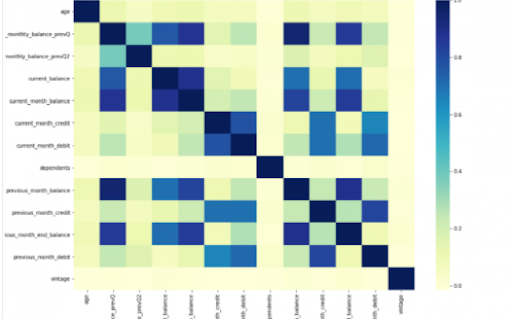
Power BI is considered a library of visualization. Correlation matrix heatmap is an integral component in the data analysis reports.

We will guide you on how to create a correlation matrix heatmap by making use of the Python correlation function. The created heatmap will be available in the reports section in Power BI.

You will need to navigate to the Report section that is available in the Power BI. Then click on the Py symbol which denotes Python visual which is available under the visualizations section. On the left side, you will see an empty Py along with a Python script editor popping up at the bottom of the screen. By this, you might have understood that Power BI is providing an option to create the visualizations with the scripts.

All the value fields will be empty firstly. For correlation heatmap illustration, all the continuous variables will be brought into the value fields, like the age current, previous month balance, monthly balance items, etc. This is considered one of the most essential steps during the integration process. If you forget to perform this step, the Power BI will not be able to recognize the variables.

As the variables are moved into the values fields, the python script will be automatically populated with the below codes.

Let us also write the code for correlation heatmap creation in Python by using the seaborn package.

# import the charting libraries matplotlib and seaborn

import matplotlib.pyplot as plt

import seaborn as sns

# create the correlation matrix on the dataset

corr = dataset.corr()

# create a heatmap of the correlation matrix

sns.heatmap(corr, cmap="YlGnBu")

# show plot

plt.show()

You can now use the run script button and run the script, which will produce a correlation matrix heatmap.

Python’s Statistical within Power BI

Generating analytical reports:

After the heatmap is generated, we can analyze the heatmap and will come to a conclusion.

With the above heatmap, below are the set of conclusions made:

  1. There is no correlation with the other variables for the number of dependents and age.
  2. There is a moderate correlation observed for the average monthly balance in the time span of the last two quarters.
  3. There is a high correlation between the average monthly balance with the previous month balance and the current month balance in the last quarter.
    It is possible to generate a heatmap for the customers who have churned and you can also compare with the customers that do not have. You can apply the filter of churn = False or True so that the heatmap can be observed. Through the analysis, it helps in deriving useful insights from data analysis to the prediction of the behavior.
  4. Power BI Training

    Weekday / Weekend Batches

Conclusion:

Through this article, you have got a clear idea of the process of integration of Python with Power BI. I hope the above information helps you. To get a clear understanding and in-depth knowledge on the subject, you can get trained and certified in Power BI through the Power BI training. The integrated environment will definitely help the organizations to handle and play with the data as and when needed. It focuses on enhancing the power and capitalizing on the benefits that are available in both tools.

related articles 


Source link