Alienware 18 Area-51 Review: Oversize, Over-the-Top and Outrageously Priced Gaming Laptop


Pros

  • RTX 5090 delivers outstanding 3D performance
  • 18-inch display is massive and fast
  • CherryMX mechanical keyboard is awesome
  • Dazzling RGB lighting is everywhere
  • RAM and storage can be upgraded after purchase

Cons

  • Pricing will make you weak in the legs
  • You’ll need to lift with your legs to move it
  • No OLED or mini-LED display options
  • Battery life is predictably short

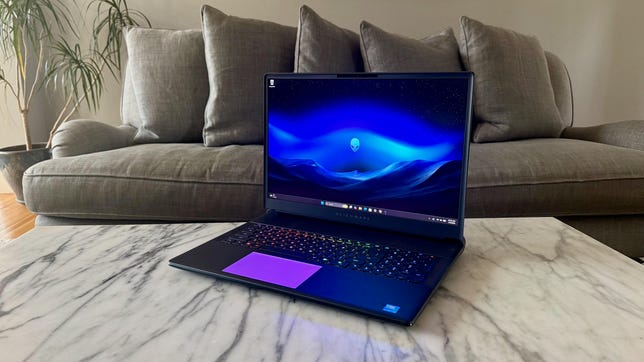
The Alienware 18 Area-51 is a laptop in name only. Its extreme size makes it more of a desktop PC that can happen to fold shut. This is a desktop replacement laptop that’s not leaving your desk very often. Unless you are the size of a professional wrestler turned actor like Dwayne “The Rock” Johnson or Danny Bautista, I don’t recommend placing the Alienware 18 Area-51 on your lap.

Even if you wanted to take it with you, I’d like to see you try to slide this thing into your backpack. No, you’ll need a duffle bag to hit the road with the Alienware 18 Area-51. Still, it’ll feel more like traveling with an all-in-one than a laptop — this 18-inch, 9-pound behemoth weighs nearly as much as Apple’s 24-inch iMac.

But what you’ll be lugging around or, more likely, have anchored to your desk is a ripper of a gaming laptop. The Alienware 18 Area-51 offers a choice of three Intel Arrow Lake CPUs and up to Nvidia’s flagship GeForce RTX 5090 GPU. You can load it up with as much as 64GB of DDR5-6400 RAM and 12TB of storage. The RAM and SSD aren’t soldered to the motherboard, so you can replace or upgrade each.

The expansive-for-a-laptop 18-inch display targets gamers. Its 2,560×1,600-pixel resolution lets you play games at 1440p, and its speedy 300Hz refresh rate will keep up with the high frame rates at 1080p. But for the price, I’m surprised it’s a standard IPS LCD and not an OLED or mini-LED display. Creators looking for a 4K resolution with stronger color performance and greater contrast will need to search elsewhere for something, such as the Asus ProArt P16.

Likewise, creators don’t need the Alienware 18 Area-51’s mechanical keyboard upgrade, but gamers will certainly love the feel of the CherryMX switches. Just be prepared for sticker shock for the pleasure of mashing those mechanical keys. 

If you’ve got a chunk of money to throw at an oversize, over-the-top gaming laptop, the Alienware 18 Area-51 is a great target at which to aim.

Alienware 18 Area-51

Price as reviewed $5,350
Display size/resolution 18-inch 2560×1600 300Hz IPS LCD
CPU Intel Core Ultra 9 275HX
Memory 64GB LPDDR5-6400
Graphics Nvidia GeForce RTX 5090
Storage 2TB SSD
Ports 2x USB-C Thunderbolt 5, 3x 1 USB Type-A 3.2 Gen 1, HDMI 2.1, Ethernet, SD card slot, combo audio
Networking Wi-Fi 7 and Bluetooth 5.4
Operating system Windows 11 Home 25H2
Weight 9.2 lbs (4.2 kg)

Dell sells three fixed configurations of the Alienware 18 Area-51 and offers a customizable model as well.

The entry-level model costs $2,400 for an Intel Core Ultra 7 255HX processor and RTX 5060 graphics along with 32GB of RAM and a 1TB SSD. That’s the lowest of the three fixed configurations, as well as the starting point of the configurable model. The middle of the three fixed models costs $2,950 for a Core Ultra 9 275HX, RTX 5070 Ti and a 2TB SSD. For $3,500, you get RTX 5080 but oddly drop back to 1TB of storage with the top preconfigured system.

Even higher CPU and GPU options are available with the customizable system where you can get a Core Ultra 9 290HX Plus and an RTX 5090, plus up to 64GB of RAM and 12TB of storage in a RAID 0 array. 

Our test system costs $5,350 and features the Core Ultra 9 275HX, 64GB of RAM, RTX 5090 graphics and a 2TB SSD. The lone display offered is an 18-inch IPS panel with a 2.5K (2,560×1,600 pixels) resolution and 300Hz refresh rate. The laptop comes with two keyboard options; our test system has the CherryMX mechanical keyboard that adds a hefty $520 to the bill. 

The Alienware 18 Area-51 starts at £2,299 in the UK and AU$5,298 in Australia. Pricing for the US and international models reflects Dell’s discounts at the time of this review.

Alienware 18 Area-51 gaming laptop with green alien head logo

The Alienware 18 Area-51’s RGB lighting extends to the top cover and rear thermal shelf.

Matt Elliott/CNET

Big and bold and littered with RGB lighting

The Alienware 18 Area-51 is the XL version of the Alienware 16 Area-51 we reviewed last year. The two share the same design with gently curved edges, aluminum top and bottom panels, a large thermal shelf behind the display and windowed section on the bottom panel that doesn’t let you see much more than a couple cooling fans and a few ribbon connectors. And there’s RGB lighting everywhere.

The 18-inch model is absolutely massive. The laptop weighs a staggering 9.2 pounds, which is a full 2 pounds heavier than the 16-inch version. Meanwhile, the 360-watt power adapter adds another 2.2 pounds if you want to take this thing on the road. That’s about 11.5 pounds of laptop.

Alienware 18 Area-51 gaming laptop bottom window

A window on the bottom panel lets you peek inside, but you can’t see much more than a couple cooling fans and the RGB lights.

Matt Elliott/CNET

But if you want a giant laptop for gaming at home (though even moving it from one room to another is a two-handed operation), then the 18-inch display certainly provides a larger canvas. This is a display geared toward gamers specifically and not creators who might also like to game. It’s an LED-backlit IPS LCD panel that doesn’t have the wide color coverage or contrast of an OLED that you can usually find at this price (or less), such as with the Asus ProArt P16 or Asus ROG Zephyrus G16.

On my display tests with a Spyder X Elite colorimeter, it covered 100% coverage of the sRGB color space but came up short in the larger color gamuts, hitting 98% of P3 and 88% of AdobeRGB. Compare those figures with the ProArt P16, a true creator laptop, that provides 100% coverage of the sRGB and P3 gamuts and 95% of AdobeRGB. 

The Alienware 18 Area-51 proved to be plenty bright, however, achieving a peak brightness of 509 nits. And with a 300Hz refresh rate, it has the speed that gamers look for. It’s both bigger and faster than the Alienware 16 Area-51, which has a 16-inch, 240Hz panel.

Alienware 18 Area-51 gaming laptop with RGB lighting on keyboard and trackpad

The keyboard has per-key RGB lighting, and you can also set the trackpad to light up when you touch it.

Matt Elliott/CNET

With or without the keyboard upgrade, the Alienware 18 Area-51 is excessive. So, I’d argue that it doesn’t make sense to spend the money for this over-the-top laptop without also spending the money for the mechanical keyboard. The CherryMX switches provide a tactile feedback that is so much snappier and more satisfying to mash in games than membrane keys. And with the ultralow-profile design keeps key travel to a reasonable level; I was able to type at my normal clip and enjoyed the clicky-clack feel. It’s certainly noisier than a normal laptop keyboard, but the enormous Alienware 18 Area-51 isn’t likely to be lugged to a library, coffee shop or any other public space with any regularity. 

With either keyboard option, you get per-key RGB lighting. And in addition to the keyboard, the Alienware 18 Area-51’s RGB lighting extends to the trackpad, the alienhead logo on the top panel, the thermal shelf behind the display and the two cooling fans you can see through the window on the bottom panel. The customization options are boundless using the Alienware Command Center app.  

Alienware 18 Area-51 gaming laptop 2.5K IPS LCD display

I wanted more from the quad speakers, which didn’t do Angine de Poitrine (or more normal-sounding music) any favors.

Matt Elliott/CNET

The Alienware 18 Area-51 has a quad-speaker array, with two tweeters positioned on either side of the keyboard and two woofers on the front edge of the bottom panel. The overall sound is a bit fuller than that of a typical laptop but still felt a bit flat to me, especially when I had the volume pushed near the max. Gamers, keep your headset handy.

The webcam is also a bit underwhelming. It’s just a 1080p camera, while many laptops that cost thousands less than the Alienware 18 Area-51 supply a 1440p or even a 4K camera. It suffices for casual video calls, but streamers will want to use an external webcam. The webcam does have an IR sensor for facial recognition Windows Hello logins, which is especially useful because the laptop lacks a fingerprint reader.

Alienware 18 Area-51 gaming laptop ports on back panel

Most of the Alienware 18 Area-51’s ports are located around back.

Matt Elliott/CNET

Given the massive size of the Alienware 18 Area-51, it’s no surprise that it has no shortage of ports. Most are located on the back edge of the thermal shelf, where you’ll find two Thunderbolt 5 ports, three USB 3.2 Gen 1 Type-A ports, HDMI 2.1 and Ethernet outputs and the power connector. Two more connections can be found on the laptop’s left side: a headset jack and a full-size SD card reader. One note on Thunderbolt connectivity: It’s GPU dependent. Thunderbolt 5 comes with configurations with RTX 5070 Ti graphics and above.

Inside, the laptop gives you the ability to upgrade both the RAM and storage. Instead of onboard memory soldered to the motherboard, the Alienware 18 Area-51 uses DDR5 modules that you can swap out. And there are a total of three M.2 slots, only one of which was occupied in our test system with the 2TB SSD.

Alienware 18 Area-51 gaming laptop internal components and expansion

Inside, you can remove the RAM and add up to three SSDs.

Matt Elliott/CNET

Alienware 18 Area-51 performance

What can I say about the Alienware 18 Area-51’s performance other than it’s incredibly fast and impressive. With its Intel Core Ultra 9 275HX, the Alienware 18 Area-51 delivered excellent multicore and single-core results on our Geekbench 6 and Cinebench 2024 CPU tests.

It was even more impressive on our 3D gaming tests, where its RTX 5090 running at a full 175 watts turned in blazing frame rates, although the gap between it and lower-cost models with RTX 5080 and 5070 GPUs aren’t as big as you might think. But Guardians of the Galaxy and Shadows of the Tomb Raider are older games that aren’t pushing these GPUs to their breaking points. 

To further gauge its 3D prowess, I ran our two new gaming benchmarks on the Alienware 18 Area-51. I don’t have results from Assassin’s Creed Shadows and F1 24 from the competing systems, but I can tell you that the Alienware 18 Area-51 ran both games with ease. It averaged 98 frames per second on Assassin’s Creed Shadows at 1080p and High settings. And it maintained a high framerate when I pushed the quality settings to Ultra High, averaging 78 fps. On F1 24, it averaged 171 fps at 1080p and 154 fps at 1440p, both with settings at Ultra High. 

Also impressive was the laptop’s ability to stay cool and quiet during gaming. The whir of the cooling fans was a constant presence during games, but they never reached jet-engine levels of noise. The back half of the bottom of the laptop got warm during longer gaming sessions, but not to a worrying degree.

Battery life was predictably short. The Alienware 18 Area-51 lasted just over four hours on our YouTube streaming battery drain test. That’s not the shortest runtime I’ve seen from a gaming laptop, but it still doesn’t let you stray too far from a wall outlet, even if you wanted to lug this nine-plus-pound laptop somewhere.

Is the Alienware 18 Area-51 worth buying?

The Alienware 18 Area-51 is overkill, and that’s the point. No one needs a laptop this large, but if you want the biggest, baddest gaming laptop and have the money to get it, it’s a supercolossal showpiece. From the 3D power of Nvidia’s flagship RTX 5090 and enormous 18-inch display to the fantastic tactile feel of the mechanical keys and dazzling RGB lighting, the Alienware 18 Area-51 is a wonderland of gaming laptop tech.

The review process for laptops, desktops, tablets and other computerlike devices consists of two parts: performance testing under controlled conditions in the CNET Labs and extensive hands-on use by our expert reviewers. This includes evaluating a device’s aesthetics, ergonomics and features. A final review verdict is a combination of both objective and subjective judgments. 

The list of benchmarking software we use changes over time as the devices we test evolve. The most important core tests we’re currently running on every compatible computer include Primate Labs Geekbench 6, Cinebench R23, PCMark 10 and 3DMark Fire Strike Ultra

A more detailed description of each benchmark and how we use it can be found on our How We Test Computers page. 

Geekbench 6 CPU (multicore)

Alienware 18 Area-51 21472Alienware 16 Area-51 20043HP Omen 16 Max 18924Alienware 16X Aurora 18587Acer Predator Helios Neo 16S AI 18113Asus ProArt P16 15377Lenovo LOQ 15 9711

Note: Longer bars indicate better performance

Geekbench 6 CPU (single-core)

Alienware 16 Area-51 3073Alienware 18 Area-51 3068HP Omen 16 Max 2961Alienware 16X Aurora 2948Acer Predator Helios Neo 16S AI 2944Asus ProArt P16 2905Lenovo LOQ 15 2475

Note: Longer bars indicate better performance

Cinebench 2024 CPU (multicore)

Alienware 18 Area-51 2113Alienware 16 Area-51 2002Acer Predator Helios Neo 16S AI 1641Alienware 16X Aurora 1630HP Omen 16 Max 1467Asus ProArt P16 1188Lenovo LOQ 15 826

Note: Longer bars indicate better performance

Cinebench 2024 CPU (single-core)

Alienware 18 Area-51 134Alienware 16 Area-51 134HP Omen 16 Max 131Alienware 16X Aurora 129Acer Predator Helios Neo 16S AI 128Asus ProArt P16 115Lenovo LOQ 15 103

Note: Longer bars indicate better performance

3DMark Fire Strike Ultra

Acer Predator Helios Neo 16S AI 17668Alienware 18 Area-51 16431Alienware 16 Area-51 13504HP Omen 16 Max 10975Asus ProArt P16 7530Lenovo LOQ 15 7269Alienware 16X Aurora 6929

Note: Longer bars indicate better performance

Guardians of the Galaxy (High @ 1920 x 1080)

Alienware 18 Area-51 184Alienware 16 Area-51 183Acer Predator Helios Neo 16S AI 177Alienware 16X Aurora 174HP Omen 16 Max 162Asus ProArt P16 124Lenovo LOQ 15 113

Note: Longer bars indicate better performance

Shadow of the Tomb Raider (Highest @ 1920 x 1080)

Alienware 18 Area-51 230Acer Predator Helios Neo 16S AI 219Alienware 16 Area-51 207HP Omen 16 Max 189Alienware 16X Aurora 184Asus ProArt P16 150Lenovo LOQ 15 143

Note: Longer bars indicate better performance

The Riftbreaker GPU (1920 x 1080)

Alienware 18 Area-51 481.21Alienware 16 Area-51 371.84HP Omen 16 Max 345Alienware 16X Aurora 260.11Lenovo LOQ 15 246.81Acer Predator Helios Neo 16S AI 220.58Asus ProArt P16 219

Note: Longer bars indicate better performance

Online streaming battery drain test

Asus ProArt P16 10:52Lenovo LOQ 15 7:48Alienware 16X Aurora 7:36Alienware 18 Area-51 4:02HP Omen 16 Max 2:45Alienware 16 Area-51 2:29Acer Predator Helios Neo 16S AI 1:55

Note: Longer bars indicate better performance

System configurations

Alienware 18 Area-51 Windows 11 Home; Intel Core Ultra 9 275HX; 64GB DDR5 RAM; Nvidia GeForce RTX 5090; 2TB SSD
Alienware 16 Area-51 Windows 11 Home; Intel Core Ultra 9 275HX; 32GB DDR5 RAM; Nvidia GeForce RTX 5080; 1TB SSD
HP Omen 16 Max Windows 11 Home; Intel Core Ultra 9 275HX; 32GB DDR5 RAM; Nvidia GeForce RTX 5080; 1TB SSD
Asus ProArt P16 Windows 11 Home; AMD Ryzen AI 9 HX 370; 32GB DDR5 RAM; Nvidia GeForce RTX 5070; 2TB SSD
Acer Predator Helios Neo 16S AI Windows 11 Home; Intel Core 9 Ultra 275HX; 32GB DDR RAM; 8GB Nvidia GeForce RTX 5070; 1TB SSD
Alienware 16X Aurora Windows 11 Home; Intel Core Ultra 7 255HX; 32GB DDR5 RAM; Nvidia GeForce RTX 5060; 1TB SSD
Lenovo LOQ 15 Windows 11 Home; AMD Ryzen 7 250; 16GB DDR5 RAM; Nvidia GeForce RTX 5060; 512GB SSD


Source link

Leave a Reply

Subscribe to Our Newsletter

Get our latest articles delivered straight to your inbox. No spam, we promise.

Recent Reviews


What is Power BI?

Power BI is a tool offered by Microsoft for business analytics that allows you to visualize your data and share insights. To build interactive dashboards and Business Intelligence reports, it converts data from various sources.

What is Power BI

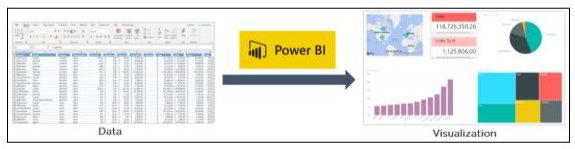
In the above illustration, you can see there is an excel document and we have some sales info. Power BI lets you create numerous charts and graphs to visualize the data using this information. Now that you’ve learned what Power BI is, let’s comprehend why you need Power BI.

Become a Power BI Certified professional by learning this HKR Power BI Training !

Why Power BI?

The contributing factors why Power BI is so common and essential in the BI domain are as follows:

1. Access to Data Volumes from Multiple Sources

Power BI can access large volumes of multi-source data. This helps you to view, evaluate, and display massive volumes of data that cannot be accessed in Excel. Excel, CSV, XML, JSON, pdf, etc. are some of the essential data sources available for Power BI. To import and store the data inside the “.PBIX” format, Power BI uses strong compression algorithms.

2. Features of an Interactive UI/UX

Power BI renders items visually attractive. With features that allow you to copy all formatting across similar visualizations, it has a simple drag and drop feature.

3. Exceptional Integration of Excel

Power BI assists to collect, analyze, distribute, and exchange business data from Excel. Anyone acquainted with Office 365 can easily connect to Power BI Dashboards with Excel queries, data models, and reports.

4. Boost preparation for big data with Azure

The use of Power BI with Azure enables you to analyze and exchange large data volumes. An azure data lake will minimize the time it consumes for business analysts, data engineers, and data scientists to get insights and increase collaboration.

5. Transform Insights to Action 

To make data-driven business decisions, Power BI enables you to obtain insights from data and transform those insights into actions.

6. Stream Analytics in Real-Time

You will be able to perform real-time stream analytics with Power BI. For gaining access to real-time analytics, it allows you to gather data from various sensors and social media sources, so you are still able to make business decisions.

Power BI Training

  • Master Your Craft
  • Lifetime LMS & Faculty Access
  • 24/7 online expert support
  • Real-world & Project Based Learning

The Architecture of Microsoft Power BI 

To work together, Power BI is a business network that includes many technologies. It offers excellent solutions for business intelligence. There are four phases in Power BI Architecture. Let’s talk about these four measures that provide detailed information about each of them.

  • Sourcing Data
  • Transforming Information
  • Report & Publish
  • Creating a Dashboard

The Architecture of Microsoft Power BI

1. Data Sourcing

Power BI can deliver data from a wide variety of internet resources and types of files. To receive the information, the information can be imported into Power BI or a live service connection can be installed. If you import a Power BI file, the data sets that are compressed are limited to 1 GB. If the information collection reaches 1 GB, it is possible to use a direct query. There are two other options for huge data sets.

  • Power BI premium.
  • Azure analytics services.

List of Supported Power BI Data Sources

Files:

Excel, XML, JSON, Text/CSV,Folder and SharePoint Folder.

Database:

SQL Server Database, Access Database, SQL Server Analysis Services Database, SAP HANA Database, SAP Business Warehouse server, Amazon Redshift, Impala, Google BigQuery (Beta), Snowflake, Oracle Database, IBM DB2 Database, IBM Informix database (Beta), IBM Netezza (Beta), MySQL Database, PostgreSQL Database, Sybase Database, Teradata Database.

Azure:

Azure SQL Database,  Azure SQL Data Warehouse, Azure Analysis Services database (Beta), Azure Blob Storage, Azure Table Storage, Azure Cosmos DB (Beta), Azure Data Lake Store, Azure HDInsight (HDFS), Azure HDInsight Spark (Beta).

Online Services:

Power BI service, SharePoint Online List, Microsoft Exchange Online, Dynamics 365 (online), Dynamics 365 for Financials (Beta), Common Data Service (Beta), Microsoft Azure Consumption Insights (Beta), Visual Studio Team Services (Beta), Salesforce Objects, Salesforce Reports, Google Analytics, appFigures (Beta), comScore Digital Analytix (Beta), Dynamics 365 for Customer Insights (Beta), Facebook, GitHub (Beta), Kusto (Beta), MailChimp (Beta), Mixpanel (Beta), Planview Enterprise (Beta), Projectplace (Beta), QuickBooks Online. 

Other:

Vertica (Beta), Web, SharePoint List, OData Feed, Active Directory, Microsoft Exchange, Hadoop File (HDFS), Spark (Beta), R Script, ODBC, OLE DB, Blank Query.

Top 50 frequently asked Power BI Interview Questions !

2. Transforming information:

Power BI provides a preview window for selecting columns or entities after the information is imported into the Powerbi system. If you need to edit the query, there are many transformation choices available to perform the work.

3. Report and Publish:

After sourcing and editing the data, we are ready to produce reports. Reports are the data visualizations in the form of graphs, charts, and pie charts with filters and slicers. There is also a great deal of custom visualization accessible. After generating reports, we will publish them to power bi facilities. You may also publish them on the energy bi-server assumption.

4. Dashboard Creation:

After publishing reports for Power BI services, we can build dashboards by pinning the individual elements or by pinning the page of the live report. When the report is saved when pinning the individual components, the visual retains the filter setting chosen. Pinning the Live Report page helps the dashboard user to interact with the visual by selecting slicers and filters.

Power BI Components

Power BI Components

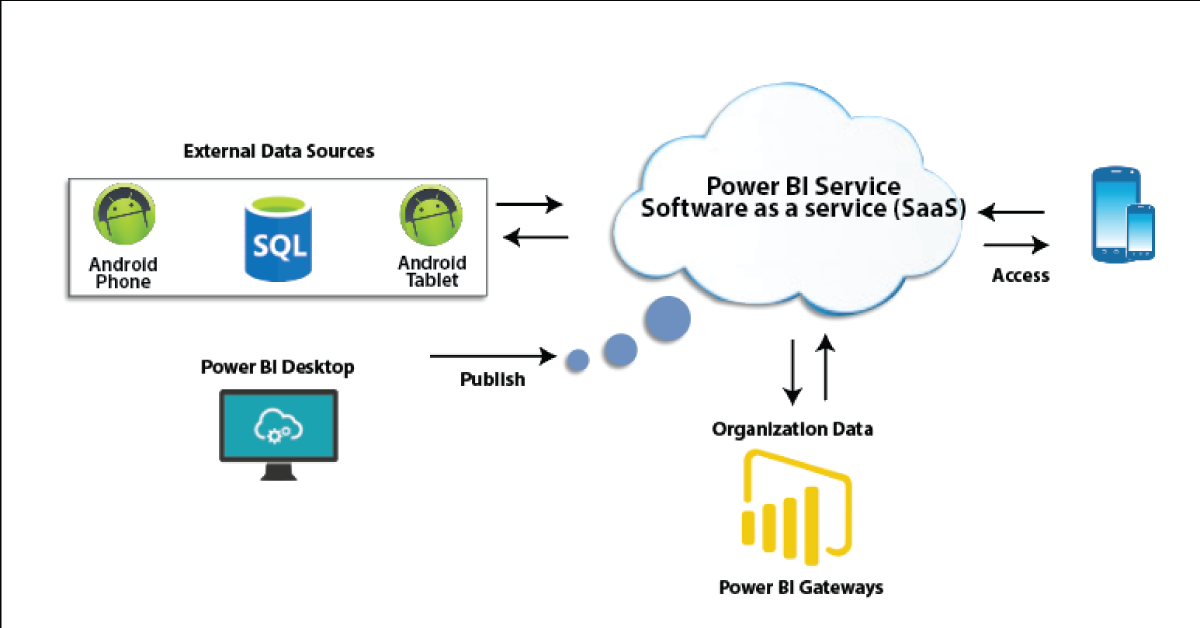
In Power BI, three main components play a significant role in providing Power BI capabilities.

1. Power BI Desktop:

Power BI Desktop is a free application that provides your local desktop to connect, convert and visualize your data. With Power BI Desktop, you can connect to numerous different information sources and merge them (often called modeling) into a data model that allows you to build graphics and image collections that you can share as records with other people within your enterprise. Power BI Desktop is used for most users working on Business Intelligence projects to produce reports and then to exchange their reports with others using Power BI.

2. Power BI Gateway:

By connecting to your on-site data sources without moving the info, the on-site Power BI gateway can be used to keep your data fresh. It helps you to query and take benefit of current investments from large datasets. With on-site gateways, you can keep your data fresh by connecting to your on-site data sources without the need to move the data. Request huge datasets and benefit from existing investments. The gateways provide the versatility you need to meet the individual requirements and needs of your organization.

3. Power BI Mobile Apps:

You can use Power BI mobile apps to stay connected to your details from anywhere. Power BI apps are available for the Windows, iOS, and Android platforms.

4. Power BI Service:

This is a cloud service for producing accounts of Power BI and data visualization. It enables designers and BI experts to produce and distribute highly formatted, pixel-perfect reports alongside their interactive Power BI content, becoming the first cloud BI solution that blends self-service BI energy with the specifications and capabilities of conventional Enterprise BI scenarios.

Power BI Service

There are also other modules that we should comprehend in order to benefit from Power BI’s advanced capabilities.

Power BI's advanced capabilities

5. Power Query:

Data mashup and conversion instrument. With Power Query in Power BI, you can connect to several different information sources, transform the data into a format you want, and be able to quickly generate reports and ideas. When using Power BI Desktop, Power Query functionality is provided in the Power Query Editor. Power Query is made accessible through the Power Query Editor on the Power BI Desktop. To open the Power Query Editor, from the Power BI Desktop Home tab, choose Edit Queries.

Power Query

6. Power Q & A:

Question and Reply Engine for Natural Language. The easiest way to get an answer from your data is often to ask a question using natural language. To explore your results, the Power BI Q & A feature allows you to use your phrases. In various papers on Power BI mobile applications and Q & A with Power BI Embedded, Q & A is discussed.

Power Q & A

7. Power Map: 

To demonstrate how the values differ in proportion across the region, the Power BI Query is used. It also displays variations in shading from dark to light. It provides a geospatial 3D tool for the visualization of data.

Power Map

8. Power Pivot:

Power Pivot is a memory modeling component that allows highly compressed data storage and extremely fast aggregation and calculation of information. As part of Excel, it is also available and can be used for creating a data model inside an Excel workbook. Power Pivot can load data on its own, or data can be loaded into it by Power Query. It is extremely similar to the SSAS (SQL Server Analysis Services) tabular model, which is like a server-based Power Pivot version. 

To gain in-depth knowledge with practical experience in Power BI, Then explore hkr’s Power BI Training In Hyderabad !

9. Power View:

Power View is an interactive visualization platform that provides users with a drag-and-drop interface to rapidly and effortlessly construct visualizations of data in their Excel workbooks (using the Power Pivot data model).

Power View

10. SSRS Reporting services 2016:

SSRS tiles are taken to a Power BI dashboard with expected SQL Server Agent updates through the integration of SQL Serb Reporting and the Power BI Services. The tile from SSRS reports gives you this integration. Integrating SSRS reports into the Power BI service will build a connection from the Power BI dashboard to detailed SSRS reports.

SSRS Reporting services 2016

HKR Trainings Logo

Subscribe to our YouTube channel to get new updates..!

The Architecture of Power BI Clusters 

Azure, Microsoft’s cloud computing platform, is the basis of the Power BI service. Power BI is currently installed in several data centers around the world, with many active deployments made available to clients in the regions served by these data centers, with an equivalent number of passive deployments serving as backups for each active deployment.

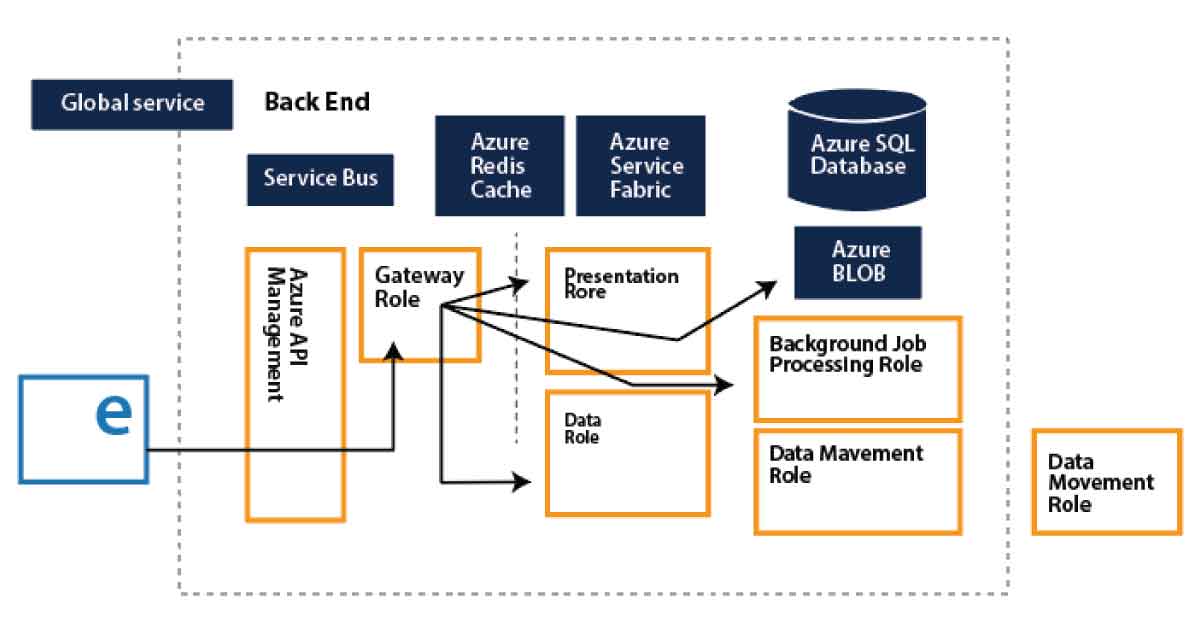
Every Power BI deployment consists of two clusters, the Web Front End (WFE) cluster, and the Back End cluster. These two clusters are seen in the following picture:

1. WFE Cluster:

To authenticate customers and provide tokens for subsequent Power BI customer connections, the WFE cluster manages the original Power BI link and authentication mechanism using AAD. The Azure Traffic Manager (ATM) is also used by Power BI to direct customer traffic to the nearest datacenter, which is determined by the DNS record of the client attempting to connect, authenticate and download static content and files. Power BI effectively distributes the appropriate static content and files to customers based on geographical location, using the Azure Content Delivery Network (CDN).

WFE Cluster

2. Backend Cluster:

The Back-End cluster is how authenticated clients interact with the Power BI service. Visualization, user dashboards, datasets, reports, data storage, information links, information refresh, and other Power BI service interaction elements are managed by the Back-End cluster. The Role Gateway works as a gateway between the demands of clients and the Power BI service. Users do not directly communicate with positions other than the gateway’s role. Azure API Management will eventually manage the gateway role.

Backend Cluster

Want to know more about Power BI,visit here Power BI Tutorial !

How would Power BI be an industry game-changer?

Through its data catalog and data management gateway, Power BI integrates centralized DW / BI techniques with cloud data sources and self-service tools, as no other application has yet been able to do. And all of its functionality is bundled as a SaaS solution so that any firm can successfully incorporate and use it. In short, the adoption curve can be accelerated by Power BI and making sophisticated BI Analytics as popular as Excel itself.

Power BI offers game-changing capabilities for all BI platform stakeholders:

1. End-users:

For a long time, end users expected the ability to readily access and analyze information. To allow each worker to use data as a basis for decision making, the natural language query of Q&A and the smart visualization engine can do more.

2. BI Analysts:

Over vast volumes of data, Power Pivot gave power users the opportunity to construct successful data models, but the information required to “fit” into clean data models.  Power Query’s data transformation and versatility further empower analysts to build their own end-to-end alternatives quickly.

3. IT & Data Managers:

The topic of push-pull has always been BI self-service. Everyone needs the tools and knowledge that customers need to make great choices. However, Good governance, protection, and auditing are also seen as an obstacle to change for power users. The catalog of Power BI data is interesting because it promotes self-service and governance simultaneously.

Not every business will move quickly to implement Power BI. Too much strategic change would be expressed too quickly for others. For some, there might be genuine regulatory or other factors that preclude consideration of cloud-based systems.

But it has been difficult and cost-prohibitive for many organizations to set up an open and comprehensive BI network. Power BI is really the solution that eventually renders sophisticated BI as easy to use as a search engine and generally accepted.

Power BI Training

Weekday / Weekend Batches

Conclusion

We had provided detailed information about the Power BI Architecture, its operations, and components in this blog. And we’ve also explained the Power BI service and its operation. After exploring this blog, you might have comprehended the need for Power BI in Business Intelligence, what Power BI is, and the various Power BI features. You’ve also learned about the Power BI service, the Power BI dashboard, and how the architecture looks.

Related Article:


Source link