
Avianca LifeMiles Amex: Complimentary Avianca Silver status


It’s generally a good idea to open a card with an airline you fly frequently. If you’re often on Avianca flights, the Avianca Lifemiles American Express® Card may very well be up your alley.

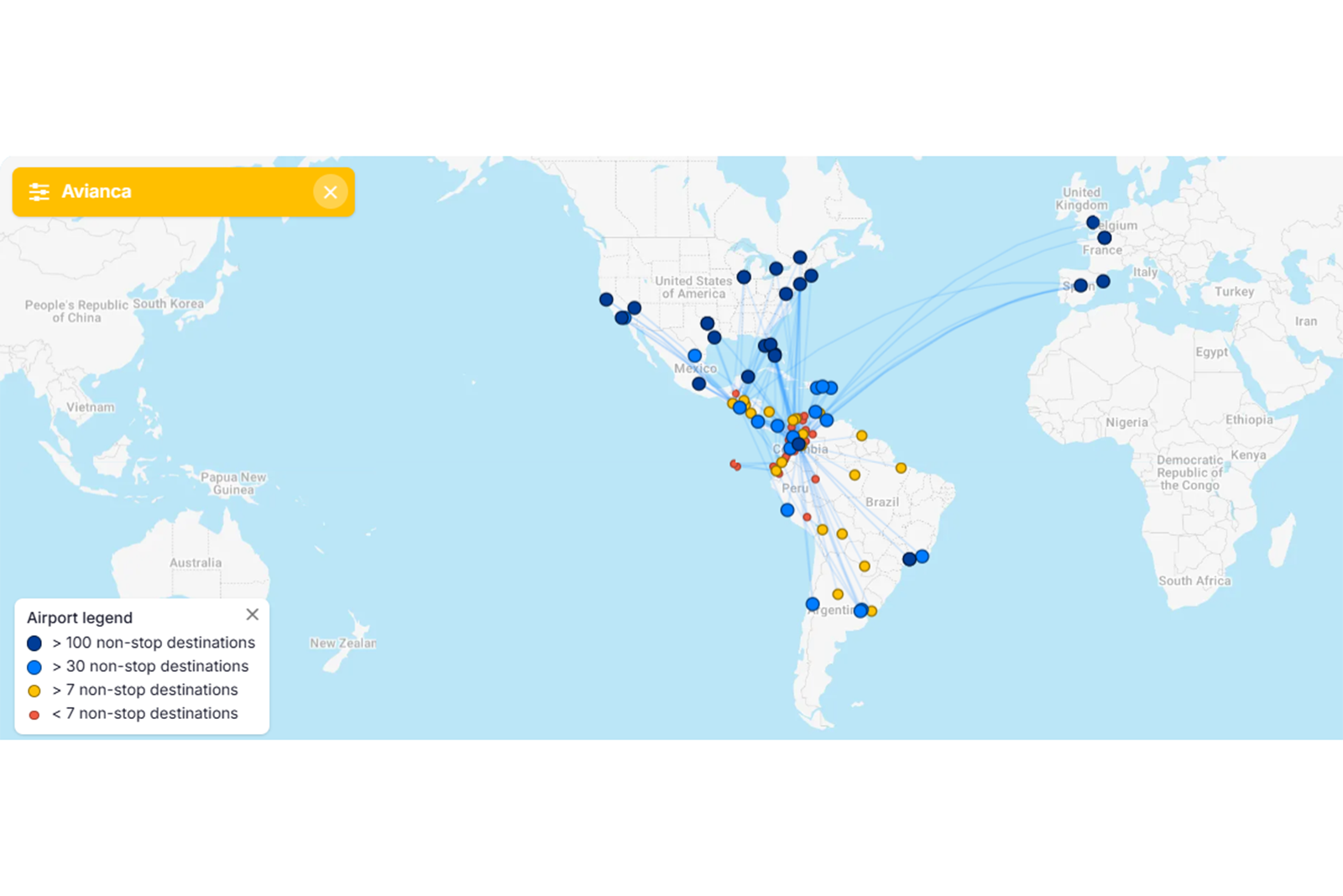
The main selling point of this mid-tier airline card is its complimentary Avianca elite status. I view it as a great fit for those who frequently fly to Colombia and Central America, the areas where Avianca’s route network is strongest. If you already have status with Avianca or only fly with the carrier occasionally, you may struggle to justify this card’s $99 annual fee (see rates and fees).

Card rating*: ⭐⭐⭐

*Card rating is based on the opinion of TPG’s editors and is not influenced by the card issuer.

Avianca Lifemiles Amex: The basics

The Avianca Lifemiles Amex looks like a fairly standard middle-of-the-road card at first glance. It has a $99 annual fee, earns bonus miles on Avianca purchases and a selection of everyday categories and comes with airline-specific benefits. It’s those airline perks that set it apart from other airline cards.

Specifically, the Avianca Lifemiles Amex offers complimentary airline elite status, something you rarely find on airline cards. You’ll receive Avianca Silver status with this card, granting you the following perks, among others:

  • Avianca lounge access twice each year
  • Extra-legroom seat selection
  • Select upgrade options
  • An extra free checked bag (excludes Basic and Light fares)
  • Priority check-in and boarding (Group B)

Avianca 787 on runway
ERIC ROSEN/THE POINTS GUY

Many airline cards make checked bags and priority boarding the centerpieces of their benefits, but the standout here for me is the lounge access. It’s very rare to come across sub-$300 cards that offer any kind of lounge access.

It may not be as far-reaching as a Priority Pass membership, but if your appetite for annual fees is slim, this card could be a good compromise.

Reward your inbox with the TPG Daily newsletter

Join over 700,000 readers for breaking news, in-depth guides and exclusive deals from TPG’s experts

On top of what you get through Avianca Silver status, this card has no foreign transaction fees (see rates and fees) and offers a 5% discount on redemptions for Avianca flights booked through Lifemiles.

It’s important to note that despite the name, the Avianca Lifemiles Amex isn’t issued by American Express. Rather, it’s issued on behalf of Cardless by First Electronic Bank using Amex’s payment network.

Avianca Lifemiles Amex pros and cons

Pros Cons

  • Complimentary Avianca Silver status
  • A good option for Avianca purchases
  • Redemption discount for Avianca flights
  • No foreign transaction fees
  • Star Alliance Silver benefits, including priority waitlist and priority standby

  • Not a great fit for those who fly Avianca infrequently
  • Weak earnings on everyday spending
  • Offers little if you already have Avianca status
  • Limited benefits when flying Star Alliance partners

Avianca Lifemiles Amex benefits

Currently, Avianca offers four status tiers. Silver status is the second tier, normally requiring 12,000 qualifying miles in a status qualification year (3,000 of which must be earned on Avianca flights). It matches to Star Alliance Silver status, a solid value proposition if you’re looking for basic benefits like priority waitlisting and standby with an entire airline alliance.

It’s important to note that you’ll only get two Avianca lounge visits per year, but any lounge access is a meaningful perk with a card that charges just $99 each year. How far this particular benefit stretches for you will depend on whether you have lounge access with another card and what lounges are in the airports you transit through most.

You’ll receive access to all Avianca VIP lounges with Silver status, though it’s important to note that the Miami International Airport (MIA) lounge location is included in the Priority Pass network. You can also redeem one of your entry passes for a companion (except for the Miami lounge).

Depending on how many lounges you can access in the airports you frequent, you may or may not find this card benefit useful.

Avianca VIP Lounge in Miami International Airport (MIA). GISELLE GOMEZ/THE POINTS GUY

You won’t receive your extra free checked bag on Basic and Light fares, which could be a big con for this card if you frequently book those fares. Your extra checked bag could cost well over a hundred dollars, depending on your origin and destination, so this benefit alone can net you back the money you spend on the card’s annual fee. But I wish this card followed the pattern of other airline cards by offering a free checked bag from the start, rather than tacking an additional bag onto the one included with your fare.

While this card’s perks are useful for those with no Avianca status, anyone with Avianca Gold or Diamond status won’t get much. Avianca Silver is the backbone of this card, and its perks are already included in Gold and Diamond status.

Related: San Francisco gets a new nonstop flight to Central America beginning June 1

How to earn and use your rewards

How to earn your rewards

The only way I see Avianca Gold or Diamond members getting meaningful value from the Avianca Lifemiles Amex is if they put significant spending on the card.

This card’s bonus categories are:

  • 2 miles per dollar spent on Avianca and Lifemiles purchases, dining and groceries
  • 1 mile per dollar spent on everything else

Airline cards are almost never a good place to put your everyday spending. If you put those expenses on a general travel rewards card instead, you’ll earn transferable points or miles that you can use with many different airlines and hotels. That will make it a lot easier to get maximum value from your rewards.

The Avianca Amex is no exception — I don’t recommend putting your everyday spending on this card.

United Polaris seats
United Polaris business class. ERIC ROSEN/THE POINTS GUY

That said, if you’re highly loyal to Avianca or you need to top off your Lifemiles balance for a specific redemption, this card earns moderately well on groceries and dining. It’s a decent option for Avianca purchases, unless you have a card that earns more on flights (such as the American Express Platinum Card®).

I’d like to see this card offer a higher earning rate for Avianca purchases since many airline cards with an annual fee offer at least 3 miles per dollar spent.

How to redeem Avianca Lifemiles

Avianca Lifemiles are powerful because they can be redeemed for flights on any Star Alliance airline, not just Avianca. As a cardholder, you’ll want to fly with Avianca at least a couple of times each year to properly take advantage of your Silver status.

Outside of that, though, you can find some great award redemptions on other Star Alliance airlines, such as United Airlines, Air Canada and Lufthansa. The Lifemiles program is a great way for points and miles beginners to practice partner award redemptions.
FLIGHTCONNECTIONS

Katie Genter, TPG’s lead writer for points and miles, recently redeemed 8,280 Lifemiles plus $81 in taxes and fees for a one-way flight from Juan Santamaría International Airport (SJO) in Costa Rica to Mexico City International Airport (MEX). The cash price was $279, so she received 2.39 cents per mile in value.

If Katie had the Avianca Amex and taken advantage of its 5% redemption discount, she would’ve saved more than 400 miles and received 2.5 cents per mile in value.

Potential drawbacks to the Avianca Lifemiles Amex

If you’re someone who flies with Avianca all the time, you may not find the perks that Avianca Silver status provides to be enough. Depending on how often you fly, you may be able to achieve Gold or Diamond status, negating many of the benefits of this card.

I won’t dock too many points from the Avianca Lifemiles Amex for only offering two lounge visits per year since this isn’t a premium airline card. Still, it could be a drawback for someone who considers having lounge access a top priority.

woman coffee computer
THOMAS BARWICK/GETTY IMAGES

Finally, this card doesn’t offer the strongest earning rates. It earns decently on Avianca purchases, but it’s outclassed by many general travel rewards cards that earn more rewards per dollar spent on flights.

Avianca Lifemiles Amex vs. Avianca Lifemiles Amex Elite

The Avianca Lifemiles Amex‘s older sibling is the Avianca Lifemiles American Express® Elite Card, a more premium option with a $249 annual fee (see rates and fees).

Both cards offer Avianca Silver status, but the Avianca Amex Elite offers additional perks beyond this, including:

  • Up to 6,000 bonus miles annually, deposited as 500 miles per month
  • 10% of your miles back on Star Alliance redemptions
  • An up to 25% discount on Avianca redemptions
  • 3 miles per dollar spent on Avianca purchases
  • 2 miles per dollar spent on dining and travel, instead of dining and groceries

Two people looking at a laptop together
CARLINA TETERIS/GETTY IMAGES

According to TPG’s April 2026 valuations, 6,000 Lifemiles are worth $84. That won’t put too much of a dent in the Avianca Amex Elite’s annual fee, and its other perks are hard to put a value on. Personally, I’d stick with the Avianca Lifemiles Amex.

Is the Avianca Lifemiles Amex worth it?

If you’re a big fan of Avianca or you fly frequently with Star Alliance airlines, I recommend seriously considering the Avianca Lifemiles Amex. It isn’t the strongest or most well-rounded card around, but it offers enough to the right cardholder. Just keep in mind that you’ll want to fly with Avianca a couple of times a year to properly take advantage of Avianca Silver status.

When to apply for the Avianca Lifemiles Amex

Currently, new Avianca Lifemiles Amex cardholders can earn 40,000 miles after spending $3,000 on purchases in the first 90 days from account opening.

According to TPG’s valuations, that welcome offer is worth $560.

Remember: Since this card isn’t issued by Amex, you won’t need to worry about Amex’s once-per-lifetime welcome bonus rule.

Other cards to consider if you don’t want the Avianca Lifemiles Amex

If the Avianca Lifemiles Amex doesn’t quite sound like the right fit for you, consider one of these options instead:

For additional options, browse our picks for the best travel cards.

Bottom line

For Avianca fans, the Avianca Lifemiles Amex is a solid option. It requires a moderate commitment to the airline, but you don’t need to fly with Avianca exclusively to get a lot of value.

If you already hold Avianca Gold or Diamond status, I’d consider a card that earns transferable rewards on flights or general travel instead. Otherwise, the Silver status that comes with this card can go a little way toward making your experiences with Avianca more enjoyable.


Apply here: Avianca LifeMiles American Express Card


Source link

Leave a Reply

Subscribe to Our Newsletter

Get our latest articles delivered straight to your inbox. No spam, we promise.

Recent Reviews


Introduction to Power BI:

Power BI is one of the popular business intelligence tools developed by Microsoft Corporations to offer various data modeling capabilities like data preparations, data visualizations, data discovery, and generating interactive data analytic dashboards. With the help of Power BI users can make powerful business-related decisions. This Power BI tool helps users to pull the data using various formats such as images, excel sheets, spreadsheets, and videos. The Power BI tool also helps to centralize the database management system, and you can also visualize the data model on it. 

The important basic components of the Power BI tool:

1. Power BI desktop:

This is a free application component available to install on your desktop, modify, visualize the data, and have full freedom to establish a connection. This also enables users to create the data model by using data from multiple sources and also you can create visuals and data reports and also share them with other team members in your organization.

2. Power BI services:

This is a cloud based service in the Microsoft cloud applications, which also eases the data sharing and collaborations of data reports. You can also bring all the relevant data sets into one place by using this component.

3. Power BI Mobile Apps:

This component will help us to bring the services and not wait for your desktop to start working. You can install this component on various operating systems like Windows 10, Androids, and IOS systems.

Become a Power BI Certified professional by learning this HKR Power BI Training !

Important features of Power BI:

The following are the important features of Power BI:

1. Offers a range of attractive data visualizations.

2. Helps users to collect data from different data sources.

3. Data set filtrations.

4. provides customizable dashboards.

5. Flexible tiles.

6. Navigation pane.

7. Informative reports.

8. Natural language Q & A Question box.

9. DAX data analysis functions.

10. Help and feedback buttons.

11. Microsoft office 365 Application launcher.

12. Great collection in content packs.

MSBI Training

  • Master Your Craft
  • Lifetime LMS & Faculty Access
  • 24/7 online expert support
  • Real-world & Project Based Learning

Advantages of Power BI tool:

The below are the key advantages of using Power BI:

1. Hybrid deployment support:

This feature provides in-built connectors that enable Power BI tools to connect with various data sources from Microsoft and other vendors.

2. Quick insights:

With the help of this Power BI feature, users can create a subset of data and automatically apply analytics to that information.

3. Cortana Integration:

This feature enables users to verbally query data using natural language and access results using Microsoft digital assistant, Cortana.

4. Customization:

This feature helps developers to change the appearance of the default visualization and reporting tools while importing new tools into the platform.

5. API’s for data integration:

The Microsoft Power BI REST API feature helps developers embedded the Power BI dashboard and various resources in other software.

6. Lower upfront Costs:

The basic version of Power BI is a free subscription service, where the full power BI Pro costs $9.99 per month, per user.

7. Mobility:

Various Power BI tools are available for mobile apps in Android and IOS.

Click here to learn Power BI Tutorial

Limitations of Power BI:

The below are the few disadvantages of using Power BI:

1. This tool is very difficult to implement. You need to loop them in the development team, the IT team to get it executed.

2. To implement row-level security in power bi and tie your web application users with Power BI users.

3. With users coming and leaving an organization, it becomes a nightmare to manage.

4. Requires considerable investment.

5. You need to buy a premium capacity.

6. Not feasible for pro users.

7. Still users need to visit your web page and the information is not delivered to them.

Introduction to MSBI:

MSIB can be abbreviated as “Microsoft business intelligence”, and this product tool is developed to provide ETL capabilities. This tool helps users to visualize and organize the multidimensional data sources to provide data extraction, transformations, and loading (ETL) features. Microsoft’s business intelligence tool also transforms the raw data into effective insightful business data.

Microsoft business intelligence tool can be divided into three categories they are;

1. SSIS or SQL server integration services: this tool is used for data integration.

2. SSAS or SQL server Analysis services: This tool is used for data analysis.

3. SSRS or SQL server reporting services: This tool is used for reporting.

      Become a MSBI Certified professional  by learning this HKR MSBI Training !

Features of MSBI:

The following are the key features of MSBI or Microsoft business intelligence tool:

1. This tool offers end-to-end single business solutions.

2. .net, web services support MSBI.

3. Easy integration tools with .NET and share point.

4. This is a Microsoft product.

5. Very easy to install and use.

6. Very less price compare to others.

7. Graphical user interface-based business intelligence tool.

8. Supports multiple servers without performance loss.

9. Also supports SEMO warehousing operations.

Business Intelligence & Analytics, msbi-vs-power-bi-description-0, Business Intelligence & Analytics, msbi-vs-power-bi-description-1

Subscribe to our YouTube channel to get new updates..!

Advantages of MSBI:

1. Offers easy data exploration and data visualization:

This is the world of data exploding, this tool offers the ability to explore valuable data and also perform data visualization tasks to get greater results. When compared with other business intelligence tools, I think this is an awesome tool in the data visualization process.

2. Acts as a managed self-service Business intelligence tool:

This Microsoft business intelligence tool provides an effective self-service business intelligence tool. The MSBI also acts as a Microsoft Excel that is used by everyone in their day-to-day activities to produce and report the data analytics.

3. This tool makes use of Native MS excel features:

The MSBI tool makes use of Microsoft Excel features to the core in order to produce effective data analysis. By using excel Microsoft excel features it’s very easy to collect data from multiple data sources.

4. MSBI tool supports Web service applications:

MSBI tool works well with programming languages like .NET and SQL database servers to build an effective web service application and also offers abundant benefits to the clients.

5. End-to-end Business solutions:

MSBI provides you a great business solution for your organization and enables users to make effective business decisions. This tool offers entire top-to-bottom business solutions.

6. Data warehouse applications:

Business intelligence tool offers greater data analytical solutions. You can collect the data warehouse from various sources. This type of warehousing is more suitable to extract the information to carry the data analytical task effectively.

 Want to know more about MSBI,visit here MSBI Tutorial.

Limitations of MSBI:

The below are the few disadvantages of using MSBI:

1. MSBI tool crowded with a lot of user interfaces, so users may get confused.

2. Sometimes very difficult to understand and master the tool concepts.

3. consists of rigid formulas.

4. Offers limited data handling in free versions.

Criteria used to compare between MSBI and Power BI tools:

While comparing these two tools, the user may get confused to decide on what basis you need to perform the comparison. We are here to help you out to select which criteria are more important in your organization.

1. Definition

2. Advantages

3. Mechanism of working

4. User-friendly

5. Data handling capacity

6. Learning curve

Learn Top 30 MSBI Interview Questions

MSBI Training

Weekday / Weekend Batches

Major differences between MSIB and Power BI:

MSBI VS Power

Here are the major differences between MSIB and Power BI based on criteria:

1. Definition:

a. The MSBI tool helps to integrate the data processing components and programming user interface. This may also help in the testing and data deploying reports in the organization.

b. Power BI tool used to access a wide range of data analytical points to generate and analyze the data reports. This tool is mostly used in turning unshaped data types into structured and modeled data formats.

Click here to get latest Power BI Interview Questions and Answers for 2022

2. Working mechanism:

a. MSBI tool is an on-premises software and available in the form of its own server format and equipment.

b. Whereas Power BI tool is cloud-based application software, used to access data through the web browser.

3. Advantages:

a. This MSBI tool has a greater drill-down feature and offers high data access.

b. Whereas Power BI has a greater data visualization, and also offers high-level visual representation.

4. User Experience:

a. MSBI tool is more difficult and very manual when compared to power BI. So user considers this too as their second option when it comes report generation task.

b. Power BI has a good graphical component and that provides an edge over the MSBI tool. So this is a great tool to use when it comes to reporting generation.

5. Data Handling:

a. MSBI has a capacity to handle semi structured and structured data and helps users to generate larger reports data.

b. Power BI is capable to handle both unstructured and semi structured data.

6. Learning curve:

a. In the MSBI tool, all the codes which are related to reporting generation are handled by developers.

b. Power BI consists of graphical features, they fulfill the data visualization and report generation process. So non-programmer can also learn this tool. 

To gain in-depth knowledge with practical experience in Power BI, Then explore hkr’s Power BI Training In Hyderabad !

Conclusion:

The main moto to use both MSBI and Power BI tools to protect business data and offers data insights. These business intelligence tools are most widely used by business analytics, IT professionals, and data analysts. I think most of the top companies prefer to use the Power BI tool to offer effective data visualization process, we can say that MSBI is a less popular tool. In this blog, we have differentiated both MSBI and Power BI tools on the basis of various criteria. 

 Related Articles:


Source link