Beartooth Singer Caleb Shomo Comes Out as Gay as Wife of 13 Years Expresses Support – Just Jared – Celebrity News and Gossip


Caleb Shomo
Credit: Getty

Caleb Shomo has came out as gay.

The lead singer of the band Beartooth opened up about his sexuality in a lengthy statement shared to his Instagram account on Saturday (May 23). Shortly after he posted the statement, his wife of 13 years, Fleur Shomo, posted her own statement with a supporting message while also confirming their marriage is over.

Caleb is the only founding member of Beartooth to still remain with the group, over a decade after the music group launched. His coming out post is currently the only post live on his Instagram page.

“There’s been a lot of speculation surrounding my personal life as of late, and I feel compelled to set the record straight before it affects those I love any further,” he began. “I am a proudly gay man.”

Caleb talked about the affect his personal life has affected his music over the years.

This is something I’ve been unpacking and reckoning with in my life for quite some time now. It’s been difficult to navigate the feelings surrounding the subject and figure out what to do with this fact.

When it comes to my art / Beartooth, I have always strived to chase who I am in the deepest part of my soul from album to album. As you could gather if you’ve followed the band at all in the earlier years, there are 4 very self deprecating albums about exploring my religious upbringing, depression, self hatred, self loathing, and hopelessness. I am grateful for all these albums, yet feel embarrassed at times that I wouldn’t allow myself to really dig up the roots for so long.

Caleb also opened up about reconciling with his sexuality and how it will impact his upcoming album.

I spent a decade burying feelings with alcohol, and honestly when I decided to put it down and focus on exploring why I felt this way for so long, it’s been a direct path to me reconciling with my sexuality in hopes that it will eventually lead to me experiencing self love. One thing I decided before I wrote a single note or lyric of the upcoming album is that whatever happens, I will express myself whole heartedly and fully. Wherever it takes me I will follow and I refuse to water any part of it down, from the music, to the lyrical content, and way I portray myself. I will only do what makes me happy at the deepest level and what is the most honest depiction of who I am. I believe it’s impossible to love every part of you when you won’t face every part of you head on. I am trying to finally be proud of who I am and I think this is a massive part of that journey.

To those who have shown me love, empowerment through living life freely and openly in my presence, supporting the queer community, or simply telling me you love me whoever I am, I am forever in your debt and I hope you know what you mean to me. I encourage anyone who’s struggling with who they are to give yourself grace. Give yourself patience. Be honest with yourself. Do the hard work instead of burying it down as deep as you physically can thinking it will change like I did. Holding these things in only hurt you and those around you. Love you all, and hopefully this is a step in the right direction to loving myself one day.

Caleb Shomo’s wife reacts to his coming out

Caleb‘s wife of 13 years, Fleur Shomo, released a statement in response to the coming out. She confirmed their marriage is over, but showed her support for him.

Not really sure how to start this cause does anything even need to be said? But I guess I’ll just dive right in.

The past few months have been a very disorienting and hurtful time to navigate. For both of us. But I will always want to love, protect and support Caleb. I have cared more about his well being over the years than anything else in the world.

To see the confusion and pain he went through and the highs and lows and wanting to help but not knowing how. You never want anything more for your person than for them to just be ok. You also ask yourself constantly if you’re a bad person for wondering wtf this means for your world & the anger you also feel. I am the only person that is having to deal with the duality of this situation. To support him whilst losing everything has been incredibly hard to figure out. You can love and support your person through the hardest time in their life, whilst also be completely demolished & lose yourself at the same time.

You question everything. But I have learned the one thing I don’t need to question is our history. No matter what anyone will say, I know it.

I have always wanted nothing more than for Caleb to be happy. Trying to help him go through this without having any idea what to do, has been a learning curve we never expected to experience together. The isolation of not being able to talk to people about this has been profound, as it has not been my story to share. My mental health has suffered & I have had moments where I have not felt or acted like myself. For those that have known & been there, thank you. I’ll never be able to repay your kindness.

Our nearly 14yrs of marriage was wonderful and full of so much fun, adventure & love. Nobody will know anything about our marriage like we do. And no one can ever truly know what depths of love exist between two people unless they are those people. I already miss it & my husband more than anything. Our story was a good one. And now it’s done.

I hope anyone in the world going through this finds hope & courage & I hope the fans can continue to support Caleb.

For now I’m going to keep focusing on what I can control and continue living my life trying to achieve what I want to achieve. And if I keep saying hi to as many dogs as possible along the way, then I’m sure things will slowly get better, day by day, piece by small piece, bird by bird.

See a photo of them below.

Posted To:Beartooth Caleb Shomo pride



Source link

Leave a Reply

Subscribe to Our Newsletter

Get our latest articles delivered straight to your inbox. No spam, we promise.

Recent Reviews


What is XPath in Selenium – Table of Content

What is XPath in Selenium?

Selenium is an open-source, most popular web automation testing tool that supports multiple browsers & OS. XPath in Selenium is an XML Path and a syntax useful for locating an element on a web page. Locating any element on the web page uses XML path or XPath expression. Further, XPath in Selenium is useful for navigating through the HTML structure of the web page. 

Moreover, XPath uses HTML DOM structure to find any element on a web page for both HTML and XML documents. 

The syntax for XPath In Selenium 

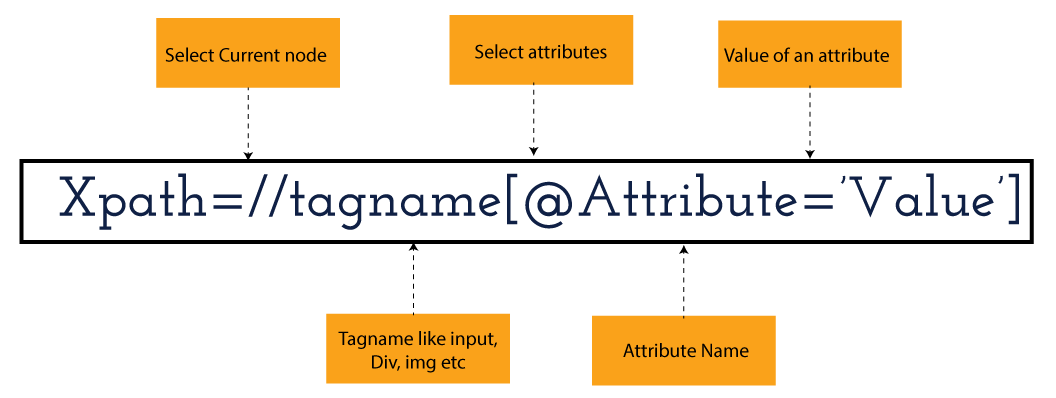
XPath in Selenium holds the element’s location on the web page. The basic syntax for XML Path Selenium is as follows-

Xpath=//tagname[@attribute="value"]

The meaning of each expression in the syntax is-

  • // : Choose the existing node.
  • Tagname: Particular node’s tagname.
  • @: This symbol denotes the “Select” attribute.
  • Attribute: Node’s attribute name.
  • Value: Attribute’s Value.

Become a master of Selenium by going through this HKR Selenium Training!

XML Document

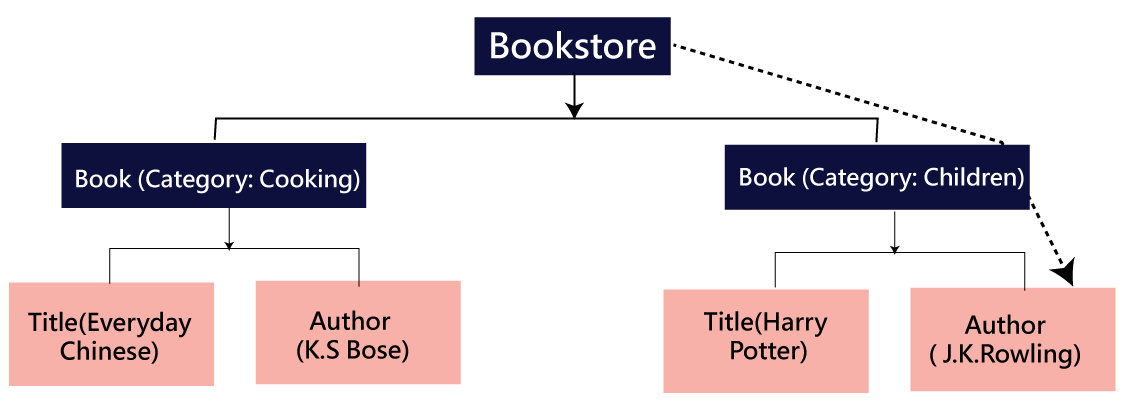
The XML documents are the text files that contain XML data, including elements and other markups, in a sequential package. Further, it can include a wide variety of data such as numbers databases, numbers of a mathematical equation, etc. You can understand XML document with an example:-

 Kumar

   AK & Co.

    032456123

Here, the above code is divided into two parts- Document Prolog & Document Elements. Let us discuss them in brief.

Document Prolog

The document prolog appears at the top of the document, beforE the root document element. It includes XML and Document type declaration. 

Document Elements

These major building blocks of XML segregate the document into different sections. Each of these document sections perform a particular purpose. Moreover, you can easily segregate a document into different sections so that search engines can use it. Further, these document elements can be the containers having text and other elements combined. 

Types of XPath

  1. Absolute XPath:
  2. Relative XPath:
Absolute XPath

In Selenium, the absolute XPath is the direct path to find the element. This Xpath begins with the “/” (Slash) symbol and helps select the element from the root. The major drawback of this XPath is that if you change the path of the element or attribute, the absolute XPath will fail.

Relative XPath:

The Relative XPath in Selenium begins with the double forward slash “//” symbol and from the middle of the HTML DOM. You can search elements anywhere on the web page as it doesn’t need to write a lengthy Xpath. This XPath is mainly considered as it is not a complete path from the root element.

For example: //input[@id=‘ap_email’]

Suppose You launch Google Chrome and navigate to google.com. Then locate the search bar utilising XPath. By analysing the web element there is an input tag and attributes like class and id. Utilise the tag name and given attributes to create XPath that will locate the search bar.

If you want to Explore more about Selenium? then read our updated article – Selenium Tutorial

What-is-xpath-in-Selenium-1

Click the Elements tab and press Ctrl + F to open a search box in chromes developers tool.  Write XPath string selector and it will try to search based on that criteria. In the image given above, it has an input tag.  //input implies tagname. Use the name attribute and pass ‘q’ as its value. It provides XPath expression as shown below:

//input[@name=’q’]

XPath string

It has focused on the element that implies this specific element was located utilising XPath.

If you want to Explore more about Selenium? then read our updated article – Selenium Tutorial!

Check out our Latest Tutorial video. Register Now Selenium Online Course to Become an expert in Selenium.


Acquire Selenium with jenkins certification by enrolling in the HKR Selenium with jenkins Training program in Hyderabad!

Selenium Certification Training

  • Master Your Craft
  • Lifetime LMS & Faculty Access
  • 24/7 online expert support
  • Real-world & Project Based Learning

XPath Functions

Automation utilizing Selenium is unquestionably an incredible innovation which gives numerous approaches to distinguish an article or component on the website page. Be that as it may, in some cases we do deal with issues in recognizing the articles on a page that have similar credits. Some cases can be: components having similar credits and names or with more than one button with similar name and ids. It’s trying to train selenium to distinguish a specific item on a website page and it is the place where XPath functions to serve as the hero. 

Frequently asked Selenium Interview Questions and Answers !!

Types of XPath Functions

Selenium involves different functions. The three of the most broadly utilized functions are given below:

1) Basic XPath

The basic XPath expression selects nodes or a list of many nodes based on various elements or attributes such as ID, Name, ClassName, etc. It selects them from the XML documents. The syntax we can use for the basic XPath is –

Xpath=//input[@name="uid"
2.Contains()

It is a method used in XPath expression when the value of an attribute or element dynamically changes. You can easily find the elements with a partial text using the “Contains” feature in the XPath expression. Now understand this with the below example.:-

Xpath=//*[contains(@type,'sub')]

The above example denotes that the full value of the element type is submitted, but we use the partial text ‘sub’ here to find the element. Thus, in the above example, we tried to find the element by giving a partial text of the attribute “submit”. 

3) Using OR & AND

Here, we use two conditions, first or second condition, among which one condition must be “True” to execute it. This method is still applicable if any one or both conditions are “true”. It means that any conditions should be true to find the element. The expression we can use for this is-

Xpath=//*[@type="submit" or @name="btnReset"]

The above XPath expression will help determine whether a single or both conditions are ‘True’.

Similarly, in the “And” XPath expression, also we use two conditions, but both conditions should be “true” to locate the element. If any one of the conditions becomes “false”, then the expression cannot find the element. The syntax we can use for this function is-

Xpath=//input[@type="submit" and @name="btnLogin"]
4) Xpath Starts-with

The function Xpath-Starts-with() in the Xpath functions is useful to find the element whose attribute value changes in some conditions. Here the value changes with the refresh of the page or by performing dynamic actions on the webpage. In this method, the initial text of the attribute should be in parallel to locate the element whose attribute value changes interactively. 

Further, you can also find the elements whose attribute value doesn’t change or remain static. You can understand this function’s use by the following example:-

Xpath=//label[starts-with(@id,'message')]

The above syntax shows that two different elements start with the initial id “message”. Here, you can use the Xpath-starts with function to check whose attribute value changes or remains static.

Become a master of Selenium by going through this HKR Selenium Training in Delhi!

HKR Trainings Logo

Subscribe to our YouTube channel to get new updates..!

5) XPath Text() Function

In Selenium WebDriver, the function XPath Text() is a built-in function useful to locate elements based on the web element’s text. Using this function, you can find the same text element. Moreover, the elements that you locate must be in a string format.

Xpath=//td[text()='UserID']

Using the above expression having text function, you can locate the element that will show the exact match of the text.

6) XPath axes methods

This method in XPath functions is useful for finding complex or changing elements. However, we can see the following XPath axes methods which we can use:-

  1. a) Following- It is useful to select all the elements in the document of the existing node(). The expression you can use for this method is-
 Xpath=//*[@type="text"]//following::input
  1. b) Ancestor- The ancestor axes method is useful to select all the ancestor elements of the existing node, like parents, grandparents, etc. Here, the expression you can use is-
Xpath=//*[text()='Enterprise Testing']//ancestor::div
  1. c) Child- This axes method selects all the child elements in the documents’ current node. The expression you can use here is-
Xpath=//*[@id='java_technologies']//child::li
  1. d) Preceding- This method helps select the nodes that come before the existing ones. Here is the example expression:-
Xpath=//*[@type="submit"]//preceding::input

The above expression helps to identify all the input elements before the currently given nodes.

  1. e) Following-sibling- This method helps to select the following siblings of the existing node. All the siblings will be equivalent to the existing node, and the method will find the sibling next to the existing node. Moreover, the syntax you can use here for this method is-
xpath=//*[@type="submit"]//following-sibling::input
  1. f) Parent- It helps to select the parent from the existing node of the element. The following is the syntax you can use here.
Xpath=//*[@id='rt-feature']//parent::div

Many div(s) match with the parent, but if you want to focus on a specific element. For this you can use the below xpath syntax-

Xpath=//*[@id='rt-feature']//parent::div[1]
  1. g) Self- In this method, it selects the existing node where it selects itself only. That means the node here is the “self”. The expression you can use for self is-
Xpath =//*[@type="password"]//self::input
  1. h) Descendant- It helps to select the descendants of the existing element where it recognizes all the element descendants of the existing element. 
Xpath=//*[@id='rt-feature']//descendant::a

Selenium Certification Training

Weekday / Weekend Batches

Conclusion

XPath or an XML Path is used to locate any element or navigate through the HTML structure of a webpage. It is generally used for automation purposes and in cases where it is difficult to find elements using locators like name, class, ID, etc. However, it is the most important among the locators useful in Selenium to identify web elements. Also, it is a handy locator for the testers of web pages.

Thus, learning about XPath in Selenium will help you quickly identify a web element on a web page. 

Related Articles:


Source link