Best airlines report 2026: Delta tops TPG’s rankings for 8th straight year


Ready or not, summer is here. And the year’s busiest rush at airports comes on the heels of an especially topsy-turvy stretch for air travel.

In the last few months alone, we’ve seen mass security backups, skyrocketing airfare and the biggest collapse of a U.S. airline in decades.

For passengers preparing to book a flight, it has made some questions more important than ever: Which airline is most likely to get you to your destination? Which airline is the most affordable? And which airline is, quite simply, the best?

Once again in 2026, the TPG team set out to answer those questions (and many others) as we crunched the numbers on thousands of datapoints to crown the champion of our annual Best Airlines Report.

And it’s a familiar name in the top spot.

Best Airlines 2026 Overall Winner: Delta Airlines

Delta Air Lines continued its remarkable run atop our airline rankings thanks to its usual sterling on-time record in 2025, along with a standout end-to-end travel experience — from airport lounge to airplane cabin.

What we changed

This year, as passengers have faced surging ticket prices, higher add-on fees and worries about whether geopolitical strife could lead to their flights being canceled, we gave more credit than ever to the price travelers pay, and to the schedule and routes airlines offer.

Here’s how the rankings shook out:
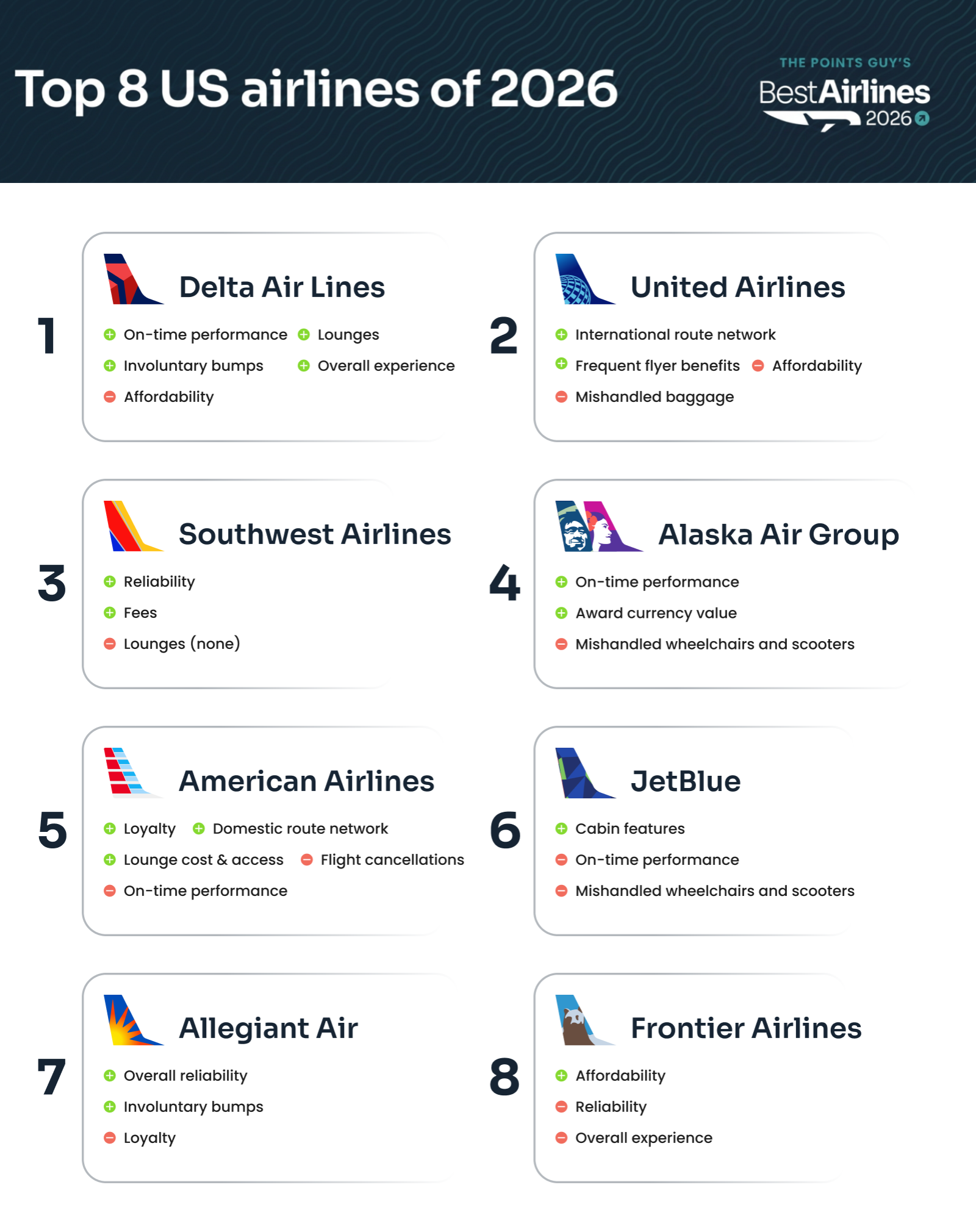
Best Airlines 2026 Overall Rankings: 1. Delta 2. United 3. Southwest 4. Alaska and Hawaiian Airlines 5. American Airlines 6. JetBlue 7. Allegiant 8. Frontier

5 big things to know: TPG’s Best Airlines of 2026

  • Delta wins again: The airline has now topped our airline rankings for the better part of the decade. It’s a testament to the consistent travel experience Delta has maintained, from the hallmark reliability it’s had through the years — to its policies, lounge network and on-board amenities.

Reward your inbox with the TPG Daily newsletter

Join over 700,000 readers for breaking news, in-depth guides and exclusive deals from TPG’s experts

  • A tight leaderboard: It was a photo finish for the next three spots in our rankings. United Airlines, Southwest Airlines and Alaska Air Group (comprised of Alaska Airlines and Hawaiian Airlines) each had a legitimate chance of winning. In fact, our metrics show United could have won if it weren’t for one score that dragged down its report card.
  • Hot and cold: American Airlines might’ve been our biggest “up and down” carrier in this year’s report, turning in the industry’s worst cancellation rate but winning our loyalty category thanks in large part to the strong value of its AAdvantage miles.
  • No more Spirit: In past years, we’ve ranked 10 U.S. carriers. This year, there are only eight listed. We were knee-deep in compiling data for this report when Spirit Airlines collapsed. It left a clear void for travelers: Our analysis shows Spirit was the second-most affordable airline in America last year.
  • Alaska + Hawaiian = Alaska Air Group: While Alaska Airlines and Hawaiian Airlines continue to fly as separate brands after merging in 2024, we evaluated them as one combined airline; this includes using data from their shared Atmos Rewards loyalty program, which is a favorite of points-savvy flyers.
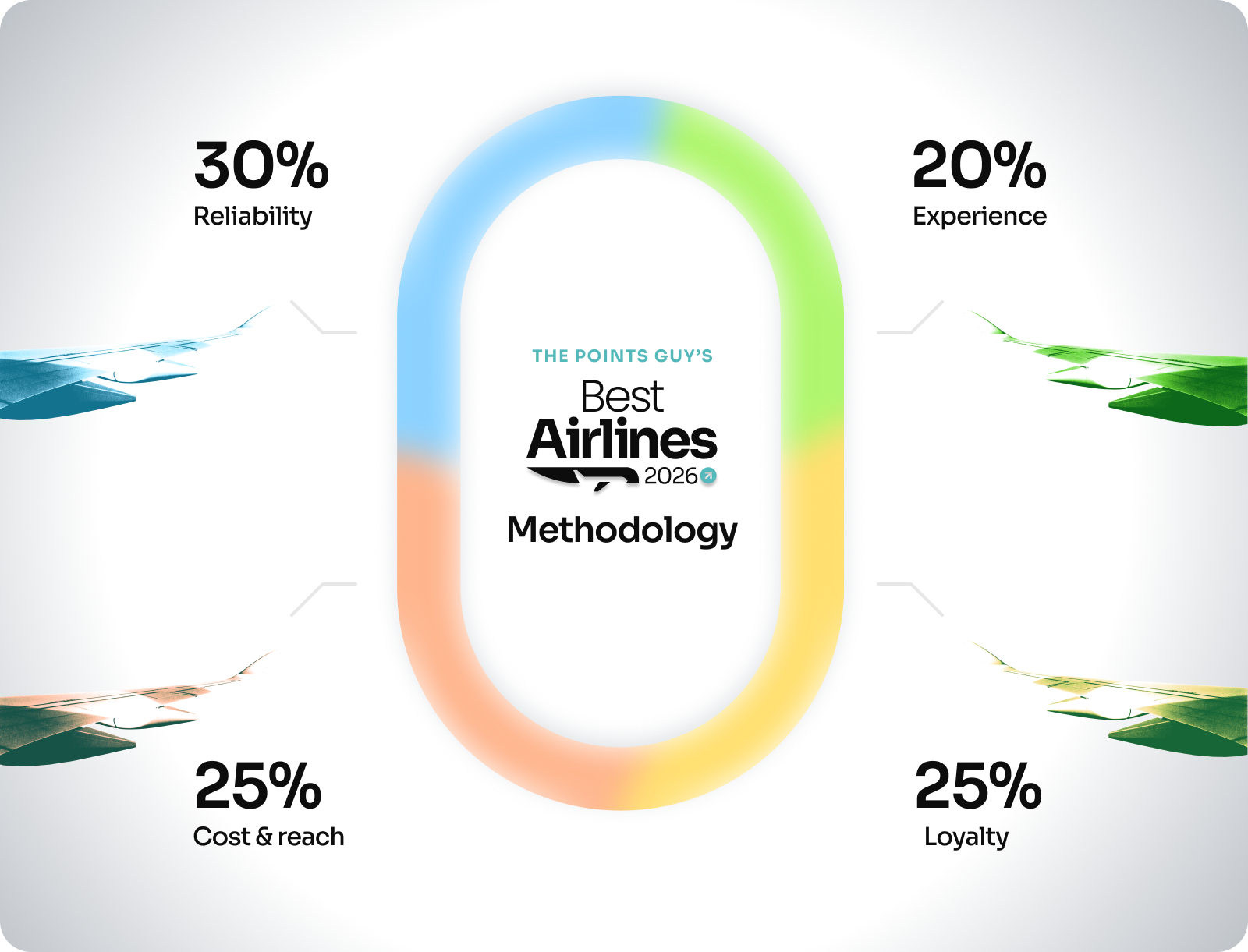
Best Airlines 2026: Methodology Overview Reliability: 30% Experience: 20% Cost and Reach: 25% Loyalty: 25%

Read more: How TPG determines the best airline

Reliability

We weigh reliability more heavily than any other category in our annual airline rankings. This section measures how well each of the largest U.S. airlines accomplishes the basics: getting you (and your belongings) to your destination, and getting you there on time.
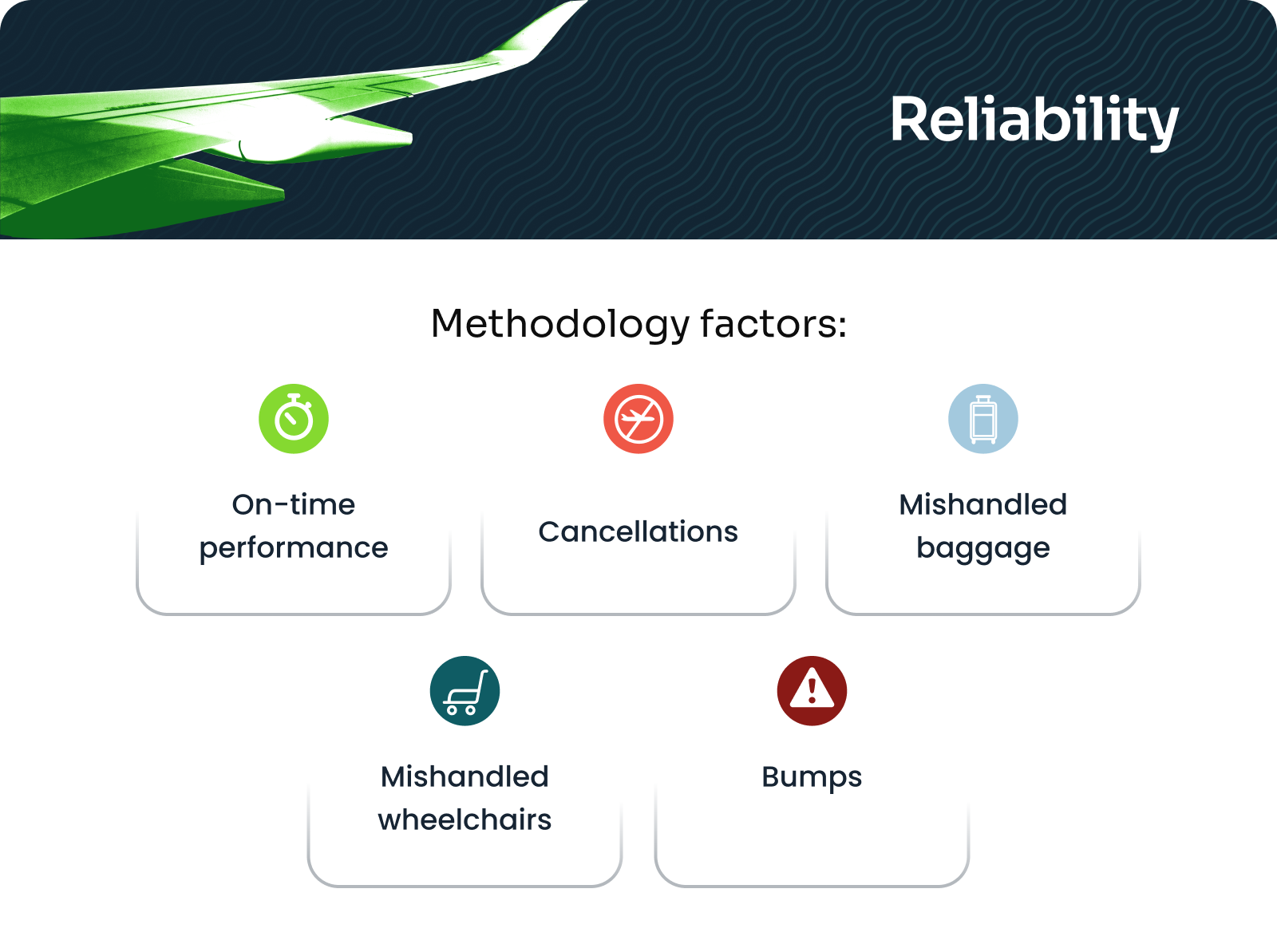
Best Airlines Reliability Methodology Factors: - On-time performance - Cancellations - Mishandled baggage - Mishandled wheelchairs - Involuntary bumps

Congress sure didn’t make things easy for airlines in 2025. Remember that weekslong government shutdown last fall? Airlines were required to cancel flights at many of the nation’s busiest airports.

It showed.

Across the airline industry, flight cancellations in 2025 were up about 15% from 2024, according to U.S. Department of Transportation data.

Airplane during takeoff
ALLEGIANT AIR

In the end, three carriers clearly stood ahead of the proverbial “pack” when it came to reliability:

  • Delta, which had standout numbers again in 2025 (despite some slippage more recently).
  • Southwest, whose third-place finish in our rankings was due in large part to its strong operational performance.
  • And Allegiant, the largely unsung budget carrier that won this all-important category.

Known for connecting underserved U.S. cities to popular leisure spots, Allegiant certainly doesn’t have the bells, whistles, big-city service or loyalty program to match its much larger competitors. And, its network is far simpler — nonstop service, no connecting passengers (or bags) to manage.

Still, the airline’s reliability speaks for itself.
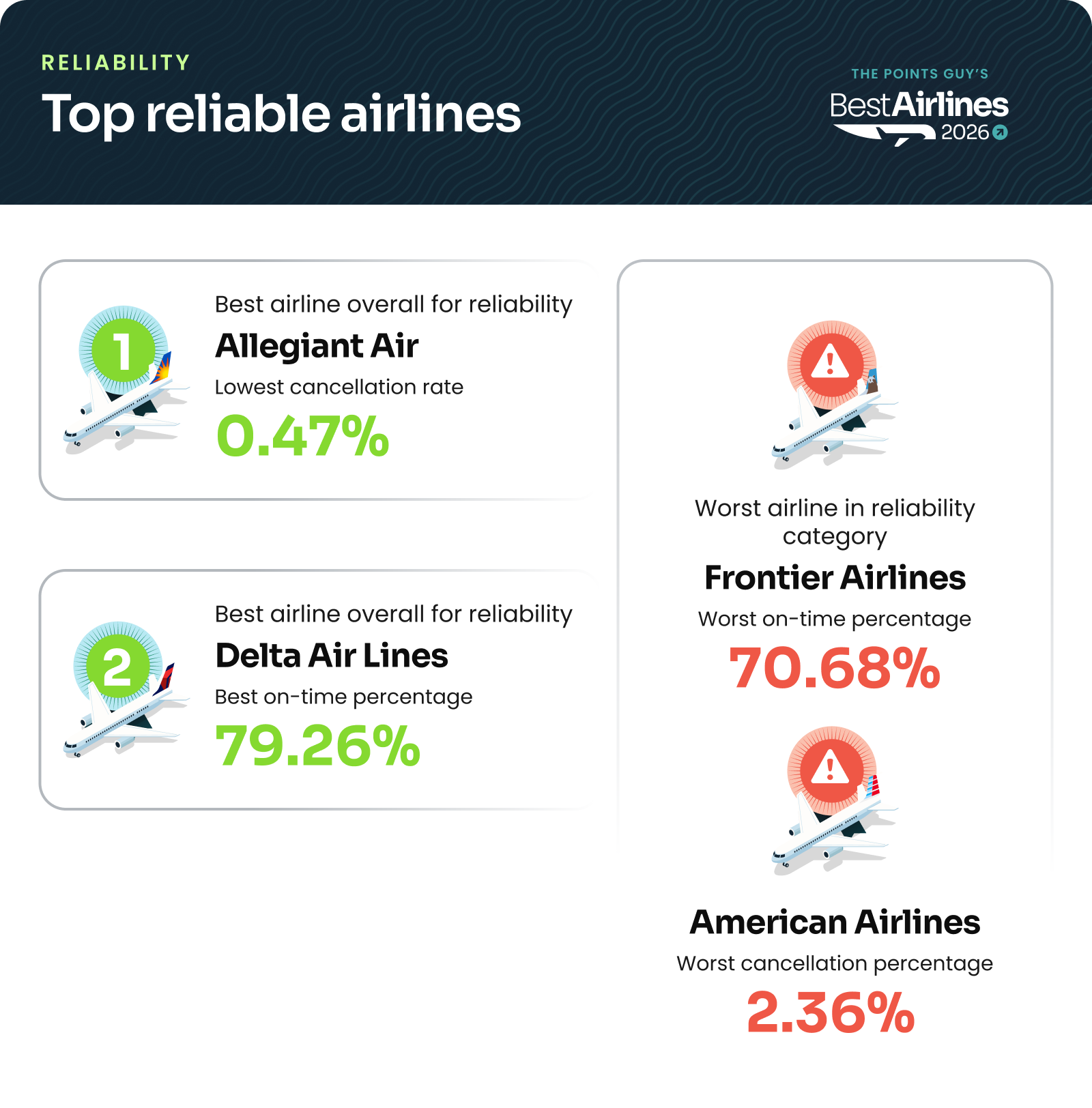
Best airlines report: Most reliable airlines: Allegiant and Delta
Source: U.S. Department of Transportation data.

How the airlines ranked for reliability (30% of overall score):

Rank Airline

Allegiant

Delta

Southwest

Alaska and Hawaiian

JetBlue

United

American

Frontier

Baggage

Think about how a missed three-point shot can lose a game, or how a swing state loss can tip an election.

That might’ve been the story for United in our report this year.

Our data shows that the Chicago-based carrier could have been crowned the best airline in the U.S. this year if it hadn’t turned in the industry’s highest rate of mishandled bags, as reported by the U.S. Department of Transportation.
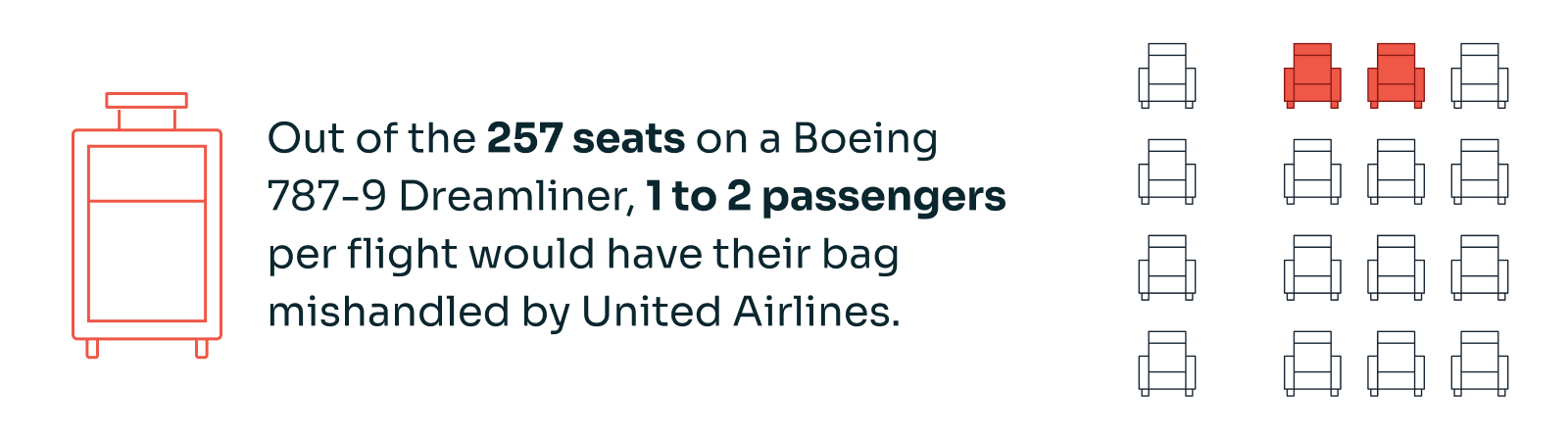
Best Airlines 2026: Out of the 257 seats on a Boeing 787-9 Dreamliner, 1-2 passengers per flight would have their bag mishandled by United Airlines.
Source: U.S. Department of Transportation data. Estimate assumes one checked bag per passenger.

American, which was second-worst in this category, technically mishandled more bags than United did. But American also handled way more total bags overall, DOT data showed — and United mishandled luggage at a higher rate in 2025, a clear opportunity for our overall runner-up going forward.

Read more: Tips for summer travel after flight cancellations hit 3-year high

Handling of wheelchairs, scooters and mobility devices

This year’s champion, Delta, turned in the industry’s lowest rate of mishandled wheelchairs, scooters and mobility devices.

The airline has also been on the front lines, in recent years, of developing new and innovative ways for passengers with disabilities to fly with comfort and dignity.

Involuntary bumps

One of the most striking findings in our report concerned passengers who were involuntarily bumped from a flight.

Keep in mind that this remains a very rare occurrence overall. That said, a couple of U.S. airlines are doing it a lot more than others.

Over the past year, DOT data shows American and Frontier combined to bump more than 22,000 passengers. Delta and Allegiant combined to (involuntarily) bump … zero.

Over the past two years, Frontier passengers were about 88,000 times more likely to be bumped than Delta passengers.
Source: U.S. Department of Transportation involuntary bump data

Some important context: Delta had more voluntary bumps last year than any other airline, which is essentially when an airline incentivizes a passenger to give up their seat.

Last-place again

Frontier has been a perpetual last-place finisher in our rankings, due in large part to its reliability challenges.

Could improvement be on the horizon? The budget airline’s CEO recently declared its past struggles “not acceptable.”

Experience

Our experience category was where Delta’s strength — and consistency — stood front and center.
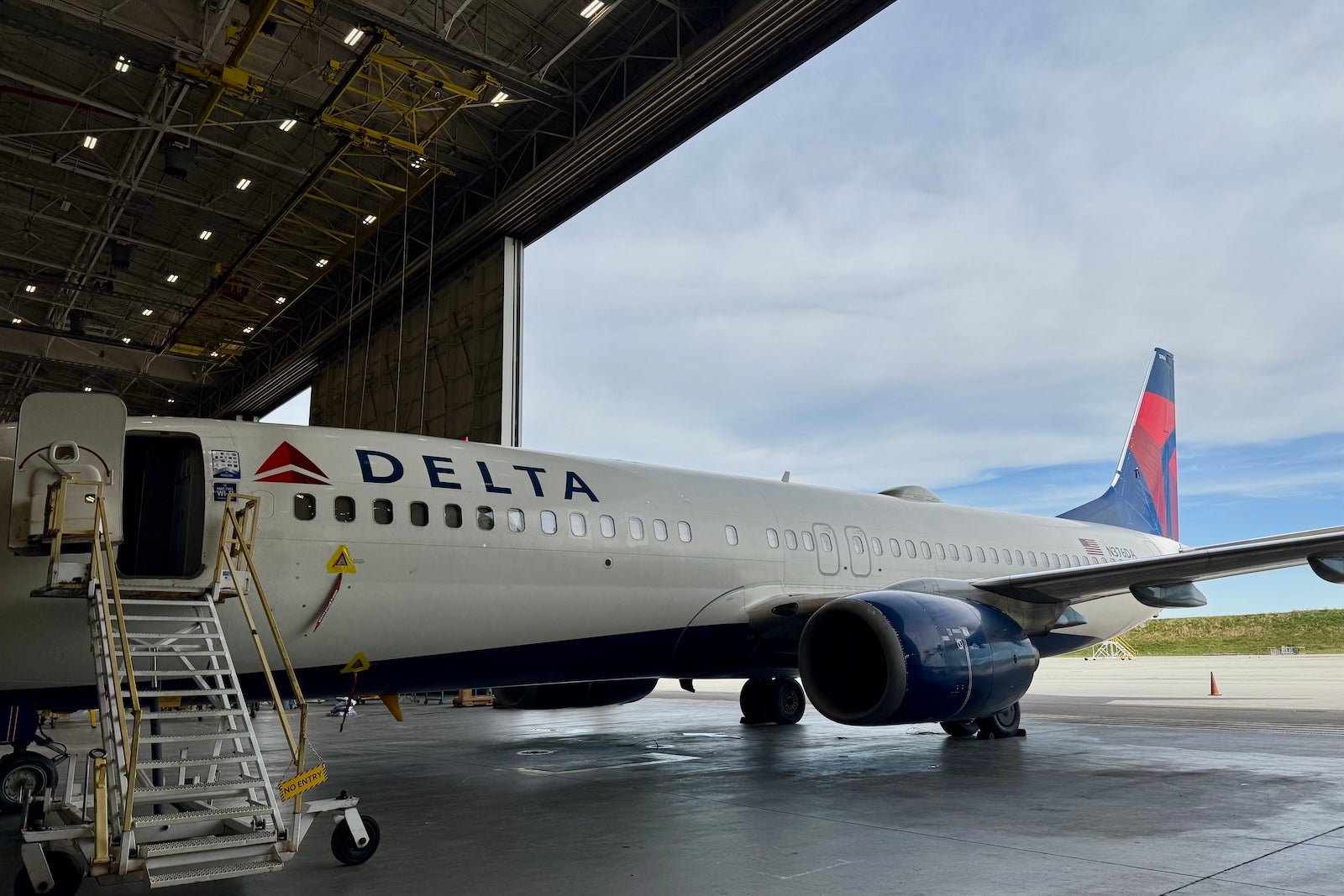
SEAN CUDAHY/THE POINTS GUY

Interestingly, the Atlanta-based carrier didn’t rank first in any of the “experience” metrics we examined. But it was close to the best in each and every one of them.
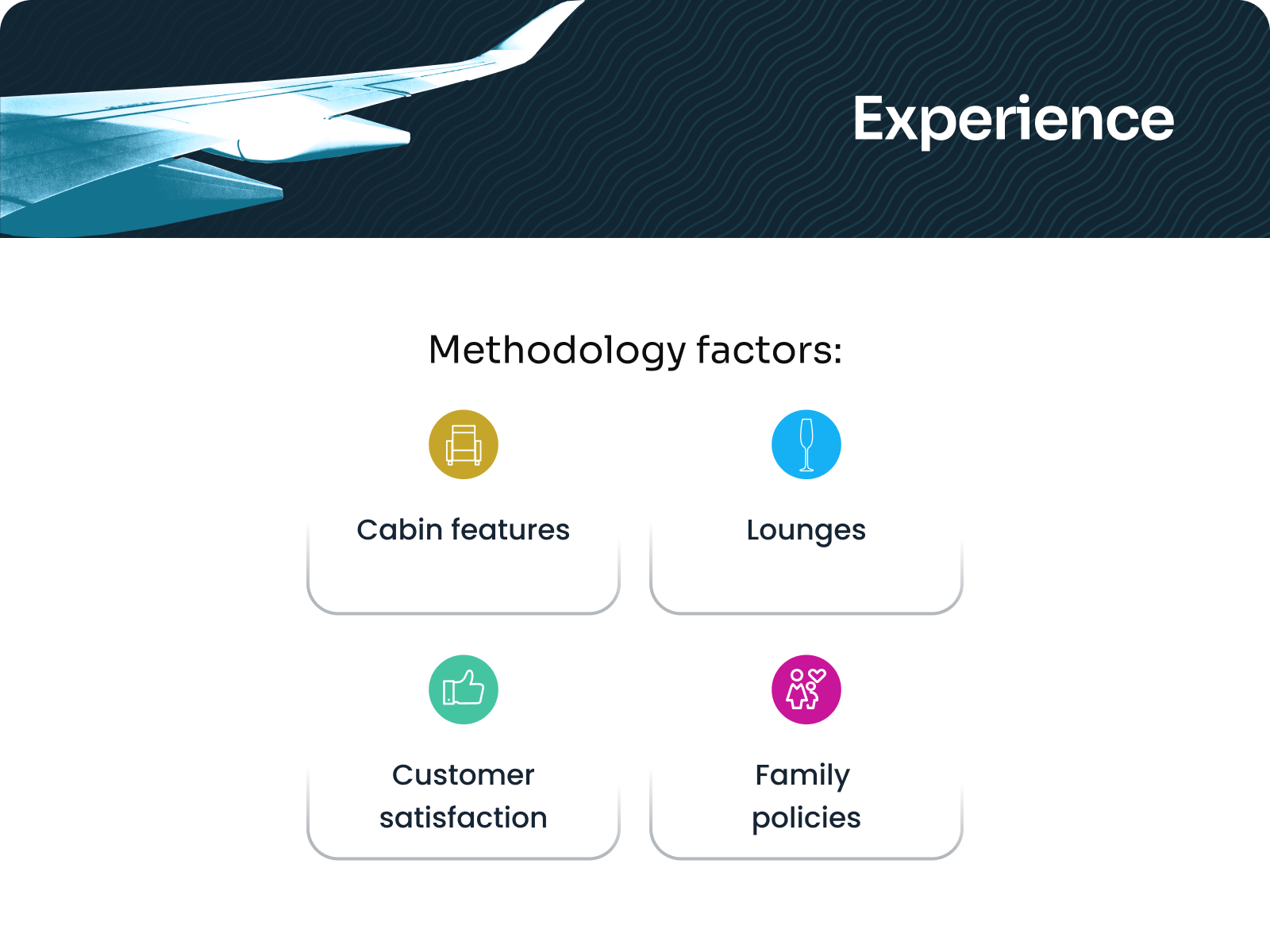
Best Airlines 2026: Experience Methodology Factors - Cabin features - Lounges - Customer satisfaction - Family policies

How the airlines ranked for travel experience (20% of overall score):

Rank Airline

Delta

Alaska and Hawaiian

United

American

JetBlue

Southwest

Allegiant

Frontier

Lounges

This year, we overhauled how we evaluate airlines’ lounges.

We wanted to know which lounge network truly offers travelers the best bang for their buck by looking at access rules, guest policies, and the annual credit card fees required to enter. We also tallied up how many clubs — and partner lounges — each airline has domestically and abroad.

According to our new formula, American’s Admirals Clubs led the way for 2026, followed closely by Delta’s Sky Clubs. The United Club network ranked third.

Read more: Which US airlines offer the best lounge access policies for travelers?

Cabin features

JetBlue continued its long run as the best U.S. airline when it comes to economy cabin features, with its trademark seatback screens and generous legroom in coach.

JORDAN WALLER/THE POINTS GUY

Inflight Wi-Fi

However, JetBlue’s competitors have closed its long-running lead on inflight Wi-Fi. After years of being the only carrier to offer on-board internet for free, most major airlines have slashed Wi-Fi fees as part of what has become the industry’s hottest new loyalty perk.
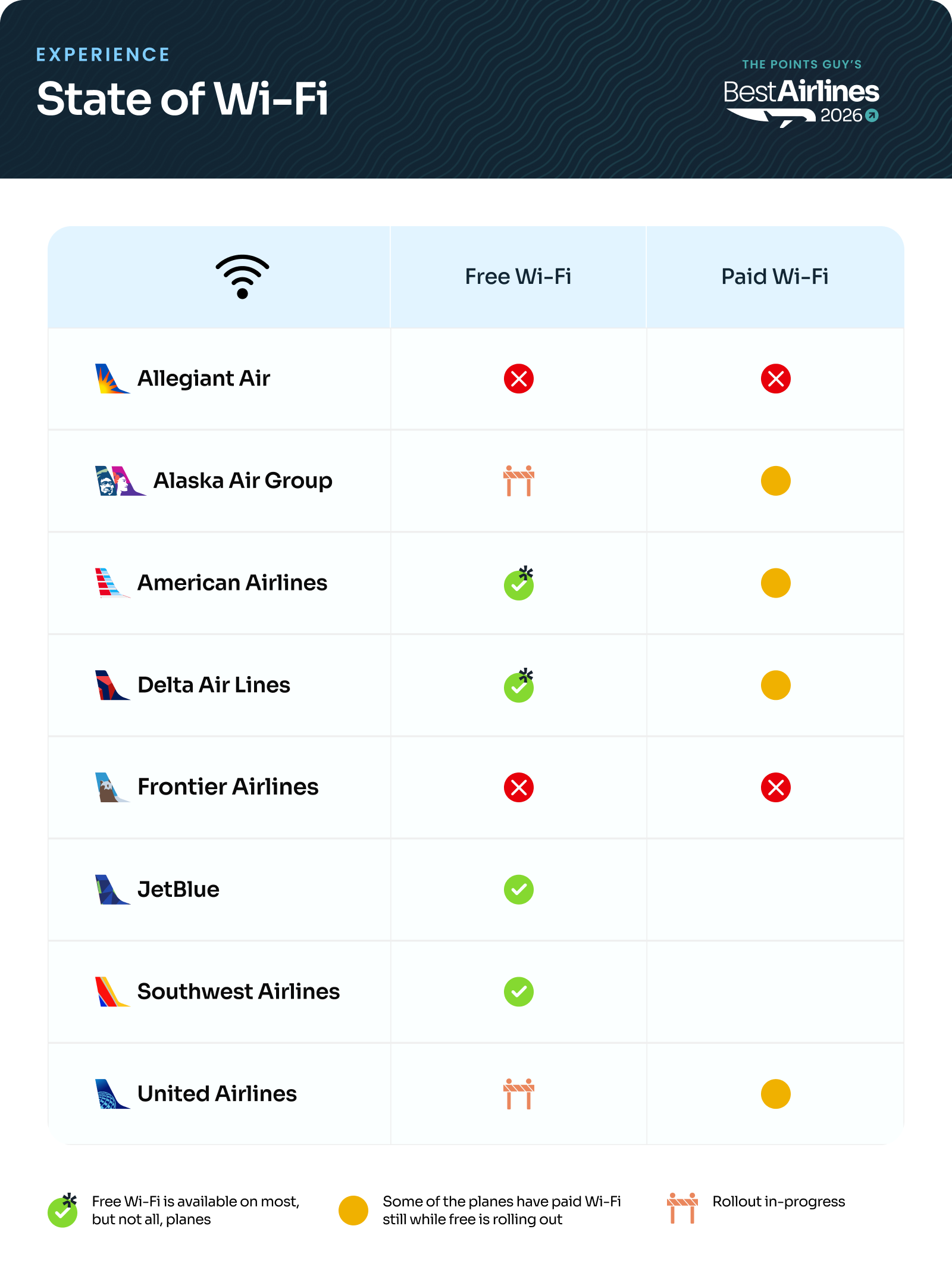

Best Airlines 2026: Wi-Fi Policy Overview
Source: TPG analysis of airline policies.
Best Airlines 2026: Top 3 family-friendly policies 1. Alaska and Hawaiian Airlines 2. United 3. American
Source: Individual airline policies. THE POINTS GUY

Cost and reach

What travelers will pay to fly in 2026 is top of mind, as soaring jet fuel costs have led to surging airfare and higher add-on fees.

Meanwhile, geopolitical uncertainty has made nonstop flight options more important than ever.

That’s why our “cost and reach” category counts for more in 2026, and now stands at 25% of an airline’s overall score.

Best Airlines 2026: Cost and Reach Methodology Factors - Route network - Add-on fees - Affordability

Despite ending its popular “bags fly free” policy last year, Southwest again led the way in this category thanks to the strength of its domestic route network and its continued affordability (on fares and overall fees) relative to its peers.

wn new plane 2
SEAN CUDAHY/THE POINTS GUY

How the airlines ranked for cost and reach (25% of overall score):

Rank Airline

Southwest

American

United

Delta

Alaska and Hawaiian

JetBlue

Frontier

Allegiant

Reach

American and United received “silver” and “gold” in our cost and reach category, respectively, thanks primarily to the “reach” portion of this section.

In 2026, we gave credit not just to how many cities an airline touched but also the overall scale of their network (via a key industry statistic known as “Available Seat Miles,” or “ASMs,” for the AvGeeks among us).

American had the most robust domestic network of any carrier in 2026, according to data provided to TPG from aviation analytics firm Cirium.

United, meanwhile, continues to offer the U.S. airline industry’s most expansive (and certainly most creative) international map.
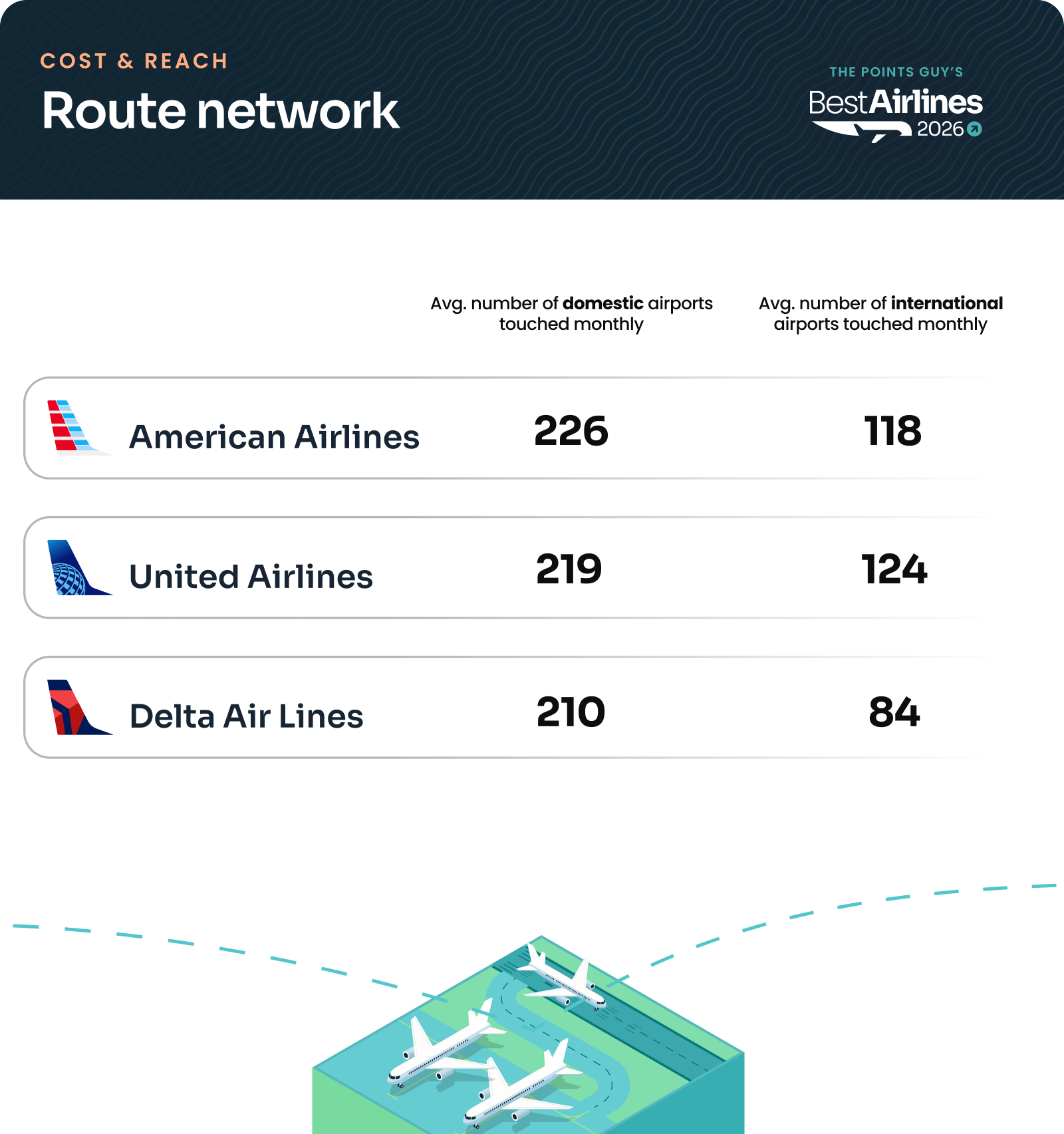
Best Airlines 2026: Route network overview for American, United and Delta.
Source: Cirium. Our “reach” analysis also accounted for ASMs (Available Seat Miles), a key industry metric.

Affordability

If there’s one area where budget airlines shine, it’s affordability.

And despite its challenges elsewhere, our review of federal data shows Frontier offered the most affordable ticket prices in the industry last year.

Here’s the sad part: Spirit was a close second, a sobering reminder of the critical competition that left the airline industry when its planes stopped flying last month.

Delta and United, which have gone all-in on “premium” in recent years, ranked as the two least affordable airlines in 2025.

Ancillary fees

Of course, budget airlines will hit your wallet with their add-on fees. Unsurprisingly, Frontier passengers paid the most for “extras” such as baggage and ticket changes.
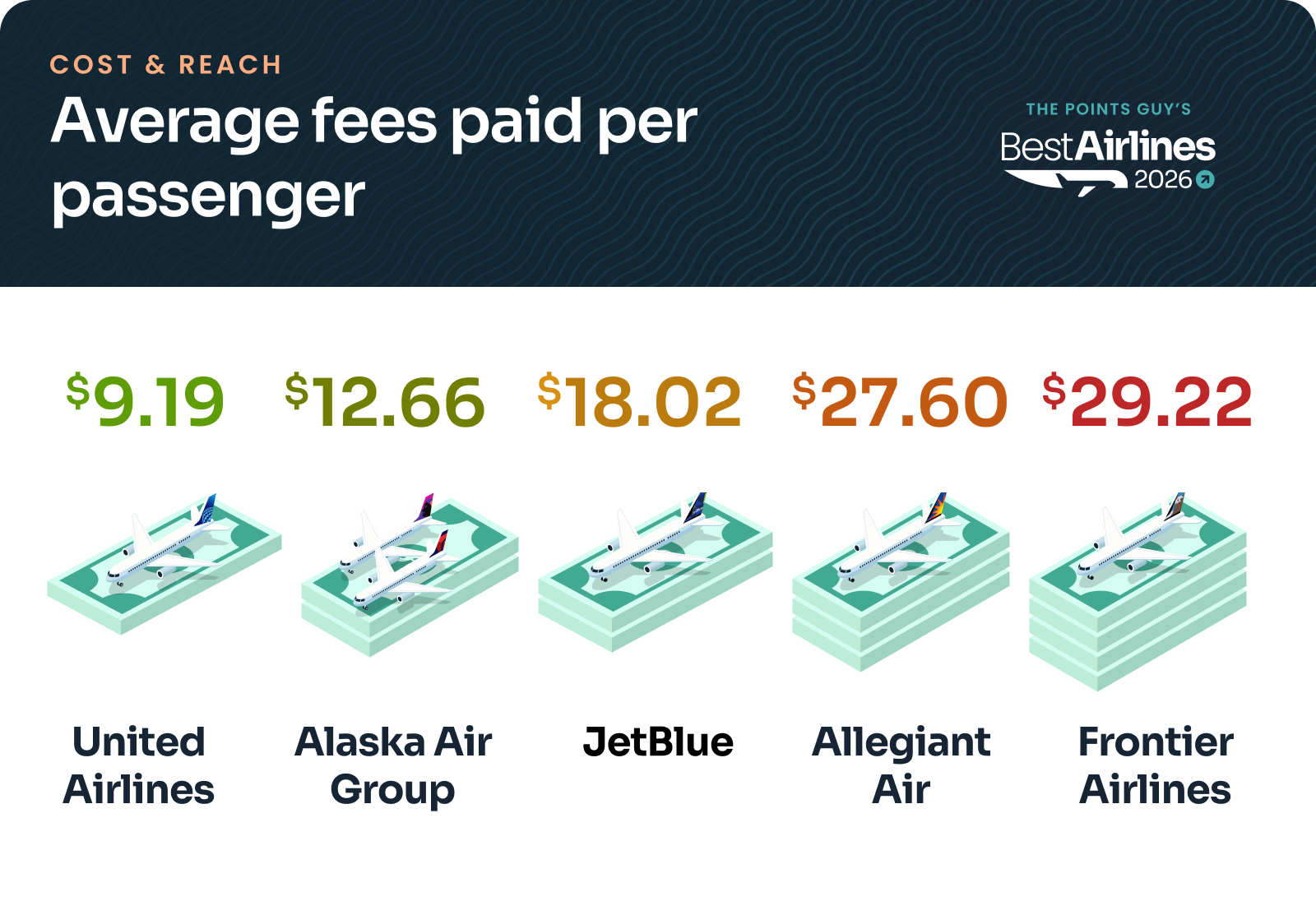
Best Airlines 2026: Average fees paid per passenger United: $9.19 Alaska and Hawaiian: $12.66 JetBlue: $18.02 Allegiant: $27.60 Frontier: $29.22
Source: Bureau of Transportation Statistics data.

It’s worth watching how Southwest ranks in fees next year. The carrier reported only half a year’s worth of bag-fee data to the government, since its baggage fees technically launched in late May 2025.
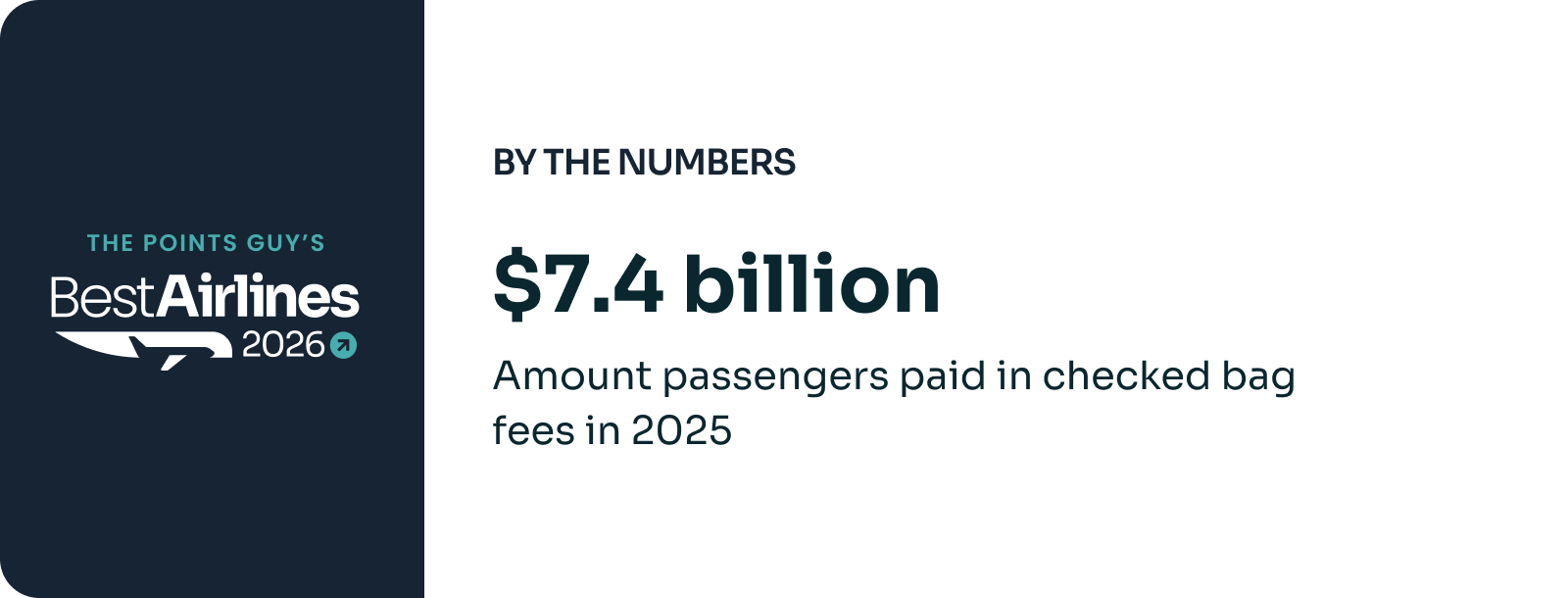
Best Airlines 2026: Passengers paid $7.4 billion in checked bag fees to U.S. airlines in 2025.
Source: Bureau of Transportation Statistics data.

Either way, expect airlines to collect more fees from you this year after nearly every major carrier hiked baggage fees in recent months amid surging jet fuel costs.

Loyalty

Closest to our hearts here at TPG is our annual “loyalty” portion of this report, which pits the major carriers’ points, miles, credit cards and frequent flyer perks against one another.

Best Airlines 2026: Loyalty Methodology Factors - Loyalty benefits - Elite status - TPG award currency valuations

This year, American narrowly edged out United to win this key category for avid travelers.

ZACH GRIFF/THE POINTS GUY

How the airlines ranked for loyalty (25% of overall score):

Ranking Airline

American

United

Alaska and Hawaiian

JetBlue

Delta

Southwest

Frontier

Allegiant

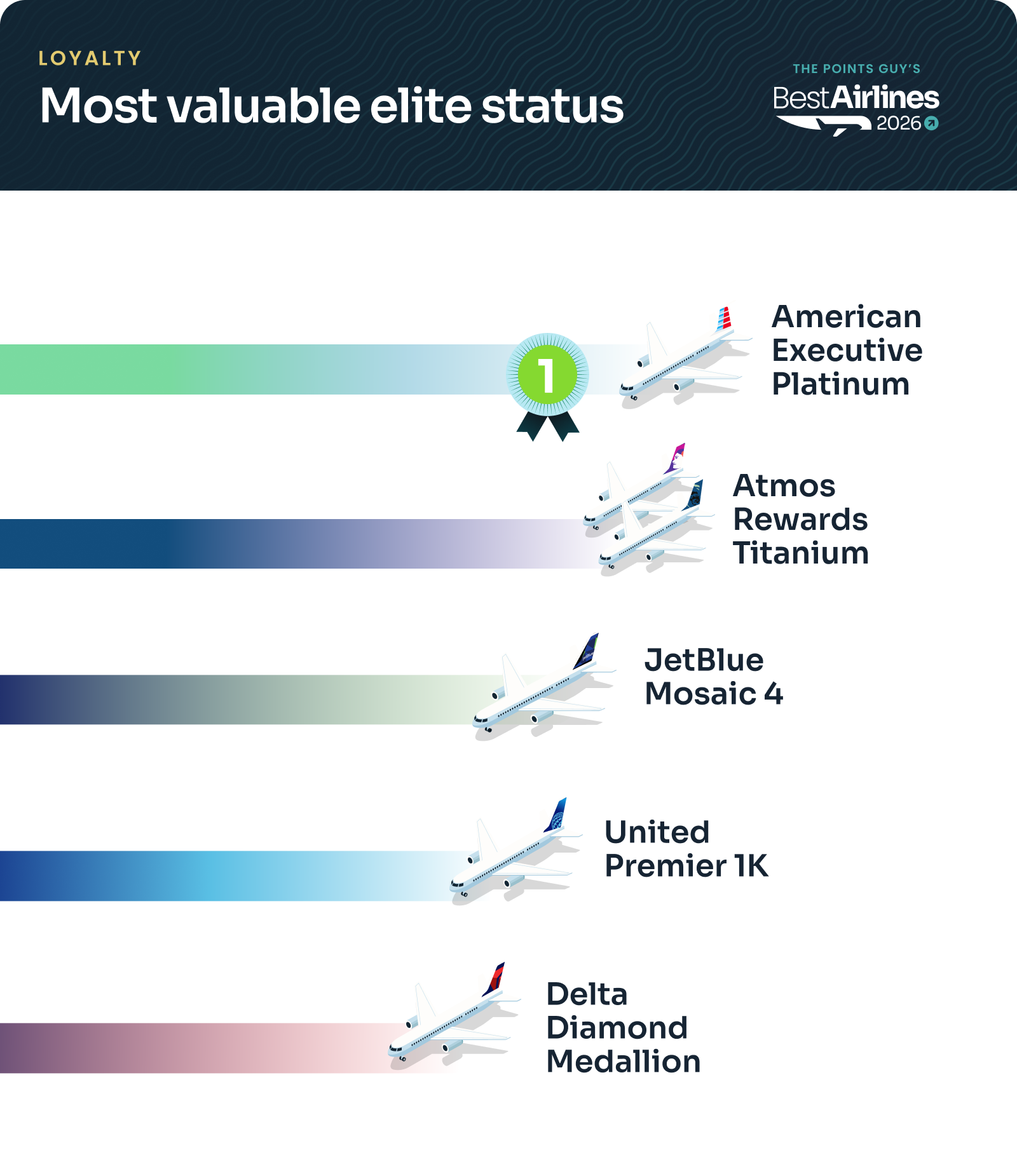
Best Airlines 2026: Most valuable elite status rankings 1. American Executive Platinum 2. Atmos Rewards Titanium 3. JetBlue Mosaic 4 4. United Premier 1K 5. Delta Diamond Medallion
Source: 2026 TPG Awards analysis.

A big reason for American’s win was the value of its AAdvantage miles, which continue to rank at the top of TPG’s monthly valuations.

That said, we continue to see some of the best redemptions in the airline industry through Atmos Rewards, the new shared loyalty program of Alaska and Hawaiian. It’s a valuable program to consider even for travelers who don’t fly with either carrier.
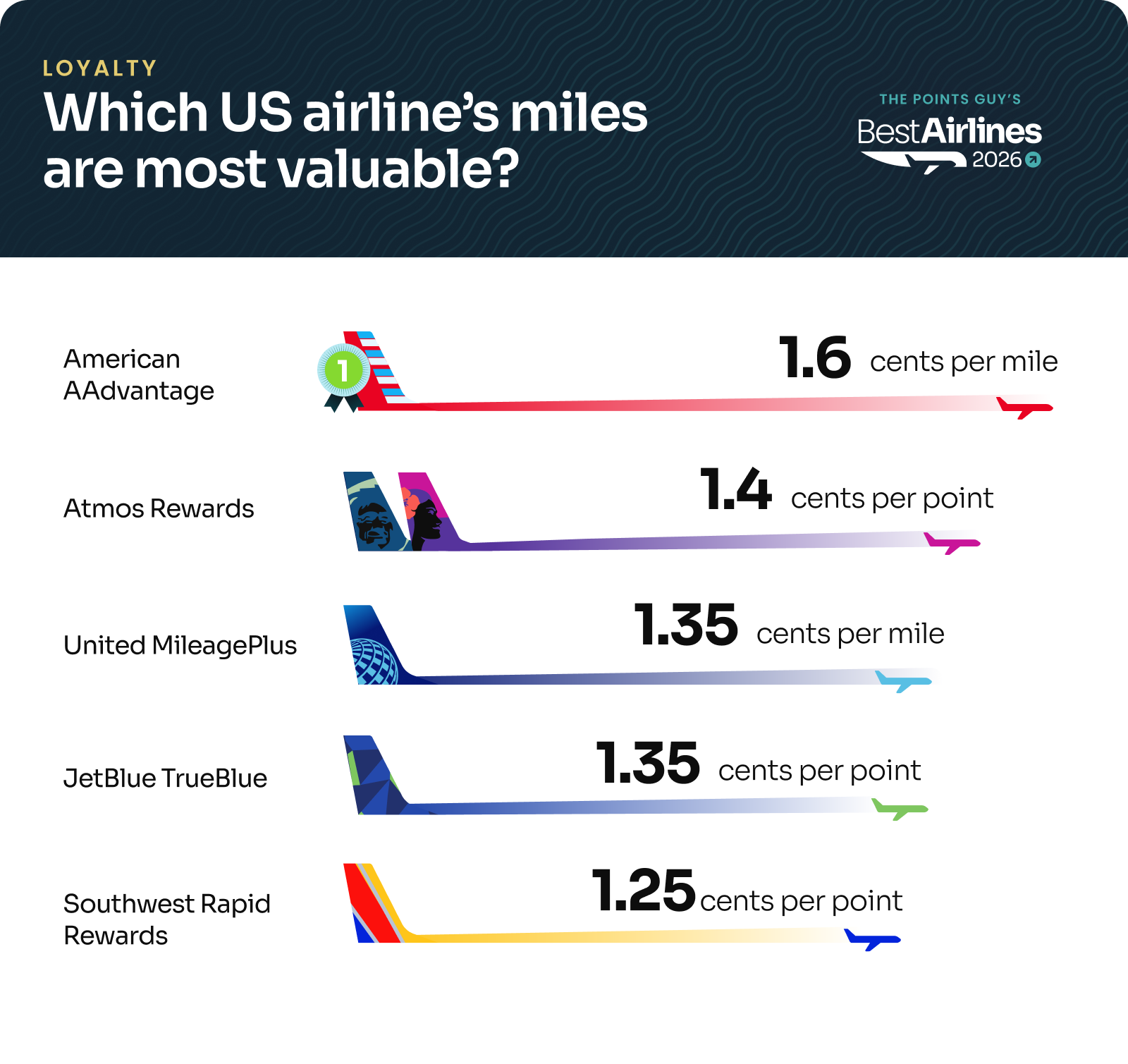
Best Airlines 2026: Which US airline's miles are most valuable? Overview graphic
Source: June 2026 TPG valuations.

The value of miles was one of the weaker categories for our overall winner, Delta; Delta SkyMiles are valued at about 1.2 cents apiece, according to our June valuations.

Frequent flyer

United’s MileagePlus program, meanwhile, led the way when it came to overall frequent flyers perks, thanks in part to the bevy of partners it has through the Star Alliance, such as Air Canada, Singapore Airlines and Turkish Airlines.

Bottom line

Delta has topped TPG’s Best Airlines rankings an incredible eight straight years. It’s a credit to the airline’s long-running operational strength and the end-to-end experience it has created for passengers.

Will the airline extend its winning streak to nine years in 2027?

All signs point to United being a formidable foe once again. If Southwest bolsters its offerings with lounges (as rumored) don’t be surprised if it makes a run at the top spot.

Plus, Delta will likely need to return to its historically strong on-time performance — and overcome a shakier start to 2026 — to hold the mantle as the best U.S. airline in 2027.

But if history is any indication, it will be a force to be reckoned with when we crunch the numbers again in one year.

Related reading:


Source link

Leave a Reply

Subscribe to Our Newsletter

Get our latest articles delivered straight to your inbox. No spam, we promise.

Recent Reviews


The following article presents the frequently asked JIRA interview questions and answers for both freshers and experienced. If you are going to attend an interview for QA professional or software testing, then these interview questions and answers will be helpful to learn. JIRA is a popular software testing tool that is useful in development and project management. You can ace the interview by reviewing these Jira testing interview questions and answers.

Let us discuss the top JIRA Interview Questions and Answers. 

Most Frequently Asked JIRA Interview Questions and Answers

1. What Is Jira?

Ans. JIRA is a popular software testing tool and an issue-tracking product from Atlassian, an Australian IT company. It is also a famous bug-tracking tool that tracks various issues in project management. This tool is popularly used in software development and testing projects. Also, JIRA covers multiple reporting tools that help manage projects related to development and track many potential bugs and software errors. 

Become a master of Jira by going through this HKR Jira Course!

[ Related Article: Jira Course ]

2. Why JIRA is used?

Ans. JIRA is popularly known as a software testing, issue tracking, and project management tool. JIRA can be used for different purposes in software development and project tracking. Here are some benefits of using the JIRA tool:

  • It helps in tracking the progress of various IT projects. 
  • This tool is platform-independent.
  • Jira can run on different Operating Systems with compatibility. 
  • It is easy to customize the platform as per user needs.
  • Further, it is a very user-friendly and cost-efficient tool.
  • It also helps to automate various workflows.

3. Explain the JIRA workflow?

Ans. JIRA workflow is a group of various software activities helpful in tracking the different transitions of a bug or issue in the SDLC process. Transitions connect the two statuses when an issue transits from one status to another. Hence, the status mentions the nature of work performed by the tester. However, the three essential stages of JIRA workflow are as follows:

  • Open/Started
  • Work in Progress
  • Close/Finally done.

4. What are the important differences between JIRA and Bugzilla?

Ans. The following are the key differences between JIRA and Bugzilla:

  • JIRA is a popular commercial tool, whereas Bugzilla is an open-source tool.
  • Bugzilla is mainly a bug-tracking tool, but JIRA is a complete project management and issue-tracking tool. 
  • JIRA is a highly intuitive and user-friendly tool, but Bugzilla needs a more interactive UI.
  • JIRA can be easily customizable per various business needs, but Bugzilla has limitations. 
  • Bugzilla cannot integrate with other tools seamlessly, whereas JIRA can easily integrate with other Atlassian tools.
  • JIRA has no advanced search options feature, but Bugzilla has such an option. 

5. Is it possible to access the JIRA cloud site through a mobile device?

Ans. Yes, using the JIRA cloud site URL, you can access the JIRA cloud site through your mobile’s web browser.

6. Can JIRA be used for test case management?

Ans. As far as we know, the server’s test case management functionality was not well-integrated into the JIRA architecture. The test case management system will be set up in two alternative ways to support the test case management system. After that, customers have the following two options: they may either modify the built-in JIRA components to conform to the requirements of the test case management system, or they can utilize the add-ons that the parent business offers.

7. Explain labeling and linking issues in JIRA?

Ans.

Labeling is also known as “tagging,” which allows you to categorize an issue as information that can be allocated to any component later. You can find this issue through labels. 

You can use this functionality to establish a relationship between two issues on separate or identical JIRA servers.

8. List the types of reports generated in JIRA?

Ans. JIRA produces the following reports on the issues based on versions, projects, etc. Here are a few examples of the various reports:

  • Pie Chart Report
  • Average Age Report
  • Resolution Time Report
  • Recently created issue report
  • User-defined Workload report
  • Pie-chart workload report
  • Created issue Vs. Resolved issue report
  • Project Time-Tracking report
  • Single-level group report

9. What is cloning an issue in JIRA?

Ans. In JIRA, cloning an issue enables users to produce a copy of the actual/original issue. It allows multiple teams or developers to work on a single issue. Further, a clone issue can also be connected to the actual issue, containing the following information. 

  • Summary details
  • Assignee
  • Work environment info
  • Security info
  • Description Details
  • Issue type
  • Reporter 
  • Priority 
  • Component detail

10. How does a service desk work in JIRA?

Ans. A service desk plays a key role in a company’s IT infrastructure and is a central point of contact. A service desk agent works to address customer issues, inquiries, and technical support requirements. The service desk aims to provide seamless delivery of various IT services, improve efficiency, and increase user satisfaction.

The process typically starts with a request submission by a user through a web portal, email, or phone call. In the JIRA service desk line, they find the request sent and start action against it. Further, the service desks also follow IT best practices to resolve customer queries. Thus, they complete the customer requests and make them satisfied. 

If you want to Explore more about Jira? then read our updated article – Jira Tutorial

Jira Training Certification

  • Master Your Craft
  • Lifetime LMS & Faculty Access
  • 24/7 online expert support
  • Real-world & Project Based Learning

11. How are reports generated in JIRA?

Ans. The below-listed steps how to produce a report in JIRA:

  • Select the desired JIRA dashboard -> click reports -> a variety of report kinds are now available.
  • Go to “Switch report” to view an alternative report.
  • To view other report options, click on the report.

12. What is an issue in JIRA?

Ans. In JIRA, an issue refers to anything that is a software bug or a task related to a project. For the JIRA software projects, issues are the primary building blocks. However, multiple companies use JIRA to track issues occurring during the software development project. 

13. Explain how an issue is created in JIRA?

Ans. The following is the process to follow during the creation of an issue within JIRA:

  • To open the “create issue” dialog box, hit the “create” button at the top of the screen.
  • Next, choose the relevant project and issue category from the “Create Issue” box options list.
  • Type the “Summary” and fill in the appropriate fields. 
  • Before producing the subsequent issue on the dashboard, confirm that you have correctly filled out all the fields.
  • Click the “Create” button if all the information is correct.

14. What are the color indicators in JIRA and mention their significances?

Ans. In JIRA, the following are the primary color indicators:

  • Blue color: The blue color indicates the actual evaluated time.
  • Green color: The time spent or logging details are indicated by this color.

Orange color: This color indicates the balance estimated time.

15. What is a Kanban board in JIRA?

Ans: JIRA Kanban board  refers to the board built through DIY options or using the Kanban preset. Moreover, this board is perfect for people only interested in managing and restricting their ongoing work time.

16. What is a SCRUM board in JIRA?

Ans. In JIRA, the Scrum board is most useful for IT teams who want to work in Sprints or phases. 

Further, this board aids in bringing all the teams together to work toward a single goal. Moreover, Scrum is quite helpful in the software development process.

17. How to create a burndown and burn up charts in JIRA?

Ans

Steps for creating a Burn Up chart:

  • Visit the official JIRA website.
  • Click on the project you are currently working on.
  • Select the reports icon, which will display on the left.
  • The Burn-up chart option needs to be chosen here.

Steps for creating a Burndown chart:

  • Visit the official JIRA website.
  • Click on the project you are currently working on.
  • Select the reports icon that displays on the panel’s left side.
  • Now, choose the burndown option from the drop-down menu of reports.

18. Define the components used in JIRA?

Ans. The components in JIRA are simply project divisions used to divide software project issues into more manageable chunks.

19. Define the validator in JIRA?

Ans. Before the transition runs in JIRA, the validator verifies that the input provided to the transition, whether the transition is valid. Moreover, the issue won’t progress to the target state of change if the validator fails.

Become a master of Jira by going through this HKR Jira Training!

20. How is the security setting helpful in JIRA?

Ans. By using the JIRA security setting, only those individuals who have been granted permission to work on issues can access the issue. Every issue’s security level can be adjusted during creation or change.

21. How can you modify multiple bulk issues?

Ans. Use the bulk change choices -> tool menu -> choose all the issues on the current page that can now be used for the bulk activities to alter any bulk issue.

You will receive the following information when you carry out a bulk operation, for example:

  • Workflow change 
  • Remove
  • Move
  • Modify

22. What are some of the popular add–on for JIRA?

  • Ans. 

    Suites utilities for JIRA

  • Script Runner
  • Zephyr for JIRA
  • JIRA toolkits
  • REST API browser
  • JIRA portfolio
  • MISC workflow extensions
  • Tempo timesheets

23. Define schemas in JIRA?

Ans. In JIRA configuration systems, Schemes are essential components. However, these are a group of configured settings that one or more Jira projects may use in the future. Further, there are seven different kinds of schemas: issue type schemes, permission schemas, and notification schemas. 

24. In JIRA workflow, is it possible to transition an issue back to its previous status?

Ans. A problem cannot be changed back to its original state. However, you can complete this task using the “On hold” option in an emergency.

25. For any agile project, how user stories in JIRA are created?

Ans. The steps below will walk you through creating user stories in JIRA: issue type -> epic and types of issues -> then the related agile stories. To do this, navigate to the “create issue” page, click the “configure fields,” and then move to “epic link.”

Alternatively, the user can build subtasks under the main user story by creating a product backlog feature.

26. What is the JIRA dashboard?

Ans: JIRA dashboard is an online website with various tools and features. They are easy to use while working on any issue.

27. What is the use of move issue wizard in JIRA?

Ans. Users can specify the JIRA project through the move issue wizard in JIRA. Hence, it allows users to alter any aspect of the issue along with the issue status and the custom field values.

HKR Trainings Logo

Subscribe to our YouTube channel to get new updates..!

28. What is an audit log?

Ans. In JIRA, a user can view all the information on the issues produced and their changes in the audit log.

29. How to add your gadgets in the JIRA dashboard?

Ans. You can follow these steps to add gadgets to the JIRA dashboard:

First, move to the JIRA dashboard and hit the dashboard link. Then, click on the “Add gadgets” option. Next, choose the gadgets you want to add through the gadget wizard.

30. What are the limitations when editing an active workflow?

Ans. Users cannot alter the workflow name and description in an active JIRA workflow.

  • The user cannot remove workflow steps.
  • It is impossible to alter the status-related stages.
  • It is impossible to edit or modify a step ID.

31. Why Use Jira?

Ans: The reason behind using JIRA is

  • Upfront and fair licensing policy
  • Features that is not available elsewhere
  • Get latest update on the progress of projects
  • It run anywhere and recognized with many famous companies
  • Easily extensible and customizable

32. Explain Labelling And Linking Issue In Jira?

Ans: 

Labelling Issue: It enables you to categorize an issue in a more informal way than assigning it to a component or version. You can then search issues according to label.
Linking Issue: This feature enables you to link an association between two issues on either on the same or different JIRA servers.

33. Explain How You Can Share An Issue With Other Users?

Ans. You can email an issue to others by using JIRA’s share feature to share it. Additionally, you can email other JIRA users a link to the problem or include a note of it in the issue’s Comment or Description section.

34. Explain How You Can Disable Mail Notification For Bulk Operations?

Ans. To turn off mail notifications for a specific bulk activity, you must deselect the “Send Notification” button in the bulk operation wizard.

35. What Does An Issue Change History Include?

Ans. The history of issue changes comprises the following:

  • Removal of a comment
  • removing a work log
  • Building or removing an issue link
  • An attached file
  • Modifications to a field of issue

36. Explain What Does The Three Color Indicates Tracking Times Or Duration For An Issue?

Ans. Three colors will be shown to indicate how long the issue has been ongoing:

  • Actual Estimate (Blue): The time initially projected to address the problem
  • Remaining Estimate (Orange): The amount of time needed to finish the problem
  • Time Spent or Logged (Green): The total time invested in fixing the issue so far.

37. Mention Some Of The Popular Add-ons For Jira?

Ans: Some popular add-ons for JIRA include,

  • Suites utilities for JIRA
  • ScriptRunner for JIRA
  • Zephyr for JIRA – Test Management
  • JIRA Toolkit Plugin
  • Atlassian REST API Browser
  • Portfolio for JIRA
  • JIRA Misc Workflow Extensions
  • Tempo Timesheets for JIRA
  • JIRA Charting Plugin

38. Mention What Is Schemes In Jira?

Ans. A key part of JIRA configuration is the schemes. One or more JIRA projects may use these schemes as the group of set-up values. Notification schemes, permission schemes, and issue-type schemes are a few examples. Further, there are seven different kinds of schemes.

  • Screens
  • Permissions
  • Notification
  • Issue types
  • Field configurations
  • Custom fields
  • Workflows

39. Mention Is It Possible To Get Back Up Your Jira Cloud Data?

Ans. You can use the Backup Manager in JIRA to back up your cloud data. However, only one backup file is kept on file at once. New backup files replace the old ones.

40. Mention What Data Can Be Backed Up?

Ans. The following data can be backed up in Jira:

  • Attached files if selected
  • Users and their group settings
  • Issues & Avatars

41. Mention Some Useful Tips On Jira Workflow?

Ans. In JIRA, statuses are the global objects. Any workflow that uses a certain status will have its status changed if its name is altered.

  • To view the appropriate transition labels, hover over a status or transition.
  • In the workflow designer, transitions cannot be copied.
  • It is not possible to make annotations inside the workflow designer.
  • You cannot instantly fix the property issue.editable.

42. Mention What Is The Role Of Validators In Jira?

Ans. Validators play a great role in JIRA software. They check the various inputs used in the transition are valid or not before the execution of transition. In case of failure, there will be no further progress in the issue to transition’s target status.

43. What Is An Event In Jira?

Ans. An event contains information about its state, default template, notification system, workflow transition, and event’s post-function interactions. In JIRA, the events can be divided into System Events and Custom Events. These are JIRA-defined and user-defined events, respectively.

Jira Training Certification

Weekday / Weekend Batches

44. What issues can we not clone in JIRA?

Ans. The following issues can’t be cloned in Jira such as time tracking, comments, and history of an issue.

45. Define JQL.

Ans. JQL refers to JIRA Query Language, which provides many advanced and adaptable methods for identifying a wide range of JIRA issues. Field, operator, keyword, and value are all included in JQL. This language is helpful for developers, managers, testers, business users, etc. 

46. What is meant by JIRA Core?

Ans. An application called JIRA Core provides an adaptable workflow management solution. By offering a framework for automating numerous business processes, it facilitates a company of different tasks and projects into a single, central location. As a result, it increases the team’s total productivity.

47. What elements make up a JIRA Schema?

AnsJIRA Schema includes the following elements:-

  • Issue Types
  • Notifications
  • Screens
  • Permissions
  • Field Configuration
  • Workflows

48. What is meant by Issue Collector?

Ans. Users can use the issue collector to integrate a JIRA feedback form into their website. Generally, a user can open a form by clicking on a trigger tab in the margin of the website’s webpage.

49. Name the Agile methodologies that support JIRA.

Ans. The following Agile methodologies support JIRA: Kanban and Scrum.

50. List the various Issue types in a Scrum project within JIRA.

Ans. The Scrum project in JIRA comes with the following issue forms by default: 

  • Epic 
  • Story 
  • Task 
  • Bug

51. Name the various source control tools that JIRA integrates.

Ans. The different source control applications that are simple to combine with JIRA include the following:-

  • Helix Core
  • Subversions
  • Git 
  • ClearCase 
  • Mercurial

52. How can you schedule an issue in JIRA?

Ans. We can quickly set up issue due dates within JIRA, which makes it easier to monitor, assess, and alert the team about the due date. The fantastic feature of issue scheduling is that it does a secure and comparable date search based on due dates. As a result, scheduling an issue within JIRA with the date field is simple. We can modify the current issue type or create a new one to do this.

53. Name the Post Functions performed after the execution of the transition.

Ans. The following post functions executed after the transition’s execution:

  • Updates to the issue field
  • Adding a remark to an issue
  • Creating events to initiate email notifications
  • Modify the production history of an issue.

50. Mention the ways to ensure data security and privacy in JIRA.

Ans. Any company using JIRA software should prioritize privacy and data security. The following are the security best practices to use in JIRA:

  • Using a firewall.
  • Using a two-factor validation system.
  • Using data encryption.
  • Updating JIRA software.
  • Taking data backup.

Conclusion

After going through these JIRA interview questions and answers, you can feel more confident attending the interview. These questions are compiled with the help of experts in the industry so that you can easily ace the interview of a QA Tester. 

About Author

author-image

As a Senior Writer for HKR Trainings, Sai Manikanth has a great understanding of today’s data-driven environment, which includes key aspects such as Business Intelligence and data management. He manages the task of creating great content in the areas of Digital Marketing, Content Management, Project Management & Methodologies, Product Lifecycle Management Tools. Connect with him on LinkedIn and Twitter.

Upcoming Jira Training Certification Online classes

Batch starts on
27th Jun 2026
Mon – Fri (18 Days)
Weekend
Timings – 10:30 AM IST
Batch starts on
1st Jul 2026
Mon & Tue (5 Days)
Weekday
Timings – 08:30 AM IST
Batch starts on
5th Jul 2026
Mon – Fri (18 Days)
Weekend
Timings – 10:30 AM IST


Source link