Building a Service-Based Business After Trade School


There are over 30 million small businesses across the country, and those that survive the first year are those that prioritize cash flow over expensive branding. In a service-based business context, your certification proves you can do the work, but your business structure proves you can stay in the market. In this article, we will discuss how to build your service-based business, after you finish trade school.

Moving from a trade school graduation to signing your first business client is a transition from being a technician to becoming an operator. The core difference lies in how you view your time: you are no longer just selling a skill, you are managing a service delivery system.

Key Takeaways for Your Service-Based Business

  • Pricing must include unbillable time to avoid hidden losses
  • Systems like banking, insurance, and quoting are non-negotiable
  • Gatekeeper relationships drive early client acquisition
  • Niche specialization increases perceived value and pricing power
  • Long-term success depends on systems, not just skill

Master Your Pricing Before Your First Lead for Your Service-Based Business

The most common trap for new trade entrepreneurs is pricing based on what the competition charges rather than what it costs to stay alive. You have to account for “unbillable time,” which includes your driving, your quoting, and your equipment maintenance. If you only bill for the hours your hood is down or your wrench is turning, you will eventually go broke while being “busy.”

Expertise is the foundation of this pricing confidence. High-quality welding programs in Atlanta provide the technical reps you need so you can quote jobs with the certainty that you won’t have to go back and fix a mistake on your own dime, for example. When you know your weld will pass inspection every time, you can charge a premium for that reliability.

Business growth relies on three fundamental operational pillars:

  • Professional quoting software to eliminate handwritten estimates
  • A dedicated business bank account to separate personal tax liabilities
  • General liability insurance that covers your specific scope of work

Acquisition Strategies for Trade Startups

You don’t need a massive marketing budget to secure your first six months of work. Instead of shouting at everyone on social media, find the “gatekeepers” who already have your ideal clients’ attention. For a welder, this might be local general contractors, HVAC companies, or property management groups who need reliable subcontractors.

Modern trade businesses are winning by being the most responsive, not necessarily the cheapest. Apprenticeship vacancies have increased recently, and the aim of reaching 1 million apprentices nationally is set, highlighting a massive gap in available skilled labor. If you are the person who answers the phone and sends a professional digital invoice within an hour of finishing the job, you have already beaten 90% of the established “old school” competition.

Digital presence matters, but specificity matters more. Don’t just say you “do metal work,” instead say you specialize in structural repair for heavy machinery or custom architectural railings. Niche expertise allows you to command premium market rates because you aren’t a commodity; you are a specialist solving a specific high-stakes problem.

Managing the Scalability Gap for Your Service-Based Business

The hardest part of owning a service business is the “yo-yo” effect: you spend two weeks doing the work, and then realize you have no work lined up for the following week because you stopped marketing. To scale, you must dedicate at least four hours every week to business development, regardless of how many active projects you have on the bench.

Growth also means knowing when to invest in better gear. While mobile welding startups can launch with relatively low overhead, your first $20,000 in profit should likely go right back into the business. Better equipment leads to faster turnaround times, which ultimately increases your hourly effective rate without raising prices for the customer.

how a construction business gained clarity

Strategic Growth Beyond the Tools for Your Service-Based Business

Success in the trades is no longer just about who has the steadiest hand or the best tools. It is about who builds the most resilient systems around their talent. By combining technical trade school training with disciplined operational habits, you transform a job into an asset that builds long-term wealth.

Keep an eye on our recent industry insights for more tips on managing your service-based overhead and navigating tax season as a new contractor.

FAQs

What’s the biggest mistake new trade business owners make?

Underpricing their services by ignoring unbillable time and true operating costs. This leads to high workload with low profitability.

Do I need to specialize right away?

Not immediately, but defining a niche early helps you stand out and attract higher-paying clients faster.

How do I get my first clients without a big budget?

Focus on relationships with contractors, property managers, and other businesses that already serve your target market.

How often should I market my services?

Every week. Even during busy periods, consistent outreach prevents gaps in your workload.

When should I reinvest in tools and equipment?

Once you start generating profit. Upgrading tools early can significantly improve efficiency and increase earnings over time.

google business page


Source link

Leave a Reply

Subscribe to Our Newsletter

Get our latest articles delivered straight to your inbox. No spam, we promise.

Recent Reviews


How to open the Power BI service?

The following steps need to be followed to open the Power BI service.

Assuming the left route sheet is imploded, select the nav sheet symbol to grow it.

1. Select Learn and look down to Sample reports. Here is some example information to use for our visit through the Power BI administration. There is a wide range of test information given to you to investigate. This time, we’ll utilize the information about the open-door examination.

2. Select the sample to open it. The Opportunity examination test report begins in the Power BI administration.

3. The Power BI administration introduces the example in your My work area. My work area is your private sandbox for learning and testing. No one but you can see the substance in My work area. Select My work area to see insights concerning this example report.

The example incorporates one report and one dataset. Regularly, business clients will not get datasets, yet this example is intended for all clients, and it includes one.

As a business client, most happy that you are imparted will exclude direct admittance to the hidden datasets. Since the Power BI tests are made for all Power BI clients, datasets are incorporated.

Become a Power BI Certified professional by learning this HKR Power BI Training !

View content (dashboards and reports) :

Content is coordinated inside the setting of a work area. Each business client has no less than one work area, and it’s called My work area. At the point when originator partners share satisfaction with you, you might wind up with extra work areas. For instance, assuming an originator doles out your access consents to one of their work areas, that work area will appear on your Power BI site.

My work area stores all the substances that you own and make. Consider it your sandbox or workspace for your meaning. My work area stays void for some Power BI business clients because your occupation doesn’t include making new happy. Business clients, by definition, consume information created by others and utilize that information to pursue business choices. Assuming you observe that you are making content, consider perusing the Power BI articles for report makers.

A work area is significantly more than an essential posting of content. You can gain some significant experience with the work area’s dashboards and reports on this page.

In this segment of the instructional exercise, we’ll put the Opportunity examination test to the side for some time and take a gander at a work area with both a dashboard and a report. On the off chance that you might want to track, look down to the lower-left corner of the Power BI administration and select Get information > Samples > Sales and Marketing Sample > Connect. Resume My Work area to see your new satisfaction.

A work area is one of the ways into your information. You can open a dashboard or report from a work area by choosing it from the rundown. You can most love a dashboard or report by floating and selecting the star symbol. Assuming that the originator gave you sharing authorizations, you can share from here too.

We should begin by opening a dashboard.

1. Select the name of the dashboard to open it.

2. The dashboard opens in the Power BI administration. Dashboards are something that separates the Power BI administration from Power BI Desktop. Find out about dashboards.

3. The moves you can make on a dashboard are shown in the top menu bar. Select More activities (…) to see the total rundown.

4. The visuals on the dashboard are organized as tiles. Float over a dashboard tile and select More choices (…) to see your options for associating with that tile.

5. Select a dashboard tile to open the report utilized to make that tile. The report extends to the page containing the visual on the tile. Here, I’ve chosen the dashboard tile with the treemap. The Power BI administration opens the YTD Category report page.

Reports have a few areas. On the left is the interactive rundown of report pages. Across the top is the menu bar containing moves you can make with the report. The choices accessible will rely upon the job and authorization the reported architect allocated to you. On the right side is the Filters sheet. Also, the middle material contains the actual report. Like the dashboard, there are moves that you can make for the whole piece, for unique visuals and a solitary report page.

Power BI Training

  • Master Your Craft
  • Lifetime LMS & Faculty Access
  • 24/7 online expert support
  • Real-world & Project Based Learning

Using the left navigation pane :

The nav sheet will be more valuable as associates share satisfaction with you. In this part of the instructional exercise, we’ll take a gander at a dashboard and report that have a place with a Power BI business client who has a ton of shared content.

1. Home is the default greeting page when you sign in to the Power BI administration. Home is an excellent leaping-off point and substitute method for exploring your substance. Content on Home is coordinated in a few distinct ways: by suggested, top choices, later, and applications. The Getting begun area is handy for new clients, with tabs containing tests, documentation, and preparing content. Select a thing to open it.

Home unites the looking and arranging instruments, the nav sheet, and material with cards that you can choose to open your dashboards, reports, and applications. You probably won’t have many cards on your Home material from the outset. However, that will change as you utilize Power BI with your partners. Your Home material likewise refreshes with suggested content and learning assets.

2. Favorites and Recent both have bolted. Select a bolt to see the leading five top picks or five most recently visited content rapidly from the flyout, and select a substance to open it.

Select the word or symbol to see your complete rundown of top choices or recent ones. These substance records give insights into the reports, applications, and dashboards.

See Recents in Power BI and Favorites in Power BI to find out additional.

3. Select Apps to show all applications that have been imparted to you or introduced. Also, select Shared with me to see dashboards and reports imparted to you. These substance regions will be unfilled since you’re simply beginning with the Power BI administration.

Top 50 frequently asked Power BI Interview Questions !

HKR Trainings Logo

Subscribe to our YouTube channel to get new updates..!

Search and sort content :

Whenever you’re new to the Power BI administration, you’ll have a couple of bits of content. As associates start offering a range to you and you start downloading applications, you might wind up with extensive arrangements of content. That is the point where you’ll see looking and arranging incredibly accommodating.

Search is accessible from pretty much all aspects of the Power BI administration. Search for the hunt box or search amplifying glass symbol.

In the Search field, type all or part of the name of a dashboard, report, exercise manual, application, or proprietor. Power BI looks through the entirety of your substance.

There are likewise numerous ways of arranging content. Drift over segment headers and search for bolts showing that the section can be set. Not everything segments can be arranged.

Or on the other hand, search for the Search Filters close to the upper right corner of your substance records. Observe content rapidly by sifting for things like kind of satisfied or proprietor.

Filters

Steps to Create a Quick Report

In the Power BI service’s navigation pane, click the Create button to open a page where you can choose your data source. It’s also available from the New report button on the Home page.

create-entry-point

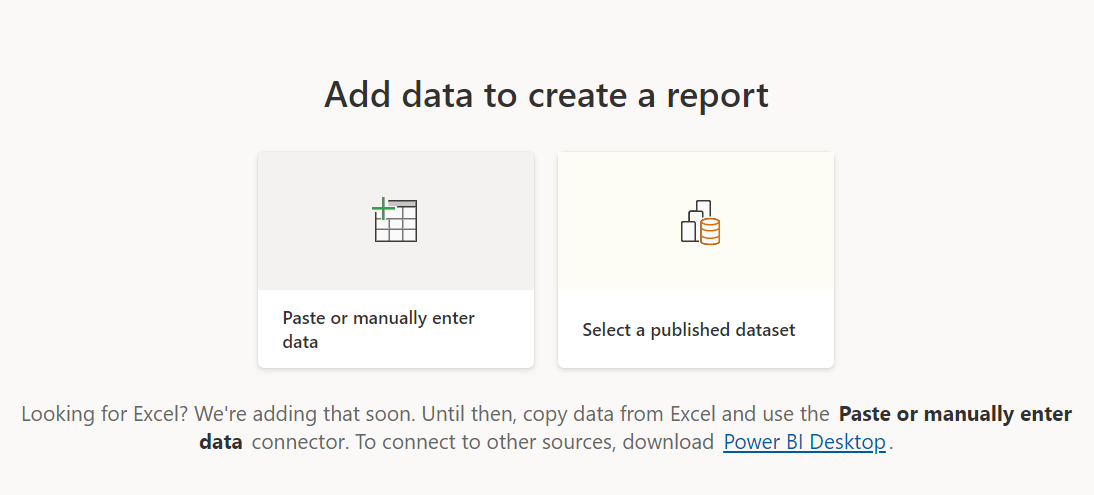
We currently only support creating a report based on an existing dataset or directly typing or pasting data into a table. Other sources, such as uploading an Excel file, will become available over time.

create-source-options

If you choose to type or paste data, you are presented with a grid into which you can begin typing. You can also use Ctrl + V or the context menu to paste data.

create-enter-data-window

Columns can be added and removed using the context menu. Select Use first row as headers if your pasted data contains a header row to promote the first row to the header row automatically. Power BI detects data types automatically, but you can also set them manually. Next to the column name, click the Data type button.

change-data-type

Power BI creates a new dataset for you and autogenerates a summarised view of your data as you go through the creation process. These automatically generated visuals get you from raw data to insights faster than ever before.

select-data-fields-generate-new-visuals

Altering the data in the report is also simple. To add or remove fields from the information, use the Your data pane. Select and deselect areas to change what you want to measure and analyze. Power BI generates meaningful charts based on your field selection.

Want to know more about Power BI,visit here Power BI Tutorial !

Power BI Training

Weekday / Weekend Batches

Conclusion :

Power BI documentation highlights some crucial steps in the complete tutorial or learning of power BI. These steps are straightforward to follow, and Microsoft has released several e-books to document them. If you have any queries, please write back to us.

Related Article :


Source link