
Chase Travel: How to use points and maximize value


Chase Ultimate Rewards is one of the most valuable and flexible rewards currencies — but how you redeem your points matters just as much as earning them.

The Chase Travel℠ portal can be an easy way to book flights, hotels, cruises and more using points or cash. It can be the best option when award space is limited or cash fares are low.

However, it’s not always the best deal.

Here’s how Chase Travel works and when to use it.

What is Chase Travel?

Chase Travel is an online booking platform where you can search and book flights, hotels, rental cars, cruises, activities and tours using either cash, points or a combination of both.

Like an online travel agency (think Expedia), it gives you access to a wide range of travel options — but with the added benefit of earning or redeeming Chase Ultimate Rewards points.

Why it can be useful

There are three main reasons to use Chase Travel:

  • When award space isn’t available
  • When you want to earn bonus points on paid travel
  • When you prefer a simple, fixed redemption value

BEN SMITHSON/THE POINTS GUY

That said, you’ll typically get the most value from Chase points by transferring them to partners like United MileagePlus and World of Hyatt, so it’s always worth comparing options.

Reward your inbox with the TPG Daily newsletter

Join over 700,000 readers for breaking news, in-depth guides and exclusive deals from TPG’s experts

Which cards unlock the most value?

You don’t need a premium card to use Chase Travel — but they do unlock the highest value.

*Depending on the specific redemption, see your rewards program agreement for full details.

Because Chase lets you pool points across cards, many travelers pair a no-annual-fee card with a Sapphire card to maximize value.

Related: Better together: The ultimate guide to the best credit card combinations

How to maximize redemptions with Points Boost

Points Boost adds a layer to Chase Travel redemptions by increasing the value of points on select bookings.

Instead of relying solely on fixed redemption rates, you can sometimes get a higher value depending on the itinerary and offer available based on the card you hold.

When booking select flights and hotels:

  • Sapphire Reserve cardholders can redeem up to 2 cents per point
  • Sapphire Preferred and Ink Preferred cardholders can redeem up to 1.75 cents per point

NICK SIMONITE/HOTEL GENEVIEVE

Use TPG’s April 2026 valuation of Chase points at 2.05 cents per point as your benchmark:

  • Above 2.05 cents per point: Strong redemption
  • 1.5–2 cents per point: Solid, especially for convenience
  • Below 1.5 cents per point: Usually better to transfer points

This makes it essential to check each booking rather than assuming a fixed value.

Related: New favorite Chase Sapphire Reserve benefit: Stack your hotel credit with Points Boost

When should you use Chase Travel?

The Chase Travel portal works best in a few specific situations.

When to use the portal:

  • Cash fares are low
  • Award availability is limited
  • You find a strong Points Boost redemption
  • You’re booking independent or boutique hotels

Delta Airbus A321neo
ZACH GRIFF/THE POINTS GUY

When to skip it:

  • Prices are higher than booking directly
  • Transfer partners offer significantly better value
  • You want hotel elite perks or points (except for The Edit properties)

TPG analysis has found that flights booked through Chase’s portal average 6% higher than booking directly, making it important to compare before booking.

Related: When to transfer Chase points instead of booking a hotel through Chase Travel

How to use Chase Travel

Booking through Chase Travel is straightforward:

  • Log in to your Chase account
  • Open your Ultimate Rewards dashboard
  • Click Travel, then Book travel
  • Search for flights, hotels, cars, cruises, activities or tours
  • Choose to pay with cash, points or both

You can also book travel for others, not just yourself.

How to book flights using Chase Travel

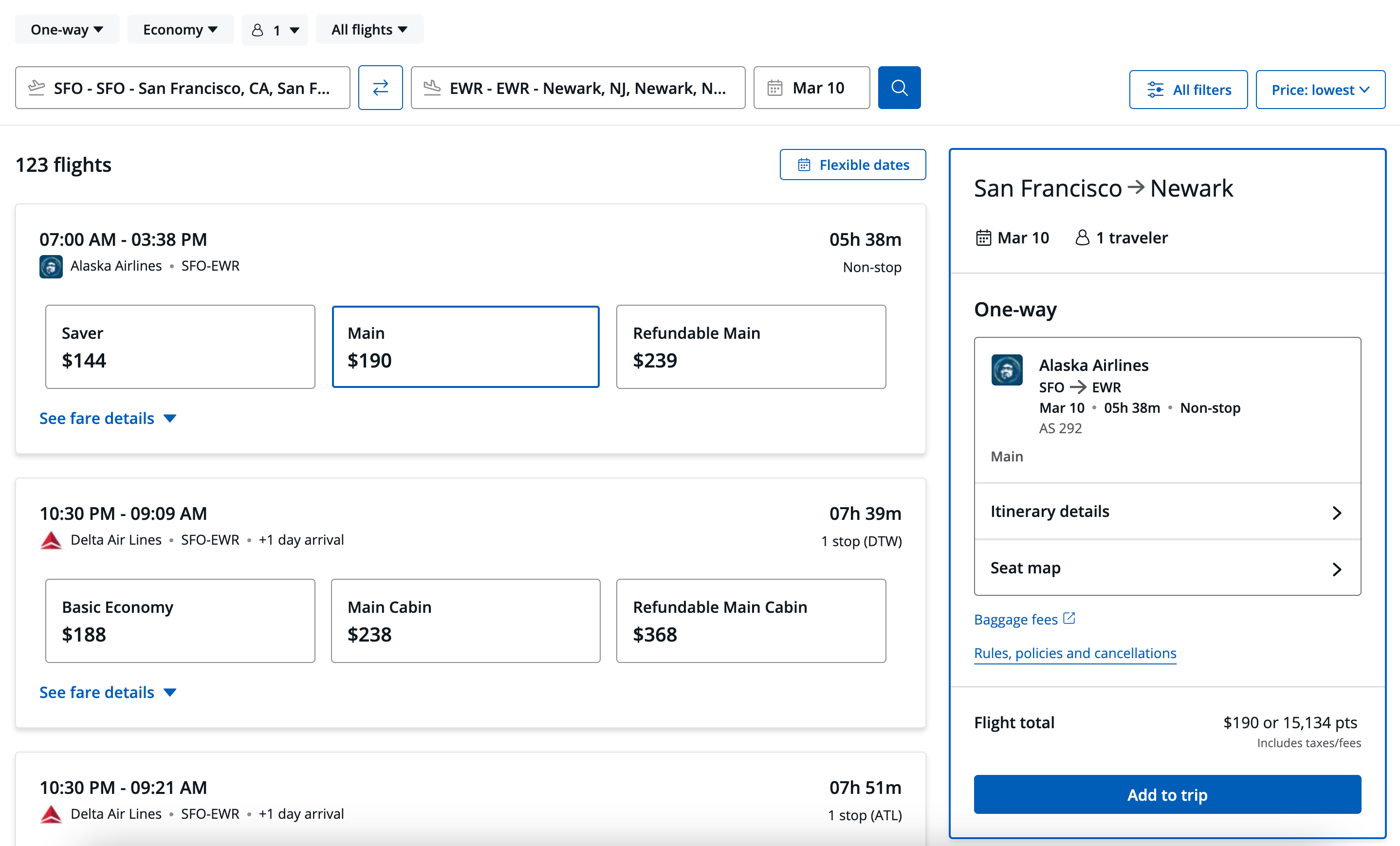
One of the biggest advantages of booking flights through the portal is that you’ll typically still earn airline miles and elite status credit, since the ticket is treated like a paid fare. That makes the portal especially useful when award seats aren’t available or when fares are inexpensive.

Booking flights through the portal works similarly to Google Flights or Expedia.
CHASE

You can compare airlines, review different fare types and select add-ons before heading to checkout.

As always, it’s worth comparing prices across multiple platforms, including directly with the airline.

How to book hotels using Chase Travel

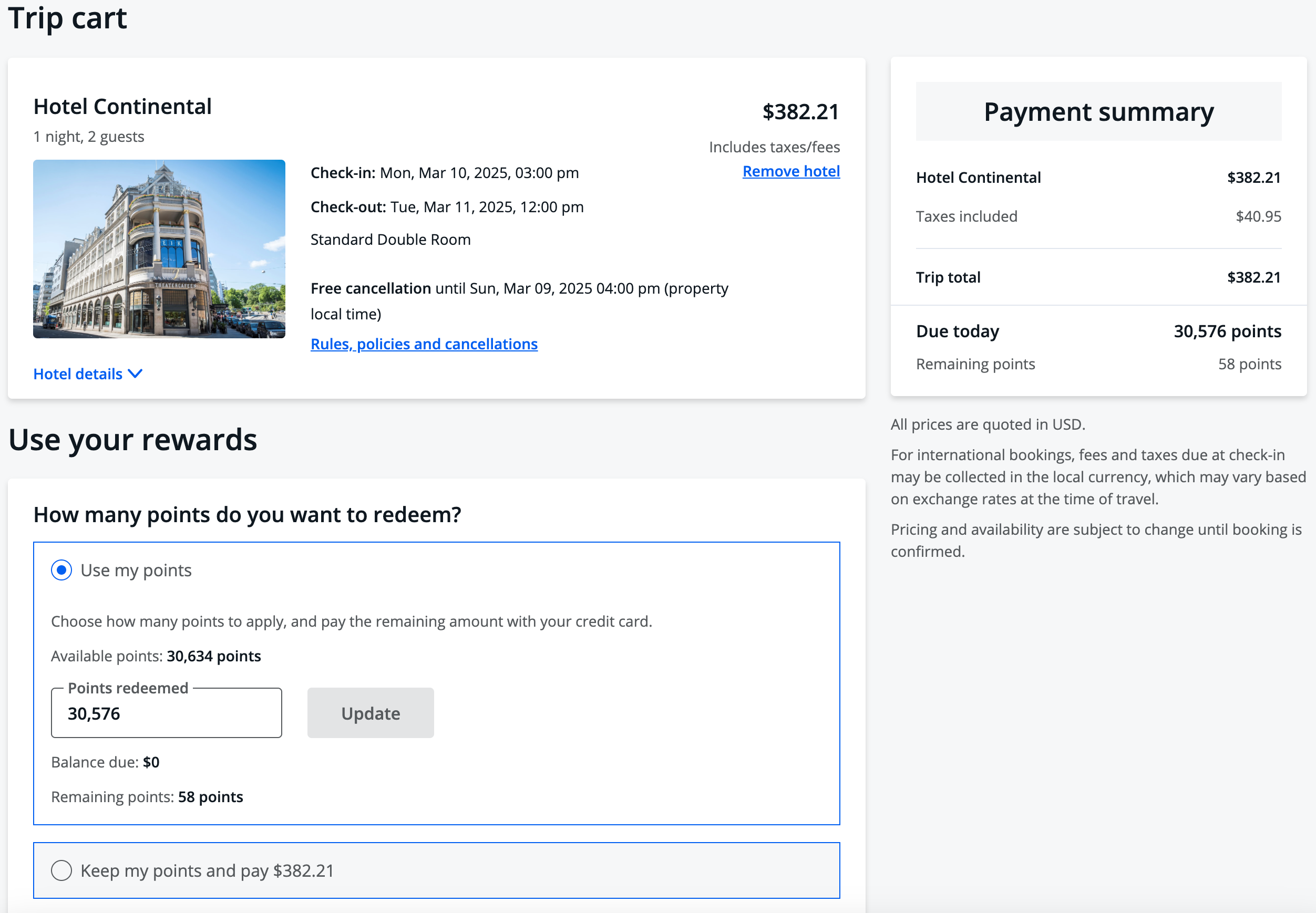
Hotel bookings follow the same process but come with a few trade-offs.

The portal can be a great way to earn Chase points on stays at independent or boutique properties, and Points Boost can occasionally improve redemption value. However, most bookings are treated as third-party reservations, which means you typically won’t earn hotel points, elite night credits or receive status perks.
CHASE

There is one notable exception: The Edit by Chase Travel, which offers benefits like room upgrades, property credits and late checkout at select luxury hotels. You’ll be able to double-dip on earning Chase points and hotel loyalty points on these bookings (except Small Luxury Hotels properties, part of Hilton).

Sapphire Reserve cardholders can unlock additional value on hotel bookings, including two $250 The Edit credits on eligible stays each year and a one-time $250 statement credit for select hotels booked through Chase Travel in 2026.

And Sapphire Preferred cardholders receive up to $50 in annual statement credits for hotel reservations made through Chase Travel.

Related: Book low-end or luxury hotels to get the best value from your points

How to book car rentals, cruises and other travel using Chase Travel

Chase Travel also lets you book rental cars, cruises, tours and activities, making it possible to plan nearly an entire trip in one place.

Rental cars follow a similar booking process to flights and hotels, and Sapphire cardholders still benefit from primary rental car insurance when paying with their card — a valuable perk that can save money on coverage.

Cars in a Europcar rental car lot in Hamburg, Germany
STEFANIE LOOS/BLOOMBERG/GETTY IMAGES

Cruises are also available to search and book through the portal, with access to thousands of itineraries across a range of cruise lines. You can typically choose to pay with cash, points or a combination of both, and some sailings may include additional perks through Chase Travel.

You can also book activities such as guided tours and experiences, which can be a convenient way to use leftover points or round out a trip.

In general, these types of bookings offer lower cents-per-point value than flights or hotels, so they’re best used for convenience rather than maximizing redemption value.

Related: Save money on your next trip: Use these tips to never pay full price for a rental car

Key things to consider before booking

Before booking through Chase Travel, keep a few key factors in mind.

  • Prices can vary: Sometimes higher, sometimes lower, sometimes identical
  • Changes can be harder: You’ll need to go through Chase Travel for support
  • Perks may not apply: Especially for hotel elite status

Most importantly, always compare portal bookings with transfer partner options — particularly for premium flights and Hyatt stays.

Bottom line

Chase Travel is a flexible way to redeem Ultimate Rewards points, especially with Points Boost and expanded booking options across travel types. But it’s not a simple fixed-value proposition.

For the best results:

  • Use approximately 2 cents per point as your benchmark
  • Look for Points Boost opportunities
  • Compare against transfer partners

Used strategically, the portal can help you stretch your points and unlock trips you wouldn’t otherwise be able to book.

Related: The power of the Chase Trifecta: Maximize your earnings with 3 cards


Source link

Leave a Reply

Subscribe to Our Newsletter

Get our latest articles delivered straight to your inbox. No spam, we promise.

Recent Reviews


DAX In Power BI – Table of Content

What is DAX?

DAX stands for Data Analysis Expression. It is used for data analysis and calculations. DAX is a collection of functions, operators and constants. All these are evaluated as one formula to get the result. These formulas are very useful in Business Intelligence tools like Power BI. In DAX, complete code is written inside a function. So, it is called a functional language.

A DAX expression that is executable may contain nested functions, conditional statements, value references, etc. DAX formulas have two primary data types: numeric and others. The numeric data types include currency, decimals, etc., whereas others include string and binary objects. In a DAX formula, we can use values of the mixed data types as inputs. The conversion will take place during the time of formula execution automatically. As per your instructions, the output values will be converted into data types. The data scientists can use the data sets in DAX to the fullest. They can discover new ways to calculate data values with the help of DAX. In DAX, expressions are evaluated from the innermost function going to the outer function one by one. 

Become a Power BI Certified professional by learning this HKR Power BI Training !

What is Power BI?

Power BI is a Business Intelligence and Data Visualization tool used to convert data from data sources into interactive dashboards and analysis reports. For interactive visualizations, BI offers a cloud-based service. It provides a simple interface for the end-user. With the help of this, the end user can create their reports and dashboards. For different platforms, different versions of Power BI like Desktop, mobile Power BI, and Service-based apps are used. For Business Intelligence, it provides multiple services and software connectors.

Use of DAX in PowerBI: 

In Power BI, we can use DAX for calculated columns, Measures, and Tables. Computed columns allow us to create new columns based on the data given. 

For example, if you want to add the “Final Price” column in the table, then the DAX function is used to calculate the new column only if the quantity and price is available.

EX:

Price = List_Items[Quantity]*List _Items[MRP]

Here each row will have its calculated value.

We can also perform calculations using measures without adding any data. This is helpful for reports. Here the price can be displayed without the need for adding a new column to store it. 

EX:

Total MRP column*Total Quantity Column.

DAX functions used on tables return the entire tables. For example, to generate a list of the countries in which the organization has its clients use the function –

Cities touched = DISTINCT (Customers[City])

Basic knowledge of Power BI Desktop for a user is enough to create reports with all the available data. But if you want to use advanced calculations in the Power BI reports, you need DAX. 95% of Power BI potentials as an analytical tool is missed if you don’t use DAX. For example, if you want to make a visual to analyze growth percentages across different states of a country, the data fields that you import are not enough for that purpose. For this, new measures using DAX Language are to be made. DAX with Power makes the data analysis an innovative and intelligent approach.

Click here to learn Power BI Tutorial

Power BI Training

  • Master Your Craft
  • Lifetime LMS & Faculty Access
  • 24/7 online expert support
  • Real-world & Project Based Learning

Some of the Useful functions of DAX in PowerBI:

DAX functions are predefined formulas that perform the calculation on values provided to it in arguments. Every function performs a particular operation on the enclosed values in an argument. In a DAX formula, you can use one or more arguments. Some of the other functions of DAX are:

Date and Time functions:

Calculations on date and time values are performed by date and time functions. The data type of these functions is the datetime data type always. Some of the Date and Time functions are CALENDARAUTO, CALENDAR, DATE, DATEVALUE, DATEDIFF, DAY, HOUR, MINUTE, EOMONTH, MONTH, SECOND, NOW, TIMEVALUE, TIME, TODAY, WEEKDAY, WEEKNUM, YEARFRAC, YEAR.

Time Intelligence Functions:

These functions are used to evaluate values over a fixed period, such as years, quarter, months, weeks, days, etc. You can compare two scenarios in your report by specifying the time using these functions. Some of the Time Intelligence Functions are CLOSINGBALANCEYEAR, CLOSINGBALANCEMONTH, CLOSINGBALANCEYEAR, DATESINPERIOD, DATESBETWEEN, DATEADD, DATESQTD, DATESYTD, DATESMTD, ENDOFYEAR, ENDOFMONTH, ENDOFQUARTER, FIRSTNONBLANK, FIRSTDATE, LASTDATE, LASTDATE, NEXTQUARTER, NEXTMONTH, NEXTDAY.

Information Functions: 

Information Functions provide information related to the data values in the rows and columns. For the given values, it evaluates the given condition in the functions and returns True or False. Some of the Information Functions are CUSTOMDATA, CONTAINS, CONTAINSROW, ISERROR, ISBLANK, ISINSCOPE, ISEVEN, ISODD, ISNUMBER, ISLOGICAL, ISNONTEXT, ISTEXT, ISONORAFTER, USERNAME, LOOKUPVALUE.

Logical Functions: 

These functions are used to logically evaluate an expression or argument and return true or false based on the condition. Some of the Logical Functions are TRUE, FALSE, AND, OR, IF, IFERROR, IN, NOT, SWITCH.

Mathematical and Trigonometric Functions: 

These are the functions that are used to perform all sorts of mathematical functions on the values referred. Some of the math and trigonometric DAX functions available in PowerBI are ACOS, ACOSH, ABS, ASINH, ASIN, ATANH, ATAN, COMBINA, COMBIN, COS, COSH, DEGREES, CURRENCY, EVEN, EXP, DIVIDE, FACT, FLOOR.

Business Intelligence & Analytics, power-bi-dax-description-0, Business Intelligence & Analytics, power-bi-dax-description-1

Subscribe to our YouTube channel to get new updates..!

Statistical Functions: 

The functions used to carry out aggregation and statistical functions on data values in a DAX expression in Power BI. Some of the Statistical DAX functions available in PowerBI are APPROXIMATEDISTINCTCOUNT, ADDCOLUMNS, AVERAGEX, AVERAGEA, AVERAGE, COUNT, COUNTA, COUNTX, MAX, MAXA, MAXX, MEDIAN, MEDIANX, MIN, MINA, MINX, GEOMEAN, GEOMEANX, GENERATE, GENERATEALL, CROSSJOIN, DISTINCTCOUNT, etc. 

Text Functions:

These functions are similar to the string functions of Excel. These functions are used to evaluate string values. Some of the text DAX functions available in Power BI are: CODE, BLANK, COMBINEVALUES, CONCATENATEX, CONCATENATE, EXACT, FIND, FORMAT, FIXED, LEN, LEFT, LOWER, MID, REPLACE, RIGHT, REPT, SUBSTITUTE, SEARCH, TRIM, UNICHAR, VALUE, UPPER. 

Parent-child functions:

These are the functions used for the data values that are part of a parent-child hierarchy. Some of the Parent-child functions DAX functions available in Power BI are PATH, PATHLENGTH, PATHITEM, PATHCONTAINS, PATHITEMREVERSE.

Table functions: 

These functions are used to apply operations and conditions on entire tables. The output generated from table functions is used as the input in other arguments or expressions in a DAX formula. The results of these functions retain relationships between the table columns. Some of the table functions in Power BI are ALL, VALUES, FILTER, DISTINCT, RELATEDTABLE.

There are some functions that are very useful but do not fall under any category: ERROR, EXCEPT, GENERATESERIES, DATATABLE, GROUPBY, INTERSECT, ISEMPTY,ISSELECTEDMEASURE,NATURALINNERJOIN,NATURALLEFTOUTERJOIN,SELECTEDMEASURE,TREATAS,UNION,VAR,SELECTEDMEASUREFORMATSTRING, SELECTEDMEASURENAME, SUMMARIZECOLUMNS.

Click here to get latest Power BI Interview Questions and Answers for 2022

Some of the important DAX functions are

Average: This function is used to find the average from a given set of values. 
Ex:

Avgcomm - AVERAGE(List_Items[Price])

Max: This function is used to find the maximum from a set of values.
Ex:

Highsale = MAX(List_Items[Price])

Min: This function is used to find the minimum from a set of values.
Ex:

Lowestsale = MIN(List_Items[Price])

Count: This function is used to count any numerical values.
Ex:

TicketVolume - COUNT(Invoices[Ticket])

Concatenate: This function is used to join values in calculated columns. You can use ConcatenateX if you are using measures.
Ex:

ProMrp = CONCATENATE(List_Items[Items], List_ Items[MRP]

TotalYTD: This function is used to calculate the sum from the beginning of the current year to a specific date. Calculations are performed based on the calendar date, not according to the financial year.
Ex:

Cumisales = TOTALYTD(SUM(List_Items[Price]) , Invoices[Date])

All: This function returns everything. It ignores filters.

Power BI Training

Weekday / Weekend Batches

Conclusion 

In this blog, we have learnt about DAX, Power BI, and the benefits of DAX in Power BI. DAX functions can perform all the advanced calculations in Power BI. Using DAX functions in Power BI allows us to use most of the Power BI potentials. I hope you found this blog helpful. If you have any queries related to DAX in Power BI, you can comment below.

Related Articles:


Source link