Dungeon Masters is the Perfect D&D Show For the Nerd-Curious


A quarter of a century ago, I gathered around a table with my middle school friends and made a 20-sided dice roll — my first in a lifetime of Dungeons & Dragons games. Rolling dice is easy, but figuring out the litany of rules in tabletop roleplaying games takes time to master. It would have been a lot easier if I could’ve just watched Dungeon Masters, a new YouTube show made by the creators of D&D, Wizards of the Coast. 

In recent years, online tabletop RPG shows like Critical Role and Dimension 20 have exploded in popularity. Viewers tune in to watch dungeon masters lead players on adventures happening in the theater of the mind, describing what happens when heroes attempt great feats, suffer setbacks and triumph over villains. It makes sense that Wizards of the Coast would want in on the success, especially since many of these shows use Dungeons & Dragons’ rules (by far the most popular tabletop RPG system, though there are many others).

It’s shrewd for Wizards of the Coast to start a show promoting its products (more on this later), but Dungeon Masters also goes out of its way to help newcomers. It’s hard to catch if you’re not a giant nerd like me who has watched and listened to other tabletop RPG shows and podcasts, which edit out a lot of the slower dice rolls and rules explanations to keep things moving. 

In contrast, Dungeon Masters looks out for the new player, briefly explaining things like spells and conditions so folks watching at home can understand the rules behind the rolls.

I saw the first episode of Dungeon Masters at a media screening at the Universal Studios offices in Los Angeles, after which I got to chat with the cast. If you’ve watched Critical Role or any other tabletop RPG shows, you know how an energetic performer can elevate the game and immerse viewers in make-believe. 

A group of actors: the four players standing in the back, while the dungeon master is seated in an ornate chair in front of them.

The cast of Dungeon Masters includes the players (in back, left to right): Devora Wilde, Neil Newbon, Mayanna Berrin and Christian Navarro, with the titular dungeon master Jasmine Bhullar seated in front.

Wizards of the Coast

Dungeon Masters has a storied ensemble of actors from TV shows, video games and other tabletop RPG series. The four players include Neil Newbon (Astarion in Baldur’s Gate III), Devora Wilde (Lae’zel in Baldur’s Gate III), Christian Navarro (Tony Padilla in 13 Reasons Why, Critical Role) and Mayanna Berrin (Janelle / Coupé in Dispatch, StoryQuest). The titular dungeon master for this season of the show is Jasmine Bhullar (Dimension 20, DesiQuest).

Fans will be able to watch the first two episodes of this first season of Dungeon Masters streaming live on the official Dungeons & Dragons YouTube channel at 6:30 p.m. PT on April 22, with additional episodes coming every Wednesday at the same time. Show details hint at guest appearances, though we’ll all just have to watch to find out who they might be.

What I saw in the first episode was familiar to a D&D veteran, but promising in what it offers for newbies (or those who need refreshers on the rules every now and again). 

A woman gestures while explaining what's happening in a game in front of a screen with the Dungeons & Dragons logo.

Jasmine Bhullar, the titular dungeon master of the first season of the Dungeon Masters show.

Wizards of the Coast

Dungeon Masters is the perfect D&D show for the nerd-curious

If you’ve watched a tabletop RPG show before, you’ll recognize the show setup for Dungeon Masters, with the four players gathered around a table while the titular dungeon master sits at a remove above them, playing their multi-role as narrator, worldbuilder and monster-controller. 

Dungeon Masters’ first episode opens up with the characters introducing themselves — Newbon as professor inventor Artificer gnome Crem, Wilde as his elven sorceress wife Zora, Navarro as solemn half-vampire ranger Eloin and Berrin as cleric of the graveyard Wesley — before Bhullar tosses them into disarray through an assault by a powerful spellcaster. Before long, they are warped into a different realm, Ravenloft, one of Dungeons & Dragons’ most beloved settings for haunted, gothic adventures.

A bookshelf showing a pair of boxed action figures on the left and a tabletop gaming source book on the right.

The first season of Dungeon Masters features material from the upcoming Ravenloft: The Horrors Within book. On the left in the photo are toys from the original Dungeons & Dragons animated series — some of the many hidden references in the background of the Dungeon Masters set.

Wizards of the Coast

In fact, the show is inspired by and uses never-before-seen features from an upcoming D&D expansion book, Ravenloft: The Horrors Within, which will be released on June 16. (Viewers can buy a tie-in Play-Along Pack to download monsters and content featured in episodes on the online D&DBeyond website to play with in their own games.) So, yes, it’s a bit of a commercial for Wizards of the Coast’s next product, but that doesn’t make the game the cast is playing any less authentic or the drama any less unpredictable. It’s built to show what players will be able to do once they get their hands on the materials, reflected in what I believe to be Dungeon Masters’ standout feature: explaining what’s actually going on in the game with visual aids.

With most other tabletop RPG shows, the cast goes through the typical process of seeing what happens: the player says what they want to do, the dungeon master says which kind of dice roll to make, the player rolls and the outcome is decided. 

But Dungeon Masters goes a step further, not just having players expound on the rolls (which bonuses to add or subtract) but also displaying info on-screen about what’s being discussed. If it’s a spell, they’ll explain what it does. If it’s a roll, they show the score it needs to beat. If it’s a damaging fireball that hits a swath of the battlefield, they’ll present a circle on a map to show who’s in its range — both friends and foes. 

A man gestures wildly while seated at a game table; a woman looks at his enthusiastic gesticulations.

Neil Newbon and Mayenna Berrin in the first episode of Dungeon Masters.

Wizards of the Coast

That fits the spirit of D&D, Newbon said during my interview with the cast. The dungeon master is there to help guide the story and explain the rules, which brings everyone at the table closer together.

“Most of the games I’ve ever played in D&D, we’ve always had somebody who needed a bit of help with the rules. It creates a sense of ensemble and togetherness that you’re there to support each other,” Newbon said. “Where the story goes, nobody knows, but it’s all about collaborative, cooperative storytelling. Even if you end up fighting each other, which happens.”

It’s also helpful for the show to move more slowly when explaining new material that nobody has seen before, Bhullar added — including the players, who are learning about it in real time each episode. 

A man smiles as a woman laughs, both seated at a gaming table.

Christian Navarro and Devora Wilde in the first episode of Dungeon Masters.

Wizards of the Coast

The cast was careful not to spoil what happens to their characters and what’s in store for viewers over the course of the show, but I couldn’t resist prying with a signature CNET question: which gadget would each of their characters want, and which must they never get their hands on?

“A camera to capture memories,” Navarro said about his half-vampire ranger, Eloin.

“I guess a scanner that lets you know who’s a zombie or not, it might be a heat reader,” Berrin said about her cleric Wesley, perhaps hinting at what’s in store. “Don’t give her a heat reader! She knows who’s undead, she’ll put them back in the ground.”

“I think Zora probably shouldn’t be allowed access to a phone that has any dating apps, I think that would be a huge mistake, or possibly a really good time,” Wilde coyly said about her sorcerer. 

“I think Crem would like an MRI device. He probably shouldn’t get his hands on an MRI device,” Newbon said. (Good luck reading into that one.)

A group of people sitting in Hollywood set-style wood-and-fabric chairs, all holding microphones and laughing together.

The cast of Dungeon Masters at the Universal Studios media premiere of the first episode. Left to right: Devora Wilde, Mayanna Berrin, Jasmine Bhullar, Christian Navarro, Neil Newbon.

Wizards of the Coast

What the cast hopes that viewers take from Dungeon Masters is that they watch and want to have that experience with their own friends. People get nervous about putting on stories, Newbon said, but the point of doing that is to have fun — it’s not supposed to be all hard work.

“Yeah, there might be a lot of preparation that [dungeon masters] do, but it’s all in the spirit of fun,” Newbon said. “So if they have fun, they can be a…”

“Dungeon Master!” Wilde said on cue. 


Source link

Leave a Reply

Subscribe to Our Newsletter

Get our latest articles delivered straight to your inbox. No spam, we promise.

Recent Reviews


Alteryx Tools – Table of Content

What is Power BI?  

Power BI is referred to as a Software as a service (SaaS) platform, a Business Intelligence tool that helps analyze organizational data and also helps in creating real-time and interactive dashboards. The Power BI business intelligence tool can be installed on any desktop, mobile or can be used online as well. It also helps in collaborating with every peer in the organization. Power BI is a data visualization tool that helps in developing dashboards and BI reports with business intelligence capabilities. Apart from data visualization, it also allows to perform data exploration, helps in establishing reliable and secure connections to the cloud data sources.

Power BI is used by many organizations because of its amazing features like visualization creation. Some of the visualization formats are column charts, area plots, bar charts, line plots, scatter plots, pie charts, treemaps, scatter plots, etc. It also includes a navigation pane that helps in navigating to the dashboards and reports, associated applications, recent work, etc. The Power BI tool also includes inbuilt functions called DAX functions that can be used for data analysis. These are predefined functions that are available in the library. In Power BI, the data can be imported either from a single or multiple data sources. Power BI is also capable of providing extensive support to both structured and unstructured data. It also includes pre-built templates for dashboard creation. You can also create customized dashboards. 

What is Python?

Python is referred to as a high-level, general-purpose, interpreted programming language that includes a set of pre-built functions and libraries which helps in performing complex operations and calculations. It is easy to learn and is used in most fields like data analytics, artificial intelligence, machine learning, etc. 

Python includes two libraries called Matplotlib and Pandas. Matplotlib library consists of the predefined functions that help in plotting the data visualizations while the pandas library also includes the predefined functions that help in working with the data available.

Become a Power BI Certified professional by learning this HKR Power BI Training !

Power BI Training

  • Master Your Craft
  • Lifetime LMS & Faculty Access
  • 24/7 online expert support
  • Real-world & Project Based Learning

Prerequisites for Power BI Python Integration:

Below is the list of the prerequisites required for Power BI Python Integration to take place.

  1. Python runtime installation: The python runtime installation includes the installation of the execution run time through which the Python script operations can be performed.
  2. Libraries installation: It is essential that some of the important libraries have to be installed which increases the robustness of Power BI. Some of the important libraries are Seaborn and Pandas.
  3. Installation of Visual Studio Code: The installation of Visual Studio code is optional. You can also install any other code editor for writing your python scripts. You can also make use of the Power BI script editor to write the scripts.
  4. Power BI settings update: The final step is to update the settings so that you can work efficiently with Python in Power BI. Through this, you can perform the scripting in Power BI. All you need to do is open up the Power BI desktop, click on the file option. Then click on options followed by settings, then navigate to the opportunities which open a new dialogue box in Power BI. Then you can click on the Python scripting, select the path from the directories and IDE of Python. Once done, you will need to click on the OK button.

Understanding the need for Python Integration in Power BI:

By now, you all might have got an idea of what Power BI and Python is for. Yes, Python is referred to as the powerful tool that helps in creating visualizations while Power BI is for creating well-versed dashboards. These dashboards include all the information which helps in providing a complete view of the organization growth, metrics, KPIs, etc. Hence, if Python and Power BI are integrated, it will be a plus for us to utilize the capabilities that Power BI and Python hold.

Apart from the above, Python and Power BI integration includes several other benefits listed below.

  • The users are allowed to run the python scripts directly within the Power BI
  • Through the integration, libraries like Matplotlib and Seaborn can be used in Power BI for data visualization.
  • Python has become a leading technology and all the machine learning frameworks and data science libraries are written in Python. Through the integration, it allows to create of the data analysis scripts using Power BI
  • To perform precise calculations and clear the complexities, some of the enriched libraries like NumPy and Pandas can be used.

Click here to learn Power BI Tutorial

Power BI Python Integration:

In order to solve complex problems in an organization, it requires data and analytics. It also requires future predictions which gives us future insights and helps us clear the bypass of the issues. Through the business intelligence tools, all these predictions and data visualizations are represented in different forms for a better understanding and analysis. With the amazing capabilities that Power BI and Python hold, organizations are being successful with their integration attaining benefits.

Any idea on how the Power BI Python Integration is performed? Well, I will help with the step by step process to perform the Power BI Python integration.

  • Setup the Integrated Environment:

The primary step is to set up an integrated environment ready for the integration process to begin. You will need to have a distribution of Python readily installed in your machine/desktop. I preferred Anaconda for coding related tasks and the base distribution of Python. Sometimes, trying to integrate Anaconda with Power BI is a difficult task.

After the installation process is completed, you will need to install four python packages, each one has its own significance. They are :

Pandas – for data analysis and data manipulation

Matplotlib and seaborn – for plotting purposes

NumPy – for performing scientific calculations

The pip command in the command line tool is used for installing these packages into the machine.

pip install pandas

pip install matplotlib

pip install NumPy

pip install seaborn

Once the above packages are installed, the python scripting needs to be enabled in Power BI. If you want to check, you can open the Power BI and detect whether the python distribution is automatically detected or not. You will need to go to the files, followed by options and settings, then click on options. You will be able to view the home directory for Python under python scripting that is installed in the machine.

Setup the Integrated Environment

Acquire Vagrant certification by enrolling in the HKR Vagrant Training program in Hyderabad!

  • HKR Trainings Logo

    Subscribe to our YouTube channel to get new updates..!

  • Data Importing using the Python script:

It is time for you to check whether Python is working within Power BI by running a sample test. The primary step to perform this function is to import a small dataset using the Python script in Power BI.

To perform this, you will need to navigate to the Home ribbon, then move to the GetData option and click on the other option. Through this, you will be able to import the data from a different set of sources available. Some of the sources are Spark, Hadoop distributed file system, (HDFS), Web, etc. In the below image, I am going to import the Churn Prediction system that is available in my system.

Data Importing using the Python

Once you click on the connect option, you will see a section that allows you to write the Python script.

Python script

You will need to click on the OK button which will further ask you to select the churn data. Once done, you will need to click on the Load option. You can also perform a check whether the data has been loaded or not through the data view option. With this, you are now ready to make use of the power query in order to perform the data transformations.

Using Power Query To Transform the data:

All the individuals who have learned Python would know that data transformation is no longer a single task-based activity.

By using the Power Query editor, the user can shape and transform the data as required with just a single click. The Power BI is also capable of keeping the record of all the transformations and operations that take place or happen during the process of transformation. We will now show you how to use the Power query to understand and know the data transformation capabilities.

Once the data is loaded in the Power BI, you will need to click on the transform data option which is available under the Home tab in order to open the query editor.

Once the query editor is opened up, you will see multiple options to perform the operations like clean, reshape and transform the data.

Power Query To Transform

We will now convert the customer_nw_category variable into a text field because these fields represent the worth category. Also, you need to know that it would not be a continuous variable.

To perform the same, you will need to select the column -> Go to the Data Type, and change the data type to a text format. All the steps will be recorded by the Power query under the applied steps section. You can also rename these steps for a better recall or reference. I will rename this step as nw_cat Text. The next step is to transform the churn column into a logical variable. True here represents for churned (1), whereas False here represents not churned (2). The step can be renamed as Churn True/False.

customer_nw_category

Once the above operation is performed, you will need to click on the close and apply option which will be available on the top left corner so that all the transformations made will be applied.

Using Python’s Statistical within Power BI:

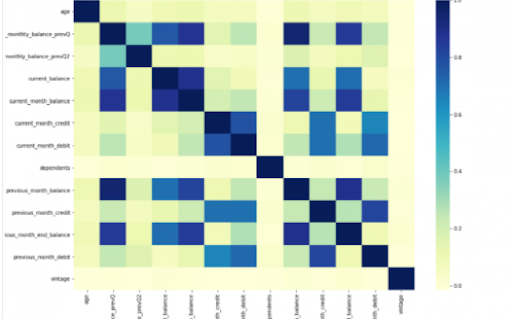
Power BI is considered a library of visualization. Correlation matrix heatmap is an integral component in the data analysis reports.

We will guide you on how to create a correlation matrix heatmap by making use of the Python correlation function. The created heatmap will be available in the reports section in Power BI.

You will need to navigate to the Report section that is available in the Power BI. Then click on the Py symbol which denotes Python visual which is available under the visualizations section. On the left side, you will see an empty Py along with a Python script editor popping up at the bottom of the screen. By this, you might have understood that Power BI is providing an option to create the visualizations with the scripts.

All the value fields will be empty firstly. For correlation heatmap illustration, all the continuous variables will be brought into the value fields, like the age current, previous month balance, monthly balance items, etc. This is considered one of the most essential steps during the integration process. If you forget to perform this step, the Power BI will not be able to recognize the variables.

As the variables are moved into the values fields, the python script will be automatically populated with the below codes.

Let us also write the code for correlation heatmap creation in Python by using the seaborn package.

# import the charting libraries matplotlib and seaborn

import matplotlib.pyplot as plt

import seaborn as sns

# create the correlation matrix on the dataset

corr = dataset.corr()

# create a heatmap of the correlation matrix

sns.heatmap(corr, cmap="YlGnBu")

# show plot

plt.show()

You can now use the run script button and run the script, which will produce a correlation matrix heatmap.

Python’s Statistical within Power BI

Generating analytical reports:

After the heatmap is generated, we can analyze the heatmap and will come to a conclusion.

With the above heatmap, below are the set of conclusions made:

  1. There is no correlation with the other variables for the number of dependents and age.
  2. There is a moderate correlation observed for the average monthly balance in the time span of the last two quarters.
  3. There is a high correlation between the average monthly balance with the previous month balance and the current month balance in the last quarter.
    It is possible to generate a heatmap for the customers who have churned and you can also compare with the customers that do not have. You can apply the filter of churn = False or True so that the heatmap can be observed. Through the analysis, it helps in deriving useful insights from data analysis to the prediction of the behavior.
  4. Power BI Training

    Weekday / Weekend Batches

Conclusion:

Through this article, you have got a clear idea of the process of integration of Python with Power BI. I hope the above information helps you. To get a clear understanding and in-depth knowledge on the subject, you can get trained and certified in Power BI through the Power BI training. The integrated environment will definitely help the organizations to handle and play with the data as and when needed. It focuses on enhancing the power and capitalizing on the benefits that are available in both tools.

related articles 


Source link