Earn airline miles on Airbnb and Vrbo stays


Sometimes, a vacation rental is the best option. I’ve used Marriott Homes & Villas to earn Marriott Bonvoy points on several recent short-term apartment rentals, and there are also Hyatt Homes & Hideaways and the Apartment Collection by Hilton if you want to stick to the major hotel loyalty programs.

But sometimes, an Airbnb or a Vrbo ends up being the best option for your trip. So, here’s how to earn some extra airline rewards on these bookings. Just keep in mind that you’ll need to enable cookies in your browser and ensure your booking is eligible.

Earning airline rewards on Airbnb bookings

There are four primary ways to earn airline rewards on Airbnb bookings, just by clicking through another site before landing on the Airbnb site to make your booking. Here’s an overview of each:

  • ANA Mileage Club: Earn 1 mile per 200 Japanese yen ($1.24) spent when you start here and click through to book an Airbnb stay.
  • British Airways Club: Earn 2 Avios per dollar spent with Airbnb when you start here and click through to book an Airbnb stay or experience.
  • Delta SkyMiles: ​Earn 1 mile per dollar spent on Airbnb stays and 3 miles per dollar spent on Airbnb services and experiences when you connect your SkyMiles and Airbnb accounts here and then book within 10 days. (You’ll need to reconnect your accounts once the 10-day window expires to continue earning.)
  • Qantas Frequent Flyer: Earn 1 point per 1 Australian dollar ($0.69) spent when you start here and book an Airbnb stay through Qantas.

People having a backyard picnic at an Airbnb
AIRBNB

None of these programs offers rewards on taxes and fees for your booking, and the mileage account name typically needs to match the primary guest’s name. I usually opt to earn British Airways Avios on my Airbnb bookings because this is the most valuable earning rate of the four programs for me and Avios are a currency I frequently use.

Related: Renting an Airbnb? Here are the best credit cards to use

Earning airline rewards on Vrbo bookings

If you prefer Vrbo, you can also earn airline rewards on your bookings by clicking through select sites before booking.

You can often earn rewards on Vrbo bookings when you click through select online shopping portals, such as the American AAdvantage eShopping portal, the Atmos Rewards Shopping portal, the Delta SkyMiles Shopping portal and the Rove Shopping portal. One advantage of booking through a shopping portal is that you can often earn rewards, even when booking a stay for someone else.

A family at a Vrbo rental
VRBO/FACEBOOK

Alternatively, if you’re booking a Vrbo stay for yourself, you can earn airline rewards at more predictable rates through the following partnerships:

Reward your inbox with the TPG Daily newsletter

Join over 700,000 readers for breaking news, in-depth guides and exclusive deals from TPG’s experts

For these three partnerships, the mileage account name will usually need to match the primary guest’s name.

VRBO/FACEBOOK

Keep in mind, Vrbo participates in the One Key rewards program, so you may be able to earn OneKeyCash on top of airline rewards on some stays. However, while stays where you complete your transaction on the Vrbo website are likely eligible for earnings through the One Key program, some stays may not be eligible.

Related: I rarely stay at major hotel chains — here’s how I maximize my reward travel anyway

Choosing the right card for your vacation rental

You can also earn points, miles or cash back by using a rewards credit card when paying for your vacation rental.

The Chase Sapphire Preferred® Card (see rates and fees) now lets cardholders earn 3 points per dollar spent on vacation home rentals booked through Airbnb, Vrbo, Plum Guide, HomeAway, Homestay.com and Vacasa. So, if you have the Chase Sapphire Preferred Card, it’s a great option for booking through these platforms.

AIRBNB

Otherwise, you’ll want to use a card that earns bonus points on general travel purchases. For example, I often use my Ink Business Preferred® Credit Card (see rates and fees) on general travel purchases, but the American Express® Green Card is another excellent option.

The information for the American Express Green Card has been collected independently by The Points Guy. The card details on this page have not been reviewed or provided by the card issuer.

If you don’t have any of these cards, consider using whatever card you use for nonbonus category spending. Cards like the Capital One Venture Rewards Credit Card, the Capital One Venture X Rewards Credit Card and the Citi Double Cash® Card (see rates and fees) are great for these types of purchases, as they all earn more than just one point, mile or percent cash back per dollar spent.

Related: You can now book boutique hotels, car rentals, grocery delivery and more through Airbnb

Bottom line

It may be tempting to navigate directly to Airbnb or Vrbo when you want to book a vacation rental, but taking an extra minute to start through an airline partner page or shopping portal can help you earn extra rewards. British Airways, Delta Air Lines, Qantas and All Nippon Airways offer ways to earn airline rewards on eligible Airbnb bookings, while Delta, United Airlines, JetBlue and select shopping portals offer options for eligible Vrbo stays.

Just remember that tracking matters. You’ll usually need to start from the correct partner page, have cookies enabled, enter the right loyalty number and make sure the loyalty account name matches the primary guest. You likely won’t earn airline rewards on taxes and fees, either.

Still, when a vacation rental is the best option for your trip, these partnerships can be an easy way to earn extra points or miles. And if your booking is eligible to stack airline rewards, OneKeyCash or another platform currency, and the rewards from your credit card, your vacation rental can become even more rewarding.


Source link

Leave a Reply

Subscribe to Our Newsletter

Get our latest articles delivered straight to your inbox. No spam, we promise.

Recent Reviews


SAP EWM Process Flow – Table of Content

Introduction to the SAP EWM:

The  SAP EWM (extended warehouse management) is one of the functional modules which is used to manage warehouse inventory and supports the processing of goods movements. The SAP EWM also allows organizations to control both inbound and outbound delivery process delivery. and movements in the warehouse. The main purpose to use EWM is to manage the outbound and inbound delivery process, maintain goods receipts, solve goods issues, fulfill customer orders, and goods distributions. 

               We have the perfect professional SAP EWM Training for you. Enroll now!

SAP EWM key features:

SAP EWM signifies the major key features which are considered so important in any organization; Let us explain one by one;

  • With the help of SAP EWM, users can control the various warehouse activities such as picking, posting, managing storage, and good sales document types.
  • The SAP EWM helps you to set the alert before the goods receipt transfer from EWM to the SAP ERP system along with this feature, users are also able to perform corrections, reversal, and inbound delivery split from the SAP EWM to the SAP ERP system.
  • Users can also perform deconsolidation of the handling of various units that contain product details and their storage locations.
  • Users can also determine the storage concepts like product slotting, and optimize the goods arrangements for the warehouse automatically.
  • The SAP EWM functional module allows users to perform various tasks like work packaging, and also monitor the warehouse activities which are performed by the warehouse employees.
  • The SAP EWM also helps organizations to keep track of the vehicles, and other transportation units (it consists of a yard-in check in and yard-out checkout) activities.
  • SAP EWM also comprises storage and handling of various hazardous substances (such as SAP environmental health, and safety EHS).
  • SAP EWM allows organizations to store the labor time, and resource usage effectively( managing the resources effectively).
  • The SAP EWM cockpit allows users to perform the transportation of products to various warehouse centers.

Overview of SAP EWM Process Flow:

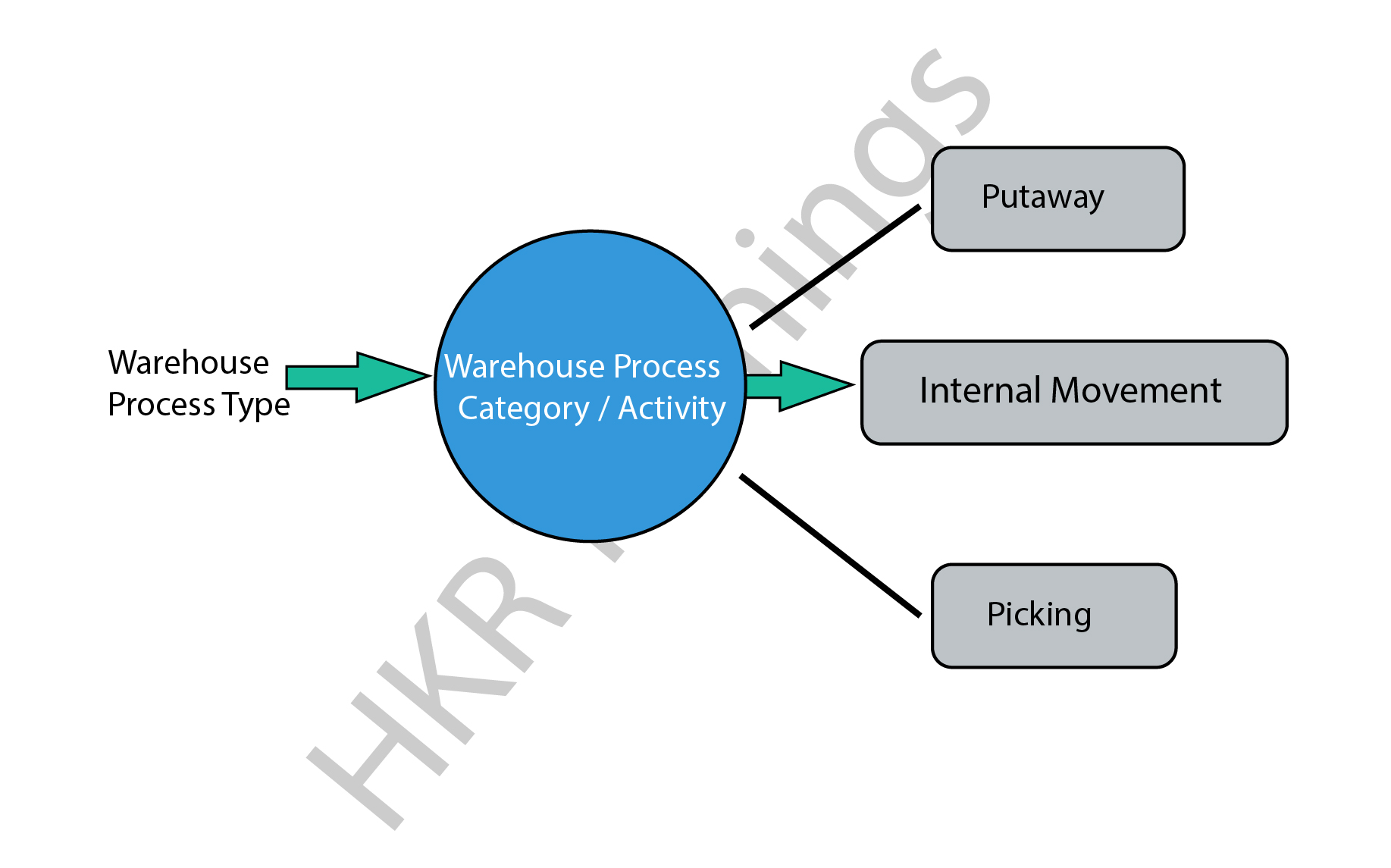
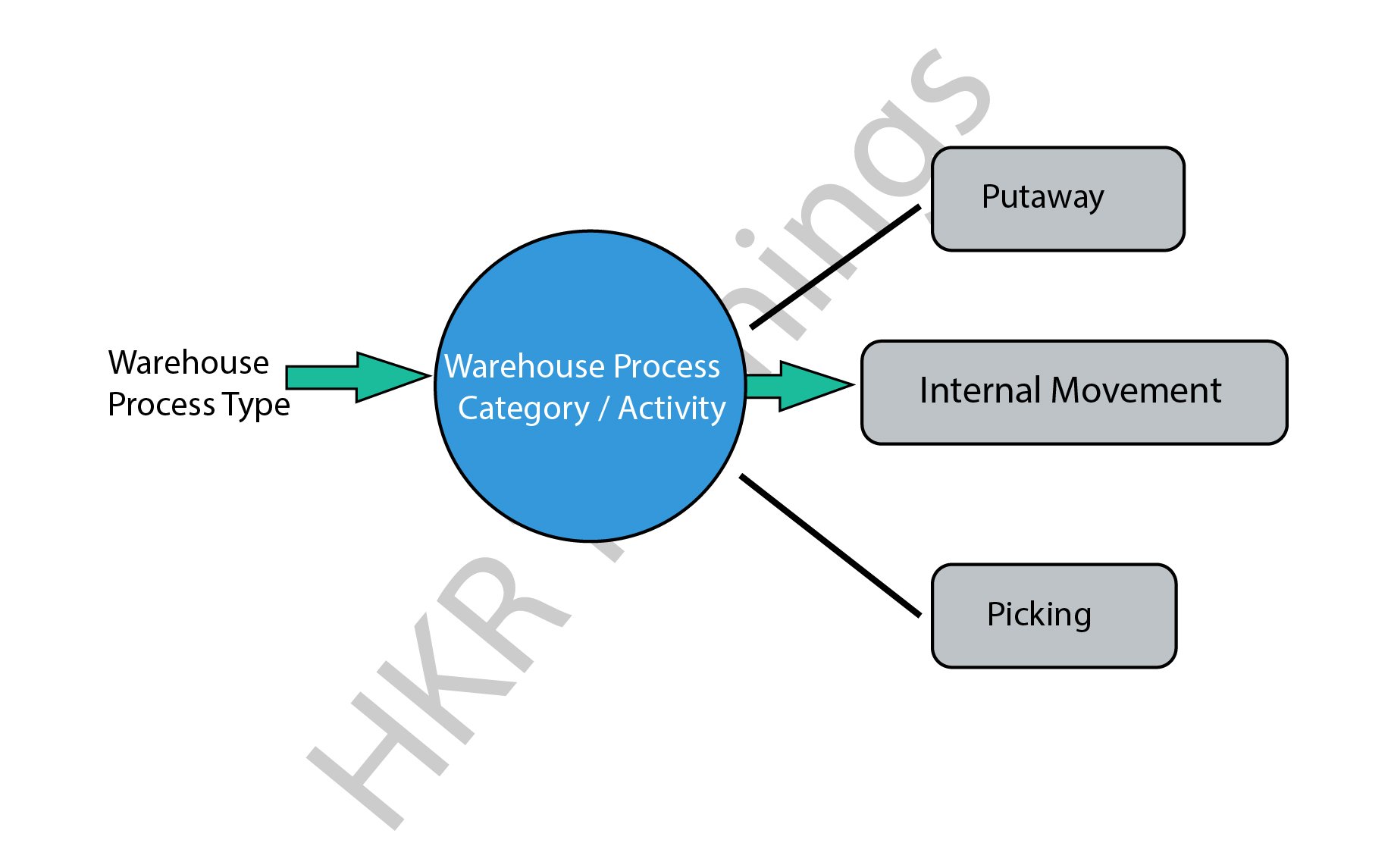
In general, SAP EWM process flow defines the type of activities that have been performed in a warehouse. We can consider the type of activities such as packing, goods receipt, goods issues, and they are assigned to each warehouse document. 

All warehouse process flow is further divided into warehouse categories. The warehouse categories also define the goods movement in the organization’s warehouses.

The following diagram explains the process flow of the SAP EWM;

SAP EWM

There are various process types also categorized in the SAP EWM system, we would like to mention them as well ;

  • Stock removal 
  • Putaway
  • Internal movement 
  • Goods receipt posting 
  • Goods issue posting 
  • Physical inventory 
  • Crossline putaway

               We have the perfect professional SAP Training in chennai for you. Enroll now!

SAP EWM Training

  • Master Your Craft
  • Lifetime LMS & Faculty Access
  • 24/7 online expert support
  • Real-world & Project Based Learning

Example 1: Here we are going to explain the internal process type for the picking type as follows;

The steps include are;

  • To create a picking type process type, go to the navigation EWM ->click on “cross-process setting” -> select warehouse tasks -> now choose to define warehouse process types.
  • You can also select the process type to copy -> then click on the copy at the top.
  • To save all the process type details -> then click on the Save button.

Example 2: internal process type for selling and receiving goods:

This process involves internal process types for selling and receiving goods/products in the warehouse. In general, the receiving goods process begins in the SAP ERP system once you have detected the purchase requisition and purchase order created. The purchase order composes the quantity of the material stored and plants in the storage location. 

There are two ways available to handle the purchase order requests;

  • Firstly you need to send the purchase order to the supplier for the goods deliveries, once you receive the goods, the receipt of the goods will keep posted.
  • Receive the order announcement from the supplier that is all about the goods arrival and purchase order request.

SAP EWM

Note: when you create the purchase order -> you can set the CTRL key to enabling the notification from the supplier. An inbound delivery will be created once you set the control. In a few cases, inbound delivery cannot be created even though you have set the control key. 

All the inbound delivery process consists of the following information;

  • Goods arrival
  • Quantity of goods
  • Store details
  • Plant location

An inbound process includes;

  • Goods receipt and optimization 
  • Transportation unit inspections
  • Quality inspection 
  • Routing of goods in warehouse 

The following image illustrates the inbound delivery process flow,

 inbound delivery process flow

Points to remember:

  • Whenever you make any changes to the inbound delivery, it will affect the SAP system.
  • The status of the inbound delivery report can be updated as per goods delivery.
  • Successful completion of the goods delivery report will also be updated on the SAP system.

          If you want to Explore more about SAP EWM? then read our article – SAP EWM Tutorial

HKR Trainings Logo
Subscribe to our YouTube channel to get new updates..!

SAP EWM outbound delivery process flow:

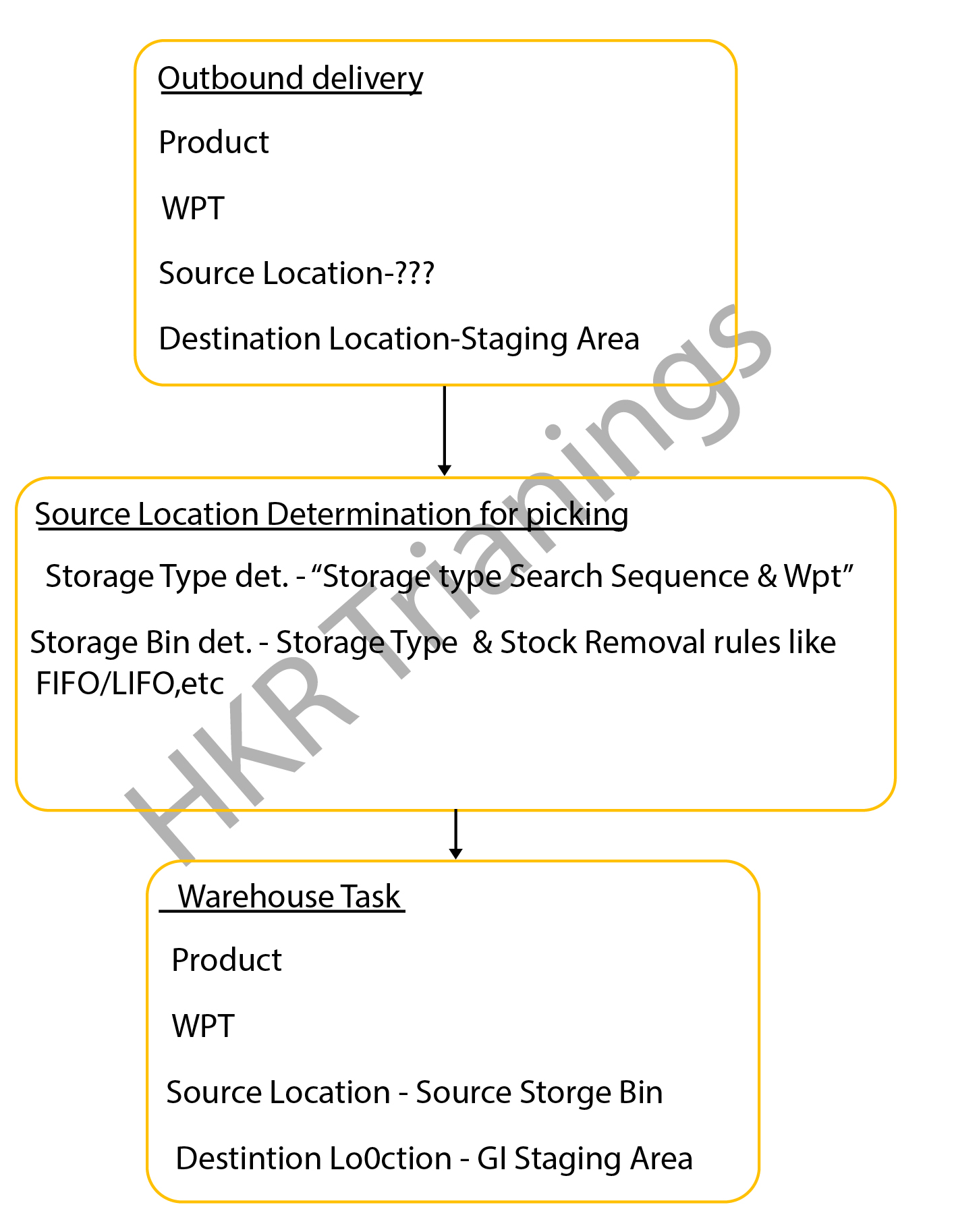
The SAP EWM outbound delivery process flow can also be known as the “Picking process”. This process type in the SAP system defines the store bin types in the warehouse. The outbound delivery process also helps to remove the stocks in the outbound goods issue process, this process is often known as the “picking process” in the SAP system.

The below diagrams explain the outbound delivery process in detail;

outbound delivery process

The types of the outbound delivery process;

  • Customer sales order: An outbound delivery process can be created with reference to the sales order to perform various tasks like picking products from a warehouse bin, packing the picked products, and resolving the goods issues which are related to the shipment.
  •  Stock transport order: this step involves moving the goods within the organization once the supply management issues it and receiving the receipt. The outbound delivery process can be created at the supplying plant, goods packed, shipment, and delivery of the products.
  • Vendor returns order: The return order is created within the ERP system if the product delivered failed to meet the customer’s expectations. 
    Production staging process: in this stage, the appropriate raw materials will be picked from the warehouse bin that is completely based on the order picking strategies and then moved to the production supply area. 

The following image explains the types of the outbound delivery processes and overall functionalities;

overall functionalities

The important documents created during the outbound delivery process;

  • Outbound delivery order: this document popularly known as the warehouse request is the source document that usually initiates the picking activity while creating a specific task.
    Warehouse task: The warehouse task consists of information like source bin, quality, search, batch, and destination bin. 
  • Warehouse orders: The warehouse orders are also the documents that are assigned to a warehouse employee to execute the product picking tasks at a specific time. The steps included in the storage bin determination in the SAP picking process:The storage bin ty             

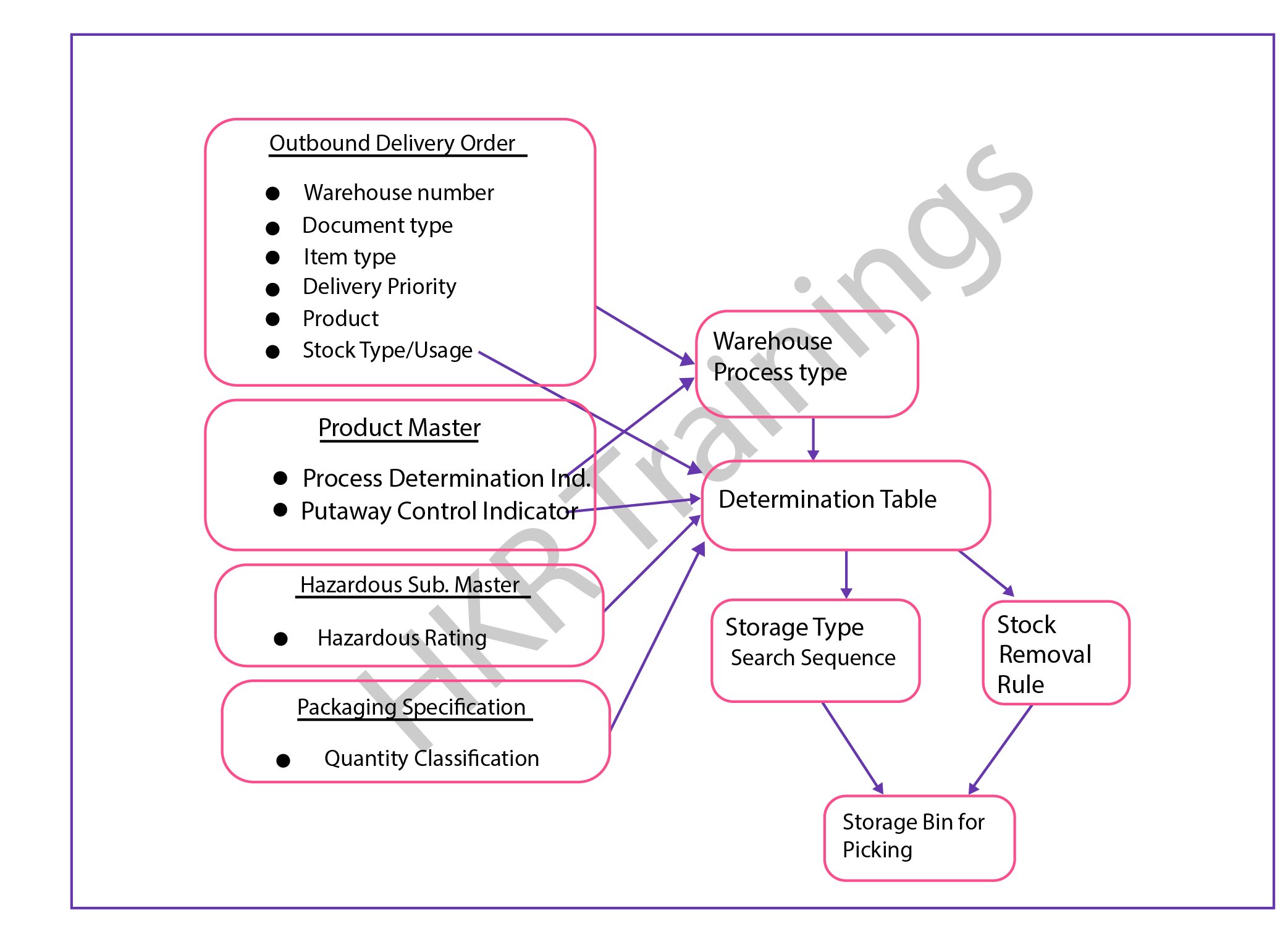
The steps included in the storage bin determination in the SAP picking process:

  • The storage bin type determination in the SAP picking process:The configuration process consists of the following parameters;Warehouse process types, stock removal control indicator (this will be maintained in the master data process), and packing specifications.
  • Stock removal determination type in the SAP picking process;This process can be performed based on the system looks available for the storage type or group of the storage types and the storage area where the stocks can be picked. 

The overall outbound determination process is shown below,

outbound determination process

                              frequently asked SAP EWM Interview Questions and Answers

SAP EWM Training

Weekday / Weekend Batches

Final note:

The latest survey report suggests that the SAP EWM is emerging as a powerful warehouse inventory management tool. The SAP EWM process flow plays a vital role in delivering efficient outcomes and also managing the storage bin. Our main aim to design this SAP EWM process flow article is to reach a global audience and shape their professional careers. This SAP EWM process flow article helps you to know both the inbound as well as process flow activities and how to perform them in the organizations to maintain the proper inventories.

Related Article:

  1. What is SAP EWM?
  2. SAP EWM Certifications


Source link