Minnesota is a major step closer to finishing a decades-long effort to clean up the St. Louis River estuary in northeastern Minnesota, the headwaters of Lake Superior, from a long legacy of industrial pollution.
Federal, state, tribal and community partners gathered Wednesday to celebrate the culmination of a two-year effort to clean contaminated sediment in the Thomson Reservoir in Carlton, Minn., 15 miles upstream of Duluth.
The $30.5 million project to address 225,000 cubic yards of contaminated sediment– enough to cover a football field more than 100 feet deep– marks the completion of the eighth and final sediment cleanup project on the Minnesota side of the St. Louis River Area of Concern, which is one of 43 sites around the Great Lakes prioritized for environmental cleanup in 1987.
The eight areas included several commercial shipping slips in the Duluth-Superior harbor that were contaminated with heavy metals and other pollutants, along with other areas along the river polluted by pulp and paper mills and historic industry.
Those sites have all been cleaned up in the past eight years due to “a lot of coordination… blood, sweat, tears, and a lot of money,” said Anne Vogel, Region 5 Administrator and Great Lakes National Program Manager for the U.S. Environmental Protection Agency.
Crews have dredged out contaminated sediment in some places. In other areas they’ve placed remedial caps on the sediment to prevent pollutants from being taken up by tiny bugs that work their way up the food chain into fish and wildlife.
At Thomson Reservoir, 20,000 tons of activated carbon was spread over the water. It sinks to the bottom and binds to the contaminants so they’re no longer available to the food web, explained Larae Lehto, a Superfund supervisor at the Minnesota Pollution Control Agency.
“So while the contamination is still there, it's no longer hazardous to the ecosystem," Lehto said.
The contaminants in the reservoir are dioxins and furans left behind from pulp and paper manufacturing prior to the enactment of the Clean Water Act in the 1970s. Lehto said the use of activated carbon had never been used on such a scale. “To our knowledge, this is the largest project of its kind” in North America, she said.
Thomson Reservoir, shown here in Carlton, Minn. on May 27, is a dammed section of the St. Louis River 15 miles from Duluth. The U.S. Environmental Protection Agency and other partners have completed a $30 million project to clean up contaminated sediment in the reservoir.
Dan Kraker | MPR News
Today this stretch of the St. Louis River looks like a slice of the Boundary Waters, with sunlight sparkling off clean water, and majestic white pines rising from the rocky shoreline.
But Lehto said people who grew up in the Cloquet area decades ago used to call the river “Stinktown.” They told her, “You don't go to the river, you don't swim in the river, you don't eat the fish out of the river.”
The river began to come back to life in the late 1970s, when a major wastewater treatment plant came on line, preventing untreated sewage from being dumped into the water.
More recently, in addition to the contaminated sediment that’s been cleaned up, agencies have also restored more than 1,000 acres of habitat across 27 different project areas. One project along the Duluth shoreline completed in 2021 excavated nearly 20,000 dump trucks full of old timber waste that had been dumped in the river and suffocated aquatic life at the base of the food chain.
The federal government spearheaded the work with $250 million provided through the Great Lakes Restoration Initiative. That funding has helped leverage an additional $208 million from state, local and industrial partners.
There’s one more major project that still needs to be completed on the Minnesota side of the St. Louis River. A $23 million project to remove sediment and invasive cattails and restore coastal marsh and wetland habitats in an area of the river known as Mud Lake is expected to be completed next year.
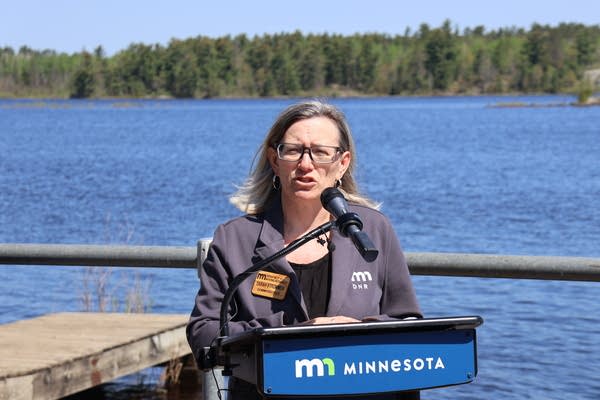
Minnesota Department of Natural Resources Commissioner Sarah Strommen speaks on May 27, at the Thomson Reservoir in Carlton, Minn. State agencies, along with the U.S. EPA and other partners, have finished a project to clean up contaminated sediment in the reservoir, the last of eight sediment projects finished as part of a broader effort to clean up legacy pollution in the St. Louis River.
Dan Kraker | MPR News
“When it's complete, we will be significantly closer to removing the St. Louis River estuary from the Great Lakes Area of Concern,” said Minnesota Department of Natural Resources commissioner Sarah Strommen.
Lehto expects the overall cleanup to wrap up in 2030 or 2031, after projects are completed on the Wisconsin side of the river.
But the payoff from the decades of remediation work is already visible in the increasing number of people who fish, paddle and even swim in the river– a sight that would have been unheard of a few decades ago.
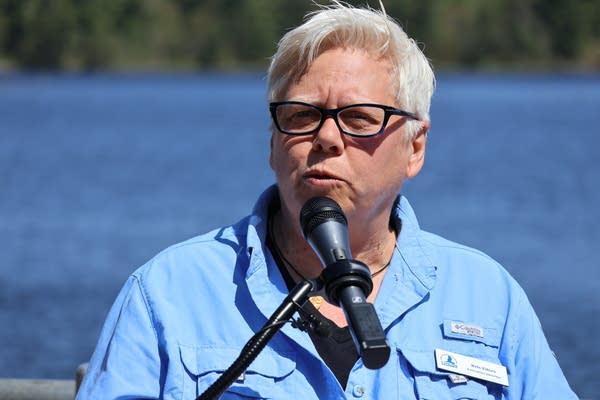
As the river has transformed, the narrative surrounding it has changed, said Kris Eilers, executive director of the St. Louis River Alliance, “From talking about pollution all the time to talking about the beauty that is here now.”
Kris Eilers, executive director of the St. Louis River Alliance, speaks at an event at Thomson Reservoir in Carlton, Minn. on May 27, to celebrate the completion of the final contaminated sediment cleanup project in a longstanding effort to restore the St. Louis River estuary.
Webassessor is an online credential management service that allows you to apply for examinations,track certification status, and take proctored exams.You must first build a profile on the ServiceNow Webassessor site before you can apply for a Mainline exam.
Registering /Scheduling a Remote/Online Proctor Exam
The below are the instructions which have to be followed to get registered or schedule enrolment for an online (remote proctored) exam.
Become a Servicenow Certified professional by learning this HKR Servicenow Training !
Scheduling or Registering an Online Proctored Exam
1. For candidate exam registration, each Test Sponsor has a branded Webassessor portal. To access your Test Sponsor’s unique link, go to their certification, testing, or training program page.
2. If you don’t already have an account, press Create Account and fill out the registration form.Enter your username and password and click Login if you already have an account.
3. Click on the “Exam Catalog” tab.
4. Look for the Online Proctored option on the exam you’d like to register for. (This delivery form is not available for all exams).
5. Next to Online Proctored, click the Buy Now or Get Now button.
6. Using the calendar, find an available testing date. The dates that are available are bolded.
7. From the list on the right, select start time.
8. Check the box below after carefully examining your Test Sponsor’s instructions.
9. Then click ‘Select”.
10. Complete the transaction’s payment section.
11. You will get an email confirmation of your enrollment, along with exam-specific details.
12. Complete the Online Exam System Check to test the system settings HERE
Note: Single-Sign-On (SSO) can be used by some Test Sponsors to connect you directly to Webassessor through their Learning Management or other internal systems. Once you’ve signed in to the LMS, you’ll be able to enter the Exam Portal for these Test Sponsors.
To register for a Webassessor Mainline Exam, follow the steps below.
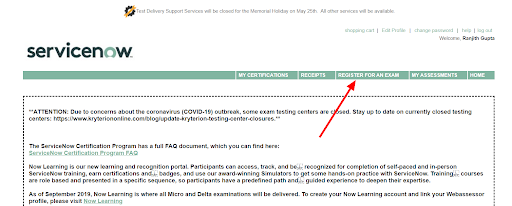
Step 1: Navigate to the REGISTER FOR AN EXAM tab after logging into Webassessor.
Step 2: Select Mainline Exams Including Retakes.
Step 3: Select the + icon next to the exam you want to finish.
Step 4: Next to Onsite Proctored or Online Proctored (depending on the delivery you wish you to complete), click Buy Now.
Onsite Proctored exam
Completed at one of the Kryterion Testing Network’s Testing Centers. Select a testing center that is available (filter based on your location). Choose the date and start time. If this is your first time taking the exam, use the voucher code you got after finishing the training to get the exam fee waived at checkout.
Online Proctored exam:
The exam was conducted entirely online. If you choose this option, make sure you follow Kryterion’s online proctoring requirements Choose a time zone, a date, and a starting time. If this is your first time taking the exam, use the voucher code you got after finishing the training to get the exam fee waived at checkout. On all confirmation and reminder communications, the exam start time will be specified in 24-hour clock format.
Creating a ServiceNow Webassessor account
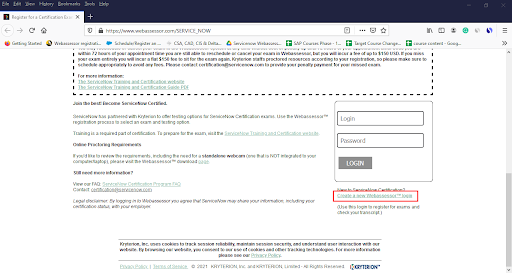
Simply go to “https://www.webassessor.com/SERVICE_NOW”
If you already have a Webassessor account, you can log in from here.
If you don’t already have a Webassessor account, click Create a New Webassessor Login Now, and then enter your details to create your account on this screen.
There are a lot of fillers that need to be filled. The most important point to remember is that your Webassessor login must be an email address, and it is advisable for you to use your personal email address instead of your work email address since you don’t want to lose access to your Webassessor login if you change jobs.
Then you enter your name, email address, and use your personal email address to create your own free developer account linked to your Salesforce account.Enter your contact details above such as address, city, state, postal code,country, and select yes in the dropdown options for agreeing to add your name and certification statuses to the public certification verification portal and then click Save.
Summary of Webassessor Home Page Participants can view relevant and important ServiceNow announcements on the home page after logging into Webassessor. Take a look at the summary of the Webassessor home page as discussed below:
My Certifications: Check the status of your ServiceNow Mainline certifications.
Receipts: Send a receipt for a scheduled or completed exam to your primary Webassessor email.
Register for an Exam: Schedule a ServiceNow Mainline exam.
My Assessments: Exams that are scheduled, in progress, or completed can be found here.
Home: Return to the main ServiceNow announcements homepage.
Edit Profile: Change your primary email address and other personal details.
Accessing ServiceNow Webassessor Overview
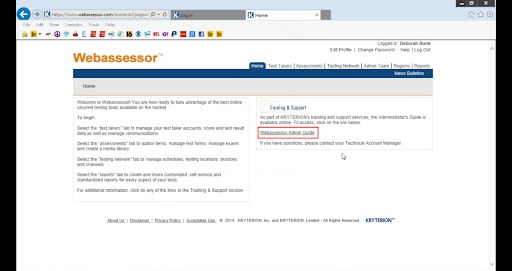
Now we are going to cover the overview of moving around in web Assessor. The URL for the web Assessor is “webassessor.com,” and it will take you to this screen which is shown below. You can log in with your username and password, and if you forget your password, we will email it to you so you can schedule a demo or get technical support.
These are the things you’ll see when you log in to the Web Assessor. The first thing you can do is edit your profile. Make sure you have all of the necessary details in there, and the administrator will assign you a password for the web Assessor system. It would be best for you to go in and design a password for yourself which would be a “change password”. There is also your help box for any web assessing assistance you can need.
Working in web Assessor is a “Web Assessor admin” guide that will take you through the various phases of working in web Assessor.
We’ll now go through the different tabs and features available in web Assessor.
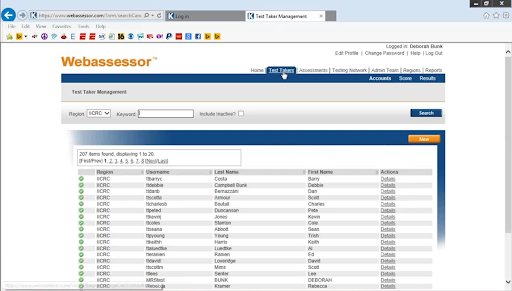
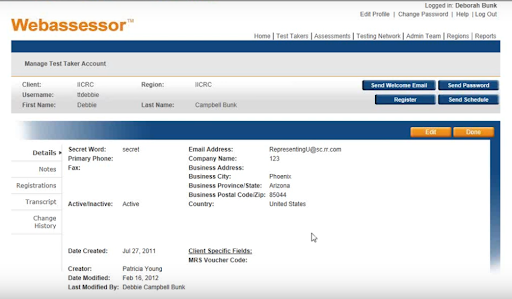
You’ll find all of the test takers, whether they’re taking the test online or in a testing center, under the test takers tab at the top of the page. The details of each of these test-takers are shown inside these screens.
This will provide them with your company’s phone number and passwords. any notes you may make, any registrations for tests they may have taken, and the test transcripts. When a test taker contacts you for a password or assistance with registering or scheduling, this was also a test taker mode.
Assessments:
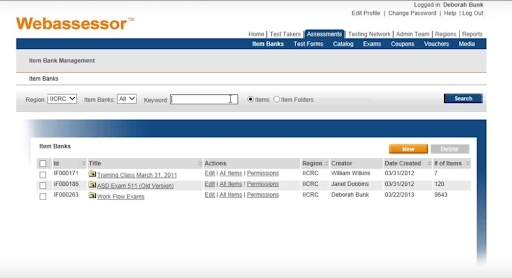
You’ll spend the most time on “assessments”. You have your item banks inside assessments and then You build your own “test forms”. All of the ICR scenes item tests are under the workflow exams in your item banks.
You can see them coated with the exam’s original time and then coded them with the new date as we make changes.
Test Forms:
Your “test forms” will be where you will build your test. This is where you’ll take the items and put them into a test form,whether you’re taking an online test,a test center test, or printing some paper. One thing to keep in mind is that once these are locked, you won’t be able to make any more changes to the test forms.
Catalog:
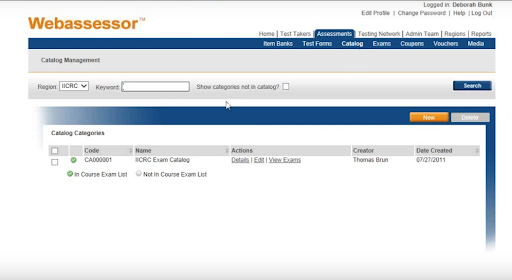
The active exams will be displayed in the “catalog”. The catalog of all the exams we have is related to the MRS (mold removal specialist) test.These are the various tests that we went through in order to establish form A and B of our exams. These are the exams that are performed at a test center.
Enroll in our Fortiweb Training program today and elevate your skills!
Subscribe to our YouTube channel to get new updates..!
Exams:
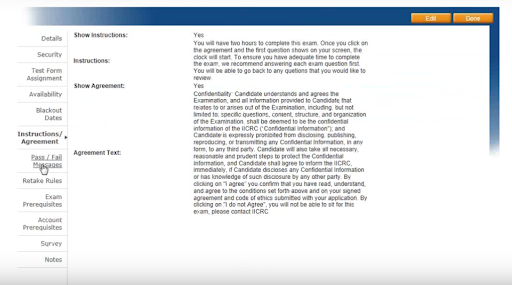
The “exams” tab will show you the details of the exam as shown in the below screen.
These details will include the cost, the security parameters, the test form alignment assignment, and the test’s availability. There are no end dates or blackout dates for these assessments if they can’t be administered at a certain time.
It also contains any “instructions” for the test-taking student. The pass and fail messages are where we establish pass and fail if you take an online test and get your results right away. There are retake rules, such as how many times you should take the exam. If we perform any surveys or have any notes on this, we will conduct an exam or account prerequisites survey. All of these can be found under exams, which is under the actual exam. The mold removal specialist is the one that we’re utilizing an outside service.
Voucher:
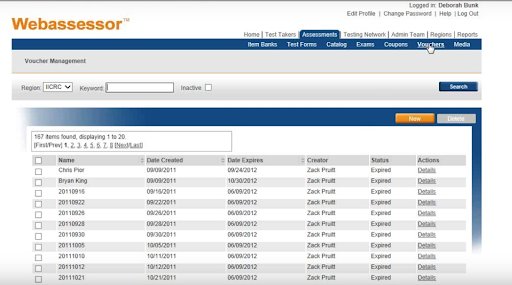
A “Vouchers” tab is where the staff assigns a code to a test taker after they have met the requirements, their application has been accepted, and they have submitted their payment, and we tend to allocate them by date. This code will be used to register for the test at a testing center.
Media Center:
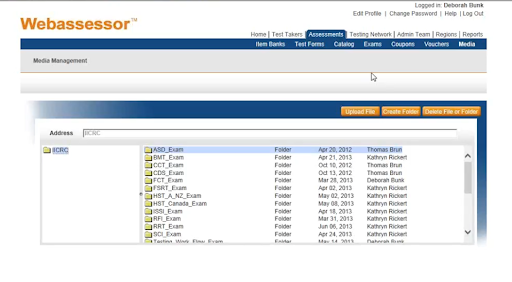
The media center will take a few moments to load because it contains all of the pictures and graphics from the test.Any item that uses it is broken down by the exam for which it is associated. All media must be uploaded here before it can be added to a test item and then transferred to a test forum.
So assessments are where you’ll be developing your items, evaluating them, updating them, and converting them to a test form to see whether you want to export them to paper and pencil or place them online. As a result, it will be used for computer-based tests, and you’ll have your voucher so that those who have paid for the test will take it.
Admin Team:
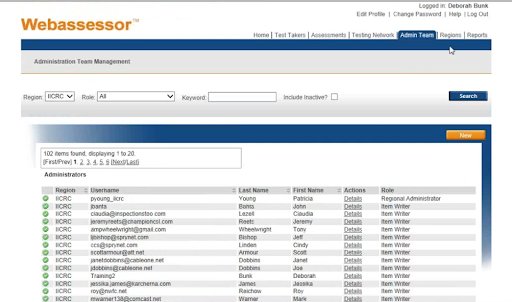
The “admin team” is the next tab. This is where volunteers and workers of the IICRC can access the web Assessor system and make changes to the item database, exams, profiles, and passwords. The original administrator, the assessment manager, the item writer, the registration manager, the private scheduler, the supervisor, and the test taker administration are the seven different roles that can be defined for the test-taker. This is where each of these roles will be developed.
Regions:
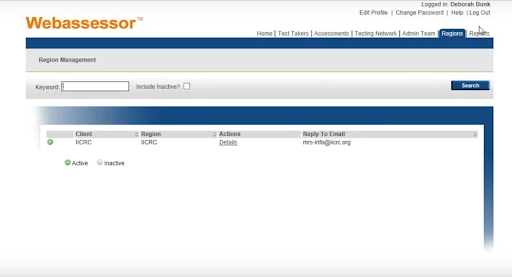
The regions are the separate entities within an organization. They can represent a variety of departments,geographic areas, and even teams. You have one region to find but if you do need additional regions to establish then you need to contact the technical Account Manager.They’re a wonderful tool for creating web pages in multiple languages or different branding elements for different business units within the same company.
Report:
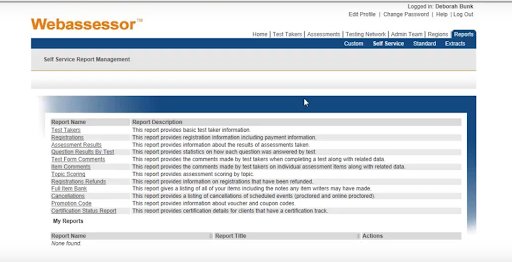
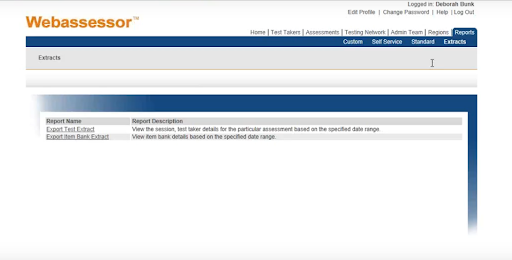
Any system standard reports that you want to keep track of on a regular basis can be saved to custom reports. The self-service reports are those that have already been developed by the web Assessor system, and you can pull various reports depending on the details that you’re looking for. Despite the fact that each report has its own set of fields and selection criteria, the reports share a lot of similar attributes.
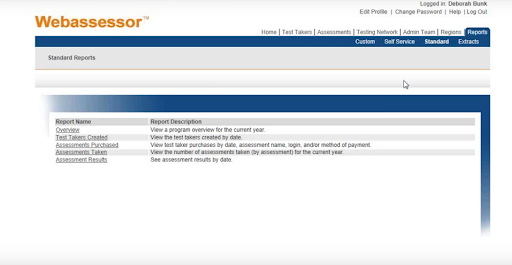
The standard reports are those that are also created with the web Assessor and are generated directly from the assessments.
The extract reports are the reports in which you would enter specifics on what you were looking for,and the data would be extracted into a CSV file, which you could then manipulate and display in various documents.
As an example,the committee members are working on their exams and need to see an updated printed version of the exam. You could review it by placing it into an approved mode, turning it into an exam, or extracting a report.Extract the data into Excel, manipulate it, and then convert it to a Word document that displays the same information to them.It will also provide them with the additional details they need to provide their source definition,documentation,and teaching point or evidence statement.
Conclusion:
We have covered the basic overview of the web Assessor system and all its features. We hope this blog has helped you with all the essential details on how to use the ServiceNow Webassessor for scheduling the exams.
To provide the best experiences, we use technologies like cookies to store and/or access device information. Consenting to these technologies will allow us to process data such as browsing behavior or unique IDs on this site. Not consenting or withdrawing consent, may adversely affect certain features and functions.
Functional
Always active
The technical storage or access is strictly necessary for the legitimate purpose of enabling the use of a specific service explicitly requested by the subscriber or user, or for the sole purpose of carrying out the transmission of a communication over an electronic communications network.
Preferences
The technical storage or access is necessary for the legitimate purpose of storing preferences that are not requested by the subscriber or user.
Statistics
The technical storage or access that is used exclusively for statistical purposes.The technical storage or access that is used exclusively for anonymous statistical purposes. Without a subpoena, voluntary compliance on the part of your Internet Service Provider, or additional records from a third party, information stored or retrieved for this purpose alone cannot usually be used to identify you.
Marketing
The technical storage or access is required to create user profiles to send advertising, or to track the user on a website or across several websites for similar marketing purposes.