Firefox’s Free VPN Adds More Servers in More Countries


Pick a server, any server. Firefox filled a gap this week in what has otherwise been a popular new free VPN service — letting customers choose from among servers in different regions.

With its Firefox 151 update — that is, the 151st version of the browser, which debuted in 2004 — you can now select a server from any of the several countries where Firefox’s owner, California-based Mozilla, has launched VPN support. The list includes the US, the UK, Canada, France and Germany. If you go with its recommended setting, Firefox will automatically choose the server closest to your location.

The most popular VPN providers have servers in many more countries around the world, including Proton VPN (145 countries), NordVPN (135), ExpressVPN (105) and Surfshark (100). In the announcement this week, Firefox said it would be adding servers in more countries.

Logging into servers in different countries is one of several reasons why people use VPNs. If, for instance, you live in the US but log into a VPN server in Germany, you can avoid geo-restrictions. Perhaps a German TV station or streaming channel only allows people living in Germany to watch, or shows something for free that costs money in the US. By joining a server in Germany, your IP address will indicate that you’re there, even though you really aren’t, allowing you to fool media providers into letting you watch their content.

Firefox said that more than 1 million people have signed up to use its free VPN, which launched in March. That early response shows that customers want VPN protections that are “built in and easy to use,” a Mozilla spokesperson told CNET.

People can “turn on IP protection directly in the browser with a single click,” the spokesperson said, adding that Mozilla’s free VPN offering “doesn’t rely on selling browsing data or injecting ads into traffic.”

Free has its limitations

Despite the early popularity of Firefox’s free VPN, CNET currently only recommends one free VPN service — Proton VPN‘s free tier plan. We found that, despite Proton’s limited server array, the service “doesn’t restrict your monthly usage, sell your data or bombard you with ads.”

Surfshark estimates that 33% of internet users worldwide use a VPN, and that half of those people use a free one. But you should be aware that free VPNs can be very risky to use. Some have weak encryption, might log your activity, collect your data or could unintentionally introduce malware, among other issues.

Read more: I Took Amnezia for a Spin. Now I See the Appeal of VPNs

Firefox’s VPN has a monthly data limit of 50GB per month. For an idea of average usage load, streaming a movie can use up about 1GB per hour in standard definition and up to 3GB per hour in high definition. Streaming music can range from 30MB to 150MB per hour, depending on audio quality. (1,000MB is equal to 1GB.)

To get the Firefox VPN, you need to install Firefox on your computer or mobile device. Then, while using Firefox, click the VPN button at the top-right of the toolbar. Next, click Get started and sign in to your Mozilla account or create one. After sign-in, click Turn on protection to activate the VPN.

The Firefox VPN can run on operating systems including Windows 10/11, MacOS, Linux, Android and iOS (including iPadOS).

Shake, shake, shake

Besides adding more VPN servers, the Firefox 151 update added new controls for iOS and Android mobile users. You can now use features such as translations, voice search and Shake to Summarize, depending on your device and region.

Shake to Summarize, which Time magazine designated as a special mention in its list of the best inventions of 2025, will summarize a webpage when you shake your phone. The feature was available only on iOS when it launched in September, but this week’s 151 update adds it to Android devices.

Shake to Summarize is available in English for Android users, with more languages coming. For iOS customers, the feature is available in English, German, French, Spanish, Portuguese, Italian and Japanese.


Source link

Leave a Reply

Subscribe to Our Newsletter

Get our latest articles delivered straight to your inbox. No spam, we promise.

Recent Reviews


What is Network Security?

The planning and implementation of network security procedures to preserve the integrity of networks and programs against hacking and illegal access is indeed a subcategory of information/cyber security. It defends the organization’s IT structure and network-accessible services against a wide range of cyber threats, including viruses, Trojan, spyware, spam ware, malware, and more. Network security includes user credentials, internet connectivity, firewalls, backups, and encryption. A network security professional’s goal is to make the system more secure by offering technical assistance using intrusion detection systems, encrypting, firewalls, and digital certificates, among other things.

Wish to make a career in the world of JNCIA? Start with JNCIA Training !

What is Cyber Security? 

Cyber security is a broad word that refers to all areas of the internet. It is a subcategory of data security that is concerned with defending the authenticity of systems, devices, and programs against assault, damage, or illegal access from the outside. It refers to a collection of approaches, technologies, and procedures for defending systems and networks from cyber-attacks. It protects networks against unwanted electronic access by putting in place a variety of security mechanisms and controls. All inbound and outbound network traffic is monitored by cyber security professionals to limit the danger of cyber assaults while also protecting the firm from unauthorized system use.

Wish to make a career in the world of Cyber Security? Start with Cyber Security Training! 

Cyber Security Training

  • Master Your Craft
  • Lifetime LMS & Faculty Access
  • 24/7 online expert support
  • Real-world & Project Based Learning

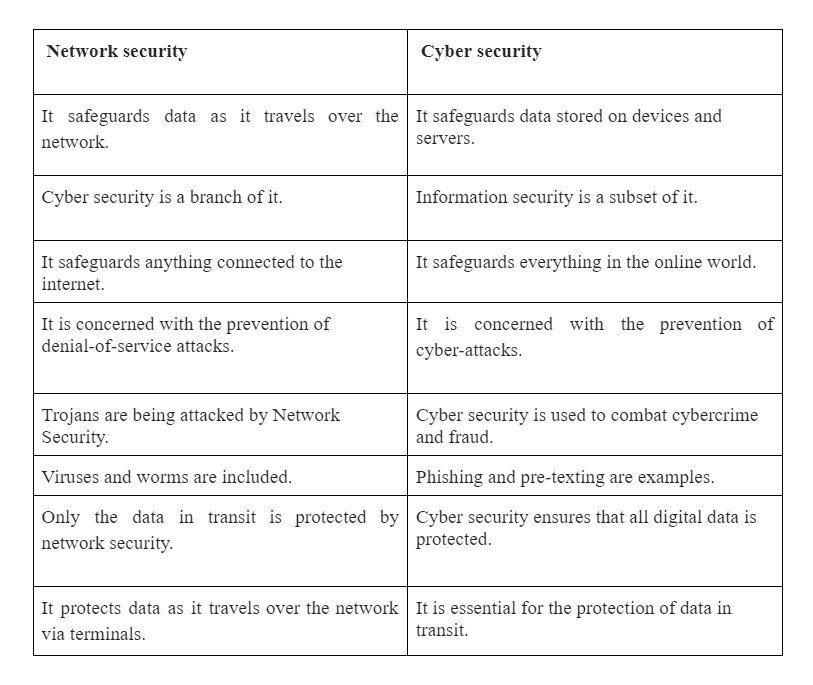
(Network Security vs Cyber security) Difference Between Both

1. Definition

Cyber security is a branch of information security that refers to a set of strategies and methodologies for preventing harm, attack, or illegal access to networks, devices, programs, and data. Cyber security, to put it simply, is the process of defending internet-connected devices and networks against digital threats. The process of safeguarding files and folders in a computer network from misuse, hacking, and illegal access to the system is known as network security. Network security is a subcategory of cyber security that guards against unwanted access to your system and network-accessible resources.

2. Security

While the phrases are interchangeable, they are vastly distinct in nature of security. If you see an organization as a walled castle, network issues are associated with keeping the peace within the castle walls and defending the organization’s sovereignty from network-related threats. Cyber security, on either hand, safeguards a company against external risks such as those posed by the internet. It defends an organization’s systems, networks, and applications against all types of digital attacks, such as phishing, baiting, and so on. The goal of network security is to secure an organization’s IT infrastructure from internet dangers such as viruses.

Wish to make a career in the world of Forescout Administrator ? Start with Forescout Administrator Training

3. Data

Network security becomes a component of cyber security, but cyber security is indeed a broad word like data security. While the authenticity of data and programs is the most important factor in both circumstances, cyber security emphasizes threat monitoring and detection to a higher extent. Network security is primarily concerned with protecting an organization’s IT network from the inside, while cyber security is concerned with protecting an organization’s information security technologies (ICT) against cybersecurity threats that exploit system weaknesses. Network security includes firewalls, user names and passwords, backup, and encryption.

If you have any doubts on Cyber Security, then get them clarified from Industry experts on our Cyber Security Tutorial !

Acquire Cyber Security certification by enrolling in the HKR Cyber Security Training in Banglore!

HKR Trainings Logo

Subscribe to our YouTube channel to get new updates..!

4. Security Expertise

Cyber security experts or analysts are those who, by their knowledge and experience of databases, firewalls, network security, and encryption, are fully responsible for defending network infrastructure and related systems. An expert in cyber security control, detection, and recovery is a cyber security professional. A security professional’s primary responsibility is to monitor all inbound and outbound traffic and to collaborate with other departments within the company to manage risk assessment tools and technology. A network security professional’s job includes securing the organization’s IT infrastructure, which contains data assets, financial data, and other confidential data

Network security and Cyber security

frequently asked Cyber security Interview questions and Answers !!

Cyber Security Training

Weekday / Weekend Batches

Conclusion

In brief, cyber security is an important part of information security dealing with data security during retention and transmission, while network security is indeed a subdivision of cyber security concerned with securing an organization’s IT infrastructure and limiting access to it. Both phrases are frequently used interchangeably, with the exception that cyber security is a much larger term, whereas network security is one component of information/cyber security.

Related Articles

  1. Cyber Security VS Data Science
  2. Cyber security Technologies


Source link