Great hotel, not-so-great stay: Here’s what didn’t work at The Bellagio


The Bellagio is a legendary hotel in the heart of the Las Vegas Strip, but I recently had a somewhat disappointing stay there.

After posting a room tour I did while at the hotel — the only post of mine to ever go “viral” on Instagram — a lot of Bellagio fans were not happy with my mild disappointment, so I wanted to explain the experience here in a bit more detail.

Here’s what we look for at The Points Guy when it comes to a great hotel stay — and why The Bellagio Resort and Casino didn’t quite fit the bill this time.

Related: These are the hotel openings TPG is most excited for in 2026

About the hotel

The Bellagio is a world-famous hotel in the center of the Vegas action. It’s probably best known for its incredible fountains located right on the Strip. The lobby features a spectacular ceiling sculpture by the artist Dale Chihuly.

CLINT HENDERSON/THE POINTS GUY

The lobby is also where you’ll find an iconic 14,000-square-foot botanical garden and conservatory.

CLINT HENDERSON/THE POINTS GUY

And that’s not all the hotel has going for it — it was also renovated a few years ago (TPG’s own Summer Hull loved the updated room she stayed in, in 2021.)

Booking through Home Away From Home

During my recent visit, I stayed in a renovated room on a high-up floor, and indeed, my room itself was fine.

The problems, though, mostly stemmed from my expectations, since I booked through Bilt’s new Home Away From Home portfolio, which comes with several important perks (or it’s supposed to).

Reward your inbox with the TPG Daily newsletter

Join over 700,000 readers for breaking news, in-depth guides and exclusive deals from TPG’s experts
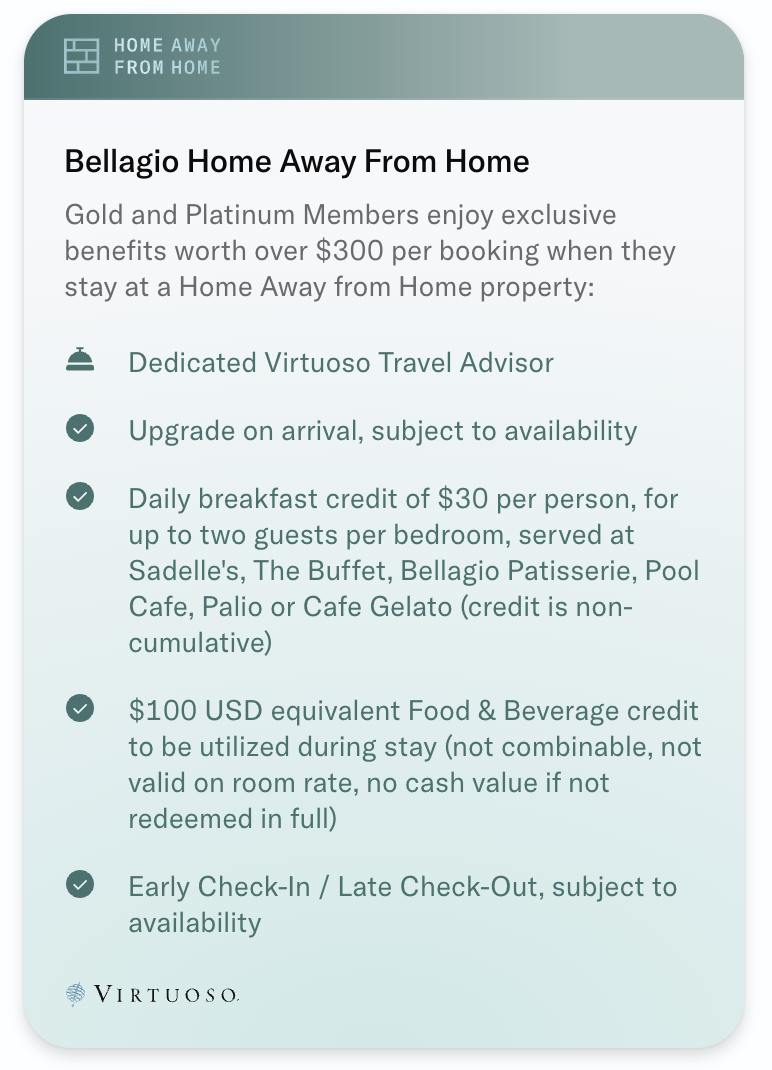
Bilt Home Away from Home perks at Bellagio.
Bilt Home Away from Home perks at Bellagio. BILT

These perks include:

  • Early check-in
  • Late checkout
  • Daily breakfast for two (up to $30 breakfast per person at Sadelle’s, The Buffet, Bellagio Patisserie, Pool Cafe, Patio or Cafe Bellagio)
  • $100 food-and-beverage property credit
  • Space-available upgrade

Here’s what didn’t work and what could’ve gone better

No upgrade

CLINT HENDERSON/THE POINTS GUY

Bilt Home Away From Home states that upgrades are subject to availability; unfortunately, I didn’t get one.

I booked a “1 Premier, King, View, 1 bed,” which I would have assumed would have a great view, but it left much to be desired. Room 28033 looked out over the back of the hotel. While I did have a view of some of the swimming pools, I did not have a view of the Strip or the Bellagio Fountain. Instead, I looked out on Interstate 15.

Between this disappointing view and no available upgrades, this was a bummer.

Ignored concierge requests

The hotel says that guests are able to text the concierge service number for assistance 24/7. However, I made multiple attempts to get a response to a request for help getting tickets to a show. There was no reply until they reminded me I needed to checkout by 11 a.m.
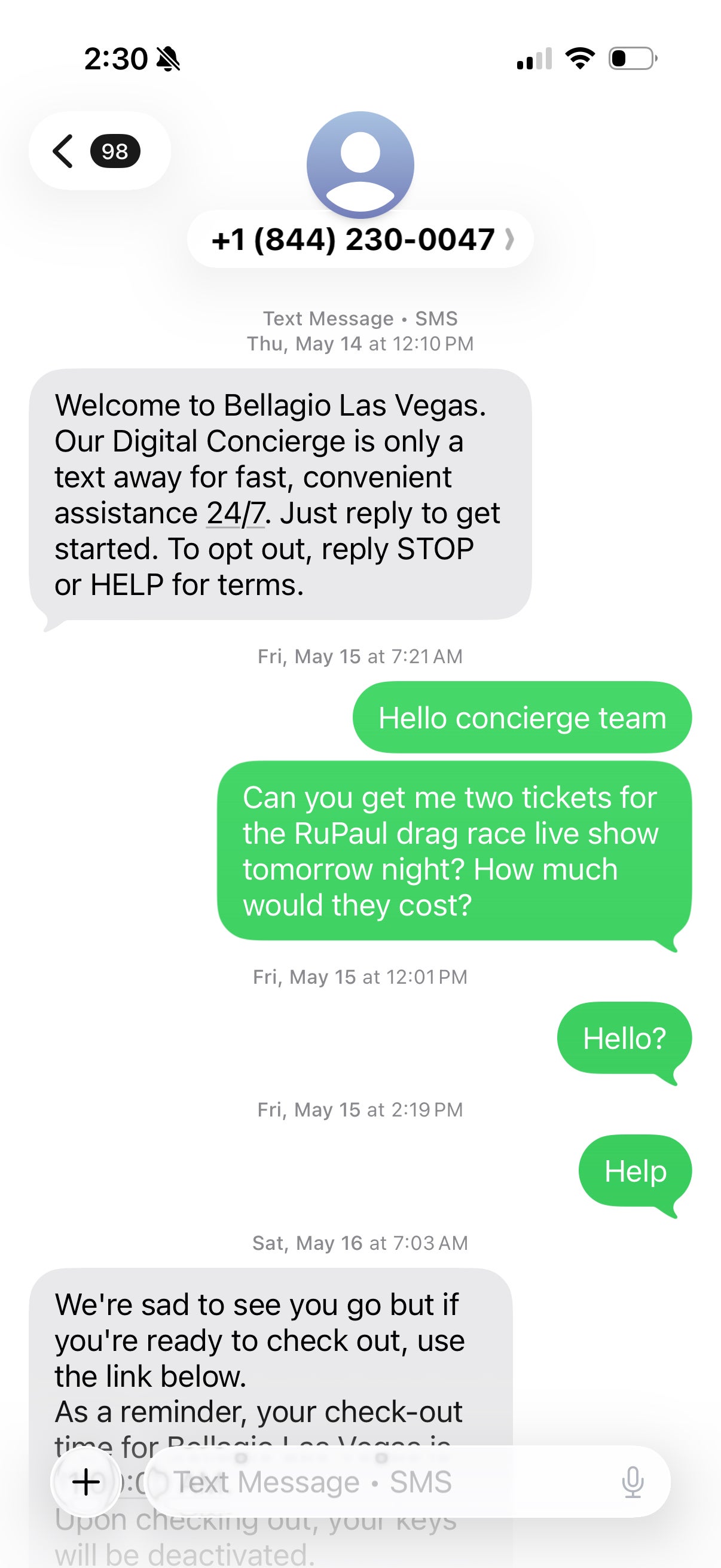
Text thread from hotel.
Text thread from hotel. BELLAGIO

Unstable WiFi

There’s no excuse for bad WiFi these days in any hotel. Sadly, the WiFi at Bellagio was not great. I had trouble getting anything to stream, and Zoom calls weren’t great either.

Refused late checkout

One of the benefits that I was counting on using was late checkout. It is supposed to come with my booking via Bilt, but no dice. I called the front desk to confirm this benefit, and the receptionist said they didn’t do late checkout after noon, which was confusing. It was especially annoying because I was moving hotels, and I couldn’t check into my next hotel until 3 p.m.

The stay was expensive

CLINT HENDERSON/THE POINTS GUY

My biggest gripe is that staying at The Bellagio was very expensive. I paid $769.86 for two nights, after a $100 credit for using Bilt Cash to book through the Bilt portal. It would have been $870 for two nights, including the $50-per-night resort fee. Thankfully, I also got a good statement credit from Bilt.

The Bilt Palladium Card(see rates and fees) gives you a $400 Bilt Travel portal statement credit each year for hotel bookings made through the portal. You get $200 to use every six months.

If I had paid the full, nearly $900 out of pocket for two nights at the Bellagio, I would have been even more disappointed.

I will say that there were several large conventions in town during my visit, so maybe I was just unlucky on some of the issues.

What I loved

RYAN SMITH/THE POINTS GUY
  • Of course, the best things about the Bellagio are the location and the stunning fountains in front. Even if you’re not staying there, you can enjoy the display. There’s a show every thirty minutes in the afternoons and then every 15 minutes at night.
  • There are plentiful food and beverage options at the hotel, which is convenient. For example, my Home Away From Home booking via Bilt included a $100 F&B credit at the resort. I also got a daily $30 credit for breakfast. I counted more than 15 dining options. And best of all, there were no issues using those credits on my bill at the end of my stay.
  • The hotel has an incredible casino, as you’d expect, and there is a great shopping mall attached to the hotel. You are also in the center of the action. It sits between Caesars Palace and Aria, and many of the biggest attractions in Vegas are within walking distance (go see Drag Race Live at the Flamingo).
  • The renovated rooms are pretty nice, if you can score one with a decent view.

Bottom line

CLINT HENDERSON/THE POINTS GUY

No shade to The Bellagio, but the poor Wi-Fi, a lack of promised benefits, unreliable customer service and high prices made for a less-than-stellar combination.

Despite my disappointment, I would stay again if the price was right. I appreciated being able to use some of my Bilt credits for the stay, and I like the renovated rooms.

I think the key is to set some realistic expectations about what you get if you book via a third-party like Bilt Home Away from Home or American Express Amex Fine Hotels + Resorts.

And maybe don’t go during a major conference in Las Vegas.

Related reading:


Source link

Leave a Reply

Subscribe to Our Newsletter

Get our latest articles delivered straight to your inbox. No spam, we promise.

Recent Reviews


SQL Server Data Tools – Table of Content

SQL Server Data Tools (SSDT) offers a declarative model to make the relational database development easy. Developers can use Transact-SQL to build, debug, maintain, and refactor databases all from within Visual Studio. They can either connect a database and work on it directly or work on a database project. Developers can also use code navigation and IntelliSense tools to work with SSDT. 

It provides a visual view to create and edit tables through Table Designer. It also offers version control for database files, which will be easier for a team-based environment.When all the data modifications are done, they can publish the projects to target platforms, which are nothing but other supported SQL platforms like SQL Database and SQL Server. 

The database projects in Visual Studio can be viewed through the SQL Server Object Explorer. It helps developers in performing light database operations like create, edit,rename, and delete tables.It also helps in implementing stored procedures, types, and functions.They can even compare schemas with the help of contextual menus.

  To gain in-depth knowledge with practical experience in SQL server, then explore  SQL server Training!

Advantages of SSDT

Here are some of the many advantages that SSDT provides.

  • Developers can create database projects through which they can carry out database operations easily.
  • All the database operations can be performed using Transact-SQL.
  • Developers get rich editing and debugging experience while working with Transact-SQL scripts.
  • They can compare data between a source and a target database.They can also set the target database data in sync with the source database.
  • Developers can configure CI/CD pipelines that reflects changes in the target database using Azure DevOps.
  • Developers can clone a production database to a test instance, apply changes to it, and publish the changes back to the production database. 
  • It lets the developers control their code versions using source control.This will be extremely beneficial in a team environment.
  • They can use Table Designer to manage table relationships.
  • The Table Designer also shows the syntax and semantic errors during build and deployment. It also shows the error while editing database entities and their definitions.
  • Developers can debug and perform SQL Server unit tests on databases to verify the changes performed.

Installation of Visual Studio

To work with SSDT, we need Visual Studio first. It is very easy to install Visual Studio. Let me walk you through the process in a step-by-step way. I also included some screenshots to help you better follow the process.

Note: If you already have Visual Studio installed on your machine, you can skip this step. 

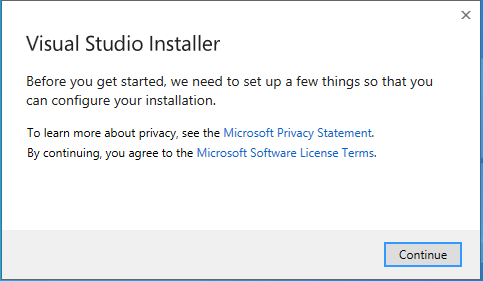
Go to https://visualstudio.microsoft.com/thank-you-downloading-visual-studio/?sku=Community&rel=16# to download Visual Studio. Run the executable file to start the installation process. You will get an installer screen asking to agree to terms and conditions.

Installation of Visual Studio

Click on ‘Continue’ to start fetching the files by the installer.It may take a while to get everything ready. It will then show the installation location and asks to choose a workload.

installer

SQL Server Certification Training

  • Master Your Craft
  • Lifetime LMS & Faculty Access
  • 24/7 online expert support
  • Real-world & Project Based Learning

Select the ‘ASP.NET and web development’ workload and click on the ‘Install’ button. It takes some time to get the installations done.You can observe the progress while the installation is being done.

ASP.NET and web development

Once the installation is complete, you will get the following screen.

installation is complete

Add SSDT to Visual Studio

Launch your Visual Studio Installer and click on ‘Modify’.  You will get the workloads screen. Choose the ‘Data storage and processing’ option under ‘Other Toolsets’.

Add SSDT to Visual Studio

Click on ‘Modify’ and it will start installing the workload. Once the process is done, you will get the following screen.

workload

Click on ‘Launch’ to open Visual Studio.

Create a database project

In the Visual Studio, click on ‘File’ in the top left corner. Click on ‘New’ and select ‘Project’. You will get the ‘Create a new project’ screen. Search for ‘SQL’ in the search box.

Create a database project

Choose the ‘SQL Server Database Project’ from the search results and click on ‘Next’. You will get a configuration page

SQL Server Database Project

Give a name for your project and click on ‘Create’.  Once the project is created, you will get your project structure in the Solution Explorer.

‘Create

Double-click on the properties option under your project.

properties option

Make sure that ‘SQL Server 2016’ is set as your target platform. Now you can start working on your databases.

HKR Trainings Logo

Subscribe to our YouTube channel to get new updates..!

Tips and Tricks

Here are some pointers that might help you while working with SSDT.

  • To keep the SQL statements clean and easy to read, use inline syntax.It will be easier to validate the DDLs.
  • Ensure that all the DDL objects in your project are set to build.
  • If you want to promote your DML statements to another environment, then it will be better to include them in the project and set the DML SQL script to none. Make sure that you compare your database in development with the one in production frequently.
  • It is always important to build a project as it captures the changes made. So, make it a habit to build your project regularly.
  • For each project, always save the Schema Comparison (SCMP) settings.
  • When you perform schema comparison, always generate the script instead of updating it. So, you can validate the script before executing it.

SQL Server Certification Training

Weekday / Weekend Batches

Conclusion

In this post, we have provided an overview of Microsoft’s SQL Server Data Tools. It also helps in designing and deploying SSIS packages using Visual Studio.There is a bit of a learning curve that is needed to master working with SSDT. Once you start practicing,it will become easier.Try working with database projects using SSDT in Visual Studio.Once you get the hang of it, you will understand that it is the easiest tool to get your database work done.

Related Articles:

1. Isolation Levels in SQL Server

2. Exception Handling in SQL Server

3. SQL Server Joins

4. SQLite vs PostgreSQL


Source link