Hope, Hype or Horror? ‘The AI Doc’ Director Charlie Tyrell Questions What Comes Next


I write (and think) about AI for a living. In any given 30-minute period, I waver between worrying that AI will destroy everything I know and love, and believing — or at least wanting to believe — that it could change humanity for the better.

Dread turns into optimism, which seeps into ambivalence, which then turns back into dread-induced cynicism. Rinse, repeat. Goodness, my central nervous system needs a break.

That debate is at the heart of a new documentary arriving in theaters today, March 27. The AI Doc: Or How I Became an Apocaloptimist (104 minutes) first premiered at Sundance in January and later screened at SXSW. The film explores the wild industry and mind-melting world of artificial intelligence. It takes an unflinching look at the tension between those who feel extreme doom versus those who feel extreme optimism about the AI boom, and how to make sense of that polarity. 

AI Atlas

The documentary’s two directors, Daniel Roher and Charlie Tyrell, were soon-to-be fathers during the filmmaking process, their kids born a week apart. Through the lens of fatherhood, the documentary makes use of hundreds of interviews, both onscreen and offscreen, with key technology and risk experts worldwide — from OpenAI CEO Sam Altman to Dan Hendrycks, executive director of the Center for AI Safety — to explore whether AI is the greatest existential threat we’ve ever known, or the most singularly exciting technology we’ve ever known, or something else entirely. 

Roher won the Academy Award for Best Documentary Feature for Navalny (2022), and Tyrell was on the Oscar shortlist for his documentary short My Dead Dad’s Porno Tapes (2018). The AI Doc was also produced by the teams behind Everything Everywhere All at Once (Daniel Kwan and Jonathan Wang) and Navalny (Shane Boris and Diane Becker).

I spoke with Tyrell this week, before the documentary’s theatrical release, to discuss fatherhood, the two-and-a-half years of making this documentary, inspirations, goals and society’s future with AI. 


The interview below was edited for length and clarity.

I know you’ve made documentaries before, but how did you prepare, going from a deeply personal short documentary to a documentary like this, that really looks at the biggest, impactful thing that is AI?
Tyrell: I mean, there was no preparing. Daniel Roher is the one who brought me into this film, and I can’t remember how many features he had made before this, but more than me. And it was just confidence in each other. And not just in Daniel Roher, but in the rest of the team to be going through it together and kind of, “We don’t need to have a plan, we’ll make the plan as we go.”And not necessarily being cavalier about it, but just knowing we had a job to do and a goal, and just keep moving forward toward that. 

So how did I navigate? Just with faith in the people around me. Coming from a personal short before this, I still tried to apply a lot of my personal sensibilities and POV to this story. It’s through the lens of fatherhood, and I became a father the same week that Daniel did. So a lot of his feelings were my feelings, and vice versa. 

I was really touched by the fatherhood lens. It was very tender and took me a little by surprise. Was that an organic process, or did you know going in with Daniel that it would be the framing?
Tyrell: It happened quite organically, but also so early in the process. I think it was in our first or second group meeting with Dan Kwan and Jonathan Wang and Shane Boris that it was presented as an idea of a way we could go about this. And we started kind of entertaining it out the gate.

And you said Daniel is the one who brought you on. Do you think your shared upcoming fatherhood was part of that?
Tyrell: Definitely. I can’t recall if this project came up before or after we were aware of each other’s babies around the corner. But definitely. I lean into serendipity, and I believe that Daniel does, too. So it was nice to have a companion when you know you’re going to go through a thing like a behemoth of a feature film, for a behemoth of a topic like AI. And to know that, “OK, I’m going to be going through this other huge thing in my life of having a kid,” and, “OK, someone else is going to be sharing that experience a little bit.” It was just so reassuring to know that. 

Of course, you have the panic of “how am I going to be able to navigate my job with a kid?” And just knowing that wasn’t going to be done all by myself gave me quite a sense of security. And actually, my kid is in the film a couple of times. There are some snuck-in frames and moments in there.

In an interview with CBS, you said a goal was making AI more democratic. Who do you think really benefits from the current AI boom, and who gets left out?
Tyrell: Well, one of the first people to benefit is going to be the tech industry, and these valuations that are happening for their companies for these, in some cases, absurd, unheard-of amounts. It’s making a lot of people very wealthy, and it’s making a lot of people very powerful. So that’s one of the first who benefits.

And then there are the people it’s not benefiting. Speaking to data centers, people are losing some of their resources that they need, like water. Some people are being displaced from their homes for these data centers. I’m mostly just speaking to the Western world and North America and the United States specifically. It’s a tricky thing and overwhelming sometimes to follow the back end of this technology … In this field, there are spaces in the world where there are individuals looking at screens and upvoting and downvoting data [to train AI], and some of it is horrific material to look at. There’s still a human being assessing what’s going into [data sets] and being exposed to, in some cases, some awful material and awful media — and not being paid very well to do it.

Was there a certain perspective that most stood out to you during the process of making this documentary? Was there one person in particular who just really had a ton to say that really stuck with you?
Tyrell: The film, including the experience of making it, really was a chorus of voices. But one that really does stand out for me, just off the cuff, was Deb Raji [a computer scientist and researcher at UC Berkeley, specializing in algorithmic auditing]. She was really able to speak to the ways this technology is deployed, at the pace it is, without the regulation that maybe it should have. Right now, today, there are people who are becoming victims because of the faults of the technology. There are people who are ending up spending the weekend in jail because a facial recognition software that was powered by AI misidentified someone and confused them with someone who did commit a crime. 

As this technology gets deployed into things like mortgages and loans and that kind of bureaucratic stuff that people need to live — it needs to go well and go right, because their lives and their wellness and their stability are depending on it. These systems are not a human being with something like compassion. They’re binary systems that will ultimately give a yes/no, without much room for pushback, because we take it as data and absolute truth. So people are being impacted by that. 

Daniel conducted the interview [with Deb Raji], and I was zoomed in more as an observer, but I was really just taken aback by a lot of what she said because it took me out of my kind of bubble that I live in. And one thing she says is, that if you feel like the negative impacts of these technologies won’t affect you because of your place in life or your privilege, it’s just a matter of time. Because it just scales up.

I felt very seen at times during this documentary because on a daily basis, I’ll flip-flop like, “AI’s going to ruin everything.” And then I’m like, “No, it’s going to be OK. We’re all going to be fine.” Humanity’s gone through really pivotal shifts before, and we’ve done OK. Were there any moments where your perspective on AI was flip-flopping back and forth? How many times did that happen?
Tyrell: The whole time and continues to now. And that’s the reality of this technology. It is both things at the same time. One of the messages of the film is exactly that this is going to have these amazing capabilities, as well as these horrible capabilities. And to wield it, we need to acknowledge and understand that’s what it’s going to be. We can’t have a belief that it’s only going to be good, or it’s only going to be bad, because it’s always going to be both.

Was there a target audience for this? Because I live and breathe AI and think about it all day, every day, but I loved this documentary, and it taught me things. Did you make it with the approach that this would be more for people who have a vague idea of what AI is, or was it for everybody?
Tyrell: What we were striving for here was a bit of a primer, a bit of a first date into the technology. And with that, we could say that the audience was people who are maybe not interested or willing to engage with this technology or this landscape — people who are maybe more content to ignore it. We wanted to make an entertaining film that would be engaging but also informative. It’s a very overwhelming topic. I personally find that when I’m overwhelmed with information, I kind of want to shut off and look away. Like, let me not have another issue to deal with in my life, right? That’s normal human nature for many people. 

We wanted to make the film so that it was accessible and, in a way, a start for most people, a beginning of a conversation for people. And with that, I don’t mean we’re being super reductive with any of it or overly simplistic, but it was made for general audiences. It was made to meet most people where they’re at when it comes to this technology.

Are there any questions about AI you wish more people asked?
Tyrell: In terms of people using it, I hope that there becomes more illumination on the energy usage to create a silly image of yourself in a different scenario and setting. I wish that there was more transparency or metrics on: “To make this image, this is how much water you’ve used, or this is how much power you’ve used.” And if people saw that, maybe they would still try to get the exact pro-perfect image of them as a centaur or something, but maybe instead of trying 50 attempts to find the right one, they would cap it off at a couple. That would be something I would like to see baked into some of the interfaces of the models.


Source link

Leave a Reply

Subscribe to Our Newsletter

Get our latest articles delivered straight to your inbox. No spam, we promise.

Recent Reviews


Alteryx Tools – Table of Content

What is Power BI?  

Power BI is referred to as a Software as a service (SaaS) platform, a Business Intelligence tool that helps analyze organizational data and also helps in creating real-time and interactive dashboards. The Power BI business intelligence tool can be installed on any desktop, mobile or can be used online as well. It also helps in collaborating with every peer in the organization. Power BI is a data visualization tool that helps in developing dashboards and BI reports with business intelligence capabilities. Apart from data visualization, it also allows to perform data exploration, helps in establishing reliable and secure connections to the cloud data sources.

Power BI is used by many organizations because of its amazing features like visualization creation. Some of the visualization formats are column charts, area plots, bar charts, line plots, scatter plots, pie charts, treemaps, scatter plots, etc. It also includes a navigation pane that helps in navigating to the dashboards and reports, associated applications, recent work, etc. The Power BI tool also includes inbuilt functions called DAX functions that can be used for data analysis. These are predefined functions that are available in the library. In Power BI, the data can be imported either from a single or multiple data sources. Power BI is also capable of providing extensive support to both structured and unstructured data. It also includes pre-built templates for dashboard creation. You can also create customized dashboards. 

What is Python?

Python is referred to as a high-level, general-purpose, interpreted programming language that includes a set of pre-built functions and libraries which helps in performing complex operations and calculations. It is easy to learn and is used in most fields like data analytics, artificial intelligence, machine learning, etc. 

Python includes two libraries called Matplotlib and Pandas. Matplotlib library consists of the predefined functions that help in plotting the data visualizations while the pandas library also includes the predefined functions that help in working with the data available.

Become a Power BI Certified professional by learning this HKR Power BI Training !

Power BI Training

  • Master Your Craft
  • Lifetime LMS & Faculty Access
  • 24/7 online expert support
  • Real-world & Project Based Learning

Prerequisites for Power BI Python Integration:

Below is the list of the prerequisites required for Power BI Python Integration to take place.

  1. Python runtime installation: The python runtime installation includes the installation of the execution run time through which the Python script operations can be performed.
  2. Libraries installation: It is essential that some of the important libraries have to be installed which increases the robustness of Power BI. Some of the important libraries are Seaborn and Pandas.
  3. Installation of Visual Studio Code: The installation of Visual Studio code is optional. You can also install any other code editor for writing your python scripts. You can also make use of the Power BI script editor to write the scripts.
  4. Power BI settings update: The final step is to update the settings so that you can work efficiently with Python in Power BI. Through this, you can perform the scripting in Power BI. All you need to do is open up the Power BI desktop, click on the file option. Then click on options followed by settings, then navigate to the opportunities which open a new dialogue box in Power BI. Then you can click on the Python scripting, select the path from the directories and IDE of Python. Once done, you will need to click on the OK button.

Understanding the need for Python Integration in Power BI:

By now, you all might have got an idea of what Power BI and Python is for. Yes, Python is referred to as the powerful tool that helps in creating visualizations while Power BI is for creating well-versed dashboards. These dashboards include all the information which helps in providing a complete view of the organization growth, metrics, KPIs, etc. Hence, if Python and Power BI are integrated, it will be a plus for us to utilize the capabilities that Power BI and Python hold.

Apart from the above, Python and Power BI integration includes several other benefits listed below.

  • The users are allowed to run the python scripts directly within the Power BI
  • Through the integration, libraries like Matplotlib and Seaborn can be used in Power BI for data visualization.
  • Python has become a leading technology and all the machine learning frameworks and data science libraries are written in Python. Through the integration, it allows to create of the data analysis scripts using Power BI
  • To perform precise calculations and clear the complexities, some of the enriched libraries like NumPy and Pandas can be used.

Click here to learn Power BI Tutorial

Power BI Python Integration:

In order to solve complex problems in an organization, it requires data and analytics. It also requires future predictions which gives us future insights and helps us clear the bypass of the issues. Through the business intelligence tools, all these predictions and data visualizations are represented in different forms for a better understanding and analysis. With the amazing capabilities that Power BI and Python hold, organizations are being successful with their integration attaining benefits.

Any idea on how the Power BI Python Integration is performed? Well, I will help with the step by step process to perform the Power BI Python integration.

  • Setup the Integrated Environment:

The primary step is to set up an integrated environment ready for the integration process to begin. You will need to have a distribution of Python readily installed in your machine/desktop. I preferred Anaconda for coding related tasks and the base distribution of Python. Sometimes, trying to integrate Anaconda with Power BI is a difficult task.

After the installation process is completed, you will need to install four python packages, each one has its own significance. They are :

Pandas – for data analysis and data manipulation

Matplotlib and seaborn – for plotting purposes

NumPy – for performing scientific calculations

The pip command in the command line tool is used for installing these packages into the machine.

pip install pandas

pip install matplotlib

pip install NumPy

pip install seaborn

Once the above packages are installed, the python scripting needs to be enabled in Power BI. If you want to check, you can open the Power BI and detect whether the python distribution is automatically detected or not. You will need to go to the files, followed by options and settings, then click on options. You will be able to view the home directory for Python under python scripting that is installed in the machine.

Setup the Integrated Environment

Acquire Vagrant certification by enrolling in the HKR Vagrant Training program in Hyderabad!

  • HKR Trainings Logo

    Subscribe to our YouTube channel to get new updates..!

  • Data Importing using the Python script:

It is time for you to check whether Python is working within Power BI by running a sample test. The primary step to perform this function is to import a small dataset using the Python script in Power BI.

To perform this, you will need to navigate to the Home ribbon, then move to the GetData option and click on the other option. Through this, you will be able to import the data from a different set of sources available. Some of the sources are Spark, Hadoop distributed file system, (HDFS), Web, etc. In the below image, I am going to import the Churn Prediction system that is available in my system.

Data Importing using the Python

Once you click on the connect option, you will see a section that allows you to write the Python script.

Python script

You will need to click on the OK button which will further ask you to select the churn data. Once done, you will need to click on the Load option. You can also perform a check whether the data has been loaded or not through the data view option. With this, you are now ready to make use of the power query in order to perform the data transformations.

Using Power Query To Transform the data:

All the individuals who have learned Python would know that data transformation is no longer a single task-based activity.

By using the Power Query editor, the user can shape and transform the data as required with just a single click. The Power BI is also capable of keeping the record of all the transformations and operations that take place or happen during the process of transformation. We will now show you how to use the Power query to understand and know the data transformation capabilities.

Once the data is loaded in the Power BI, you will need to click on the transform data option which is available under the Home tab in order to open the query editor.

Once the query editor is opened up, you will see multiple options to perform the operations like clean, reshape and transform the data.

Power Query To Transform

We will now convert the customer_nw_category variable into a text field because these fields represent the worth category. Also, you need to know that it would not be a continuous variable.

To perform the same, you will need to select the column -> Go to the Data Type, and change the data type to a text format. All the steps will be recorded by the Power query under the applied steps section. You can also rename these steps for a better recall or reference. I will rename this step as nw_cat Text. The next step is to transform the churn column into a logical variable. True here represents for churned (1), whereas False here represents not churned (2). The step can be renamed as Churn True/False.

customer_nw_category

Once the above operation is performed, you will need to click on the close and apply option which will be available on the top left corner so that all the transformations made will be applied.

Using Python’s Statistical within Power BI:

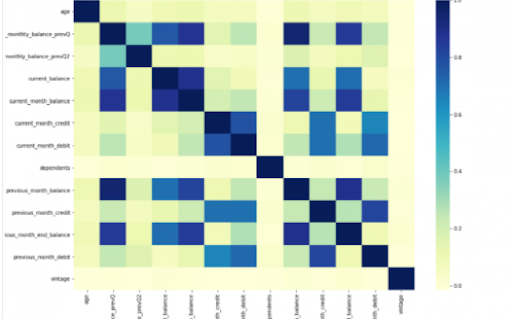
Power BI is considered a library of visualization. Correlation matrix heatmap is an integral component in the data analysis reports.

We will guide you on how to create a correlation matrix heatmap by making use of the Python correlation function. The created heatmap will be available in the reports section in Power BI.

You will need to navigate to the Report section that is available in the Power BI. Then click on the Py symbol which denotes Python visual which is available under the visualizations section. On the left side, you will see an empty Py along with a Python script editor popping up at the bottom of the screen. By this, you might have understood that Power BI is providing an option to create the visualizations with the scripts.

All the value fields will be empty firstly. For correlation heatmap illustration, all the continuous variables will be brought into the value fields, like the age current, previous month balance, monthly balance items, etc. This is considered one of the most essential steps during the integration process. If you forget to perform this step, the Power BI will not be able to recognize the variables.

As the variables are moved into the values fields, the python script will be automatically populated with the below codes.

Let us also write the code for correlation heatmap creation in Python by using the seaborn package.

# import the charting libraries matplotlib and seaborn

import matplotlib.pyplot as plt

import seaborn as sns

# create the correlation matrix on the dataset

corr = dataset.corr()

# create a heatmap of the correlation matrix

sns.heatmap(corr, cmap="YlGnBu")

# show plot

plt.show()

You can now use the run script button and run the script, which will produce a correlation matrix heatmap.

Python’s Statistical within Power BI

Generating analytical reports:

After the heatmap is generated, we can analyze the heatmap and will come to a conclusion.

With the above heatmap, below are the set of conclusions made:

  1. There is no correlation with the other variables for the number of dependents and age.
  2. There is a moderate correlation observed for the average monthly balance in the time span of the last two quarters.
  3. There is a high correlation between the average monthly balance with the previous month balance and the current month balance in the last quarter.
    It is possible to generate a heatmap for the customers who have churned and you can also compare with the customers that do not have. You can apply the filter of churn = False or True so that the heatmap can be observed. Through the analysis, it helps in deriving useful insights from data analysis to the prediction of the behavior.
  4. Power BI Training

    Weekday / Weekend Batches

Conclusion:

Through this article, you have got a clear idea of the process of integration of Python with Power BI. I hope the above information helps you. To get a clear understanding and in-depth knowledge on the subject, you can get trained and certified in Power BI through the Power BI training. The integrated environment will definitely help the organizations to handle and play with the data as and when needed. It focuses on enhancing the power and capitalizing on the benefits that are available in both tools.

related articles 


Source link