I saved the receipts, here’s how much real-world value the Sapphire Reserve Card delivered in the last year


The Chase Sapphire Reserve® (see rates and fees) is back in the spotlight thanks to its highest-ever publicly available welcome bonus: Earn 150,000 bonus points after spending $6,000 on purchases in the first three months from account opening.

But even with a massive bonus on the table, there’s one number that’s hard to ignore: the card’s $795 annual fee.

Chase says the Sapphire Reserve offers more than $3,000 in annual value through statement credits, perks and travel benefits. That sounds great in theory — but I wanted to know what the card was actually worth in my real life.

So I looked back at the nearly 12 months since the card’s June 2025 overhaul and added up every credit and perk I actually used.

The result? About $2,200 in redeemed statement credits alone — before factoring in lounge visits, points earned, travel protections and more.

CHASE

Getting $2,200 in value from Chase Sapphire Reserve credits

If you think it takes some level of effort to get full value out of many of the premium cards, such as the Chase Sapphire Reserve, you’re not wrong.

I have a lot of credit cards (25 to be exact) and a very busy life as a working parent of two active kids, so while I try to maximize the cards in my wallet, I’m also not rearranging my life to chase every obscure credit.

In looking back at the last year, there are a few Sapphire Reserve credits I didn’t use — or didn’t fully use — which I imagine is probably common for many other cardholders.

But from those I did use, the total is around $2,200 in credits.

Reward your inbox with the TPG Daily newsletter

Join over 700,000 readers for breaking news, in-depth guides and exclusive deals from TPG’s experts

Here’s where the value actually came from for me over the last year:

Benefit Official Value How I Used It Approx. Value Used
The Edit by Chase Travel℠ Credit

Up to $500 annually (two up-to-$250 credits)*

Grand Cayman, Germany & Anaheim hotel stays

$750

Chase Travel Credit valid at select IHG Hotels and others

Up to $250 this year**

Grand Cayman IHG stay

$250

Up to $300 annually

Automatically applied to travel purchases

$300

Sapphire Reserve Exclusive Tables Dining Credit

Up to $300 annually (two up-to-$150 biannual credits)

Used $150 in Austin + $150 in Hawaii

$300

Up to $300 annually (split into two up-to-$150 biannual credits; through Dec. 31, 2027; activation required)

Used for & Juliet + Book of Mormon

$300

Up to $300 annually (Up to $25 in monthly promos plus at least one complimentary year of DashPass; activate by Dec. 31, 2027).

Monthly promos used throughout the year

$180

Up to $120 annually (Up to $10 each month through Sept. 30, 2027, does not apply to Wait & Save, bike or scooter rides)

Partial usage

$60

Peloton Monthly Membership Credit

Up to $120 annually (through Dec. 31, 2027)

Partial usage

$60

Apple TV+ and Apple Music Subscription Benefit

Up to $288 annual value (one-time activation required for both services, through June 22, 2027)

Didn’t use so far

$0

Global Entry / TSA PreCheck / NEXUS Credit

Up to $120 every 4 years

Didn’t use this year

$0

  • Approximate Total Credits Used: $2,200
  • Annual Fee: $795
  • Approximate Net Positive Credit Value: $1,400+

*Must be on prepaid stays of two nights or more.
**A one-time $250 statement credit for eligible prepaid hotel stays booked through Chase Travel in 2026.

Here are a few details on how I’m using some of the larger credits.

Using $750 in Chase The Edit credits

I stacked using a combination of Ultimate Rewards points via Points Boost and one $250 Chase Sapphire Reserve The Edit credit in 2025 to book a two-night stay the J.W. Marriott Bonnet Creek in Orlando near Walt Disney World.

Pool at JW Marriott Orlando Bonnet Creek
JW Marriott Orlando Bonnet Creek Resort & Spa. ANDREA ROTONDO/THE POINTS GUY

I’ve already booked two stays for 2026, using up the full $500 credit for this year (in $250 increments). On one of the upcoming stays in Grand Cayman, I was also able to use the $250 hotel credit we’ll talk more about below.

Using $250 Chase Select Hotel Credit

This year, Sapphire Reserve cardholders can use a one-time $250 statement credit for eligible prepaid hotel stays of two nights or more booked through Chase Travel. This credit is only valid for certain brands, including:

  • IHG Hotels & Resorts
  • Minor Hotels
  • Montage Hotels & Resorts
  • Omni Hotels & Resorts
  • Pan Pacific Hotels and Resorts
  • Pendry Hotels & Resorts
  • Virgin Hotels
Hotel Indigo Grand Cayman IHG

The plan here is to find a hotel where you can use both this $250 credit and one of your $250 The Edit credits to get $500 off a two-night stay, which is exactly what I’ve done for an IHG property in Grand Cayman.

CHASE

Using $300 in Stubhub credits to see Broadway shows

I used both of my biannual $150 StubHub credits for Broadway shows — first for & Juliet and later for an upcoming showing of The Book of Mormon.

Using the Stubhub credit to see Broadway shows such as &Juliet. SUMMER HULL/THE POINTS GUY

In both cases, tickets to the shows start under $150, so the credit can often fully cover one ticket or even get you part of the way to two tickets.

Using $300 in Exclusive Tables dining credit

I’ll be honest, this $300 annual dining credit ($150 available Jan. – June and another $150 July – Dec.) was a tougher one for me at first.

I kept trying to force a way to use it close-ish to home. But the reality is, outside of major cities, there’s not a lot of easy ways to put this credit to use, as there aren’t a ton of Chase Exclusives Tables outside of major cities.

So, I stopped trying to use it while close to home and now try to find somewhere fun to use it when we hit the road to places like Orlando, New York City, Austin and even Honolulu.

While in Hawaii this spring, we had an excellent meal for three that came in just over $150 at Hau Tree on the beach in Honolulu. We did the same while in Austin for the weekend in fall 2025 at La Condesa.

TPG Tip: I loved the frozen ube pina colada at Hau Tree and the queso flameado appetizer is absolutely not to be missed if you make it to La Condesa in Austin.

Using the Chase Exclusive’s Dining Credit while in Hawaii. SUMMER HULL/THE POINTS GUY

Lounge visits, points and more

On top of the credits, which are pretty easy to quantify, I’ve also gotten plenty of other value from my Sapphire Reserve.

Since January 2026 alone (when the counter reset), I’ve earned over 40,000 Chase Ultimate Rewards points that TPG values (as of May 2026) at north of $800. Many of those points were earned at increased multiples, such as 8 points per dollar via Chase Travel, 4 points per dollar on hotel and airfare booked direct with hotels and airlines and 3 points per dollar on dining.
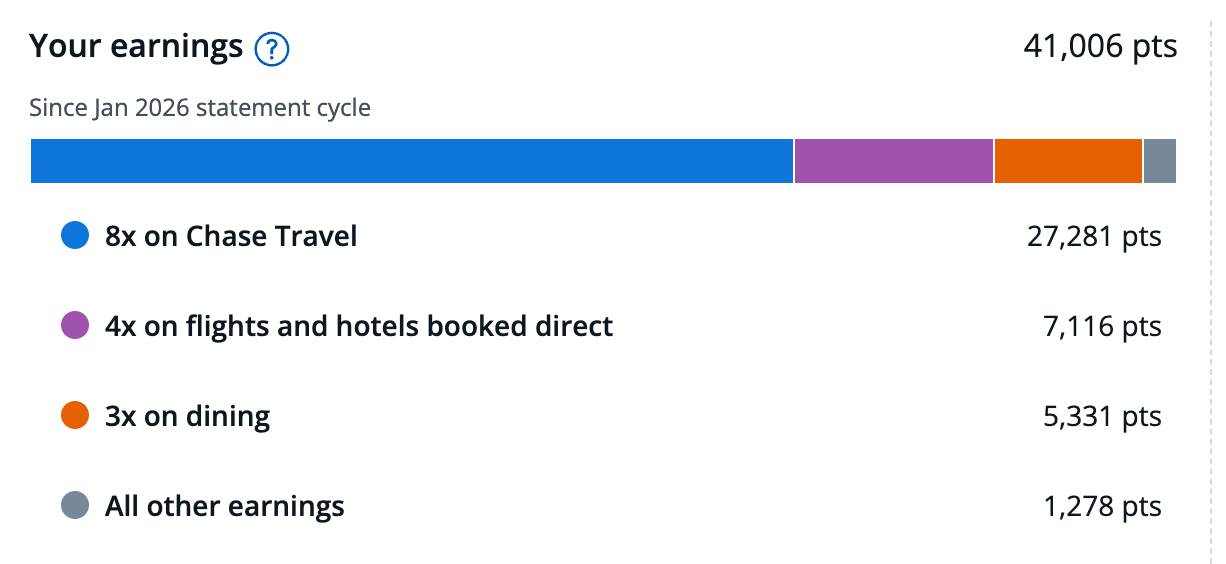
CHASE

I’ve also had at least six visits to Sapphire Lounges at various airports over the last year, including at New York’s LaGuardia, San Diego, Philadelphia and Las Vegas.

Between meals, coffee and drinks, those lounge visits probably saved my family and me another couple of hundred dollars over the course of the year versus if we’d been foraging in the airport instead of enjoying the treats in the lounge.

Chase Sapphire Lounge in Las Vegas. SUMMER HULL/THE POINTS GUY

Bottom line

The Chase Sapphire Reserve isn’t a card everyone should pay $795 a year to carry. It’s $95 per year sister, the Chase Sapphire Preferred® Card (see rates and fees) is likely a better match for some who don’t travel as much or simply don’t want to bother with using up as many of the credits.

But after looking back at my own spending and travel over the last year, it’s clear the Sapphire Reserve math easily works for me.

I redeemed roughly $2,200 in statement credits alone, earned tens of thousands of valuable Chase Ultimate Rewards points on my spending and regularly used perks like Sapphire Lounge access while traveling.

If you’re someone who travels regularly and can realistically use several of the card’s credits each year, the Sapphire Reserve can absolutely deliver more value than its annual fee.

And with the card currently offering its highest-ever public welcome bonus, now may be the best time to apply if you’ve decided to add it to your wallet.

If you think the Chase Sapphire Reserve is a winner for your wallet, I’d recommend getting the card while it has its highest-ever public offer of 150,000 bonus Chase Ultimate Rewards points, earned after spending $6,000 on purchases in the first three months from account opening.


Source link

Leave a Reply

Subscribe to Our Newsletter

Get our latest articles delivered straight to your inbox. No spam, we promise.

Recent Reviews


Incremental Load in QlikView – Table of content

What is Incremental load?

The practice of loading only new or modified records from a database into an existing QVD is known as an incremental load. As compared to complete loads, incremental loads are more effective, which is especially useful for large data sets. In QlikView, an incremental load occurs when new data from a source database is loaded while previously retrieved data is loaded from a local store. QVD files or the QVW format used with a binary load are commonly used to save data. 

Why incremental load?

Is your BI application storing large amounts of data in a  atabase? Is it happening regularly, if so? Because BI applications are expected to handle larger data sets, frequent refreshes must obtain the most up-to-date information. In both cases, loading all of the data historically every time to get the most recent updated records on a timely basis is inefficient. This is where the concept of “Increment Load” comes in handy for making BI applications more efficient.

To gain in-depth knowledge with practical experience in QlikView, Then explore HKR’S QlikView Online Course!

What is the intention of the incremental load?

The “Incremental Load” is the answer to all of the previous questions. The loading process’s performance is improved by pulling only new and updated records rather than the entire data set and appending them to the existing data set (QVD). To keep it simple, incremental load updates old table/QVD data with newly modified records at each refresh. It increases the loading process 100 times over conventional loads in this manner.

How exactly incremental load works?

Let’s take a closer look at it by putting it to use. The workflow steps for implementing the same are described below.

1. You must load the whole data without the incremental Load. Either time you need to update new records, you must reload the whole data, which takes a long time to load and save on the local drive (QVD). You can only load new/updated records with incremental loading.

2. In a table, find the last revised record date from the QVW.

3. Connect to the data repository based on the last updated date and pull the recently inserted records that are older than the last modified date. The “where” clause of the load script can be used to do this.

4. To get live data, attach the recently modified records to the current table locally.

5. The incremented table should be added to the BI application.

Qlikview Training Certification

  • Master Your Craft
  • Lifetime LMS & Faculty Access
  • 24/7 online expert support
  • Real-world & Project Based Learning

Illustration of Incremental Load in Real Time

The practice of loading only new or modified records from a database into an existing QVD is known as an incremental load. As compared to complete loads, incremental loads are more effective, which is especially useful for large data sets. The incremental load can be applied in various ways, with the following being the most common:

  • Insert only (Do not validate for duplicate records).
  • Insert and update.
  • Insert, update and delete.

Illustration of Incremental Load in Real Time

1. Insert Only: 

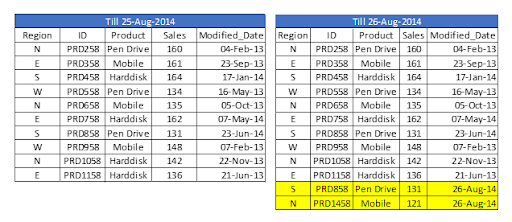
Let’s assume we have sales raw data (in Excel) updated with necessary details about the transaction by modified date if a new sale is registered. We already had a QVD produced before yesterday because we are working on QVDs (25-Aug-14 in this case). Now you can load incremental data (Highlighted in yellow below).

Insert Only

To begin, build a QVD for data up until August 25, 2014. We need to know the date on which QVD was last changed to find new incremental data. The maximum Modified_date in the available QVD file will be used to determine this. As previously stated, It is concluded that “Sales. qvd” is up to date with data until August 25, 2014. The following code will be used to determine the last updated date of “Sales. qvd”:

QVD file

We have loaded the most recent QVD into memory and then identified the most recent modified date by storing the maximum number of “Modified_Date” values. We then save this date in a variable called “Last_Updated_Date” and delete the “Sales” table. I used the Peek() function to store the maximum number of changed dates in the above code. The syntax is as follows:

Peek( FieldName, Row Number, TableName)

lets’s get started with QlikView Tutorial

This function retrieves the contents of a given field from an internal table row. FieldName and TableName must be string values, while Row must be an integer value. The first record is indicated by a 0, the second by a 1, and so on. Negative numbers indicate the order of the table from the top. The last record is indicated by a -1.

We can load incremental records of the data set (Where clause in Load statement) and merge them with available QVD because we know when the records will be considered new records after that date (Look at the snapshot below).

incremental records of the data set

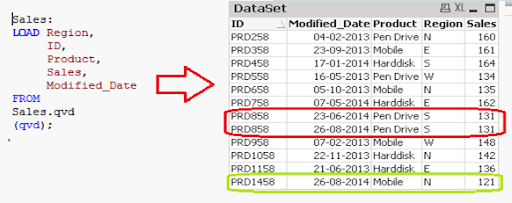
Now, load the most recent QVD (Sales), which will have incremental records.

incremental records

As you can see, two records from August 26, 2014, have been added. However, we’ve also added a duplicate record. Since we haven’t accessed the available records, we may tell that an INSERT is the only approach that will not validate duplicate records.

Furthermore, we are unable to update the value of existing records using this method.

To recap, the steps to load only incremental records to QVD using the INSERT only method are as follows:

1. Recognize and load new records.
2. Combine this data with the QVD file.
3. Replace the old concatenated table with the new QVD file.

2. Insert and Update method:

We can’t search for duplicate records or update existing records, as seen in the previous case. The Insert and Update approach comes in handy here:

Insert and Update method

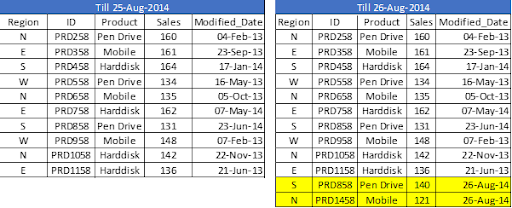
Assume ID is the primary key, and we should be able to define and distinguish new or updated records based on change date and ID.

To use this process, repeat the steps for identifying new records as in the INSERT the only method. Then, apply the search for duplicated records or change old records’ value when concatenating incremental data with existing records.

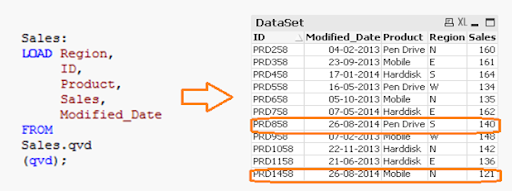
incremental data with existing records

We’ve only loaded records where the Primary Key(ID) is new. The Exists() feature prevents the QVD from loading old records because the Latest version is already in memory, so expired record values are immediately updated.

Both specific records are now available in QVD, along with an updated sales value for ID (PRD858).

feature prevents the QVD

Business Intelligence & Analytics, incremental-load-in-qlikview-description-0, Business Intelligence & Analytics, incremental-load-in-qlikview-description-9

Subscribe to our YouTube channel to get new updates..!

3. INSERT, UPDATE, and DELETE method:

This method’s script is somewhat similar to the INSERT & UPDATE method, except there is an additional step to remove deleted records.

We’ll use an inner join with a concatenated data set (Old+Incremental) to load primary keys for all records in the new data set. Only common records shall be maintained, and unnecessary records will be deleted due to the inner join. Assume that in the previous case, we want to remove a record with the ID PRD1058.

INSERT, UPDATE, and DELETE method

We have a data set of one record added (ID PRD1458), one record modified (ID PRD158), and one record deleted (ID PRD1058).

Qlikview Training Certification

Weekday / Weekend Batches

Advantages of Incremental Load

The following are the benefits of the incremental load.

  • By removing the maximum load of data, it provides a productive load at any time.
  • As opposed to the standard model, it lowers the time it takes to get complete data by 100 times.
  • Incremental load reduces the database’s traffic load.
  • It reduces the workload for data source drivers.
  • The Incremental load minimizes the load on RAM.
  • It functions as a JIT (Just-In-Time) engine in the Data Extraction layer, fetching data in real-time.
  • It makes use of QVD file formatted tables, which significantly compresses the results.

Data Localization

The incremental load uses newly added data and attaches it to the recently incremented table, resulting in data access that is still local to the BI application.

Conclusion

This blog has addressed how incremental loads are faster and more effective than FULL loads for loading data. You should make regular backups of your data as the best idea, and if there are problems with your database server or network, your data can be affected or lost. It would be best to choose which approach is best for you based on your business and application needs. Insert and Update is used in the majority of BFSI applications. In most cases, records are not deleted.

Other Related Articles:


Source link