I Tried Internxt, an Encrypted, Secure Cloud Storage Built for the Post-Quantum Era


As a full-time creator and freelancer, I produce video content, manage brand partnerships and handle sensitive client data every day. Even if your files are encrypted, bad actors could be gaining access to them, or stealing your data today with a goal to unlock it tomorrow.

A zero-knowledge, post-quantum encryption cloud storage service like Internxt can give you peace of mind. And you can use CNET’s special offer to get up to 87% off any Internxt paid plan. Claim the offer here.

  • Internxt uses zero-knowledge encryption, which means even the company itself cannot access your files.
  • It’s the first cloud storage provider to implement post-quantum encryption, protecting data against future quantum computer attacks.
  • The service includes a full privacy suite: encrypted cloud storage, VPN, antivirus, email cleaner, video calls and more.
  • It works across Mac, Windows, Linux, Web, iOS and Android with clean, familiar apps.
  • Internxt is open source, independently audited by Securitum and fully GDPR-compliant. It also meets ISO 27001, HIPAA, ENS, SOC 2, and other security certifications.
  • It also features Internxt AI, a private alternative to ChatGPT and Gemini.

For years, I’ve used Dropbox, Google Drive and iCloud for cloud storage. Each one does something well. But none of them offer true zero-knowledge encryption by default. That means the companies can technically access your files, and so can hackers.

To get ahead of these concerns, I gave Internxt a try. Here’s my experience, along with what you need to know about the latest threats to data privacy.

internxt-cnet-1.png

Screenshot: Fei Wu

What makes encrypted cloud storage different and more secure than regular cloud storage?

Services like Google Drive, Dropbox and iCloud encrypt your files during transfer and while they sit on their servers. But the companies hold the encryption keys. This means they can decrypt and view your data whenever they want or need to.

Zero-knowledge encryption flips that model. With Internxt, your files are encrypted on your device before they ever leave it. Internxt never sees your data in readable form. Even if a bad actor were to breach servers, all they would find is scrambled data that is completely useless without your private key.

internxt-cnet-2.png

Screenshot: Fei Wu

What everyday consumers should know about quantum computing

A quantum computer is fundamentally different from the computer on your desk. Regular computers process information as ones and zeros, one calculation at a time. Quantum computers use different information units called qubits, which can represent multiple states simultaneously. This allows qubits to solve certain mathematical problems exponentially faster than anything we have today.

The encryption that currently protects your files relies on math problems that are nearly impossible for today’s computers to crack. But quantum computers will be able to break those encryption methods in hours instead of centuries.

The “harvest now, decrypt later” threat

One scary scenario is a strategy security researchers call “harvest now, decrypt later.” Bad actors today are already collecting encrypted data, stockpiling it and waiting for quantum computers to become powerful enough to unlock it all. According to a 2026 Citigroup report, this is already considered an immediate and systemic threat, especially for data with a long shelf life like personal records, medical files and business contracts.

Internxt is the first cloud storage provider to implement post-quantum encryption using Kyber 512, an algorithm recognized by the National Institute of Standards and Technology (NIST). This means the files you upload to Internxt today are protected against both current threats and future quantum attacks.

Think of it this way: Most cloud storage locks your data with a padlock that works fine today, but will be easy to pick in a few years. Internxt uses a system designed to remain unbreakable even after quantum computers arrive.

My experience with Internxt

When I signed up for Internxt, the first thing I noticed was how familiar the interface looked. If you have used Google Drive or Dropbox before, you will feel right at home. The web app has a clean sidebar with Drive, Backups, Shared, Recents, Trash and Desktop sections.

The first thing I stored was a backup codes file for our password manager, which felt appropriate for a service built around security. Then I uploaded several MP4 video files from a recent YouTube shoot. The upload process through the browser was smooth, fast and very straightforward.

internxt-cnet-3.png

Screenshot: Fei Wu

I also installed the macOS desktop app, which lets you sync and backup folders automatically, similar to how Dropbox or Google Drive desktop apps work.

Because of the zero-knowledge encryption, Internxt’s transfer speeds can sometimes feel slightly slower than something like Dropbox. The post-quantum encryption process happens on your device, so a lot of it will also depend on how powerful your device is. This is a tradeoff of the encryption happening locally on your device before anything uploads. For our use case, where we are backing up important files rather than collaborating in real time, this was fine.

internxt-cnet-5.png

Screenshot: Fei Wu

More than just cloud storage

When you subscribe to Internxt, you get what they call a complete privacy suite. Beyond the encrypted cloud storage, your plan includes an encrypted VPN, antivirus protection, a device cleaner, encrypted video calls and encrypted.

The entire bundle starts at around $1.65 per month for 1TB billed annually, and they also offer lifetime plans if you just want to make one lump-sum payment and enjoy Internxt for life. For comparison, I pay significantly more per month for Dropbox alone, without any of those additional privacy features.

The service is also open source, meaning anyone can inspect the code on GitHub, and in an independent audit by Securitum, a leading European cybersecurity firm, no critical vulnerabilities were found.

internxt-cnet-4.png

Screenshot: Fei Wu

Consider switching to Internxt

Whether you’re a business owner or a consumer who wants more futureproofed data privacy, Internxt deserves a serious look. Between AI agents that can inadvertently leak private information and the looming quantum threat, the question is no longer whether you need encrypted cloud storage, but when.

You can use CNET’s special offer to get up to 87% off any Internxt paid plan. Claim the offer here.

Frequently asked questions

What is zero-knowledge encryption?

Zero-knowledge encryption means your files are encrypted on your device before they are uploaded. The cloud provider never holds the keys and cannot access your data, even if compelled by a court order or affected by a server breach.

What is post-quantum encryption and why does it matter?

Post-quantum encryption uses algorithms specifically designed to resist attacks from quantum computers. As quantum technology improves, traditional encryption methods like RSA will become vulnerable.

Is Internxt difficult to set up?

Not at all. I found the interface to be clean and intuitive. If you have ever used a cloud storage app, you will be comfortable within minutes. Desktop apps are available for Mac, Windows and Linux, plus mobile apps for iOS and Android.

How much does Internxt cost?

Plans start at around $1.65 per month (billed annually) for 1TB. The company also offers lifetime plans and a 30-day money-back guarantee.


Source link

Leave a Reply

Subscribe to Our Newsletter

Get our latest articles delivered straight to your inbox. No spam, we promise.

Recent Reviews


What is UFT/QTP?

Microfocus UFT, formerly known as QTP, offers software applications with regression and functional automation. Compared to the anticipated outcomes of the app under evaluation, it lets testers detect bugs, gaps, or defects. UFT will be renamed UFT One with the new update.

UFT uses the Visual Basic Scripting (VBScript) language to define the test process and manipulate the testing objects and application controls. Using a UFT tool, developers can evaluate all three layers of the program’s operations through a single console: service layer, database layer, and GUI. 

History of UFT 

QTP was originally published and subsequently acquired by HP (Hewlett-Packard) by Mercury Interactive. Its original name was Astra Quick Test and later named Quick Test Professional, but the latest version is Unified Functional Tester (UFT).

HP Testing Service and UFT 11.5 merged HP QuickTest Professional into a single bundle of software, which was made accessible until 2016 and then sold to Micro Focus as HP Software Division. UFT One 15.0.2 is the most recent edition of UFT.

Now, let’s look at the version history of QTP/UFT.

  • Astra Quicktest first version (1998)
  • QuickTest Professional v6.5 (2003)
  • HP QuickTest Professional v9.1 (2007)
  • Hp-Unified Functional Testing v11.5 (2012)
  • Micro Focus UFT v14.3 (2019)
  • Micro Focus UFT One v15.0.1 (2020)

Why is UFT/QTP the best automation testing tool?

UFT One is probably the most commonly used automation platform on the market. It is renowned for its ease of use and the support of automation testers from a wide group. It is a tool that is user-friendly.

Let’s explore a couple of points that make it the best automation tool:

  • All can use the UFT Micro Focus (both technical and non-technical)
  • Alongside web-based applications, you can test the desktop.
  • UFT facilitates different environments for software development, such as Oracle, SAP, etc.
  • VB Script is supported by QTP.
  • In QTP, there is a built-in object repository.
  • Using the UFT app, you can perform functional automation testing without interruption.

UFT/QTP Features

New features are included in the most latest UFT version:

  • AI-based testing: Improves the coverage and speed of your test.
  • New Test Objects: In PDF, Salesforce Lightning, JavaFX, and more, you can find some new objects.
  • New Test Objects: You can find some new objects in PDF, Salesforce Lightning, JavaFX, and more.
  • Web extensibility support: Provides extra assistance for third-party and custom controls.
  • PDF Report Makeover: HTML results-generated PDFs look better than ever and are easier to use. The norms of the test can be easily understood.
  • Technology stack: You can use new versions of SAP NWBC, Java, Bamboo, TortoiseGit, and many more that are supported.

Installation of UFT 

We’ll see how to install the trial version of UFT in this section. There is a 30-day trial offered by Micro Focus UFT One.

Step 1: Navigate to the free trial page of Micro Focus https://www.microfocus.com/en-us/products/uft-one/free-trial  first and fill in the required information.

STEP A

UFT Training

  • Master Your Craft
  • Lifetime LMS & Faculty Access
  • 24/7 online expert support
  • Real-world & Project Based Learning

Step 2: On the next screen, you will receive a successful registration message. And go to your inbox and confirm Micro Focus UFT One’s text.

STEP%20B

Step 3: Next, on the login screen, enter your email details, and click on the sign-in button.

STEP C

Step 4: Your dashboard will appear after you create your free trial account and select UFT’s download option.

STEP D

Step 5: Click on UFT_14.03_Setup.exe on the next screen.

STEP E

Step 6: Open it in a folder after the download process is completed and start the installation process by double-clicking on it on your PC.

Step 7: Click on the Next button.

STEP F

Step 8: The installation process starts

STEP G

Step 9: In the next screen, select Microsoft Office Access database engine 2010 and click the OK button. Then it will start installing.

STEP H

Step 10: Then, click the Next button when the Welcome screen will appear.

STEP I

Step 11: Accept the terms, and then click Next.

STEP J

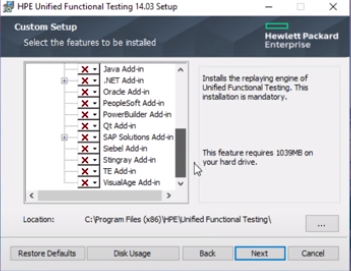
Step 12: Next, all the add-ins are selected by default. Click on the option next to it.

STEP K

Step 13: Select all checkboxes and click on the install option. 

STEP 13

Step 14: After the installation process is finished, click on the finish option.

STEP L

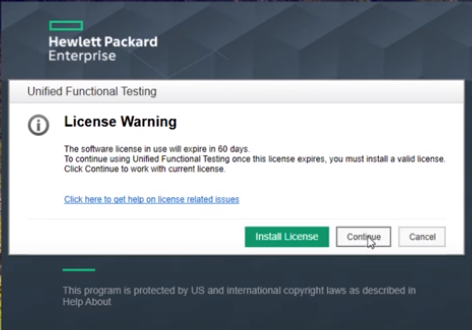
Step 15: On the desktop, select the HPE UFT Icon and select the Continue button.

STEP M

Step 16: On the next screen, click OK and the HPE UFT Dashboard appears as shown below.

STEP N

others, uft-tutorial-description-1, others, uft-tutorial-description-16

Subscribe to our YouTube channel to get new updates..!

Advantages of UFT/QTP 

  • The most important benefit of using UFT is that it is simple to use, and because it includes the language of VBScript, no high-level programming language is needed.
  • An excellent method of Object Recognition.
  • Recording and playback assistance, and the ability to edit scripts after recording.
  • Numerous add-ins are supported, such as Java, .Net, Oracle, SAP, and many more.
  • Common automation frameworks are endorsed, such as the data-driven testing approach, keyword-driven testing strategy, hybrid frameworks, modular testing strategy, etc.
  • Integration is easily supported by UFT with test management tools such as QC, Test director, and more.
  • It comes with loads of QTP’s inbuilt properties and methods as well as VBScript’s inbuilt functions.
  • Extensible to Several Development Environments.
  • Enhanced Code Reusability.
  • Quick Scripting Process.

UFT Certification

One of the most demand certifications in the testing world is the Micro Focus UFT certification. Obtaining Micro Focus UFT certified opens ample opportunities for your career development if you want to step forward in a testing career.

The certification exam available for UFT is the Unified Functional Testing (UFT) Certified Professional Exam. This exam verifies and validates the aspirant’s knowledge of Unified Functional Testing (UFT) version 14.x. Application. The cost to attempt the exam is $200.

Scope of UFT/QPT

Testers over the globe broadly utilize small-scale Center UFT to automate their processes. This tool makes it simpler for QA pros to carry out different testing, including regression and functional testing. The testers can assist in composing the test scripts utilizing the VBScript version, which streamlines the method of controlling the objects and application controls. As numerous organizations automating the testing method, the demand for UFT is increasing at a regular pace.

Therefore the long run of UFT looks broad and provides plenty of opportunities.

UFT Training

Weekday / Weekend Batches

Conclusion

In the current software testing market, the UFT has been a very prominent tool. By supporting only the Windows environment, UFT enables you to generate test scripts using the user interface. Thus we have reached the tutorial’s end and have provided you with all the essential information about the UFT concepts and functionalities.


Source link