Keltie Knight is opening up about her 2023 facelift.
The 44-year-old Live from E! host detailed her cosmetic surgery years ago after fixating on “every little thing” she saw wrong in her appearance after being on camera for years.
In a candid essay for Glamour, Keltie revaeled she first tried Kybella and CoolSculpting, before getting a “minimally invasive necklift” at 35, as her plastic surgeon said she was too young for a facelift. But the necklift would only last five years, and by that time she would be able to go in for a facelift.
“My surgery was initially supposed to be three or four hours, and instead it was almost nine,” she shared. “That’s because when Dr. [Jason] Diamond pulled back my face, there was so much scar tissue from the filler and the threads and the microneedling and all the medi-spa s–t I had done that it was basically frying my face underneath.”
At the same time as her facelift, the host revealed she was also undergoing a major health issue with her uterus, where she was diagnosed with microcytic anemia, which is a blood disorder, and she had a hysterectomy in early 2024.
“I wanted to do the facelift before taking care of an actual medical issue. I was disgusted with myself. It was like, I want to die because of my uterine condition, but I’m going to fix my face first,” she wrote.
Keltie said that the facelift was “the best thing I ever did even though it was so expensive,” but she still “felt shame about actually going through with it.”
“I didn’t really know if I was going to tell anyone,” she added.
However, it wasn’t until she went to Rachel Zoe‘s birthday party, which was filmed for the latest season of The Real Housewives of Beverly Hills, when Dorit Kemsley approached her and said, “You’re aging backward.”
“I threw out the thing that no one—except my two best gays and my husband—knew,” Keltie admitted. “I said, ‘Thanks. I had a facelift.’”
She didn’t intend to say it on camera and she wasn’t even mic’d up, but after producers later heard the conversation and were interested in possibly using it, she agreed that that it could be aired on the show.
“I thought, ‘You know what? Just own it,’” Keltie recalled. “I had written this big chapter for my book about doing whatever the f–k you want to your face and how I want to stop the drama of judgment. What if it’s good to admit you got a f–king facelift at 41? What if that actually is freeing?”
Several other celebrities have recently opened up about getting facelifts.
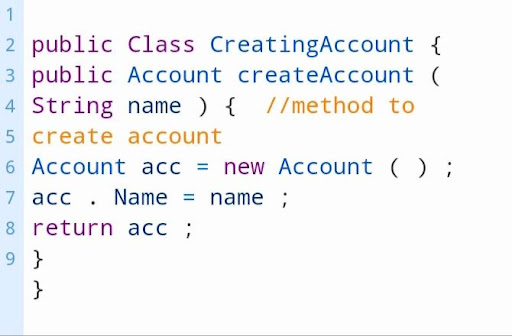
Class is a kind of template Which is created from apex objects that are created, they consist of other classes with the user defined methods, variables and static initialization code. After when we save successfully, variables are invoked by other apex codes helped in methods which have been designated with web services keyword. It enables us to create and manage the apex classes from setup in a quick find box, They use developer console for additional development functionality. They may write class methods according to the syntax outlined in apex code developer’s guide.
By consuming a WSDL document which is stored on a local drive, they can develop automatically. Which allows the developers to make call outs for the external services in apex. In developer edition organization we can create, edit, delete or add the user interface of salesforce. By using the metadata API deployment only we can change apex, salesforce supports its users by providing its extensions for visual codes or for its migration tools, but not the part of our salesforce and also for the purposes of subscription agreements. By creating an apex class, we can perform various actions.
We create it in apex from developers console, along with salesforce eclipse IDE and from apex class details page. For creating a class, the developer needs to follow the following steps.
First we need to go and click on the name developer console,
next have to click on the file next and then on the apex class.
For creating class from salesforce IDE, we require some steps they are,
first we have to open force.com eclipse id,
then need to create the new project by clicking on file, new and then on apex class,
finally provide the name for it and click on Ok, finally our class is ready to use.
Creating the class by using apex class detail page is another way for creating class, for this we need to follow some steps they are,
we need to click on the name
have to click on setup. Then have to search for apex class
choose the link to open apex class detail page,
finally click new and provide the name for that new class, then class is ready for use.
Salesforce Training
Master Your Craft
Lifetime LMS & Faculty Access
24/7 online expert support
Real-world & Project Based Learning
Structure of the class
The structure of the class includes syntax that contains the combination of the access modifiers, sharing modes, class name, and also class body, we may look at all the further options.
Modifiers
Salesforce apex classes include three kinds of access modifiers, they are private, public and global.
Private: When we declare our access modifier as private, then the class will be known for local only. We cant access our class outside of the particular piece as default classes have these modifiers.
Public: When we declare our class as public, that will be accessible for all codes of apex irrespective of our organization, if we have defined methods along with web services keyword, we have to declare the containing class with the global keyword.
Global: When we declare our class as global, we will gain access to all apex codes irrespective of our organizations. If we have defined a method with a web service keyword, we must declare a containing class with the global keyword.
Sharing modes of the class
It allows different methods for sharing the class they are, with sharing, which give respect for the user access settings and profile permissions.
Without sharing: When a user doesn’t have accessed at least 10 records from 30, then all the 30 will update the running class in system mode. Which is defined with the without sharing keyword known as system mode.
Virtual: when we use the keyword virtual that indicates the class, that can allow extend and override. When methods need overridden, then they should declare with the keyword virtual.
Abstract: When we declare the class as abstract, it contains only signatures of methods which are not actual implementations.
Class methods and constructions
For defining methods, we need to specify the following.
Need modifiers like public or private, which may be optional.
Value of the returned data by the methods like string or integer, when the method doesn’t return the value we can use Void.
It requires a list of input parameters that are used for the method, which is separated by commas, and enclosed in parenthesis. When there are no parameters, we may use the set of empty parentheses.
Methods body requires to enclose in braces, the code of the method includes the local declaration.
We can use the following syntax for defining methods.
Variables
We need to follow to specify the following to declare the variable.
It allows modifiers like public, final, and static.
It includes data types like string and boolean, and the variable requires the name and value.
The following is the syntax to defining a variable.
Apex properties
It is similar to variables. We can do additional things with code for the property value before it returned. Those properties may use to validate the date just before when the data are changed. We need to follow this syntax in the body to declare a property.
Subscribe to our YouTube channel to get new updates..!
Salesforce Apex Pros
There is no need for purchasing the infrastructure. It provides security for applications with full authentication for the process to access the applications. It is easy to develop that exist on applications, which provides on demand and different tenant salesforce back end databases.
Unlike other programming languages it is not easy to create threads, not possible for temporary files in apex. Which is important to keep in mind that the application created by them must be able to handle multiple documents, and all the requests return a huge collection of records from the database, those cannot show elements on the user interface.
Salesforce Training
Weekday / Weekend Batches
Conclusion:
Class is a blueprint from where objects are created, these classes are similar to java classes. Invoice processor describes the class with all actions and methods which can be performed on the invoice, that is in context. Knowledge and development of the platform are required, apex is one of the best programming languages That has to be used with salesforce, Which assumes it like we already have set up salesforce to be used for our apex programming.
To provide the best experiences, we use technologies like cookies to store and/or access device information. Consenting to these technologies will allow us to process data such as browsing behavior or unique IDs on this site. Not consenting or withdrawing consent, may adversely affect certain features and functions.
Functional
Always active
The technical storage or access is strictly necessary for the legitimate purpose of enabling the use of a specific service explicitly requested by the subscriber or user, or for the sole purpose of carrying out the transmission of a communication over an electronic communications network.
Preferences
The technical storage or access is necessary for the legitimate purpose of storing preferences that are not requested by the subscriber or user.
Statistics
The technical storage or access that is used exclusively for statistical purposes.The technical storage or access that is used exclusively for anonymous statistical purposes. Without a subpoena, voluntary compliance on the part of your Internet Service Provider, or additional records from a third party, information stored or retrieved for this purpose alone cannot usually be used to identify you.
Marketing
The technical storage or access is required to create user profiles to send advertising, or to track the user on a website or across several websites for similar marketing purposes.