Kroger Rewards now lets you redeem points for groceries


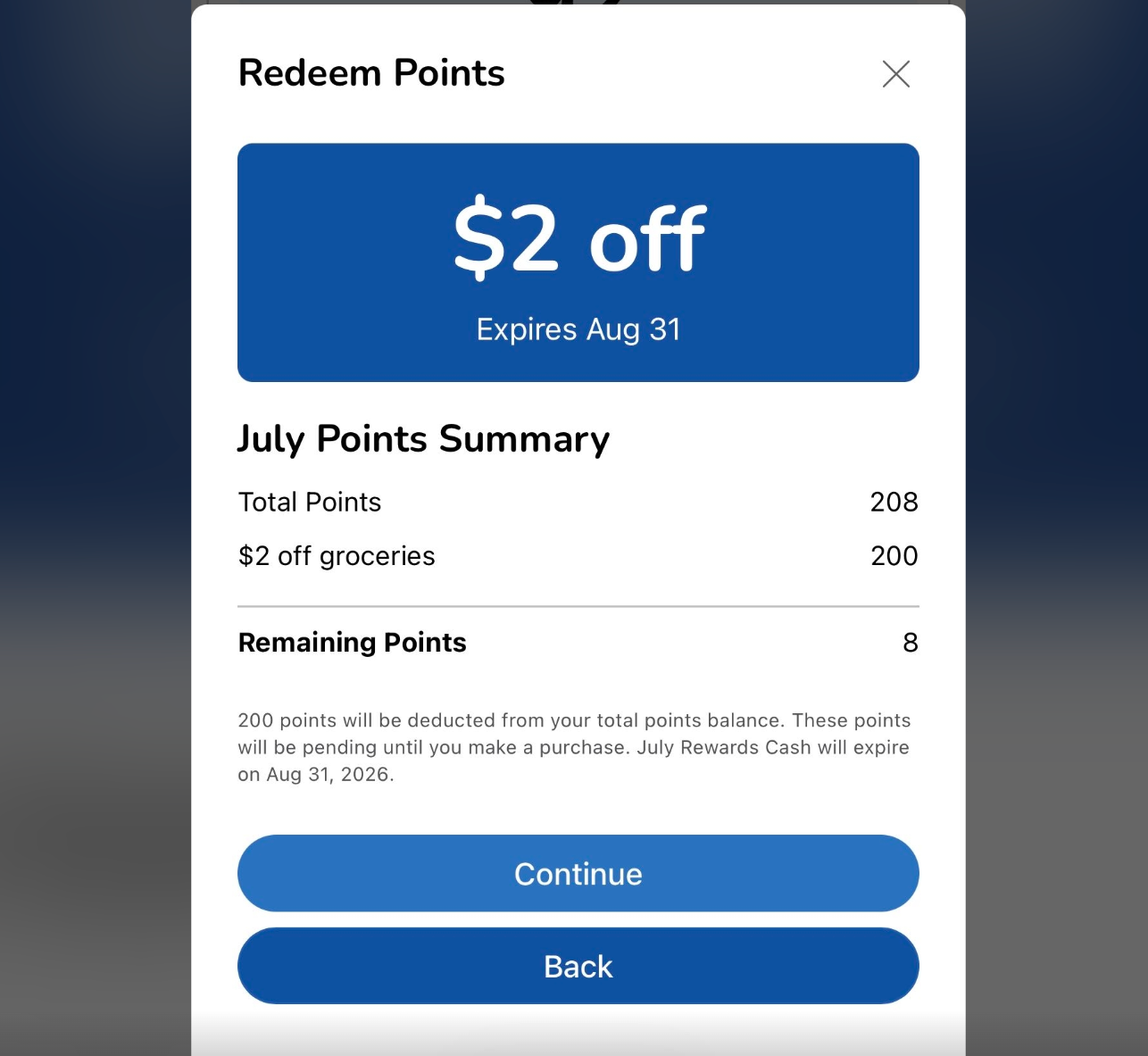
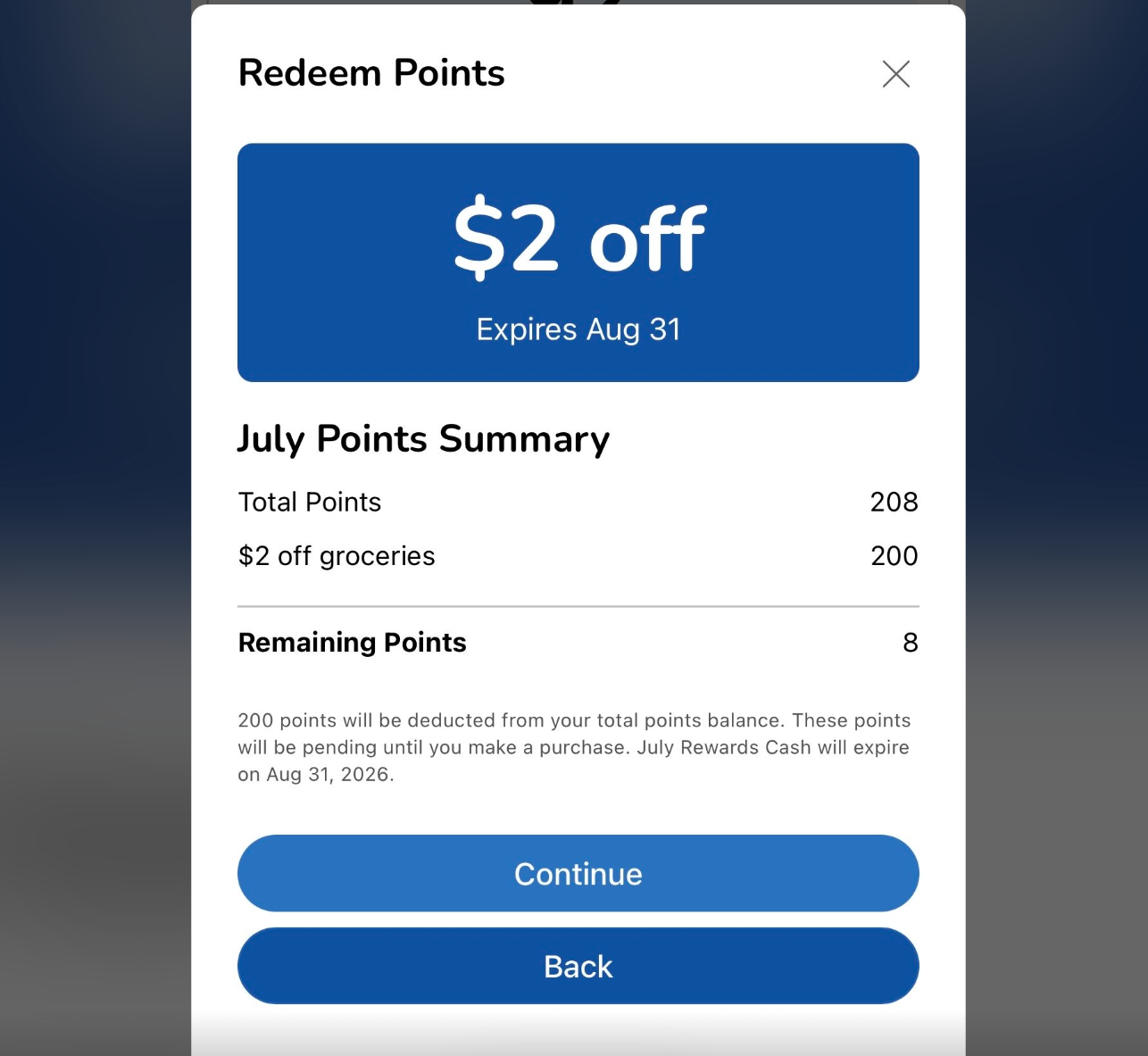
Attention, Kroger shoppers: You can now redeem your Kroger Rewards points for groceries instead of just fuel.

Until now, Kroger Fuel Points (as it was previously known) has been one of our top loyalty programs for saving on gas because it can save you up to $1 per gallon on as many as 35 gallons of fuel purchased at Kroger gas stations and participating partner locations. But that maximum value assumes you actually need to buy a fair amount of gas, which many shoppers don’t. In fact, some shoppers don’t have cars at all.

That’s exactly what this new redemption option solves, giving shoppers who don’t regularly buy gas another easy way to use their rewards.

Related: Best grocery credit cards

Kroger now allows you to use points to save on groceries

Members continue to earn 1 point per dollar spent on most grocery purchases, plus bonus points on qualifying gift cards and eligible prescriptions. That part doesn’t change.

But now, when it comes time to redeem your Kroger points, you have more choices, including:

  • The ability to redeem 100 points for $1 off groceries (up to $10 off per day)
  • The ability to redeem 100 points for 10 cents off per gallon of fuel (up to $1 off per gallon on up to 35 gallons of fuel)
KROGER

Which is the best way to use points at Kroger?

It’s hard to argue against using points to save on groceries since we all need to eat.

But if you regularly buy more than 10 gallons of fuel at a time, redeeming your points at the pump will usually provide better value.

Reward your inbox with the TPG Daily newsletter

Join over 700,000 readers for breaking news, in-depth guides and exclusive deals from TPG’s experts

KROGER

Here’s what 1,000 Kroger Rewards points are worth depending on how you redeem them.

1,000-point redemption options Total savings Point value

$10

1 cent per point

$10

1 cent per point

$15

1.5 cents per point

$20

2 cents per point

$35

3.5 cents per point

If you buy exactly 10 gallons of gas, redeeming for fuel and groceries provides the same value. Buy more than 10 gallons and you’ll get a greater return with fuel. Buy less than 10 gallons — or don’t buy gas at all — and redeeming points for groceries is the better option.

Think of the grocery redemption as a new floor value for Kroger Rewards while fuel remains the ceiling.

M. SCOTT BRAUER/BLOOMBERG/GETTY IMAGES

Related: How to ensure you earn bonus points for grocery purchases

Bottom line

Previously, shoppers who didn’t buy much gas often struggled to get significant value from their Kroger Rewards points, especially given that points expire at the end of the month following when they were earned.

This change makes the program useful to a wider audience since the new grocery redemption option gives Kroger Rewards members a guaranteed minimum value of 1 cent per point when redeemed toward groceries and provides for more options to use the points before they expire.

However, if you regularly buy more than 10 gallons of gas at a time or frequently shop at one of Kroger’s sister brands — including Fred Meyer, Ralphs and Harris Teeter, which have similar loyalty programs but don’t currently offer a grocery redemption option — fuel remains the more valuable (or only) way to use your points.

Related reading:


Source link

Leave a Reply

Subscribe to Our Newsletter

Get our latest articles delivered straight to your inbox. No spam, we promise.

Recent Reviews


Why use Power BI

Power BI permits real time dashboard refreshes. It gives pre-constructed dashboards and reports for SaaS Solutions. It provides a secure and solid association with your information sources in the cloud or on-premises. It provides Quick sending, hybrid arrangement, and secure climate. It permits information investigation utilizing common language query. It provides highlights for dashboard representation routinely refreshed with the local area.

Become a Power BI Certified professional by learning this HKR Power BI Online Training !

Three solutions for operating Power BI on Mac

Power BI cannot be operated on a Mac. 

Some of the recommendations to execute Power BI on Macintosh Devices are given below:

  • Install and operate Power BI on a Virtual Machine, after that remote into the provided Virtual Machine.
  • Install and operate Power BI on a PC and utilize a remote viewer to manage the PC.
  • Utilize an optional BI solution.
  • Install the Windows on Mac utilizing Boot Camp. 

Power BI Training

  • Master Your Craft
  • Lifetime LMS & Faculty Access
  • 24/7 online expert support
  • Real-world & Project Based Learning

Power BI’s brace for Mac Devices

1. Operate Power BI on a particular Virtual Machine

One could easily create a Windows Virtual Machine on Google Cloud, Azure, or AWS.

Azure: https://azure.microsoft.com/en-us/services/virtual-machines/ 

AWS: https://aws.amazon.com/getting-started/tutorials/launch-windows-vm/

After that install and execute Power BI on the Virtual Machine. Then install Microsoft Remote Desktop for Mac on every device to provide your group access to the given VM.

Power BI’s brace for Mac Device

Microsoft Remote Desktop

Some of the disadvantages to this method are:

  1. It is very tough to command permission access and the version history.
  2. Only one person can work on the machine at a particular time, as Power BI for desktop is not a shared tool.

Enroll in our R Online Training program today and elevate your skills!

HKR Trainings Logo

Subscribe to our YouTube channel to get new updates..!

2. Execute Power BI on a PC and remote to the PC

This is somewhat similar to the first approach, but now you can utilize a machine.

You could create a Windows PC, install and operate Power BI on the given PC. 

Install MS Remote Desktop, AnyDesk, or TeamViewer, to provide people availability to the PC and utilise Power BI from other Macs.

Disadvantages are the same as the previous method, and you must have a PC at hand.

Power Bi on a Surface Book

3.Utilise another optional BI tools

Power BI, amazing as it assists your group with merging information and fabricate reports and dashboards with an incredible information modelling layer. It is not easy to find a worthy tool in the firm to replace Power BI, yet there are two optional solutions that are completely cloud-based, could repeat its functions, and at times do considerably more.

Top 50 frequently asked Power BI Interview Questions !

Power BI Training

Weekday / Weekend Batches

A. Holistics

Holistics

Holistics is an incredible full-stack information platform which allows organizations to build up an end to end, reusable, and adaptable information analytics stack with minimal engineering resources. It gives information analysts an amazing SQL based data modeling method, yet it similarly causes them to assemble an information warehouse and mechanize reporting. Holistics is intended to enable non-specialized clients to receive experiences having a self service analytics offering.

B. Looker+StichData

Looker, a big information analytics platform and BI that encourages you to investigate, dissect and collaborate real time marketing investigation easily. Looker is exceptionally a ground-breaking server based Data Modeling BI device, notwithstanding, they don’t support Data Imports, and Data Transforms so you will be having the need of another tool for this called StitchData with which you can access all the uses of Power BI.

Looker+StichData

4. Install Windows on Mac using Boot Camp

Boot camp is a utility which encourages you to introduce Microsoft Windows 10 on your Mac, at that point switch among macOS and Windows while restarting your Mac. 

Want to know more about Power BI,visit here Power BI Tutorial !

Advantages of Power BI 

  • Post distributing the information into Power BI web administration can plan revival without manual intercession.
  • Provides pre-assembled dashboards and reports for SaaS Solutions. 
  • Give constant dashboard refreshes.
  • Reconciliation with both Python and R coding to utilize representations. 
  • Query gives numerous choices identified with cleaning the information. 
  • Power BI provides brisk arrangement, hybrid design, and a protected climate. 
  • Information investigation utilizing normal language inquiry. 
  • Secure and dependable association with your information sources in the cloud or on-premises. 
  • New highlights added that are incredible for excel clients. 
  • Broad database availability capacities Q&A include distribution to the web. 
  • Highlight for dashboard representation 
  • Power BI supported by the superpower with computerized reasoning and AI.

Take your career to next level in workday with HKR. Enroll now to get  Power BI Training in Hyderabad demo !

Conclusion:

It is hard to continue to utilize Power BI provided that the device is assembled solely for the Windows Desktop. Rather than permitting your information group to work cooperatively, your data pipeline will rely upon Windows. This is troublesome and prohibitive if your association works fundamentally on Mac.The consequence here is that on the off chance that you don’t utilize a Microsoft-stack at your association, a 100% cloud-based solution would be a superior met for your requirements.

Related Articles:

Row Level Security in Power BI


Source link