Lenskart Brings AI-Powered Smart Glasses to India with Early Access Launch


Engineered in India, B by Lenskart combines a 12 MP camera, Gemini-powered AI, powerful Snapdragon AR1 processor, and immersive directional audio in a sleek 40g frame.

National, May, 2026: Lenskart, Asia’s largest eyewear company, has announced B by Lenskart, engineered in India and designed with a ‘glasses first’ philosophy. B by Lenskart lets you capture photos and videos, listen to music and take calls, and interact with an AI assistant in a lightweight 40-gram frame, delivering a hands-free experience that prioritises comfort, style, and all-day usability.

B by Lenskart is a Gemini AI-powered smart glasses designed to be your everyday companion. Buddy can understand and converse in more than 40 languages, including natural Hinglish and Indian languages, and can see what the wearer sees to provide contextual responses and real-time assistance.

After its debut at Lenskart’s IPO event in November 2025, B by Lenskart opened its early-access waitlist on March 31, 2026, and has already received more than 35,000 registrations as of May 12, 2026. The product reflects Lenskart’s vision to lead India’s smart eyewear revolution while co-creating the experience with Indian consumers, whose feedback will help shape future iterations of the product.

Unlike conventional wearables that prioritise technology over usability, B by Lenskart has been designed as eyewear first. From its lightweight form factor to practical innovations such as a temple-tip charging cable that allows the glasses to be charged by personal devices even while being worn, every aspect of the product is built to integrate seamlessly into everyday life.

The smart glasses are equipped with a 12 MP Sony camera capable of capturing HD video and 4K photos. Users can also take calls and listen to music through directional speakers and a three-microphone array, with multiple sound modes including Discreet, Normal, and Boosted to suit different environments. At just 40 grams, B by Lenskart is significantly lighter than other comparable smart glasses currently available.

The eyewear comes with Japanese ultra-thin blue light lenses and a sleek charging case that delivers up to 48 hours of charging on the go.  The dedicated B by Lenskart app acts as a central hub to store media, manage settings, interact with Buddy, and sync the device. To promote transparency and responsible use, an LED indicator light automatically turns on whenever the camera is recording video or capturing photos, notifying those nearby.

B by Lenskart is set to be priced at ₹27,000 at commercial launch, with a special early-bird price of ₹22,000 available for select customers who join the early-access program.

Commenting on the announcement, Peyush Bansal, Co-Founder and CEO, Lenskart, said: “At Lenskart, we have always believed that India has the will to build products that can compete globally. With B by Lenskart, we wanted to create smart glasses that are eyewear first, comfortable, stylish, and practical enough to be worn all day. This is our first step into wearable technology, and we are excited to build this category alongside our customers in India before taking it to global markets.”

Consumers can register for exclusive early access through the B by Lenskart waitlist on the Lenskart website and app.

Early Access Waitlist link:
https://www.lenskart.com/b-smartglasses-by-lenskart

About Lenskart

Founded in 2008 by Peyush Bansal, Neha Bansal, Amit Chaudhary, and Sumeet Kapahi, Lenskart began as an online business in India in 2010 and opened its first retail store in New Delhi in 2013. Today, Lenskart is the largest eyewear company in Asia, with over 3,000 stores globally, including more than 2,500 stores across India.

The company operates a global house of brands that includes Meller, OWNDAYS, Le Petit Lunetier, John Jacobs, Vincent Chase, and Aqualens. Lenskart has a presence across India and international markets including Spain, Netherlands, Japan, Singapore, Thailand, United Arab Emirates, and Saudi Arabia.

Lenskart completed its initial public offering in November 2025 and continues to expand across online and offline channels, including retail stores, websites, mobile applications, and other digital platforms.  You can view more at https://www.instagram.com/bbylenskart/


Source link

Leave a Reply

Subscribe to Our Newsletter

Get our latest articles delivered straight to your inbox. No spam, we promise.

Recent Reviews


Incremental Load in QlikView – Table of content

What is Incremental load?

The practice of loading only new or modified records from a database into an existing QVD is known as an incremental load. As compared to complete loads, incremental loads are more effective, which is especially useful for large data sets. In QlikView, an incremental load occurs when new data from a source database is loaded while previously retrieved data is loaded from a local store. QVD files or the QVW format used with a binary load are commonly used to save data. 

Why incremental load?

Is your BI application storing large amounts of data in a  atabase? Is it happening regularly, if so? Because BI applications are expected to handle larger data sets, frequent refreshes must obtain the most up-to-date information. In both cases, loading all of the data historically every time to get the most recent updated records on a timely basis is inefficient. This is where the concept of “Increment Load” comes in handy for making BI applications more efficient.

To gain in-depth knowledge with practical experience in QlikView, Then explore HKR’S QlikView Online Course!

What is the intention of the incremental load?

The “Incremental Load” is the answer to all of the previous questions. The loading process’s performance is improved by pulling only new and updated records rather than the entire data set and appending them to the existing data set (QVD). To keep it simple, incremental load updates old table/QVD data with newly modified records at each refresh. It increases the loading process 100 times over conventional loads in this manner.

How exactly incremental load works?

Let’s take a closer look at it by putting it to use. The workflow steps for implementing the same are described below.

1. You must load the whole data without the incremental Load. Either time you need to update new records, you must reload the whole data, which takes a long time to load and save on the local drive (QVD). You can only load new/updated records with incremental loading.

2. In a table, find the last revised record date from the QVW.

3. Connect to the data repository based on the last updated date and pull the recently inserted records that are older than the last modified date. The “where” clause of the load script can be used to do this.

4. To get live data, attach the recently modified records to the current table locally.

5. The incremented table should be added to the BI application.

Qlikview Training Certification

  • Master Your Craft
  • Lifetime LMS & Faculty Access
  • 24/7 online expert support
  • Real-world & Project Based Learning

Illustration of Incremental Load in Real Time

The practice of loading only new or modified records from a database into an existing QVD is known as an incremental load. As compared to complete loads, incremental loads are more effective, which is especially useful for large data sets. The incremental load can be applied in various ways, with the following being the most common:

  • Insert only (Do not validate for duplicate records).
  • Insert and update.
  • Insert, update and delete.

Illustration of Incremental Load in Real Time

1. Insert Only: 

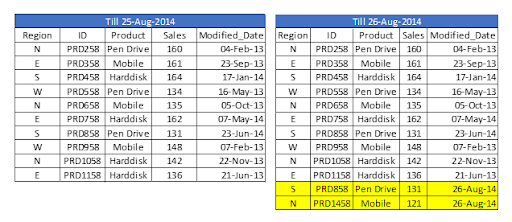
Let’s assume we have sales raw data (in Excel) updated with necessary details about the transaction by modified date if a new sale is registered. We already had a QVD produced before yesterday because we are working on QVDs (25-Aug-14 in this case). Now you can load incremental data (Highlighted in yellow below).

Insert Only

To begin, build a QVD for data up until August 25, 2014. We need to know the date on which QVD was last changed to find new incremental data. The maximum Modified_date in the available QVD file will be used to determine this. As previously stated, It is concluded that “Sales. qvd” is up to date with data until August 25, 2014. The following code will be used to determine the last updated date of “Sales. qvd”:

QVD file

We have loaded the most recent QVD into memory and then identified the most recent modified date by storing the maximum number of “Modified_Date” values. We then save this date in a variable called “Last_Updated_Date” and delete the “Sales” table. I used the Peek() function to store the maximum number of changed dates in the above code. The syntax is as follows:

Peek( FieldName, Row Number, TableName)

lets’s get started with QlikView Tutorial

This function retrieves the contents of a given field from an internal table row. FieldName and TableName must be string values, while Row must be an integer value. The first record is indicated by a 0, the second by a 1, and so on. Negative numbers indicate the order of the table from the top. The last record is indicated by a -1.

We can load incremental records of the data set (Where clause in Load statement) and merge them with available QVD because we know when the records will be considered new records after that date (Look at the snapshot below).

incremental records of the data set

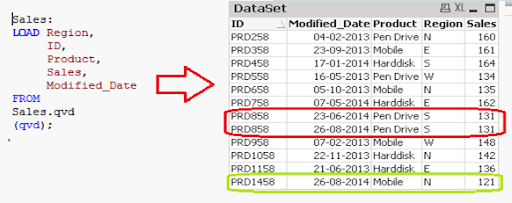
Now, load the most recent QVD (Sales), which will have incremental records.

incremental records

As you can see, two records from August 26, 2014, have been added. However, we’ve also added a duplicate record. Since we haven’t accessed the available records, we may tell that an INSERT is the only approach that will not validate duplicate records.

Furthermore, we are unable to update the value of existing records using this method.

To recap, the steps to load only incremental records to QVD using the INSERT only method are as follows:

1. Recognize and load new records.
2. Combine this data with the QVD file.
3. Replace the old concatenated table with the new QVD file.

2. Insert and Update method:

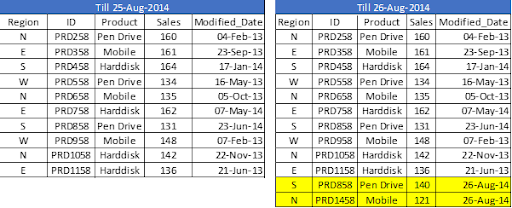
We can’t search for duplicate records or update existing records, as seen in the previous case. The Insert and Update approach comes in handy here:

Insert and Update method

Assume ID is the primary key, and we should be able to define and distinguish new or updated records based on change date and ID.

To use this process, repeat the steps for identifying new records as in the INSERT the only method. Then, apply the search for duplicated records or change old records’ value when concatenating incremental data with existing records.

incremental data with existing records

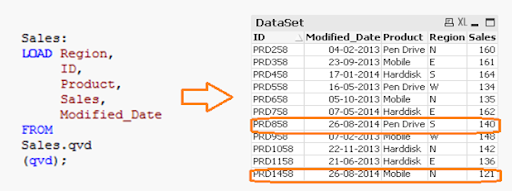
We’ve only loaded records where the Primary Key(ID) is new. The Exists() feature prevents the QVD from loading old records because the Latest version is already in memory, so expired record values are immediately updated.

Both specific records are now available in QVD, along with an updated sales value for ID (PRD858).

feature prevents the QVD

Business Intelligence & Analytics, incremental-load-in-qlikview-description-0, Business Intelligence & Analytics, incremental-load-in-qlikview-description-9

Subscribe to our YouTube channel to get new updates..!

3. INSERT, UPDATE, and DELETE method:

This method’s script is somewhat similar to the INSERT & UPDATE method, except there is an additional step to remove deleted records.

We’ll use an inner join with a concatenated data set (Old+Incremental) to load primary keys for all records in the new data set. Only common records shall be maintained, and unnecessary records will be deleted due to the inner join. Assume that in the previous case, we want to remove a record with the ID PRD1058.

INSERT, UPDATE, and DELETE method

We have a data set of one record added (ID PRD1458), one record modified (ID PRD158), and one record deleted (ID PRD1058).

Qlikview Training Certification

Weekday / Weekend Batches

Advantages of Incremental Load

The following are the benefits of the incremental load.

  • By removing the maximum load of data, it provides a productive load at any time.
  • As opposed to the standard model, it lowers the time it takes to get complete data by 100 times.
  • Incremental load reduces the database’s traffic load.
  • It reduces the workload for data source drivers.
  • The Incremental load minimizes the load on RAM.
  • It functions as a JIT (Just-In-Time) engine in the Data Extraction layer, fetching data in real-time.
  • It makes use of QVD file formatted tables, which significantly compresses the results.

Data Localization

The incremental load uses newly added data and attaches it to the recently incremented table, resulting in data access that is still local to the BI application.

Conclusion

This blog has addressed how incremental loads are faster and more effective than FULL loads for loading data. You should make regular backups of your data as the best idea, and if there are problems with your database server or network, your data can be affected or lost. It would be best to choose which approach is best for you based on your business and application needs. Insert and Update is used in the majority of BFSI applications. In most cases, records are not deleted.

Other Related Articles:


Source link