Lizzo swears she has no bad blood with Taylor Swift!
This week, a social media user tried to start a rumor that the Truth Hurts singer is beefing with the Opalite artist! The drama began when someone on X (Twitter) posted a clip of Lizzo’s music video for STFU along with the caption:
“The Life Of A Showgirl + MY FACE HURTS FROM SMILING — 4.005M. ICEMAN + MAID OF HONOUR + HABIBTI — 683k.”
The 38-year-old rapper then asked, “Can someone explain what this means?” To which another social media user claimed she trashed-talked Taylor, which has impacted her My Face Hurts From Smiling record on the charts:
“it means all that s**t talking you did about Tay finally caught up to you”
Whoa, what? We cannot recall one instance Lizzo has ever s**t-talked Taylor! Can you? Lizzo has even openly admitted to being inspired by Taylor, once calling herself the “Black Taylor Swift” since they both pull from their personal lives to write songs. And even the About Damn Time crooner can’t recall a time she has bashed her or any fellow performer! She fired back on Saturday:
“Are you well? First of all I have never talked s**t about Taylor Swift— also while we on the subject I’ve never talked s**t about any artist. Just because I mention an artist by name does not mean I’m talking s**t— grow tf up pls”
Swifties then insisted Lizzo did trash-talk Tay Tay… by allegedly siding with her enemy Kanye West in 2016! We all know that year was very rough for the pop star, as he dropped the infamous track Famous, in which he called her a b**ch, and had a sex doll version of Taylor in a music video. Travis Kelce‘s fiancée insisted she never approved of Kanye calling her a b**ch. However, Kim Kardashian claimed Taylor lied and consented to the lyrics, even releasing a phone call that seemingly showed the songstress giving her approval. The public turned on her, called her a liar, and she went into hiding for about a year.
A full, unedited version of the conversation between Kanye and Taylor eventually came out, proving the Our Song artist’s version of events! But before that, Lizzo praised Kanye in 2016:
“Thank you @kanyewest for humanizing fame. Maybe one day we’ll all finally get over it. #FAMOUS”
A Swiftie resurfaced the tweet, telling Lizzo not to “rewrite history.” And the Grammy winner replied:
“Baby I know u must be flexible cus this is a stretch!“
Oof! Lizzo really ruffled the Swifties’ feathers! Perhaps she should’ve stayed off X today!
What are YOUR thoughts, Perezcious readers? Is the Ye tweet a stretch? Tell us in the comments (below)!
The practice of loading only new or modified records from a database into an existing QVD is known as an incremental load. As compared to complete loads, incremental loads are more effective, which is especially useful for large data sets. In QlikView, an incremental load occurs when new data from a source database is loaded while previously retrieved data is loaded from a local store. QVD files or the QVW format used with a binary load are commonly used to save data.
Why incremental load?
Is your BI application storing large amounts of data in a atabase? Is it happening regularly, if so? Because BI applications are expected to handle larger data sets, frequent refreshes must obtain the most up-to-date information. In both cases, loading all of the data historically every time to get the most recent updated records on a timely basis is inefficient. This is where the concept of “Increment Load” comes in handy for making BI applications more efficient.
To gain in-depth knowledge with practical experience in QlikView, Then explore HKR’S QlikView Online Course!
What is the intention of the incremental load?
The “Incremental Load” is the answer to all of the previous questions. The loading process’s performance is improved by pulling only new and updated records rather than the entire data set and appending them to the existing data set (QVD). To keep it simple, incremental load updates old table/QVD data with newly modified records at each refresh. It increases the loading process 100 times over conventional loads in this manner.
How exactly incremental load works?
Let’s take a closer look at it by putting it to use. The workflow steps for implementing the same are described below.
1. You must load the whole data without the incremental Load. Either time you need to update new records, you must reload the whole data, which takes a long time to load and save on the local drive (QVD). You can only load new/updated records with incremental loading.
2. In a table, find the last revised record date from the QVW.
3. Connect to the data repository based on the last updated date and pull the recently inserted records that are older than the last modified date. The “where” clause of the load script can be used to do this.
4. To get live data, attach the recently modified records to the current table locally.
5. The incremented table should be added to the BI application.
Qlikview Training Certification
Master Your Craft
Lifetime LMS & Faculty Access
24/7 online expert support
Real-world & Project Based Learning
Illustration of Incremental Load in Real Time
The practice of loading only new or modified records from a database into an existing QVD is known as an incremental load. As compared to complete loads, incremental loads are more effective, which is especially useful for large data sets. The incremental load can be applied in various ways, with the following being the most common:
Insert only (Do not validate for duplicate records).
Insert and update.
Insert, update and delete.
1. Insert Only:
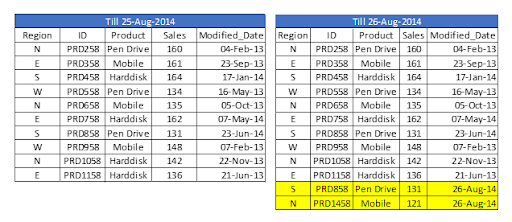
Let’s assume we have sales raw data (in Excel) updated with necessary details about the transaction by modified date if a new sale is registered. We already had a QVD produced before yesterday because we are working on QVDs (25-Aug-14 in this case). Now you can load incremental data (Highlighted in yellow below).
To begin, build a QVD for data up until August 25, 2014. We need to know the date on which QVD was last changed to find new incremental data. The maximum Modified_date in the available QVD file will be used to determine this. As previously stated, It is concluded that “Sales. qvd” is up to date with data until August 25, 2014. The following code will be used to determine the last updated date of “Sales. qvd”:
We have loaded the most recent QVD into memory and then identified the most recent modified date by storing the maximum number of “Modified_Date” values. We then save this date in a variable called “Last_Updated_Date” and delete the “Sales” table. I used the Peek() function to store the maximum number of changed dates in the above code. The syntax is as follows:
This function retrieves the contents of a given field from an internal table row. FieldName and TableName must be string values, while Row must be an integer value. The first record is indicated by a 0, the second by a 1, and so on. Negative numbers indicate the order of the table from the top. The last record is indicated by a -1.
We can load incremental records of the data set (Where clause in Load statement) and merge them with available QVD because we know when the records will be considered new records after that date (Look at the snapshot below).
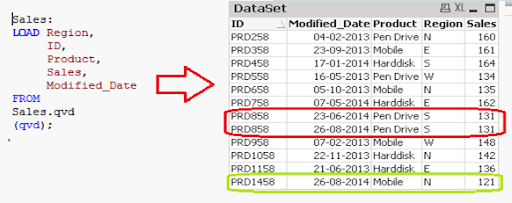
Now, load the most recent QVD (Sales), which will have incremental records.
As you can see, two records from August 26, 2014, have been added. However, we’ve also added a duplicate record. Since we haven’t accessed the available records, we may tell that an INSERT is the only approach that will not validate duplicate records.
Furthermore, we are unable to update the value of existing records using this method.
To recap, the steps to load only incremental records to QVD using the INSERT only method are as follows:
1. Recognize and load new records. 2. Combine this data with the QVD file. 3. Replace the old concatenated table with the new QVD file.
2. Insert and Update method:
We can’t search for duplicate records or update existing records, as seen in the previous case. The Insert and Update approach comes in handy here:
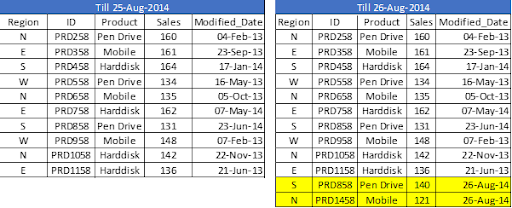
Assume ID is the primary key, and we should be able to define and distinguish new or updated records based on change date and ID.
To use this process, repeat the steps for identifying new records as in the INSERT the only method. Then, apply the search for duplicated records or change old records’ value when concatenating incremental data with existing records.
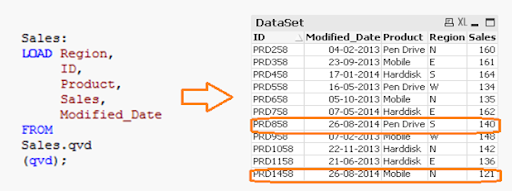
We’ve only loaded records where the Primary Key(ID) is new. The Exists() feature prevents the QVD from loading old records because the Latest version is already in memory, so expired record values are immediately updated.
Both specific records are now available in QVD, along with an updated sales value for ID (PRD858).
Subscribe to our YouTube channel to get new updates..!
3. INSERT, UPDATE, and DELETE method:
This method’s script is somewhat similar to the INSERT & UPDATE method, except there is an additional step to remove deleted records.
We’ll use an inner join with a concatenated data set (Old+Incremental) to load primary keys for all records in the new data set. Only common records shall be maintained, and unnecessary records will be deleted due to the inner join. Assume that in the previous case, we want to remove a record with the ID PRD1058.
We have a data set of one record added (ID PRD1458), one record modified (ID PRD158), and one record deleted (ID PRD1058).
Qlikview Training Certification
Weekday / Weekend Batches
Advantages of Incremental Load
The following are the benefits of the incremental load.
By removing the maximum load of data, it provides a productive load at any time.
As opposed to the standard model, it lowers the time it takes to get complete data by 100 times.
Incremental load reduces the database’s traffic load.
It reduces the workload for data source drivers.
The Incremental load minimizes the load on RAM.
It functions as a JIT (Just-In-Time) engine in the Data Extraction layer, fetching data in real-time.
It makes use of QVD file formatted tables, which significantly compresses the results.
Data Localization
The incremental load uses newly added data and attaches it to the recently incremented table, resulting in data access that is still local to the BI application.
Conclusion
This blog has addressed how incremental loads are faster and more effective than FULL loads for loading data. You should make regular backups of your data as the best idea, and if there are problems with your database server or network, your data can be affected or lost. It would be best to choose which approach is best for you based on your business and application needs. Insert and Update is used in the majority of BFSI applications. In most cases, records are not deleted.
To provide the best experiences, we use technologies like cookies to store and/or access device information. Consenting to these technologies will allow us to process data such as browsing behavior or unique IDs on this site. Not consenting or withdrawing consent, may adversely affect certain features and functions.
Functional
Always active
The technical storage or access is strictly necessary for the legitimate purpose of enabling the use of a specific service explicitly requested by the subscriber or user, or for the sole purpose of carrying out the transmission of a communication over an electronic communications network.
Preferences
The technical storage or access is necessary for the legitimate purpose of storing preferences that are not requested by the subscriber or user.
Statistics
The technical storage or access that is used exclusively for statistical purposes.The technical storage or access that is used exclusively for anonymous statistical purposes. Without a subpoena, voluntary compliance on the part of your Internet Service Provider, or additional records from a third party, information stored or retrieved for this purpose alone cannot usually be used to identify you.
Marketing
The technical storage or access is required to create user profiles to send advertising, or to track the user on a website or across several websites for similar marketing purposes.


“
 “
“