
MN weather: Sleety, icy, snowy system through Thursday


“It's a mess, ain’t it Sheriff?

If it ain’t it'll do till a mess gets here.” ― Cormac McCarthy, “No Country for Old Men”

One of the messiest storms of the season is about to plow into Minnesota. Our inbound weather system brings a rainy, icy, sleety, snowy mix to different parts of Minnesota Wednesday night through Thursday.

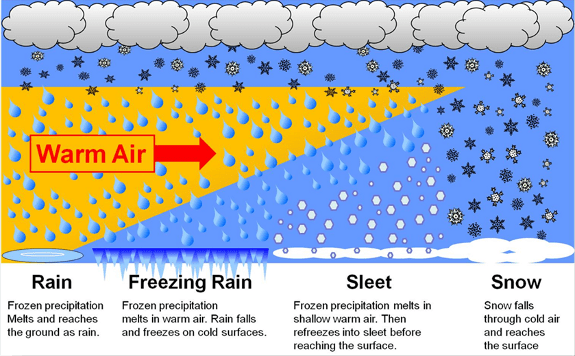
precip types
A 3D view of how different air masses create different precipitation types on the edge of warm and cold air in a wintry system
National Weather Service

Winter storm warnings are posted for areas in and around the Twin Cities and along the North Shore. Winter weather advisories cover most of the rest of Minnesota.

Here’s the language in the Twin Cities area winter storm warning.

Including the cities of St Peter, Chanhassen, Hutchinson, Victoria, Gaylord, Chaska, St Paul, Redwood Falls, Shakopee, Hastings, Red Wing, Le Sueur, Stillwater, New Ulm, Faribault, Minneapolis, and Olivia

220 PM CDT Wed Apr 1 2026 …WINTER STORM WARNING REMAINS IN EFFECT FROM MIDNIGHT TONIGHT TO NOON CDT THURSDAY…

* WHAT…Heavy mixed precipitation expected. Total snow accumulations up to one inch, sleet accumulations around three quarters of an inch, and ice accumulations around one quarter of an inch. Winds gusting as high as 30 mph.

* WHERE…McLeod, Renville, Sibley, Carver, Dakota, Hennepin, Ramsey, Scott, Washington, Brown, Le Sueur, Nicollet, Rice, Goodhue, and Redwood Counties.

* WHEN…From midnight tonight to noon CDT Thursday. * IMPACTS…Roads, and especially bridges and overpasses, will likely become slick and hazardous. Significant ice accumulation on power lines and tree limbs may cause widespread and long-lasting power outages. Plan on slippery road conditions. The hazardous conditions will impact the Thursday morning commute.

Let’s break down storm timing, coverage, and precipitation types. Then look ahead to the second system rolling in Friday and Saturday.

System No. 1 Wednesday night and Thursday

Our first weather maker is a Colorado low tracking through Iowa Thursday. I’m a little leery of track and precipitation type forecast accuracy with these systems lately as they pass right through the zone with fewer weather balloon launches from Colorado through Nebraska and South Dakota.

Most forecast models have similar solutions featuring mainly snow in the northern half of Minnesota with a rainy icy mix south.

The National Oceanic and Atmospheric Administration’s NAM 3 km model shows the rain, ice and snow zones increasing in coverage overnight into Thursday. The forecast model loop below runs between 7 p.m. Wednesday and 1 a.m. Friday.
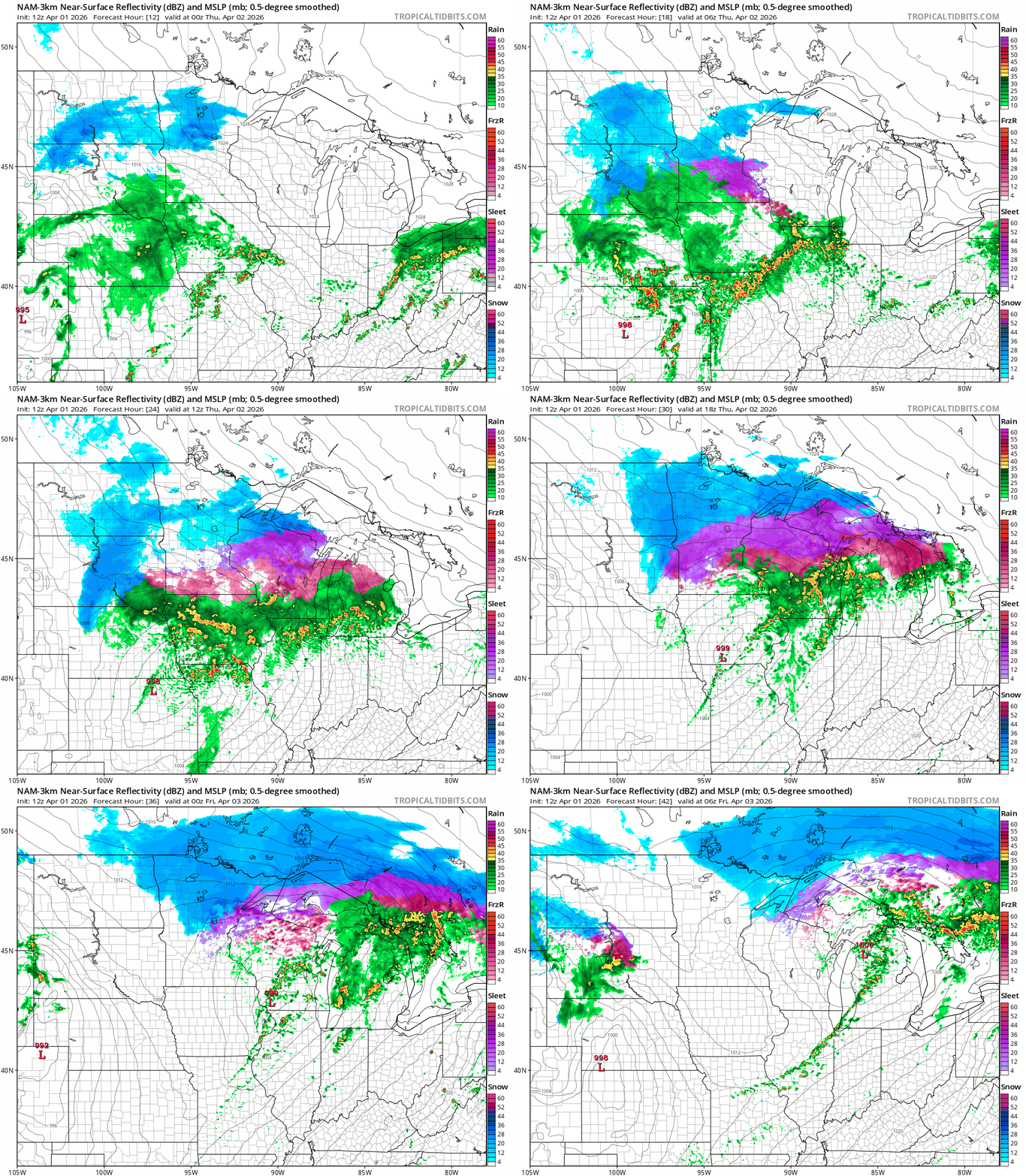
NOAA NAM 3 km model
North American Mesoscale 3 km model between 7 p.m. Wednesday and 1 a.m. Friday
NOAA, via Tropical Tidbits

Southern Minnesota

Southern Minnesota will see a mix from rain south to icy precipitation around the Twin Cities area. The ice and sleet could get heavy overnight into early Thursday.

Some areas could see up to an inch of sleet accumulation, and it could be pinging off your windshield during your Thursday morning commute.

Glaze ice is also likely from the Twin Cities east into central Wisconsin where ice storm warnings are up.
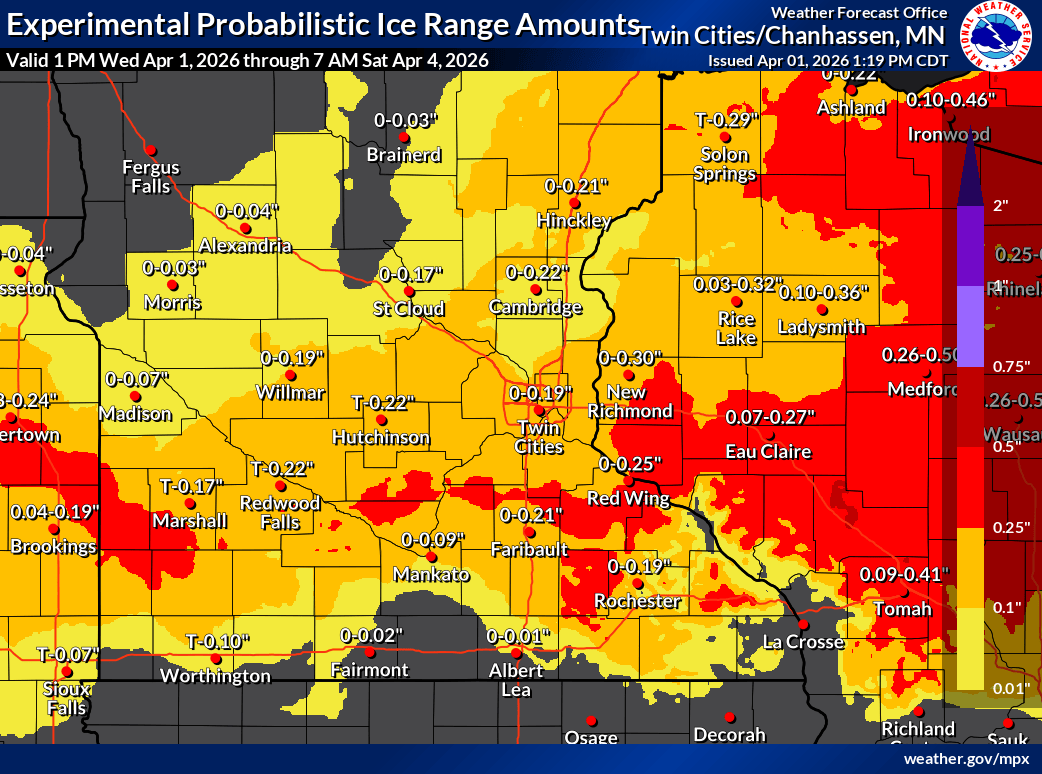
Ice potential
Ice potential
Twin Cities National Weather Service office

Thursday’s morning commute looks like the most impactful time. With temperatures right around 32 degrees a variety of precipitation types may fall.
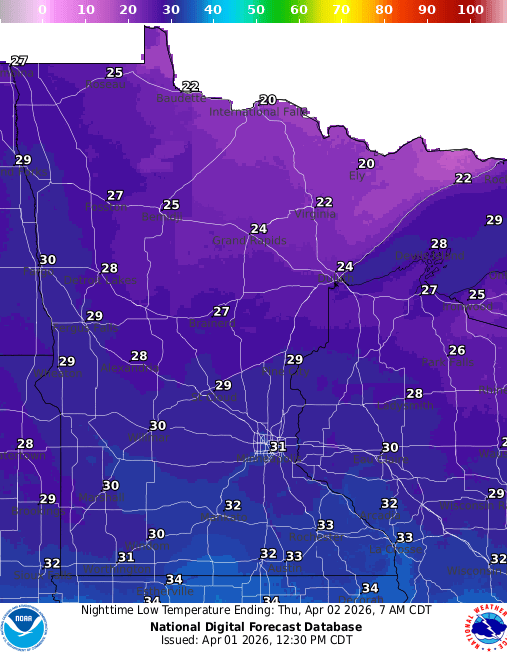
Forecast low temperatures Thursday
NOAA

It should be warm enough for mostly rain by Thursday afternoon from the Twin Cities south.
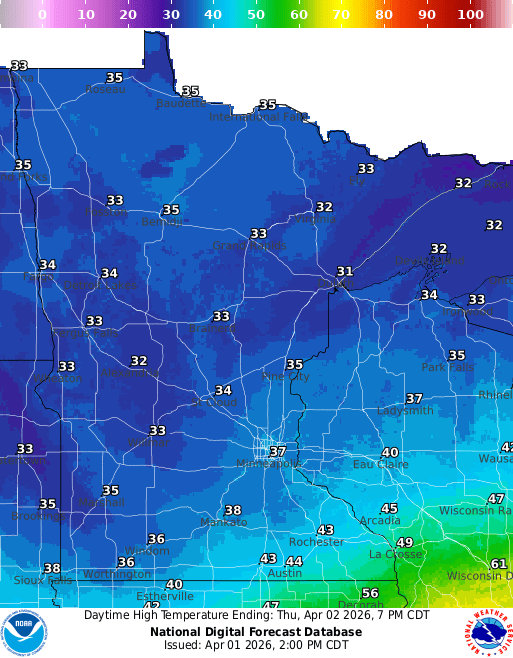
Forecast high temperatures Thursday
NOAA

Central and northern Minnesota

To the north, it will be mostly wet, heavy sloppy snow. The heaviest snow zone favors the North Shore where 5 to more than 10 inches is likely. (See the map at the top of the post.) There will be less snow as you move farther south.
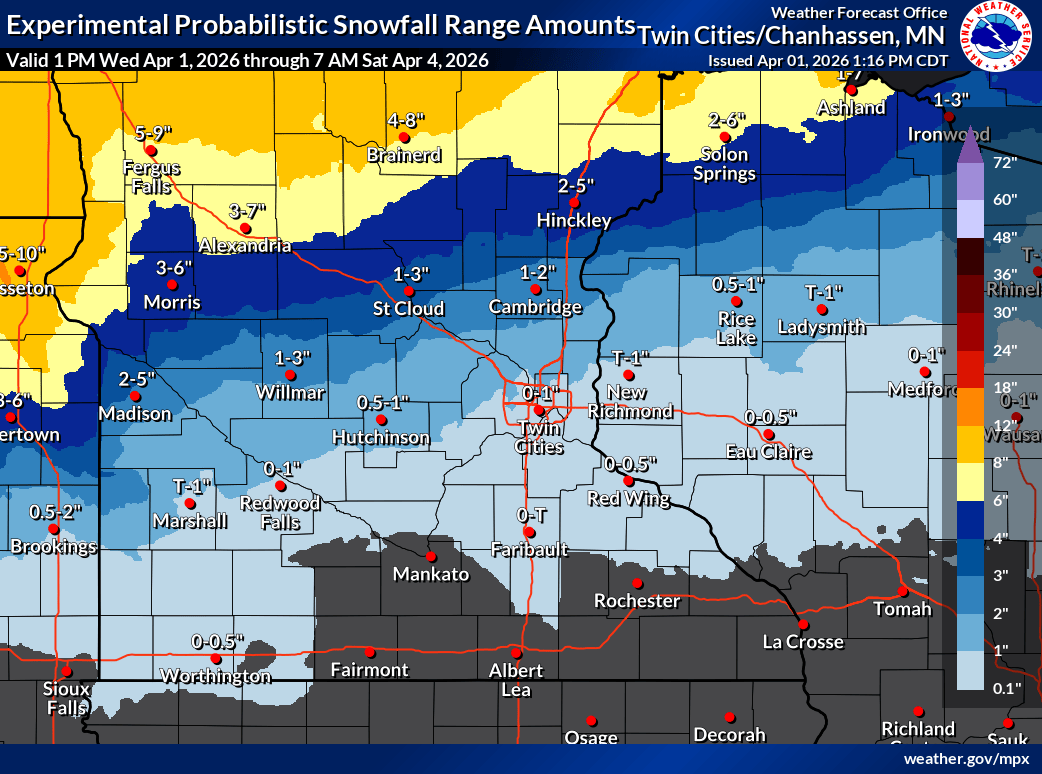
Snowfall projection
Snowfall projection
Twin Cities National Weather Service office

System No. 2 Friday and Saturday

The second system appears to track slightly farther north. That could mean more rain for the Twin Cities with another shot of heavy wet snow north.

The Canadian model seem reasonable as a solution at this point. The forecast model loop below runs between 1 p.m. Friday and 1 a.m. Sunday.
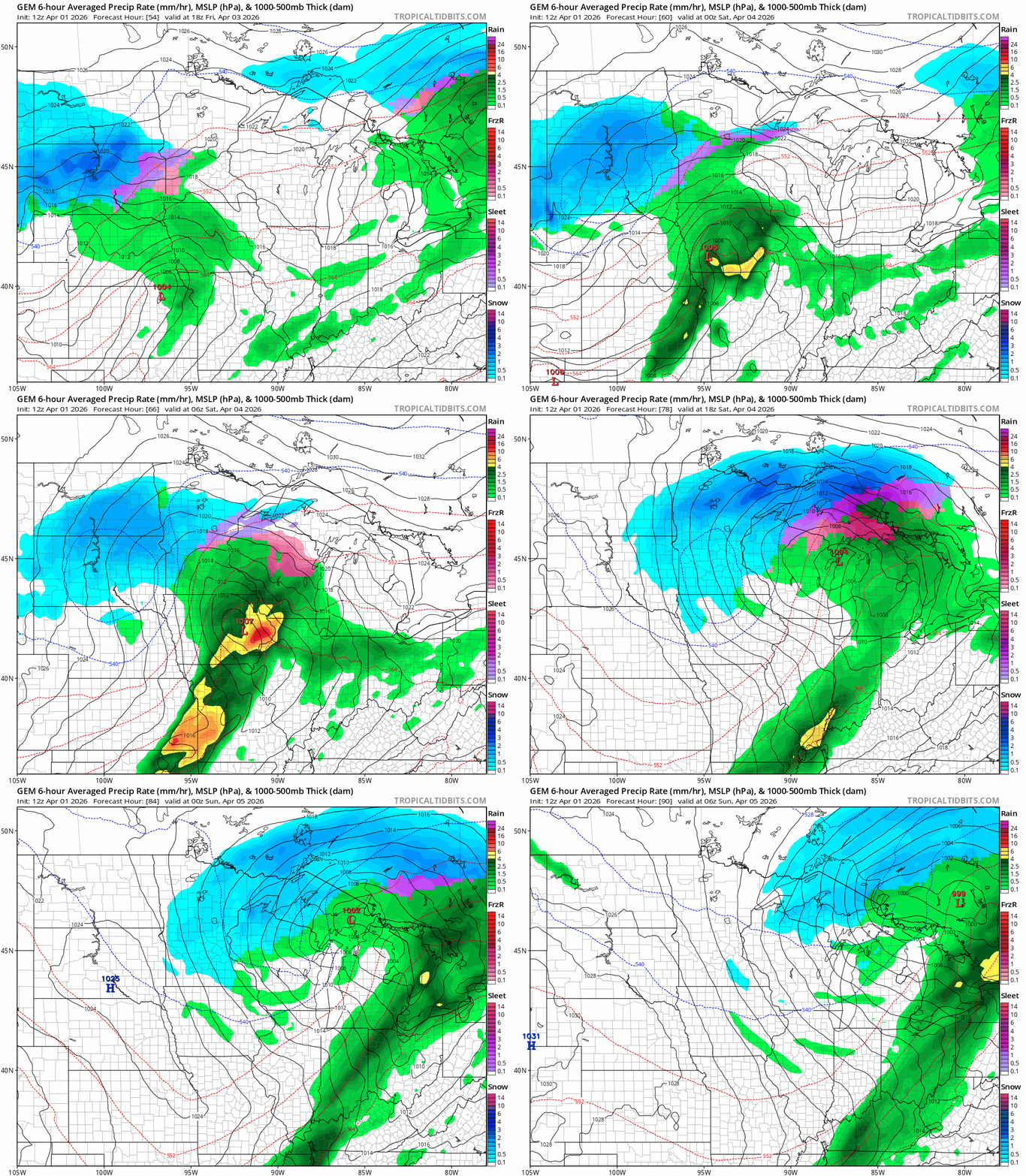
Canadian model
Global Environmental Multiscale model between 1 p.m. Friday and 1 a.m. Sunday
Environment Canada, via Tropical Tidbits

Overall snowfall again favors northern Minnesota.

On the map below, this Canadian model (Kuchera) snowfall output for both systems runs through 7 a.m. Sunday. I think the potential for more than a foot of heavy wet snow is possible across the north and especially the North Shore regions by Sunday.
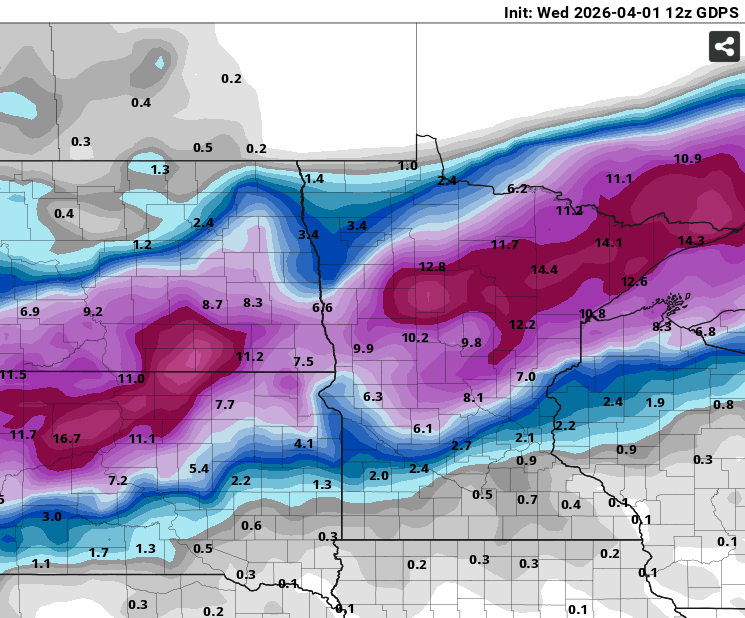
Canadian model 3
Canadian model (Kuchera) snowfall output through Sunday morning.
Environment Canada, via Pivotal Weather

Easter Sunday looks sunnier and cool.

There are signs we may warm up into the 50s and 60s south again by next Wednesday.

Take it easy out there, Minnesota.


Source link

Leave a Reply

Subscribe to Our Newsletter

Get our latest articles delivered straight to your inbox. No spam, we promise.

Recent Reviews


Lost a crucial document because your system crashed before you could save it? Worry no more! Microsoft Word has introduced an automatic save option that regularly backs up your work, so you’ll never lose your progress again.

Users will now be able to manage their Word documents without thinking about saving them manually. The new Microsoft Word update allows users to automatically save their documents to the cloud as soon as they start documenting any content piece.

Raul Munoz, the Senior Product Manager at Microsoft, has stated about the new feature, “We are modernizing the way files are created and stored in Word for Windows! Now you don’t have to worry about saving your documents: Anything new you create will be saved automatically to OneDrive or your preferred cloud destination.

Microsoft additionally hints at introducing similar features for Windows Excel and PowerPoint, which are now live.

How Does the Auto-save Feature Work?

The auto-save option can be accessed and used effectively with the compatible Word for Windows version. Let’s understand how the process works-

Primarily, users need to create a fresh document in Word and switch the AutoSave option on. Unlike the previous default document name- DocumentN, the autosave feature saves the files with the date.

Microsoft Word Update - Step 1

Source: Microsoft Tech Community

To change the name of the file and its location, users need to select Save or press Ctrl+S. After selecting the file name and location, press Confirm to save the changes.

Microsoft Word Update - Step 2

Source: Microsoft Tech Community

In case users try to close the file before it gets saved, a dialog displays on the screen asking whether they intend to Discard or Keep the file. If users try to close empty files, Word discards them without asking for confirmation.

Microsoft Word Update - Step 3

Source: Microsoft Tech Community

Availability of the Auto-Save Feature of Microsoft Word Update-

The AutoSave feature of Microsoft Word update is available to users with Version 2509 (Build 19221.20000) or newer. This advancement is set to enhance accessibility and address the challenge of lost files. Similar features have been introduced on Windows Excel and PowerPoint as well.

Advantages of the Latest Microsoft Word Update

Microsoft Word’s new auto-save feature will unlock several benefits for users. Alongside increased security, it offers flexible file management capabilities. Let us discuss other significant advantages-

Flexibility in File Storage and Control: Users can store and manage their files more flexibly than ever. As users are in charge of the documents, they can adjust file names and locations to save, organizing the files according to convenience.

Never Lose Your Files: The auto-save feature in Microsoft Word addresses the challenge of losing files due to not saving them manually. As soon as you start making progress in a file, it automatically gets saved.

Enhanced Security and Compliance: Files saved in your organization’s cloud servers already adhere to the set security guidelines and practices. Hence, users do not need to think about protecting the files separately.

Increased Accessibility: The auto-save feature enables enhanced accessibility of Word files. It can be accessed from diverse types of devices and platforms once shared, including Android, iOS, and web browsers. Changes made to the file will get synced on all devices and platforms.

Better Collaboration: The AutoSave feature has made collaboration within and across teams easier. Users can easily share the cloud file and initiate collaboration by making changes, adding comments, and resolving comments in real time.

Agentic AI Support: The Word files are now equipped with Copilot agentic AI support. Users can unlock AI-powered capabilities whenever they need to improve or update their documents. Nevertheless, to use Copilot in Word, a Microsoft 365 Copilot license is needed.

Additional Tips: 

  • Users will be able to easily change the location for new documents. Right-click on any cloud folder in the File section of Word, then select Set as Default Location to choose the location.
  • Users can manage how their files are created, whether in the traditional manner or automatically in the cloud, in the Save tab of Word Options, and opt in or opt out for Create new files in the cloud automatically.

Key Elements to Keep in Mind-

  • When a new Word session is started while another is running, the new file does not autosave. Hence, users need to close the previous file to enable the auto-save option for new files.
  • Users may sometimes encounter a delay in refreshing the recent files list while changing the name of a document.
  • If users disable the option for Show the Start screen when this application starts, remember that the first file they create will not autosave automatically.

Concluding Remarks!

Microsoft has been making significant advancements in its 365 Office platforms for better collaboration and enhanced productivity of diverse teams within an organization. With the integration of Copilot and flexible features, the firm is aiming to boost user experience and accessibility of the tools, including Word for Windows.

Learn about the major technological shifts and practices with KnowledgeNile!


FAQs:

1. What is the AutoSave feature in Microsoft Word?

Answer: The AutoSave feature in Microsoft Word lets users save their files automatically.

2. What is the purpose of AutoSave?

Answer: The AutoSave feature aims to reduce the challenges of data loss in unwanted circumstances, such as power shortages and device failures.

3. Where are AutoSave Word documents stored?

Answer: Automatically saved Word files are stored in cloud storage, like OneDrive.


Recommended For You:

Oracle identity cloud vs Microsoft Active Directory: Which to opt for and why?


Source link







