Now You Can Direct Anthropic’s Claude Cowork AI From Your Phone


Max subscribers get first access.
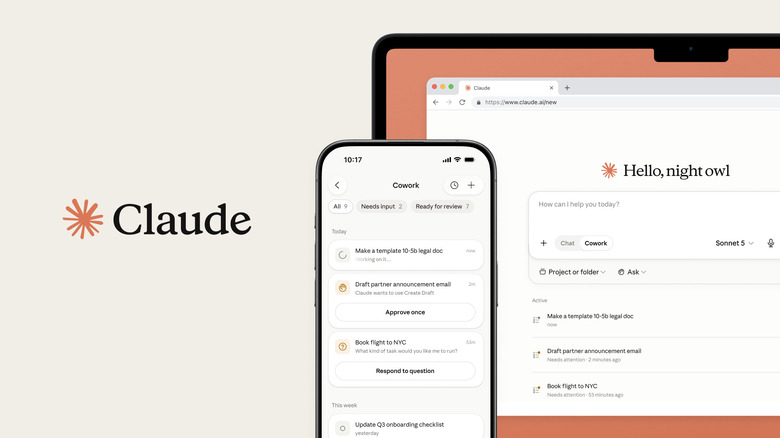
At the start of the year, Anthropic debuted Claude Cowork, an offshoot of its coding agent that gives people a way to ask Claude for help with tasks on their computer. After expanding the capabilities of the software in March, Anthropic is giving users a way to manage Cowork from their phones. Once you update to the latest version of the Claude app on Android and iOS, look for the new Cowork tab in the sidebar.

To be clear, today’s update doesn’t mean you can use Anthropic’s agent to automate tasks on your phone. Instead, it’s a way to keep tabs on what Claude is doing on your computer back home. Anthropic has also updated Cowork to make it capable of running tasks in the background, where previously your device needed a stable internet connection for Claude to do its thing. If Claude needs permission to complete a task, you’ll get a notification on your phone, from which you can tell it to move forward. “Nothing ships until you’ve reviewed and approved it,” says Anthropic.

Looking forward, Anthropic plans to unify Cowork with its chatbot, so that you can converse with Claude and give it computer-related tasks from a single interface. Users will see this change occur first on Claude’s web client and desktop app. The company also plans to bring projects and artifacts together as well. Projects allows you to group your chats and files around a single topic so that you can make the most of Claude’s context window. As for artifacts, they’re small apps and games Claude can program for you. I suspect Anthropic might be doing this to give more visibility to artifacts since they’re an interesting offering from the company, but I don’t see many people engaging with them online, despite the fact Anthropic recently made it easier to do just that .

If you’re a Max subscriber, you’ll get access to today’s update first. Anthropic plans to bring the mobile integration to other plans in the coming weeks.


Source link

Leave a Reply

Subscribe to Our Newsletter

Get our latest articles delivered straight to your inbox. No spam, we promise.

Recent Reviews


The memo also prevents companies from altering AI models being used by the military without prior approval.

Less than a week after signing an executive order that attempts to regulate the booming AI industry, President Trump has signed a National Security Presidential Memorandum that aims to put cutting edge AI tools into the hands of the US military. According to the memo signed on Friday, the Trump administration is establishing another framework that would “accelerate AI adoption” across a network of federal defense agencies and “adapt the best commercial and open-source technologies for mission use.”

“The men and women who defend our nation deserve the best, most secure and most reliable AI in the world, and our citizens deserve to know it is handled responsibly with the care and seriousness they expect,” Michael Kratsios, director of the White House Office of Science and Technology Policy, said on X.

More specifically, the memo said that the US government would do “rapid onboarding of the most advanced AI models from multiple vendors.” Along with the faster adoption, the Secretary of Defense Pete Hegseth will have to issue an updated directive on autonomous weapon systems. Lastly, the memo introduces a new restriction to AI models used by the government, where “no entity, commercial or otherwise, can disable, degrade or modify an AI system that American warfighters depend on without prior approval.”

There is one limitation on the memo, though, which detailed that the US’ network of defense agencies can’t create or release an AI model that’s designed to “censor free speech, embed ideological bias or conduct unlawful surveillance against the American people.” However, the administration is still interested in influencing “frontier models” as Trump’s executive order from earlier this week would grant the US government a 30-day window to review them before a public release.


Source link