NTT, NTT DATA and INDYCAR Extend Entitlement Partnership with Multi-Year Agreement


  • NTT extends its sponsorship of the NTT INDYCAR SERIES, entering new phase of partnership
  • NTT and NTT DATA accelerate outcomes for Penske Entertainment through advanced AI and data capabilities
  • Partnership enhances growing momentum across sport, including rising viewership

Mumbai – May 28, 2026 – NTT, Inc., together with NTT DATA Group Corporation, today announced the renewal of its sponsorship of the NTT INDYCAR SERIES. Under the renewed agreement, NTT has expanded its role beyond race analytics and fan engagement to provide advanced AI and data capabilities for Penske Entertainment and INDYCAR. This includes AI-driven operations, real‑time decision intelligence and emissions visibility across INDYCAR, the historic Indianapolis Motor Speedway (IMS) and marquee events within the Penske Entertainment portfolio.

110th Running of the Indianapolis 500

NTT, along with its subsidiary NTT DATA, a global leader in AI, digital business and technology services, will continue as the Official Technology Partner for INDYCAR, the NTT INDYCAR SERIES, IMS, the Indianapolis 500 and the NASCAR Brickyard weekend.

“​​Our partnership has evolved from series‑level analytics into an enterprise‑wide AI and data intelligence collaboration,” said Akira Shimada, President and CEO, NTT. “In addition to powering race‑day analytics and enabling AI‑driven intelligence that supports safety, sustainability and decision‑making, NTT is applying data and AI at scale with our clients and partners to create a more connected, resilient and responsible future.”

Evolving the Fan Experience Through AI-Driven Intelligence

During a typical race weekend, including the Indianapolis 500, the NTT INDYCAR SERIES generates billions of real‑time data points from cars, teams and track operations. NTT DATA provides actionable insights to inform race control, operations teams, broadcast partners and event planners to support faster, more precise decisions.

Penske Entertainment and NTT DATA are deploying AI to transform how fans experience INDYCAR—starting with “Up To Speed,” a new AI‑powered feature delivering smarter, more dynamic race insights to fans, alongside expanded real‑time data, content and digital experiences coming online throughout this season. The new “Up To Speed” feature is available now on the INDYCAR App powered by NTT DATA.

700,000+ new users have downloaded the reimagined INDYCAR App powered by NTT DATA since its 2023 re-launch, driving an overall usage increase of more than 30% with fans in more than 100 countries reflecting expanded international interest in motorsports.

NTT DATA Provides Developments in Sustainability and Safety

  • Emissions tracking and sustainability accountability were strengthened through carbon accounting and automated data collection, supporting Penske Entertainment’s “Racing toward Zero” initiative across 100+ organizations and partners.
  • A state‑of‑the‑art tracking platform streamlines data collection, reduces reporting gaps and provides improved visibility for emissions measurement.
  • AI‑driven Venue Solutions at IMS support real‑time decision‑making across the 1,000‑acre venue, using predictive modeling, advanced connectivity and analytics to enhance crowd management, traffic planning and operational safety.

With attendance rising annually to over 350,000 fans on site, including a sold‑out race in 2025 and 2026, NTT DATA delivers critical data to provide a safe, seamless, high‑quality experience at scale.

“Leading into another iconic edition of The Greatest Spectacle in Racing, we are thrilled to continue our world-class partnership with NTT,” said Roger Penske, Founder and Chairman, Penske Corporation. “Their significant expertise as a global leader in AI, digital business and technology services is integral to how we build engagement across INDYCAR’s fanbase and provide a top-notch customer experience at the Racing Capital of the World. This is a partnership based on trust and a shared commitment to innovation and excellence, providing all the foundational attributes necessary for a long-term and highly successful relationship.”

The announcement comes on heels of significant momentum driven during NTT’s ongoing immersive partnership with Penske Entertainment.

To read more about NTT and NTT DATA’s data and AI services visit: https://www.nttdata.com/global/en/services/generative-ai

About NTT
NTT is a leading global technology innovator, providing a broad range of services to both consumers and businesses. As a mobile operator and provider of infrastructure, networks, and services, NTT is dedicated to promoting a sustainable future through cutting-edge innovations. Our portfolio includes business consulting, AI-powered solutions, application services, global networks, cybersecurity, data center and edge computing, all supported by our deep global industry expertise. Generating over $90 billion in revenue and employing 340,000 professionals, we allocate 30% of our annual profits to fundamental research and development. With operations spanning more than 70 countries and regions, our clients include over 75% of Fortune Global 100 companies, alongside thousands of enterprises, government organizations, and millions of consumers.

About NTT DATA
NTT DATA is a $30+ billion business and technology services leader, serving 75% of the Fortune Global 100. We are committed to accelerating client success and positively impacting society through responsible innovation. We are one of the world’s leading AI and digital infrastructure providers, with unmatched capabilities in enterprise-scale AI, cloud, security, connectivity, data centers and application services. Our consulting and industry solutions help organizations and society move confidently and sustainably into the digital future. As a Global Top Employer, we have experts in more than 70 countries. We also offer clients access to a robust ecosystem of innovation centers as well as established and start-up partners. NTT DATA is part of NTT Group, which invests over $3 billion each year in R&D. Visit us at nttdata.com

About INDYCAR
INDYCAR is the Indianapolis‑based governing body for North America’s premier open‑wheel autoracing series, the NTT INDYCAR SERIES and its developmental series, INDY NXT by Firestone. The NTT INDYCAR SERIES features an international field of the world’s most versatile drivers who compete on superspeedways, short ovals, street circuits and permanent road courses. The 2026 season consists of 18 races in the United States and Canada and is highlighted by the historic Indianapolis 500 presented by Gainbridge. The NTT INDYCAR SERIES, INDY NXT by Firestone, the Indianapolis Motor Speedway and IMS Productions are owned by Penske Corporation.


Source link

Leave a Reply

Subscribe to Our Newsletter

Get our latest articles delivered straight to your inbox. No spam, we promise.

Recent Reviews


Introduction to SAP SD (Sales and Distribution):

SAP SD (Sales and distribution) is one of the significant functional modules of any enterprise resource planning (ERP). The SAP SD module helps in the bills management, shipping, services, transportation, and selling of the products. This functional module is closely integrated with other modules like Material Management (MM), product planning (PP), and logistics. 

 Become a SAP SD Certified professional by learning this HKR SAP SD Training !

SAP SD: creating master and material data

Master data management is a key factor in the SAP sales and distribution functional module. 

Primarily, there are two levels of master data available they are;

First, let’s discuss the first level;

   a. Customer master data.

   b. Material master and 

   c. Pricing conditions

Now discuss the second level;

It includes only;

Output conditions

It’s time for us to know how to create customer master records;

In general, the master record consists of information about the business transactions and also information about the customers where the organization uses this information to collaborate with them. 

Let us know the important transactions being used in the creation of customer master records.

  • XD01, XD02, and XD03 -> used to create/ modify/ display the customer data.
  • VD01, VD02, and VD03 -> used to create/ modify/ display the sales data.
  • FD01, FD02, and FD03 -> used to create/modify/ display the customer company code.
  • XD04 and XD05 -> display the change document and used to block the customers (global orders, delivery, and billing, etc).
  • XD06 and XD07 -> used for deletion of unwanted data and create contact person details.

To create a master data all you need to do is use an account group;

  • Use the T-codes XD01, VD01, and FD01.

*Note: XD01 -> this includes the sales area details, and that will be stored in the tables like KNA1, KNVV, and KNB1.

             VD01 -> this includes the sales data and no company code data will be included.

              FD01 -> this includes all about the company code levels, and the data will be stored in the tables KNA1 and KNB1.

  • The steps included are, 

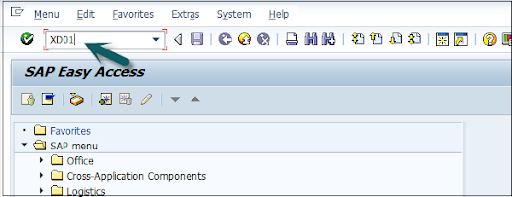
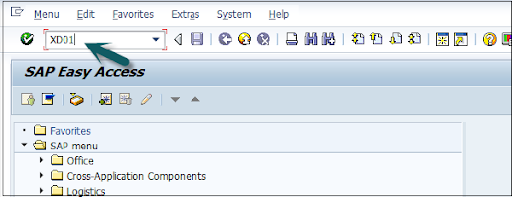
Open the SAP editor, then enter the T-code “XD01”, as shown below;

XD01

  • Then the new window will open, enter the following details;

               a. First, choose the account group from the given list

               b. Enter the customer number and select the proper company code.

  • Now enter the sales area details like;   

              a. Sales organization 

              b. Distribution channel 

              c. Various divisions details.

  • Once you have entered all the details, click on “Tick mark” as shown below;

Tick mark

  • In the next step, enter the general details like title, name, address, company code data, and sales area data, etc.

enter the general details

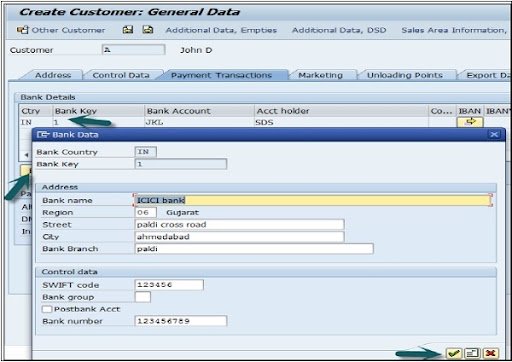
  •  The next step is to add the control data details, and the image as given below;

control data details

  • Now go to the sales area details and enter the details like shipping data, partner function, and customer pricing, etc.

sales area details

  • Click on the “save” button to view the customer details;

save data

Top 30 frequently asked SAP SD Interview Questions !

SAP SD Training

  • Master Your Craft
  • Lifetime LMS & Faculty Access
  • 24/7 online expert support
  • Real-world & Project Based Learning

SAP SD: creating partner function

The partner function in SD allows users to identify which partner functions need to be performed with the business process. Consider a simple example; when all the customer functions are performed by partner function, this process is known as an obligatory function in Sales and distribution.

Related Articles SAP SD Modules !

All the partner functions can be categorized on the basis of a partner type. The partner types can be named as;

1. Partner type customers consist of four sub-modules;

        a. Sold to party type

        b. Ship to party type 

        c. Bill to party type 

        d. Payer 

2. Partner type contact persons 

3. Partner type vendors 

4. Forwarding agents 

5. Employee responsible 

6. Sales personnel type 

7. Partner type personnel

Related Articles SAP SD Flow ! 

In the below section, we would like to mention a few important partners type and their core functionalities ;

Customer type -> Sold-to-party 

                             Payers 

                             Ship-to-party 

                             Bill-to-party 

Vendors type -> Forwarding agents (fwdg agents)

Human resource type -> Employee responsible
                                       Sales personnel 

Contact person types -> contact person (CP)

Now it’s time for us to know how to create the partner functions;

The steps included are;

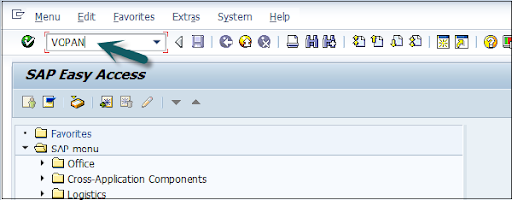
  • First, go to the SAP Access window -> type the T-code VOPAN as shown below;

VOPAN

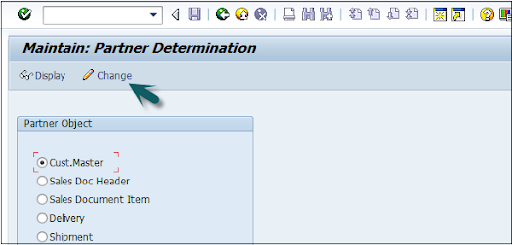
  • Then a new window will pop up -> select the partner type -> then click on the change button.

select the partner type

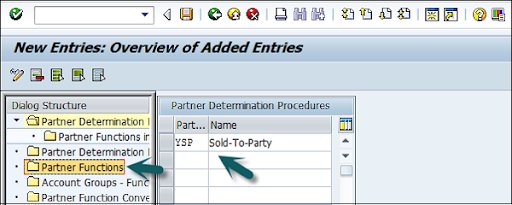
  • This window also opens the new browser -> click on the partner determination procedures -> click on the partner function that is available on the left panel as shown in the below image;

click on the partner determination procedures

  • Click on the new entries;

Click on the new entries

  • The last step includes entering the general information like name, type, and customerd

entering the general information

  • Now click on the “Save” button to save all the details which you have entered. 
SAPS, sap-sd-tutorial-description-6, SAPS, sap-sd-tutorial-description-12

Subscribe to our YouTube channel to get new updates..!

SAP SD: Creating a material stock

Suppose you have already adopted SAP in the organization and now it’s time to add all your stock in the Sales and distribution module. 

The steps included creating a material stock;

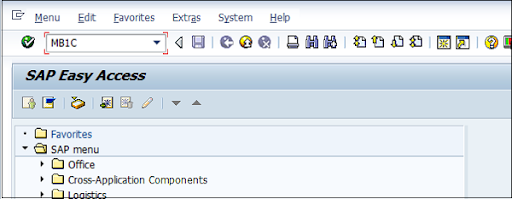
  • Use the transaction code MB1C and movement type 561 to receive the purchase order.

MB1C

  • Now a new window will pop up, enter the date, storage, plant, and movement type details as shown below;

new window

  • Now select the movement as per your requirements-> click enter as shown in the below image;

movement as per your requirements

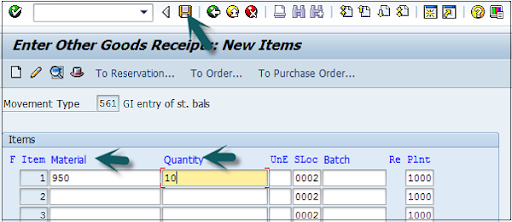
  •  A new window will pop up, now enter the material code ->create the quantity for the stocks -> click save as shown below;

create the quantity for the stocks

  • Finally, a material document with a stock number will be displayed.

SAP SD Training

Weekday / Weekend Batches

SAP SD: pre-sales order activities 

All sales order activities can be divided into pre-order and post-order sales activities. Pre-order sales take place before the product is sold out and post-order sales take place after the product is sold out. 

There are two types of pre-sales order activities that take place, they are;

Related Articles SAP SD Tables ! 

Inquiries 

Inquiries are nothing but questionaries about if the product is available or not, the cost of the products, and the delivery of the product. 

The t-codes which are used to perform inquiries;

1. VA11: Create inquiry logistics -> sales and distribution -> sales -> inquiry -> create.

2. VA12: Change inquiry

3. VA13: display or inquiry search

Quotations:

A quotation is a legal document or blueprint, which enables customers to know about the products or services. 

The following are the T-codes used to create the quotations:

1. VA21: Creating a quotation.

2. VA22: Changing of quotation.

3. VA23: display or quotation search

First, let’s start with creating inquiries:

Foremost, an inquiry is not about the blueprint or a document, but it is all about information that is related to products or materials, and goods quality.

The navigation is as follows:

First, go to the logistics -> sales, and distributions -> click on “sales” -> Inquiry -> create a T-code (VA11).

Note: when you use this T-code, create the below details to access this t-code.

Inquiry type -> ZEC 1 (IECPP inquiry)

Sales organization ->  4000

Distribution channel -> 40

Division ->  00

The steps included are;

  • Open the SAP easy access menu -> enter the T-code VA11 as shown below;

VA11

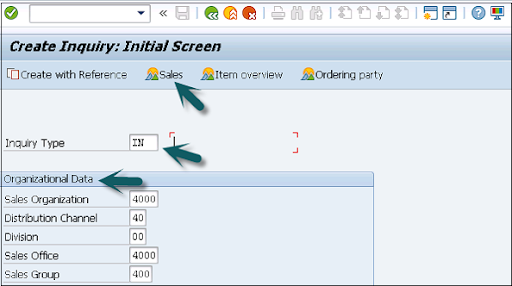
  • Now enter the Inquiry type as “IN” -> then organizational details -> click on save button as shown in the below image;

organizational details

  • Now the new window will pop up -> enter the partner functions such as; sold-to-party and shift-to-party -> enter the material code -> quanity details -> click save.

sold-to-party and shift-to-party

A message like inquiry type “123456789” will be created and displayed. 

Benefits of using SAP Sales and Distribution:

{ Related Articles: SAP SD Training in Pune }

The following are the benefits of using SAP sales and distribution;

  • SAP Sales and distribution helps to track the overall sales distributions.
  • Helps to track organizational sales data along with the team performance.
  • Recording pre-order and post-order sales activities.
  • Define the important process for the sales and distribution methods.
  • Helps users to categorize the diverse sales and distribution process.
  • Offers effective management in order to manage the material management, pricing, and stocks.

Conclusion:

From this article, we can consider that Sales and distribution is an important functional module. In every ERP based organization, they prefer to adopt Material management along with sales and distribution to manage/track the overall sales. I hope this SAP SD tutorial may help a few SAP communities to learn, and explore the basic sales knowledge. 


Source link