Python-Ogre is the Python language binding to the OGRE 3D engine. It is intended to offer the performance and the functionality of OGRE(Object-Oriented Graphics Rendering Engine) with the availability and user-friendliness of Python in a way that makes the development of 3D games easier and quick and makes the OGRE engine more available to beginners, who could otherwise be intimidated by the technical aspects of writing in C++. The Ogre engine has lower performance than the original C++ demos. However, the original OGRE engine delivers very high performance, and the Python-Ogre performance is even more than acceptable for all games, except those that are more graphics-intensive ones.
History:
The PyOgre project started at the beginning of 2005 when a Python binding for OGRE was tried for the first time using Boost. Python of the Boost C++ library through two members of the Ogre3D community, Federico Di Gregorio and Clay Culver. This effort was ultimately unsuccessful, which led to the use of SWIG as a basis for C++ binding. This method turned out to be quite successful, offering the community a limited and error-prone implementation to some extent, but nevertheless an implementation.
By the middle of 2006, Lakin Wecker started working on Python-Ogre based on the Boost. Python libraries, as has been attempted in the past. It was developed in parallel to the PyOgre project. He was assisted by Andy Miller, who later became responsible for the development of the project with the help of Roman Yakovenko, Joseph Lisee, and Ben Harling during the engine evolution.
PyOgre development was discontinued in the middle of 2007 and was formally replaced by Python-Ogre. In 2008, Andy Miller was actively involved in including new features to Python-Ogre, along with supporting and maintaining it. Since January 2014, python-ogre.org’s main site has been disconnected, but wiki.python-ogre.org still exists.
Become a python Certified professional by learning this HKR Python Training !
Python Training Certification
Master Your Craft
Lifetime LMS & Faculty Access
24/7 online expert support
Real-world & Project Based Learning
What is the use of Python Ogre?
Python-ogre is cross-platform and open source.
Python is significantly faster in prototyping than C/C.
Python-ogre is going through development so that you can create an executable Windows, Linux, and Mac for distribution with some effort.
How to install python ogre?
Following are the step to be followed for the installation of Python-ogre:
To install Python-ogre, you need to Download Python-ogre Windows binary packages.
Then run Python “setup.py” install from the Python-ogre root directory(from the location you have unzipped the file)
Switch to the demos/xxx directory (based on what you want to execute).
Execute python demo_xxx.py.
Python ogre library:
Following are the libraries that are supported now or have already run with the Python-Ogre engine. Some specific libraries are indicated in each version. For all libraries listed, demos are available. But, not all the demos work because of the constant evolution of the codebase and the limited number of active developers.
Renderer
Ogre 1.4.9 – Legacy version
Ogre 1.5 – “Shoggoth” experimental software build
Ogre 1.6 – official release
Ogre 1.7 – “Cthugha” experimental build, with full DirectX 10 support.
GUI
Beta GUI: Compact and lightweight OGRE GUI library
CEGUI: Completely equipped general-purpose video game GUI library
Navi: OGRE GUI library based on HTML/CSS/JS
Quick GUI: OGRE GUI library based on Widget and user-friendly
Hikari: OGRE GUI library based on Flash
I/O
OIS: Standard OGRE input library, permitting the buffered, object-oriented input
Audio
Open AL: Cross-platform audio API mainly used with Ogre3D
Physics
Bullet: Complete physics engine with similar a feature set of proprietary libraries, providing both rigid and soft body collision detection
ODE: Open source rigid body with collision detection library
Newton: provides real-world physics simulation, in which accuracy and the real-world physical parameters are intended over performance and the latest features
PhysX: high performance, proprietary, Popular, and fully featured library
NxOgre: Wrapper for the library – PhysX and the Ogre3D, including an editor and other useful features based on Ogre3D.
Effects
Particle Universe: scriptable particles will affect engines which makes it easy to create complicated particle effects.
Caelum: Realistic weather, atmosphere, sky and lighting simulation
Acquire Websense certification by enrolling in the HKR Websense Training program in Hyderabad!
Subscribe to our YouTube channel to get new updates..!
Python ogre compatibility and Support
Python-Ogre is compatible with all the platforms that OGRE supports:
Microsoft Windows: Binaries can be found on Python-Ogre forums. Linux: Build instructions are available from the Python-Ogre wiki site. An Ubuntu binary is in the process of development. Mac OS X: Build instructions are available in the Python-Ogre wiki site. Python-Ogre is based on Mac OS X 10.4 “Tiger” as well as Mac OS X 10.5 “Leopard”.
Support
The Python-Ogre wiki includes all the build instructions for OS Platforms like Windows, Linux, and Mac, along with the tutorials and example code snippets. Ogre3D is hosting the official Python-Ogre forum to assist developers in using the engine.
Python Training Certification
Weekday / Weekend Batches
Conclusion :
In this blog, we have covered all the basic concepts of Python-ogre like Python-ogre history, purpose, installation steps, Python-ogre libraries, and Python-ogre compatibility and Support. I hope you found this article helpful. For more topics on Python-ogre, stay tuned to HKR trainings.
AWS DaaS (Amazon Desktop as a Service), furthermore recognised as Amazon WorkSpaces, is a service provided by Amazon. The basic concept in Amazon WorkSpaces is that you can access the desktop from any kind of device at any point of time. Once relative to conventional desktops and on-premises VDI solutions, you could indeed pay monthly or hourly for the WorkSpaces you initiate, saving you money.
WorkSpaces are another name for these desktops. You won’t have to install any hardware or complicated software, which saves time and money. You could either add or delete thousands of users as needed, and they are allowed to use any kind of device to access the WorkSpaces.
Why Amazon Workspaces?
Many of us are using VM ware, Citrix, and other technology as we enter the technology enhancement era, but what is the problem with it? It requires significant upfront investments in back-end hardware equipment and application components, as well as ongoing maintenance. But on the other hand, Amazon workspaces, The AWS Management Console, allows you to stipulate virtual desktops for just an unlimited number of people with just a few clicks.
It’s essentially an AWS cloud-based full-desktop service that’s fully managed. AWS manages the desktop environment’s updates and patches, and management, and it has a very cost-effective compensation model that can be hourly or monthly.
How do AWS Workspaces work?
Each and every WorkSpace is considered as an AWS-hosted chronic long-term Windows Server 2008 R2 instance which makes it look like Windows 7. The users are allowed to access their desktops via PCoIP, and backup of the data is performed for every 12 hours as a default case.
User Preferences
The user needs to have a stable Internet connection with UDP ports and open TCP ports. The primary step is to download the Amazon WorkSpaces client application for their device, which is freely available.
Become a AWS Certified professional by learning this HKR AWS Training !
AWS Training
Master Your Craft
Lifetime LMS & Faculty Access
24/7 online expert support
Real-world & Project Based Learning
Amazon Workspace Architecture ?
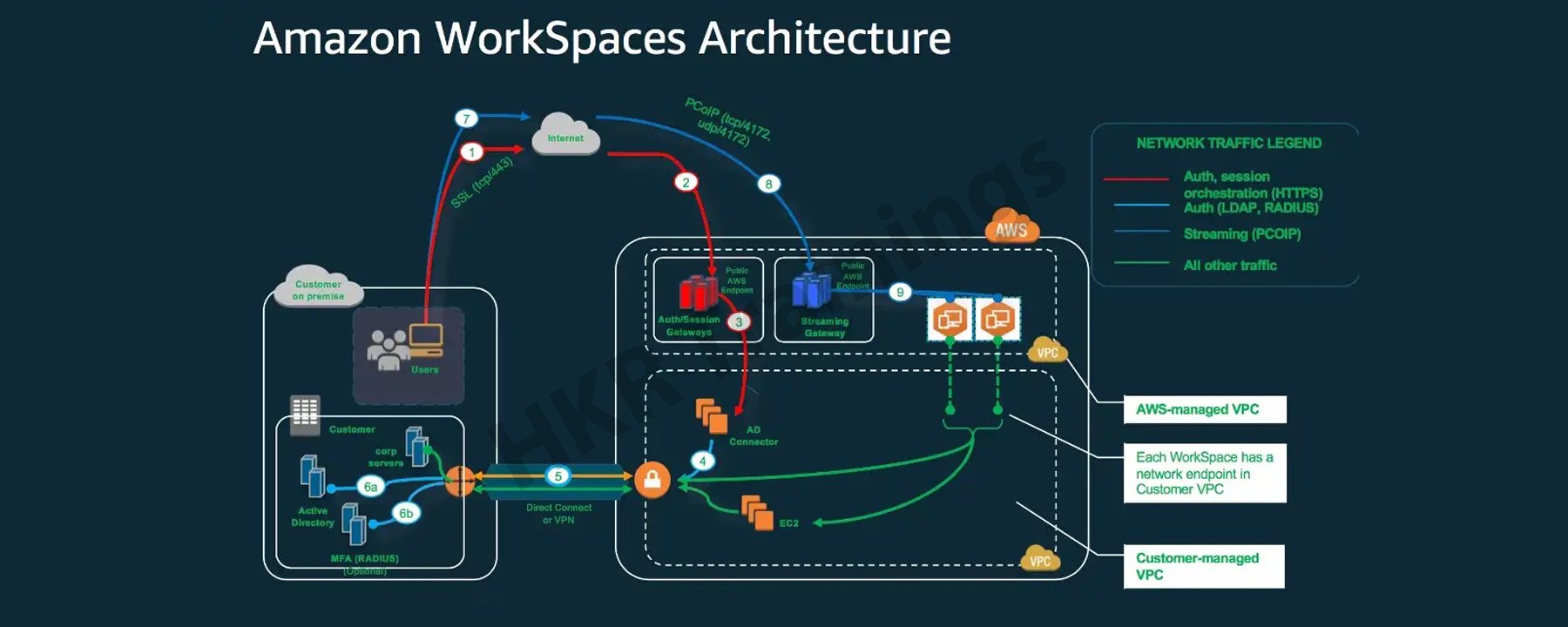
The following diagram depicts the high-level architecture of the Amazon WorkSpaces solution, with a customer using the internet to connect to an Amazon WorkSpace via an Amazon WorkSpaces Windows client.
A Virtual Private Cloud is linked to Amazon workspaces (VPC). The information for workspaces and users is stored and managed by AWS Directory services. To authenticate users, Amazon Workspace uses the Simple AD, AD Connector, or AWS Managed Microsoft AD directory.
Users gain access to the workspace using a client application on a supported device. The traffic towards the directory workspace sends user login information to the authentication gateway. Streaming traffic is started through the streaming gateway after the user has been authenticated. Ports for connecting to the workspace.
These ports are used by client applications to connect to the workspace:
Client applications and web browsers that support the operating system can connect to AWS Workspaces.
There are client applications for:
Windows Operating System
macOS
Ubuntu is a Linux distribution.
Chromebooks are a type of computer that runs on
iPads
Android
Tablets that burn
Amazon Workspace Benefits:
Desktop Delivery Simplified:
You don’t have to be concerned about your computer’s life cycle. When you start creating one, it really is provisioned, deployed automatically. It is preserved by Amazon, and when you close your account, Amazon recycles the desktop for future use. AWS WorkSpaces eliminates such a need to handle all of your desktop’s hardware and software, as well as the need to set up a complex Virtual Desktop Infrastructure (VDI).
You don’t have to buy new laptops or desktops every time you require more; instead, you can use WorkSpaces’ AWS Desktop as a Service to access the cloud-based desktops. These desktops focus on providing resources for Compute, Memory, Storage, and Databases based on the performance requirements of the users.
Control Over The Desktop Resources:
AWS Workspaces eliminates the need to consider the number of desktops to implement. Furthermore, it aids in the configuration of the desktop you require. It offers a variety of memory, CPU, and storage configurations that you can tweak to make the most compatible version for your app. It also reduces the amount of hardware you’ll need to purchase. It is possible to adaptively adjust the resources you utilize, which will help you save money.
Amazon Workspace is made possible by the Amazon Virtual Private Network. The user can use AWS key management services to access encrypted storage volumes in the cloud. No user data is stored on the local device to improve user data security and reduce your overall risk surface area. The user data is not only available on the local device, which reduces the risk involved via the unauthorised access to the data.
AWS WorkSpaces come with a dedicated VPC that gives every user encoded and provides secured access to AWS cloud storage volumes.KMS (Key Management Services) can also be used. It includes both public and private key files. Only the private key file has access to it.
Provide a variety of desktop operating systems to choose from:
AWS WorkSpaces offers Windows 7, Windows 10, and Amazon Linux as operating systems. Any device can be used to access the computing experience of these operating systems. You can also use your personal licence to run WorkSpaces on your own laptop running Windows 7 or 10. You’ll be able to restore your default settings this way.
Deliver Desktops to a Wide Range of Devices:
Windows and Mac computers, Chromebooks, Fire tablets, iPads, and Android tablets are all supported by Amazon WorkSpaces. Access is also possible using the Chrome and Firefox browsers. You can simply download the Amazon Workspaces client and access your WorkSpace from any device once it has been implemented for your use.
Manage and scale your global desktop deployment from a single location:
From the AWS console, a user can control a global deployment of tens of thousands of Workspaces. Desktops can be provisioned as the workforce’s needs change. It is available in 11 regions and offers high-performance cloud computing from anywhere you need it, as well as the ability to scale global desktop deployments.
Utilise your current directory:
The WorkSpace can be securely integrated with an existing corporate directory, such as Microsoft Active Directory.
To give all authorised users access to company resources, multi-factor authentication tools are available.
Subscribe to our YouTube channel to get new updates..!
AWS Workspace Features:
Amazon WorkSpaces is providing the end-users with a secured, cloud-based and managed virtual desktop experience. In contrast to the traditional on-premises VDI solutions, you do not need to think about deploying, procuring, or managing an environment which is complex because Amazon WorkSpaces handles everything for you. Traditional desktop management or an on-site solution for a VDI requires capital investment and is difficult to manage and deploy.
Using a cloud-based virtual desktop eliminates upfront costs and the need to manage the desktop because Amazon will handle everything. It will provide your users with a cost-effective, user-friendly, and widely accessible desktop experience.
Amazon WorkSpaces Bundles:
To start with WorkSpaces, pick a bundle that includes a variety of software and hardware options, then launch as many WorkSpaces as you need. After the WorkSpaces have been provisioned, you’ll get an email to their inbox with instructions on how to establish connectivity.
You can also customise your WorkSpace by creating a custom image and installing your own software bundle.
Microsoft Office and Trend Micro Worry-Free Business Security Services are pre-installed software bundles with Standard plus, Value plus, Performance plus, PowerPro plus, Power plus, GraphicsPro plus or Graphics plus bundles available.
Allowing to bring your own licences:
You can utilizee Amazon WorkSpaces to run the existing Windows 10 Desktop licences on hardware which is physically devoted to you. You could save about 16 percent ($4 per WorkSpace per month) once you bring your existing Windows licence to WorkSpaces versus WorkSpaces, which include a new Windows licence. To satisfy this criteria, your company must meet Microsoft’s licensing requirements and devote itself to having to run upto 100 Amazon WorkSpaces per month in a specific AWS region. Confirm that you might run at least 4 of them AlwaysOn or at least 20 AutoStop GPU-enabled WorkSpaces in a particular region on a monthly basis on a dedicated hardware if you plan to use GPU-enabled bundles (Graphics, GraphicsPro, Graphics.g4dn, and GraphicsPro.g4dn).
Setting up a desktop with Amazon WorkSpaces is simple. It is your choice to either bring up one or more Amazon WorkSpaces, the only thing you have to do is to select the bundles which adequately suit your users’ needs, as well as the count of the Amazon WorkSpaces you want to launch. After your Amazon WorkSpaces provisioning has been completed, the users will receive an email to their inbox with instructions on how to connect to their Amazon WorkSpace and also the steps on where to download the applications within the Amazon workspaces based on their requirements. You can easily delete an Amazon WorkSpace if you do not require it.
Depending on the bundle you choose, you’ll get a different amount of persistent storage. The data that users store on their WorkSpace volume is backed up to Amazon S3, ensuring its security. They can attach Amazon WorkDocs Drive to WorkSpaces, making all of the content on the WorkDocs Drive accessible to users.
How to create Amazon workspaces?
Step 1: Under End User Computing, type WorkSpaces or search for WorkSpaces. Select it by clicking on it.
Select Get Started Now from the drop-down menu.
Select Quick Setup. (This can be used to create WorkSpaces for individuals or small groups.) Step 2: Just choose a specified operating system bundle (free tier to avoid charges), then run the programme and wait for the WorkSpace to appear.
Proceed to Launch WorkSpaces after entering the Username, First Name, Last Name, and Email.
To access the WorkSpaces Console, click View the WorkSpaces Console.
Wait till your WorkSpace’s status changes from Pending to Available.
Step 1: You will receive an email from AWS once the Amazon WorkSpace becomes available, as seen in the image following table:
To begin, go to the link marked 1 and keep updating your profile by entering a new password.
The previous link will now automatically redirect you to the Client download page. Alternatively, you can click on the 2nd link. Alternatively, you can utilize the following link: Amazon WorkSpace is a service provided by Amazon. Choose the appropriate client for your device on the website. It’s Windows in this case.
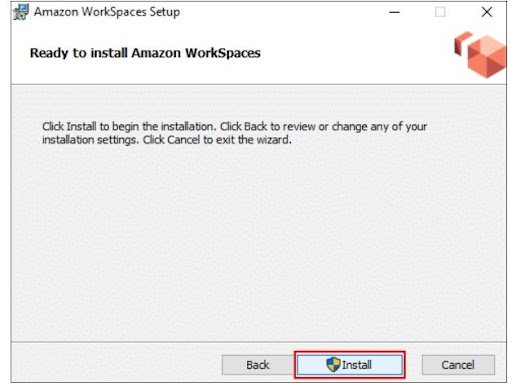
Step 2: Save it by clicking on the download button. Run the saved file and install it as you would any other programme. Even though most of you already know how to do it, screenshots displaying how and where to install the AWS Workspaces Client are provided.
Choose one of the following two options: If you’re installing it on your own computer, choose to install for all users of this computer; otherwise, choose Install just for you.
On your desktop, you should now see an Amazon WorkSpaces icon.
Step 3: After you’ve completed the installation, go to the Amazon WorkSpaces icon and enter your registration code, which you can find in the mail you received.
Then, after entering your Username and Password, click Sign in.
Wait for the desktop to be launched by the WorkSpace Client. You’ve just finished launching your first WorkSpace!
Deleting the Amazon WorkSpace that was created:
Step 1: Select the WorkSpace you would like to remove, and then go to Actions and Remove WorkSpaces.
Step 2: Wait for WorkSpace to be terminated. And that WorkSpace is no longer available!
Conclusion:
For the users of Windows, Mac, and Chromebooks, the Amazon WorkSpaces client applications provide a positive Windows desktop experience with high quality. Recognize the benefits of the change to both your employees and your company. Interact with those ideals to increase employee buy-in. Amazon WorkSpaces is an Amazon Web Services virtual desktop infrastructure (VDI) service (AWS). It’s a cloud-based desktop computing service from the market leader in cloud services. Because Amazon was one of the first public cloud providers, its VDI products are among the most well-known.
To provide the best experiences, we use technologies like cookies to store and/or access device information. Consenting to these technologies will allow us to process data such as browsing behavior or unique IDs on this site. Not consenting or withdrawing consent, may adversely affect certain features and functions.
Functional
Always active
The technical storage or access is strictly necessary for the legitimate purpose of enabling the use of a specific service explicitly requested by the subscriber or user, or for the sole purpose of carrying out the transmission of a communication over an electronic communications network.
Preferences
The technical storage or access is necessary for the legitimate purpose of storing preferences that are not requested by the subscriber or user.
Statistics
The technical storage or access that is used exclusively for statistical purposes.The technical storage or access that is used exclusively for anonymous statistical purposes. Without a subpoena, voluntary compliance on the part of your Internet Service Provider, or additional records from a third party, information stored or retrieved for this purpose alone cannot usually be used to identify you.
Marketing
The technical storage or access is required to create user profiles to send advertising, or to track the user on a website or across several websites for similar marketing purposes.