Tribal nations continue toward energy independence


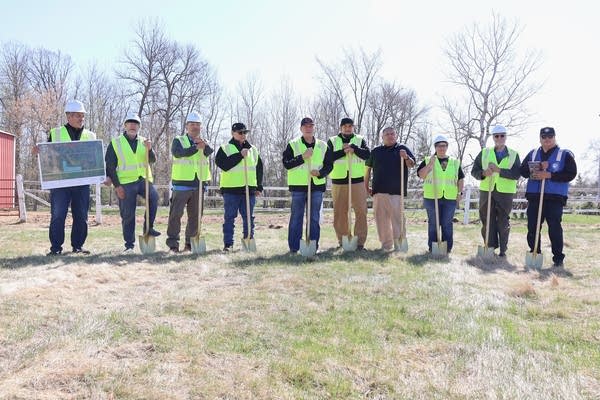
Project and Red Lake Nation leadership pose for picture outside

On a windy day just east of the Red Lake Nation's boundaries, tribal and energy leaders gathered to break ground on a new solar array. The project, named Makwa Solar Array, is being built on land the tribe owns near Blackduck.

Red Lake Nation chair Darrel Seki Sr., said the idea for the array was first introduced 11 years ago. He said he’s happy to see it come to fruition.

“It will benefit our members that have homes to cut the rate on their electric bill,” he said. “That's the purpose of this.”

Darrell Seki Sr. wearing a black hat and reflection vest
Darrell Seki Sr., chairman of the Red Lake Nation, said, as of May 15, that plans to build a solar array were first considered in 2015.
Mathew Holding Eagle III | MPR News

Once complete, the array will generate three megawatts of renewable energy. According to the Minnesota Rural Electric Association, that’s capable of powering approximately 500 homes. Makwa Solar Array was funded through grants and by the Red Lake Nation. The project was developed by the Indigenous led Solar Bear.

“I'm a tribal member of the Red Lake Nation, so being able to be a part of this and to be able to help make this dream a reality, I'm just so ecstatic,” Solar Bear owner Robert Blake said. “This is just an incredible moment right now.”

Blake is also executive director of the nonprofit Native Sun Community Power Development. It’s involved with workforce development for the project, as well as some of the planning and preparation. He said the Makwa Solar Array will benefit the community in more ways than one.

“The proceeds from the sale of this power is going to go back into community programming,” he said. “So, that's what's really going to be exciting about this.”

Red Lake Nation’s project hasn’t started construction yet, but once finished the 3-megawatt solar array will be one of the largest on tribal lands. And it will be wholly owned by the Red Lake Nation.

The launch near Blackduck follows a big solar array project from White Earth Nation called the Pine Point Resilience Hub. It’s a 500-kilowatt solar array paired with a planned 2.76 megawatt-hour battery. Both projects reached key development milestones for funding before the Trump administration dialed back tax credits for solar.

“I'm really glad to see many of Minnesota tribal nations still moving forward with all of those projects that they have planned,” said Lissa Pawlisch, assistant commissioner of federal and state initiatives for the Minnesota Department of Commerce, Division of Energy Resources.

She noted that the One Big Beautiful Bill terminated a 30 percent tax credit for solar projects, which could make it harder for other tribes to fund projects in the future.

“The fact that the tax credits have sunset is really going to make a dent in how those tribal nations are able to move forward, and what they have to pay for at the end of the day,” Pawlisch said. “Thirty percent tax credit means 30 percent of the funds that would have been covered elsewhere, now has to be made up by local investors, local funding resources, and that's going to certainly inhibit things going forward.“

Against that backdrop, she’s excited to see the White Earth and Red Lake projects launch.

“These tribal communities are responding to the needs of their community, saying, ‘This is the kind of stuff we want to see happen,' and then getting it done,” Pawlisch said.

Robert Blake wearing sunglasses, black hat and blue vest
Robert Blake is the owner of Solar Bear, the organization responsible for developing the new solar array.
Mathew Holding Eagle III | MPR News

Energy sovereignty

Corrie Grosse, a sociologist and environmental studies professor at the College of St. Benedict and St. John’s University, has been tracking tribes’ efforts to gain energy independence or sovereignty.

“First and foremost, sovereignty is the right, the ability to self-determine, to control your own economy, to care for your people and for the environment,” Grosse said. “Energy is an area where tribes can really assert their sovereignty or can increasingly so.”

As the author of the book “Working Across Lines: Resisting Extreme Energy Extraction,” Grosse said she’s researched resistance to fossil fuels, and is now focusing on solutions, including “Native leadership and renewable energy in particular.”

A view of a solar panel array near a playground.
The Pine Point Resilience Hub, seen here on May 4, is located at a K-8 school on the White Earth Nation.
Courtesy of Andres Perez

That falls in line with work the Red Lake Nation and White Earth Nation are doing for their own solar arrays.

Grosse said utilities often charge customers more on a reservation than off reservation.

“It's something that I don't know the exact answer to, but it's just really stark,” Grosse said. “There's not a lot of support for sovereignty from local and rural utilities sometimes.”

Grosse said conflicts also exist between utility companies and tribes that try to exert control over their own energy needs.

She pointed to the Minnesota Valley Cooperative Light and Power Association threatening to cut off power to the Upper Sioux Community’s casino, after they revealed plans to activate a solar array to power it, as an example.

Grosse said more education about what sovereignty is as well as how to support it could help.

Backup energy

The White Earth Nation’s Pine Point Resilience Hub is based at a K-8 school and gathering center for elders. The hub was designed to provide backup energy capable of powering the building in times of emergencies. It could power medical devices or act as a warming center in winter.

The Pine Point Resilience Hub was made possible through a partnership between developer 10Power, the White Earth Nation, Pine Point School, 8th Fire Solar and Ziegler Energy Solutions.

Sandra Kwak is the CEO and founder of 10Power, a social impact enterprise that works with communities and tribal nations to build, own, and operate renewable energy projects for climate justice and energy sovereignty.

“This project is really a signature piece of what we do, in that it's providing resilience for the community,” Kwak said. “The school and the tribe are going to own the assets, and we were able to raise capital so that it was zero out of pocket for the community.”

A woman gives a speech in a gymnasium.
10Power CEO Sandra Kwak, delivered a speech Monday, May 4, 2026, during the Pine Point Resilience Hub ribbon cutting.
Courtesy of Andres Perez

Kwak said the resilience hub is going to produce more than 100 percent net of the school’s annual energy usage. She added while the solar part of the project is active, the battery portion won’t be finished until the coming months.

“We're hoping that we'll see more participation programs for the battery to be able to increase resilience for the grid as a whole in the region,” Kwak said.



Source link

Leave a Reply

Subscribe to Our Newsletter

Get our latest articles delivered straight to your inbox. No spam, we promise.

Recent Reviews


Installation of Jira Application:

1. Download the Jira zip file to your OS:

  • Refer to https://www.atlassian.com/software/jira/core/download for Jira Core.
  • Refer to https://www.atlassian.com/software/jira/download for Jira Software.
  • Refer to https://www.atlassian.com/software/jira/download for Jira Service Management. 

Become a master of Jira by going through this HKR Jira Training!

2. Create a folder named installation directory. This is the place where the Installation of Jira will be done. Do not use spaces or special characters in the path. Extract the Jira Zip file in your installation directory.

3. Create a folder named the home directory. This is the place where Jira data such as search indexes, logs, and files are stored. You should create this folder separately from your installation directory.

Let Jira know where to find the home directory when it starts. There are two ways to do it. 

  • Setting up an environment variable (generally Preferred)
  • Edit the jira-application.properties file

Setting up an environment variable:

  • You need to set an environment variable called “Jira_Home” in the OS with an exact path to the home directory.   
  • set JIRA_HOME=A:\path\to\jira-home
  • where A is the drive on which you have created the home directory.
  • You may later specify the above command in a script that is used to start Jira.

Edit the jira-application.properties file:

  • In any text editor, edit the file installation_directory\atlassian-jira\WEB-INF\classes\jira_application.properties. 
  • Next, add jira.home exact path to your home directory. You should avoid backlashes.
  • If you set a UNC path, you will have to double escape the primary backslash.

If you want to Explore more about Jira? then read our updated article – Jira Tutorial

Jira Administration Training

  • Master Your Craft
  • Lifetime LMS & Faculty Access
  • 24/7 online expert support
  • Real-world & Project Based Learning

4. By default, Jira checks port 8080.  If another application uses the same ports, you must tell Jira to use another port.

5. Then you can start Jira.  

  • Start the installation process by running installation_directory/bin/start-jira.bat. A command prompt opens. Closing it will stop Jira.
  • To run Jira in your browser, go to http://localhost:8080/.
  • If the command prompt window immediately closes, then your Java_home variable may be incorrectly set.

[ Related Article : jira training ]

Setting up Jira Application:

1. Select the setup method. Select ‘I will set it up myself’.

2. Connect with your database: 

  • If you haven’t done that yet, now is the time for you to set up a database.
  • Select My own database.
  • Select your database type and enter your database details.

3. Define Application properties:

  • Enter the name of your Jira site
  • Choose if your website needs to be private or everyone can register. You’ll be able to change that later.
  • Enter your basic URL through which people will be able to access your Jira website.

JIRA will connect to your database by means of a standard connection to the JDBC database. Connection sharing is managed in JIRA and can be modified later using the JIRA configuration tool.

When using Oracle or MySQL, there is an additional step:

  • Download and extract suitable database JDBC drivers.
  • Put the JAR file in your jira_installation/lib folder before proceeding with the setup wizard.

4. Enter the License:

  • Follow the instructions to sign in to my.atlassian.com to recover your license or enter the license key.

5. Sign up for your admin account:

  • Enter your administrator account details. Additional administrators can be added at the end of the setup.

6. Configure email notifications:

  • Enter the email server details. It enables Jira to send notifications when problems change.

7. Get started with Jira: 

That’s all! Your Jira website can be accessed from your basic URL or a URL such as http://computer_name(or)IP_address:port

Now, let us go through some of the prerequisites before we install Jira.

frequently asked Jira Interview Questions and Answers !!

HKR Trainings Logo

Subscribe to our YouTube channel to get new updates..!

Jira installation Prerequisites:

1. See the Supported Platforms page to learn which version of Jira you are installing. It will provide you information about the supported operating systems, browsers and databases. 

Note: 

  • The installation of Jira on OSX is not supported.
  • We can use JDK (Java Development Kit) or JRE (Java Runtime Environment).
  • Only the version of Apache Tomcat provided with Jira is supported.

2. If you install Jira on a 32-bit system, you must reduce the maximum amount of heap available for Jira. 2GB is the default size 64bit system which is very high for a system with 32 bit and may be unsuitable for available memory.

Follow these steps once you have extracted files from the archive, but even before you start Jira.

  • The Default setenv file must be renamed. 

Go to the Jira-install-directory/bin directory and remove the setenv.bat/.sh file (edit its name). 

Label setenv32.bat/. sh as setenv.bat/.sh. Jira will use that file during startup.

  • You need to add properties for the jira-config.properties file.

Go to the home directory of Jira, and change the jira-config.properties file. In case there is no file, you may create it.

Add the properties below:

jira.index.batch.maxrambuffermb=256

jira.index.interactive.maxrambuffermb=256

3. Executing Jira as a service on Windows indicates that your Jira application will start automatically once Windows is started. You need to use the Windows installer if you wish to execute Jira as a Service.
In the event that you decide not to use Jira as a service: You need to start and stop Jira by executing the file start-jira.bat in your Jira installation folder. 

Jira will be executed as the Windows user account which is used to install Jira, or you may choose to operate it as a dedicated user. (This user requires complete read and write access for the installation folder and the base folder). Jira requires a manual restart when your server is restarted.

4. In order to start Jira in production, you must have an external database. Refer to the Supported Platforms page for the version you are installing for a list of currently supported databases. If you do not have a database, then PostgreSQL is the best choice. It is free, easy to configure, and has gone through many tests with Jira.

  • Configure your database before you start. Stepwise guidance for all supported databases can be found in Connecting Jira Apps to a Database.
  • UTF-8 character encoding can be used.
  • If you use either Oracle or MySQL, you will be required to download your database driver.
  • The integrated H2 database can be used to evaluate Jira, but you need to migrate to a different database before executing it in production. An external database can be easier to use right from the beginning.

5. You require a valid Jira software server, Jira service desk server or Jira Core server license to operate JIRA.

  • If you have not purchased a Jira Application License, then you can create an evaluation License during configuration.
  • If you are having a license key, you will be asked to log into my.atlassian.com to get it back, or you may manually enter the key while configuring.
  • If you are moving from Jira Cloud, then you will require a new Jira license.

6. Before installing Jira, make sure that you are using a supported Java version and that the JAVA_HOME environment variable is set properly.

Jira applications will work with Oracle JDK, OpenJDK, or JRE. To verify the JAVA_HOME variable:

  • Open the command prompt and enter “echo %JAVA_HOME%” and press Enter. 
  • If you are able to see the path to your Java install directory, then the JAVA_Home environment variable has been properly set. 
  • If nothing is shown, or  %JAVA_HOME% is shown, you need to manually define the JAVA_HOME environment variable.

Become a master of Windows Networking by going through this HKR Windows Networking Training !

Jira Administration Training

Weekday / Weekend Batches

Conclusion:

In this post, we have gone through the installation of the Jira application on windows, Setting up the Jira application and the prerequisites before installing Jira. I hope this post was helpful!

Other Article:

Bitbucket Training

Jira Sample Resumes


Source link