Gov. Tim Walz on Tuesday appointed Associate Justice Theodora Gaïtas to serve as chief justice of the Minnesota Supreme Court, following the retirement of current Chief Justice Natalie Hudson in September.
The move leaves an associate seat open on the bench, which Walz said he will fill with the appointment of Ramsey County District Court Judge Reynaldo Aligada Jr. A ceremony announcing the appointment of both justices is scheduled for Tuesday afternoon.
Ramsey County District Court Judge Reynaldo A. Aligada Jr. was appointed to the Minnesota Supreme Court by Gov. Tim Walz on Tuesday.
Courtesy of the Minnesota Judicial Branch
Gaïtas has previously served on the Minnesota Court of Appeals and the Fourth Judicial District Court. Walz appointed her to the Supreme Court in 2024. The DFL governor said her experience as the only Supreme Court justice to serve at all three levels of the judicial branch, as well as the first former public defender to lead the court, would serve the state well.
“Justice Gaïtas will be an exceptional chief justice, leading the Judicial Branch with wisdom, resolve, and fairness,” Walz said in a news release. “She brings a rare breadth of experience, having served at every level of our state’s judiciary, and will be the first public defender to serve as chief justice of the Minnesota Supreme Court. That perspective will be invaluable, guiding her leadership as she takes on this profound responsibility to serve all Minnesotans.”
Gaïtas said she is honored to be appointed to lead the state’s high court.
“I’m committed to a judiciary that all Minnesotans can access, trust, and rely on. These commitments will guide every decision I make as chief justice,” she said. ”I look forward to working alongside the talented judges and court professionals across this state, whose dedication makes justice possible every day. And I want to recognize and thank Chief Justice Hudson, who has provided outstanding service to the judicial branch and the people of Minnesota.”
Aligada will fill the vacancy left by Gaïtas when she is elevated to the chief justice post. He currently chairs the Minnesota Supreme Court Advisory Committee on the Minnesota Rules of Evidence. Prior to serving on the Ramsey County District Court, he worked in the Office of the Federal Defender and as an associate at the firm Robins, Kaplan, Miller and Ciresi.
Walz said Aligada“is someone who leaves a lasting impression on everyone he meets, pairing a keen legal mind with genuine humility and compassion.”
“He will be a justice who truly sees and listens to the people who come before him, ensuring every voice is heard and respected,” Walz continued in a news release. “In addition to his outstanding judicial background, he will bring a perspective not yet represented on this court, the voice of Minnesota’s Asian Pacific Islander community, further strengthening the court’s connection to the people it serves.”
Aligada said he’s humbled and honored to join the court.
“I am so grateful to the governor and his team for entrusting me with this great responsibility. I recognize the impact the Court’s decisions have on the lives of Minnesotans, and I will strive to do justice and protect the rule of law,” Aligada said.
Members of the Commission on Judicial Selection and the governor’s administration reviewed seven candidates and recommended that four interview for the associate justice position. And three current associate justices — Gaïtas, Anne McKeig and Paul Thissen — interviewed for the chief justice position.
When Gaïtas is elevated to the chief post and Aligada joins the court, five of the justices will be Walz appointees. And all seven justices on the court will have been appointed by Democratic governors, as is currently the case.
Selenium is an open-source, most popular web automation testing tool that supports multiple browsers & OS. XPath in Selenium is an XML Path and a syntax useful for locating an element on a web page. Locating any element on the web page uses XML path or XPath expression. Further, XPath in Selenium is useful for navigating through the HTML structure of the web page.
Moreover, XPath uses HTML DOM structure to find any element on a web page for both HTML and XML documents.
The syntax for XPath In Selenium
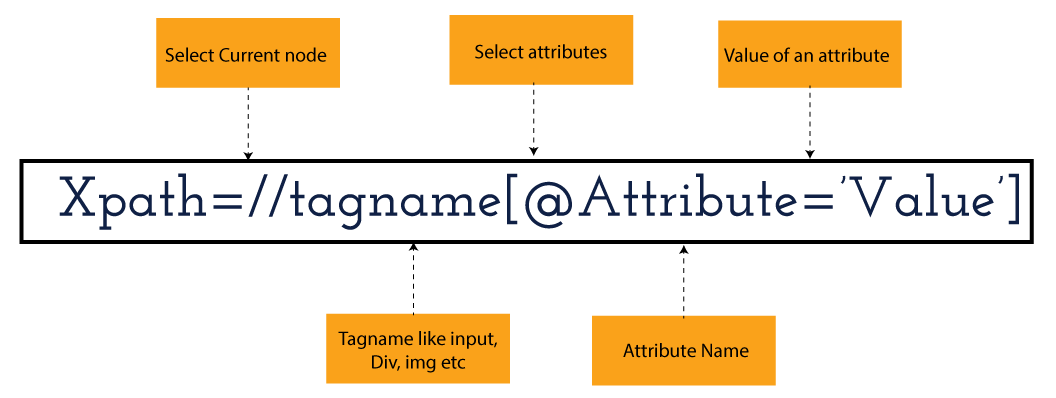
XPath in Selenium holds the element’s location on the web page. The basic syntax for XML Path Selenium is as follows-
Xpath=//tagname[@attribute="value"]
The meaning of each expression in the syntax is-
// : Choose the existing node.
Tagname: Particular node’s tagname.
@: This symbol denotes the “Select” attribute.
Attribute: Node’s attribute name.
Value: Attribute’s Value.
Become a master of Selenium by going through this HKRSelenium Training!
XML Document
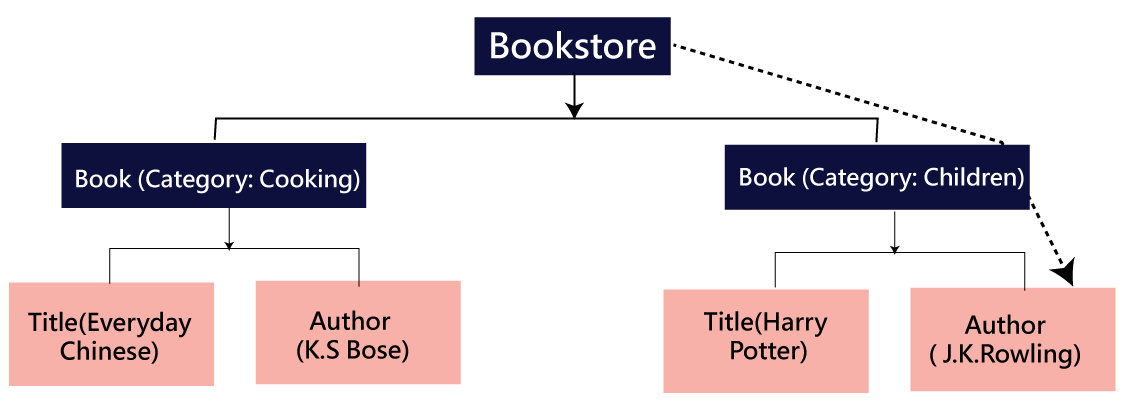
The XML documents are the text files that contain XML data, including elements and other markups, in a sequential package. Further, it can include a wide variety of data such as numbers databases, numbers of a mathematical equation, etc. You can understand XML document with an example:-
Kumar
AK & Co.
032456123
Here, the above code is divided into two parts- Document Prolog & Document Elements. Let us discuss them in brief.
Document Prolog
The document prolog appears at the top of the document, beforE the root document element. It includes XML and Document type declaration.
Document Elements
These major building blocks of XML segregate the document into different sections. Each of these document sections perform a particular purpose. Moreover, you can easily segregate a document into different sections so that search engines can use it. Further, these document elements can be the containers having text and other elements combined.
Types of XPath
Absolute XPath:
Relative XPath:
Absolute XPath
In Selenium, the absolute XPath is the direct path to find the element. This Xpath begins with the “/” (Slash) symbol and helps select the element from the root. The major drawback of this XPath is that if you change the path of the element or attribute, the absolute XPath will fail.
Relative XPath:
The Relative XPath in Selenium begins with the double forward slash “//” symbol and from the middle of the HTML DOM. You can search elements anywhere on the web page as it doesn’t need to write a lengthy Xpath. This XPath is mainly considered as it is not a complete path from the root element.
For example: //input[@id=‘ap_email’]
Suppose You launch Google Chrome and navigate to google.com. Then locate the search bar utilising XPath. By analysing the web element there is an input tag and attributes like class and id. Utilise the tag name and given attributes to create XPath that will locate the search bar.
If you want to Explore more about Selenium? then read our updated article –Selenium Tutorial
Click the Elements tab and press Ctrl + F to open a search box in chromes developers tool. Write XPath string selector and it will try to search based on that criteria. In the image given above, it has an input tag. //input implies tagname. Use the name attribute and pass ‘q’ as its value. It provides XPath expression as shown below:
//input[@name=’q’]
It has focused on the element that implies this specific element was located utilising XPath.
If you want to Explore more about Selenium? then read our updated article –Selenium Tutorial!
Check out our Latest Tutorial video. Register Now Selenium Online Course to Become an expert in Selenium.
Acquire Selenium with jenkins certification by enrolling in the HKR Selenium with jenkins Training program in Hyderabad!
Selenium Certification Training
Master Your Craft
Lifetime LMS & Faculty Access
24/7 online expert support
Real-world & Project Based Learning
XPath Functions
Automation utilizing Selenium is unquestionably an incredible innovation which gives numerous approaches to distinguish an article or component on the website page. Be that as it may, in some cases we do deal with issues in recognizing the articles on a page that have similar credits. Some cases can be: components having similar credits and names or with more than one button with similar name and ids. It’s trying to train selenium to distinguish a specific item on a website page and it is the place where XPath functions to serve as the hero.
Selenium involves different functions. The three of the most broadly utilized functions are given below:
1) Basic XPath
The basic XPath expression selects nodes or a list of many nodes based on various elements or attributes such as ID, Name, ClassName, etc. It selects them from the XML documents. The syntax we can use for the basic XPath is –
Xpath=//input[@name="uid"
2.Contains()
It is a method used in XPath expression when the value of an attribute or element dynamically changes. You can easily find the elements with a partial text using the “Contains” feature in the XPath expression. Now understand this with the below example.:-
Xpath=//*[contains(@type,'sub')]
The above example denotes that the full value of the element type is submitted, but we use the partial text ‘sub’ here to find the element. Thus, in the above example, we tried to find the element by giving a partial text of the attribute “submit”.
3) Using OR & AND
Here, we use two conditions, first or second condition, among which one condition must be “True” to execute it. This method is still applicable if any one or both conditions are “true”. It means that any conditions should be true to find the element. The expression we can use for this is-
Xpath=//*[@type="submit" or @name="btnReset"]
The above XPath expression will help determine whether a single or both conditions are ‘True’.
Similarly, in the “And” XPath expression, also we use two conditions, but both conditions should be “true” to locate the element. If any one of the conditions becomes “false”, then the expression cannot find the element. The syntax we can use for this function is-
Xpath=//input[@type="submit" and @name="btnLogin"]
4) Xpath Starts-with
The function Xpath-Starts-with() in the Xpath functions is useful to find the element whose attribute value changes in some conditions. Here the value changes with the refresh of the page or by performing dynamic actions on the webpage. In this method, the initial text of the attribute should be in parallel to locate the element whose attribute value changes interactively.
Further, you can also find the elements whose attribute value doesn’t change or remain static. You can understand this function’s use by the following example:-
Xpath=//label[starts-with(@id,'message')]
The above syntax shows that two different elements start with the initial id “message”. Here, you can use the Xpath-starts with function to check whose attribute value changes or remains static.
Subscribe to our YouTube channel to get new updates..!
5) XPath Text() Function
In Selenium WebDriver, the function XPath Text() is a built-in function useful to locate elements based on the web element’s text. Using this function, you can find the same text element. Moreover, the elements that you locate must be in a string format.
Xpath=//td[text()='UserID']
Using the above expression having text function, you can locate the element that will show the exact match of the text.
6) XPath axes methods
This method in XPath functions is useful for finding complex or changing elements. However, we can see the following XPath axes methods which we can use:-
a) Following- It is useful to select all the elements in the document of the existing node(). The expression you can use for this method is-
Xpath=//*[@type="text"]//following::input
b) Ancestor- The ancestor axes method is useful to select all the ancestor elements of the existing node, like parents, grandparents, etc. Here, the expression you can use is-
c) Child- This axes method selects all the child elements in the documents’ current node. The expression you can use here is-
Xpath=//*[@id='java_technologies']//child::li
d) Preceding- This method helps select the nodes that come before the existing ones. Here is the example expression:-
Xpath=//*[@type="submit"]//preceding::input
The above expression helps to identify all the input elements before the currently given nodes.
e) Following-sibling- This method helps to select the following siblings of the existing node. All the siblings will be equivalent to the existing node, and the method will find the sibling next to the existing node. Moreover, the syntax you can use here for this method is-
f) Parent- It helps to select the parent from the existing node of the element. The following is the syntax you can use here.
Xpath=//*[@id='rt-feature']//parent::div
Many div(s) match with the parent, but if you want to focus on a specific element. For this you can use the below xpath syntax-
Xpath=//*[@id='rt-feature']//parent::div[1]
g) Self- In this method, it selects the existing node where it selects itself only. That means the node here is the “self”. The expression you can use for self is-
Xpath =//*[@type="password"]//self::input
h) Descendant- It helps to select the descendants of the existing element where it recognizes all the element descendants of the existing element.
Xpath=//*[@id='rt-feature']//descendant::a
Selenium Certification Training
Weekday / Weekend Batches
Conclusion
XPath or an XML Path is used to locate any element or navigate through the HTML structure of a webpage. It is generally used for automation purposes and in cases where it is difficult to find elements using locators like name, class, ID, etc. However, it is the most important among the locators useful in Selenium to identify web elements. Also, it is a handy locator for the testers of web pages.
Thus, learning about XPath in Selenium will help you quickly identify a web element on a web page.
To provide the best experiences, we use technologies like cookies to store and/or access device information. Consenting to these technologies will allow us to process data such as browsing behavior or unique IDs on this site. Not consenting or withdrawing consent, may adversely affect certain features and functions.
Functional
Always active
The technical storage or access is strictly necessary for the legitimate purpose of enabling the use of a specific service explicitly requested by the subscriber or user, or for the sole purpose of carrying out the transmission of a communication over an electronic communications network.
Preferences
The technical storage or access is necessary for the legitimate purpose of storing preferences that are not requested by the subscriber or user.
Statistics
The technical storage or access that is used exclusively for statistical purposes.The technical storage or access that is used exclusively for anonymous statistical purposes. Without a subpoena, voluntary compliance on the part of your Internet Service Provider, or additional records from a third party, information stored or retrieved for this purpose alone cannot usually be used to identify you.
Marketing
The technical storage or access is required to create user profiles to send advertising, or to track the user on a website or across several websites for similar marketing purposes.