Waymo — the Alphabet-owned driverless taxi service which has seen a rapid expansion in recent years — is rolling out a new rewards program today.
The service is called Waymo Premier, and it promises priority pickups along with a 10 percent in-app rebate applied to future rides. Subscribers will also get fee-free cancellations, though only up to five a month. Lastly, Premier gives subscribers the chance to be among the first to use Waymo in new cities as the service expands, which is certainly one way to reframe the concept of paying to beta test those new coverage areas.
The asking price for all of this is $30 a month, and that’s where Waymo Premier feels like it’s jumping the shark. Uber One, the loyalty service for Waymo’s human-driven competitor, is only $10 a month but gets you discounts on hotels, car rentals and food delivery, in addition to 6 percent in-app credits on rides. You even get 10 percent of a car rental cost credited to your Uber account.
Meanwhile, Lyft offers Lyft Pink, which also costs $10 a month and gets you 5 percent off Standard rides along with free priority pickup. The whole point of eliminating the driver from a taxi service was supposed to be saving on human labor costs, but when you’re putting drivers out of a job and charging the customer three times as much, it’s fair to question where the value of Waymo Premier is hiding.
It’s not as if you’ll offset the inflated price of Waymo Premier by riding with robots, either. As found by rideshare data analytics firm Obi in a June 2025 report, a ride with Waymo is much more expensive on average than the same ride taken with Uber or Lyft. So, you’re paying more for the subscription and more per-ride, all to be carted around by a self-driving system that still needs human intervention from remote workers. It’s not exactly the deal of the century, and you never know when your ride will crush a beloved neighborhood cat to death.
Which brings us to the many, many times Waymo has been in the news for the wrong reasons recently. It’s not that Uber and Lyft are problem-free — late last year, the New York Times uncovered that Uber allowed violent felons to drive with its platform, not to mention all the sexual assault complaints and lawsuits against the company. There are valid reasons to want no one else in the car with you, especially if you’re a lone woman or a member of a marginalized community. If a bear is preferable to a man, so is a car that might drive directly through a guns-drawn police standoff or flee from police with you inside. But there’s no reason to pay $30 more for the privilege each month on top of the already inflated ride fees, especially when Waymo has had to recall software for its entire fleet as recently as last month following dangerous behavior during a flood in San Antonio, Texas.
SQL Server Data Tools (SSDT) offers a declarative model to make the relational database development easy. Developers can use Transact-SQL to build, debug, maintain, and refactor databases all from within Visual Studio. They can either connect a database and work on it directly or work on a database project. Developers can also use code navigation and IntelliSense tools to work with SSDT.
It provides a visual view to create and edit tables through Table Designer. It also offers version control for database files, which will be easier for a team-based environment.When all the data modifications are done, they can publish the projects to target platforms, which are nothing but other supported SQL platforms like SQL Database and SQL Server.
The database projects in Visual Studio can be viewed through the SQL Server Object Explorer. It helps developers in performing light database operations like create, edit,rename, and delete tables.It also helps in implementing stored procedures, types, and functions.They can even compare schemas with the help of contextual menus.
To gain in-depth knowledge with practical experience in SQL server, then exploreSQL server Training!
Advantages of SSDT
Here are some of the many advantages that SSDT provides.
Developers can create database projects through which they can carry out database operations easily.
All the database operations can be performed using Transact-SQL.
Developers get rich editing and debugging experience while working with Transact-SQL scripts.
They can compare data between a source and a target database.They can also set the target database data in sync with the source database.
Developers can configure CI/CD pipelines that reflects changes in the target database using Azure DevOps.
Developers can clone a production database to a test instance, apply changes to it, and publish the changes back to the production database.
It lets the developers control their code versions using source control.This will be extremely beneficial in a team environment.
They can use Table Designer to manage table relationships.
The Table Designer also shows the syntax and semantic errors during build and deployment. It also shows the error while editing database entities and their definitions.
Developers can debug and perform SQL Server unit tests on databases to verify the changes performed.
Installation of Visual Studio
To work with SSDT, we need Visual Studio first. It is very easy to install Visual Studio. Let me walk you through the process in a step-by-step way. I also included some screenshots to help you better follow the process.
Note: If you already have Visual Studio installed on your machine, you can skip this step.
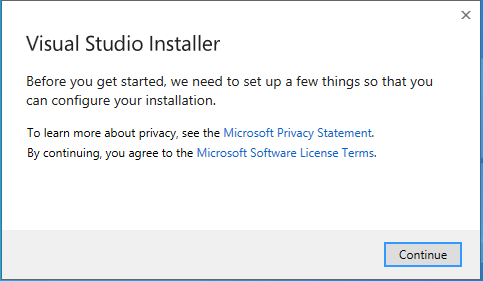
Go to https://visualstudio.microsoft.com/thank-you-downloading-visual-studio/?sku=Community&rel=16# to download Visual Studio. Run the executable file to start the installation process. You will get an installer screen asking to agree to terms and conditions.
Click on ‘Continue’ to start fetching the files by the installer.It may take a while to get everything ready. It will then show the installation location and asks to choose a workload.
SQL Server Certification Training
Master Your Craft
Lifetime LMS & Faculty Access
24/7 online expert support
Real-world & Project Based Learning
Select the ‘ASP.NET and web development’ workload and click on the ‘Install’ button. It takes some time to get the installations done.You can observe the progress while the installation is being done.
Once the installation is complete, you will get the following screen.
Add SSDT to Visual Studio
Launch your Visual Studio Installer and click on ‘Modify’. You will get the workloads screen. Choose the ‘Data storage and processing’ option under ‘Other Toolsets’.
Click on ‘Modify’ and it will start installing the workload. Once the process is done, you will get the following screen.
Click on ‘Launch’ to open Visual Studio.
Create a database project
In the Visual Studio, click on ‘File’ in the top left corner. Click on ‘New’ and select ‘Project’. You will get the ‘Create a new project’ screen. Search for ‘SQL’ in the search box.
Choose the ‘SQL Server Database Project’ from the search results and click on ‘Next’. You will get a configuration page
Give a name for your project and click on ‘Create’. Once the project is created, you will get your project structure in the Solution Explorer.
Double-click on the properties option under your project.
Make sure that ‘SQL Server 2016’ is set as your target platform. Now you can start working on your databases.
Subscribe to our YouTube channel to get new updates..!
Tips and Tricks
Here are some pointers that might help you while working with SSDT.
To keep the SQL statements clean and easy to read, use inline syntax.It will be easier to validate the DDLs.
Ensure that all the DDL objects in your project are set to build.
If you want to promote your DML statements to another environment, then it will be better to include them in the project and set the DML SQL script to none. Make sure that you compare your database in development with the one in production frequently.
It is always important to build a project as it captures the changes made. So, make it a habit to build your project regularly.
For each project, always save the Schema Comparison (SCMP) settings.
When you perform schema comparison, always generate the script instead of updating it. So, you can validate the script before executing it.
SQL Server Certification Training
Weekday / Weekend Batches
Conclusion
In this post, we have provided an overview of Microsoft’s SQL Server Data Tools. It also helps in designing and deploying SSIS packages using Visual Studio.There is a bit of a learning curve that is needed to master working with SSDT. Once you start practicing,it will become easier.Try working with database projects using SSDT in Visual Studio.Once you get the hang of it, you will understand that it is the easiest tool to get your database work done.
To provide the best experiences, we use technologies like cookies to store and/or access device information. Consenting to these technologies will allow us to process data such as browsing behavior or unique IDs on this site. Not consenting or withdrawing consent, may adversely affect certain features and functions.
Functional
Always active
The technical storage or access is strictly necessary for the legitimate purpose of enabling the use of a specific service explicitly requested by the subscriber or user, or for the sole purpose of carrying out the transmission of a communication over an electronic communications network.
Preferences
The technical storage or access is necessary for the legitimate purpose of storing preferences that are not requested by the subscriber or user.
Statistics
The technical storage or access that is used exclusively for statistical purposes.The technical storage or access that is used exclusively for anonymous statistical purposes. Without a subpoena, voluntary compliance on the part of your Internet Service Provider, or additional records from a third party, information stored or retrieved for this purpose alone cannot usually be used to identify you.
Marketing
The technical storage or access is required to create user profiles to send advertising, or to track the user on a website or across several websites for similar marketing purposes.