We’ve Tested Dozens of Air Fryers. This Ninja Model Is Our Favorite (by Far)


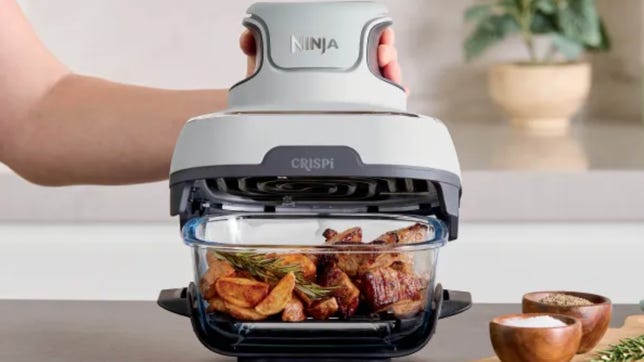
Hand holding cooking lid above glass-bowl air fryer

Pros

  • Cook, serve, and storage capabilities
  • Easy to clean: almost everything is dishwasher-safe
  • Intuitive operation
  • No concern about PFAS
  • Ability to see cooking in progress
  • Can buy additional glass vessels for maximum food prep
  • Small storage footprint with nesting capabilities
  • Portable

Cons

  • Price is on the high side for air fryers
  • Some exposed hot elements during operation

Air fryers come in all shapes and sizes. There are toaster oven-style air fryers, Instant Pot air fryers and many full-size ovens that even feature an air fryer function. I’ve tried almost all of them, and one stands out as the best for an average home cook.

Following loads of air fryer testing — more than two dozen models at last count — the glass-bowl Ninja Crispihas emerged as CNET’s top pick overall. 

After using Ninja’s innovative Crispi glass air fryer for more than a year, with its nontoxic chambers that double as serving bowls and storage containers, I’m still all in. The glass cooking chamber and modular build represent the most significant advancement in air fryer design since these appliances appeared more than ten years ago.

ninja crispi bowls with chicken and sprouts inside

Food that’s cooked in the Crispi is ready to be packed away or brought to the table as soon as it’s done. 

Pamela Vachon/CNET

The Crispi has a nontoxic glass cooking chamber that’s easy to clean, and its cooking power is as good or better than any we’ve tested. Plus, the entire unit breaks down for easy storage after use — a claim that 99% of other air fryers can’t make.

Read more: Air Fryer Fails: 8 Foods That Just Can’t Handle the Heat

Here’s how the Ninja Crispi glass air fryer works, along with four key reasons I made the switch.

Ninja Crispi 4-in-1 portable glass air fryer at a glance

  • Style: Modular air fryer with two sizes of glass cooking vessels and a separate cooking pod in three color options
  • Dimensions: 13.5 by 12 by 13.5 inches
  • Power: 1,500 watts
  • Weight: 15.74 pounds
  • Price $160

Ninja Crispi operation: How it’s different

A Ninja Crispi is air frying chicken. The fryer basket is a glass cooking chamber.

Being able to visually track progress is one of the big draws for Ninja’s new air fryer.

Pamela Vachon/CNET

The cooking pod itself includes crisp, bake, air fry and max crisp functions. Crisp is intended to revive leftovers, while max crisp is the ideal setting for packaged frozen foods. While it is tempting, given their baking dish look, the glass TempWare bowls are not intended to be used as the actual cooking vessels for batters in bake mode, because air still needs to circulate below the cooking vessels to be effective. (Will I try anyway? The temptation is real.) 

Pressing any button will activate a digital timer, allowing you to add or subtract minutes. (The timer defaults to 10.) When the timer is below 1 minute, it switches to seconds, and the device beeps to alert you when the cycle is complete. Overall, the Ninja Crispi’s sound level was similar to that of conventional air fryer models, with a moderate whir while operating.

4 reasons the glass Ninja Crispi is better

1. I can check the progress of my food without losing heat

ninja crispi cooking chicken

You can track cooking progress without stopping the machine.

Pamela Vachon/CNET

As expected, the ability to see the cooking in progress was really satisfying, both from a nerdy perspective and as a way to look for visual cues to determine when to flip items or assess doneness. Both chicken parts and Brussels sprouts were cooked evenly and efficiently, with little risk of overcooking, given the 360-degree view into the proceedings.

Because I can track progress without opening the basket or stopping the machine, food cooks faster. Who doesn’t love that?

2. Glass bowls are nontoxic and easy to clean

A Ninja Crispi is cooking potatoes.

We found the glass cooking chamber superior on several fronts.

Ninja

Most air fryers use aluminum cooking baskets with a nonstick coating. Those coatings tend to chip and break down if you’re not careful. Plenty of folks are concerned about the health ramifications for ingesting nonstick chemicals that chip off cookware. With a glass-bowl air fryer, there’s no worry.

If that’s not enough, glass is much easier to deep-clean than nonstick surfaces and you can use the dishwasher without issue. 

3. The glass bowls double as food storage containers

Ninja Crispi baskets store the cooked chicken and brussels sprouts as can be seen through the glass.

The cooked food is ready to be packed away or brought to a party as soon as it’s done. 

Pamela Vachon/CNET

The versatility, however, makes the Ninja Crispi tremendously interesting, especially for avid meal preppers. Full meals or individual cooked components can be stored directly from the cooking process in the fridge, thanks to the included lids for easy storage. (Although I am bound by refrigerator logistics to tell you to let it all cool first, so you don’t inadvertently raise the temperature inside your fridge.) 

Additional cooking bowls in various sizes can be purchased separately, allowing for the preparation of multiple individually cooked meals with no cleanup required between uses: simply transfer the cooking pod from one cooking vessel to the next, assembly-line style. Sunday meal prep has never been easier, nor required fewer dishes.

4. It breaks down for easy storage

Ninja Crispi air fryer has been taken apart and stored in a drawer.

Not many air fryers break down for easy storing the way the Crispi does.

David Watsky/CNET

The Ninja Crispi is also easy to store, with a footprint and height requirement that is far less than a lot of conventional models. It also makes for easy portability — ideal for a potluck or even just a self-care hot meal — and you can even justify cooking on site. Either of the cooking bowls or the cooking pod could easily fit in a shoulder bag. If I worked in an office, it would thrill me to bring the whole thing with me to have a hot, healthful lunch without reheating. Although if you’re contemplating being the person to cook fish directly at your desk — maybe don’t.

Not only can the larger 4-quart bowl be used directly as a family-style serving vessel — whose practical feet preclude the need for a trivet or pot holder — but one could argue that the smaller 4-cup vessel can be used to eat out of directly, significantly reducing the number of dishes to wash. Speaking of washing, everything except the cooking pod itself is dishwasher-safe. 

Ninja Crispy setup

Nina Crispi sits empty on counter next to a spare glass air frying basket.

Convenient as it, the glass cooking chamber does get hotter than your average air fryer base.

Pamela Vachon/CNET

Although it doesn’t resemble a typical air fryer, the Ninja Crispi was intuitive to set up and use. Each glass cooking vessel has a built-in stand with feet that keeps it off the counter. Side handles are also fitted to the bowls’ stands, allowing easy transportation between the counter and the table (since the vessels can also be used for serving) and making it easy to shake the contents as needed during cooking.

The nonstick crisper plates were packaged separately and were easy to place in the bowls and remove for cleaning. Lids for the 6-cup and 4-quart bowls were also included: a snap-on lid for the smaller and a simpler press-on lid for the larger. 

The cooking pod features an ergonomic shape for easy lifting and includes feet for secure placement on the counter when not in use. The cooking pod sits easily on top of the 6-cup bowl, and a big-batch adapter frame fits the cooking pod onto the larger bowl. Between unwrapping and rinsing all of the washable parts, I was ready to go in about 2 minutes.

What I didn’t like about the Ninja Crispi

As a modular device with numerous built-in practicalities and versatility, the Ninja Crispi is a game-changer in the air fryer market. That said, at $160, it’s on the more-expensive side for an air fryer. 

Those with little ones in the house may also want to note that when the cooking pod is used with the adapter for large batches, the adapter can become hot and potentially expose them once the heating pod is removed. Never mind little ones; if you’re an absent-minded cook yourself, it can be a hazard.

Read more: 8 Foods That Go From Good to Great in an Air Fryer

Final verdict on the Ninja Crispi

If you’re a disciple of air fryer cooking and, especially if you have a serious commitment to meal prepping, the Ninja Crispi is arguably one of the most versatile models on the market. It’s satisfying to use and easy to store and clean. You may want to look for it on sale during Prime Day or a similar event, but even without a discount, its utility and the Ninja brand’s reputation justify its price tag.


Source link

Leave a Reply

Subscribe to Our Newsletter

Get our latest articles delivered straight to your inbox. No spam, we promise.

Recent Reviews


Alteryx Tools – Table of Content

What is Power BI?  

Power BI is referred to as a Software as a service (SaaS) platform, a Business Intelligence tool that helps analyze organizational data and also helps in creating real-time and interactive dashboards. The Power BI business intelligence tool can be installed on any desktop, mobile or can be used online as well. It also helps in collaborating with every peer in the organization. Power BI is a data visualization tool that helps in developing dashboards and BI reports with business intelligence capabilities. Apart from data visualization, it also allows to perform data exploration, helps in establishing reliable and secure connections to the cloud data sources.

Power BI is used by many organizations because of its amazing features like visualization creation. Some of the visualization formats are column charts, area plots, bar charts, line plots, scatter plots, pie charts, treemaps, scatter plots, etc. It also includes a navigation pane that helps in navigating to the dashboards and reports, associated applications, recent work, etc. The Power BI tool also includes inbuilt functions called DAX functions that can be used for data analysis. These are predefined functions that are available in the library. In Power BI, the data can be imported either from a single or multiple data sources. Power BI is also capable of providing extensive support to both structured and unstructured data. It also includes pre-built templates for dashboard creation. You can also create customized dashboards. 

What is Python?

Python is referred to as a high-level, general-purpose, interpreted programming language that includes a set of pre-built functions and libraries which helps in performing complex operations and calculations. It is easy to learn and is used in most fields like data analytics, artificial intelligence, machine learning, etc. 

Python includes two libraries called Matplotlib and Pandas. Matplotlib library consists of the predefined functions that help in plotting the data visualizations while the pandas library also includes the predefined functions that help in working with the data available.

Become a Power BI Certified professional by learning this HKR Power BI Training !

Power BI Training

  • Master Your Craft
  • Lifetime LMS & Faculty Access
  • 24/7 online expert support
  • Real-world & Project Based Learning

Prerequisites for Power BI Python Integration:

Below is the list of the prerequisites required for Power BI Python Integration to take place.

  1. Python runtime installation: The python runtime installation includes the installation of the execution run time through which the Python script operations can be performed.
  2. Libraries installation: It is essential that some of the important libraries have to be installed which increases the robustness of Power BI. Some of the important libraries are Seaborn and Pandas.
  3. Installation of Visual Studio Code: The installation of Visual Studio code is optional. You can also install any other code editor for writing your python scripts. You can also make use of the Power BI script editor to write the scripts.
  4. Power BI settings update: The final step is to update the settings so that you can work efficiently with Python in Power BI. Through this, you can perform the scripting in Power BI. All you need to do is open up the Power BI desktop, click on the file option. Then click on options followed by settings, then navigate to the opportunities which open a new dialogue box in Power BI. Then you can click on the Python scripting, select the path from the directories and IDE of Python. Once done, you will need to click on the OK button.

Understanding the need for Python Integration in Power BI:

By now, you all might have got an idea of what Power BI and Python is for. Yes, Python is referred to as the powerful tool that helps in creating visualizations while Power BI is for creating well-versed dashboards. These dashboards include all the information which helps in providing a complete view of the organization growth, metrics, KPIs, etc. Hence, if Python and Power BI are integrated, it will be a plus for us to utilize the capabilities that Power BI and Python hold.

Apart from the above, Python and Power BI integration includes several other benefits listed below.

  • The users are allowed to run the python scripts directly within the Power BI
  • Through the integration, libraries like Matplotlib and Seaborn can be used in Power BI for data visualization.
  • Python has become a leading technology and all the machine learning frameworks and data science libraries are written in Python. Through the integration, it allows to create of the data analysis scripts using Power BI
  • To perform precise calculations and clear the complexities, some of the enriched libraries like NumPy and Pandas can be used.

Click here to learn Power BI Tutorial

Power BI Python Integration:

In order to solve complex problems in an organization, it requires data and analytics. It also requires future predictions which gives us future insights and helps us clear the bypass of the issues. Through the business intelligence tools, all these predictions and data visualizations are represented in different forms for a better understanding and analysis. With the amazing capabilities that Power BI and Python hold, organizations are being successful with their integration attaining benefits.

Any idea on how the Power BI Python Integration is performed? Well, I will help with the step by step process to perform the Power BI Python integration.

  • Setup the Integrated Environment:

The primary step is to set up an integrated environment ready for the integration process to begin. You will need to have a distribution of Python readily installed in your machine/desktop. I preferred Anaconda for coding related tasks and the base distribution of Python. Sometimes, trying to integrate Anaconda with Power BI is a difficult task.

After the installation process is completed, you will need to install four python packages, each one has its own significance. They are :

Pandas – for data analysis and data manipulation

Matplotlib and seaborn – for plotting purposes

NumPy – for performing scientific calculations

The pip command in the command line tool is used for installing these packages into the machine.

pip install pandas

pip install matplotlib

pip install NumPy

pip install seaborn

Once the above packages are installed, the python scripting needs to be enabled in Power BI. If you want to check, you can open the Power BI and detect whether the python distribution is automatically detected or not. You will need to go to the files, followed by options and settings, then click on options. You will be able to view the home directory for Python under python scripting that is installed in the machine.

Setup the Integrated Environment

Acquire Vagrant certification by enrolling in the HKR Vagrant Training program in Hyderabad!

  • HKR Trainings Logo

    Subscribe to our YouTube channel to get new updates..!

  • Data Importing using the Python script:

It is time for you to check whether Python is working within Power BI by running a sample test. The primary step to perform this function is to import a small dataset using the Python script in Power BI.

To perform this, you will need to navigate to the Home ribbon, then move to the GetData option and click on the other option. Through this, you will be able to import the data from a different set of sources available. Some of the sources are Spark, Hadoop distributed file system, (HDFS), Web, etc. In the below image, I am going to import the Churn Prediction system that is available in my system.

Data Importing using the Python

Once you click on the connect option, you will see a section that allows you to write the Python script.

Python script

You will need to click on the OK button which will further ask you to select the churn data. Once done, you will need to click on the Load option. You can also perform a check whether the data has been loaded or not through the data view option. With this, you are now ready to make use of the power query in order to perform the data transformations.

Using Power Query To Transform the data:

All the individuals who have learned Python would know that data transformation is no longer a single task-based activity.

By using the Power Query editor, the user can shape and transform the data as required with just a single click. The Power BI is also capable of keeping the record of all the transformations and operations that take place or happen during the process of transformation. We will now show you how to use the Power query to understand and know the data transformation capabilities.

Once the data is loaded in the Power BI, you will need to click on the transform data option which is available under the Home tab in order to open the query editor.

Once the query editor is opened up, you will see multiple options to perform the operations like clean, reshape and transform the data.

Power Query To Transform

We will now convert the customer_nw_category variable into a text field because these fields represent the worth category. Also, you need to know that it would not be a continuous variable.

To perform the same, you will need to select the column -> Go to the Data Type, and change the data type to a text format. All the steps will be recorded by the Power query under the applied steps section. You can also rename these steps for a better recall or reference. I will rename this step as nw_cat Text. The next step is to transform the churn column into a logical variable. True here represents for churned (1), whereas False here represents not churned (2). The step can be renamed as Churn True/False.

customer_nw_category

Once the above operation is performed, you will need to click on the close and apply option which will be available on the top left corner so that all the transformations made will be applied.

Using Python’s Statistical within Power BI:

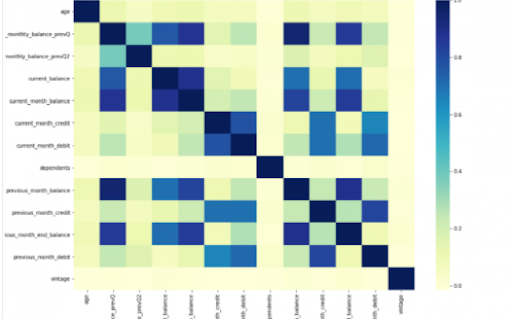
Power BI is considered a library of visualization. Correlation matrix heatmap is an integral component in the data analysis reports.

We will guide you on how to create a correlation matrix heatmap by making use of the Python correlation function. The created heatmap will be available in the reports section in Power BI.

You will need to navigate to the Report section that is available in the Power BI. Then click on the Py symbol which denotes Python visual which is available under the visualizations section. On the left side, you will see an empty Py along with a Python script editor popping up at the bottom of the screen. By this, you might have understood that Power BI is providing an option to create the visualizations with the scripts.

All the value fields will be empty firstly. For correlation heatmap illustration, all the continuous variables will be brought into the value fields, like the age current, previous month balance, monthly balance items, etc. This is considered one of the most essential steps during the integration process. If you forget to perform this step, the Power BI will not be able to recognize the variables.

As the variables are moved into the values fields, the python script will be automatically populated with the below codes.

Let us also write the code for correlation heatmap creation in Python by using the seaborn package.

# import the charting libraries matplotlib and seaborn

import matplotlib.pyplot as plt

import seaborn as sns

# create the correlation matrix on the dataset

corr = dataset.corr()

# create a heatmap of the correlation matrix

sns.heatmap(corr, cmap="YlGnBu")

# show plot

plt.show()

You can now use the run script button and run the script, which will produce a correlation matrix heatmap.

Python’s Statistical within Power BI

Generating analytical reports:

After the heatmap is generated, we can analyze the heatmap and will come to a conclusion.

With the above heatmap, below are the set of conclusions made:

  1. There is no correlation with the other variables for the number of dependents and age.
  2. There is a moderate correlation observed for the average monthly balance in the time span of the last two quarters.
  3. There is a high correlation between the average monthly balance with the previous month balance and the current month balance in the last quarter.
    It is possible to generate a heatmap for the customers who have churned and you can also compare with the customers that do not have. You can apply the filter of churn = False or True so that the heatmap can be observed. Through the analysis, it helps in deriving useful insights from data analysis to the prediction of the behavior.
  4. Power BI Training

    Weekday / Weekend Batches

Conclusion:

Through this article, you have got a clear idea of the process of integration of Python with Power BI. I hope the above information helps you. To get a clear understanding and in-depth knowledge on the subject, you can get trained and certified in Power BI through the Power BI training. The integrated environment will definitely help the organizations to handle and play with the data as and when needed. It focuses on enhancing the power and capitalizing on the benefits that are available in both tools.

related articles 


Source link