What airline’s lounge access policies give you the best bang for your buck?


There are few things that can elevate your travels more than relaxing in an airport lounge ahead of your flight.

However, there are trade-offs when it comes to lounge access.

For starters, getting in usually isn’t free. Guest policies can also vary, and some access methods limit the number of visits. And, of course, just how many lounges you can get into plays a major role in determining the best strategy for you.

Related: Best airport lounge access credit cards: 4 picks for frequent flyers

As part of TPG’s 2026 best airlines report, we took a deep dive into these very characteristics to identify which airline offers the best bang for your buck — and here’s what we found.

How TPG evaluates our airline lounge access rankings

To help analyze the various options, we started with three overarching questions:

  • What’s the most cost-effective way to access the largest number of lounges with each airline?
  • Where are the lounges you can access — based on both the number of unique airports and number of lounges?
  • What restrictions (or flexibility) come along with said access?

Once we compiled all the data across airlines, we took each airline’s lounge footprint, factored in the access policies and calculated an adjusted cost-per-airport and cost-per-lounge for the primary access method.

In the end, one airline rose to the top — with another nipping on its heels.

Reward your inbox with the TPG Daily newsletter

Join over 700,000 readers for breaking news, in-depth guides and exclusive deals from TPG’s experts

Best overall: American Airlines

American Airlines took the top score in the lounge category thanks to the Citi® / AAdvantage® Executive World Elite Mastercard® (see rates and fees). This card’s $595 annual fee includes a full Admirals Club membership, granting wide-ranging lounge access to the carrier’s own Admirals Clubs, Alaska Lounges, Qantas Lounges and even select Oneworld lounges when flying American or a partner airline.
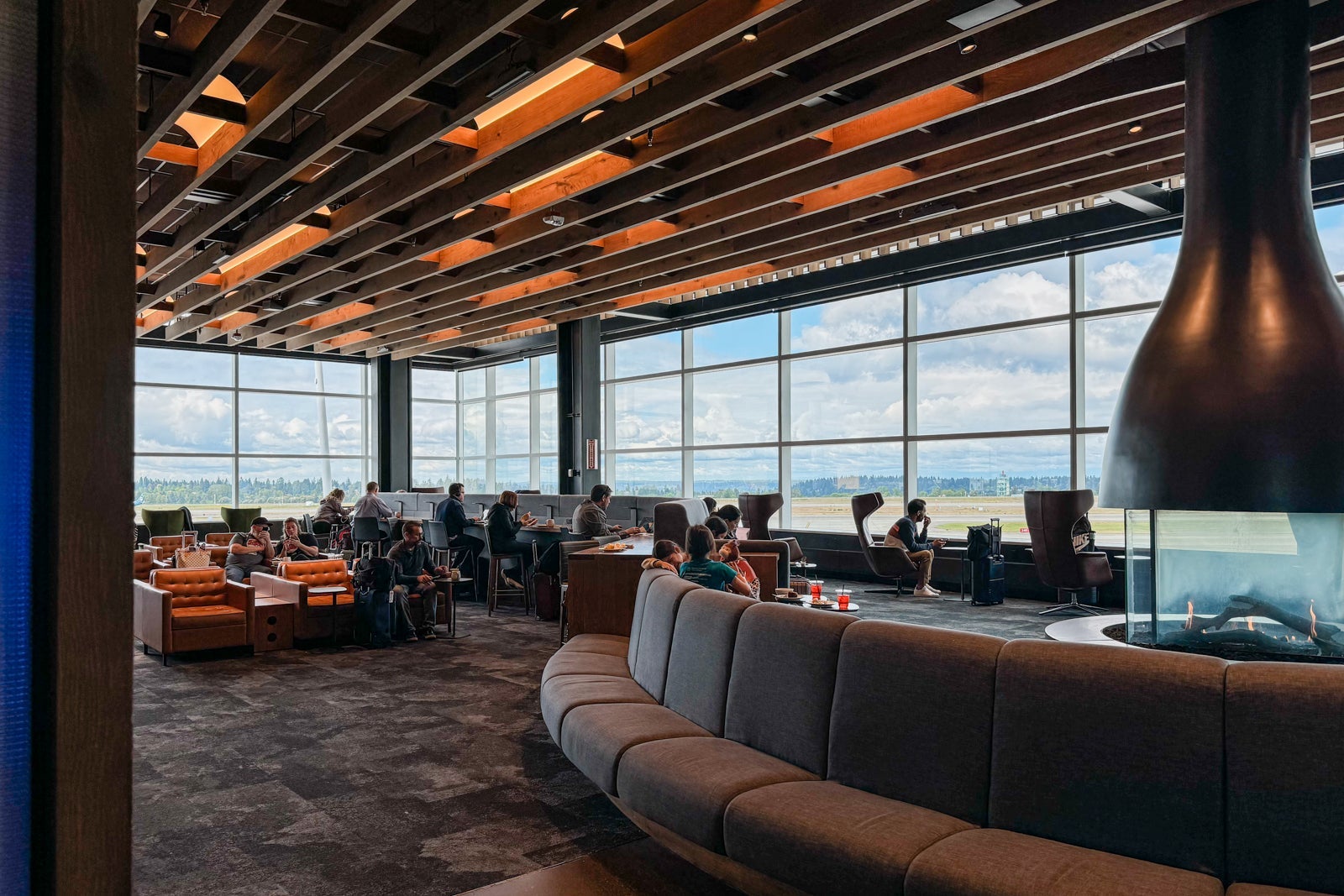
Alaska's SEA-NRT inaugural flight
Alaska Lounge on Seattle’s N-Concourse. SEAN CUDAHY/THE POINTS GUY

All in, you have lounge access in more than 80 global airports across more than 100 individual locations.

Beyond the footprint, the Citi Executive Card features a pair of really appealing policies:

  • Guest policy: You can access these lounges with either two guests or your immediate family (spouse or partner and dependent children under the age of 18).
  • Authorized user access: Authorized users on the card get their own access, though it’s limited to Admirals Club locations. This even includes the same guest privileges as the primary cardholder. You can add up to three for an additional $175 in annual fees, and it’s $175 for each one after that.

These pushed American above its counterparts.

Read more: 3 reasons why this is the best card for Admirals Club lounge access

Most extensive network: Delta Air Lines

However, nipping on American’s heels was Delta Air Lines, TPG’s overall best airline for the eighth straight year. The carrier already has a larger footprint of its own lounges compared to any of its competitors. However, since we also analyzed the access policy on the Delta SkyMiles® Reserve American Express Card, this expanded the list significantly.

That’s because you can also access the following lounges when flying a Delta flight booked with your Delta Reserve Card:

SEA Amex Centurion Lounge
Centurion Lounge at Seattle-Tacoma International Airport (SEA). CLINT HENDERSON/THE POINTS GUY

In the U.S. alone, this gives you nearly 50 airports and close to 90 individual lounges.

However, the card’s access policies blunt the effectiveness of this huge network. For starters, you’re only eligible for 15 annual visits to Sky Clubs (unless you spend $75,000 on the card in a calendar year). In addition, you get only four guest passes per year — any additional guests will cost you $50 each. Finally, you aren’t eligible for lounge access on a basic economy ticket.

Nevertheless, if you frequently travel alone and don’t need more than 15 Sky Club visits in a year, the Delta Reserve Card may be a great option.

Read more: Why the Delta SkyMiles Reserve card is still one of the best cards in my wallet

Best for elites and big spenders: United Airlines

While spending on the Delta Reserve can unlock unlimited Sky Club visits, United Airlines may actually be a better option for elite travelers and big spenders. That’s because the United Club℠ Card (see rates and fees) gives a pathway to a much broader set of lounges for these individuals.

When you reach Premier Gold status (or higher) or spend $50,000 on the card in a calendar year, you unlock United Club All Access membership. This is valid for the rest of the calendar year in which it’s earned and the entire following calendar year. Beyond United Clubs, this gives you access to over 140 additional lounges across close to 60 international airports.

In addition, the United Club Card allows the primary cardholder to bring in one adult guest and dependent children under the age of 18, so this can be quite valuable for family travelers.

Other highlights from the report

There were some other interesting items that came out of our analysis.

Credit cards usually offer the best access

In most cases, the best access method was the carrier’s premium credit card — but that wasn’t true across the board.

Alaska Airlines is a great example. The Atmos™ Rewards Summit Visa Infinite® credit card provides two Alaska Lounge day passes each quarter, and while it has a comparatively low annual fee of $395, it’s not the best Alaska option for extensive lounge access. That’s the Alaska Lounge+ membership, which is $795 and includes unlimited access to Alaska Lounges plus nearly 90 partner locations.

JetBlue Priority Pass access

First, the JetBlue Premier Card was actually the best for non-brand lounge access among all of the access methods we reviewed. Even though there’s only a single JetBlue BlueHouse open right now — at New York’s John F. Kennedy International Airport (JFK) — the card also gives you Priority Pass Select membership, a relative rarity on cobranded airline cards.

The information for the JetBlue Premier Card has been collected independently by The Points Guy. The card details on this page have not been reviewed or provided by the card issuer.

Vienna Lounge. PRIORITY PASS

Using the Citi Executive Card for Alaska lounge access

In addition, Alaska travelers may be best served by the Citi Executive Card, especially since it’s $200 cheaper than an Alaska Lounge+ membership. The lounge footprint is almost identical, and since Alaska is part of Oneworld, you can still access all of the applicable locations, whether you’re flying American, Alaska or another alliance carrier.

Read more: Are you an Alaska Airlines loyalist? Here’s why you need the Citi / AAdvantage Executive

Lower-budget options for lounge access

Finally, there are many alternative ways to access these lounges, so you may have a lower-cost option available.

For example, both the Citi Strata Elite℠ Card (see rates and fees) and the Citi® / AAdvantage® Globe™ Mastercard® (see rates and fees) include four Admirals Club passes each year — and the Citi AAdvantage Globe card currently has an limited-time welcome offer of 90,000 bonus miles after $5,000 in purchases in the first four months of account opening.

You also receive a pair of United Club passes on the United℠ Explorer Card (see rates and fees) each year.

Crunch the numbers to ensure you can justify the high annual fee of a premium card or a paid lounge membership.

Related: Are premium credit cards worth the annual fee?

Bottom line

We overhauled the lounge access methodology portion of our 2026 list of the best airlines in the U.S. — and the data was fascinating. While American scored the highest overall, Delta’s lounge network was the most extensive, especially when considering the list of Amex and Escape lounges that Delta Reserve cardholders can access.

Of course, much of this depends on your unique situation, so be sure to take your personal travel habits into account when deciding on the best way to unlock lounge access for your next trip.


Source link

Leave a Reply

Subscribe to Our Newsletter

Get our latest articles delivered straight to your inbox. No spam, we promise.

Recent Reviews


SCCM Tutorial – Table of Content

What is SCCM and how it works?

System Center Configuration Manager (SCCM) is a product from Microsoft for systems management connected over the corporate network.It’s a software management suite that allows us to manage Windows, macOS (OS X), Linux, or UNIX systems.It can also manage mobile operating systems such as Windows Phone,Symbian,iOS, and Android. It provides features like patch management, remote control, operating system deployment, network protection, and many more.

SCCM manages both application installations and software updates. It provides distributed deployment on remote systems connected through the corporate network. We can configure a few target machines through the management console. It even keeps track of the network’s inventory.

Start learning Microsoft SCCM online course from hkrtrainings to make a bright career in the world of SCCM!

SCCM version history

The SCCM was originally released with the name ‘Systems Management Server 1.0’ in 1994.It targeted management of MS-DOS, Windows for Workgroups, Macintosh, LAN Manager, etc. It has evolved drastically over the years incorporating many features. Let’s see some of the significant releases.

The ‘Systems Management Server 1.2’ was released in 1996, which includes remote-control, SNMP, inventory, and network monitoring capabilities.  Microsoft introduced software-distribution capabilities in ‘Systems Management Server 2003’ in 2003.

The ‘System Center Configuration Manager 1602’ released in 2016 includes conditional access for PCs, Office 365, management of mobiles, and Windows 10. In the same year, they improved integration with the Windows Store to support online and offline licensed apps.The latest stable version of SCCM was released on April 1st, 2020. The name of this version is ‘Endpoint Configuration Manager 2002’.

SCCM Architectural components

Let’s look at the architectural components of SCCM 2012 R2. The core role of SCCM is a site. The SCCM 2012 architecture consists of three different site types.

  • A single stand-alone primary site with no secondary sites
  • A primary site with one or more secondary sites
  • A central administration site at the top level with one or more primary sites. The primary sites, in turn, can have one or more secondary sites.

Central Administration Site (CAS)

When an organization has to maintain more than 100,000 clients, then we should go for CAS. We can set up primary sites for a set of clients. The primary sites in CAS hierarchy are treated as child sites. They have limited roles and no clients assigned. The CAS should be configured with a SQL server to store the hierarchical data. The entire SCCM can support a maximum of 400,000 clients.

SCCM Training

  • Master Your Craft
  • Lifetime LMS & Faculty Access
  • 24/7 online expert support
  • Real-world & Project Based Learning

Primary Site

Primary sites manage clients through connected networks. A primary site can support up to 250 secondary sites, 100,000 clients, and 10 management points. If an organization has to manage less than 100,000 clients, then a single stand-alone primary site would suit best.

Secondary Site

To service clients in remote locations, we can use secondary sites. A secondary site can be installed from the Configuration Manager console. When a secondary site is installed, a management point and a distribution point are automatically deployed. A secondary site requires either a SQL Server Express or a full instance of SQL Server.

Frequently asked SCCM Interview Questions and Answers !!

Features of SCCM

Below are the primary management features of the Configuration Manager.

Co-management

We can attach existing Configuration Manager deployment to the Microsoft 365 cloud using co-management. We can manage Windows 10 devices by both Configuration Manager and Microsoft Intune. 

Desktop Analytics

It is a cloud-based service that can integrate with the Configuration Manager. We can combine data from our organization with the data collected from millions of devices and provide insights. 

Cloud-attached management

We can use cloud management gateway, cloud-based distribution points, etc. to manage internet-based clients.

Real-time management

We can use CMPivot to query online devices for deeper insights. We can also deploy Windows PowerShell scripts to clients.

Application management

We can create, manage, deploy, and monitor applications on different devices. We can also integrate with the Microsoft Store to deliver cloud-based apps.

OS deployment

We can deploy OS images on specified target machines. The image deployment might use PXE, multicast, or bootable media.

Software updates

We can monitor and deploy software updates within an organization. 

Company resource access

Users from remote locations can access data and applications. It includes Wi-Fi, VPN, email, and certificate profiles.

Compliance settings

We can assess, track, and remediate the configuration compliance of client devices. We can also configure compliance settings to only a few specified target devices.

Endpoint Protection

It provides security, antimalware, and Windows Firewall management for all the systems connected in your organization. 

Inventory

We can monitor assets like hardware devices and software that belong to an organization.

Related Article: SCCM Certification

others, sccm-tutorial-description-0, others, sccm-tutorial-description-1

Subscribe to our YouTube channel to get new updates..!

On-premises mobile device management

This supports managing Windows 10 Enterprise and Windows 10 mobile devices.

Power management

We can monitor the power consumption of client computers. We can configure the power plans of the systems in an organization.

Remote control

We can remotely deploy client computers from the Configuration Manager console.

Reporting

It offers advanced reporting capabilities. It provides a lot of default reports too.

Software metering

We monitor the software usage data from the clients. We can determine if the software is being used or not.

Prerequisites for SCCM installation

The following are the prerequisites that we need to set up before going through with the installation of the SCCM.

  • Create system management container
  • Assign site server computer permissions on the container
  • Extend active directory schema
  • .Net Framework 
  • Remote differential compression
  • Windows assessment and deployment kit

We can install a prerequisite checker (Prereqchk tool) and verify if all the components are configured or not. Open a command prompt as an administrator. Go to ‘.\SMSSETUP\BIN\X64’ location and the below command. Prereqchk.exe /AdminUI

The pre checker will run and check for all the required components. If all the components are found, we will get a result that says ‘All required prerequisite tests have completed’ with a status of success. Now you are good to go ahead with the SCCM installation.

SCCM Training

Weekday / Weekend Batches

Installation of SCCM

Download the SCCM ISO from the https://www.microsoft.com/Licensing/servicecenter/default.aspx page. Run the ‘Splash.hta’ file and select the ‘Install’ option. The initial screen will show the steps necessary to install SCCM. Click on ‘Next’, and you will get a ‘Getting Started’ screen. Select the ‘Install a Configuration Manager Primary Site’ checkbox and click on ‘Next’. 

Enter the product key and click on ‘Next’. Accept all the Microsoft Software License Terms, the Product License Terms, and click on ‘Next’. You will get a ‘Prerequisite Downloads’ screen. Specify the location for the prerequisite file download, and click on ‘Next’. On the Server, and Client Language Selection screens, select ‘English’ as the language, and click on ‘Next’.  

Enter the site code, site name, and specify the installation folder on the ‘Site and Installation Settings’ screen. Select the ‘Install the primary site as a stand-alone site’ option on the ‘Primary Site Installation’ screen. Enter the SQL server name, database name, and click on ‘Next’. On the next screen, enter the path to the SQL Server data file, path to the SQL Server log file, and click on ‘Next’.

Click on ‘Next’ on the SMS Provider Settings screen. Select the ‘Configure the communication method on each site system role’ option on the ‘Client Computer Communication Settings’ screen, and click on ‘Next’. Select the ‘Install a Management Point’, ‘Install a Distribution Point’ checkboxes, and click on ‘Next’. Click ‘Next’ on the ‘Usage Data’ screen. Click ‘Next’ on the next screen too. 

You will get a summary of all the options that you have selected.Click on ‘Next’ to proceed. On the next screen, you can see the prerequisite checks. Click on ‘Begin Install’ to start the installation. Once the installation is complete, click on ‘Close’.

Related Article: SCCM Client Installation

Comparison between SCCM and WSUS

Both the SCCM and WSUS are patching solutions developed by Microsoft, but they have some differences. 

  • Both SCCM and WSUS are on-premise solutions.
  • Organizations of any size can use WSUS. Organizations of large size will use SCCM.
  • WSUS offers some patching automation with no up-front costs. SCCM is a paid patch system. 
  • WSUS does not offer reporting and network visibility. 
  • WSUS does not handle patching third-party applications.SCCM provides more support for third-party application patching.

Conclusion

Systems Center Configuration Manager (SCCM) is a perfect solution for managing a large number of systems with various operating systems. SCCM has been used by many organizations. The learning curve for SCCM is complex, but once you get started with it, it will be easier to work with SCCM. The SCCM helps in standardizing all your systems in your domain. Even if your system is connected to your network with a live connection, or with a VPN, or through a remote connection, you can configure it easily with SCCM.

Related articles:

1.Sccm Deployment

2.Difference between SCCM and WSUS

3.Sccm overview

4.Altiris Training

5. SCCM Latest Version


Source link