It’s easy to assume your data is just… safe. In this article, we will discuss why your business needs a Microsoft 365 backup, and why it is so important to have.
Emails, files, OneDrive, Teams—it’s all in the cloud, so most people don’t think twice about it. It feels automatic. Like it’s handled.
The problem is, “in the cloud” doesn’t actually mean backed up. It just means stored somewhere else. And when something gets deleted, overwritten, or locked, that’s when the difference shows up.
What Microsoft 365 Does and Doesn’t Do
Microsoft 365 is reliable, but it’s not designed to be your backup system.
There’s a shared responsibility model behind it. Microsoft keeps the platform running, but your data—what gets deleted, changed, or lost—that part is still on you, which is why many businesses look for ways to backup Office 365 data in the cloud instead of relying on default retention.
There are retention policies and recycle bins, but they’re limited. Once something’s gone past that window, it’s gone.
Where Things Actually Go Wrong
It’s usually not some huge disaster.
More often it’s small things—someone deletes the wrong folder, a file gets overwritten, an employee leaves and data disappears with them. It happens all the time.
Then there are bigger issues. Ransomware, for example, can encrypt files that sync across your system. If it spreads through OneDrive or SharePoint, you’re dealing with more than just one machine.
Why a Backup Changes Things
Having a backup means you’re not stuck trying to fix things in real time.
You can restore emails, files, or entire accounts to a previous state without scrambling. That alone takes a lot of pressure off when something goes wrong.
Tools like this help you store data securely and run backups on a set schedule, so you’re not relying on manual saves or hoping nothing gets missed.
Some also include protection against malicious links and other threats that can slip through email. This is what strong businesses do differently, working to keep their information safe.
What to Look For in a Backup Tool
Not every backup solution is the same.
You want something that actually runs automatically, not something you have to remember to use. Encryption matters too—especially if you’re dealing with sensitive information.
It also helps if you can restore specific files or emails, not just everything at once. Granular recovery saves time.
The Cost of Not Having One
Downtime adds up faster than people expect.
If email is down for even a few hours, communication stops. Projects stall and clients notice. And if data is permanently lost, that’s a different problem entirely.
For a small business, even one incident can cost more than a backup solution would have for a year.
It’s Not About Overcomplicating Things for Your Business
This isn’t about adding more systems just for the sake of it.
It’s about covering a gap that a lot of businesses assume is already handled. Once you have a backup in place, it mostly runs in the background.
You don’t think about it—until you need it.
If you’re thinking about ways to make your business a little more resilient without adding a lot of complexity, take a look at more insights on our site.
A functioning structure and informational flux that gathers businesses, finance, and technological operations alongside each other to drive up the businesses through cloud transformation.
It promotes data-powered decision-making in due time and results in financial responsibility. The collaboration of finance, operations, and business teams makes it possible to achieve it.
FinOps is a field that integrates principles of financial management with cloud engineering and operations to give organizations an analysis of their cloud expenditure. It also allows them to make well-versed decisions on the allocation of their cloud budget and costs. Its goal is to increase the revenue or the business value with the help of the cloud. It also helps organizations control their cloud expenditure while still maintaining the performance level, dependability, and security required to assist their business operations.
Principles of Cloud FinOps
Accountability
With a set of pre-defined KPIs and benchmarks, the teams responsible for value realization reporting and costing amendment can be held accountable. This makes decision-making a process with standards.
Business Value Realization
Decisions taken from the perspective of business make Cloud FinOps successful.
Flexibility
Encourage constant budget allocation, IT spending, and forecasting to push ahead with agile budgeting and planning procedures in the IT industry.
Clarity of Costs
All organizational levels have access to instantaneous cost and billing data.
Partnerships
For cloud finance management, collaborate with departments like IT, finance, app development, and architecture.
Fluctuating nature of the cloud
Accept the pay-as-you-go aspect of cloud and gain from providing dynamic customer service to meet their ever-changing requirements.
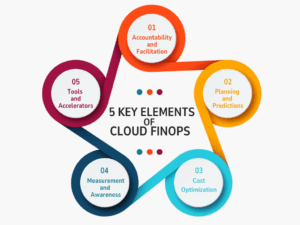
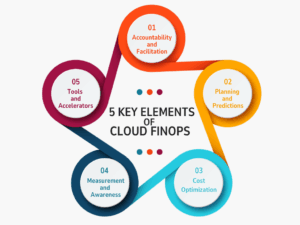
Five Key Elements that Make Cloud FinOps
1. Accountability and Facilitation
This element centers on setting up centralized, multi-functional teams that include engineering, finance, operations, architecture, and app developers, while also setting up governance and benchmarks for cloud expenditure.
2. Planning and Predictions
For cloud planning and predictions to be effective, an organization must allocate resources, benchmark efficacy, and gain a deeper understanding of the cost drivers.
3. Cost Optimization
This element, which is an ongoing, repetitive process that focuses on identifying key cost-optimization drivers, offers a consistent methodology to manage cloud consumption in the most economical way.
4. Measurement & Awareness
This key element focuses on building a key set of KPIs and business-value metrics to calculate the transformation’s success. Customers frequently begin with a set of cost-optimization metrics before switching to unit economics or business value metrics, like cost per transaction or cost per customer served.
5. Tools and Accelerators
To sum up, using the right tools and accelerators is crucial for efficiently managing and monitoring cloud spending. It comprises:
Using Google Cloud cost-management tools to examine cost and billing data in real time
Creating a reporting dashboard for tracking values and managing cloud spending
Putting automation scripts into place to create budget alerts and account guardrails
Benefits That Cloud FinOps Offer
Business Value Realization
Initial focus on cloud migration often leaves the business goal of infrastructure in the rear. Proper cooperation between various departments makes FinOps effective and a success. This allows the reconsideration of business values while lifting cloud management to new heights.
Better Decision Making
Making decisions to make business better than today is the whole point here. Using the insights from cloud data and financial analytics, the FinOps team is able to make informed decisions regarding the business’s cloud computing commodities. This also makes them focus on the business goals.
Art of Predictions and Cloud Reporting
FinOps teams analyze cloud spend and set standards for future cloud costs using analytics, reporting, and forecasting cloud FinOps tools. They can create budgets fittingly and evade unplanned surplus costs thanks to the jacked-up cost visibility.
Accountability for Clear Cloud Use
By providing clarity into resource ownership and cloud spending, FinOps promotes accountability while leveling the time and effort needed for research and change implementation.
Challenges That FinOps Come With
Before Cloud FinOps begins to show results, you must surpass many predicaments. These may include issues with organizational processes, technical implementation, or how the teams as a whole perceive the changes.
Governance
Incorporating new methods, tools, and challenges requires all the things to be in place and well-governed. The processes to be incorporated ought to adhere to existing laws, rules, and compliance standards. It can be challenging to describe these approaches, create policies, and implement them.
Technical Glitches
There might be considerable technical glitches in putting the suggested modifications into practice, from planning effective cost data collection and processing to putting per-instance optimizations, element migration, and access management into practice.
All of the alterations should certainly be based on practicality, as well as administering the right balance between cost-effectiveness and effort, while taking into account the gross solution’s business value.
Cultural Alterations
As the FinOps framework requires processes to be established at every level of an organization, an actual cultural transformation must take place for FinOps methodologies to be implemented successfully. This entails setting up a culture of financial responsibility and accountability while maintaining the requirements of the company and the objectives of the other players in mind.
It could be challenging to bring in this culture, as it needs not only the establishment of appropriate processes but also a shift in the team’s mentalities. So, it is a task!
From Chaos of Cloud to Clarity: An Imperative for Businesses
Cloud FinOps is the way of the future for businesses, but excessive cloud spending can undermine the very advantages that companies are trying to achieve. Cloud FinOps management transforms from a standalone finance function into a vital business capability with FinOps.
Businesses that adopt Cloud FinOps not only reduce cloud expenses but also acquire the flexibility to change course more quickly, the assurance to make more intelligent investments, and the transparency to match IT with business value.
The ability to forecast precisely, budget dynamically, and optimize continuously is not a luxury in a world where cloud usage is only increasing; rather, it is a competitive necessity.
1. What is another name for FinOps? Answer: FinOps is the blend of “Finance” and “DevOps”. It shows the collaboration between business and engineering groups. It is also known by terms like Cloud Financial Management and Cloud Financial Optimization.
2. When did FinOps start? Answer: It began in 2019 as an open community comprising individuals and organizations where knowledge of cloud financial management could be shared.
3. What is the future of FinOps? Answer: FinOps’s future depends on comprehensive innovation and teamwork. FinOps and ITAM combination will be essential as cloud infrastructure develops to trim the financial waste, promote sustainability, and improve AI-powered optimization.
To provide the best experiences, we use technologies like cookies to store and/or access device information. Consenting to these technologies will allow us to process data such as browsing behavior or unique IDs on this site. Not consenting or withdrawing consent, may adversely affect certain features and functions.
Functional
Always active
The technical storage or access is strictly necessary for the legitimate purpose of enabling the use of a specific service explicitly requested by the subscriber or user, or for the sole purpose of carrying out the transmission of a communication over an electronic communications network.
Preferences
The technical storage or access is necessary for the legitimate purpose of storing preferences that are not requested by the subscriber or user.
Statistics
The technical storage or access that is used exclusively for statistical purposes.The technical storage or access that is used exclusively for anonymous statistical purposes. Without a subpoena, voluntary compliance on the part of your Internet Service Provider, or additional records from a third party, information stored or retrieved for this purpose alone cannot usually be used to identify you.
Marketing
The technical storage or access is required to create user profiles to send advertising, or to track the user on a website or across several websites for similar marketing purposes.