Medically reviewed by Arno Kroner, DAOM
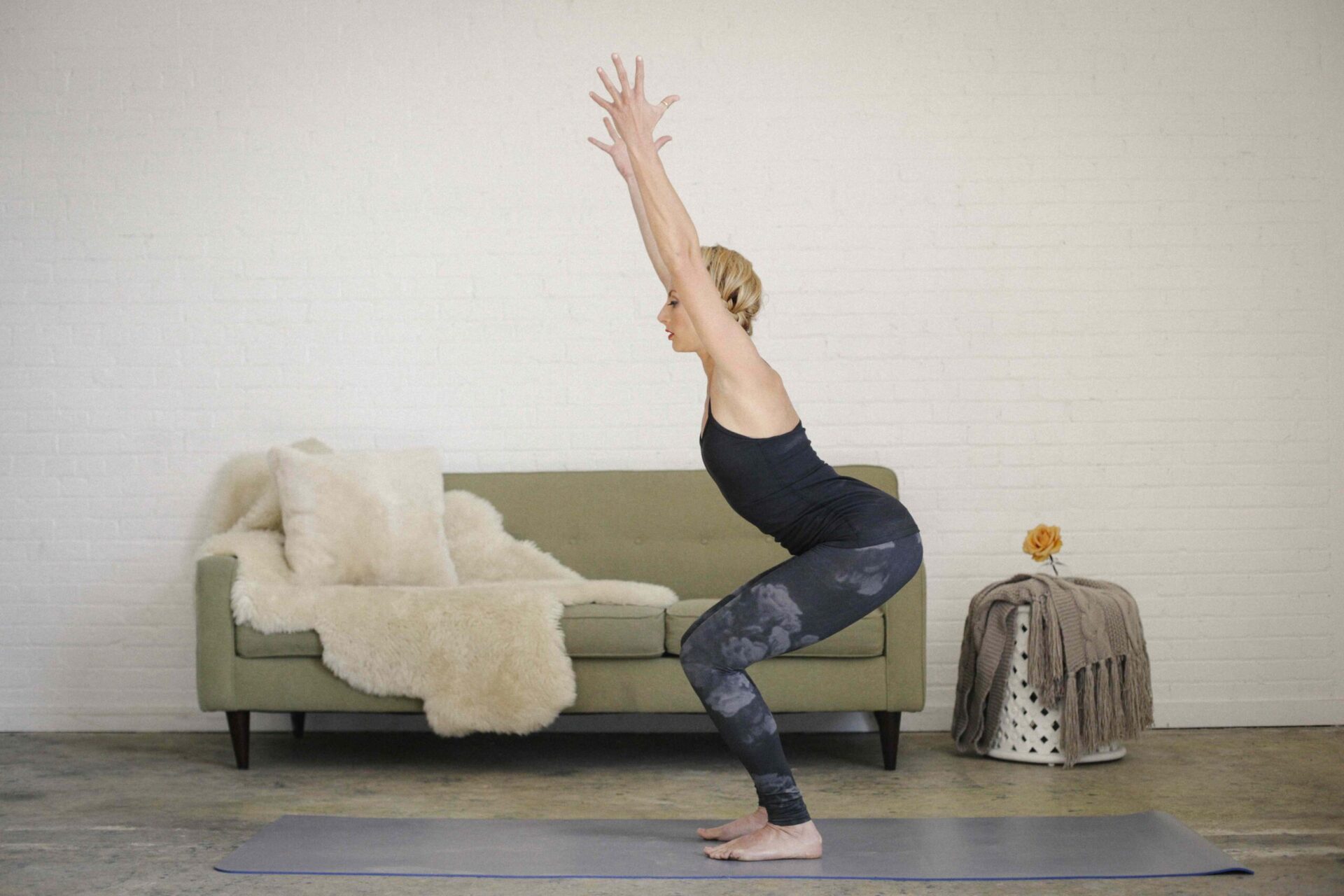
:max_bytes(150000):strip_icc():format(jpeg)/HDC-GettyImages-595886795-70ba97c5ad7c443db804d95a8cc1556e.jpg "A blonde woman in a black leotard and leggings, standing on a yoga mat in a room, doing yoga, squatting down with her arms raised.")
Credit: Mint Images / Getty Images
- Exercising your feet can help strengthen and protect your body from falls.
- Hip abductor strength is important for balance and mobility, regardless of your age.
- Doing lunges increases your hip and knee extensor muscle strength.
You need balance for everyday movements, like walking and going up and down stairs. Though balance can sometimes be tricky, there are lots of ways to improve it.
Engaging your core strength is foundational for balance, explained Duana Soeda Stinson, CPT, a NASM Corrective Exercise Specialist and Pilates instructor. But in addition to doing your crunches, these nine simple exercises can help you find your footing when it comes to balance, Stinson told Health.
1. Roll Feet
Problems with your feet can affect the whole body. This is why the American Orthopaedic Foot and Ankle Society recommends exercising your feet as often as you can. Here’s how to do it:
- Grab a tennis or lacrosse ball. Focusing on the arch, roll the ball from your big toe to your heel and back, then from the middle toe to the heel and back, then from the pinky toe to the heel and back. Pause wherever you feel a tight spot.
- Next, anchor your heel to the ground, and with the ball under the ball of the foot, move your foot like a windshield wiper, rolling side-to-side.
- Lastly, with the ball at the arch of the foot, curl your toes over the top of the ball to feel a stretch through the foot.
- Do this for two minutes on each foot to loosen them up and get them ready to engage.
2. Chair Pose With Heel Raise
A 2013 study published in BMC Complementary Medicine and Therapies showed that the chair pose in yoga is one of the most effective movements for engaging the ankle, knee, and hip at the same time. This exercise is a variation of the chair pose. Here’s how to do it:
- Stand with your feet together. Place a tennis or lacrosse ball between your ankles to keep your feet parallel, and engage the inner thighs.
- Lift your arms in front of you to shoulder height. Send the hips back into a shallow squat position.
- Lift your heels, pause, and then lower them back down. Repeat this four to eight times.
- Holding the heels up, lift the arms straight up overhead with your biceps by your ears, pause, and then lower the arms back down to shoulder height. Repeat four to eight times.
3. Single-Leg Standing Clamshells and Kickback
Clamshell exercises are great and efficient moves for activating the gluteus muscles and hip flexors, which are crucial to overall stability. Here’s how to do it:
- Stand on your left leg, knee soft. Bend the right leg and place a tennis or lacrosse ball behind the right knee, squeezing it, so it doesn’t fall.
- Lift the right knee up and out to the side, externally rotating your right hip for a clamshell. Then lower back down. Repeat four to eight times.
- Next, still standing on the left foot and squeezing the ball, drive your right heel straight back for a kickback. Maintain a neutral spine with the core engaged. Return the knees together. Repeat four to eight times.
- Do both moves on the other side.
4. Figure Four to Straight Leg Pulse
A standing figure four challenges your balance and really opens up the hips. Exercises that reduce your base of support and change your center of gravity are effective in balance training, studies show. You’ll get both in this exercise.
The added mini squat stretches the hamstring, and the leg lift challenges your core. Here’s how to do it:
- Stand on your left leg and place the right ankle over the left thigh into a figure-four position.
- Send the hips down and back, hinging only slightly forward (think: single-leg squat). Drive through the left foot to stand back up. Repeat four to eight times.
- Then, still standing on the left leg, straighten the right leg out in front, hinging slightly at the hip.
- Lift and lower the right leg a couple of inches for a pulse, using the core to help lift the leg. Repeat four to eight times.
- Repeat both moves on the other side.
5. Hip Mobility to Extension
This is another exercise that engages the glutes and opens up the hip via abductor motion. Research shows that strong hip abductors (muscles on the outer thighs) are crucial for balance and mobility function, regardless of age.
The glutes of the standing leg are fired up during the mobility movement, then the glutes of the extended leg are used during the leg lift. Here’s how to do it:
- Stand on your left leg and pull the right knee in toward the chest, standing tall with your core engaged and left glute activated.
- Make a circle with the right knee, taking it out to the side, back, and then forward again. Repeat for eight reps.
- Then, still standing on your left leg, extend the right leg behind you, hold it straight, and pulse it up and down a couple of inches, using the right glute to lift for eight reps.
- Repeat both moves on the other side.
6. Side Kick
The side kick is a movement used in many martial arts, including Tai Chi. This movement is great for developing balance. During each movement, different body parts take turns playing the role of stabilizer and mover, allowing smooth movements to be executed without compromising balance and stability. Here’s how to do it:
- Stand on your right leg with the toes turned slightly outward and leaning slightly to the right.
- Drive your left knee up toward your chest, then extend the knee to kick the heel straight out to the side. Pull the knee back in, then lower the leg.
- Repeat five times, then switch sides.
7. Adduction Glider With Heel Raise
The act of adduction means to bring back to the center of the body. This exercise targets the hip adductor muscles. Research has found that problems with balance and functionality in older adults can be linked to a decline in muscle strength of hip abductors.
Here’s how to do it:
- Stand on the left foot with the right foot placed on a glider or towel, feet hip-width apart.
- Send hips back with the left knee pointing forward as you drive the right leg straight out to the side.
- Next, raise the left heel, and then drive through the ball of the foot as you stand up and bring the glider back to the center.
- Make sure the left knee points forward and stays over the toes the entire time. Lower your heel back down to reset.
- Repeat for four to eight reps, then switch sides.
8. Reverse Glider Lunge With Heel Raise
The split squat or lunge is an exercise that increases hip and knee extensor muscle strength. This exercise adds a heel raise for an additional balance challenge. Here’s how to do it:
- Stand on the left foot with the right foot placed on a glider or towel, feet hip-width apart.
- Slowly glide the right leg straight back, keeping the knee straight and bending the left knee so it stacks over the ankle.
- Next, raise the left heel, and then drive through the ball of the foot as you stand up and bring the glider forward. Lower heel to reset.
- Repeat for four to eight reps. Then switch sides.
9. Roll Down to Side Plank to Pike
An effective balance training program should include exercises that feature static (still) and dynamic (moving) postures, changes in the base of support, variations in the height of the center of gravity, and different standing surfaces. This exercise brings in most of those criteria.
The plank and side plank positions are static body-balancing and muscle-strengthening exercises. The pike is a dynamic but destabilizing force on the body, which is excellent for balance recovery.
Here’s how to do it:
- With your feet on gliders or towels, stand about hip-width apart. Place the hands on the floor in front of the feet, bending the knees softly if needed.
- Engaging the abs and keeping your torso in a straight line, drive the feet back into a plank position, with the shoulders over the hands and the back and hips aligned.
- Rotate the heels and torso to the left (toes pointing right) as you lift your right arm toward the ceiling to form a side plank position.
- Rotate back to the center to come to a regular plank.
- Then, pull the belly button up toward the spine to lift the hips and drive the feet back up toward your hands. (If this feels too hard, bend your knees and pull them in toward your hands.)
- Repeat, this time rotating your heels and torso to the right and lifting the left arm. Continue alternating for four reps on each side.