9 Ingredients in Korean Skincare That May Help Reduce Visible Signs of Aging


Fact checked by Nick Blackmer

Credit: Mariyariya / Getty Images
  • Ginseng, peptides, and salmon DNA can support collagen production and help improve skin elasticity.
  • Snail mucin, propolis, and centella asiatica hydrate the skin and strengthen the skin barrier.
  • Niacinamide, fermented ingredients, and tranexamic acid help brighten skin and reduce discoloration.

Korean skincare is known in the U.S. for achieving a “glass skin” appearance or preventing aging. But do ingredients like snail mucin and salmon DNA actually help combat wrinkles, improve skin texture, and boost firmness? Here, board-certified dermatologists and skin care experts share what the research says.

1. Ginseng

Ginseng has a long history in traditional medicine. “It contains bioactive compounds known as ginsenosides that function as antioxidants and may support collagen production and skin elasticity,” Pooja Rambhia, MD, a cosmetic dermatologist at UnionDerm, told Health.

According to Rambhia, ginseng helps neutralize oxidative stress, a major driver of collagen breakdown and visible aging. Ginseng-based ingredients may help improve the appearance of dull or fatigued skin over time.

Ginseng is commonly added to serums, essences, and creams that target early signs of aging. “It is particularly useful when used in daytime routines under sunscreen to help support the skin against environmental stressors,” said Rambhia.

2. Snail Mucin

Snail mucin, also called snail secretion filtrate, is one of the most recognizable ingredients in Korean skincare. “It contains glycoproteins, peptides, hyaluronic acid-like molecules, and antioxidants that support hydration and help promote skin repair,” said Rambhia.

Research suggests these compounds may improve skin barrier function and support collagen, which can translate into smoother skin texture and modest improvements in fine lines with consistent use, according to Rambhia.

Snail mucin is good for people with dry, sensitive, or irritated skin who are looking for improved hydration and skin texture. “It is commonly found in essences, serums, and moisturizers and is typically applied after cleansing and toning but before heavier creams,” said Rambhia.

3. Fermented Ingredients

Fermented ingredients are a hallmark of Korean skincare. Fermented rice water helps brighten and smooth, and other probiotic-derived fermented extracts like bifida ferment lysate may support the skin barrier and help maintain a balanced microbiome. This can benefit people with dull, uneven skin without the risk of irritation associated with stronger active ingredients.

Fermented ingredients are most commonly used in essences, serums, and toners. “They are compatible with most active ingredients, pair particularly well with niacinamide, and individuals with sensitive skin may benefit from patch testing before regular use,” said Rambhia.

4. Niacinamide

Niacinamide is a form of vitamin B3 that is widely used in Korean skincare. “It supports the skin barrier by increasing ceramide production, reduces inflammation, and helps regulate sebum production,” said Rambhia.

Clinical studies have also shown that niacinamide can help reduce hyperpigmentation and uneven skin tone, minimize the appearance of pores, and strengthen the skin barrier. It’s useful for a wide range of skin types, including oily, acne-prone, and sensitive skin.

Niacinamide is found in toners, serums, and moisturizers. “It can be used both morning and night and pairs well with retinoids, sunscreen, and antioxidants,” said Rambhia. “Concentrations around 2% to 5% are typically well tolerated.”

5. Centella Asiatica

Centella asiatica (cica) is a botanical ingredient widely used in Korean skincare for its calming and reparative properties. “The active components of this plant have been shown in studies to promote fibroblast activity and support collagen synthesis while also reducing inflammation,” said Rambhia.

According to Michelle Lee, MD, a board-certified plastic surgeon and founder of PERK Plastic Surgery, it’s frequently found in products designed to calm irritated skin and support barrier repair, making it particularly helpful for individuals with redness or sensitive skin.

It is commonly found in serums, creams, and barrier-repair formulations and can be used alongside most active ingredients to improve tolerability.

6. Salmon DNA (PDRN)

PDRN (polydeoxyribonucleotide) is a regenerative ingredient derived from salmon DNA that has become a staple in Korean aesthetic medicine. According to Lee, it works by activating a receptor in your body called the adenosine A2A receptor. These receptors then cause certain skin cells to become more active and produce more collagen, which can help improve elasticity and promote healing.

“You’ll most commonly see it in serums, ampoules, and sheet masks, and it’s usually applied after cleansing and before moisturizer,” Whitney Hovenic, MD, a double board-certified dermatologist and Mohs surgeon, told Health. “It can be especially helpful for people with a compromised skin barrier, post-procedure skin, early signs of aging, or skin that’s recovering from inflammation like acne.”

In clinical practice, PDRN is often used post-procedure, such as after laser resurfacing or microneedling, to accelerate tissue repair, said Lee.

7. Peptides

Peptides are short chains of amino acids that act as signaling molecules for skin cells, Valerie Aparovich, a biochemist, certified cosmetologist, aesthetician, and science team lead at OnSkin, told Health.

According to Aparovich, signal peptides stimulate cells to produce more collagen, elastin, and other structural proteins in the dermal matrix.

Aparovich says peptides have a high safety profile, are non-drying and non-comedogenic, and are suitable for all skin types. “[It’s] generally recommended to introduce them as anti-ageing therapy starting at age 30 to 40,” she said. “Prioritize products that stay on the skin for longer periods, such as creams, and use them daily and consistently over time, usually for at least three months, so they can deliver visible results.”

8. Tranexamic Acid (TXA)

Tranexamic acid is typically found in products focused on brightening and treating discoloration. “You’ll often see it in serums paired with ingredients like niacinamide, licorice root, or vitamin C,” said Hovenic.

Tranexamic acid improves the appearance of photodamaged skin and hyperpigmentation, which are often linked to aging, says Aparovich. “It effectively reduces dark spots, sun-induced discoloration, and melasma by regulating pathways involved in excess melanin production, resulting in a more even complexion.” As with most pigment treatments, consistent use and daily sunscreen are key to achieving the best results, she added.

Tranexamic acid is generally considered safe and may cause only minor redness, which resolves within a few hours, said Aparovich.

9. Propolis Extract

Propolis is a resin-like substance produced by bees and is rich in flavonoids, polyphenols, and antioxidants, said Hovenic. “It offers antimicrobial and anti-inflammatory properties, which can help reduce acne-causing bacteria and calm irritated skin, while also supporting hydration and skin barrier function.”

According to Hovenic, some studies suggest propolis may promote wound healing and improve overall skin recovery, which can help smooth uneven texture and soften the appearance of fine lines over time.

It is typically found in ampoules, serums, essences, and masks, and fits well into layered hydration routines.






Source link

Leave a Reply

Subscribe to Our Newsletter

Get our latest articles delivered straight to your inbox. No spam, we promise.

Recent Reviews


Alteryx Tools – Table of Content

What is Power BI?  

Power BI is referred to as a Software as a service (SaaS) platform, a Business Intelligence tool that helps analyze organizational data and also helps in creating real-time and interactive dashboards. The Power BI business intelligence tool can be installed on any desktop, mobile or can be used online as well. It also helps in collaborating with every peer in the organization. Power BI is a data visualization tool that helps in developing dashboards and BI reports with business intelligence capabilities. Apart from data visualization, it also allows to perform data exploration, helps in establishing reliable and secure connections to the cloud data sources.

Power BI is used by many organizations because of its amazing features like visualization creation. Some of the visualization formats are column charts, area plots, bar charts, line plots, scatter plots, pie charts, treemaps, scatter plots, etc. It also includes a navigation pane that helps in navigating to the dashboards and reports, associated applications, recent work, etc. The Power BI tool also includes inbuilt functions called DAX functions that can be used for data analysis. These are predefined functions that are available in the library. In Power BI, the data can be imported either from a single or multiple data sources. Power BI is also capable of providing extensive support to both structured and unstructured data. It also includes pre-built templates for dashboard creation. You can also create customized dashboards. 

What is Python?

Python is referred to as a high-level, general-purpose, interpreted programming language that includes a set of pre-built functions and libraries which helps in performing complex operations and calculations. It is easy to learn and is used in most fields like data analytics, artificial intelligence, machine learning, etc. 

Python includes two libraries called Matplotlib and Pandas. Matplotlib library consists of the predefined functions that help in plotting the data visualizations while the pandas library also includes the predefined functions that help in working with the data available.

Become a Power BI Certified professional by learning this HKR Power BI Training !

Power BI Training

  • Master Your Craft
  • Lifetime LMS & Faculty Access
  • 24/7 online expert support
  • Real-world & Project Based Learning

Prerequisites for Power BI Python Integration:

Below is the list of the prerequisites required for Power BI Python Integration to take place.

  1. Python runtime installation: The python runtime installation includes the installation of the execution run time through which the Python script operations can be performed.
  2. Libraries installation: It is essential that some of the important libraries have to be installed which increases the robustness of Power BI. Some of the important libraries are Seaborn and Pandas.
  3. Installation of Visual Studio Code: The installation of Visual Studio code is optional. You can also install any other code editor for writing your python scripts. You can also make use of the Power BI script editor to write the scripts.
  4. Power BI settings update: The final step is to update the settings so that you can work efficiently with Python in Power BI. Through this, you can perform the scripting in Power BI. All you need to do is open up the Power BI desktop, click on the file option. Then click on options followed by settings, then navigate to the opportunities which open a new dialogue box in Power BI. Then you can click on the Python scripting, select the path from the directories and IDE of Python. Once done, you will need to click on the OK button.

Understanding the need for Python Integration in Power BI:

By now, you all might have got an idea of what Power BI and Python is for. Yes, Python is referred to as the powerful tool that helps in creating visualizations while Power BI is for creating well-versed dashboards. These dashboards include all the information which helps in providing a complete view of the organization growth, metrics, KPIs, etc. Hence, if Python and Power BI are integrated, it will be a plus for us to utilize the capabilities that Power BI and Python hold.

Apart from the above, Python and Power BI integration includes several other benefits listed below.

  • The users are allowed to run the python scripts directly within the Power BI
  • Through the integration, libraries like Matplotlib and Seaborn can be used in Power BI for data visualization.
  • Python has become a leading technology and all the machine learning frameworks and data science libraries are written in Python. Through the integration, it allows to create of the data analysis scripts using Power BI
  • To perform precise calculations and clear the complexities, some of the enriched libraries like NumPy and Pandas can be used.

Click here to learn Power BI Tutorial

Power BI Python Integration:

In order to solve complex problems in an organization, it requires data and analytics. It also requires future predictions which gives us future insights and helps us clear the bypass of the issues. Through the business intelligence tools, all these predictions and data visualizations are represented in different forms for a better understanding and analysis. With the amazing capabilities that Power BI and Python hold, organizations are being successful with their integration attaining benefits.

Any idea on how the Power BI Python Integration is performed? Well, I will help with the step by step process to perform the Power BI Python integration.

  • Setup the Integrated Environment:

The primary step is to set up an integrated environment ready for the integration process to begin. You will need to have a distribution of Python readily installed in your machine/desktop. I preferred Anaconda for coding related tasks and the base distribution of Python. Sometimes, trying to integrate Anaconda with Power BI is a difficult task.

After the installation process is completed, you will need to install four python packages, each one has its own significance. They are :

Pandas – for data analysis and data manipulation

Matplotlib and seaborn – for plotting purposes

NumPy – for performing scientific calculations

The pip command in the command line tool is used for installing these packages into the machine.

pip install pandas

pip install matplotlib

pip install NumPy

pip install seaborn

Once the above packages are installed, the python scripting needs to be enabled in Power BI. If you want to check, you can open the Power BI and detect whether the python distribution is automatically detected or not. You will need to go to the files, followed by options and settings, then click on options. You will be able to view the home directory for Python under python scripting that is installed in the machine.

Setup the Integrated Environment

Acquire Vagrant certification by enrolling in the HKR Vagrant Training program in Hyderabad!

  • HKR Trainings Logo

    Subscribe to our YouTube channel to get new updates..!

  • Data Importing using the Python script:

It is time for you to check whether Python is working within Power BI by running a sample test. The primary step to perform this function is to import a small dataset using the Python script in Power BI.

To perform this, you will need to navigate to the Home ribbon, then move to the GetData option and click on the other option. Through this, you will be able to import the data from a different set of sources available. Some of the sources are Spark, Hadoop distributed file system, (HDFS), Web, etc. In the below image, I am going to import the Churn Prediction system that is available in my system.

Data Importing using the Python

Once you click on the connect option, you will see a section that allows you to write the Python script.

Python script

You will need to click on the OK button which will further ask you to select the churn data. Once done, you will need to click on the Load option. You can also perform a check whether the data has been loaded or not through the data view option. With this, you are now ready to make use of the power query in order to perform the data transformations.

Using Power Query To Transform the data:

All the individuals who have learned Python would know that data transformation is no longer a single task-based activity.

By using the Power Query editor, the user can shape and transform the data as required with just a single click. The Power BI is also capable of keeping the record of all the transformations and operations that take place or happen during the process of transformation. We will now show you how to use the Power query to understand and know the data transformation capabilities.

Once the data is loaded in the Power BI, you will need to click on the transform data option which is available under the Home tab in order to open the query editor.

Once the query editor is opened up, you will see multiple options to perform the operations like clean, reshape and transform the data.

Power Query To Transform

We will now convert the customer_nw_category variable into a text field because these fields represent the worth category. Also, you need to know that it would not be a continuous variable.

To perform the same, you will need to select the column -> Go to the Data Type, and change the data type to a text format. All the steps will be recorded by the Power query under the applied steps section. You can also rename these steps for a better recall or reference. I will rename this step as nw_cat Text. The next step is to transform the churn column into a logical variable. True here represents for churned (1), whereas False here represents not churned (2). The step can be renamed as Churn True/False.

customer_nw_category

Once the above operation is performed, you will need to click on the close and apply option which will be available on the top left corner so that all the transformations made will be applied.

Using Python’s Statistical within Power BI:

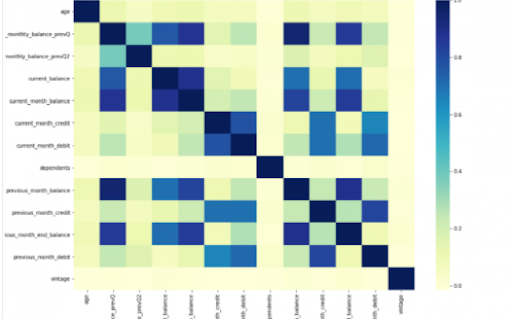
Power BI is considered a library of visualization. Correlation matrix heatmap is an integral component in the data analysis reports.

We will guide you on how to create a correlation matrix heatmap by making use of the Python correlation function. The created heatmap will be available in the reports section in Power BI.

You will need to navigate to the Report section that is available in the Power BI. Then click on the Py symbol which denotes Python visual which is available under the visualizations section. On the left side, you will see an empty Py along with a Python script editor popping up at the bottom of the screen. By this, you might have understood that Power BI is providing an option to create the visualizations with the scripts.

All the value fields will be empty firstly. For correlation heatmap illustration, all the continuous variables will be brought into the value fields, like the age current, previous month balance, monthly balance items, etc. This is considered one of the most essential steps during the integration process. If you forget to perform this step, the Power BI will not be able to recognize the variables.

As the variables are moved into the values fields, the python script will be automatically populated with the below codes.

Let us also write the code for correlation heatmap creation in Python by using the seaborn package.

# import the charting libraries matplotlib and seaborn

import matplotlib.pyplot as plt

import seaborn as sns

# create the correlation matrix on the dataset

corr = dataset.corr()

# create a heatmap of the correlation matrix

sns.heatmap(corr, cmap="YlGnBu")

# show plot

plt.show()

You can now use the run script button and run the script, which will produce a correlation matrix heatmap.

Python’s Statistical within Power BI

Generating analytical reports:

After the heatmap is generated, we can analyze the heatmap and will come to a conclusion.

With the above heatmap, below are the set of conclusions made:

  1. There is no correlation with the other variables for the number of dependents and age.
  2. There is a moderate correlation observed for the average monthly balance in the time span of the last two quarters.
  3. There is a high correlation between the average monthly balance with the previous month balance and the current month balance in the last quarter.
    It is possible to generate a heatmap for the customers who have churned and you can also compare with the customers that do not have. You can apply the filter of churn = False or True so that the heatmap can be observed. Through the analysis, it helps in deriving useful insights from data analysis to the prediction of the behavior.
  4. Power BI Training

    Weekday / Weekend Batches

Conclusion:

Through this article, you have got a clear idea of the process of integration of Python with Power BI. I hope the above information helps you. To get a clear understanding and in-depth knowledge on the subject, you can get trained and certified in Power BI through the Power BI training. The integrated environment will definitely help the organizations to handle and play with the data as and when needed. It focuses on enhancing the power and capitalizing on the benefits that are available in both tools.

related articles 


Source link