A conservation group has listed a major river in the Boundary Waters Canoe Area as the third most endangered river in the country on its annual list of threatened waterways.
It marks the fourth time American Rivers has included the South Kawishiwi River on its list of 10 most endangered rivers — it was also selected in 2013, 2018 and 2021.
The river winds in and out of the federally protected canoe wilderness area in northeast Minnesota. Twin Metals, a subsidiary of the Chilean mining giant Antofagasta, has proposed building an underground mine for copper and nickel along the pristine river’s shoreline near Ely, just south of the Boundary Waters.
The designation from American Rivers comes as the U.S. Senate is poised to take up a resolution later this month that would reverse the 20-year long ban on mining in the area, which could open the door for Twin Metals to reapply to open a mine there.
The Kawishiwi River flows June 12, 2019, near Ely, Minn. Twin Metals is proposing to build an underground copper-nickel mine near Ely and close to the Boundary Waters Canoe Area Wilderness. Much of the mining would take place on the left side of this image in the forested land.
Derek Montgomery for MPR News
Conversation groups argue that mining for metals such as copper and nickel, which carries with it the potential for more severe water pollution than iron ore mining in Minnesota, could cause irreparable harm to one of the nation’s most cherished and highly visited wilderness areas.
“Spoiling some of the purest, most pristine waters for a foreign mine and foreign corporate interests is a short-sighted move that could cause irreversible harm to the region,” said Elizabeth Riggs, Great Lakes regional director for American Rivers.
In 2023, the Biden administration imposed a 20-year mining moratorium covering about 350 square miles of federal land south of the Boundary Waters, including where the Twin Metals mine would be located.
The land is located outside the Boundary Waters but within its watershed. As a result, water pollution from mining could flow into the federally protected wilderness area.
In January, the U.S. House passed a resolution introduced by Rep. Pete Sauber, R-Hermantown, to overturn the moratorium. It would also prohibit future administrations from imposing another ban.
Stauber’s resolution utilizes a law called the Congressional Review Act that allows Congress to overturn federal agency rules with simple majority votes in both chambers. That means it couldn’t be blocked by a Senate filibuster, which, under the upper chamber’s rules, requires 60 votes to call legislation for a vote.
But the Senate is running out of time to take up the measure. Ingrid Lyons, executive director of Save the Boundary Waters, said Congress faces a deadline of April 24 or April 27 to pass the resolution and send it to President Trump for his signature.
Lyons said Senate leadership has signaled the vote could occur in the next 10 days. She said public lands advocates are lobbying furiously against the measure. That includes descendants of former President and noted land conservationist Theodore “Teddy” Roosevelt, who sent a letter to Congress urging members to reject the resolution and “seek ways to permanently protect the Boundary Waters.”
“We are having a lot of really good meetings, a lot of surprising meetings, about what overturning these protections would mean,” said Lyons, who describes it as an unprecedented effort to overturn public land management decisions. “It really kind of opens up a Pandora's box in terms of public land decisions.”
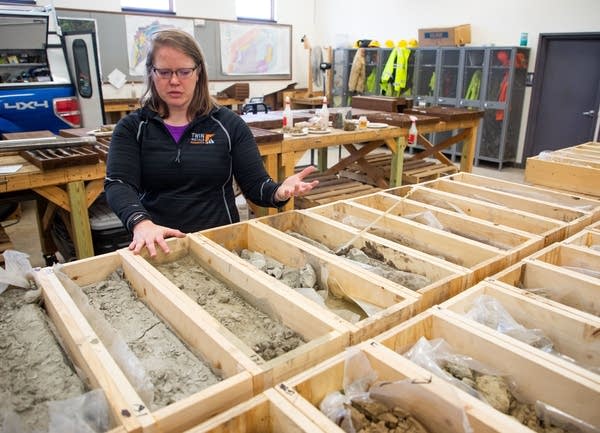
Geologist Nicole Hoffmann talks about core samples taken June 12, 2019, at the offices for Twin Metals in Ely, Minn. The company is proposing to build an underground copper-nickel mine near Ely and close to the Boundary Waters Canoe Area Wilderness.
Derek Montgomery for MPR News
When Stauber introduced his resolution in January, he said the “dangerous and illegal mining ban was thrust upon my constituents and our way of life in Northern Minnesota and put our nation’s mineral security in jeopardy.”
Julie Lucas, executive director of the industry group Mining Minnesota, said overturning the moratorium wouldn’t mean an automatic green light for mining projects. They would still have to go through years of applying for permits and environmental impact studies.
“It's about getting us back into the conversations and back into environmental review. Because these are significant deposits there, and we should be looking at what it would mean to mine those.”
Lucas says those in the mining industry also value the preciousness of the Boundary Waters.
“We didn't go into this industry because we don't love the environment. We went into it because we want to make mining better.”
Power BI is a set of software services, apps, and connectors that work together to turn disparate data sources into coherent, visually immersive, and interactive insights. Your data could be in the form of an Excel spreadsheet or a hybrid data warehouse that is both on-premises and cloud-based. Power BI makes it simple to connect to your data sources, visualize and uncover what matters, and share your findings with whomever you choose.
Become a Power BI Certified professional by learning this HKR Power BI Training !
What are Datasets in Power BI?
A dataset is a data collection that you can connect to or import. Power BI allows you to connect to and import all kinds of datasets, allowing you to put everything together in one place. Dataflows can also be used for sourcing the data for Datasets. Workspaces are associated with datasets, and a single dataset can be used in multiple workspaces. We have selected “My workspace” and then the “Datasets + dataflows” tab in the example below
Let us now look into the different types of Datasets in Power BI.
Types of Datasets
Datasets in Power BI are ready to report and visualize the source of data. There are five different types of datasets, each of which can be constructed in one of the following ways:
An existing data model will be connected that is not hosted in a Power BI capability.
Power BI Desktop file needs to be uploaded which includes a model.
Uploading a CSV (comma-separated values) file, or uploading an Excel workbook (Includes one or more Excel tables and/or a workbook data model).
Creating a push dataset using the Power BI service.
Creating streaming or dataset with hybrid streaming using the Power BI service.
Let us now explore different types of Datasets.
1) External-hosted models
Azure Analysis Services and SQL Server Analysis Services are the two types of externally hosted models. Installing the on-premises data gateway, whether on-premises or VM-hosted infrastructure-as-a-service (IaaS), is required to connect to a SQL Server Analysis Services model. A gateway isn’t required for Azure Analysis Services.
When there are existing model investments, such as those that form part of an enterprise data warehouse(EDW), connecting to Analysis Services makes sense. By utilizing the identity of the Power BI report user, Power BI can establish a live connection to Analysis Services, enforcing data permissions. Both tabular models and multidimensional (cubes) are supported by SQL Server Analysis Services. A live connection dataset sends queries to externally hosted models, as demonstrated in the accompanying
2) Power BI Desktop-developed models
A model can be created using Power BI Desktop, a client application for Power BI development. The model is essentially a tabular Analysis Services model. Models can be created by importing data from dataflows and blending it with data from external sources. While the characteristics of how modeling can be accomplished are outside the subject of this article, it’s crucial to note that Power BI Desktop supports three different types, or modes, of models. We are going to discuss the datasets in the coming sections.
Row-Level Security (RLS) can be used in externally hosted models and Power BI desktop models to restrict the amount of data that can be obtained for a certain user. Users in the Salespeople security group, for instance, can only see report data for the sales region(s) to which they’ve been assigned. Roles in RLS can be either static or dynamic. Static roles apply the same filters to all users allocated to the position, whereas dynamic roles filter by the report user.
3) Excel workbook models
The creation of a model is automatic when datasets are created from Excel workbooks or CSV files. To construct model tables, Excel tables, and CSV data are imported, and an Excel workbook data model is translated to produce a Power BI model. In every scenario, data from a file is imported into a model.
4) Push Dataset
A Power BI dataset that can only be created and populated using the Power BI API is known as a push dataset. However, the lack of a good user interface for creating a push dataset restricted its adoption to scenarios where a single table was inhabited with real-time data streaming.
5) Hybrid Streaming Dataset
Real-time streaming in Power BI allows you to stream data and update dashboards in real-time. Real-time data and visuals can be displayed and updated in any Power BI visual or dashboard. Factory sensors, social media sources, service usage metrics, and a variety of other time-sensitive data collectors or transmitters can all be used to collect and transmit streaming data.
Before discussing the steps of creation. It is necessary to know that there are three basic ways to retrieve data in Power BI Desktop that you will use to create your visualizations:
1) Live:
Here you will be connecting to a server that carries all the data. Although no data is sent, the model’s metadata is imported into Power BI Desktop. A query is transmitted to the server when you build visualizations, and it is then executed. The outcomes are then visualized and returned to Desktop. With SQL Server Analysis Services (SSAS) models, whether multidimensional or Tabular, live connections are commonly employed. Power BI Desktop behaves like any other thin client in this scenario, like Excel or Reporting Services (SSRS). It is not possible to make major modifications to the model, but you can add new measurements that will be available in that .pbix file.
2) DirectQuery:
You can make more modifications to the model here than you can with a Live connection. The data is kept on the server, and queries are run on the server, just like in Live. The Power BI Desktop model, for instance, allows for the creation of relationships.
3) Import:
Power Query queries are used to import the data into a Power BI Desktop file (.pbix). The data is compressed highly so it’s feasible to load records in millions into a file on your system. A model, comparable to an SSAS Tabular model, is built behind the scenes. This is the most versatile mode, as it allows you to blend data from any source. However, all data must be loaded into your model, which can take a long time to refresh.
Now, let’s move to create the dataset. Below are the steps which make you comprehend the creation of the Power BI Dataset.
1) A dataset is connected to the .pbix file where it was created one by one. When you first launch PBI Desktop, click “Get Data” to create a new dataset.
Alternatively, you can choose a source from the dropdown menu as shown below:
2) Let’s assume we imported a few tables from the WideWorldImporters SQL Server sample database (The .pbix file can be downloaded here). The tables and their relationships are visible in the Model view:
3) You can view the actual data of one table at a time in the “Data view”.
4) You can create, view, and interact with visualizations built on top of the data and model in the “Report view”.
The dataset is made up of the data as well as the model view. Now, let’s move to the different modes of Dataset available in Power BI.
Subscribe to our YouTube channel to get new updates..!
Dataset modes in the Power BI
These modes of Dataset in Power BI ascertain whether or not data is imported into the model or retained in the data source. The following are the three Dataset modes in Power BI:
Import
DirectQuery
Composite
1) Import
The most popular mode for developing datasets is the import mode. Because of in-memory querying, this mode provides incredibly quick performance. Modelers can also benefit from design flexibility and support for certain Power BI service capabilities (Quick Insights, Q&A, etc.). It’s the default mode when developing a new Power BI Desktop solution because of these advantages.
It’s crucial to realize that all imported data is saved on disk. When the data is refreshed or queried, it should be fully loaded into the memory of Power BI. Import models can yield very rapid query results once they are in memory. It’s also crucial to note that there’s no such thing as a partially loaded Import model in memory. An Import model can also integrate data from any number of supported data source types. The following image illustrates it.
2) DirectQuery
Import mode can be replaced by DirectQuery mode. Data is not imported into models created in DirectQuery mode. Instead, they are made up entirely of metadata that defines the model’s structure. If the model is queried, data is retrieved by using the native queries from the underlying data source.
3) Composite
The composite mode can blend DirectQuery and Import modes, or integrate multiple data sources for DirectQuery. The storage mode for every model table can be configured for models created in Composite mode. Calculated tables (defined with DAX) can also be used in this mode.
Import and DirectQuery modes are used in composite models to give you the best of both modes. They can blend the high query performance of in-memory models with the capacity to access near real-time data from data sources when set properly.
Conclusion: We have successfully learned that Power BI lets you connect various datasets for importing and bringing them all together in one place. In this blog, we explored the topics of Datasets in Power BI in a systematic flow by understanding Power BI, then Datasets in Power BI, different types of Datasets and models used for reporting and visualizing data, creating a Dataset for connecting files, and various modes of Datasets in Power BI.
To provide the best experiences, we use technologies like cookies to store and/or access device information. Consenting to these technologies will allow us to process data such as browsing behavior or unique IDs on this site. Not consenting or withdrawing consent, may adversely affect certain features and functions.
Functional
Always active
The technical storage or access is strictly necessary for the legitimate purpose of enabling the use of a specific service explicitly requested by the subscriber or user, or for the sole purpose of carrying out the transmission of a communication over an electronic communications network.
Preferences
The technical storage or access is necessary for the legitimate purpose of storing preferences that are not requested by the subscriber or user.
Statistics
The technical storage or access that is used exclusively for statistical purposes.The technical storage or access that is used exclusively for anonymous statistical purposes. Without a subpoena, voluntary compliance on the part of your Internet Service Provider, or additional records from a third party, information stored or retrieved for this purpose alone cannot usually be used to identify you.
Marketing
The technical storage or access is required to create user profiles to send advertising, or to track the user on a website or across several websites for similar marketing purposes.